Back to Top

Tech, Web, Cloud & Cabling Services

Category: Quick Reference Guides

Quick Reference Guides Category

Microsoft 365 Business: Get Office + Windows 10 in one SMB-friendly subscription

Will preview $20/month software-as-a-service plan Aug. 2

Earlier this week, Microsoft introduced two additional software-as-a-service subscription plans to the partners who will try to sell them.

The pair join an increasing number of subscription deals that the Redmond, Wash. company has modeled on the Office 365 pattern. The new plans even carry the “365” label, which Microsoft sees as a unifying identifier.

Microsoft 365 is, as CEO Satya Nadella introduced it Monday, “a fundamental departure in how we think about product creation,” composed of, initially at least, two plans. The more expensive, Microsoft 365 Enterprise, is simply a new name for a year-old, two-tier product titled “Secure Productive Enterprise E3” and “Secure Productive Enterprise E5.” Those SKUs (stock-keeping units) were introduced at Microsoft’s 2016 partner conference. Like SPE, M365 Enterprise tosses Windows 10 Enterprise, Office 365 and Enterprise Mobility + Security into a bucket.

But “Microsoft 365 Business,” or M365 Business for short, is the more interesting of the two plans because it is actually new. Nadella thought the same. “I’m so excited about the product innovation that you will see today around small and medium-sized businesses,” he said during a two-hour keynote before partners.

So, what’s Microsoft 365 Business?

That’s the new deal Microsoft will push later this year after an unspecified time in preview, which will start Aug. 2.

M365 Business includes:

Office 365 Business Premium, a software-and-service plan that includes all the Office applications, hosted Exchange email, OneDrive storage service and more. Alone, Office 365 Business Premium costs $12.50 per user per month when billed on an annual basis.

Windows 10 Pro: Devices currently running Windows 7 Professional or Windows 8.1 Pro may be upgraded to Windows 10 Pro under M365 Business.

Windows 10 Business: According to Microsoft, “Windows 10 Business is a set of cloud-[based] services and device management capabilities that complement Windows 10 Pro and enable the centralized management and security controls of Microsoft 365 Business.” The services and tools include a subset of those from Intune, Microsoft’s enterprise mobility management (EMM) platform, as well as Windows AutoPilot, an automated deployment service bundled with Windows 10’s March 2017 feature upgrade, aka 1703 and Creators Update.

How much does M365 Business cost?

$20 per user per month when it launches later this year.

That’s $7.50 per user per month more than Office 365 Business Premium, or an extra $90 per user annually. For that amount, customers receive the difference between the two plans: the upgrade to Windows 10 Pro and the various management service components.

Who is Microsoft 365 Business for?

According to Microsoft, the plan is “built for small and midsize customers that have little to no IT resources on staff.”

Although companies of any size can purchase M365 Business licenses, any one customer can buy no more than 300 subscriptions, another signal that it aims at small and medium-sized organizations.

The limited management tools also play to that theme. They’re designed to be easy to use and offer only basic functionality, and are accessed via simple control panels similar to what they may have already used for Office 365.

What’s the Windows 10 upgrade all about in M365 Business?

Microsoft’s descriptions of this component are sketchy thus far. An extensive company Q&A on the subscription plan had the most information, saying, “If you have devices that are licensed for Windows 7, 8 and 8.1 Professional, Microsoft 365 Business provides an upgrade to Windows 10 Pro.” (The “Professional” label holds for Windows 7, but 8 and 8.1 are dubbed “Pro” instead, as is Windows 10.)

Computerworld was unable to unearth additional details of the upgrade, specifically what happens when a customer cancels a M365 Business subscription or lets one expire. Do devices that were upgraded from Windows 7 Professional to Windows 10 Pro retain the latter license? Or is the Windows 10 license revoked, forcing customers to reinstall the previous OS?

Microsoft declined to answer questions about that scenario, and analysts who had been briefed by the company said that licensing issues were not discussed in Microsoft’s presentation.

The matter of expiring subscriptions requires context. Generally, when customers exit a subscription, say, Office 365, the applications and services will retreat into a reduced functionality mode or stop working entirely. Something similar happens after a subscription to Windows 10 Enterprise E3 or E5 lapses. “When a subscription license expires … the Windows 10 Enterprise device seamlessly steps back down to Windows 10 Pro,” Microsoft states in a support document.

In other instances, Microsoft doesn’t strip away an upgrade. Customers who have subscribed to Windows 10 Enterprise E3 or E5 may upgrade devices equipped with Windows 7 Professional or 8.1 Pro, to Windows 10 Pro; if they later depart the E3 or E5 plan, the Windows 10 license permanently remains in place.

Which of these options remains — cancellation or retention — is what’s unclear in the case of M365 Business.

What management tools does M365 Business include?

Enough, says Microsoft, to adequately serve small and mid-sized businesses.

What Microsoft calls “a simplified management console” controls device and user management functions. The tools bundled in M365 Business include:

  • Auto-install (and easy uninstall) Office
  • Wipe company data from devices, both company- and employee-owned
  • Enforce user settings on devices, including access to Windows Store or use of Cortana
  • Force users to save all work to OneDrive for Business
  • Configure new PCs as well as existing systems running Windows 10 Pro 1703 (Creators Update) or later using AutoPilot
  • Automatically update and upgrade Windows 10 PCs using Windows Update for Business

We heard there’s a preview of M365 Business. What’s that deal?

Yes, there will be a preview available starting, Microsoft’s said, on Wednesday, Aug. 2. The preview will be accessible from this website. Users may, in fact, sign up now for the preview on that page.

Although there is no charge for the preview, Microsoft recommended that potential customers contact their preferred Microsoft Partner — or locate one — to handle the M365 Business deployment.

Interestingly, Microsoft said, “Devices running Windows 7 [Professional] or 8.1 Pro are eligible for an upgrade to Windows 10 Pro within the Microsoft 365 Business preview.” It was unclear whether that upgrade would be retained or retracted at the end of the preview.

What does M365 Business require?

According to Microsoft, Windows 7 Professional PCs “likely meet the minimum requirements.” However, only Windows 10 devices can be managed in M365 Business, a powerful motivator for equipping as many systems as possible with the newer OS.

The other major precondition for the subscription — Azure Active Directory (AAD) — is necessary to enforce user and device policies set in the management console, and for other tasks, such as AutoPilot set-up. Microsoft acknowledged that on-premises Active Directory works with M365 Business, but “it is not recommended.”

Have questions?

Get answers from Microsofts Cloud Solutions Partner!
Call us at: 856-745-9990 or visit: https://southjerseytechies.net/

South Jersey Techies, LL C is a full Managed Web and Technology Services Company providing IT Services, Website Design ServicesServer SupportNetwork ConsultingInternet PhonesCloud Solutions Provider and much more. Contact for More Information.

To read this article in its entirety click here.

Symantec Endpoint Protection (SBE)- Upgrading the cloud agent

Symantec has recently become aware of a medium vulnerability in older versions of the server agent. The latest version addresses this vulnerability in new installations and was released February 15th, 2017. Server agents that are not already upgraded will be identified in the SEP SBE cloud management console starting on March 8th. A manual upgrade will be required to ensure you have the latest protection.

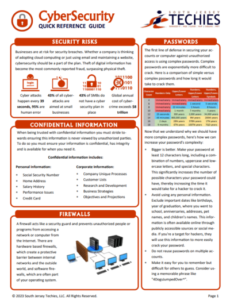
Quick Reference CyberSecurity Guide

In today’s digital age, cybersecurity is at the forefront of technology, both at the workplace and in our personal lives. With the increasing frequency and sophistication of cyber threats, it is essential that we all play a role in protecting sensitive information both business and personal.


To help you stay informed and vigilant about cybersecurity best practices, we have created a Quick Reference Guide for Cybersecurity to be shared with your users as a courtesy to better protect themselves from cyber threats and contribute to a safer digital environment.

Please Download Our Quick Reference Cyber Security Guide Below

Quick Reference CyberSecurity Guide

If you have any questions, please email us at support@sjtechies.com or call us at (856) 745-9990.

What Terms You Need to Know to Get Your Business GDPR-Ready


What Is EU GDPR? 

The EU GDPR is a law designed to protect and empower residents of the EU by guiding business usage of personal data. In essence, it is reshaping the way corporations handle personal data by controlling its collection, use, and storage. It will replace the regulations and frameworks of the existing 20-year-old directive (95/46/EC).


Who Is the GDPR Protecting and Empowering? 

The data subject: This is any individual that can be directly or indirectly identified or uniquely singled out in a group of individuals, from any stored data.


What Is the GDPR Protecting? 

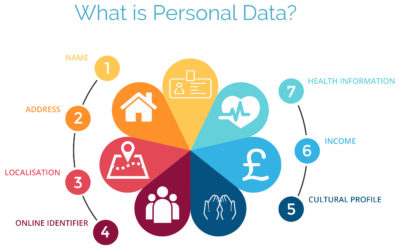
Personal data: This is any information relating to an individual, whether in reference to their private, professional, or public life. It includes things like names, photos, email addresses, location data, online identifiers, a person’s bank details, posts on social networking websites, medical information, work performance details, subscriptions, purchases, tax numbers, education or competencies, locations, usernames and passwords, hobbies, habits, lifestyles, or a person’s computer’s IP address.


Who Is the GDPR Regulating? 

The data controller: This is the person who, alone or jointly with others, determines the purposes for, and means of, processing personal data. A data controller is not responsible for the act of processing (this falls to the data processor); they can be defined as the entity that determines motivation, condition, and means of processing.

Generally, the role of the controller is derived from the organization’s functional relation with the individual. That is, a business is the controller for the customer data it processes in relation to its sales, and an employer is the controller for the employee data they process in connection with the employment relationship.


Who Else Is the GDPR Regulating? 

Data processors: This is the person who processes personal data on behalf of the controller. Typical processors are IT service providers (including hosting providers) and payroll administrators. The processor is required to process the personal data in accordance with the controller’s instructions and take adequate measures to protect the personal data. The GDPR does not allow data processors to use the personal data for other purposes beyond providing the services requested by the controller.


What Does the GDPR Consider “Processing?” 

Processing refers to any operation or set of operations performed upon personal data, whether or not by automatic means—such as collection, recording, organization, storage, adaptation or alteration, retrieval, consultation, use, disclosure by transmission, dissemination or otherwise making available, alignment or combination, blocking, erasure, or destruction. Processing must be fair and lawful, although transparency is significantly strengthened. The processor may not use the personal data for their own purposes.


What Rights Do the Data Subjects Have? 

Under the GDPR, data subjects can request the following:

  • To be informed about the data processing
  • To consent to the processing of their personal data (opt in) or object to the processing of their personal data (opt out)
  • To obtain their personal data in a structured and commonly used format in order to transfer that data, in certain circumstances, to another controller (data portability)
  • To not be subject to fully automated data processing or profiling
  • To know what data is processed (right of access)
  • To correct where any data is incorrect
  • To have data erased under certain circumstances, for example, where the retention period has lapsed or where consent for the processing has been withdrawn (referred to commonly as the “right to be forgotten”) and to register a complaint with the supervisory authority


Other Key Elements to Consider in Preparing for GDPR

We’re not done yet. There are four more important elements to consider with GDPR as you become ready.


1) Data Breach Notification

For controllers, GDPR requires that breach notice must be provided, where feasible, within 72 hours of becoming aware of a breach; processors need to provide notice to controllers without undue delay. Any data breaches must be documented.

2) Data Minimization

This requires the level and type of data being processed to be limited to the minimum amount of data necessary. This requires you to ensure that the purpose in which the data is agreed and the purpose in which the data was collected are materially similar. The processors should ensure that individuals’ privacy is considered at the outset of each new processing, product, service, or application, and only minimum amounts of data are processed for the specific purposes collected and processed.

3) Data Pseudonymization

The GDPR defines pseudonymization as “the processing of personal data in such a way that the data can no longer be attributed to a specific data subject without the use of additional information.” To pseudonymize data, the “additional information” must be “kept separately and subject to technical and organizational measures to ensure non-attribution to an identified or identifiable person.” In other words, it is a strategy designed to enhance protection and privacy for applicable identifying data.

Although similar, anonymization and pseudonymization are two distinct techniques that permit data controllers and processors to use de-identified data. The difference between the two techniques rests on whether the data can be re-identified.

4) Fair Processing of Personal Data

This requires the processing of personal data to be fair and lawful. Generally, only the level and type of data collected should be limited to the minimum amount of data necessary (see data minimization above). There are a number of methods in which the data may be processed, including: express consent (which may be withdrawn at any time), legitimate interest basis (the subject of which legitimacy may be challenged by the data subject), honoring obligations under the agreement with the data subject, or any other legal basis that may apply.


What We Can Do to Help

We know this information can be overwhelming, but taking the proper steps now will save you headaches later. SolarWinds provides products that can help you with getting ready. Our Risk Intelligence software is one of them, providing you with hard data on:

  • A business’ quantified financial risk
  • Personally identifiable information (PII)
  • Protected health information
  • Payment information located in storage
  • Access permissions for sensitive data

Search your ‘data at rest’ for risk areas and start the data mapping you need to get ready for GDPR.

Windows 10 will be available via USB flash drive or DVD

USB flash drives

There is a possibility that microsoft will be selling Windows 10 on USB flash drives.

As you may know, installing an operating system from a USB flash drive is easier and faster than installing it from an optical disc. A USB flash drive is not as bulky as an optical disc and doesn’t require an external case. You just take it out of your pocket, pull off the cap, and insert it into your computer’s USB port. USB flash drives are faster than optical drives too. USB flash drives have read and write speeds that measure in 10x megabytes per second (MB/s), while optical disc read and write speeds measure in 1x MB/s.

With that in mind, it’s no surprise that there are a multitude of articles on the web that describe how to create a Windows installation package on a USB flash drive. Microsoft even provides a tool that facilitates the procedure.

With Windows 10 on the horizon, there have been rumors floating around the web that in addition to making the upgrade available as a download, Microsoft will also be selling the retail copies of the new operating system on both DVD and USB flash drive.

As a regular follower of the German website WinFuture, I recently encountered an article that indicates that Microsoft will indeed be selling the 32-bit and 64-bit versions of Windows 10 Home and Pro on USB flash drives in addition to the DVD option. Having a USB flash drive option makes sense, because tablets don’t come with optical disc drives.

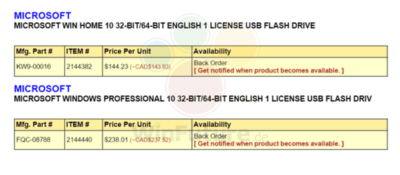
The WinFuture article contained a screen shot (Figure A) showing catalog details of the USB offerings. As you can see, it appears that the USB flash drive will contain both the 32-bit and 64-bit versions. Presumably, the USB flash drives will sell for the same price as the DVDs.

Figure Afigurea

Windows 10 Home and Pro will be sold on USB flash drives.

You can find a number of software reseller sites (mostly Canadian) with advertisements for the USB flash drive offerings of Windows 10 by Googling the part numbers shown in the screenshot: FQC-08788 for the Pro edition and KW9-00016 for the Home edition. However, keep in mind that we’ll have a clearer vision of the USB flash drive offerings once we get closer to the Windows 10 launch date of July 29th.

Have questions?

Get help from Microsofts Cloud Solutions Partner!
Call us at: 856-745-9990 or Visit: https://southjerseytechies.net/

South Jersey Techies, LLC is a full Managed Web and Technology Services Company providing IT Services, Website Design ServicesServer SupportNetwork ConsultingInternet PhonesCloud Solutions Provider and much more. Contact for More Information.

To read thsi article in its entirety click here.

Patience will be the key to a successful Windows 10 upgrade

let the dust settle before you attempt the free Windows 10 upgrade.

Windows 10

With the official Windows 10 launch and Microsoft’s promise that the upgrade for Windows 7/8.1 systems will be free for the first year after launch, you’ll have until July 29, 2016, to make your move. Just because it’s free doesn’t mean you have to rush to get your copy—unless, of course, it’s a status thing.

For the ordinary Windows user, there really isn’t any immediate need to be one of the first people to download Windows 10. In fact, you’ll probably have a better upgrade experience if you hold off for a bit. Wait for the hype to die down, wait for the load on the Windows Update servers to wane, and more importantly, wait for the first wave of updates to make their way out to the masses of Windows users who had to be the first.

Besides, unless you’re a Windows Insider program participant, chances are that you won’t be able to get Windows 10 right away anyhow.

In his July 2nd blog post, “Windows 10: Preparing to Upgrade One Billion Devices,” Terry Myerson stated:

“We want to make sure all of you have a great upgrade experience, so we’ll roll-out Windows 10 in phases to help manage the demand.”

He then goes on to say:

“Starting on July 29, we will start rolling out Windows 10 to our Windows Insiders. From there, we will start notifying reserved systems in waves, slowly scaling up after July 29th. Each day of the roll-out, we will listen, learn and update the experience for all Windows 10 users.”

That last sentence hints at the fact that the Microsoft is anticipating the possibility that there may be some glitches in the first wave of the roll out.

To be sure, I’m not suggesting that you hold out for months before you upgrade—rather, I’m saying that you may want to give it a couple of weeks just to see how others are faring with Windows 10. With Microsoft’s Windows as a service model, the ongoing testing via the extension of the Windows Insider program, and the rapid update system developed during the Windows Insider preview program, the hope is that any issues that crop up in the first weeks after initial availability will be quickly resolved.

Have questions?

Get help from IT Experts/Microsofts Cloud Solutions Partner
Call us at: 856-745-9990 or visit: https://southjerseytechies.net/

South Jersey Techies, LLC is a full Managed Web and Technology Services Company providing IT Services, Website Design ServicesServer SupportNetwork ConsultingInternet PhonesCloud Solutions Provider and much more. Contact for More Information.

To read this article in its entirety click here.
The BlackBerry platform’s slow fade to black

blackberry-logo-SJTechiesBlackBerry’s operating system was recently dealt blow by Facebook. Find out how this could be the final nail in the BB10 coffin.

The only reason this headline should surprise anyone is the fact that BlackBerry OS is actually still alive. End of story, right? Truth be told, most assumed BlackBerry’s operating system dead when the company decided to release a device running the Android platform. It seemed to be the only logical step forward for BlackBerry Limited. And yet, BB continues on.

Only now, they continue on without Whatsapp and Facebook support.

When pressed for the reason why they are pulling support, Facebook made their case quite simple, stating that 99.5 % of all smartphone sales are of the Android, iOS, and Windows Mobile platforms.

Makes sense.

What doesn’t make sense is the fact that the BlackBerry OS is still alive and kicking. Yes, I understand BlackBerry was the platform for business users for a very long time, but that time has come and gone and the only relevant platforms are obvious. In fact, even Windows Mobile is barely hanging on to any semblance of relevancy.

What can you expect

If you happen to be a BlackBerry user, you already knew that Whatsapp pulled the plug. Now you can count on the Facebook app functioning (sans updates) until the end of the year. Once 2016 passes, the app will cease to be available in any form.

My guess is, once the Facebook app no longer functions on the platform, the Grim Reaper will swoop into the offices of the BB10 developers and have a field day. Facebook holds a powerful sway over the ebb and flow of the consumer. No Facebook, no platform.

And you may be saying to yourself, “BB10 is a business-centric platform, there’s no need for a Facebook app”. That assumption is false for at least two reasons. First, businesses actually use Facebook as a form of marketing. Second, you’re assuming that business users do not spend any amount of time on Facebook. According to comScore, the average American citizen spends 40 minutes a day on the social network platform. Relatively speaking, that’s a significant amount of time (considering users tend to work on Facebook in a sort of “hit and run” style). And if you factor in the peak Facebook hours of 1 p.m. – 3 p.m., it’s clear that business users do spend time on Facebook.

BlackBerry’s reaction

Of this separation, BlackBerry said:

“We are extremely disappointed in their decision as we know so many users love these apps. We fought back to work with WhatsApp and Facebook to change their minds, but at this time, their decision stands,”

BlackBerry even started a Twitter campaign to change Facebook’s mind, with the hashtag #ILoveBB10Apps. I did a quick Twitter search for that hashtag and found the hashtag (somewhat) backfired on BlackBerry. Tweets ranging from angry users (one user asking how his BlackBerry device could be showing 0% battery, yet still be functioning), to the usual flood of memes and spam. Some users did proclaim they’d be sticking with BlackBerry by way of the PRIV (which, if we’re being honest, at that point you are as much in support of Android as you are BlackBerry). Of course, there were the BlackBerry faithful, extolling the values of BlackBerry 10 multitasking, security, and such to convince Facebook to not pull the plug.

The truth is in the numbers

You really shouldn’t need anything more than that telling number 99.5. That is beyond significant. We’ve watched new (and promising) platforms come and go, thanks to the might that is Android and iOS. Because BlackBerry has been around for a while, doesn’t give them a special hall pass to avoid the apple flavored robotic death hammer.

If BlackBerry wants to continue on, their only hope clearly lies in Android. The BlackBerry faithful will gladly continue on, with their physical keyboards and Android platform. Either that, or they can say goodbye to BlackBerry altogether, because Facebook pulling support could well be the killing blow to the little platform.

Have questions?

Get answers from Microsofts Cloud Solutions Partner!
Call us at: 856-745-9990 or visit: https://southjerseytechies.net/

South Jersey Techies, LL C is a full Managed Web and Technology Services Company providing IT Services, Website Design ServicesServer SupportNetwork ConsultingInternet PhonesCloud Solutions Provider and much more. Contact for More Information.

To read this article in its entirety click here.
Microsoft Surface Studio: The smart person’s guide

Everything you need to know about the Surface Studio, Microsoft’s new all-in-one PC designed to tempt professional artists and designers over to Windows.

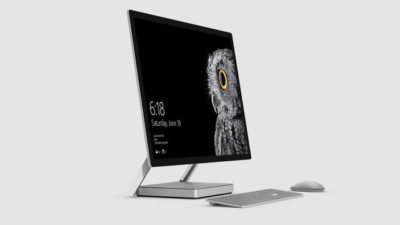
microsoft-surface-studio

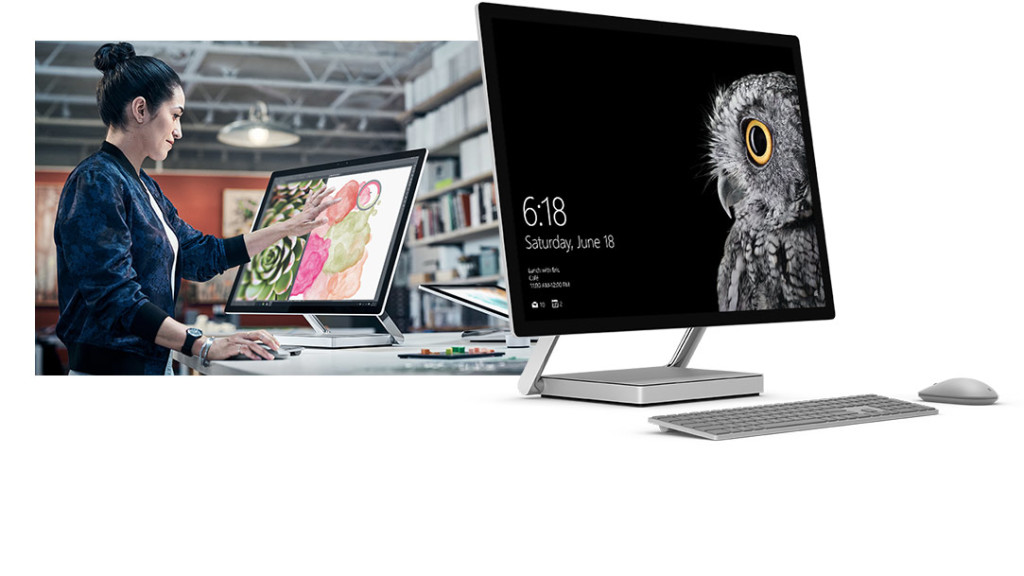
The Surface Studio is an all-in-one PC with premium specs, designed to wow professional artists, designers, architects and other creatives.

While the $2,999 price tag will deter most consumers, Microsoft seems to be targeting the Studio at design professionals, who would otherwise be using Apple Macs alongside specialist devices like Wacom’s Cintiq drawing tablet.

The Studio is a machine with a lot to recommend it, but one that could still be a leap too far for creatives already heavily invested in alternative tech.

Executive summary

  • What it is: The Surface Studio is a high-end, all-in-one PC aimed at being a drafting table and canvas for creatives.
  • Why it matters: The machine marks Microsoft’s first venture into designing desktop PCs and may put pressure on Apple and other manufacturers to crank up specs on competing machines.
  • Who it is for: Artists, designers, architects — creative professionals who want a machine that shows off their work at its best.
  • Why you should get it: For its super sleek, razor-sharp display that lets users draw straight onto the screen.
  • Why you shouldn’t get it: The price is too high or you’re a professional already heavily invested in alternative software and hardware.
  • How to get it: Pre-order online, although stock is limited according to Microsoft

What it is

An all-in-one, Windows 10 PC designed to dazzle users with its superlative display.

The screen, a 28-inch touchscreen LCD monitor, is ‘the thinnest in the world’ according to Microsoft, and sits on a counterbalanced hinge that makes it easy to push down onto the desk, and start drawing on with a digital pen.

The monitor’s 4K+ resolution and ability to display more than one billion colors, as well as to show drawings and documents at 1:1 scale with their paper equivalents, is designed to give professionals the ability to see how their creations would look in the real world.

Sketching on the screen with the Surface Pen is made easier when the Studio is used with the newly released Surface Dial, a brushed silver knob that can be rotated to select a new color when drawing on the screen or to turn the image.

Why it matters

From the point of view of artists and designers, the Studio offers a high-end computer built around their creative needs, which does away with having to use a separate drawing tablet and computer.

Even if creatives ignore the Surface Studio, its release is good news, likely to prompt incumbents like Apple and Wacom to spec up and cut the prices of new machines — in particular for the iMac, which the Studio has been compared to many times, despite the iMac lacking a touchscreen.

By following up the immaculately designed Surface Book laptop with a striking machine like the Surface Studio, Microsoft also appears to be trying to establish itself as a competitor to Apple on the design front.

Who it is for

Broadly, the Studio seems to be aimed at anyone who draws or designs for a living.

In launch videos, the Studio was seen being used by artists, architects and product designers.

The multi-purpose nature of the Studio, a machine that combines a Windows desktop PC with the functionality of a separate digital drawing tablet, such as the Cintiq 27 QHD Touch, will likely make the $2,999 price tag easier to swallow among those in the creative industries.

Why you should get it

If you draw or design for a living there are plenty of reasons why you might want the Studio. For example, there’s the quality of the display and the ease with which the Surface Pen draws on the screen. Microsoft describes this experience as virtually as fluid as drawing on paper. Then there’s the Studio’s significant graphical processing power, the ability to view documents and drawings actual size on screen and the ease with which you can switch push down the monitor and begin drawing.

Why you shouldn’t get it

Despite the Studio’s looks, its high price makes it hard to recommend as a consumer purchase, particularly when an iMac with a higher resolution, and only very slightly smaller screen, will cost less money.

Even professional creators are unlikely to abandon their current expensive setup for a Studio, as Mikako Kitagawa, principal research analyst with Gartner, pointed out.

“An all-in-one device is not the most cost-effective device, as the users pay for both the computing unit and monitor at the same time,” she said.

“Creative professionals have already invested heavily in hardware and software. For instance, many professional illustrators use a high-end drawing tablet and high-resolution monitor at the same time.”

If those same professionals exclusively use macOS, as is the case in some creative outlets, then the high cost of switching to Windows will also be a deterrent, she said.

There is also Microsoft’s odd decision not to include the $99 Surface Dial with the Studio, despite the peripheral featuring so heavily in demos of the machine, and being particularly useful for tasks like changing colors while drawing with the Surface Pen.

How to get it

The Surface Studio is available to pre-order from Microsoft, with prices starting at $2,999 and shipping starting from 12 December. Microsoft has warned the machine will be available in limited quantities.

Tech specs:

$2,999: 1TB drive; Intel Core i5 CPU; 8GB RAM; 2GB GPU

$3,499: 1TB drive; Intel Core i7 CPU; 16GB RAM; 2GB GPU

$4,199: 2TB drive; Intel Core i7 CPU; 32GB RAM; 4GB GPU

Display: 28″ PixelSense Display; 4500 x 3000 resolution; 192 DPI; Color settings: Adobe sRGB, DCI-P3 and Vivid Color Profiles; Touch: 10-point multi-touch; Aspect ratio: 3:2 TB drive; Intel Core i5 CPU; 8GB RAM; 2GB GPU

Processor: Quad-core 6th Gen Intel Core i5 or i7

Graphics: NVIDIA GeForce GTX 965M 2GB GPU GDDR5 memory or NVIDIA GeForce GTX 980M 4GB GPU GDDR5 memory

Storage: 1TB or 2TB ‘rapid hybrid drive’

Memory: 8GB, 16GB, or 32GB RAM

Wireless: 802.11ac Wi-Fi; Bluetooth 4.0; Xbox Wireless built-in3

Dimensions: Display: 25.09 x 17.27 x 0.44 in (637.35 x 438.90 x 11.4 mm); Base: 9.84 x 8.66 x 1.26 in (250.00 x 220.00 x 32.20 mm)

Weight: 21.07 lbs max (9.56 kg)

Connections: 4 USB 3.0; Full-size SD card reader (SDXC compatible); Mini Displayport; 3.5mm headset jack; Compatible with Surface Dial onscreen interaction

Cameras: 5.0MP front-facing camera with 1080p HD video

Audio: Dual microphones; Stereo 2.1 speakers with Dolby Audio Premium

Buttons: Volume and power

Surface Pen

Surface Keyboard

Surface Mouse

Power cord with grip-release cable

Security: TPM chip for enterprise security; Enterprise-grade protection with Windows Hello face sign-in

Have questions?

Get answers from Microsofts Cloud Solutions Partner!
Call us at: 856-745-9990 or visit: https://southjerseytechies.net/

South Jersey Techies, LL C is a full Managed Web and Technology Services Company providing IT ServicesWebsite Design ServicesServer SupportNetwork ConsultingInternet PhonesCloud Solutions Provider and much more. Contact for More Information.

To read this article in its entirety click here.

Change the Processor Affinity setting in Windows 7 to gain a performance edge

Under specific circumstances and with careful tweaking, you can increase Windows 7’s performance using the Processor Affinity setting.

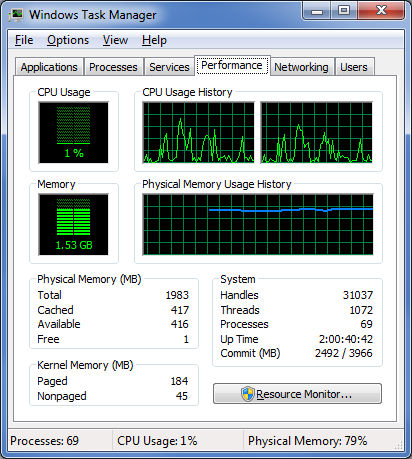
If you have a multi-core processor, chances are good that on the Performance tab in Windows Task Manager, you have noticed that the CPU Usage History graphs look about the same for each core, as shown in Figure A. The reason for this is that most applications you run these days have been designed with multi-core processors in mind and will work with the operating system to distribute their operations as evenly as possible across all the available cores.

Figure A

In most cases, you’ll notice that the CPU Usage History graphs look about the same for each core.

In most cases this even distribution provides you with the best performance possible. However, that’s not always going to be the case. For instance, older applications that were designed for single-core processors can behave irrationally — they may all of a sudden begin maxing out the CPU usage at 100 percent and appear to be locked up. In other circumstances, you might be able to achieve better overall performance from certain applications by configuring each of them to run on different processor cores.

Fortunately, Windows 7 allows you to configure applications to use only one, or several, of the processor cores in a multi-core system by using the Processor Affinity setting.

In this edition of the Windows Desktop Report, Iwe’ll show you two ways to change the Processor Affinity setting in Windows 7.

From Task Manager

Changing the Processor Affinity setting from within Task Manager is a pretty straightforward operation once you know how to do it. To launch Task Manger, you can use the keystroke combination [Ctrl] + [Shift] + [Esc] or you can simply right-click on the taskbar and select Task Manager from the context menu.

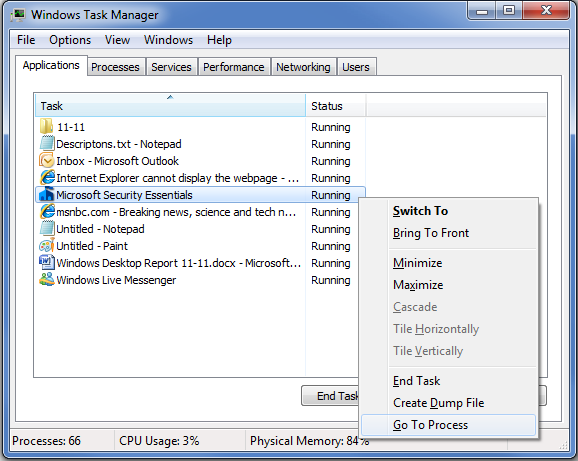
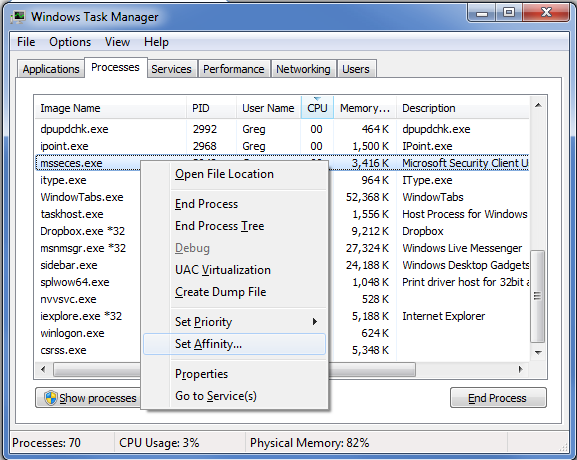
Once Task Manager is up and running, select the Applications tab, right-click on the application that you want to work with, and select the Go to Process command, as shown in Figure B. When you get to the Processes tab, right-click on the process and from that context menu, select the Set Affinity command, as shown in Figure C. (If the processes are jumping around, it may be hard to select the correct process, so you might just want to press the Application key or [Shift]+[F10].)

Figure B

Right-click on an application and select the Go to Process command.

Figure C

Right-click on the process and select the Set Affinity command.

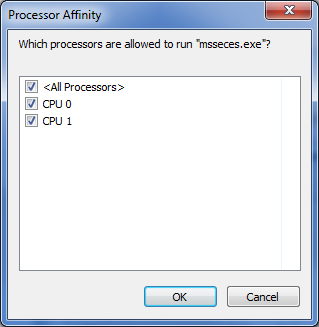
After you select the Set Affinity command, you’ll see the Processor Affinity dialog box shown in Figure D. As you can see, the default setting is All Processors, which in the case of my example system are CPU 0 and CPU 1. At this point, you can clear the All Processors check box and then select the CPU on which you want the process to run.

Figure D

The Processor Affinity dialog box allows you to choose which processor(s) you want to use.

An example

To take a look at the effects of using the Set Affinity command, we launched two applications: Microsoft Security Essentials and Disk Defragmenter. Next we used the Set Affinity command to assign Microsoft Security Essentials to CPU 0 and Disk Defragmenter to CPU 1. We then started each application running — Microsoft Security Essentials performing a full scan and Disk Defragmenter defragging a 500GB disk.

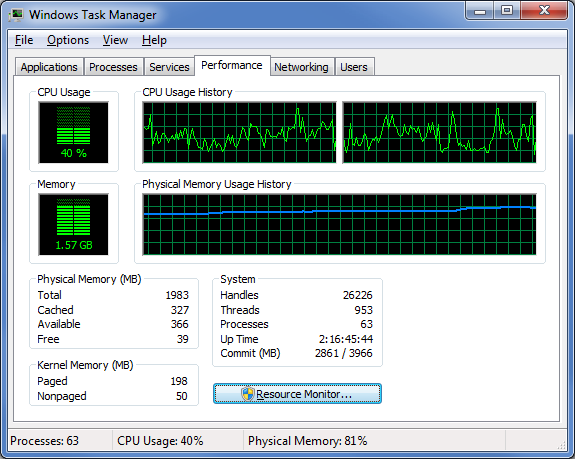
Once each application began working, they started sucking up CPU time, so we went to the Performance tab in Windows Task Manager to look at the CPU Usage History graphs. When we did, we could see that each graph was showing different measurements, as shown in Figure E.

Figure E

Each of the CPU Usage History graphs shows different measurements.

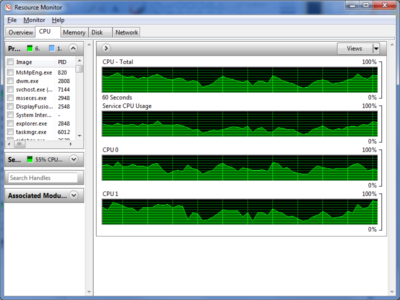
To specifically see how each CPU core was faring, we launched Resource Monitor and selected the CPU tab. Again, we could see that each CPU core was showing different usage measurements, as shown in Figure F.

Figure F

Resource Monitor’s CPU tab specifically identifies each CPU core and its usage.

Now, of course, my example combination is purely for the sake of showing each CPU handling a separate process. However, there are instances where running Microsoft Security Essentials on a separate CPU core would be beneficial.

From a shortcut

Now if you find that running an application on a specific CPU core works well, you might want to use it again in the future. If so, chances are that you won’t want to have to go through the Task Manager each time. Fortunately you can create a shortcut to launch an application with a specific affinity setting.

For example, to launch Disk Defragmenter so that it runs only on CPU 0, you would create a shortcut with the following command line:

C:\Windows\System32\cmd.exe /C start /affinity 1 dfrgui.exe

To launch Disk Defragmenter on CPU 1, you would create a shortcut with the following command line:

C:\Windows\System32\cmd.exe /C start /affinity 2 dfrgui.exe

The number that follows the start /affinity command is called the affinity mask and is defined as a hexadecimal number. However, the CPU core number can be calculated more easily using binary numbers. For instance, the command

C:\Windows\System32\cmd.exe /C start /affinity 3 dfrgui.exe

will launch Disk Defragmenter on both CPU 0 and CPU 1. If you convert 3 into a binary number you will get 0011. Under the affinity mask system, processors are numbered from the right to left beginning with 0 and since there are 1’s in the first two places, this indicates CPU 0 and CPU 1.

Suppose you have a Quad core processor. If so and you use an affinity mask of 4, that will convert into binary 0100, which indicates CPU 2. If you use an affinity mask of 9, that will convert into binary 1001, which indicates CPU 0 and CPU 3.

For more information on the start /affinity command, open a Command Prompt window and type the command

start /?

Have questions?

Get answers from Microsofts Cloud Solutions Partner!
Call us at: 856-745-9990 or visit: https://southjerseytechies.net/

South Jersey Techies, LL C is a full Managed Web and Technology Services Company providing IT Services, Website Design ServicesServer SupportNetwork ConsultingInternet PhonesCloud Solutions Provider and much more. Contact for More Information.

To read this article in its entirety click here.

Now Microsoft Office 365 tackles ‘fake CEO’ email spoofing attacks

Microsoft is rolling out a host of new email security features for Office 365 later this quarter, as it looks to thwart hackers and criminals.

‘Insider spoofing’ or faking the CEO’s email address to trick the CFO into transferring millions to criminal bank accounts is big business. Now Microsoft is using big data and reputation filters to try and squish the threat.

According to the FBI, between October 2013 and August 2015, 7,066 US businesses have fallen prey to ‘business email compromise’, netting criminals an estimated $747m.

Non-US victims lost a further $51m over the period, with the FBI estimating a 270 percent increase in identified victims since January 2015, when it first released figures about the threat category.

As Microsoft notes, when a corporate email domain is spoofed, it makes it hard for existing filters to identify the bogus email as malicious.

However, Microsoft reckons it has achieved a 500 percent improvement in counterfeit detection using a blend of big data, strong authentication checks, and reputation filters in Exchange Online Protection for Office 365.

It’s also rolling out new phishing and trust notifications to indicate whether an email is from a known sender or if a message is from an untrusted source, and therefore could be a phishing email.

The company is also promising a faster email experience as it vets attachments for malware and new tools to auto-correct messages that are mis-classified as spam. The aim is to boost defences without impairing end-user productivity.

Malicious email attachments remain a popular way for attackers to gain a foothold in an organization and, as RSA’s disastrous SecurID breach in 2011 showed, a little social engineering can go a long way to ensuring someone opens it.

Microsoft’s new attachment scanner, called Dynamic Delivery of Safe Attachments, looks to reduce delays as it checks attachments for potential threats.

Currently it captures suspicious looking attachments in a sandbox with a ‘detonation chamber’ where it analyses it for malware in a process takes five to seven minutes.

Microsoft hasn’t figured out a faster way to analyse the attachment, but instead of holding up the email as it conducts the scan, it will send the body of the email with a placeholder attachment. If the attachment is deemed safe, it will replace the placeholder and if not, the admin can filter out the attachment.

The feature is part of Microsoft’s Office 365 Exchange Online Protection and Advanced Threat Protection services.

The company is also tackling false-positive spam, or legitimate messages that are mis-identified as spam, and vice versa, with a new feature called Zero-hour Auto Purge, which allows admins to “change that verdict”.

“If a message is delivered to your inbox and later found to be spam, Zero-hour Auto Purge moves that message from the inbox to the spam folder; the reverse is true for messages misclassified as spam,” Microsoft notes.

Microsoft is testing this approach with 50 customers and says it will be rolled out for all Exchange Online Protection global clients in the first quarter of 2016.

Have questions?

Get help from IT Experts/Microsofts Cloud Solutions Partner
Call us at: 856-745-9990 or visit: https://southjerseytechies.net/

South Jersey Techies, LLC is a full Managed Web and Technology Services Company providing IT Services, Website Design ServicesServer SupportNetwork ConsultingInternet PhonesCloud Solutions Provider and much more. Contact for More Information.

To read this article in its entirety click here.
CALL US NOW!