Back to Top

Tech, Web, Cloud & Cabling Services

Tag Archives: South Jersey Techies

South Jersey Techies tag

Microsoft overhauls Outlook with move to Office 365

Th new tweaks include 13 new themes, Clutter and search U

Microsoft has announced a new-look Outlook.comas it prepares to move the service to its Office 365 productivity suite.

Microsoft is taking personalisation seriously in this update, adding 13 new themes for the email application and learning what you want to see and what you don’t.

“Your inbox is part of your daily routine. It’s where you keep in touch with family and friends, check the shipping status of packages and find deals from your favourite companies. These new inbox features are aimed at creating a richer and more engaging inbox, while maintaining the same look and feel you love,” the company said in a blog post.

This first new feature is called Clutter and it will sort your inbox into the emails you normally ignore (the clutter) and those you want to read, which it will surface in the main inbox. Any emails it thinks are clutter will be moved into a separate folder. You can move emails you want to see out of the clutter and in time, the machine will get to know exactly what should be in each mailbox.

Search has also been boosted in the latest iteration of Outlook. If you start searching for a particular email, the application will highlight emails from the people you email most often when searching for content. Refiners helps you filter out the irrelevant content by allowing you to search based on sender, folder, date, and attachments.

For those who are sent lots of videos or richer content, Microsoft has implemented a link preview function that will show a snippet of the link’s content when yu open the email. If you send a lot of images, you can now just copy and paste these directly into the body of an email.

Messages can be popped out in a new windows, to make it easy for you to compose more than one email at once and add-ins allow you to see information while you’re writing an email so you don’t have to keep switching whole apps.

You can also now pin the most important of your emails to the top of your inbox so they’re always there when you need them and flags mean you can mark messages for following up later.

Microsoft also announced the ability to switch between email and Skype easily if you want to take a conversation into IM mode and better sharing with OneDrive.

The Outlook update has been rolled out to select users as a preview already, but made available to others in the coming weeks, the company said.

Have Questions?
Contact Microsoft’s Cloud Solution Partner now!
Call 856-745-9990 or visit: http://southjerseytechies.net/

Microsoft Office Mobile

ios-office365-hero2Microsoft released Office Mobile in the Apple Store for free to all Office 365 users on June 14, 2013.  Office Mobile has a lot of stipulations and only provides the basic document editing capabilities.  Integrating Office Mobile with SkyDrive and Office 365 is a smooth process.

The first stipulation is Office Mobile is designed for iPhone.  The app is not optimized for iPad use; older iPad(s) receive errors.  The second stipulation is Office Mobile requires an Office 365 subscription.  A large percent of businesses have not switched to Office 365 which excludes potiential Office Mobile users.

For Office 365 subscribers, Office Mobile is a free app that provides the ability to view, edit and save Office documents.  All users that are not Office 365 subscribers can continue to use Office-compatible mobile apps that provide the same functionality.

Office Mobile has a similar interface to Windows phone.  After installing Office Mobile, users can view, edit and save Word, Excel and Powerpoint documents.  Users may be surprised with the limited editing abilities.  SkyDrive, SkyDrive Pro and SharePoint are ways to access documents.  ”Recent Documents” tracks the most recent documents that you viewed or changed and makes them easily accessible.

For more information on Hosted Services and Office 365

 please contact us 856-745-9990 or click here.


Improved Outlook for Office365

1

Office 365 has recently improved the user interface as well as, the included social and communication features.  Outlook starts in the now-familiar three-pane view, but without the ribbon menus of the full Outlook 2013.  

Navigation pane is located on the left of the screen.  To create, rename, empty or delete folders can be done with a right-click on the specific folder.

Tasks can be accessed through the Task tab at the bottom of the Navigation Pane.  Using color-coordinated icons can easily categorize tasks.  Also, flagged e-mails will show up in the general task list.

The View Pane is located on the right side of the screen.  In the view pane there are options to Reply, Delete and more options (…).  Deleting, printing and creating simple rules are located in the ‘More Options’ drop down menu.  For full control of creating/editing rules, setting automated replies or creating retension policies select Options in the Settings menu.

Your IM status will show next to the account name at the top of the screen.  The IM that is offered as part of Outlook is different than Microsoft Lync.  Microsoft Lync is used for chat, audio/video chat and meetings with anyone, within or outside of your organization.

For more information on Hosted Services & Office365

 please contact us 856-745-9990 or click here.


Tips for Switching to Office 365

Office-365-Logo-ThumbTakeaway:  Moving to Office 365 will provide anywhere access for Microsoft features but before you decide to switch there are 10 things everyone should consider.

Migrating

Starting fresh or merging Active Directory from a local machine are options when switching to Office 365.  Exchange 2010 SP2 can minimize the process of merging an existing Active Directory environment by using the included wizard.

Spam Filtering

Microsoft Forefront Online Protection is the spam filter that will need to be setup and configured when switching to Office 365.

Outbound Addressing

Switching to Office 365 you will have to configure user accounts because the e-mail addresses will add ‘.onmicrosoft.com’ to the end of the addresses.

Utilities

For on-site Exchange servers there are additional utilities that can be installed, for Office 365 you cannot install additional software on 365 servers.

DNS Issues

When switching to Office 365 you will have to confirm a list of DNS entries and create SRV records for Microsoft Lync.  If you have a Microsoft DNS server this shouldn’t be an issue.

Management Tools

If there are no longer on-site Exchange servers, Exchange Management Console and ADUC will no longer be used.   Exchange Control Panel is the primary management tool for Office 365.

File Server Permissions

Prior to switching to Office 365, decide how users will access on-site File Servers without on-site Domain Controllers and permissions to manage file access.  There are a few options before switching your network to Office 365.

Mobile Devices

Connecting mobile devices to Office 365 could take several days.  If you chose to start fresh but would like to keep your existing contacts, calendar and mail, you will need to merge the existing PST file to the Office 365 mailbox.  If you have merged your organization to Office 365 this should not be a problem.

Control Issues

Office 365 takes control of common administrative tasks such as:

  • Software upgrades
  • Patch Management
  • & many others.

Microsoft Communication

Microsoft will continue to reach out to your organization via e-mail and phone calls to answer any questions and to ensure that everything works out during the switch.

For more information on Hosted Services and Office 365

 please contact us 856-745-9990 or click here.


Office 365 vs. Google Apps

MSvGAMicrosoft and Google have been in a publicity rivalry over the services.  Days before the Google I/O Conference, Microsoft announced Sensia Halsovard, Arysta LifeScience and Sepco III have chosen Office 365 after using Google Apps.  Other companies have also switched to Office 365 are that Caltex Australia, FHI 360 and Santa Clara County

“Google Apps was difficult to use and lacked the capabilities our employees had grown accustomed to in Office,” said Dustin Collins, global head of IT infrastructure, Arysta LifeScience. “With Office 365 we’re able to interact and engage with each other more, allowing us to efficiently and quickly respond to new opportunities. As a result, we’re a more agile, competitive organization.”

Google offers a set price for their services, while Microsoft’s price varies by Residential and Company size.  The familiarity and dependability already established with Microsoft Office products is why many organizations are choosing Office 365 over Google Apps.

For more information on Hosted Services and Office 365

 please contact us 856-745-9990 or click here.


RingCentral’s New Pricing Editions

RingCentral is a company that specializes in providing business VoIP services, fax services and mobile communication solutions. RingCentral is moving from one (1) Office product to multiple Office editions with differentiated feature or functionality.

New Pricing Editions

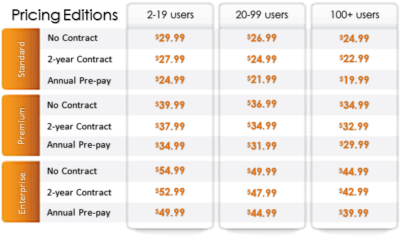
Effective July 4th, RingCentral Office has changed to an editions pricing model (US Only).  Each edition now includes specific feature sets and is priced differently.

PricingEditions2

Frequently Asked Questions

Q: Do existing Office customers get moved to new editions?

No.  Existing customers or users will continue to be granted a special exception on their current plans: Entrepreneur, Office Metered Toll-Free (MTF) and Office Unlimited.

Q:  Can existing users be upgraded to the new editions?

Yes.  They can use the upgrade wizard.

Q:  What are the benefits of these new Office editions?

The new editions offer the following:

      • Offers you flexibility to select the best feature or functionality set based on your business needs at a low monthly price.
      • Enables your large business to move up the market through enterprise level capabilities.
      • Provides one complete solution for any location and any number of employees.
      • Enables advanced call management and phone system administration.
      • Lets you manage, access, and use on smartphones and tablets.

Q:  What are the differences among the new Office editions?

There are various differences among the new editions, namely:

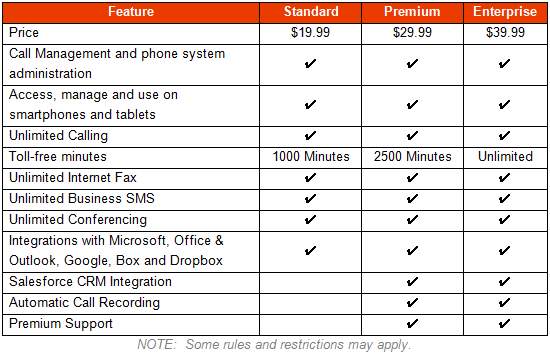
Standard:  Cloud PBX with call management features and mobile apps, unlimited calling/faxing/texting/conferencing and 1000 toll-free minutes.

Premium:  All Standard edition features, Salesforce CRM integration, Automatic call recording, Premium support for 10+ users and 2500 toll-free minutes.

Enterprise:  All Premium edition features and unlimited toll-free minutes

Refer to the table below for more information:

PricingEditions3

For answers to more frequently asked questions, click here.

For more information regarding RingCentral,

please contact us at 856-745-9990 or click here.

New Features for RingCentral

RCLogo_taglineSM

RingCentral is a company that specializes in providing business VoIP services, fax services and mobile communication solutions.  RingCentral continues to offer more features to boost efficiency. 

Intercom:

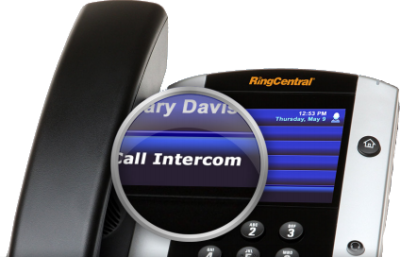
intercomIntercom allows you to call an individual extension that will automatically pick up on speaker.  This is a “one-to-one” feature, not a “page-all” feature.

Intercom is available for:

  • Cisco – 303 / 502G / 504G / 508G / 509G / 525G / 525G2 
  • Polycom – 321 / 331 / 335 / 450 / 550 / 560 / 650 / 670 / VVX500

Softphone and Polycom 6000 conference phones can only initiate Intercom using the touch tone command.

polycom_vvx500

Polycom VVX-500

The new color touchscreen IP phone with 12 touch keys that display Presence Status, speakerphone, integrated PoE, Gigabit Ethernet… etc.

sms

Business SMS:

Business SMS easily integrates with iPhone(s) and Android(s) to allows you to use your business RingCentral number to send and receive text messages from customers, colleagues and company departments.

  • Unlimited texting
  • Ability to text from multiple devices using RingCentral smartphone App

conferencing2Audio Conference Bridge:

Audio Conference Bridge allows you to setup and/or join unlimited conference calls anytime and anywhere. 

  • Dedicated conference bridge dial in number
  • Free unlimited conference calling
  • Host & Participant access codes for each RingCentral User

callrecording3Call Recording:

Call Recording can be used on your Softphone, IP phone or cell phone and allows you to record conversations on for RingCentral phone number.

  • On-demand recording
  • Recordings stored in the cloud
  • Anytime access for playback or download

callparkCall Park:

Call Park allows you to park a call (put on hold) in two ways:

  • Public Call Park – allows anyone to pick up the call
  • Directed Call Park – only allows the owner of the extension to retrieve.

For more information regarding RingCentral,

please contact us at 856-745-9990 or click here.

American Red Cross – Mobile Apps

Untitled

September is National Preparedness Month sponsored by the Federal Emergency Management Agency in the US Department of Homeland Security.  American Red Cross now offers Mobile Apps that include a Volunteer App, First Aid App, Shelter Finder App and multiple natural disaster Apps.  Prepare your company and family for emergency situations using ‘Make a Plan’ feature in each App.

vaVolunteer App

Team Red Cross wants you! Join Team Red Cross to help provide care and comfort to your local community when the unthinkable occurs. Team Red Cross is looking for people with various backgrounds, talents, and skill levels. Make a difference, support your community and join Team Red Cross!

taTornado App

Get your family and home ready for a tornado with the official Tornado App from the American Red Cross. The Tornado app puts everything you need to know prepare for a tornado – and all that comes with it – in the palm of your hand.

haHurricane App 

Monitor conditions in your area or throughout the storm track, prepare your family and home, find help and let others know you are safe even if the power is out – a must have for anyone who lives in an area where a hurricane may strike or has loved ones who do. 

sfaShelter Finder App 

The Red Cross Shelter Finder is available in the iTunes store and works on iOS devices. The Shelter Finder displays open Red Cross shelters and their current population on an easy to use map interface.

faaFirst Aid App

The official American Red Cross First Aid app puts expert advice for everyday emergencies in your hand. The official American Red Cross First Aid app offers videos, interactive quizzes and simple step-by-step advice it’s never been easier to know first aid. 

eaEarthquake App 

Be ready for an earthquake with Earthquake by American Red Cross. Get notified when an earthquake occurs, prepare your family and home, find help and let others know you are safe even if the power is out – a must have for anyone who lives in an earthquake-prone area or has loved ones who do.

wfaWildfire App 

Be ready for wildfires with the official Red Cross wildfire app. Blaze Warnings, Blaze Alerts” and Blaze Path Tracker are tools included with the Wildfire App. You can also let loved ones know that you are safe even if the power is out and learn what steps you should take to prepare your family, home and pets – all from the palm of your hand.

Download these Apps:  Android and Apple

Scams that Target Small Businesses and How to Spot Them

Consumers are not the only ones vulnerable to scams.  If you own a small business or are part of a nonprofit organization, you could be open to several different types of cons without even realizing it.

The Federal Trade Commission (FTC) has put together a list of some of the more common scams and posted them on the website along with plenty of resources to help you spot con artists and keep them from taking advantage of you and your business.

“Your best protection? Learn the signs of scams that target businesses,” the FTC says. “Then tell your employees and colleagues what to look for so they can avoid scams.”

From the FTC website:

Fake Invoices

Scammers create phony invoices that look like they’re for products or services your business uses — maybe office or cleaning supplies or domain name registrations. Scammers hope the person who pays your bills will assume the invoices are for things the company actually ordered. Scammers know that when the invoice is for something critical, like keeping your website up and running, you may pay first and ask questions later. Except it’s all fake and if you pay, your money may be gone.

Unordered Office Supplies and Other Products

Someone calls to confirm an existing order of office supplies or other merchandise, verify an address, or offer a free catalog or sample. If you say yes, then comes the surprise — unordered merchandise arrives at your doorstep, followed by high-pressure demands to pay for it. If you don’t pay, the scammer may even play back a tape of the earlier call as “proof” that the order was placed. Keep in mind that if you receive merchandise you didn’t order, you have a legal right to keep it for free.

Directory Listing and Advertising Scams

Con artists try to fool you into paying for nonexistent advertising or a listing in a nonexistent directory. They often pretend to be from the Yellow Pages. They may ask you to provide contact information for a “free” listing or say the call is simply to confirm your information for an existing order. Later, you’ll get a big bill, and the scammers may use details or even a recording of the earlier call to pressure you to pay.

Utility Company Imposter Scams

Scammers pretend to call from a gas, electric, or water company saying your service is about to be interrupted. They want to scare you into believing a late bill must be paid immediately, often with a wire transfer or a reloadable card or gift card. Their timing is often carefully planned to create the greatest urgency — like just before the dinner rush in a restaurant.

Government Agency Imposter Scams

Scammers impersonate government agents, threatening to suspend business licenses, impose fines, or even take legal action if you don’t pay taxes, renew government licenses or registrations, or other fees. Some businesses have been scared into buying workplace compliance posters that are available for free from the U.S. Department of Labor. Others have been tricked into paying to receive nonexistent business grants from fake government programs. Businesses have received letters, often claiming to be from the U.S. Patent and Trademark Office, warning that they’ll lose their trademarks if they don’t pay a fee immediately, or saying that they owe money for additional registration services.

Tech Support Scams

Tech support scams start with a call or an alarming pop-up message pretending to be from a well-known company, telling you there is a problem with your computer security. Their goal is to get your money, access to your computer, or both. They may ask you to pay them to fix a problem you don’t really have, or enroll your business in a nonexistent or useless computer maintenance program. They may even access sensitive data like passwords, customer records, or credit card information.

Social Engineering, Phishing and Ransomware

Cyber scammers can trick employees into giving up confidential or sensitive information, such as passwords or bank information. It often starts with a phishing email, social media contact, or a call that seems to come from a trusted source, such as a supervisor or other senior employee, but creates urgency or fear. Scammers tell employees to wire money or provide access to sensitive company information. Other emails may look like routine password update requests or other automated messages but are actually attempts to steal your information. Scammers also can use malware to lock organizations’ files and hold them for ransom.

Business Promotion and Coaching Scams

Some scammers sell bogus business coaching and internet promotion services. Using fake testimonials, videos, seminar presentations, and telemarketing calls, the scammers falsely promise amazing results and exclusive market research for people who pay their fees. They also may lure you in with low initial costs, only to ask for thousands of dollars later. In reality, the scammers leave budding entrepreneurs without the help they sought and with thousands of dollars of debt.

Changing Online Reviews

Some scammers claim they can replace negative reviews of your product or service, or boost your scores on ratings sites. However, posting fake reviews is illegal. FTC guidelines say endorsements — including reviews — must reflect the honest opinions and experiences of the endorser.

Credit Card Processing and Equipment Leasing Scams

Scammers know that small businesses are looking for ways to reduce costs. Some deceptively promise lower rates for processing credit card transactions, or better deals on equipment leasing. These scammers resort to fine print, half-truths, and flat-out lies to get a business owner’s signature on a contract. Some unscrupulous sales agents ask business owners to sign documents that still have key terms left blank. Don’t do it. Others have been known to change terms after the fact. If a sales person refuses to give you copies of all documents right then and there — or tries to put you off with a promise to send them later — that could be a sign that you’re dealing with a scammer.

Fake Check Scams

Fake check scams happen when a scammer overpays with a check and asks you to wire the extra money to a third party. Scammers always have a good story to explain the overpayment — they’re stuck out of the country, they need you to cover taxes or fees, you’ll need to buy supplies, or something else. By the time the bank discovers you’ve deposited a bad check, the scammer already has the money you sent them, and you’re stuck repaying the bank. This can happen even after the funds are made available in your account and the bank has told you the check has “cleared.”


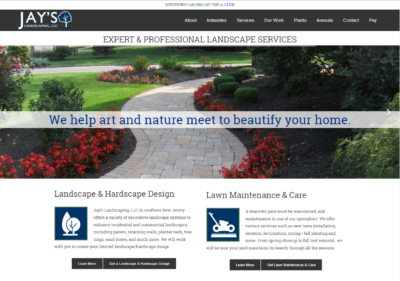
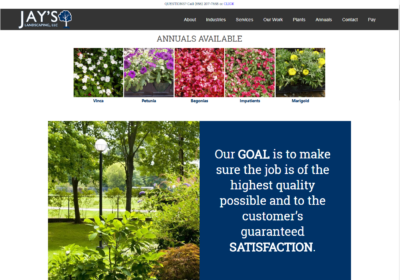
New Website Design – Jay’s Landscaping, LLC

The Website Design team of South Jersey Techies has been constantly working on developing great looking websites using the latest web technologies. The most recent website developed by our team is for Jay’s Landscaping, LLC in South Jersey

Jay’s Landscaping is a full-service landscape design and installation company. Our services include lawn maintenance, installation of retaining walls, brick walkways and patios, pruning, mulching, drainage, irrigation, and chemical fertilization.

To view the Website 

Have questions?

Our Web Design team is here to help
Call us at: 856-745-9990 or visit: https://southjerseytechies.net

South Jersey Techies, LLC is a full Managed Web and IT Services Company located in Marlton, NJ providing IT ServicesManaged IT Services, Website Design ServicesServer SupportIT ConsultingVoIP PhonesCloud Solutions Provider and much more. Contact Us Today.

CALL US NOW!