Back to Top

Tech, Web, Cloud & Cabling Services

Tag Archives: South Jersey Techies

South Jersey Techies tag

Hassman Research Institute

Website Design – Hassman Research Institute

The Website Design team of South Jersey Techies has been constantly working on developing great looking websites using the latest web technologies. The most recent website developed by our team is for Hassman Research Institute in Berlin, NJ.


Hassman Research Institute


Have questions?

Our Web Design team is here to help, call us at: 856-745-9990 or visit: https://southjerseytechies.net

South Jersey Techies, LLC is a full Managed Web and IT Services Company located in Marlton, NJ providing IT ServicesManaged IT Services, Website Design ServicesServer SupportIT ConsultingVoIP PhonesCloud Solutions Provider and much more. Contact Us Today.

Website Design – Event Medical Staffing Solutions

The Website Design team of South Jersey Techies has been constantly working on developing great looking websites using the latest web technologies. The most recent website developed by our team is for Event Medical Staffing Solutions in Sharon Hill, PA.

Event Medical Staffing Solutions (EMSS) has a nationwide network of emergency medical professionals focusing on special events, sporting events, construction sites, medical escort services and the television and film industry.

Event Medical Staffing Solutions specialize in on-site medical needs for any duration at any location, and any type of event. They have teams on standby 24/7 to respond to your last minute needs.


Have questions?

Our Web Design team is here to help
Call us at: 856-745-9990 or visit: https://southjerseytechies.net

South Jersey Techies, LLC is a full Managed Web and IT Services Company located in Marlton, NJ providing IT ServicesManaged IT Services, Website Design ServicesServer SupportIT ConsultingVoIP PhonesCloud Solutions Provider and much more. Contact Us Today.

New Website Design – W.J. Wallace Paving

The Website Design team of South Jersey Techies has been constantly working on developing great looking websites using the latest web technologies. The most recent website developed by our team is for W.J. Wallace Paving in Delanco, NJ.

W.J. Wallace Paving is a trusted asphalt paving company serving in South Jersey. W.J. Wallace Paving has been consistently providing exceptional value, superior customer service and the highest workmanship in South Jersey for over 30 years.

We specialize in Commercial, Industrial, Municipal and Residential Asphalt paving in South Jersey. Whether it’s paving, patching, resurfacing, seal coating or site clearing, W.J. Wallace Paving is a name you can trust and rely on. W.J. Wallace Paving carries full liability insurance and workers compensation insurance on all employees with one of the best experience modifiers in our industry for safety.

Have questions?

Our Web Design team is here to help
Call us at: 856-745-9990 or visit: https://southjerseytechies.net

South Jersey Techies, LLC is a full Managed Web and IT Services Company located in Marlton, NJ providing IT ServicesManaged IT Services, Website Design ServicesServer SupportIT ConsultingVoIP PhonesCloud Solutions Provider and much more. Contact Us Today.

Apple iOS 7

FINALiOS7.2

Apple iOS 7 is expected to be released this Fall for both, iPhone and iPad users.  Apple created a simple and more useful experience with iOS 7 that includes many new features.

Control Center

Control Center allows access to common controls and apps from any screen with just one swipe.  Controls included are turning on/off Wi-Fi, turning on/off Bluetooth and adjusting the display brightness.  Apps included are Camera, Flashlight, Calculator and many more.

Notification Center

Notification Center allows you to view new messages, mail, to-dos and missed calls from any screen with just one swipe.  The Notification Center has a new feature called Today.  Today allows you to view everything for “Today” including weather, appointments and local traffic.  Also, this feature gives you a glance at Tomorrow. 

Multitasking

Multitasking is smart way to switch between apps quickly.  To access “Multitasking” press the “Home” button twice.  Multitasking with iOS 7 is more efficient because it learns how you use your apps.  If you check a specific app every day at the same time, your app will be waiting for you.

AirDrop

AirDrop allows you to easily share photos, videos, contacts with the app and a Share button.  AirDrop transfers are encrypted and use Wi-Fi or Bluetooth to share data securely.

Siri

Siri has a redesigned user interface with a new sound and many new capabilities.  Siri has a more natural sounding voice (female/male) and is easier to understand.  Siri’s great new look fades on top of your screen.  Additionally, Siri can answer questions using Bing and Wikipedia, control iTunes radio, return phone calls, play voicemails and many more.

Mail

Mail has a redesigned user interface with many new features and controls.  New features  include the ability to view PDF comments and annotations, add/reorganize the mailbox list, and Mac and PC users with Microsoft Exchange 2010 can also now sync notes.


Second Generation Surface Tablets

mss2_1

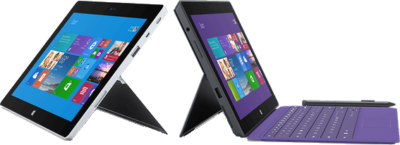
Microsoft has offically announced that the release date for the second generation surface tablets, Surface 2 and Surface Pro 2, will be October 22, 2013.  Pre-order for Surface 2 and Surface Pro 2 is available.

Both new Surface tablets will have a dual-angle kickstand and multiple connectivity options such as Bluetooth 4.0, Wi-Fi 802.11, USB 3.0, micro-SD expansion and HD video-out port.

The new Type and Touch Covers will be released with both tablets.  Both Covers include backlighting and additional sensors.  Also, Microsoft has designed a Power cover that is designed to add additional battery life to both Tablets.

mss21

The Surface 2 has a 10.6 Clear Type Full HD (1920×1080) Display and will run Windows RT 8.1 Operating System on an nVidia Tegra 4 Processor. The Surface Pro 2 has two storage options including, 32 GB and 64 GB.  Surface 2 is priced at $449.

sur2

Pre-order a Surface 2 Tablet.

mss22

The Surface Pro 2 has a 10.6 Clear Type Full HD (1920×1080) Display and will run Windows 8.1 Pro Operating System on an Intel Core i5 Processor. The Surface Pro 2 has multiple storage options including 64 GB, 128 GB, 256 GB and 512 GB.  Surface Pro 2 is priced at $899.  

surp2

Pre-order a Surface Pro 2 Tablet.

Microsoft – Retiring TechNet Subscription

Microsoft TechNet Logo color_4

Microsoft TechNet Subscription service is a subscription program and resource center for IT Professionals.  On July 1, 2013 Microsoft announced that as of August 31, 2013, all sales for TechNet Subscription service will be discontinued.  Active accounts will have access for the remainder of their subscription.  Once the subscription period ends, subscribers will no longer have access to the TechNet Subscriptions benefits portal.Microsoft is focusing on developing free offerings for the IT community.

Improved Free Offerings for IT Professionals:

  • TechNet Evaluation Center is a free evaluation software available for 30-180 days with no feature limits. 
  • TechNet Virtual Labs allows you to evaluate software without the need to install bits locally.  For more information or to visit the Virtual Labs click here.
  • TechNet Forums is a free online forums where IT professionals can ask technical questions and receive rapid responses from members of the community. 
  • Microsoft Virtual Academy is a free online learning site, with over 200 expert-led technical training courses across more than 15 Microsoft technologies (additional courses added weekly).

Microsoft Xbox One

Xbox One can be pre-ordered starting today for the release date in November 2013.  Microsoft has created an All-In-One entertainment system.  Xbox One is more than just a gaming console; it can be used for movies, music, gaming and the ability to connect set-top boxes using HDMI.

This All-In-One system is built with 8GB GDDR3 RAM, 8 Core Microsoft Custom CPU and 500GB Storage.  Connections include Gigabit Ethernet and IEEE 802.11 b/g/n WiFi.  Also built-in are USB ports, Optical Output and HDMI input and output.

Kinect 2 has a 1080p camera and can process 2GB of data per second.  Kinect 2 has “Unparalleled voice, vision, and motion technology lets you reach into games and entertainment like never before.”

Microsoft Smart Glass App is a secondary screen allows you to interact with your Xbox while watching movies, listening to music, surfing the Internet or gaming.  Smart Glass App is available for both Microsoft and Android users.

Above all, the wireless controller is new and improved.  Haptic technology is used to enhance the controller triggers.  Also improved are the thumb sticks and D-Pad.

What is new and improved with 802.11ac?

Wi-Fi_Logo.svg

Takeaway:  IEEE 802.11ac is the next generation wireless networking protocol as the successor of IEEE 802.11n.

What is 802.11?

IEEE 802.11 is a group of physical layer standards that provide the foundation for wireless networks.

802.11 Timeline:

  • 1997:  802.11 – 1 or 2 Mbps in 2.4 GHz spectrum (Legacy)
  • 1999:  802.11a – 54 Mbps in 5 GHz spectrum
  • 1999:  802.11b – 11 Mbps in 2.4 GHz spectrum
  • 2003:  802.11g –  54 Mbps in 2.4 GHz spectrum
  • 2009:  802.11n – 600 Mbps in 2.4 GHz and 5 GHz spectrum

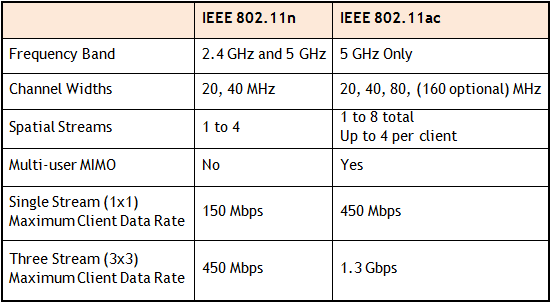
802.11n vs. 802.11ac

802.11ac offers the freedom of a wireless network combined with the capabilities of Gigabit Ethernet.  In a 5.0 GHz spectrum, 802.11ac will provide up to 500Mbps (single) or 1000 Mbps (multi).  Final ratification for 802.11ac expected in December 2013.

table


Small Business Phone Services

I have a small business that is growing rapidly- I hope to double my payroll
this year. My need for comprehensive business services is going to grow even
faster than my staff. We are a technical company that offers services over the
phone, as well as personal service right to our client’s locations. That means
we need to be able to receive calls, transfer them to our reps in the field, and
have them be able to transfer calls right back to the office all on the same
phone system. Up until now, we have been using a plan from a business cell phone
company, but as we grow, we are going to need a service to handle our own PBX.
That’s a private branch exchange- basically our own internal business phone
service. The days of ‘family plan,’ style business phone services are
(thankfully) behind us.

We are going to be moving into a multi- floor office building, so we will
need a service that can provide my people with business phone lines at their
desks, but also with cell phones that are part of the same system. I need to be
able to monitor and record calls, direct clients to the right place with a
short, simple automated system, and even make automated message calls to clients
at their request. Basically, I’m pretty sure we need everything a business phone service
could offer. I need one that does it all- but don’t let that fool you; we’re
still a small business with only about one hundred regular clients.

I have been looking into enterprise business services for business cell phones, and it is a
complicated world. There are a lot of companies that make bold, vague promises
about ‘providing solutions,’ ‘business services,’ etc. There’s lots of smug,
high-brow language that does not say very much. I won’t know if a company can
help me, and for how much, until I actually tell them what I need. We are in a
precarious position- needing a lot of different services but still being
relatively small, so I want to avoid the big companies. I don’t want to get
locked into a service that has an attractive introductory deal and then held in
by a complicated contract. I want a company that just handles business phones. I
want a small, dedicated company like mine to handle our phone system for
life.

Ten Top Microsoft Office Tips

The ten most popular Microsoft Office tips

Takeaway:  Susan Harkins lists ten most popular Office tips published in the Windows and Office Blog, and the now inactive Office Blog.MS_Office_2007_Logo.svg

When considering tips to share, think about ease-of-use and efficiency. A few naturally rise to the top as your favorites. For your commemoration, here are 10 of 2012’s most popular posts from both the Office Blog, which was deactivated in mid-2012, and the current Windows and Office Blog. Thank you for reading, and thank you for sharing your thoughts and enhancements with one another throughout the year.

1: A quick Word trick for typing text into a scanned document

The response to this limited technique surprised me. It’s something only a few will use, but if you’re one of those few, it can be a big help! I was pleasantly surprised at the positive response it received and the way readers enhanced the technique.

2: Use Word macros to save your place in a document

These two short macros make quick work of bookmarking work areas in a Word document. When the built-in navigation techniques just don’t get the job done for you, consider these macros or one of the alternative methods that readers shared.

3: A quick and dirty way to compare columns of Excel data

This quick Go To comparison solution is great for a one-time task. Comparing Excel data is a common task, and I receive frequent questions for solutions. This solution is a great one to add to your bag of tricks.

4: Demystify Excel’s PivotTable feature with this simple method

Sometimes a great tip doesn’t offer a specific solution, but rather guides you to using a feature more efficiently and effectively. Users tend to ignore Excel’s pivot table feature because they don’t really understand it – hence this blog post offers some quick insight into how to use this feature without mind-bending tricks.

5: Create a dynamic Excel chart and make your own dashboard

This blog post is one of my favorites. I enjoyed sharing the technique, but more than that, I loved the way the readers jumped in to help one another with a step I accidentally omitted in the instructions. TechRepublic readers rock!

6: A quick Excel keyboard trick for selecting large ranges

This technique uses Go To ([F5]) in an unusual way – to anchor two cells, creating a range. The ensuing conversation shared a number of great selection tips!

7: Three tips for rounding Excel time values

Using the right function can help you round up your rounding woes. Excel offers three rounding functions and knowing them all will round out your skills nicely. (Okay, I promise to stop that.)

8: Three things you must do when you inherit an Excel workbook

I review a lot of workbooks, so this blog was one of my favorites to write. In my experience, performing these three quick tasks when inheriting a workbook can speed up your troubleshooting time. Fortunately, it sparked some insightful conversation into what others do.

9: Launch Word with the most recently used document

Reader response sometimes surprises me, as it did for this easy technique. I hadn’t expected so many great alternatives from the readers.

10: Run a list of rolling credits at the end of your PowerPoint presentation

I’m glad a PowerPoint technique made the top list, but it wasn’t because the readers loved my technique. Mostly, the conversation centered on the typo I missed, and then my lack of proper contrition for said typo. It was fun while it lasted.


CALL US NOW!