Back to Top

Tech, Web, Cloud & Cabling Services

Tag Archives: South Jersey Techies

South Jersey Techies tag

Nokia Lumia 1020 vs. iPhone 5s

Takeaway:  Before rushing out to buy the new iPhone 5s, take a look at the Nokia Lumia Specifications compared to the iPhone 5s.
wa2

Nokia Lumia 1020 is equipt with dynamic live tiles, Office Mobile, a 4.5 Puremotion HD+ AMOLED display and is the winner of the Best Smartphone Camera Award by Gizmodo for the 41-megapixel camera.

Apple’s iPhone 5s will be released on Today, September 20, 2013. The iPhone 5s is available in three colors and will run the recently released, iOS 7.

Compare the iPhone 5s to Nokia Lumia 1020:

iPhone 5s

Nokia Lumia 1020

Price (2-YR Contract) $199.99 – $399 $199.99
Carrier Verizon, AT&T, Sprint, T-Mobile AT&T
Operating System iOS 7 Windows Phone 8
Dimensions 4.87 x 2.31 x .30 5.13 x 2.81 x .41
Weight 3.95 ounces 5.57 ounces
Display 4 inch, 326 ppi, 1136×640 4.5 inch, 334 ppi, 1280×768
Battery Life 10 hours Browsing, 10 hours Talking and 10.4 days Standby 6.7 hours Browsing, 12.5 hours Talking and 16 days Standby
Camera (Back) 8 MP, f/2.2 aperture, LED Flash, 5-Element Lens, 3X Zoom, Digital Image Stabilization, Backside Illumination Sensor 41 MP, f/2.2 aperture, Xenon Flash, 6-Element Lens, 3X Zoom, Optical Image Stabilization, Backside Illumination Sensor
Camera (Front) 1.2 MP, 1280×960, Backside Illumination Sensor 1.2 MP, f/2.4 aperture, 1280×960, Backside Illumination Sensor
Colors  Gold, Gray, Silver Yellow, White, Black
Audio iTune Store for music, Support AAC, Protected AAC, HE-AAC, MP3, MP3 VBR, AIFF, WAV, Apple Losssless and Audible (2, 3, 4, Enhanched Audio, AAX and AAX+) Xbox music or Nokia music; Supports MP3, AMR-NB, ASF, MP4, AAC, AMR, MP3, M4A, WMA, 3GP, 3G2, WMA 10 Pro, GSM FR, WMA 9, AAC LC, AAC+/HEAAC and eAAC+/HEAACv2 codecs
Video 1080p, Full HD, 1920×1080 at 60 frames per second, 3X Zoom, Slow-Motion video, Video Stabilization, Face Detection, Geotagging, Still Photos while Recording 1080p, Full HD, 1920×1080 at 30 frames per second, 6X Zoom, Video Streaming, Five White Balance Modes, Video Stabilization, Autofocus
Memory  N/A  2 GB
Storage 16, 32 or 64 GB local (5 GB Free – Cloud) 32 GB local (7 GB Free – Cloud)
Processor Apple A7, dual-core, 1.7 GHz Qualcomm Snapdragon S4, dual-core, 1.5 GHz
Connectivity Lightning (Charge), Nano SIM (Storage), 3.5 mm audio, USB, Bluetooth 4.0, 802.11 a/b/g/n Wi-Fi Micro USB (Charge), Micro SIM (Storage), 3.5 mm audio, USB 2.0, Bluetooth 3.0, 802.11 a/b/g/n Wi-Fi

Tips for Supporting iOS 7

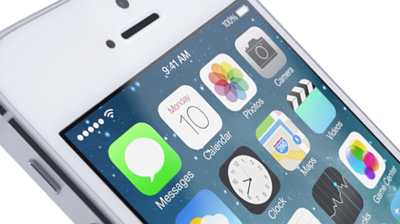
ios7

September 18, 2013 was the official release of iOS 7.  Complementary to iOS 7 are several support questions for corporate-owned iOS devices, including Bring Your Own Device (BYOD) and Corporate Owned Personally Enabled (COPE) devices.

COPE devices are corporately compliant prior to distribution to employees; this allows consistency and higher security for all enterprise devices.

There may be a few problems when upgrading to iOS 7 such as older iPhone/iPad devices may not support iOS 7 and not all features are available on all devices or in all countries. 

Here are some tips for supporting iOS 7 in the enterprise. 

Implement VPP

Apple now offers a Volume Purchase Program (VPP) for business.  VPP can retain volume licenses for Apps and Books.  Download Apple’s VPP Guide.

Third-Party iOS Apps

Configuring third-party apps can be completed in iOS 7,  Mobile Device Management (MDM) distributes the third-party configuration and the developer needs to enables it.

Test and Troubleshoot

The most important step before deploying in-house developed enterprise app(s) is to test and troubleshoot.  Testing and troubleshooting will save time and resources after deployment.

Per App VPN

Per app VPN ensures that only managed app data travels through VPN.  iOS 7 apps can automatically be connected to VPN when launched.  Also, for security purposes this tool will separate corporate data and personal data.


Popular Tools in Excel 2013

Excel 2013 has easy access tools that generate professional-looking results quickly.  There are several new features with the new version that should not be overlooked.

Flash Fill

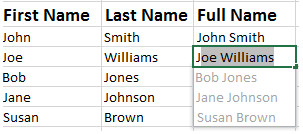
Flash Fill identifies and adapts to basic formatting to automatically input your data.  This tool performs several tasks such as merging information from multiple columns, adding formatting to current column and fixing anomalies with data.  Flash Fill will recognize and apply the selected format to your data but if data differs from row to row, it will not format correctly.

EFF1

Recommended Charts

rcRecommended Charts identifies data guides the user to choose the best chart type for their data.  The main objective of using a chart is to highlight your work in a significant way.

      1. Open the Excel Spreadsheet needed to create a chart.
      2. Select the Insert Tab.
      3. Select the Recommended Charts button to see suggested charts.

Recommended PivotTables

rptRecommended PivotTables are interactive tables that can analyze data, compare data and detect patterns/relationships.  In previous versions, PivotTables were too complex.

      1. Open the Excel Spreadsheet needed to create a table.
      2. Select the Insert Tab.
      3. Select the Recommended Charts PivotTables to see suggested tables. 

Quick Analysis

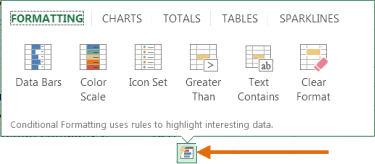
Quick Analysis is an additional way to generate a chart for data. To generate a chart to highlight your work in a significant way, select the data and click the Quick Analysis Icon.

Untitled

Timelines

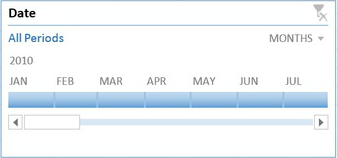
Timelines let you filter through PivotTables, similar to a slicer.  The timeline will be embedded alongside the Pivot Table.

  1. Select the PivotTable.
  2. Click the contextual Analyze Tab.
  3. Select Insert Timeline (in the Filter Group).
  4. Then select OK.
  5. In the upper-right corner you can select years, quarters, months or days.

Excel_New_Ftrs.FigE

Cloud Support

Cloud Support by Microsoft allows users to save Excel files to SkyDrive or SharePoint site.  Saving to SkyDrive or a SharePoint site allows users to review and edit files from any device with an Office 365 subscription.

Apps for Excel

appsMicrosoft offers Apps for Excel to enhance what you can do with Excel.  Categories for Apps include Content Management, Financial Management, Productivity, Workflow and Process Management and many more. 

Present Online

Present Online is a way to share workbooks and allows others to update it.  Present Online requires the installation of Lync (if you have Office Professional Plus; Lync is already installed).

  1. Sign into Lync.
  2. Open all workbooks you need to share. (Close workbooks you do not want to share).
  3. In Excel, click the File Tab.
  4. In the left pane, choose Share.
  5. Click Present Online.
  6. Click Present.
  7. Select a Lync meeting or create a new one.
  8. Click OK.


Speeding Up Your Home Internet: Tricks and Tips

Though we live in an age of nearly-ubiquitous broadband, it still seems like certain pages don’t load as quickly as one would like.  After you’ve tried changing your ISP (Internet service provider), or ordering a T1 internet connection, consider that many problems can be solved with a series of tips and tricks, outlined below.

  • The first area to make changes is your browser.  Microsoft’s Internet Explorer once held an overwhelmingly large market share, but that’s no longer the case.  Browsers such as Mozilla Firefox, Google Chrome, and Safari from Apple have all become increasingly popular.  They are free to install and render websites much more efficiently than Internet Explorer.  Plus, they have two additional benefits, both of which can help keep your computer and internet running fast.  First, these browsers are more secure, including precautions to prevent malware such as viruses from being installed, a common cause of computer slowness.  Also, these browsers allow the user to install extensions, or programs designed to modify the browser’s functionality.
  • Extensions can be used to remedy another common cause of perceived Internet slowness.  More and more websites include Flash and JavaScript.  While neither is inherently bad, more content takes more time to load and render.  Of you feel you can do without the bells and whistles, there are extensions designed to block this content from being downloaded and shown on your computer.  AdBlock Plus just blocks advertising, but Flashblock blocks all Flash content.  If you’re not ready to go that far, ClickToFlash is a great extension.  It stops Flash content from being shown initially, but gives the user the option of clicking to display it.
  • If checking out your computer yields no positive results, your router might be to blame.  The router’s function is to take a single Internet connection and split it so that every device in the house can make use.  This is very handy, but if the router is wireless and the person installing it does not know better, it can open your network to attack.  All routers should be password protected and secured using the strongest method supported by your devices.  WPA2 authentication is currently the best.  If the network remains unprotected, your connection may be slowed by neighbors leeching from your connection.

These are only a few of the most common causes of Internet slowness.  Hopefully one of the solutions will work for you!

How to Get Rid of Computer Equipment

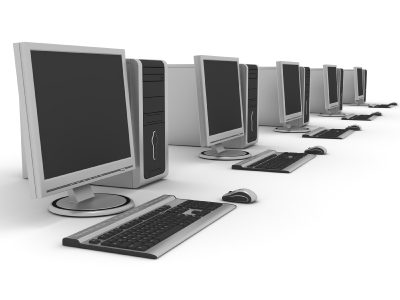
computersTakeawayWhen equipment reaches the end of its useful life, IT must either dispose of it or find it a new home. Here are several good ways to handle the situation.

Few companies amortize their computing equipment for more than three years of useful life. So once computing assets reach the end of the line, what do you do with them? In 2013, some best practice answers remain the same, but others are new. Here’s a checklist for dealing with old IT equipment.

1: Meet Your Green Requirements

In some industries and geographical areas, companies are now required to demonstrate adherence to green standards and environmental sustainability. One way to show compliance is by having environmentally effective policies for disposing of old computing equipment. In doing so, you also contribute to corporate sustainability compliance. There is value in that.

2: Work with Local Schools

Corporate IT can partner with local schools by donating good but used equipment that they can use for technology projects. Some companies take this goodwill effort even further by partnering with schools in tech development programs that include student internships with the company. “Proven” interns from these programs can make excellent IT hires. The company also develops a great reputation in the community.

3: Use Older Equipment for Training and Testing

Especially in thin client application environments that don’t depend on compute-in-the-box (think cloud), older equipment is ideal for training, which historically operates on thin budgets and is always looking for a resource infusion.

You can also use older equipment for testing purposes, as long as your test results will accurately emulate the production environment they are targeted for.

4: Cannibalize

Some older equipment can be used as spare part sources if there is enough version compatibility between the old and the new equipment. Replacement disk drives are a great example.

5: Work your Trade-ins (lease/buy)

Never underestimate your ability to trade up to new equipment by turning in your old equipment. You can secure a discount that may be as much as one-third of your new equipment retail price. If you lease equipment instead of buying it, a mechanism in the lease contract allows you to get credit for older equipment on the lease that you are exchanging for new.

6: Sell to the Third-party Market

Especially for power servers, mainframes, and disk drives, you can usually find a third-party reseller of older equipment that will buy it from you (only to resell it to another company). However, to qualify your equipment for this market, you must first recertify it with its original vendor. In the equipment re-certification process, the vendor examines and (if necessary) repairs the equipment to make sure it is production-ready.

7: Cycle Down Older Equipment to Low Power Users

In most companies, the high power users are in areas like finance and engineering. Users requiring desktop or laptop computers with fewer bells and whistles might be in the warehouse, the factory, or in work locations where there is a lot of environmental interference (dust, etc.), which you don’t want to subject your newest equipment to. Many companies have a downward rotation cycle they apply to desktop and laptop computers that cycles these assets into lower-power user groups after a certain time frame. By using this strategy, companies can often extend the life cycles of these assets for two or more years.

8: Sell or Auction Older Equipment to Employee

Many employees look for inexpensive laptops that they and their children can use at home or at school. If they can purchase a nice computer that might not be the latest and greatest but that still works and fits their budgets, they are happy to take an older piece of equipment off your hands.

9: Donate to Charities

Charities are always looking for free computing equipment that can run their operations. However, never approach them with an eye toward dumping off equipment that is so antiquated it won’t support Internet or run a current word processor or spreadsheet program. In fact, many charities have wised up to the old “dump it” approach and now set minimum standards for accepting older equipment (e.g., “must at least run a Windows 7 operating system”).

10: Sell for Scrap

Companies used to give away old equipment to recycling.  But in today’s lucrative scrap metal market, the goal instead should be to sell this equipment to scrappers.

If you are looking to purchase new equipment please contact us at (856) 745-9990. 

Top 4 Smartphones

Takeaway:  Specifications break down of the top four prominent smartphones.

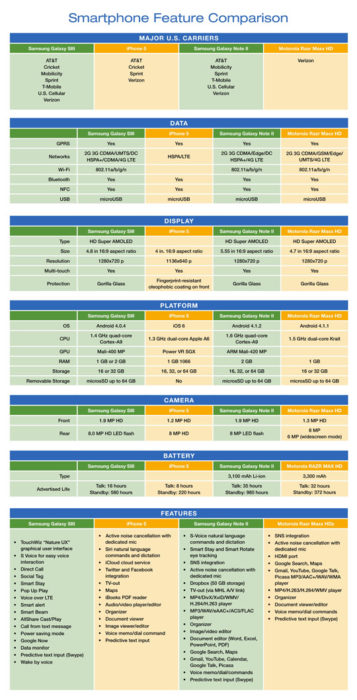
In the United States the top four smartphones are Samsung Galaxy SIII, iPhone 5, Samsung Galaxy Note II and Motorola Razr Maxx HD.  The chart compares mobile carriers, platform, hardware, networks/ Wi-Fi, display, camera and battery for all four leading phones.

If you’re thinking about buying a new smartphone, the chart below will be a quick guide with the necessary feature-to-feature comparisons to make a worthy choice.

Smartphone_Blog_040813_2


Will Microsoft Surrender?

Win82

The innovative plan for Windows 8 was to connect the mature personal computer generation with the prospering one of smartphones and tablets.

Many users are finding difficulty with adapting to the new Operating System.  Two major requests for Windows 8.1 (code-named “Blue”) is to bring back the Start button and boot-to-desktop feature.  Currently, the Start button is located in “Charms” which is a secondary taskbar set on the right-side of the screen.  The initial boot screen has much larger icons with live tiles.  Live tiles are software widgets that present dynamic content.

Windows_Start_ButtonMicrosoft is considering allowing users to restore the Start button and initially boot to the traditional desktop with Windows 8.1 (code-named “Blue”).

If Microsoft decides to add the Start button or boot-to-desktop feature to Blue, it will not be the first time a Windows Operating System has changed the user interface backwards to satisfy the users.

Microsoft has still not announced a release date for Windows Blue.  Likely, more information will arise from the Microsoft Build Developer Conference on June 26 – 28, 2013.


Alternatives to Outlook

Takeaway:  Alternative options for mail client’s that are not as costly as Outlook but offer the same features.

Outlook is one of the most widely used email clients in the business world.  For smaller companies, there are email clients that provide cost-effective solutions.  Other email clients offer a variety of features that are comparable to Outlook.  The most significant means of communication in the office is email; communication will suffer if the email client does not work well with the organizations requirements. 

Opera Mail

BLOG_OperaMail2Opera Mail is free and offered for Windows, Mac and Linux.  This e-mail client supports POP, IMAP (no Exchange support), newsgroups, RSS, and Atom feed.  Opera mail has a fast and simple user interface, thread views, spam protection and allows you to browse websites.

Dreammail

BLOG_Dreammail2Dreammail is free and offered for Windows XP/Vista/7.  This e-mail client supports POP3, RSS, and ESMTP/Google/Yahoo.  Dreammail has multiple accounts and multiple-users setup, templates, signature options, anti-spam, address book, message filtering and a web-mail tool.

iScribe

BLOG_iScribe2iScribe is free and offered for Windows and Linux.  This e-mail client supports POP3 and IMAP, as well as international standards.  iScribe has built-in baysian span filter, frequent updates and can be used from a portable drive.

Postbox

Blog_PostBox2Postbox is $9.95 per license and offered for Windows and Mac.  This e-mail client is best for Gmail but it also supports POP and IMAP.  Postbox has native Gmail label support, fast access to your favorite accounts, social networking integration and you can add Dropbox services.

Evolution Mail

BLOG_EvolutionMail2Evolution is free and offered for Linux (open source).  This e-mail client supports POP, IMAP and Exchange.  Evolution has calendar, tasks, contacts, memos, LDAP compatibility, folder search, encryption, multiple accounts, server support, default plugins, as well as, additional plugins.


HP Moonshot Server

HPMoonshot2

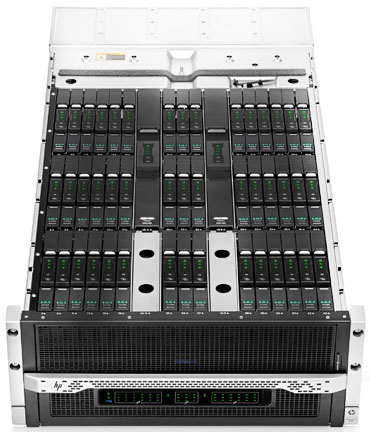
On April 8, 2013 Hewlett-Packard took a fairly dramatic departure from traditional server designs with the release of the Moonshot Server.

Moonshot uses low-power smartphone style processors to optimize data center servers.  Although, Moonshot looks traditional, the Moonshot 1500 Chassis contains shared power, cooling, networking, storage and 45 pluggable servers.  There are several chipsets available.

Instead of putting together another server that requires intense power and cooling, HP reconstructed the server design.  Moonshot provides a vast amount of resources such as scalability while reducing the use of physical space, cooling and power.

Many companies partnered with HP on the Moonshot Project including:  AMD, Intel, ARM, Citrix, Cloudera, Redhat, SUSE and many others.

Disadvantages for the Moonshot server could range from an unenthusiastic entrance to the risk of a minimal hardware component failure that could bring down 45 critical servers because an entire rack of servers are set in one box.

If you are looking to purchase new equipment please contact us at (856) 745-9990.


CALL US NOW!