Back to Top

Tech, Web, Cloud & Cabling Services

Category: Hardware

Hardware Category

Here’s what’s coming next from Sling TV

Sling TV CEO Roger Lynch talks pricing, DVR, and certified hardware.
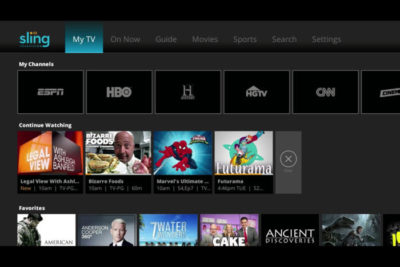
A lot’s changed in the two years since Sling TV made its grand debut at CES 2015. Instead of being the only streaming option for cable channels like ESPN and CNN, Sling is now one of three options alongside PlayStation Vue and DirecTV Now, and it will soon have a fourth competitor in Hulu.

Accordingly, Sling has changed with the times. The company, a subsidiary of Dish Network, has added new channels, created a second base package with a different mix of channels, and is working on a cloud DVR feature.

What else is in store for Sling this year? Here’s what we learned from Roger Lynch, Sling’s CEO, during CES 2017:

On DVR, which is “months” away

Sling began testing DVR service in an invite-only beta on Roku devices last month, and while it’s clearly a work in progress, Lynch says feedback has been positive. “The only feedback that isn’t positive is, ‘I wish I had this feature or that feature,’ all of which are being built already anyway,” Lynch says.

For now, Sling is prioritizing simple improvements like grouping recordings from a series into a folder, rather than listing them all separately. The eventual goal is to list all episodes from a series—whether it’s on-demand, recorded, or live—in a single window.
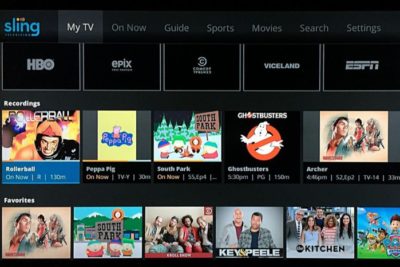
Still, Lynch gave only a rough time frame for when DVR might launch publicly, “It’s not in weeks. It’s not in years. It’s in months,” he says. “We want to get it out as quickly as possible.”

On AirTV and “Optimized for Sling TV”

Just before CES began, Dish announced a new brand called AirTV. Its first product, the AirTV player, puts Sling TV front-and-center, while integrating over-the-air channels and Netflix recommendations into the Sling guide.

Lynch sees AirTV as an example for other device makers to follow. “I’m hopeful that other device partners will make devices similar to this, and do similar types of integrations for Sling, and that it’ll spur innovation in the ecosystem,” he says.

To that end, Sling’s sole CES announcement was an “Optimized for Sling TV” certification program, which will help consumers know whether a device works well with the service. With streaming devices, for instance, criteria could include a Sling button on the remote control, integration with over-the-air broadcasts in the Sling guide, and a way to auto-launch Sling when users turn on the device.

Lynch says Sling is still finalizing how it’ll enforce those criteria. Roku, for instance, pre-loads the Sling app and includes a quick-launch remote button on some models, and that might be enough to earn Sling’s approval. Other types of devices may have different criteria.

“There’s router companies that are looking to be optimized for Sling. So what does that mean for router companies? It doesn’t meant they’re going to integrate OTA and put a button on the remote. It means they’re going to do something to optimize for the experience,” Lynch says.

On separating Sling Orange and Blue

Last year, Sling introduced a second base package, separate from its original $20-per-month plan. The newer plan is called Sling Blue, and it starts at $25 per month, while the original is now called Sling Orange. (Subscribers can bundle the two plans, which have different channel lineups with some overlap, for $40 per month.)

Might Sling eventually try to merge these two plans?

“We work really, really hard not to combine them,” Lynch says. “The problem with combining them is, you end up with a $35 to $40 package because there’s so much content, and you price yourself out of the market from where I think the big opportunities [are].”

That sounds like a shot at rivals like PlayStation Vue, DirecTV Now, and Hulu, none of whom are attempting to match Sling’s base prices. “For us, the Sling Orange product is the perfect cord-cutter product. It’s great for people who use antennas because you’re not forced to buy locals, and locals are really expensive,” Lynch says.

Sling Blue, meanwhile, will likely compete more directly with those larger bundles over time. “That’ll become a broader content package at a higher price point,” Lynch says.

On getting what it wants from TV networks

Since its launch in 2015, Sling has offered a “Replay” feature that lets users rewind live TV and watch several days’ worth of past programming. It’s a nice alternative to setting up a DVR, but not every channel supports the feature.

As you might expect, that’s partly because of issues with streaming rights. But Sling is working on accommodating those issues so it can support Replay on more channels.

“Every program has different requirements, like, can you fast forward, can you not fast forward, yes you can fast forward, but not through commercials,” Lynch says. “There are channels that have granted us rights to Replay, but we haven’t made Replay available on the channel yet, because we still have to put in some technology to enable that, because of the business rules that channel has.”

On the whole, though, negotiating those sorts of features with TV networks is getting easier. Lynch notes that two years ago, Sling was scrambling just to get a basic package together—the service launched with a mere 11 channels—but now TV networks are much more interested.

“When we first launched,” Lynch says, “we didn’t have as much leverage to demand things like that as we do now.”

Have questions?

Get answers from Microsofts Cloud Solutions Partner!
Call us at: 856-745-9990 or visit: https://southjerseytechies.net/

South Jersey Techies, LL C is a full Managed Web and Technology Services Company providing IT Services, Website Design ServicesServer SupportNetwork ConsultingInternet PhonesCloud Solutions Provider and much more. Contact for More Information.

To read this article in its entirety click here.
Killer keyboard shortcuts to help you master Windows

These Windows keyboard shortcuts help you navigate your PC faster, master documents, wrangle various virtual desktops, and shut down and secure a computer, using just a few keys.windows-keyboardDespite notable advancements in speech-recognition technology and voice input, and the popularity of tablets, the humble PC continues to be the workhorse device of choice for many workers around the world. And whether you’re an office-bound professional slouched behind a desktop PC, or a globetrotting executives armed with the latest ultrabook, the “physical” hardware keyboard continues to play a crucial role in productivity.The last thing you want in the heat of the moment is to fumble around for a mouse or have to take multiple steps to complete a task that could be done with a quick keyboard shortcut. Of course, learning and remembering such shortcuts can be hard work, and you’ll need to take some time to find the appropriate shortcuts for you.We’re here to assist. This list of valuable Windows keyboard shortcuts will help you work smarter and faster.

Keyboard shortcuts for the Windows surfer

windows-surfer

If you hope to master Windows keyboard shortcuts, you should start with the Windows desktop. The following shortcuts let you toggle between app windows and quickly resize them without having to reach for a mouse or align your apps.

  • Windows key (a.k.a., “Winkey“) + D.  Minimize all app windows and jump straight to the desktop. Hit the shortcut again to bring all apps back to the foreground.
  • Winkey + Comma. Take a quick peek at your desktop, and then release the keys to snap all apps back to the foreground.
  • Winkey + Left Arrow, or Winkey + Right Arrow. Dock your app windows to the left or right of the screen.
  • Winkey + Down Arrow, or Winkey + Up Arrow. Maximize or minimize a selected app. Or dock your app windows to the top or bottom of your display, when app windows are already docked to the left or right.
  • F11 – Toggle an active window in and out of full screen mode.
  • Ctrl + Esc – Bring up your Start menu. (This is particularly helpful if you use a keyboard that doesn’t have a Winkey.)

Windows keyboard shortcuts for the Kung Fu typer

These useful shortcuts help zoom the cursor around your page much quicker than if you use a mouse or trackpad.

  • Ctrl + Right Arrow, or Ctrl + Left Arrow. Move the cursor one word to the right or left.
  • Ctrl + Down Arrow, or Ctrl + Up Arrow. Move the cursor to the start or end of the next or previous paragraph.
  • Ctrl + Z, or Ctrl + Y. Undo or redo almost any action, as long as the app supports the feature.

Windows keyboard shortcuts for virtual desktop Jujutsu

Long a staple feature in Linux and the Mac, Microsoft finally officially incorporated virtual desktops into its Windows 10 OS. The indispensable feature lets you create additional desktops to better manage multiple app windows.

  • Winkey + Ctrl + D, or Winkey + Ctrl + F4. Create or close a virtual desktop.
  • Winkey + Ctrl + Left Arrow, or Winkey + Ctrl +Right Arrow. Toggle through your virtual desktops.
  • Winkey + Tab. Display the “Task View” interface for an overview of all virtual desktops. You can use the Arrow keys to toggle through desktops if you also hit Tab when in this mode. Hit Enter to jump to a selected desktop.

Windows keyboard shortcuts for the browser ninja

You’ve probably used a web browser for as long as you’ve had a computer, but do you take full advantage of keyboard shortcuts for browser navigation? These browser shortcuts all work the in latest versions of Internet Explorer, Microsoft Edge, Mozilla Firefox and Google Chrome.

  • Alt + D. Put the cursor into the browser’s address bar.
  • Ctrl + W, or Ctrl + T. Close or open a new browser tab.
  • Ctrl + Shift + T. Reopen the last browser tab you closed. (This comes in handy when if you hit Ctrl + W too quickly.)
  • Ctrl + Plus sign, or Ctrl + Minus sign. Zoom in and out on a web page. Reset the zoom level with Ctrl + 0.
  • Ctrl + Tab, or Ctrl + Shift + Tab. Toggle to the next browser tab from left to right, or from right to left.
  • Alt + Right Arrow, or Alt + Left Arrow. Browse forward or backward through recently visited websites. These shortcuts perform the same function as a browser’sForward and Back buttons.

Windows keyboard shortcuts for locking up and shutting down

This guide wouldn’t be complete without some shortcuts that help you shut down your PC and then lock things up.

  • Winkey + L. Immediately lock your PC.
  • Ctrl + Shift + Esc. Open the Task Manager to monitor app or forcibly shut down frozen programs.
  • Alt + F4. Close an active app. Using this shortcut key when your desktop is at the forefront invokes the “Shut Down Windows” prompt.

Have questions?

Get answers from Microsofts Cloud Solutions Partner!
Call us at: 856-745-9990 or visit: https://southjerseytechies.net/

South Jersey Techies, LL C is a full Managed Web and Technology Services Company providing IT Services, Website Design ServicesServer SupportNetwork ConsultingInternet PhonesCloud Solutions Provider and much more. Contact for More Information.

To read this article in its entirety click here.

Pro tip: Sort table data in a Word document

sort word

Microsoft Word


Sorting data in a Word document isn’t something you routinely do. On the other hand, presenting list and table data is, so the potential exists that one day you’ll want to sort something. The good news is that it’s easy to sort data in a table or a list. In this article, I’ll show you how to do just that. We’ll work through a few simple sorting examples. You can use most any table, or you can download the example .docx or .doc file.

Behind the scenes

Word relies on paragraphs when sorting, which seems a bit odd within the context of a table (or list). The paragraph formatting mark determines where one paragraph ends and the next starts. As you can see in Figure A, there’s no paragraph mark in a table. The end-of-cell markers denote the end of each cell’s content. The similar marker at the end of each row (outside the right border) is an end-of-row marker. These markers also contain cell and row formatting. When sorting a table, Word relies on the end-of-row marker to identify where one row ends and the next begins, the same way the paragraph mark does. (To see a document’s formatting symbols, click Show/Hide in the Paragraph group on the Home tab.)

Figure A

Table end-of-row markers are similar to paragraph markers.

Sort by the first column

We’ll start with the simplest sort possible; we’ll sort a table by the values in the first column. To do so, select, the table by clicking its move handle (the small square in the top-left corner). If you don’t see this handle, check the view. It’s available only in Print Layout and Web Layout. With the entire table selected, do the following:

  1. Click the contextual Layout tab. In the Data group, click Sort — or click Sort in the Paragraph group on the Home tab. In Word 2003, choose Sort from the Table menu.
  2. The resulting dialog does a good job of anticipating the sort. Notice that the Header Row option (at the bottom) is selected. As a result, the Sort By field is set to Species — the label in the first column’s header (Figure B).
    Figure B

  3. This is exactly what we want, so click OK. Figure C shows the sorted table.
    Figure C

Before we move on, let’s discuss the Type and Using options to the right. We didn’t need to change either, but sometimes you will. The Type options are Text, Number, and Date. Word usually defaults to the appropriate data type. You can force a specific type by choosing a different option other than the one Word assumes (but you’ll rarely have reason to do so). The Using options defaults to Paragraph — we talked about that earlier.

Sort by the second column

That first exercise was easy. Let’s complicate things a bit by sorting by the second column. Fortunately, it’s just as easy as the first. Repeat steps 1 and 2 from the first exercise. Then, do the following:

  1. In the resulting dialog, click the Sort By drop-down.
  2. Choose Common Name, the header label for the second column.
  3. Click OK. Figure D shows the results of sorting by the second column.
    Figure D

That wasn’t any more difficult that the first sort. Tell Word which column contains the values you want to sort by and click OK — that’s it!

Sort by multiple columns

With only two sort tasks under your belt, you’re beginning to see how simple the sorting process in Word can be. Let’s complicate things a bit so you can see how flexible this feature truly is. Let’s sort by the Class column and then sort the bird and mammal groups in a secondary sort. Repeat steps 1 and 2 from the first two exercises. Then, do the following:

  1. To sort by the Class, choose Class from the Sort By drop-down.
  2. To further sort each class group, click Common Name from the Then by drop-down (Figure E). You could add a third column to the sort if the results warranted the additional grouping.
    Figure E

  3. Click OK to see the results shown in Figure F.
    Figure F

What about lists?

You might be wondering how to sort the same data in list form. Word handles the list sort the same way — the exact same way. Highlight the list and click Sort in the Paragraph group on the Home tab. In the resulting dialog, check the header option and set appropriately (if necessary). Then, determine the sort order by choosing the fields (columns), appropriately.Figure G shows the result of sorting the same data in list form.

Figure G

Sort a columnar list the same way you sort a table.


The Biggest Tablet Rumors So Far

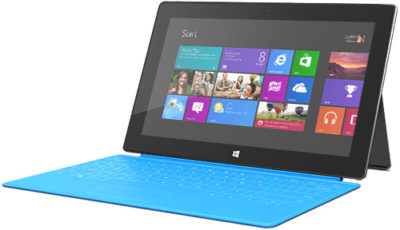
The latter half of 2012 should see some exciting developments in tech including a new iPhone,Windows Phone 8 smartphones, Microsoft’s Windows 8-powered Surface, Android 4.1 devices, and tablets, lots and lots of tablets.

Apple is expected to introduce a smaller iPad before December, Amazon may roll out its follow-up to the original Kindle Fire, and Samsung may be one of the first companies to get on board with Windows RT.

Here’s a look at some of the hottest tablet speculation that we may see turn into actual products before the holidays.

iPad Mini

Apple may be getting ready to stop competitors from invading the iPad’s turf with a low-priced 7-inch iPad to take on Amazon’s Kindle Fire and Google’s Nexus 7. Bloomberg recently reported that Apple was prepping a 7-inch tablet that would launch in October for $200. On Sunday the The New York Times reported a similar story to the news wire, but added the new iPad Mini will have a 7.85-inch screen.

The Kindle Fire and Google’s Nexus 7 are seeing some success against the iPad by not taking on the iPad. The two companies sell $200 tablets designed largely for content consumption instead of trying to offer an iPad-like device that can replace your laptop in a pinch.

The Fire and Nexus 7 each operate by providing deep hooks into each company’s content stores to make it easy for people to buy more movies, TV shows, apps, and games. The strategy of focusing on content consumption appeared to work for Amazon, and critics are already saying good things about Google’s Nexus 7.

Kindle Fire 2

Amazon announced the original Kindle Fire in September 2011 and, as we close in on the tablet’s one year anniversary, thoughts turn to what Amazon may have planned as a follow-up to this tablet.

A May Reuters report in May claimed the next Kindle Fire will offer an 8.9-inch display. Earlier in July, an analyst for NPD DisplaySearch told CNET that Amazon was prepping three versions of the Kindle Fire 2, including a 7-inch tablet with a screen with 1280-pixel-by-800-pixel resolution, a camera, and a 4G option.

The current Kindle Fire features a 7-inch display with a resolution of 1024 pixels by 600 pixels.

Kindle FirePad

The Times’ Sunday report about the mini iPad also claimed that Amazon is prepping a bigger version of the Fire to take on Apple’s tablet. There are no details about screen size or functionality, so it’s not clear what the purported device would be like or if it would actually be designed to take on the iPad.

More likely–at least in my view–is that Amazon would prep a larger version of the Kindle Fire that is better adapted to consuming visual content such as movies and gaming. But to keep the price low, Amazon would offer fewer hardware features than Apple’s tablet such as GPS, Bluetooth, and front- and rear-facing cameras.

Rumblings about a bigger Kindle Fire have been circulating for some time. The latest report before the Times claim was from BGR in June saying the new Amazon device would have a 10-inch display and quad-core processor.

Samsung RT

Samsung will have one of the first tablets out of the gate loaded with Windows RT, the version of Microsoft Windows 8 designed for ARM processors, according to Bloomberg.

The device will purportedly feature a Qualcomm Snapdragon processor, but no other device details are known. Samsung’s Windows RT tablet should debut in October when Windows 8 is set for a public launch.

Beyond the Rumors

We already know that Microsoft will roll out its Surface tablets later in 2012 and into 2013, and Acer in June said it plans to launch a Windows RT tablet in early 2013. As we get closer to the Windows 8 launch in October, more details should be announced about the upcoming crop of Windows 8-powered tablets.

To View Full Article Click Here

Changes to SSL Certificates Industry Wide

SSL Certificate Industry Change

There’s a pretty big change coming for SSL Certificates. And, we think it’s really important to keep you in the loop on these changes.

The biggest change you need to be aware of: if you have an active SSL certificate with an intranet name (e.g.’server1?, ‘mail’, ‘www’, ‘server2.local’, etc.), or a reserved IP address, it’s going to be revoked by October 1, 2016.

Also, on July 1, 2012, customers will no longer be able to purchase, renew, rekey, or manage their SSLs with intranet names or IP addresses that expire past November 1, 2015.

This is an industry-wide decision, not one specific to our company.

For more information on the Certification Authorities Browser Forum guidelines, go here.

For more information on which IPv4 Addresses are reserved, go here. We do not support any certificates using IPv6.

Our highly trained, courteous support staff is waiting to take your call. Whatever time it takes to assist you, that’s the time you’ll receive. We’ll resolve any issue to your complete satisfaction.

Call (888) 505-1532 to get started now

iOS 10.0.3 now update available for iPhone7

If your mobile connection keeps cutting out, this update should fix it.

iphone7plus

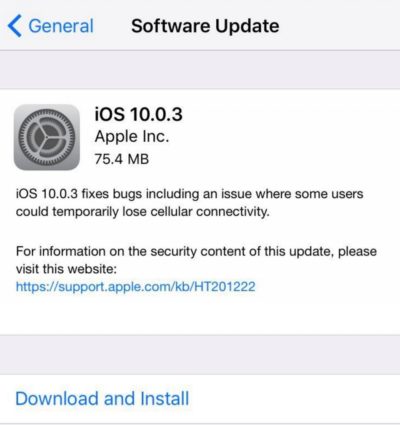
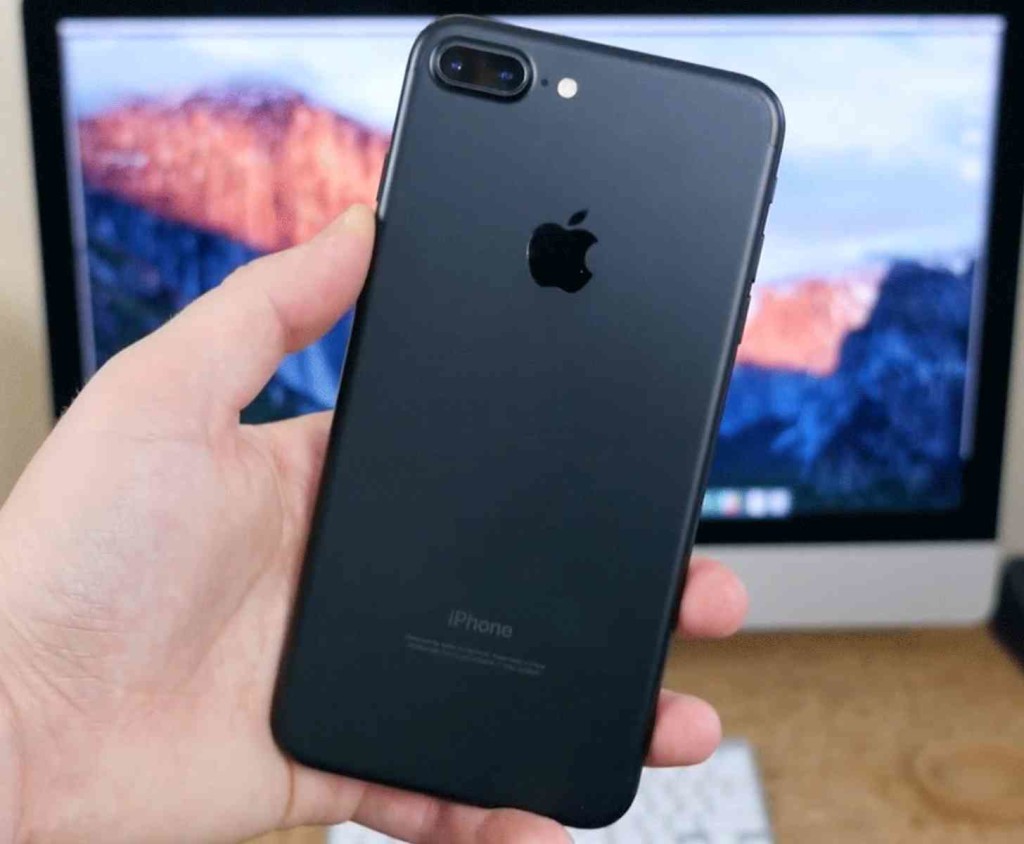
Apple on Monday released iOS 10.0.3, an update for the iPhone 7 and iPhone 7 Plus. To install the update, open the Settings app and tap General > Software Update. The update can also be installed by connecting your iPhone 7 to your Mac and using the iTunes app.

iOS 10.0.3 addresses an issue that could cause the iPhone 7 to “temporarily lose cellular connectivity.” The workaround to the issue before the update was to turn off Voice over LTE.

Since the 10.0.3 update addresses an issue specifically for the iPhone 7, the update is not seen by other iPhone models. For now, the iPhones in Apple’s current lineup are on different iOS versions. When Apple releases the iOS 10.1 update, which includes the Portrait mode camera feature, the iPhones will probably be back in iOS version alignment.

Tip: Before updating your iPhone 7, be sure to back up your data.

Have questions?

Get answers from Microsofts Cloud Solutions Partner!
Call us at: 856-745-9990 or visit: https://southjerseytechies.net/

South Jersey Techies, LL C is a full Managed Web and Technology Services Company providing IT ServicesWebsite Design ServicesServer SupportNetwork ConsultingInternet PhonesCloud Solutions Provider and much more. Contact for More Information.

To read this article in its entirety click here.

New Apple TV release date, specs, price and news

For the fourth generation Apple TV, the possibilities are endless

Update: The new Apple TV is finally here and available to buy right now in all Apple Stores. Here’s the final pricing: $149 and $199 pricing for the 32GB and 64GB versions in the US respectively, £129 and £169 in the UK, while in Australia the cost is AU$269 and AU$349 for the different versions.

Apple TV


Original story below…

Three years of waiting for a major upgrade and six months of rumors have lead to this point: the new Apple TV, announced earlier in September at the company’s iPhone 6S event.

When it came time to think about the upgrade to the Cupertino company’s seminal streamer, it seems one Steve Jobs-ian point made it through the chopping board: the new Apple TV needs to be just as smart if its predecessor and just as easy to use. It needs to offer a slew of contemporary features but still remain relatively clean looking.

Perhaps unsurprisingly, the new Apple TV is all of those things.

Now, before you go down into the comments and leave a nasty retort, we know that “new Apple TV” is a fairly confusing name. But Apple bows to no numerical and/or logic system, and since the Apple TV has yet to see a true sequel until now, instead receiving iteration after iteration of internal upgrades, this is just the way the Apple peels.

It’s been about two years since the last minor change to the Apple TV and three since the last major one. Which, for a company that’s bound and determined to release a new iPhone every 12 months, seems a little strange that Apple’s popular streamer has been MIA since the iPhone 5.

But our patience has been rewarded, and Apple has delivered the next iteration of a great streaming device. It packs a faster processor than its predecessor, a great-looking UI, too. It has an all-new remote that comes with a built-in microphone and works with Siri, not to mention the fact that it doubles as a Wii-like motion game controller.

It has a sharp new OS – a hybrid of OSX and iOS – and comes with a loaded app store that Tim Cook says will usher in a new age of television. It’s ostentatious and bold vision packed into a tiny box. But that’s Apple for you.

Cut to the chase
What is it? The next generation of Apple’s set-top box, the Apple TV
When is it out? Monday October 26 2015 in over 80 countries worldwide
How much does it cost? The 32GB version will cost $149 (£129, AU$269) while the 64GB version will come in at $199 (£169, AU$349)
Why is it better? It has a faster processor, better interface, more apps, a Wii-esque remote and has voice search functionality

When WWDC 2015 came and went without an Apple TV announcement, we were a little disappointed. But when rumors started to circulate about the Cupertino company’s September 9 event, our hopes and dreams for a brand-new set-top box started to solidify into reality. It turns out it wasn’t all wishful thinking, either. Rumors of Apple’s next set-top box practically boiled over until most, if not all, of the Apple’s big secrets saw the light of day before the 9th. (You can find the key points highlighted in bold!)

New Apple TV user interface

AppleTV


User interfaces are absolutely crucial, and Apple built its reputation on putting together some of the sleekest, most easy-to-use pieces of software on the market. The new Apple TV harnesses that long tradition of doing things right and wildly improves the old model’s layout into something more modern.

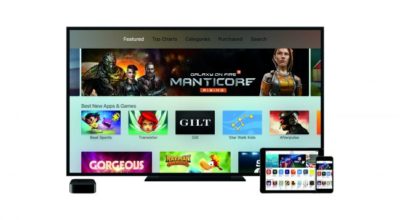
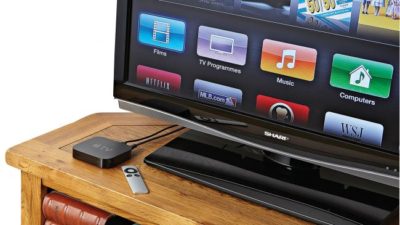
The new UI is purposefully flat, with top-level boxes for music and movies on the iTunes store, your most used apps like Netflix and Hulu, as well as the recently added App Store – which is like to pack TV-optimized games alongside Apple Music and its music-streaming kin.

It’s all built on top of a new OS called tvOS that works like a hybrid of iOS and OSX. There are 11 million developers on the platform according to Apple senior vice president of Internet Software and Services, Eddy Cue, which means you can expect a ton of third-party apps available on the first day.

tvOS will support Siri and include universal search results that enable searches across multiple streaming video services as well as Apple’s iTunes Store. That means instead of searching for a movie on each individual app, you’ll be able to see a select number of services in every search (think Netflix, Amazon Prime Instant Video, Hulu, YouTube, Vimeo, etc).

New Apple TV remote

apple-tv-remote


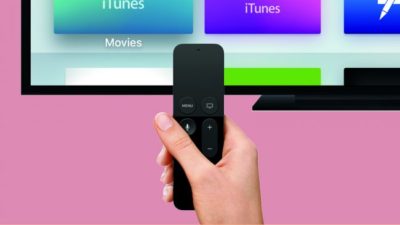
Also, we know that the New Apple TV will include an updated remote control (goodbye, boring aluminum IR remote) that operates over Bluetooth and features a mix of physical buttons and a touchpad.

Inside the remote, Apple looks to be packing in some Wii-esque motion sensors, which would make playing games on the App Store that require tilt easy. Speaking of Bluetooth, we’ve heard whispers that you might be able to connect any console-style controller made for iOS to the Apple TV if the new remote doesn’t do it for you.

Of course the remote will include an internal microphone so you can chat withSiri, meaning that the new Apple TV might be fully operable just with your voice.

Apps shown off so far that use the remote are a new-and-improved Crossy Road, Beats Sports – a Wii-like game from the Rock Band developers, MLB At Bat andApple Music. And for fans of the old-fashioned Home Shopping Network, Gilt will allow you to shop for deals from the comfort of your couch.

There are thousands more apps in the works, and techradar has confirmed with a handful of developers that even though the store looks sparse, many more apps are right around the corner.

New Apple TV hardware

apple-tv-specs

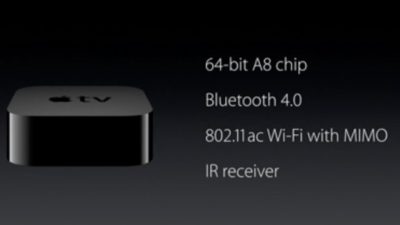
But like my mama always said, it’s what’s on the inside that counts. And inside the New Apple TV is packing a 64-bit A8 processor, currently found in the iPhone 6 Plus. It’s several times more powerful than the current Apple TV, and gives it the necessary horsepower to truck through the latest wave of graphically intense games. Does this mean that your Apple TV will become the premier spot to play the latest Call of Duty or Madden game? Most likely not. But for fans of casual or semi-casual gaming, the New Apple TV will be a pretty mean gaming machine.

It will support Bluetooth 4.0 (necessary to work with the all-new Siri remote),802.11ac WiFi with MIMO and come with either 32GB or 64GB of internal flash storage. None of this, however, is going to come cheap.

New Apple TV price

As expected, the 32GB will cost $149 (£129, AU$269) while the 64GB version will come in at $199 (£169, AU$349). It’s about three times the cost of the current Apple set-top box, but that price feels justified with all the new bells and whistles.

The only thing that would’ve sweetened the deal? A subscription to the purported cable alternative Apple has been working on for the past few months. This feature is likely to be coming, but we can now confirm that it missed the Apple TV announcement on September 9.

New Apple TV release date

So when can you get it? Apple launched the new Apple TV in over 80 countries on Monday October 26, and will expand to over 100 by the end of 2015.

New Apple TV competition

Looks like the new Apple TV isn’t the only shiny new set-top box on the market this holiday season. Recently Amazon launched a 4K version of the Amazon Fire TV, while Google has recently shipped out a Chromecast 2.

Finally, after techradar caught wind of the new Roku 4 thanks to a filing with the FCC in late September, Roku launched its stellar new streaming box at the tail end of October.

So far the consensus among reviewers is that the Chromecast 2 offers a faster response time and extremely affordable price tag if you can stand living without a user interface, while the the 4K Amazon Fire TV is great, but ultimately too dependent on a Prime subscription to do much good.

Conversely, the Roku 4 brings one of the best operating systems and universal search functions to the table, however the unit is noticeably louder and hotter than the Roku 3.

The first rumors of an Apple owned and operated cable service was given life on the web around the same time Sling TV made a splash in the US. The only problem with this plan is that Apple would need a lot of partners – FOX, NBC, ABC, Viacom, etc… – within a short time period.

The potential package in question would have a number of channels you know and love from cable but streamed over your Internet service for a lower monthly cost than traditional vendors like Sky, Virgin, Verizon or Time Warner Cable.

A service like that, exclusive to Apple TV, could be a huge differentiator and killer app for Cupertino. Whether Apple’s TV streaming dreams come to fruition – or actually exist at all – however, remains to be seen.

Apple pulls the plug on TV

After 10 years of research and development, Apple has officially stopped working on the fabled Apple television set, according to The Wall Street Journal.

According to a source familiar to the situation, because it was unable to add anything new to the world of flat-panels and 4K Ultra-HD TVs, Apple has thrown in the towel once and for all.

Apple is still expected to release both an updated version of the traditional set-top box as well as an over-the-top streaming service like Sling TV at its World Wide Developers Conference which starts on June 8.

The history of Apple TV

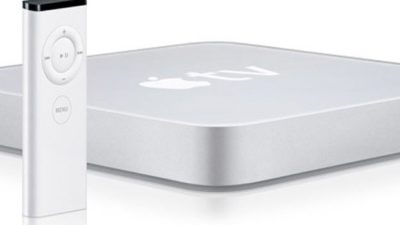
The first Apple TV launched back in 2006 and stuck out from the crowd by boasting its own hard drive and composite cables to hook up to then-new SD TV sets. It had a measly Intel Crofton Premium M processor and 256MB of DDR2 memory.

Apple_TV_first_gen

Version 2 ditched the internal storage for a better 802.11a/b/g/n Wi-Fi antenna, upgraded Apple A4 processor and favored streaming media over anything stored on physical drives. While some lamented the disappearance of a HDD, some appreciated the Apple TV’s smaller size as a result of the change.

Launching in 2012, Apple TV Version 3, the latest version of the Apple TV, didn’t offer much of an upgrade over its predecessor. It still streamed media and had a streamlined user-interface based on iOS (at that time it was iOS7). Of course the processor got a bump to the A5 to handle 1080p video and it finally doubled down on RAM to a solid 512MB.

apple_tv

Starting on March 9, 2015, the currently available Apple TV will drop to $69 (about £45, AU$90) and has first-dibs on HBO’s new standalone streaming service, HBO Now.

Have questions?

Get help from IT Experts/Microsofts Cloud Solutions Partner
Call us at: 856-745-9990 or visit: https://southjerseytechies.net/

South Jersey Techies, LLC is a full Managed Web and Technology Services Company providing IT Services, Website Design ServicesServer SupportNetwork ConsultingInternet PhonesCloud Solutions Provider and much more. Contact for More Information.

To read this article in its entirety click here.

Prepare for removal of PPTP VPN before you upgrade to iOS 10 and macOS Sierra

Prepare for removal of PPTP VPN before you upgrade to iOS 10 and macOS Sierra

apple-beta-ios10-macossierra

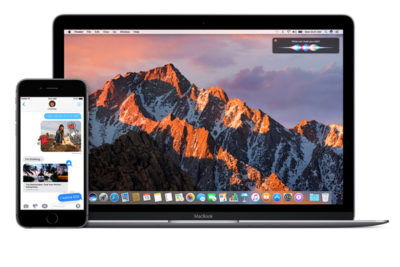
System administrators preparing for iOS 10 and macOS Sierra should stop using PPTP connections for VPN. Learn about alternatives you can use to protect your data.

If you’ve set up a PPTP VPN server, iOS 10 and macOS Sierra users won’t be able to connect to it. iOS 10 and macOS Sierra will remove PPTP connections from any VPN profile when a user upgrades their device.

Even though PPTP protocol is still available on iOS 9 and earlier or OS X El Capitan and earlier, we don’t recommend that you use it for secure, private communication.

Alternatives to PPTP connections for VPN

Try one of these other VPN protocols for user-based authentication that are more secure:

  • L2TP/IPSec
  • IKEv2/IPSec
  • Cisco IPSec
  • SSL VPN clients on the App Store such as those from AirWatch, Aruba, Check Point, Cisco, F5 Networks, MobileIron, NetMotion, Open VPN, Palo Alto Networks, Pulse Secure, and SonicWall

Have questions?

Get answers from Microsofts Cloud Solutions Partner!
Call us at: 856-745-9990 or visit: https://southjerseytechies.net/

South Jersey Techies, LL C is a full Managed Web and Technology Services Company providing IT ServicesWebsite Design ServicesServer SupportNetwork ConsultingInternet PhonesCloud Solutions Provider and much more. Contact for More Information.

Symantec Security Cloud

Symantec Endpoint Protection Cloud Windows client upgrade scheduled for August 5, 2019

The SEP Cloud client for Windows is updated periodically to provide improvements and defect fixes. The next update is scheduled to start on August 5, 2019.

WHAT’S NEW ?

In this release, the SEP Cloud client for Windows will be updated to version 22.18 to provide an enhanced protection framework and client stability.

  • Fixed an issue related to the OS feature on the agent, which was randomly failing with a medium severity while applying the Management policy.
  • Fixed an issue related to the security event: “A process modified a critical system resource.” This event was erroneously displayed in the console as a threat detection/remediation event. The event is now removed and will not be displayed in the console.
  • Enhancement to process HTTP error 429 status code request. The SEP Cloud agent will not attempt to connect with the cloud when the 429 status code is returned, but instead, try to connect based on the timeout information.
  • If the timeout information is not available, then the product will retry to connect in 15 minutes by default.

IMPACT

All Windows devices that are currently enrolled in SEP Cloud will automatically be updated in the background, using LiveUpdate. This update does not affect the security of your devices.

To start, the update is distributed to a small set of clients over the first seven days of the release, and then the remaining clients will get the update. If you want to update sooner, you can run LiveUpdate from the Symantec Endpoint Protection Cloud client UI.

Action Required

  • Windows device restart
    All users with Windows devices will be prompted to restart their devices after the update. Even if they delay the restart, their Windows clients remain Protected.

If no user is logged on the device when the upgrade is made available, then the prompt is provided until the user logs on. The product update will not force the restart of the device.

  • Windows installation package refresh
    Administrators who created a Windows installation package before August 5 should create and distribute a new one after August 5 to use for new Windows package deployments.

If you have any questions, please email us at support@sjtechies.com or call us at (856) 745-9990.

Office Mobile for iPhones

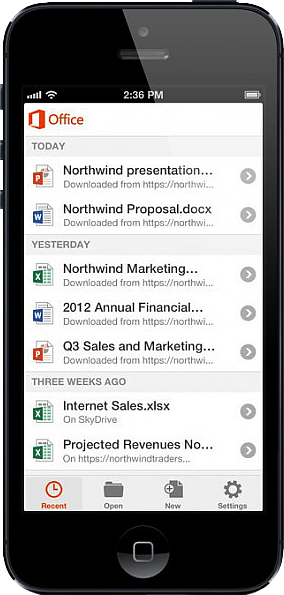
Untitled On June 14, 2013, Microsoft released Office Mobile in the Apple Store for all Office 365 users at no cost.  This app is available for iPhone 4 and up, iPad 3rd generation and up, iPad Mini and iPod Touch 5th generation.  All devices are required to run iOS 6 and up.

Office Mobile allows you to view and edit Word, Excel, and PowerPoint documents.   SkyDrive, SkyDrive Pro and SharePoint are ways to access documents.  “Recent Documents” tracks the most recent documents that you viewed or changed and makes them easily accessible.  Offline editing does not require a constant internet connection but allows you to save your changes once reconnected to a network.

On June 10, 2013 Apple announced that iWork Apps, such as Pages, Numbers and Keynote, can cross platforms to be used on Windows Systems.  Although, iWork Apps are proficient, they can not compare to the Office Suite. 

Microsoft has taken a huge step by crossing platforms with Office software and returning the upper hand to Microsoft.  Office 365 has become more valuable for businesses and home users.  

For more information on Hosted Services and Office 365

 please contact us 856-745-9990 or click here.


CALL US NOW!