Back to Top

Tech, Web, Cloud & Cabling Services

Category: Hardware

Hardware Category

Microsoft’s new Surface Laptops unveiled

Microsoft’s most direct shot at the MacBook yet

This slideshow requires JavaScript.

The one Surface product that fans have been clamoring over for years, a straight up Surface Laptop, is finally here. But, in taking design cues from both the Surface Pro and Surface Book lines, Microsoft has set lofty expectations for its first dedicated laptop device.

Priced at $999 (about £770, AU$1,330), the Surface Laptop clearly aims to chip at the MacBook and MacBook Air models that dominate college campuses practically worldwide. In fact, Microsoft claims that its cheaper (and larger) Surface Laptop can last far longer on a charge than Apple’s 12-inch MacBook: 14.5 hours.

However, every Surface Laptop shipped will come with Windows 10 S installed, Microsoft’s new version of Windows 10 that only accepts app installs downloaded from the Windows Store.

With the ability to switch from Windows 10 S to the 100% open Windows 10 Pro for $49 if you miss the chance in 2017 for free, should you need an app outside of the Windows Store that badly (spoiler: you probably will).

Regardless, at that price, can Microsoft garner enough interest from college students (or more likely their parents), who are often already strapped from the cost of an education?

The Surface Laptop in traditional ‘Platinum’

Design

Clearly, part of Microsoft’s plan is to lure those folks in with an incredibly gorgeous, and potentially trendsetting, design. The 13.5-inch Surface Laptop may very well be Microsoft’s most attractive computing product yet.

And, with four colors to choose from – Burgundy, Platinum, Cobalt Blue and Graphite Gold – there’s bound to be one that appeals to you.

A full aluminum lid and base wrap the laptop in much the same way it does a Surface Book, but ditches the aluminum in the keyboard deck for a Alcantara fabric that surrounds every plastic key and meets with the aluminum base in a seemingly airtight seal.

The fabric, according to Microsoft, is imported from Italy and laser cut to fit every Surface Laptop. Now, while many of the design elements are the same, the 13.5-inch (2,256 x 1,504) PixelSense touch display, the smooth glass-coated Precision touchpad, the chrome logo centered on the aluminum lid, we’re told that very few parts from previous parts are found within the Surface Laptop.

That much is obvious in the nature of the felt used for this keyboard deck compared against that which the Type Covers from Microsoft utilize. It’s smoother and more plush than those Type Covers, and we’re told it’s spill resistant.
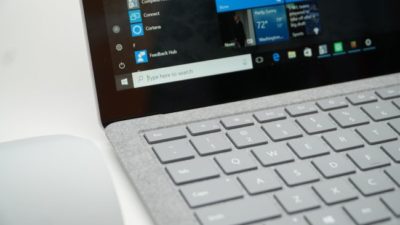
The Surface Laptop’s keyboard deck is awfully comfortable

Plus, the additional height afforded by this traditional laptop design allowed Microsoft to equip the keyboard with 1.5mm of travel, and the difference in typing between that and the Surface Pro 4 is night and day. Finally, Microsoft devised a speaker system beneath the keyboard that radiates sound through the spaces between the keys and the keyboard deck.

The result isn’t much better audio than you’d find in a MacBook Air, perhaps a bit fuller, but at least it’s consistently in an uninterrupted position. Naturally, the audio gets a bit muffled when typing, but since the sound radiates throughout the laptop base, there isn’t a major loss in audio detail.

That leaves the side of the laptop base to house Microsoft’s proprietary power and docking port found on other Surface devices, as well as a USB 3.0 and Mini DisplayPort, not to mention an audio jack. If you’re already asking, “where’s the USB-C,” we’ve already been there.

Microsoft tells us that it intends for its own port to handle concerns of connectivity expansion via the Surface Connect port and its Surface Dock, while refraining from alienating customers that have yet to completely update to USB-C.

A fine explanation, but that doesn’t tell us why USB 3.0 and not USB 3.1 at least, as you’re missing out on some major data transfer speed improvements there.

Those strange strips of plastic on the base? They’re Wi-Fi antennae

Performance and battery life

Microsoft can pack the Surface Laptop with the latest Intel Core i5 or Core i7 processors (Kaby Lake), up to 512GB of PCIe solid-state storage (SSD) and as much as 16GB of RAM.

That’s a mighty powerful laptop on paper, likely stronger than either the MacBook Air or 12-inch MacBook, while rising above even the latest 13-inch MacBook Pro that still utilizes Skylake processors.

(The $999 model comes packing a 128GB SSD and 4GB of RAM with the Intel Core i5.)

As for how Microsoft fit that kind of power a laptop just 0.57 inches (14.48mm) thin, a brand new, proprietary vapor chamber cooling system helps a whole lot. The system changes the physical state of the heat as it’s taken in through the center of a fan vent in the rear of the laptop base and spits it out of the sides of that same vent.

While we obviously weren’t able to stress-test the Surface Laptop, we were able to test out how it feels to use. For starters, at just 2.76 pounds (1.25kg), this thing is super light, which is all the more impressive considering it’s a 13.5-inch, Gorilla Glass 3 touchscreen you’re looking at.
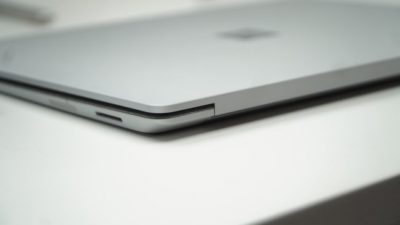
Note the Surface Connect dock port – Microsoft’s answer to USB-C

Microsoft chalks this up to, in part, the thinnest LCD touch module ever used in a laptop design. This, in turn, helps the lid to lift with just one finger. However, perhaps the hinge design needs refinement.

While you can open the display with just a finger, that slightness in the hinge is felt when the screen bounces with every tap of the touchscreen. It’s the very reason we question the inclusion of touchscreens in traditional laptops to begin with. Unfortunately, it seems Microsoft hasn’t found a better solution here.

That said, typing on the keyboard is the best time we’ve had doing such on a Surface product yet, and the portability of the whole thing is right there with Apple’s best.

As for battery life, Microsoft is, again, claiming 14.5 hours on a single charge. Microsoft later clarified for us that this number was achieved via local video playback with all radios but Wi-Fi disabled.

That testing environment sounds very similar to how TechRadar tests for battery life, so we might see battery life results in a full review fall much closer to this claim. If so, then Surface Laptop will be very tough to beat in longevity and be a potentially major driver for sales.
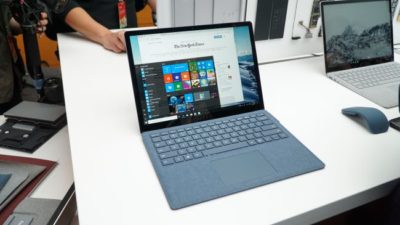
This is the Surface Laptop in Cobalt Blue

Early verdict

The fact that the Surface Laptop ships with a limited – sorry, “streamlined” – operating system and costs more than some previous Surface systems that come with full fat Windows 10 cannot go unnoticed – regardless of the free upgrade through this year. Unless Microsoft changes its tune come 2018, folks buying one of these with holiday gift money at the turn of the year would be wise to tack 50 bucks on top of whichever configuration they choose to get Windows 10 Pro.

While this switch will be free for any Surface Laptops bought in the education sector, that won’t help the Surface Laptop’s target audience come 2018: late high school and college students.

That said, the Surface Laptop’s incredible, potentially trendsetting design cannot go unnoticed either. Frankly, this is a laptop that appears to outclass the MacBook Air and 12-inch MacBook – and possibly even the 13-inch MacBook Pro – for hundreds less.

Save for a questionable platform versus pricing decision, the Surface Laptop has all the makings of yet another winning piece of hardware from Microsoft.

Have questions?

Get answers from Microsofts Cloud Solutions Partner!
Call us at: 856-745-9990 or visit: https://southjerseytechies.net/

South Jersey Techies, LL C is a full Managed Web and Technology Services Company providing IT Services, Website Design ServicesServer SupportNetwork ConsultingInternet PhonesCloud Solutions Provider and much more. Contact for More Information.

To read this article in its entirety click here.

Mozilla Joins Google and Facebook in Phasing Out Adobe Flash

Web browsers don’t like the security and stability problems that come with Flash.

Another popular web browser has had it with Adobe Flash.

Mozilla said this week that it plans to gradually wean its Firefox web browser from Adobe’s ADBE -1.07% multimedia player. In August, Firefox will no longer support “certain Flash content” that it deems “not essential to the user experience,” although Mozilla did not specify what type of Flash content it was referring to.

Mozilla will still support “legacy Flash content” for an unspecified time, but the company urged websites that use Flash or Microsoft MSFT -0.25% Silverlight, another multimedia web player similar to Flash, for their videos or online games to adopt newer “HTML technologies as soon as possible.”

In May, Google GOOG -0.59% detailed its plans to end support of Flash for its Chrome web browser, and it hopes to completely rid itself of Flash advertisements by the beginning of 2017.

Google, like Adobe, is urging website operators to switch to the HTML5 coding language to display multimedia like video on their sites.

Flash is notoriously buggy and prone to many security vulnerabilities. Firefox believes that by ending support for Flash, its users will see “enhanced security, improved battery life, faster page load, and better browser responsiveness.”

Still, Mozilla is not totally cutting ties with Adobe. Mozilla said it would “continue to work closely with Adobe to deliver the best possible Flash experience for our users” as it phases the multimedia player out, and said that an engineering partnership between the two companies has improved some performance and stability in Firefox when it displays Flash content.

Last summer, Facebook’s FB -0.27% chief security officer Alex Stamos urged Adobe via Twitter to disable Flash because of its security vulnerabilities.

In April, Adobe issued an emergency update to Flash after security researchers found a flaw that allowed hackers to distribute so-called ransomware to owners of Microsoft Windows personal computers. Ransomware is basically a form of malware that lets hackers block people from accessing their computer or related computer networks so that a hacker can demand payment in return for access.

In 2010, legendary Apple AAPL -1.32% CEO Steve Jobs wrote a 1,700 word essay on Flash and why Apple’s problems with the multimedia player, which he claimed hurt the “reliability and security of our iPhones, iPods and iPads.”

Have questions?

Get answers from Microsofts Cloud Solutions Partner!
Call us at: 856-745-9990 or visit: https://southjerseytechies.net/

South Jersey Techies, LL C is a full Managed Web and Technology Services Company providing IT Services, Website Design ServicesServer SupportNetwork ConsultingInternet PhonesCloud Solutions Provider and much more. Contact for More Information.

To read this article in its entirety click here.

Microsoft updates support policy: New CPUs will require Windows 10

In a change to its longstanding support policy, Microsoft says PCs based on new CPU architectures, including Intel’s Skylake chips, will require Windows 10. A list of preferred systems will support older Windows versions on new hardware, but only for 18 months.

Windows 10

Enterprise customers are still the bulwark of Microsoft’s Windows business, in both the client and server segments.

Historically, those customers have also been among the most conservative, lagging years behind the latest releases of an operating system release. Those practices have been encouraged by Microsoft’s support lifecycle, which offers a generous ten years of support for each Windows release.

Effective today, that policy is changing in a subtle but significant way, with the addition of new hardware requirements for support of pre-Windows 10 releases. The company’s also publishing a preferred list of systems that will receive special attention for updates and support.

Yes, Windows 7 (currently in the Extended support phase) will continue to receive updates until January 14, 2020, and Windows 8.1 will be supported until January 10, 2023. But in a series of “clarifications” to its support policy today, the company announced that support for those older Windows versions will be available only for “previous generations of silicon.”

Going forward, as new silicon generations are introduced, they will require the latest Windows platform at that time for support… Windows 10 will be the only supported Windows platform on Intel’s upcoming “Kaby Lake” silicon, Qualcomm’s upcoming “8996” silicon, and AMD’s upcoming “Bristol Ridge” silicon.

The policy will be phased in beginning with systems based on Intel’s new 6th-generation CPUs (code-named Skylake), which debuted a few months ago. New consumer-based Skylake devices must run Windows 10 to be supported.

For enterprise customers that want to buy “future proof” new hardware based on Skylake processors running older Windows versions, Microsoft will publish “a list of specific new Skylake devices we will support to run Windows 7 and Windows 8.1.” That support will run for a period 18 months, until July 17, 2017, after which those enterprise customers will be expected to upgrade to Windows 10.

Examples of systems that will be on the initial release of the list include Dell’s Latitude 12, Latitude 13 7000 Ultrabook, and XPS 13; HP’s EliteBook Folio, EliteBook 1040 G3; and Lenovo’s ThinkPad T460s, X1 Carbon, and P70 models.

The list will continue to be updated, Microsoft says.

Any machine that earns a place on the elite enterprise support list will get very special treatment indeed, with the idea being to reassure corporate customers that these models are especially likely to perform well on Windows 10 in the new era of continuous updates:

For the listed systems, along with our OEM partners, we will perform special testing to help future proof customers’ investments, ensure regular validation of Windows Updates with the intent of reducing potential regressions including security concerns, and ensure all drivers will be on Windows Update with published BIOS/UEFI upgrading tools, which will help unlock the security and power management benefits of Windows 10 once the systems are upgraded.

These models also get special treatment for enterprises that are still planning their Windows 10 migration, with an 18-month grace period where the older OS versions are fully supported.

Through July 17, 2017, Skylake devices on the supported list will also be supported with Windows 7 and 8.1. During the 18-month support period, these systems should be upgraded to Windows 10 to continue receiving support after the period ends. After July 2017, the most critical Windows 7 and Windows 8.1 security updates will be addressed for these configurations, and will be released if the update does not risk the reliability or compatibility of the Windows 7/8.1 platform on other devices.

Of course, enterprise customers who want to stick with earlier Windows versions beyond that mid-2017 deadline have lots and lots of options, based on current generations of Intel processors such as the Broadwell and Haswell lines. Those systems, which are based on what Microsoft calls “downlevel silicon,” will continue to be fully supported for pre-Windows 10 operating systems.

In today’s blog post, Microsoft says it’s seeing “unprecedented demand from our enterprise customers” in Windows 10. Enterprise customers are especially interested in new Windows 10 security features like Credential Guard, which uses hardware virtualization to safeguard credentials from attack.

Windows 8-era enhancements like Secure Boot, which protects systems from being compromised by rootkits and bootkits, also require new hardware.

Not surprisingly, today’s announcement contains the usual cheery statements from Microsoft’s three biggest hardware partners: Dell, HP, and Lenovo. All three companies compete aggressively in the low-margin consumer market, where virtually all new systems will run Windows 10. But enterprises will pay premium prices for the improvements in battery life and security in Skylake-based mobile systems, making this the most attractive segment to target.

Have questions?

Get help from IT Experts/Microsofts Cloud Solutions Partner
Call us at: 856-745-9990 or visit: https://southjerseytechies.net/

South Jersey Techies, LL C is a full Managed Web and Technology Services Company providing IT Services, Website Design ServicesServer SupportNetwork ConsultingInternet PhonesCloud Solutions Provider and much more. Contact for More Information.

To read this article in its entirety click here.
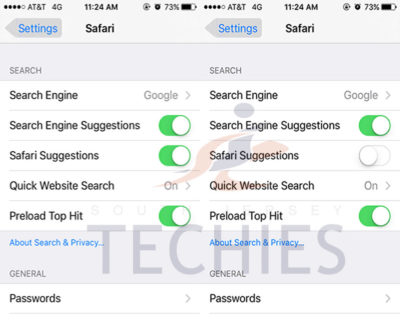
Safari on iOS and Mac crashing, bug related to Safari Suggestions, here’s how to fix

A strange bug is affecting many Safari users today, causing crashes on iPhone, iPad and Mac. For many users, simply tapping in the URL bar will cause the browser app to crash completely.  The exact issue causing the crashing has not been locked down, but it appears to be related to Apple’s Safari Suggestions service. It’s a very annoying bug that is affecting a lot of people all of sudden today.

sjt-blog-safari-crash-ios

When you type a URL, Apple sends what you type to its servers, returning a response with autocomplete search queries, Top Sites and other info. There appears to be a bug in this server request that is causing Safari to randomly crash. Users are discovering some potential workarounds until Apple fixes the problem properly …

Disabling Safari Suggestions seems to be helping resolve the bug for many people on iOS. On your iPhone or iPad, go into Settings, tap Safari, and toggle off the ‘Safari Suggestions’ switch. This will fix the crashing, obviously its only a temporary fix until Apple sorts its servers out as it will disable the Safari Suggestions functionality.

Another option is to enter Private Browsing mode. In private browsing, by design Safari does not contact the suggestions server for intelligent completion options, so the server is never contacted and the crash never arises.

The bug is affecting users in many countries, but not all. It also depends on the state of your Safari, whether it has certain data cached already. The crash has been seen on iOS 8, iOS 9 and OS X 10.11. The bug could be even more widespread beyond these platforms however. It is pretty crazy flaw that is affecting so many people this morning, with many reports across European iOS customers.

We have contacted Apple about the issue for clarification, but it’s such a serious functional flaw that we expect a fix very shortly. Please note: this is an unrelated incident to the prank site CrashSafari.com.

Update: The Safari crash bug has now been fixed, according to Apple.

Have questions?

Get help from IT Experts/Microsofts Cloud Solutions Partner
Call us at: 856-745-9990 or visit: https://southjerseytechies.net/

South Jersey Techies, LL C is a full Managed Web and Technology Services Company providing IT Services, Website Design ServicesServer SupportNetwork ConsultingInternet PhonesCloud Solutions Provider and much more. Contact for More Information.

To read this article in its entirety click here.
Windows 10 & network share access denied – Solution

Network Share access denial is another issue that users are facing with Windows 10.

Recent upgrade to Windows 10 all of a sudden makes network share no longer accessible on Windows machines you may have in your environment.

Here is the tutorial that solves the issue.

Problem

This is what you see when you try to go to any \\something network share:

\\something is not accessible. You might not have permission to use this network resource. Contact the administrator of this server to find out if you have access permissions. The account is not authorized to log in from this station.

open folder

There’s some changes in the Windows 10 internals which results in the access denial. The new build does not allow anonymous (guest) access to shares by default, as a security measure.It can be resolved by creating a new registry key in the right hive and rebooting.

Solution

Fire up the registry editor (regedit). Navigate to:

Registry editor

Here, you will need to create a new parameter (32-bit DWORD). Right-click:

Parameter

Then, name it AllowInsecureGuestAuth and assign it a value of 1.

DWORD

The hive should look thusly:

Registry Editor

And you’re done. Reboot, and enjoy your network access.

Have questions?

Get answers from Microsofts Cloud Solutions Partner!
Call us at: 856-745-9990 or visit: https://southjerseytechies.net/

South Jersey Techies, LLC is a full Managed Web and Technology Services Company providing IT Services, Website Design ServicesServer SupportNetwork ConsultingInternet PhonesCloud Solutions Provider and much more. Contact for More Information.

To read this article in its entirety click here.
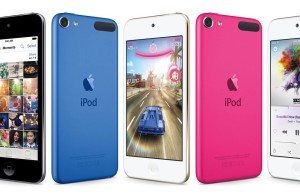
Apple Updates iPod Touch

New iPod uses same chip as iPhone 6 and will come in an array of colors

Varieties of the new iPod Touch

Apple Inc. introduced its updated iPod Touch that features the same chip used in the iPhone 6 and other upgrades that bring the device’s capabilities more in line with those of its smartphones.

The update also includes a new color lineup—including space gray, silver, gold, pink and blue—for the iPod Touch, as well as the iPod Nano and iPod Shuffle models.

The iPod was a breakthrough portable music player when it was introduced in 2001, but it has been displaced by smartphones in recent years.

Starting at $199, Apple said the iPod Touch has 10-times faster graphics performance and improved fitness tracking. The company said the upgraded iPod also offers three-times faster Wi-Fi connectivity.

Apple also touted the iPod Touch’s new 8-megapixel iSight camera and an improved FaceTime HD camera, with features including slo-mo and burst mode, as well as improved face detection for higher quality selfies.

Have questions?

Call us at: 856-745-9990 or Visit: https://southjerseytechies.net/

South Jersey Techies, LLC is a full Managed Web and Technology Services Company providing IT Services, Website Design ServicesServer SupportNetwork ConsultingInternet PhonesCloud Solutions Provider and much more. Contact for More Information.

To read thsi article in its entirety click here.

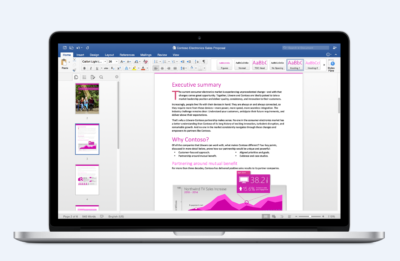
Office 2016 for Mac is here!

Kirk Koenigsbauer, corporate vice president for the Office Client Applications and Services team said “Today we are taking a big step forward for Mac® users—Office 2016 for Mac is now available in 139 countries and 16 languages. Based on feedback from the great Mac Office community, we’ve made major updates to each of the apps, and we couldn’t be more pleased to deliver it first to our Office 365 customers.”

Unmistakably Office, designed for Mac

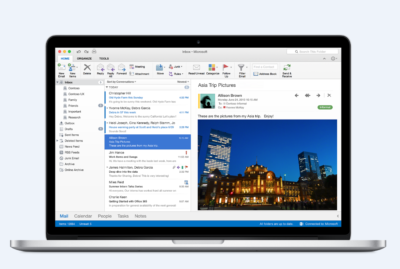
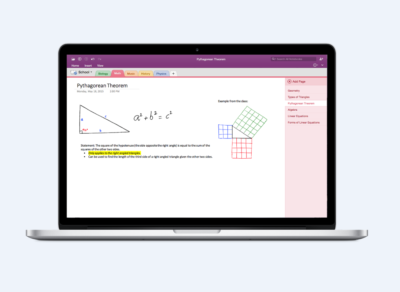
The new versions of Word, Excel, PowerPoint, Outlook and OneNote provide the best of both worlds for Mac users—the familiar Office experience paired with the best of Mac.

If you already use Office on a PC or iPad, you will find yourself right at home in Office 2016 for Mac. It works the way you expect, with the familiar ribbon interface and powerful task panes. Mac users will appreciate the modernized Office experience and the integration of Mac capabilities like Full Screen view and Multi-TouchTM gestures. With full Retina® display support, your Office documents look sharper and more vibrant than ever.

Office for Mac is cloud-connected, so you can quickly get to the documents you’ve recently used on other devices and pick up where you left off. New, built-in document sharing tools make it easy to invite teammates to work on a document together. When sharing documents, you won’t have to worry about losing content or formatting, as Office for Mac offers unparalleled compatibility with Office on PCs, tablets, phones and online.

Five modern, first-class applications

Word for Mac


Word for Mac—Word’s powerful writing and reviewing tools make it easy to create great-looking documents. The new Design tab lets you easily apply designer-quality layouts, colors and fonts throughout your document. You can work on the same document simultaneously with your teammates and use threaded comments to have a conversation right next to the corresponding text.


Excel for Mac


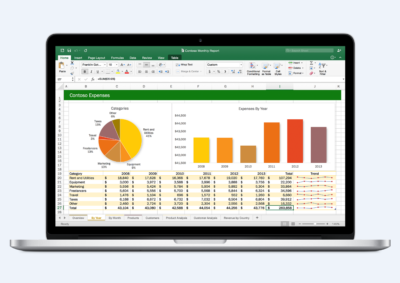
Excel for Mac—The new Excel for Mac helps you visualize your information by recommending charts best suited for your data with chart previews. Familiar keyboard shortcuts, autocomplete and an improved formula builder save you time when creating spreadsheets or entering data. For deeper analysis, new PivotTable Slicers help you filter large volumes of data and discover patterns.

PowerPoint for Mac

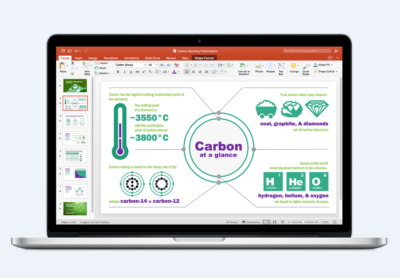
PowerPoint for Mac—PowerPoint’s improved Presenter View gives you full control when you present by showing you the current slide, next slide, speaker notes and a timer on your Mac screen, while the audience only sees your presentation on the big screen. The new animation pane helps you design and fine-tune animations, and the latest set of slide transitions add polish to your presentations.

Outlook for Mac

Outlook for Mac—Managing your email, calendar, contacts and tasks has never been easier. The new Outlook for Mac has push mail support so your inbox is always up-to-date. The improved conversation view automatically organizes your inbox around threaded conversations, so you won’t have to hunt for related messages. And the new message preview shows you the first sentence of an email just below the subject line so you can quickly decide if you want to read it now or come back later.

One Notebook for Mac

OneNote for Mac—OneNote is the newest addition to Office for Mac. You can capture your ideas in digital notebooks and access them on any device. Find things quickly with the OneNote search engine that tracks your tags, indexes your typed notes and recognizes text in images and handwritten notes. Bold, italicize, underline or highlight notes, insert files, pictures and tables and organize your notes however you want. You can also share notebooks with friends, family or colleagues so everyone can work together on travel plans, household tasks or work projects.

Made better by Mac users

The customer participation in Office for Mac preview since its launch in March exceeded expectations, making it largest Office for Mac beta ever. Thanks to everyone who participated in the preview program and helped improve the product.

Mac preview participants provided with over 100,000 pieces of feedback. Based on this feedback, Office released seven updates in four months with significant improvements in performance and stability. Also added features like improved Mail Merge in Word, Propose New Time in Outlook and support for External Data Connections in Excel.

And the best news is that Office for Mac will continue to see ongoing improvements over time. With released updates and new features for Office 365 customers at least once per quarter.

Available today for Office 365 customers

Office 365 subscribers can get the newest version of Office for Mac today. All you need is an Office 365 subscription (Office 365 Home, Personal, Business, Business Premium, E3 or ProPlus), which includes the rights and access to use Office applications on Mac, Windows, iOS and Android devices, along with additional value in OneDrive and Skype.

Here are a few different ways to get Office 2016 for Mac today:

  • Already an Office 365 customer? On your Mac, just browse to your account page (office.com/myaccount), sign in and follow the installation instructions. If you have Office 365 through your organization, go to portal.office.com/OLS/MySoftware.aspx.
  • Are you a student? You may get Office 2016 for Mac for free or at a substantial discount. It takes only 30 seconds to find out at office.com/student.
  • Otherwise, go to office.com/mac or buy an Office 365 subscription at your local retailer.

Office 2016 for Mac will become available as a one-time purchase option this September.

We hope you’re as excited as we are about the new Office for Mac. It’s one of many important releases this summer. “We released Word, Excel and PowerPoint for Android phones just two weeks ago, which join Outlook and OneNote for Android phones, and we are just weeks away from delivering Office Mobile apps for Windows 10.” said Kirk Koenigsbauer

Have questions?

Get help from Microsoft’s Cloud Solutions Partner.
Call us at: 856-745-9990 or visit: https://southjerseytechies.net/

South Jersey Techies, LLC is a full Managed Web and Technology Services Company providing IT Services, Website Design ServicesServer SupportNetwork ConsultingInternet PhonesCloud Solutions Provider and much more. Contact for More Information.

To read this article in its entirety click here.

Office 365: New capabilities for iPad and iPhone

New features make Office and OneDrive the best place to work on iPad and iPhone

More and more, people around the world are working on the go, changing locations and devices as they create and collaborate with others throughout their day. As they work across their PCs, Macs and mobile devices, they expect an uncompromising experience that is familiar yet optimized for the device they are using.

Microsoft is committed to providing best in class experiences on all devices, and today, we are proud to share with you a set of new Office capabilities across Word, Excel, PowerPoint, and OneDrive on iOS that will delight and make iPad and iPhone users more productive than ever before.

Real-time co-authoring in Word, Excel, and PowerPoint on iOS – We live in a world where we’re often collaborating with multiple people in different locations and Office 365 provides the broadest and deepest toolkit for collaboration between individuals, teams, and entire organizations. Using real-time co-authoring, colleagues, friends, and family can contribute to and edit documents simultaneously in the Word, Excel and PowerPoint iOS apps. This allows you to know who else is working with you in a document, see where they’re working, and view changes automatically within seconds. The co-authoring experiences are also available in Office Online and the latest versions of Word, Excel and PowerPoint on the PC and Mac, all made possible by storing your documents in OneDrive or SharePoint.

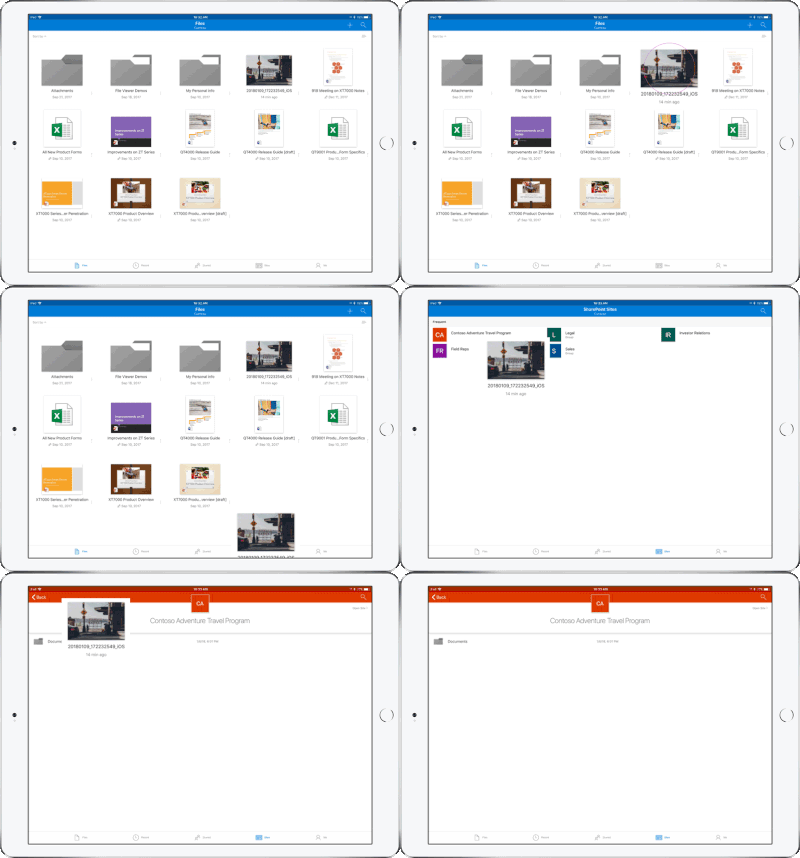
Drag and drop files anywhere with OneDrive – Sometimes your files can get scattered between different folders or even services and applications. Now it’s easier than ever to organize and rearrange your files. You can drag files in between folders in OneDrive and, if your teammates use SharePoint to work together, you can even drag OneDrive files to a SharePoint site giving them immediate access. On iPad, you can also drag files from other apps, such as iMessage, into your OneDrive and drag files out of your OneDrive to other apps.

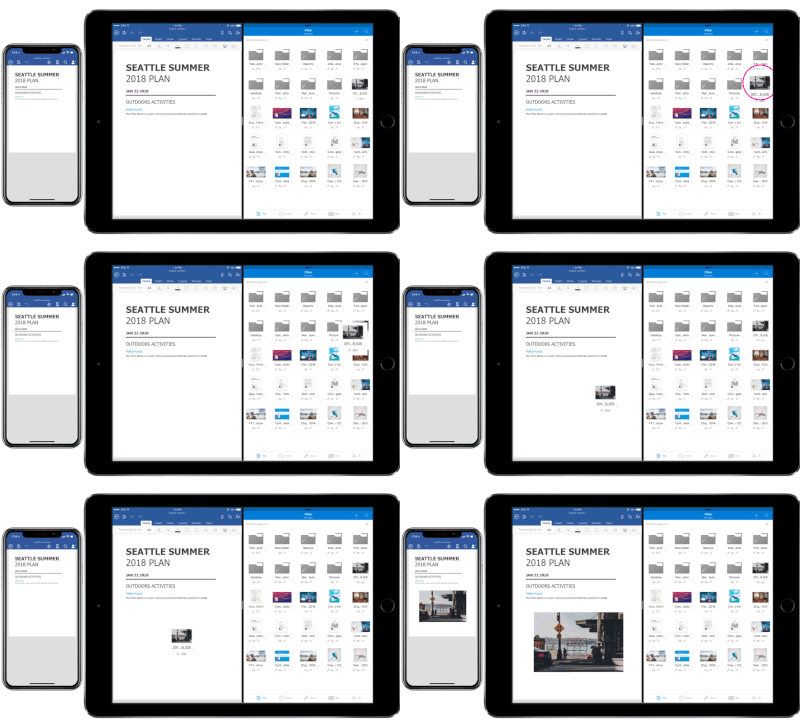
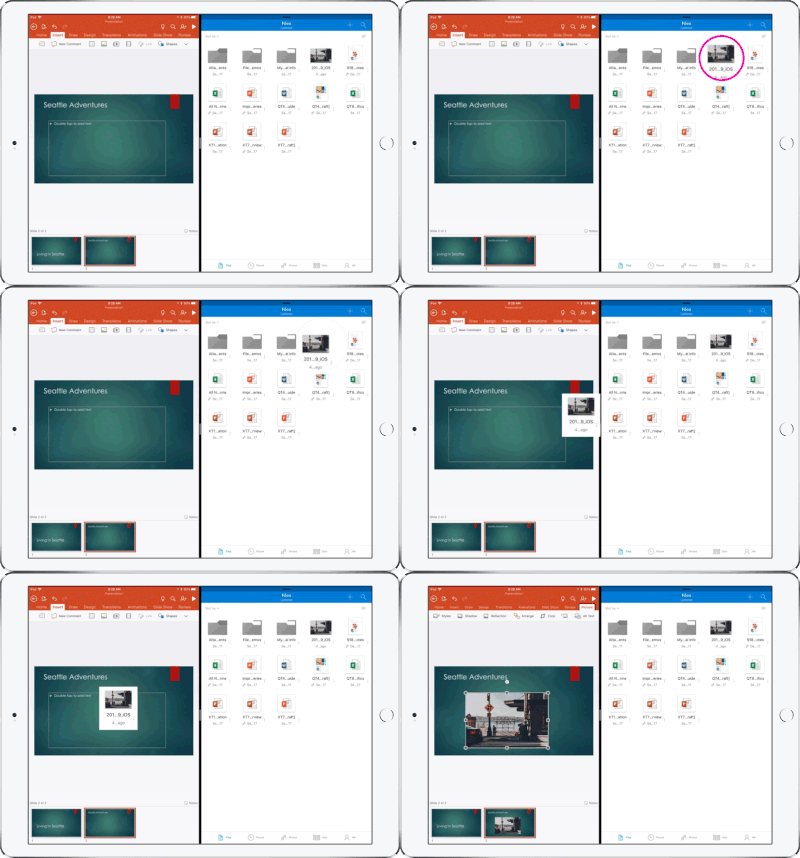
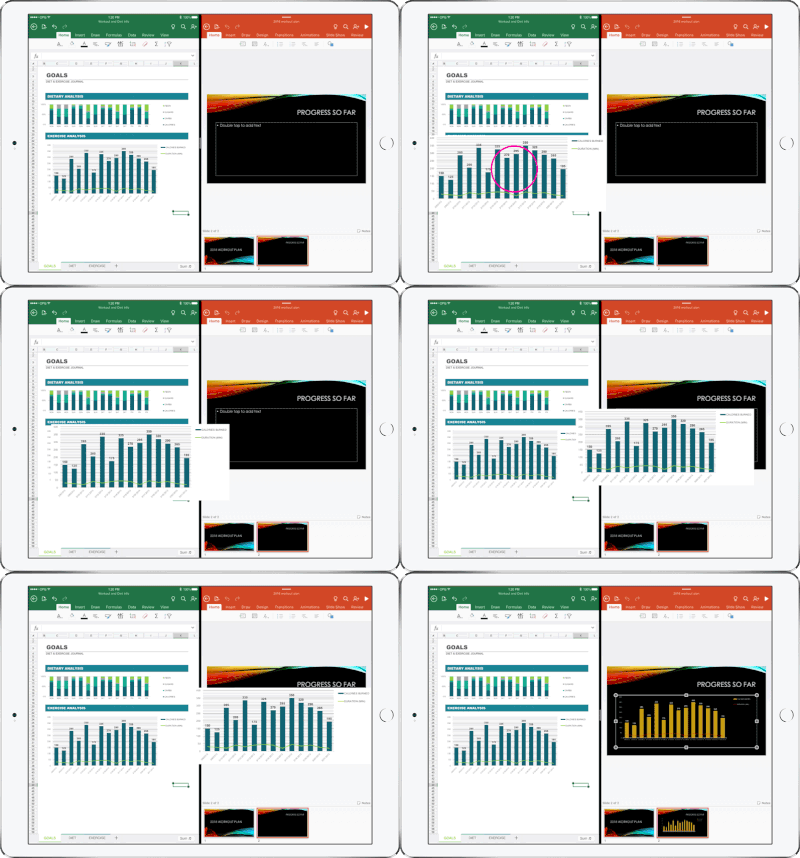
Drag and drop content between Word, Excel, PowerPoint, and OneDrive on iPad – One of the most common and powerful tasks when creating content is pulling in text, photos, graphs, and other objects from different sources. Now you can pull in content with ease on your iPad with drag and drop support in Office and OneDrive. Easily drag and drop objects from OneDrive or from one Office app to another.

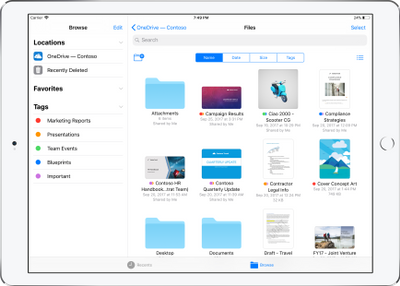
OneDrive Files app support – Today we’re also announcing native support for the Files app in iOS 11. OneDrive integration with the Files app allows you to access, upload, edit, and save your content to OneDrive or SharePoint from apps that support Files app integration. You can also tag and favorite your OneDrive and SharePoint files from within the Files app.

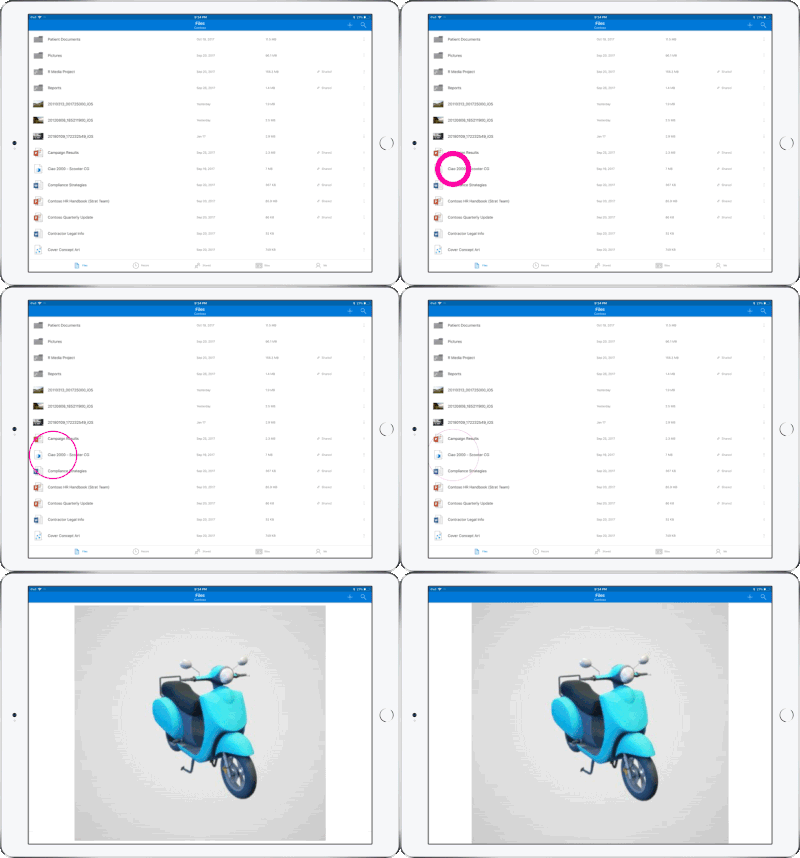
OneDrive redesigned to find the files that matter – The OneDrive iOS app has been redesigned from the ground up with a new layout that uses your screen space more efficiently allowing you to find your files faster. It’s easier to scan across file names, see the information that matters to you, and sort files how you want. New metadata is visible in the list view, so you can easily identify new files and files that have been shared.

Universal link support for shared files – Being able to seamlessly share and securely access files is essential for teamwork. Previously when you received a link to a shared file, you would be directed to a browser and prompted to re-authenticate. Today, we are announcing universal link support, which will open the document directly in the Word, Excel, or PowerPoint iOS apps. Further, if you don’t have a supporting application for the file, you’ll be directed to the OneDrive app to preview the file.

Preview 130+ file types in your OneDrive app – You and the people you work with use a variety of different file formats, but when you’re on your mobile device you might not have access to the native applications for those files. Now, the OneDrive iOS app creates crisp thumbnails and supports large previews of over 130 file types, including Adobe Photoshop and Illustrator, RAW, 3D objects, and high-precision DICOM images. OneDrive lets you open, view, and share all of your files without leaving the app.

New accessibility features for Word, Excel and PowerPoint on iOS 11
The VoiceOver rotor in iOS improves navigation and the accessibility of content. For example, you can use the built-in rotor on iOS to navigate line-by-line or word-by-word and change the speed at which VoiceOver speaks. The new Office-specific rotors also let people with vision impairments navigate more efficiently in Word across tables and links, slides in PowerPoint, and sheets in Excel.

Users can also leverage larger text options in accessibility settings to modify the text size in the core Office apps. Visit the support pages for Excel, Word, and PowerPoint to learn more.

You can use take advantage of these new capabilities in the coming days by updating the Word, Excel, PowerPoint, and OneDrive apps in the Apple App Store.

Apple iOS 7

FINALiOS7.2

Apple iOS 7 is expected to be released this Fall for both, iPhone and iPad users.  Apple created a simple and more useful experience with iOS 7 that includes many new features.

Control Center

Control Center allows access to common controls and apps from any screen with just one swipe.  Controls included are turning on/off Wi-Fi, turning on/off Bluetooth and adjusting the display brightness.  Apps included are Camera, Flashlight, Calculator and many more.

Notification Center

Notification Center allows you to view new messages, mail, to-dos and missed calls from any screen with just one swipe.  The Notification Center has a new feature called Today.  Today allows you to view everything for “Today” including weather, appointments and local traffic.  Also, this feature gives you a glance at Tomorrow. 

Multitasking

Multitasking is smart way to switch between apps quickly.  To access “Multitasking” press the “Home” button twice.  Multitasking with iOS 7 is more efficient because it learns how you use your apps.  If you check a specific app every day at the same time, your app will be waiting for you.

AirDrop

AirDrop allows you to easily share photos, videos, contacts with the app and a Share button.  AirDrop transfers are encrypted and use Wi-Fi or Bluetooth to share data securely.

Siri

Siri has a redesigned user interface with a new sound and many new capabilities.  Siri has a more natural sounding voice (female/male) and is easier to understand.  Siri’s great new look fades on top of your screen.  Additionally, Siri can answer questions using Bing and Wikipedia, control iTunes radio, return phone calls, play voicemails and many more.

Mail

Mail has a redesigned user interface with many new features and controls.  New features  include the ability to view PDF comments and annotations, add/reorganize the mailbox list, and Mac and PC users with Microsoft Exchange 2010 can also now sync notes.


Surface Pro

ms_surface_proThe Surface by Microsoft is a crossover between a laptop and a tablet. The Surface Pro is a business tablet that has a detachable keyboard, stylus and a kickstand. Putting the Surface Pro above other tablets is the aptitude to run Microsoft Office programs including Word, Excel and PowerPoint.

Microsoft released a television commercial for the Surface Pro, “The Vibe”, starring Daniel ‘Cloud’ Campos from the original Surface Commercial.  This enthusiastic campaign includes professional dancers as “business people” showing the capabilities of the Surface Pro. Similar to Windows 8, Metro “Modern” UI; the commercial has the same ambiance.

According to IDC, Microsoft has finally made its way to the Top 5 for Tablets. In the first quarter of 2013, Microsoft has 1.8% Market Share. Unlike the first quarter of 2013, Microsoft has 0% Market Share. Also, ASUS moved up from #4 to #3, knocking Amazon down a space.

TopFiveTabletVendors


CALL US NOW!