Back to Top

Tech, Web, Cloud & Cabling Services

Category: Hardware

Hardware Category

HP Moonshot Server

HPMoonshot2

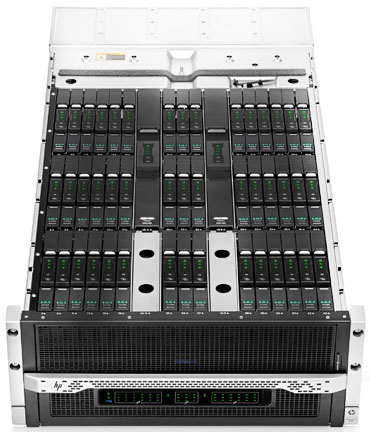
On April 8, 2013 Hewlett-Packard took a fairly dramatic departure from traditional server designs with the release of the Moonshot Server.

Moonshot uses low-power smartphone style processors to optimize data center servers.  Although, Moonshot looks traditional, the Moonshot 1500 Chassis contains shared power, cooling, networking, storage and 45 pluggable servers.  There are several chipsets available.

Instead of putting together another server that requires intense power and cooling, HP reconstructed the server design.  Moonshot provides a vast amount of resources such as scalability while reducing the use of physical space, cooling and power.

Many companies partnered with HP on the Moonshot Project including:  AMD, Intel, ARM, Citrix, Cloudera, Redhat, SUSE and many others.

Disadvantages for the Moonshot server could range from an unenthusiastic entrance to the risk of a minimal hardware component failure that could bring down 45 critical servers because an entire rack of servers are set in one box.

If you are looking to purchase new equipment please contact us at (856) 745-9990.
 

Windows Phone 8

WP8_2

Takeaway:  Information for and against Windows Phone 8.

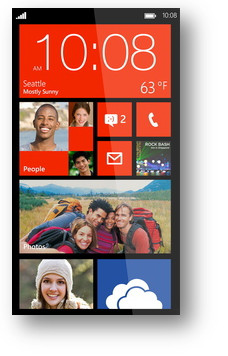
The second generation Windows Phone was release in October 2012.  Windows Phone 8 bundles essential functionality including navigation, storage, sharing and apps.

Windows Phone 8 runs Modern UI (Metro) which is typography-style layout also known as Swiss Style.  Microsoft added several new colors as additional options for users such as Cobalt, Olive, Amber, Steel and many others.

The apps collection does not include popular apps such as YouTube, Flash, HBOGO and several others.  Lastly, Windows Phone 8 does not have vocal turn-by-turn navigation.

Unlike iOS and Android, the core of social media, such as Facebook and Twitter, are built-in to the operating system.  Windows Phone 8 does not have a notification bar (Android) or disrupting notifications (iOS).  Checking social media updates, e-mail and weather will be a simple task after setting up your home screen by arranging live tiles.


Apple iOS 7

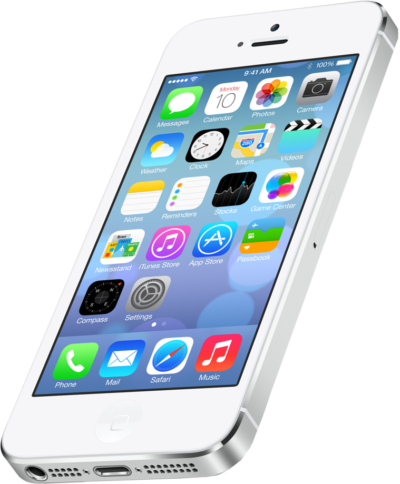
ios7_2On Monday, June 10, 2013 Apple exposed iOS 7 at the Worldwide Developers Conference.  The new OS will be available for multiple devices including  iPhone 4 and up, iPad 2 and up and the iPad Mini.

New features for iOS 7 include:

Control Center:  By swiping from the bottom to the top will now allow you to adjust your settings

AirDrop:  For Apps that allow sharing, AirDrop will encrypt data that a user shares to friends within a close distance.

Activation Lock:  To prevent smartphone crimes, when disabling “Find My iPhone” the phone will be locked and only the correct Apple credentials will unlock the phone.

Multitasking:  Apps can develop patterns based on usage.  These patterns will allow the iOS 7 to update apps in the background based on network connections.

Car integrated iOS:  For 2014, many car manufacturers are integrating iOS with the car display.

Safari:  Safari has been updated with navigation, smart search and iCloud Keychain.

Siri:  Siri can now operate more of the iPhone including voicemail, Wikipedia, Twitter, Bing and many others.

Camera:  Photos are well-organized as Moments.  Also, the camera has new photo filter options.

App Store:  The App Store can organize Apps based on age and geographical location.  Also, background updating will eliminate manual updating. 

Music:  Music, Movies and TV Shows are now stored together in your Library.  

iTunes Radio:  A streaming music service that will be available with iOS 7.


Apple: Larger Screens for iPhones & iPads

Apple-LogoApple, Inc. offers innovative products that continue to grow its customer base.  Testing new designs for current products is a consistent task for Apple, Inc.

“Apple has been slow to react to consumer desire for larger smartphone screens, [and] entry level price points on new phones,” said BGC Financial’s Colin Gillis. “Waiting and waiting, for the new products to launch, has become painful,” he wrote.

Currently, Apple is testing various sizes for iPhone and iPad screens.  Samsung has become the world’s largest smartphone maker because Samsung offers a variety of smartphones with display sizes that range up to 5.5-inches.   Continuing to compete with Samsung, Apple is testing for a 5-inch iPhone screen expected to be released in 2014.

A new tablet design is also being tested by Apple with a display that is a little less than 13-inches.  This would be a great addition to the iPad that has a 9.7-inch display and the iPad Mini that has a 7.8-inch display.

Lastly, Apple has been developing an iPhone that would be cheaper than the current iPhone.  According to many articles, the cheaper iPhone will be made from plastic instead of the traditional metal casing that will be available in different colors.

Apple, Inc. could climb back to the top of both smartphone and tablet sales by releasing a larger display for the iPhone/iPad and releasing an iPhone that is reasonably priced.


Features the iPhone Could Use

Untitled2

iPhone 5 is the fastest, thinnest and lightest iPhone;  nevertheless many features remain absent that are provided by Apple’s competitors. 

NFS Built-In

Apple prefers to use Passbook system instead of Near Field Communication (NFC).  Passbook is not capable of performing all tasks that NFC can handle such as the ability to beam content by touching devices or send money via PayPal wirelessly.

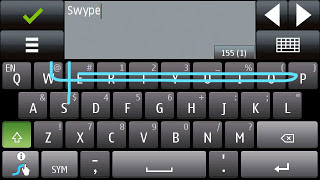
Swypeswype-symbian

“Swype is a faster and easier way to input text on any screen.”

Swype gives your phone the capability to input text by sliding your finger from letter to letter accross the screen.  Only Android smartphones offer this input ability.

SD Cards

iPhone’s are not built to extend device storage using external SD Cards, Micro SD Cards or Mini SD Cards.

Storage

Many iPhone user’s have replaced their iPod’s with their smartphone.  The storage capacity for an iPhone (64GB) versus an iPod Classic (160GB) is not comparable. 

USB

iPhones have never used a standard USB cable to sync.  Currently, iPhone 5 uses a new MicroDock connection that will not allow older sync cables to connect without a specific adapter.

Micro HDMIUntitled3

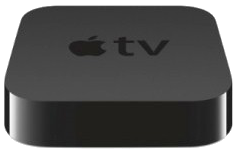
Android devices have a Micro-HDMI port for retrieving video from your phone. iPhone 5 requires a special adapter or an Apple TV to retrieve video.

Changing the Battery

Although, iPhone 5 provides a stronger battery, some users require more power but replacing an iPhone battery is challenging.  To replace the battery it requires a special screw driver and special tools to lift the screen 90°.

Battery Life

While the iPhone 5’s battery is larger that the iPhone 4S, it produces the same battery life because of the bigger screen and power to run 4G LTE.

iOS 7 + Business

222

Apple has officially released iOS 7 Today, September 18, 2013.  The new OS includes many new features and Apps that are beneficial to enterprise users.  iPhone(s) and iPad(s) with these new features will be easier for IT departments to deploy and manage in enterprise environments.

overview_features_title

Touch ID Fingerprint Reader

fingerprint-o2Touch ID Fingerprint Reader is a 500ppi fingerprint sensor embedded in the “Home” button.  The touch sensor has a 360 degree ability to read a fingerprint.  Your fingerprint can also approve purchases from iTunes Store, the App Store, and the iBooks Store.

Single Sign On (SSO)

sso

Enterprise single sign on (SSO) logs users in without requiring them to enter credentials multiple times.  SSO with can be configured across apps to verifies user permissions for enterprise resources and can be used for the App Store.

Per App VPN

vpnPer app VPN ensures that only managed app data travels through VPN.  iOS 7 apps can automatically be connected to VPN when launched.  Per app VPN will provide IT  administrators control over corporate network access.

Open-In Management

openin

iOS 7 allows business to protect corporate data by controlling which apps (and accounts) are used to open documents and attachments. Managed “open in…” gives IT the ability to configure the list of apps available in the sharing panel.

Mobile Device Management (MDM)

mdm

The MDM protocol in iOS 7 includes a number of new commands, queries, and configuration options that make third-party MDM solutions even more powerful.  Also, Stremlined MDM enrollment allows IT to skip basic setup steps and fully configure devices with corporate settings and policies

To read previous articles regarding iOS 7, new iOS features and additional iOS features.


Important Privacy Settings in iOS 7

The new iOS 7 upgrade resets original settings and adds new settings that users should be aware of.

System Services

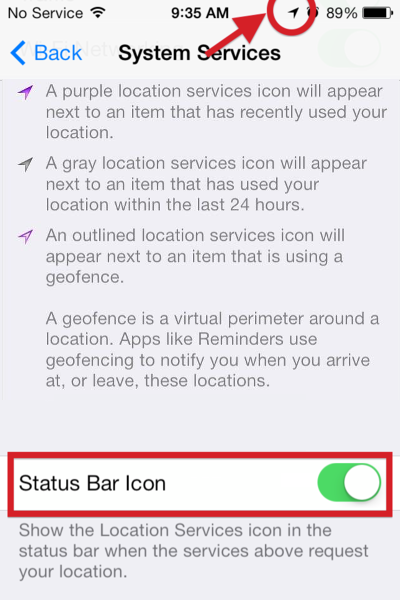
The System Services is difficult to find at the bottom of the Privacy > Location Services panel.

Status Bar Icon

Settings > Privacy > Location Services > System Services

The Status Bar Icon setting will appear in three ways:  Purple for Recently Used, Gray for Used within 24 Hours and Outlined for Geofence.  Turn ON this setting.

SBI

Diagnositcs & Usage

Settings > Privacy > Location Services > System Services > Diagnostics & Usage

DU

The Diagnostics & Usage setting detects/records iPhone usage and anonymously sends a report to Apple to improve the device.  Turn OFF this setting.

Frequent Locations

Settings > Privacy > Location Services > System Services > Frequent Locations

FLThe Frequent Locations setting detects/records data about your locations, using GPS coordinates of frequently visited locations.  Turn OFF this setting.

Location-Based iAds

Settings > Privacy > Location Services > System Services > Location-Based iAds

LBIA

The Location-Based iAds collect and share location data based on real-time geographic location of your Apple device.  Turn OFF this setting.

Advertising

Settings > Privacy > Advertising

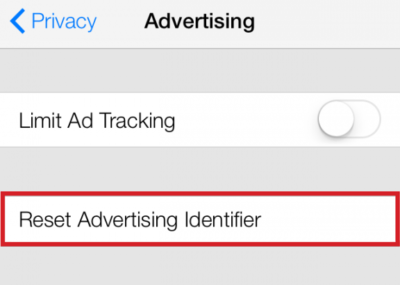
The Limit Ad Tracking setting prevents adverizers  from targeting your device. Turn Limit Ad Tracking ON.

The Advertising Identifier gives users control over advertisers’ capability to use tracking systems by resetting the Advertising ID.  Reset Advertising Identifier.

RAI

Do Not Track

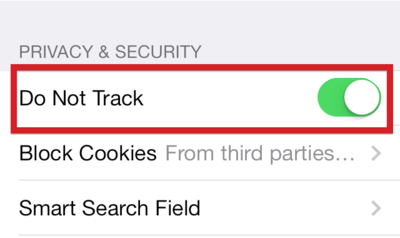
Settings > Safari > Do Not Track

The Do Not Track setting allows users to have privacy while using Safari.  Turn ON this setting.

DNT


CALL US NOW!