Back to Top

Tech, Web, Cloud & Cabling Services

Category: Events

Events Category

South Jersey Techies was a proud sponsor of Evesham Education Foundation at this weeks’ Larry Kull Memorial Golf Classic

iPhone 7: What business users need to know

Apple recently announced the latest version of its flagship smartphone. Here are the features and functions that will matter to professionals.

iphone7lineup

The iPhone 7 is officially here. At an Apple event in California on Wednesday (September 7, coincidentally), the phone was unveiled by Tim Cook and the crew amid a variety of Apple announcements.

The first mention of the new device came in a now-deleted tweet that read: “New cameras. Water-resistant. Stereo speakers. Longer battery life. This is 7.” Apple is known for being tight-lipped until the last possible second, so it was definitely a surprise.

The phone has a new design, featuring an aluminum body with almost non-existent seams and is available in gold, silver, rose gold, black, and Jet Black. The home button was also redesigned, with Force sensitivity and a new Taptic engine. It can also be programmed by third-party applications and customized as well.

The above tweet wasn’t a fluke. The new enclosure is both water and dust resistant, with IP67 protection standard.

The new, 12-megapixel iPhone 7 camera has image stabilization and a wider f1.8 aperture lens that is made up of six distinct layers. The sensor for the camera is faster and more efficient, and a quad-LED flash can help users take better photos. The iPhone 7+ gets a second 12MP camera to use as a telephoto lens.

A new image processor helps balance colors and tone in an image, among many other features. This could be helpful for small marketing departments, or businesses that rely on image content, to produce better photos.

The front camera is a 7MP FaceTime HD camera. This will be helpful for road warriors and remote workers alike, as it could provide a better experience for mobile video conferencing.

The new Retina HD display is now 25% brighter than previous generations. The iPhone 7 has stereo speakers with twice the volume and better quality sound. If you want to use headphones, the traditional auxiliary input jack is gone, and the Apple EarPods now connect via Lightning connector only. If you have traditional headphones, though, Apple will include an adapter in the box with the new iPhone 7 and 7+.

Apple also debuted a wireless version of its earbuds called AirPods. They use a W1 chip to enable “intelligent connection” and users can access Siri through the AirPods with a tap. The batteries provide five hours of listening per charge.

In terms of performance, the iPhone 7 has a new A10 Fusion 64-bit, four core processor. Using two high-efficient cores, tasks like checking email will take less battery power. It also has stronger graphics performance while consuming less power than previous models. Pro apps, like those from Adobe, can perform better on the device as well.

Storage-wise, the new iPhones will be available with 32GB, 128GB, or 256GB of space.

apple_watch_series_2

Apple also announced the Apple Watch Series 2. The watch is swim-proof, which is a fancy way of saying that it is water resistant up to 50 meters. Its second-generation SiP (system in a package) has a dual-core processor that’s up to 50% faster, and a stronger GPU for better graphics performance as well.

A new display is easier to read, and the more powerful hardware allows for more complex apps to be built for the device. Built-in GPS will be good for business travelers, and developers can take advantage of it to build more contextual apps. Of course, watchOS 3 came to preview back in June, but Apple was expected to bring a new version of the hardware for quite some time.

Real-time collaboration is coming to the iWork suite as well. Apple showcased the functionality by editing the slide deck live on stage. Of course, Google Docs and Office 365 have had similar functionality for some time, and iWork has struggled to gain traction in the enterprise, but it’s a welcome update.

Have questions?

Get answers from Microsofts Cloud Solutions Partner!
Call us at: 856-745-9990 or visit: https://southjerseytechies.net/

South Jersey Techies, LL C is a full Managed Web and Technology Services Company providing IT Services, Website Design ServicesServer SupportNetwork ConsultingInternet PhonesCloud Solutions Provider and much more. Contact for More Information.

To read this article in its entirety click here.

Microsoft Surface Studio: The smart person’s guide

Everything you need to know about the Surface Studio, Microsoft’s new all-in-one PC designed to tempt professional artists and designers over to Windows.

microsoft-surface-studio

The Surface Studio is an all-in-one PC with premium specs, designed to wow professional artists, designers, architects and other creatives.

While the $2,999 price tag will deter most consumers, Microsoft seems to be targeting the Studio at design professionals, who would otherwise be using Apple Macs alongside specialist devices like Wacom’s Cintiq drawing tablet.

The Studio is a machine with a lot to recommend it, but one that could still be a leap too far for creatives already heavily invested in alternative tech.

Executive summary

  • What it is: The Surface Studio is a high-end, all-in-one PC aimed at being a drafting table and canvas for creatives.
  • Why it matters: The machine marks Microsoft’s first venture into designing desktop PCs and may put pressure on Apple and other manufacturers to crank up specs on competing machines.
  • Who it is for: Artists, designers, architects — creative professionals who want a machine that shows off their work at its best.
  • Why you should get it: For its super sleek, razor-sharp display that lets users draw straight onto the screen.
  • Why you shouldn’t get it: The price is too high or you’re a professional already heavily invested in alternative software and hardware.
  • How to get it: Pre-order online, although stock is limited according to Microsoft

What it is

An all-in-one, Windows 10 PC designed to dazzle users with its superlative display.

The screen, a 28-inch touchscreen LCD monitor, is ‘the thinnest in the world’ according to Microsoft, and sits on a counterbalanced hinge that makes it easy to push down onto the desk, and start drawing on with a digital pen.

The monitor’s 4K+ resolution and ability to display more than one billion colors, as well as to show drawings and documents at 1:1 scale with their paper equivalents, is designed to give professionals the ability to see how their creations would look in the real world.

Sketching on the screen with the Surface Pen is made easier when the Studio is used with the newly released Surface Dial, a brushed silver knob that can be rotated to select a new color when drawing on the screen or to turn the image.

Why it matters

From the point of view of artists and designers, the Studio offers a high-end computer built around their creative needs, which does away with having to use a separate drawing tablet and computer.

Even if creatives ignore the Surface Studio, its release is good news, likely to prompt incumbents like Apple and Wacom to spec up and cut the prices of new machines — in particular for the iMac, which the Studio has been compared to many times, despite the iMac lacking a touchscreen.

By following up the immaculately designed Surface Book laptop with a striking machine like the Surface Studio, Microsoft also appears to be trying to establish itself as a competitor to Apple on the design front.

Who it is for

Broadly, the Studio seems to be aimed at anyone who draws or designs for a living.

In launch videos, the Studio was seen being used by artists, architects and product designers.

The multi-purpose nature of the Studio, a machine that combines a Windows desktop PC with the functionality of a separate digital drawing tablet, such as the Cintiq 27 QHD Touch, will likely make the $2,999 price tag easier to swallow among those in the creative industries.

Why you should get it

If you draw or design for a living there are plenty of reasons why you might want the Studio. For example, there’s the quality of the display and the ease with which the Surface Pen draws on the screen. Microsoft describes this experience as virtually as fluid as drawing on paper. Then there’s the Studio’s significant graphical processing power, the ability to view documents and drawings actual size on screen and the ease with which you can switch push down the monitor and begin drawing.

Why you shouldn’t get it

Despite the Studio’s looks, its high price makes it hard to recommend as a consumer purchase, particularly when an iMac with a higher resolution, and only very slightly smaller screen, will cost less money.

Even professional creators are unlikely to abandon their current expensive setup for a Studio, as Mikako Kitagawa, principal research analyst with Gartner, pointed out.

“An all-in-one device is not the most cost-effective device, as the users pay for both the computing unit and monitor at the same time,” she said.

“Creative professionals have already invested heavily in hardware and software. For instance, many professional illustrators use a high-end drawing tablet and high-resolution monitor at the same time.”

If those same professionals exclusively use macOS, as is the case in some creative outlets, then the high cost of switching to Windows will also be a deterrent, she said.

There is also Microsoft’s odd decision not to include the $99 Surface Dial with the Studio, despite the peripheral featuring so heavily in demos of the machine, and being particularly useful for tasks like changing colors while drawing with the Surface Pen.

How to get it

The Surface Studio is available to pre-order from Microsoft, with prices starting at $2,999 and shipping starting from 12 December. Microsoft has warned the machine will be available in limited quantities.

Tech specs:

$2,999: 1TB drive; Intel Core i5 CPU; 8GB RAM; 2GB GPU

$3,499: 1TB drive; Intel Core i7 CPU; 16GB RAM; 2GB GPU

$4,199: 2TB drive; Intel Core i7 CPU; 32GB RAM; 4GB GPU

Display: 28″ PixelSense Display; 4500 x 3000 resolution; 192 DPI; Color settings: Adobe sRGB, DCI-P3 and Vivid Color Profiles; Touch: 10-point multi-touch; Aspect ratio: 3:2 TB drive; Intel Core i5 CPU; 8GB RAM; 2GB GPU

Processor: Quad-core 6th Gen Intel Core i5 or i7

Graphics: NVIDIA GeForce GTX 965M 2GB GPU GDDR5 memory or NVIDIA GeForce GTX 980M 4GB GPU GDDR5 memory

Storage: 1TB or 2TB ‘rapid hybrid drive’

Memory: 8GB, 16GB, or 32GB RAM

Wireless: 802.11ac Wi-Fi; Bluetooth 4.0; Xbox Wireless built-in3

Dimensions: Display: 25.09 x 17.27 x 0.44 in (637.35 x 438.90 x 11.4 mm); Base: 9.84 x 8.66 x 1.26 in (250.00 x 220.00 x 32.20 mm)

Weight: 21.07 lbs max (9.56 kg)

Connections: 4 USB 3.0; Full-size SD card reader (SDXC compatible); Mini Displayport; 3.5mm headset jack; Compatible with Surface Dial onscreen interaction

Cameras: 5.0MP front-facing camera with 1080p HD video

Audio: Dual microphones; Stereo 2.1 speakers with Dolby Audio Premium

Buttons: Volume and power

Surface Pen

Surface Keyboard

Surface Mouse

Power cord with grip-release cable

Security: TPM chip for enterprise security; Enterprise-grade protection with Windows Hello face sign-in

Have questions?

Get answers from Microsofts Cloud Solutions Partner!
Call us at: 856-745-9990 or visit: https://southjerseytechies.net/

South Jersey Techies, LL C is a full Managed Web and Technology Services Company providing IT ServicesWebsite Design ServicesServer SupportNetwork ConsultingInternet PhonesCloud Solutions Provider and much more. Contact for More Information.

To read this article in its entirety click here.

Now Microsoft Office 365 tackles ‘fake CEO’ email spoofing attacks

Microsoft is rolling out a host of new email security features for Office 365 later this quarter, as it looks to thwart hackers and criminals.

‘Insider spoofing’ or faking the CEO’s email address to trick the CFO into transferring millions to criminal bank accounts is big business. Now Microsoft is using big data and reputation filters to try and squish the threat.

According to the FBI, between October 2013 and August 2015, 7,066 US businesses have fallen prey to ‘business email compromise’, netting criminals an estimated $747m.

Non-US victims lost a further $51m over the period, with the FBI estimating a 270 percent increase in identified victims since January 2015, when it first released figures about the threat category.

As Microsoft notes, when a corporate email domain is spoofed, it makes it hard for existing filters to identify the bogus email as malicious.

However, Microsoft reckons it has achieved a 500 percent improvement in counterfeit detection using a blend of big data, strong authentication checks, and reputation filters in Exchange Online Protection for Office 365.

It’s also rolling out new phishing and trust notifications to indicate whether an email is from a known sender or if a message is from an untrusted source, and therefore could be a phishing email.

The company is also promising a faster email experience as it vets attachments for malware and new tools to auto-correct messages that are mis-classified as spam. The aim is to boost defences without impairing end-user productivity.

Malicious email attachments remain a popular way for attackers to gain a foothold in an organization and, as RSA’s disastrous SecurID breach in 2011 showed, a little social engineering can go a long way to ensuring someone opens it.

Microsoft’s new attachment scanner, called Dynamic Delivery of Safe Attachments, looks to reduce delays as it checks attachments for potential threats.

Currently it captures suspicious looking attachments in a sandbox with a ‘detonation chamber’ where it analyses it for malware in a process takes five to seven minutes.

Microsoft hasn’t figured out a faster way to analyse the attachment, but instead of holding up the email as it conducts the scan, it will send the body of the email with a placeholder attachment. If the attachment is deemed safe, it will replace the placeholder and if not, the admin can filter out the attachment.

The feature is part of Microsoft’s Office 365 Exchange Online Protection and Advanced Threat Protection services.

The company is also tackling false-positive spam, or legitimate messages that are mis-identified as spam, and vice versa, with a new feature called Zero-hour Auto Purge, which allows admins to “change that verdict”.

“If a message is delivered to your inbox and later found to be spam, Zero-hour Auto Purge moves that message from the inbox to the spam folder; the reverse is true for messages misclassified as spam,” Microsoft notes.

Microsoft is testing this approach with 50 customers and says it will be rolled out for all Exchange Online Protection global clients in the first quarter of 2016.

Have questions?

Get help from IT Experts/Microsofts Cloud Solutions Partner
Call us at: 856-745-9990 or visit: https://southjerseytechies.net/

South Jersey Techies, LLC is a full Managed Web and Technology Services Company providing IT Services, Website Design ServicesServer SupportNetwork ConsultingInternet PhonesCloud Solutions Provider and much more. Contact for More Information.

To read this article in its entirety click here.


HAPPY FALL Y’ALL!

South Jersey Techies invites you to stop by our office our 3rd Annual Holiday Lights-to-Music Display!

This time we are celebrating Halloween! 

Located at 229 North Locust Ave, Marlton NJ.

We hope you enjoy the show and have a Spooktacular time!!

Visit 7pm thru midnight each evening now until Halloween


South Jersey Techies

Park and Tune into 89.9FM


Microsoft teases Windows 10’s sleek new look for the future

“Project Neon” will give your Windows 10 PC a fresh coat of paint later in 2017.
Microsoft’s planning a sleek visual refresh for Windows 10, and the company quietly teased its first official glimpse of what’s coming in the future during the Windows Developer Day keynote on Wednesday.

There aren’t many details being shared about “Project Neon” right now—as the refresh was called in earlier leaks—but the new visual look will focus on animations and transitions. The basic concept is “to add fluidity, animation, and blur to apps and the operating system,” as first reported by Windows Central. The new design language also hopes to make it easier for developers to create attractive apps.

The design refresh should extend to all Windows 10 devices including PCs and tablets, HoloLens, Xbox, and the few surviving Windows Phones, according to Windows Central.
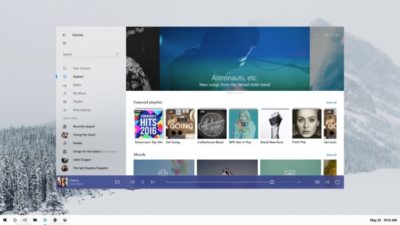
Twitter user Tom Hounsell shared a clean version of Microsoft’s first look at Windows 10’s forthcoming design tweaks. The image shown on the livestream had large text overlaid on top of the screenshot.

As you can see, this isn’t a huge change, but the visual refresh gives Windows 10 a sleeker, more modern feel. The taskbar icons look a little more dynamic and bolder. Cortana is using the icon instead of the search box, though it’s not clear if this will be the default look. The clock on the taskbar is also bolder, and the usual notification area icons including the Action Center are notably absent. The open Groove Music window itself looks more polished and Aero-esque as well, with no title bar to be seen—just unobtrusive options in the app’s upper-right corner.

The impact on you at home: Windows Central says that some of the code for Project Neon is already available in recent Insider Preview builds of Windows 10; however, it’s unlikely the visual refresh will be ready in time for the massive Creators Update this spring. Microsoft is expected to share more information about Neon during the Build conference in May. The Creators Update is expected to roll out in late March or early April, followed by a second major update later in 2017.

Have questions?

Get answers from Microsofts Cloud Solutions Partner!
Call us at: 856-745-9990 or visit: https://southjerseytechies.net/

South Jersey Techies, LL C is a full Managed Web and Technology Services Company providing IT Services, Website Design ServicesServer SupportNetwork ConsultingInternet PhonesCloud Solutions Provider and much more. Contact for More Information.

To read this article in its entirety click here.

Holiday Food Drive


Holiday Food Drive!

South Jersey Techies has teamed up with local businesses to help replenish Cherokee High School’s Food Pantry this holiday season!

WHEN: Saturday, December 11th from 9:30a-11:30a
WHERE: Laurel Oak Garden Center

Bring your non-perishable food items on December 11th and get a FREE picture with Santa while enjoying our hot coco bar!

Can’t make it on December 11th but still want to donate? There are 6 drop off locations where donations can be delivered at any time before December 11th listed below.

Questions can be emailed to Scott Zielinski of The Zielinski Real Estate Group @ scott@zhomesrealestate.com

Halloween Lights to Music!


HAPPY FALL Y’ALL!

South Jersey Techies invites you to stop by our office for a Holiday Lights-to-Music Display! This time we are celebrating Halloween!

Located at 229 North Locust Ave, Marlton NJ.

We hope you enjoy the show and have a Spooktacular time!!

Visit 7pm thru midnight each evening until Halloween


Park and Tune into 89.9FM


Holiday Lights to Music Display

Need something fun to do with the kids this holiday season? Stop by our new office located at 229 North Locust Ave in Marlton, New Jersey and check out our first ever Lights to Music Display!

Park and Tune into 89.9FM

5pm thru midnight each evening until New Years Eve!

Marlton Baseball Sponsor

Thank you Marlton Baseball for our plaque for sponsoring the 5-6 y/o baseball league this year. It was our pleasure and we look forward to it again next year!


CALL US NOW!