Back to Top

Tech, Web, Cloud & Cabling Services

Tag Archives: Microsoft

Microsoft tag

Office 365 ProPlus

billionphotos-1669715

ProPlus

ProPlus

Your Office instantly, wherever you go. Get the latest tools for productivity, collaboration, compliance, and BI—powerful, flexible, and delivered fast, with smooth upgrades.
 

Best experience virtually anywhere

With Office in the cloud, you always have the latest versions of your familiar Office applications right where you need them. Working on your iPhone or Android phone? Use Office Mobile to view and edit files.3 Using your tablet? Access Office through a browser to create and edit documents. And when you’re away from your own desk, you can stream Office to any Internet-connected PC.1 You get one familiar experience across all your devices, and your files are always up to date.

The flexibility to deploy and manage on your terms

Deploy the way that’s best for you—on-premises with your own tools, or with assistance from the Office 365 online service. And you can run Office 365 ProPlus side by side with earlier Office versions, so your workers can make a smooth transition. Upgrades are smooth, too, because your customizations are respected and add-ins and data files are loaded automatically. Plus, you can monitor the health and performance of your Office in real time across your organization.

Enhanced security for email and advanced compliance tools

Protecting the privacy and security of your data is essential. With Office 365, you can simplify compliance. Team members can access project-related email and documents right from their email. You can help your users avoid sending email with sensitive information to unauthorized recipients by using policy tips in email. Recording and archiving meetings, including IM conversations, is easy for IT. Plus you can scan Excel spreadsheets for errors, and view an audit trail of changes.

Advanced Business Intelligence tools that are easy to use

No matter how good your data, you need insight to make it work for you. Gain insight fast by giving everyone powerful BI tools that are easy to use. With Office 365 ProPlus you can streamline integration and manipulation of large volumes of data from various sources and perform rapid analysis. For more insight, explore different views of data in a pivot table or pivot chart with a click, and bring data to life by compiling data, charts, and graphs into one interactive visualization.

If you are interested in Office 365 ProPlus or would like to sign up for a trial please click here or contact us at 856-745-9990.
SharePoint Online

sponline

Share Point Online

SharePoint Online

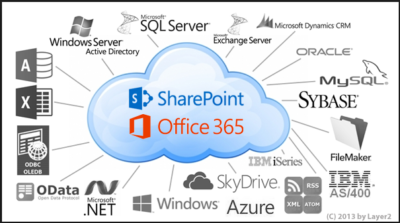
You can also get SharePoint Online with Office 365.  SharePoint Online delivers the powerful features of SharePoint without the associated overhead of managing the infrastructure on your own. Flexible management options ensure that you still retain the control you need to meet the compliance requirements of your organization. You can purchase SharePoint in the cloud as a standalone offering or as part of an Office 365 suite where you could also get access to Exchange, Lync, the Office clients and web apps.

Cross device availability

Easily access and interact with your SharePoint news feed, wherever you go using the SharePoint mobile apps available across various devices.

Easy to Manage

You can get setup in virtually no time! The powerful admin console allows your organization to easily manage capabilities, policies and security for all the content and features within SharePoint. Automated maintenance of the servers ensure that you are always up to date with the latest features with minimal downtime.

Enterprise grade reliability and standards

Safeguard your data by hosting it in geographically distributed data centers with continuous data backup, premier disaster recovery capabilities and a team of experts monitoring the servers around the clock.

Office 365 FastTrack and adoption offer

FastTrack is the onboarding service benefit included for qualified Office 365 customers. Microsoft onboarding experts will provide personalized assistance ensuring the service is ready to use company-wide.

To see all the features that are included, view the detailed service descriptions.

If you are interested in SharePoint Online please contact us at 856-745-9990.
Tips for Switching to Office 365

Office-365-Logo-ThumbTakeaway:  Moving to Office 365 will provide anywhere access for Microsoft features but before you decide to switch there are 10 things everyone should consider.

Migrating

Starting fresh or merging Active Directory from a local machine are options when switching to Office 365.  Exchange 2010 SP2 can minimize the process of merging an existing Active Directory environment by using the included wizard.

Spam Filtering

Microsoft Forefront Online Protection is the spam filter that will need to be setup and configured when switching to Office 365.

Outbound Addressing

Switching to Office 365 you will have to configure user accounts because the e-mail addresses will add ‘.onmicrosoft.com’ to the end of the addresses.

Utilities

For on-site Exchange servers there are additional utilities that can be installed, for Office 365 you cannot install additional software on 365 servers.

DNS Issues

When switching to Office 365 you will have to confirm a list of DNS entries and create SRV records for Microsoft Lync.  If you have a Microsoft DNS server this shouldn’t be an issue.

Management Tools

If there are no longer on-site Exchange servers, Exchange Management Console and ADUC will no longer be used.   Exchange Control Panel is the primary management tool for Office 365.

File Server Permissions

Prior to switching to Office 365, decide how users will access on-site File Servers without on-site Domain Controllers and permissions to manage file access.  There are a few options before switching your network to Office 365.

Mobile Devices

Connecting mobile devices to Office 365 could take several days.  If you chose to start fresh but would like to keep your existing contacts, calendar and mail, you will need to merge the existing PST file to the Office 365 mailbox.  If you have merged your organization to Office 365 this should not be a problem.

Control Issues

Office 365 takes control of common administrative tasks such as:

  • Software upgrades
  • Patch Management
  • & many others.

Microsoft Communication

Microsoft will continue to reach out to your organization via e-mail and phone calls to answer any questions and to ensure that everything works out during the switch.

For more information on Hosted Services and Office 365

 please contact us 856-745-9990 or click here.


Microsoft Office Mobile

ios-office365-hero2Microsoft released Office Mobile in the Apple Store for free to all Office 365 users on June 14, 2013.  Office Mobile has a lot of stipulations and only provides the basic document editing capabilities.  Integrating Office Mobile with SkyDrive and Office 365 is a smooth process.

The first stipulation is Office Mobile is designed for iPhone.  The app is not optimized for iPad use; older iPad(s) receive errors.  The second stipulation is Office Mobile requires an Office 365 subscription.  A large percent of businesses have not switched to Office 365 which excludes potiential Office Mobile users.

For Office 365 subscribers, Office Mobile is a free app that provides the ability to view, edit and save Office documents.  All users that are not Office 365 subscribers can continue to use Office-compatible mobile apps that provide the same functionality.

Office Mobile has a similar interface to Windows phone.  After installing Office Mobile, users can view, edit and save Word, Excel and Powerpoint documents.  Users may be surprised with the limited editing abilities.  SkyDrive, SkyDrive Pro and SharePoint are ways to access documents.  ”Recent Documents” tracks the most recent documents that you viewed or changed and makes them easily accessible.

For more information on Hosted Services and Office 365

 please contact us 856-745-9990 or click here.


Office 365 vs. Google Apps

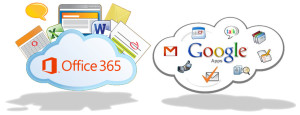
MSvGAMicrosoft and Google have been in a publicity rivalry over the services.  Days before the Google I/O Conference, Microsoft announced Sensia Halsovard, Arysta LifeScience and Sepco III have chosen Office 365 after using Google Apps.  Other companies have also switched to Office 365 are that Caltex Australia, FHI 360 and Santa Clara County

“Google Apps was difficult to use and lacked the capabilities our employees had grown accustomed to in Office,” said Dustin Collins, global head of IT infrastructure, Arysta LifeScience. “With Office 365 we’re able to interact and engage with each other more, allowing us to efficiently and quickly respond to new opportunities. As a result, we’re a more agile, competitive organization.”

Google offers a set price for their services, while Microsoft’s price varies by Residential and Company size.  The familiarity and dependability already established with Microsoft Office products is why many organizations are choosing Office 365 over Google Apps.

For more information on Hosted Services and Office 365

 please contact us 856-745-9990 or click here.


Important: Internet Explorer Vulnerability

IEIMPORTANT INFORMATION: US-CERT and UK security agencies warn users to stop using Internet Explorer because of the severity in this security hole that has been used in “limited, targeted attacks”.

United States Computer Emergency Readiness Team released an alert on April 28, 2014 regarding vulnerabilities in Microsoft’s Internet Explorer.  Internet Explorer versions 6 through 11 are susceptible to be victims of attacks to exploit the Remote Code Execution Vulnerability.

US-CERT Vulnerability Note VU#22292

Microsoft Security Advisory 2963983

Workarounds:

Basic protection includes the installation of Anti-malware software, enabling a Firewall and applying all Windows/Microsoft updates.  In addition to basic protection, we recommend taking extra preventative steps listed below.  It is not necessary to apply all of the following workarounds, apply one to help protect your system and data.

Enable Enhanced Protection Mode

    1. Open IE 10 or IE 11.
    2. Click the Tools menu and select Internet Options.
    3. In the Internet Options window, click the Advanced tab.
    4. Scroll down the list of options until you see the Security section, click the checkbox to Enable Enhanced Protected Mode.  For IE 11 in a 64-bit version of Windows, you also need to click the checkbox to “Enable 64-bit processes for Enhanced Protected Mode”.
    5. Restart IE to force the new settings.

Change Access Control List and unregister VGX.DLL:

32-Bit Systems:

      1. Open elevated Command Prompt (Run as Administrator)
      2. Run the following command:
        “%SystemRoot%\System32\regsvr32.exe” -u “%CommonProgramFiles%\Microsoft Shared\VGX\vgx.dll”
      3. Click OK to close Dialog Box confirming un-registration has succeeded.

64-Bit Systems:

      1. Open elevated Command Prompt (Run as Administrator)
      2. Run the following command(s) separately:
        “%SystemRoot%\System32\regsvr32.exe” -u “%CommonProgramFiles%\Microsoft Shared\VGX\vgx.dll” “%SystemRoot%\System32\regsvr32.exe” -u “%CommonProgramFiles(x86)%\Microsoft Shared\VGX\vgx.dll”
      3. Click OK to close Dialog Box confirming un-registration has succeeded.

Windows XP and all other users.

For all user(s) that cannot follow recommendations from Microsoft are urged to use a different web browser.  For secure download(s) of Google Chrome or Mozilla Firefox, please follow the links provided.

For assistance with Changing IE Settings or Install a new Browser

 please contact us 856-745-9990 or click here.


Second Generation Surface Tablets

mss2_1

Microsoft has offically announced that the release date for the second generation surface tablets, Surface 2 and Surface Pro 2, will be October 22, 2013.  Pre-order for Surface 2 and Surface Pro 2 is available.

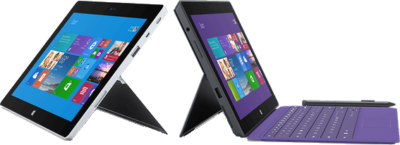
Both new Surface tablets will have a dual-angle kickstand and multiple connectivity options such as Bluetooth 4.0, Wi-Fi 802.11, USB 3.0, micro-SD expansion and HD video-out port.

The new Type and Touch Covers will be released with both tablets.  Both Covers include backlighting and additional sensors.  Also, Microsoft has designed a Power cover that is designed to add additional battery life to both Tablets.

mss21

The Surface 2 has a 10.6 Clear Type Full HD (1920×1080) Display and will run Windows RT 8.1 Operating System on an nVidia Tegra 4 Processor. The Surface Pro 2 has two storage options including, 32 GB and 64 GB.  Surface 2 is priced at $449.

sur2

Pre-order a Surface 2 Tablet.

mss22

The Surface Pro 2 has a 10.6 Clear Type Full HD (1920×1080) Display and will run Windows 8.1 Pro Operating System on an Intel Core i5 Processor. The Surface Pro 2 has multiple storage options including 64 GB, 128 GB, 256 GB and 512 GB.  Surface Pro 2 is priced at $899.  

surp2

Pre-order a Surface Pro 2 Tablet.

Surface Pro

ms_surface_proThe Surface by Microsoft is a crossover between a laptop and a tablet. The Surface Pro is a business tablet that has a detachable keyboard, stylus and a kickstand. Putting the Surface Pro above other tablets is the aptitude to run Microsoft Office programs including Word, Excel and PowerPoint.

Microsoft released a television commercial for the Surface Pro, “The Vibe”, starring Daniel ‘Cloud’ Campos from the original Surface Commercial.  This enthusiastic campaign includes professional dancers as “business people” showing the capabilities of the Surface Pro. Similar to Windows 8, Metro “Modern” UI; the commercial has the same ambiance.

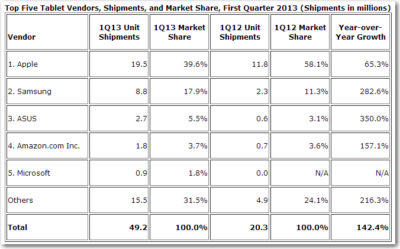
According to IDC, Microsoft has finally made its way to the Top 5 for Tablets. In the first quarter of 2013, Microsoft has 1.8% Market Share. Unlike the first quarter of 2013, Microsoft has 0% Market Share. Also, ASUS moved up from #4 to #3, knocking Amazon down a space.

TopFiveTabletVendors


Microsoft – Retiring TechNet Subscription

Microsoft TechNet Logo color_4

Microsoft TechNet Subscription service is a subscription program and resource center for IT Professionals.  On July 1, 2013 Microsoft announced that as of August 31, 2013, all sales for TechNet Subscription service will be discontinued.  Active accounts will have access for the remainder of their subscription.  Once the subscription period ends, subscribers will no longer have access to the TechNet Subscriptions benefits portal.Microsoft is focusing on developing free offerings for the IT community.

Improved Free Offerings for IT Professionals:

  • TechNet Evaluation Center is a free evaluation software available for 30-180 days with no feature limits. 
  • TechNet Virtual Labs allows you to evaluate software without the need to install bits locally.  For more information or to visit the Virtual Labs click here.
  • TechNet Forums is a free online forums where IT professionals can ask technical questions and receive rapid responses from members of the community. 
  • Microsoft Virtual Academy is a free online learning site, with over 200 expert-led technical training courses across more than 15 Microsoft technologies (additional courses added weekly).

Microsoft Xbox One

Xbox One can be pre-ordered starting today for the release date in November 2013.  Microsoft has created an All-In-One entertainment system.  Xbox One is more than just a gaming console; it can be used for movies, music, gaming and the ability to connect set-top boxes using HDMI.

This All-In-One system is built with 8GB GDDR3 RAM, 8 Core Microsoft Custom CPU and 500GB Storage.  Connections include Gigabit Ethernet and IEEE 802.11 b/g/n WiFi.  Also built-in are USB ports, Optical Output and HDMI input and output.

Kinect 2 has a 1080p camera and can process 2GB of data per second.  Kinect 2 has “Unparalleled voice, vision, and motion technology lets you reach into games and entertainment like never before.”

Microsoft Smart Glass App is a secondary screen allows you to interact with your Xbox while watching movies, listening to music, surfing the Internet or gaming.  Smart Glass App is available for both Microsoft and Android users.

Above all, the wireless controller is new and improved.  Haptic technology is used to enhance the controller triggers.  Also improved are the thumb sticks and D-Pad.

CALL US NOW!