Back to Top

Tech, Web, Cloud & Cabling Services

Tag Archives: South Jersey Techies

South Jersey Techies tag

Chrome turns 50 and stands at a crossroads

As Google reaches a major milestone, let’s reflect on its uncertain future.

google_chrome

Google’s Chrome browser has just reached a major milestone, hitting its 50th release.

For Google, it’s a moment for positive reflection. To emphasize Chrome’s might, the company points to the browser’s 771 billion page loads per month, 1 billion monthly active mobile users, 9.1 billion auto-filled forms, and 145 million malicious webpages averted. One might also point to Chrome’s ever-growing usage, accounting for 47 percent of all worldwide pageviews, including mobile, according to StatCounter.

Indeed, Chrome has become an indispensable tool for many web users, and has served as a leader in the browser world. It introduced the idea of limiting menu clutter around actual webpages, and popularized the syncing of bookmarks, tabs, and browser history across devices. After all these years, it remains PCWorld’s most highly-recommended web browser.

Yet for all the good Chrome has done, Google’s browser now stands at a crossroads. Aside from just another way to browse the Internet, it’s unclear exactly what Google wants Chrome to be.

Browser or platform?

In the beginning, Google’s key tenets for Chrome were speed and simplicity. The browser’s minimal menu system (or “chrome,” hence the name) got out of the way, and its JavaScript engine crushed the competition as websites grew more advanced in the late aughts.

Those advantages are less pronounced now. Nearly every other browser has embraced restraint with their own chrome, and Chrome is no longer the clear victor in benchmarks. Meanwhile, the ever-increasing demands of the modern web have given Chrome a reputation for being a resource hog and a battery killer, even if other browsers aren’t markedly better.

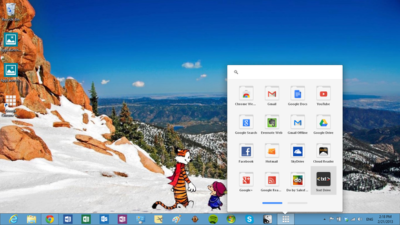
A few years after Chrome launched, Google started broadening its ambitions. It introduced the Chrome Web Store, and eventually the concept of native Chrome apps with offline functionality. A Chrome app launcher followed, along with push notifications from web services and Google Now. These new features were supposed to turn Chrome into a platform-within-a-platform on Windows and Mac, while making Chrome OS into a legitimate desktop operating system.

fullscreenapplauncher

But over the last year, Google has dismantled or abandoned many of those efforts. The Chrome notification center is now dead on Windows and Mac, as Google considersembracing native notifications on those platforms. The Chrome Web Store fell into disrepair years ago, and Google has shown little interest in cleaning it up. The Chrome app launcher got nixed on Windows, Mac, and Linux because no one was using it.

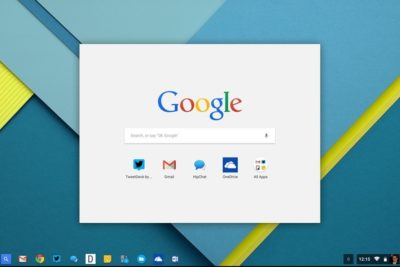
As for Chrome OS, its future is far from certain. Although the platform has traction in the education world, and probably isn’t going away, a merged Chrome-Android operating system for consumers seems likely.

chromeoslauncher

Amid all these retrenchments, Chrome has introduced no big noteworthy features to its desktop browser. The most interesting browser developments are instead happening on alternatives such as Microsoft Edge (with its page annotation and embedded Cortana assistant) and Vivaldi (with its web panels and tab stacking).

Google may arguably be more interested in mobile Chrome, now that smartphone usage has eclipsed the desktop. But in a world of apps, Facebook, and Instant Articles, the idea that users will spend significant amounts of time in a browser seems quaint. Perhaps that’s why Google’s 1 billion mobile user statistic is on a monthly basis, not a daily one.

So as Google celebrates Chrome’s 50th release, it should also ask itself what Chrome is now trying to accomplish. Will it recommit to its original focus on speed and simplicity, or will it try to innovate with new features? Is Chrome a platform unto itself, or just a really good way to access webpages? Are the fates of the desktop and mobile versions intertwined, or are they separate? If Google can’t answer those questions, version 100 might not be so celebratory.

Have questions?

Get answers from Microsofts Cloud Solutions Partner!
Call us at: 856-745-9990 or visit: https://southjerseytechies.net/

South Jersey Techies, LL C is a full Managed Web and Technology Services Company providing IT Services, Website Design ServicesServer SupportNetwork ConsultingInternet PhonesCloud Solutions Provider and much more. Contact for More Information.

To read this article in its entirety click here.

Windows phones’ free-fall may force Microsoft to push harder on Windows 10 adoption

Microsoft needs to protect its access to your wallet.

Windows_Phone_logo


Poor little Windows phone could have a bigger effect on Microsoft’s business than you’d think. As the company’s mobile device strategy continues to disintegrate, Microsoft may feel compelled to push harder on Windows 10 adoption and paid services to prove it can survive without a viable smartphone—and that could be bad news for consumers.

The raw numbers are shocking: Microsoft sold a minuscule 2.3 million Lumia phones last quarter, down from 8.6 million a year ago. Phone revenue declines will only “steepen” during the current quarter, chief financial officer Amy Hood warned during a conference call. That’s dragged down Microsoft’s results as a company, too.

Chief executive Satya Nadella opened his remarks to analysts optimistically, however, by noting that Windows 10 now powers 270 million devices in active use, a steady increase in its user base since the formal launch of Windows 10 last July. Later on, he summed up Microsoft’s message: “In this world, what matters most is the mobility of a person’s experience, not any one single device,” he said.

Will Wall Street buy it? If it does, Nadella will be free to continue. But if investors begin to get cold feet, you might see Microsoft push Windows 10 more aggressively to keep its numbers up.

Microsoft

Selling hardware to sell services

Nadella’s strategy is simple enough: grow Microsoft’s revenues, in part by convincing customers to adopt its paid subscription services. The most direct way is through sales of Surface or Lumia hardware. If that fails, then a third-party Windows 10 PC will suffice. Failing that, Microsoft apps like Bing or Cortana running on iOS or Android are acceptable as well.

But what Microsoft really wants is to sign you up for paid subscription services: Office 365 and Xbox Live, plus the corresponding enterprise licenses for Windows 10, Office 365, and Azure. ”Overall, the thing that we’re most focused on with Office 365 is how do we make sure we have the Office 365 endpoints everywhere, [with] good usage,” Nadella said.

bing-home-page

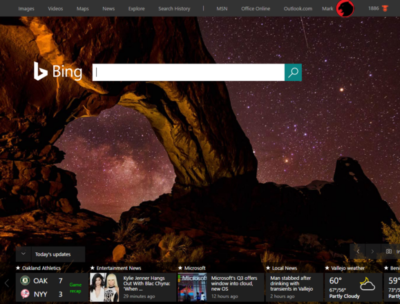
According to Verto, which measures online audience across all devices, Microsoft has four online properties with more than 100 million users per month: Microsoft Live (177.1 million), Bing (138.9 million), Microsoft Office (136.3 million), and MSN (121.5 million). Skype has 83.7 million users.

Viewed through the lens of “constant currency” adjustments that discount inflation, Microsoft’s strategy seems to be working: commercial Office 365 license revenue was up 7 percent, consumer Office 365 license revenue by 6 percent. Windows non-Pro revenue growth was 15 percent, though Pro revenue to the commercial market dipped by 11 percent. Xbox Live active users are now at 46 million, up 24 percent from a year ago.

Hidden dangers

Peer a little closer, though, and you begin to see signals that may be worrying the more impatient sectors of Wall Street. For one, device revenue is expected to continue falling. Save for a $12.7 billion holiday quarter, revenue in Microsoft’s “More Personal Computing” group has bumped along each quarter for the past year at about $9.3 billion or so. It’s expected to fall to between $8.7 billion and $9 billion this quarter, CFO Amy Hood said, apparently all attributable to the decline in phone sales.

The PC is the most frequently used device to access Microsoft services, Verto found, with 195.6 million monthly users. The smartphone is second, with 85.8 million users—but few of those devices are Windows phones.

lumia950

”Microsoft is clearly in an interesting position,” said Hannu Verkasalo, the chief executive of Verto, in an emailed statement.Microsoft has said in the past that the service matters more than the device, and the company does have software traction. “They have quickly pushed their mobile reach with their new device agnostic strategy,” Verkasalo continued.

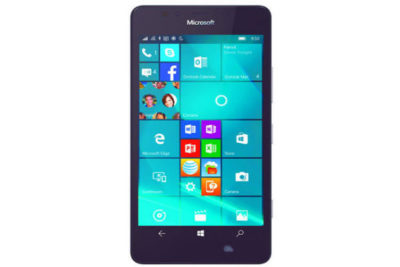
Here’s the catch: “Even though they still have twice as many users using Microsoft services on PCs versus smartphones,” Verksala pointed out, “the mobile segment is the growth area.”Lacking a viable mobile device, Microsoft is missing out on opportunities to get even closer to users—and their wallets—in this growth area.

There’s also some evidence that Microsoft isn’t selling services as quickly as it could. Microsoft added just 1.6 million Office 365 consumer subscribers during the quarter, for a total of just 22.2 million users. Remember, at least 60 million Windows 10 PCs were sold during that quarter alone.

Keep your eyes open

All this means that the process of locking in customers to the Microsoft platform might be taking longer than expected. To date, investors haven’t minded, generally cheering Nadella’s leadership and sending the company’s stock up to near its all-time high in 1999.

But given Microsoft’s lower earnings and revenue—and downward guidance in key business units—it’s possible Microsoft may come under greater pressure to make its Windows 10 vision a reality. That’s not necessarily great news for consumers.

We all know how Microsoft originally made Windows 10 a free update, then began essentially forcing upgrades on users. To be fair, the company hasn’t stopped rolling out updates and new features, with the so-called Anniversary Update on the horizon.

So far, the company has taken the same “softly, softly” approach to Office 365: New Skype for Business features essentially require Office 365, as do new unsafe email warnings for Outlook. But what might Microsoft do if it feels it needs to make Office 365 stickier—put all of Office Online behind a paywall, perhaps?

Several analysts questioned Microsoft about potential profit margin declines. Nadella and other Microsoft executives indicated they’re staying the course. Eventually, though, Wall Street is going to take a harder look at how Microsoft’s strategy is playing out—and the one-year anniversary of Windows 10 could be the ideal time.

Say what you will about Windows 10 and privacy—Microsoft remains generally benign. But if investors start putting the screws in, you can’t help but wonder if there will be more pressure to pay up.

Have questions?

Get answers from Microsofts Cloud Solutions Partner!
Call us at: 856-745-9990 or visit: https://southjerseytechies.net/

South Jersey Techies, LL C is a full Managed Web and Technology Services Company providing IT Services, Website Design ServicesServer SupportNetwork ConsultingInternet PhonesCloud Solutions Provider and much more. Contact for More Information.

To read this article in its entirety click here.

Microsoft 365 Business: Get Office + Windows 10 in one SMB-friendly subscription

Will preview $20/month software-as-a-service plan Aug. 2

Earlier this week, Microsoft introduced two additional software-as-a-service subscription plans to the partners who will try to sell them.

The pair join an increasing number of subscription deals that the Redmond, Wash. company has modeled on the Office 365 pattern. The new plans even carry the “365” label, which Microsoft sees as a unifying identifier.

Microsoft 365 is, as CEO Satya Nadella introduced it Monday, “a fundamental departure in how we think about product creation,” composed of, initially at least, two plans. The more expensive, Microsoft 365 Enterprise, is simply a new name for a year-old, two-tier product titled “Secure Productive Enterprise E3” and “Secure Productive Enterprise E5.” Those SKUs (stock-keeping units) were introduced at Microsoft’s 2016 partner conference. Like SPE, M365 Enterprise tosses Windows 10 Enterprise, Office 365 and Enterprise Mobility + Security into a bucket.

But “Microsoft 365 Business,” or M365 Business for short, is the more interesting of the two plans because it is actually new. Nadella thought the same. “I’m so excited about the product innovation that you will see today around small and medium-sized businesses,” he said during a two-hour keynote before partners.

So, what’s Microsoft 365 Business?

That’s the new deal Microsoft will push later this year after an unspecified time in preview, which will start Aug. 2.

M365 Business includes:

Office 365 Business Premium, a software-and-service plan that includes all the Office applications, hosted Exchange email, OneDrive storage service and more. Alone, Office 365 Business Premium costs $12.50 per user per month when billed on an annual basis.

Windows 10 Pro: Devices currently running Windows 7 Professional or Windows 8.1 Pro may be upgraded to Windows 10 Pro under M365 Business.

Windows 10 Business: According to Microsoft, “Windows 10 Business is a set of cloud-[based] services and device management capabilities that complement Windows 10 Pro and enable the centralized management and security controls of Microsoft 365 Business.” The services and tools include a subset of those from Intune, Microsoft’s enterprise mobility management (EMM) platform, as well as Windows AutoPilot, an automated deployment service bundled with Windows 10’s March 2017 feature upgrade, aka 1703 and Creators Update.

How much does M365 Business cost?

$20 per user per month when it launches later this year.

That’s $7.50 per user per month more than Office 365 Business Premium, or an extra $90 per user annually. For that amount, customers receive the difference between the two plans: the upgrade to Windows 10 Pro and the various management service components.

Who is Microsoft 365 Business for?

According to Microsoft, the plan is “built for small and midsize customers that have little to no IT resources on staff.”

Although companies of any size can purchase M365 Business licenses, any one customer can buy no more than 300 subscriptions, another signal that it aims at small and medium-sized organizations.

The limited management tools also play to that theme. They’re designed to be easy to use and offer only basic functionality, and are accessed via simple control panels similar to what they may have already used for Office 365.

What’s the Windows 10 upgrade all about in M365 Business?

Microsoft’s descriptions of this component are sketchy thus far. An extensive company Q&A on the subscription plan had the most information, saying, “If you have devices that are licensed for Windows 7, 8 and 8.1 Professional, Microsoft 365 Business provides an upgrade to Windows 10 Pro.” (The “Professional” label holds for Windows 7, but 8 and 8.1 are dubbed “Pro” instead, as is Windows 10.)

Computerworld was unable to unearth additional details of the upgrade, specifically what happens when a customer cancels a M365 Business subscription or lets one expire. Do devices that were upgraded from Windows 7 Professional to Windows 10 Pro retain the latter license? Or is the Windows 10 license revoked, forcing customers to reinstall the previous OS?

Microsoft declined to answer questions about that scenario, and analysts who had been briefed by the company said that licensing issues were not discussed in Microsoft’s presentation.

The matter of expiring subscriptions requires context. Generally, when customers exit a subscription, say, Office 365, the applications and services will retreat into a reduced functionality mode or stop working entirely. Something similar happens after a subscription to Windows 10 Enterprise E3 or E5 lapses. “When a subscription license expires … the Windows 10 Enterprise device seamlessly steps back down to Windows 10 Pro,” Microsoft states in a support document.

In other instances, Microsoft doesn’t strip away an upgrade. Customers who have subscribed to Windows 10 Enterprise E3 or E5 may upgrade devices equipped with Windows 7 Professional or 8.1 Pro, to Windows 10 Pro; if they later depart the E3 or E5 plan, the Windows 10 license permanently remains in place.

Which of these options remains — cancellation or retention — is what’s unclear in the case of M365 Business.

What management tools does M365 Business include?

Enough, says Microsoft, to adequately serve small and mid-sized businesses.

What Microsoft calls “a simplified management console” controls device and user management functions. The tools bundled in M365 Business include:

  • Auto-install (and easy uninstall) Office
  • Wipe company data from devices, both company- and employee-owned
  • Enforce user settings on devices, including access to Windows Store or use of Cortana
  • Force users to save all work to OneDrive for Business
  • Configure new PCs as well as existing systems running Windows 10 Pro 1703 (Creators Update) or later using AutoPilot
  • Automatically update and upgrade Windows 10 PCs using Windows Update for Business

We heard there’s a preview of M365 Business. What’s that deal?

Yes, there will be a preview available starting, Microsoft’s said, on Wednesday, Aug. 2. The preview will be accessible from this website. Users may, in fact, sign up now for the preview on that page.

Although there is no charge for the preview, Microsoft recommended that potential customers contact their preferred Microsoft Partner — or locate one — to handle the M365 Business deployment.

Interestingly, Microsoft said, “Devices running Windows 7 [Professional] or 8.1 Pro are eligible for an upgrade to Windows 10 Pro within the Microsoft 365 Business preview.” It was unclear whether that upgrade would be retained or retracted at the end of the preview.

What does M365 Business require?

According to Microsoft, Windows 7 Professional PCs “likely meet the minimum requirements.” However, only Windows 10 devices can be managed in M365 Business, a powerful motivator for equipping as many systems as possible with the newer OS.

The other major precondition for the subscription — Azure Active Directory (AAD) — is necessary to enforce user and device policies set in the management console, and for other tasks, such as AutoPilot set-up. Microsoft acknowledged that on-premises Active Directory works with M365 Business, but “it is not recommended.”

Have questions?

Get answers from Microsofts Cloud Solutions Partner!
Call us at: 856-745-9990 or visit: https://southjerseytechies.net/

South Jersey Techies, LL C is a full Managed Web and Technology Services Company providing IT Services, Website Design ServicesServer SupportNetwork ConsultingInternet PhonesCloud Solutions Provider and much more. Contact for More Information.

To read this article in its entirety click here.

The 50+ best features in iOS 11

With new apps like Files, a desktop-like Dock and countless smaller tweaks and advances, Apple’s new mobile OS offers plenty of enhancements.
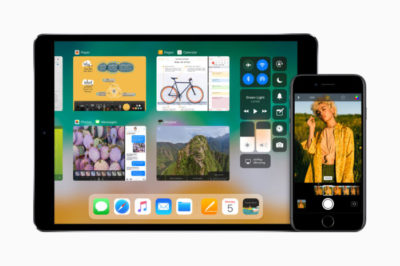
credit: Apple

Apple’s upcoming iOS 11, already in public beta and due out this fall in its final form, delivers numerous improvements and changes for iPad and iPhone users. These include a host of new enterprise-useful features — especially for the iPad — as well as a variety of tweaks that will almost any user.

Here’s a rundown of the 50 or so most important things you need to know to get the most from Apple’s mobile platform.

Augmented reality

Apple’s newly introduced ARKit framework lets developers create augmented reality experiences that can be accessed using compatible (A9- and A10-processor-powered) iOS devices — meaning iPhones and iPads released since September 2015. The software only recognizes horizontal planes today, but this will change in the future, and it’s expected to help companies explore new opportunities, from online retail to gaming to unified communications. Apple’s AR partners include Valve/SteamVR, Unity and Epic Games.

credit: Apple

What’s critical here is that hundreds of millions of devices will immediately support AR once iOS 11 ships, making this an extremely viable VR platform development opportunity.

Machine intelligence

iOS 11 carries numerous smart features, all wrapped up in Apple’s ultra-private secure shells, in which your identity is protected by technologies including differential privacy. That commitment to privacy means Apple has been crafting smart solutions that work on a device rather than by sharing data with the less secure cloud. Apple also introduced Core ML, a general-purpose machine-learning framework that developers can use to integrate machine learning inside their apps. Here are some of the ways Apple has applied A.I. and machine learning in iOS 11:

  • When you type, the keyboard will suggest words you may have looked at recently, such as restaurant or place names or locations viewed in Safari or Messages.
  • The People folder in Photos becomes more accurate, and information about your friends will sync across all your Apple ID logged-in devices.
  • Photos can now recognize even more “Memories” events, including things such as nights out and anniversaries.
  • Based on what you are doing in other apps, iOS 11 can provide personalized recommendations in Safari, Maps, Messages and News.

Siri is the voice assistant front end to Apple’s systemwide machine intelligence. The latter is what gives Siri the capacity to make recommendations based on what you’ve been doing. iOS 11 adds several Siri-specific improvements.

  • Siri translation: Siri can now translate conversation between English, Chinese, French, German, Italian and Spanish.
  • Siri Kit improvements: Developers can use the SiriKit framework to integrate Siri support inside apps for ride scheduling, bill payments, banking, messaging, image search, VoIP calls, workouts, car controls and to-do lists.
  • Type to Siri: You can now choose to type your Siri requests rather than speak them. To do so, you must first enable the feature in Settings>General>Accessibility>Siri. Then toggle Type to Siri to On (green).

iPad Pro replaces more PCs

Apple has called the PC a “truck” and declared the iPad Pro to be the “only computer” you need. That said, it’s fair to note that while Apple’s tablets can replace computers in some situations, they can’t yet do so in all cases. Apple’s response has been to introduce numerous iPad-only improvements in iOS 11 that make the device far more productive. That means you’ll likely see Apple’s tablets replacing PCs in more scenarios.

credit: Apple

  • The Dock: The new, customizable Dock holds up to 15 apps (or folders containing apps). Three additional slots to the right of the Dock show a trio of the most recently used apps. You get to the Dock by swiping up from within any application.
  • Drag and drop: You can select a single item by tapping it, and if you continue to hold it — and then tap one or more additional items — you can select a number of items. You can then bring up the Dock, tap an app and place those items you selected on/in the app. This feature also works with the newly introduced Files browser (see below). Together, Files and drag-and-drop make working on an iPad feel much more like working on a computer than on a giant iPhone.
  • Split View: Apple has refined Split View on the iPad, introducing a new feature it calls Slide Over. It works like this: Summon the Dock by swiping up the screen (from within any app); you can then tap an app icon and drag it to the right side of the screen to open a narrow version of it. This makes it easy to switch between apps using the Dock and Split View. (If you have a keyboard, you can switch apps using the Mac-familiar Command-Tabbuttons.)
  • App Switcher: When you look at Control Center (swipe all the way up) you’ll also see Apple’s revised App Switcher. Here you’ll find thumbnails showing all your most recent apps and workspaces, giving you easy access to those you want. You’ll spend less time in the Home screen and more time working in the apps you need.
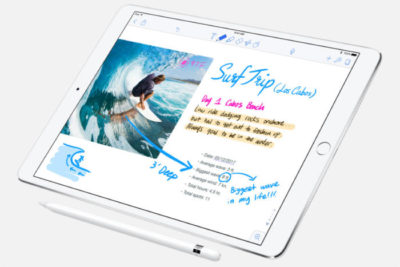
  • Apple Pencil: Tap the screen to instantly open Notes and begin writing. In other Apple apps, you can tap the screen to create an Instant Markup that lets you annotate a PDF or screenshot.
credit: Apple

Files: iOS gains a file system

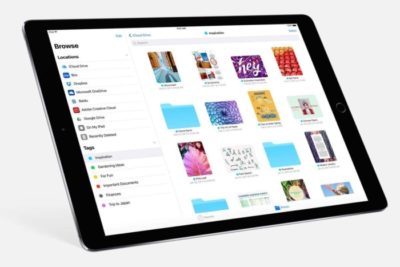
The new Files app delivers something we’ve been hoping for since iOS first appeared in 2007: a file system. Open it up and you’ll find a Search bar and three different areas: LocationsFavorites and Tags.

credit: Apple

Locations lets you access files held in iCloud Drive, on your device or the trash (if they were recently deleted). You can also bring in files held in third-party services such as Dropbox.

Favorites is self-explanatory, but Tags is interesting: When you tap the Share item for any file, you’ll find a new +Tag item to the right of the file name at the top of the screen. Tap this and you can assign a new tag to the file. If you haven’t started using tags, you probably should, since they will help you find items across all your Apple devices.

Files also provides several other features:

  • Create a new folder and use iOS 11’s improved drag-and-drop support to drag multiple itemsinto it.
  • Sort files by namedatesize and tags.
  • Skip between list and icon-based views.
  • Drag items to other apps.
  • Long-press an item and you can Copy, Rename, Move, Share, Tags, Info, or  Delete it in the popover menu that appears.

Enterprise deployment — simplified

iOS 11 brings changes designed to make it easier to deploy Apple devices across the enterprise. Meanwhile, enterprise-focused Apple partners such as Deloitte, IBM, Cisco and JAMF now provide iOS deployment expertise and technologies as a service.

Among the enterprise deployment highlights in iOS 11:

  • MDM services can push iOS updates to supervised devices, even if they’re locked.
  • You can add any device to the Device Enrollment Program.
  • MDM commands can be set to execute only when a device has a wired connection — saving on corporate bandwidth.
  • A new restriction forbids enterprise users from adding their own VPN.
  • You can now enable signing and encryption in Mail and Exchange separately; before you could only enable signing and encryption at once.
  • Sysadmins can now configure home screen layout and app installs on Apple TV.
  • You can easily integrate Cisco Spark and WebEx meetings into iOS 11 apps.

A faster, smarter Safari

Quick and easy browsing of the web has bolstered Apple’s success since the iMac arrived in 1999, so the latest iteration of Safari in iOS will affect millions of users. The focus this year is on speed (you’ll like the faster scrolling) and security.

The security enhancements will likely have the biggest effect on users. These include better, easier cookie blocking and Intelligent Tracking Prevention, which uses built-in machine A.I. to reduce cross-site tracking by identifying and limiting this practice.

Safari supports a new video codec, HEVC (H.265). This will mean higher-quality video at much lower file sizes compared to the older H.264.

The browser’s search bar now allows you to track flights and define words.

PDF creation using the browser is also improved: Just tap Share and choose Markup as PDF to make a PDF you can annotate.

Finally, like the High Sierra version of the browser, Safari on iOS adds support for WebRTC. This opens the doors to cross-platform, browser-based video collaboration.

Business Chat bots

Apple at WWDC 2017 in June announced a key partnership with Nuance to create a bot-based customer service ecosystem for Messages, called “Business Chat.”  Apple’s plan is to integrate Nuance’s Digital Customer Engagement Platform with Apple Business Chat. This will enable new breeds of A.I.-based intelligent assistants in Messages and means you’ll see a little messages icon pop up on brand websites and in search results. Nuance’s asynchronous messaging tech is already used across other messaging platforms that support bots. Major companies, including Bank of America, Domino’s, FedEx and USAA, already use Nuance’s solution.

Enterprises exploring B2C or B2B bot technologies will find that Apple’s solution lets customers find your business and start conversations from Safari, Maps, Spotlight and Siri using tens of millions of mobile devices.

Your iOS, your Control Center
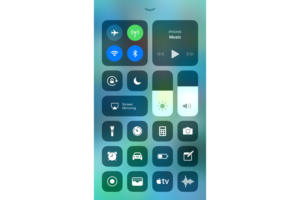
Every iOS user already interacts with Control Center. Swipe up and you can invoke numerous items for quick access. iOS 11 sees significant improvements here, including a redesign that combines everything in one window, brings in a range of new functions, and lets users choose which tools are available in their Control Center (Settings>Control Center).

This customization is limited, however; you can’t add third-party widgets at this time, and you cannot remove certain tools, such as those for Airplane Mode, Wi-Fi, AirDrop, Rotation Lock, AirPlay and Music.

Control Center has another handy talent: You get 3D Touch-like interaction even when using a device that doesn’t support 3D Touch. Force-touch the Torch widget and slide your finger to increase brightness, or touch, hold and slide the timer widget to very swiftly set a time, even if you’re using an iPhone SE.

Mightier Maps

Maps continues to improve, with features such as the introduction of new AR-like city flyover views. These use your iOS device’s camera and sensors to track your position and move you around 3D representations of key cities, such as London or New York. To explore these views, search for a major city and look for a Flyover button. Tap this to access the view. (Not every city is supported, so if the city you chose doesn’t have the button, keep trying.)

It’s an engaging feature that offers more potential as additional cities are added, but Apple has also worked hard to make Maps more effective for getting quickly from point A to point B. iOS 11 offers indoor maps for shopping malls, for instance, as well as airports and transit hubs. It also includes these key items:

  • A Do Not Disturb When Driving feature designed to keep you from getting distracted by incoming Notifications while behind the wheel.
  • A new Lane Guidance feature that shows you the correct highway lane to be in to make the turns you need to stay on course.
  • A speed limit display in Maps, beginning with those posted for U.S. roads.
  • A new “Light Guidance” mode that provides a bird’s-eye view so you can better scout out the journey ahead when using Maps for travel instructions.
  • A new way to access zoom mode: Just double tap a Map and, while keeping your finger pressed into the display, move your finger up and down to zoom in and out.

credit: Apple

Let’s work (better) together

No one really likes jumping through hoops to make devices work together. iOS 11 makes this a lot easier:

  • Automatic setup: Got a new iOS device? Just hold it near an iOS 11 device (or High Sierra Mac) you already own and are logged into using your Apple ID. Many of your personal settings, preferences and iCloud Keychain passwords will be carried over to your new device, so it is ready to use, fast.
  • Instant Wi-Fi: iOS 11 users can approve others to use their Wi-Fi network by holding the devices close together, authorizing them, and transferring the password automatically. This should help schools and enterprises more easily manage routine Wi-Fi password changes.
  • QR Code scanning: The Camera app will automatically scan and understand QR codes. Point your device at the code, tap to focus, and a notification box will let you respond to that code. This will come in useful for automatic setup of things such as Wi-Fi networks, HomeKit devices, contact cards, website URLs and more.
  • Core NFC: This new iOS 11 framework lets developers create apps that can read NFC tags. It’s a little limited at the moment — it only works one-way, so you can use it to access information about museum exhibits and visitor attractions rather than for more sophisticated payment systems.

The image thing

Apple’s been working hard to improve your images. Last year’s introduction of the bokeh effect in the iPhone 7 Plus was a great example of this, since it basically put a pro-photo portrait camera in your pocket. iOS 11 maintains this tradition:

  • The biggest enhancement is introduction of support for the HEIF photo format. Based on the video-focused HVEC format, HEIF is capable of saving images around half the file size of JPEGs but at much higher quality (up to 16-bit, versus 8-bit).
  • Apple has developed a way to transcode images from HEIF to JPEG on the fly, without performance degradation.
  • If you use an iPhone 7 Plus, Portrait Mode in iOS 11 supports optical image stabilization and HDR, so you can expect much better images in low light.
  • Apple has also added new filters to improve images, including one designed to make skin tones appear more natural.
  • Live Photos gains several improvements. Not only can you now share these live moments with others as GIF files (or as an mp4 on Android), but you get to choose the key image and can apply three new effects: loop, bounce and long exposure. (The latter blurs anything that’s moving within a frame so you can focus on the subject).

Document scanning and Notes

Apple’s Notes app spent years in the wilderness before getting much attention. By the time iOS 10 arrived, Notes had already become a sort of low-budget replacement for Evernote, but it gets much more versatility in iOS 11. Certainly, for business users it has become an excellent tool to keep receipts and other expenses in one place when traveling:

  • You can scan documents from within a Note; just tap the plus sign and choose Scan Documents, then point your device until the document is in focus and highlighted by a yellow tint. You can then keep, share or even sign the scan (the latter on the iPad Pro using an Apple Pencil).
  • Apple has added the capacity to draw inside Notes using the familiar sketch tools interface from the iPad.
  • You can pin notes to the top of your list, more easily search through your notes, and quickly place notes within subject folders.

A few more things

There are many more improvements within iOS 11, including a one-handed keyboard option, person-to-person payments within Messages, the capacity to record and broadcast what’s happening on-screen, and App Offloading, which lets you delete an app you don’t use often while keeping the app data. When you need it, just download the app again to use that data. You’ll also find improved screenshot annotation and significant additions to CareKit and ResearchKit, which provide a platform for health and medical equipment developers.

If this has whetted your appetite enough to try iOS 11 for yourself, you can register to join Apple’s iOS 11 Public Beta program. Otherwise, wait until the final version arrives, when the bugs should have been ironed out.

Have questions?

Get answers from Microsofts Cloud Solutions Partner!
Call us at: 856-745-9990 or visit: https://southjerseytechies.net/

South Jersey Techies, LL C is a full Managed Web and Technology Services Company providing IT Services, Website Design ServicesServer SupportNetwork ConsultingInternet PhonesCloud Solutions Provider and much more. Contact for More Information.

To read this article in its entirety click here.


New Website Design – Comfort Callers

The Website Design team of South Jersey Techies has been constantly working on developing great looking websites using the latest web technologies. The most recent website developed by our team is for Comfort Callers in Sharon Hill, Pennsylvania.

Comfort Callers was founded and is managed by a team comprised of Paramedics, Emergency Medical Technicians, Police Officers and Home Care workers who wanted to bridge the gap between those who want to remain at home and independent and their family and friends who are concerned about their well being.

Have questions?

Our Web Design team is here to help
Call us at: 856-745-9990 or visit: https://southjerseytechies.net

South Jersey Techies, LLC is a full Managed Web and IT Services Company located in Marlton, NJ providing IT ServicesManaged IT Services, Website Design ServicesServer SupportIT ConsultingVoIP PhonesCloud Solutions Provider and much more. Contact Us Today.

Symantec Endpoint Protection (SBE)- Upgrading the cloud agent

Symantec has recently become aware of a medium vulnerability in older versions of the server agent. The latest version addresses this vulnerability in new installations and was released February 15th, 2017. Server agents that are not already upgraded will be identified in the SEP SBE cloud management console starting on March 8th. A manual upgrade will be required to ensure you have the latest protection.

Microsoft Office for iPad is here!

ipad-office

Edit, work, create, and get more done from your iPad, for free

ipad-office3

Four new, free apps are available on your iPad®. With both Microsoft OneDrive and Dropbox access, online storage—and access to your files—is always just a click away on your iPad. The new Microsoft Office apps give you the ability to flat out get more done.

  • With the new Microsoft Word app, you can edit, create, and save your docs, wherever work takes you
  • The new Excel app lets you analyze your data on the fly
  • Build and deliver your presentations—right from your tablet or phone—with the new PowerPoint app
  • The new Microsoft OneNote app helps you work collaboratively and stay organized on the go

With these apps, you can now access, edit, and save directly to your Dropbox account. You can even open and edit files that have already been saved in Dropbox.

Adding Dropbox is easy.  When you are in any of the new apps, follow these simple steps:

1. Tap on the arrow in the top left, then tap Open
2. Tap “Add a Place”
3. Select Dropbox

To get the Office apps for iPad®, open www.appstore.com/microsoftoffice from your iPad’s web browser.


RingCentral – New & Improved

ringcentralRingCentral is a company that specializes in providing business VoIP services, fax services and mobile communication solutions. With plans ranging from a single user to over 20 users, RingCentral makes it clear that they can cater to both small businesses and large corporations. With a cloud-based virtual office system and new Interface, RingCentral makes it possible to enjoy your virtual office from virtually anywhere.

Business SMS Beta

RingCentral-big-icon_6655Using your RingCentral number and App from Google Play or iTunes, you will have unlimited texting to customers and co-workers from your Tablet or Smartphone.  

Improved Web Interface

Boosting the efficiency of the RingCentral system, many features have been added, corrected and removed.   The new interface is mapped with navigation tabs that can be used on a Computer, Tablet or Smartphone.

RingCentral Conferencing

RingCentral Conferencing includes host and participant access codes for anytime conference calls.  All users can invite and have up to 1000 attendees for a conferencing from their mobile devices.

RingCentral Presence

RingCentral Presence feature allows you to see the status of colleagues on your phone.  Whether on you desk phone or cell phone,  Presence will tell you which lines are available, busy and on hold.

rc

For more information regarding RingCentral,

please contact us at 856-745-9990 or click here.

National Cyber Security Awareness Month Tips

360px-US_Department_of_Homeland_Security_Seal.svg

October is National Cyber Security Awareness Month by Department of Homeland Security.

National Cyber Security Awareness Month encourages vigilance and protection by sharing tips and best practices in regard to how to stay safe.

Small businesses are a large target for criminals because they have limited resources dedicated to information system security.  Cyber criminals look for access to sensitive data.

Create a cyber security plan

The Federal Communications Commission offers a Cyber Planner for small businesses.  The planner guide allows specific sections to be added to your guide, including Privacy and Data Security, Scams/Fraud, Network Security, Website Security, Email, Mobile Devices, Employees, Facility Security, Operational Security, Payment Cards, Incident Response/Reporting and Policy Development/Management.

Generate a personalized Small Biz Cyber Planner Guide.

Establish Rules and Educate Employees

Create rules and guidelines for protecting information.  Educate employees on how to post online in a way that does not share intellectual property.  Clearly explain the penalties for violating security policies.

Network Protection

Deploy and update protection software, such a antivirus and antispyware software, on each computer within your network.  Create a regularly scheduled full computer scan.

Manage and assess risk

Cyber criminals often use small businesses that are less-protected to get to larger businesses.  Being a victim of a cyber-attack can have a huge impact on any business including financial issues, loss of possible business partner(s) and many more issues.

Download and install software updates

Installing software updates from vendors can protect your network for unwanted viruses and malware.  Vendors frequently release patches/updates for their software to improve performance and fine-tune software security.  (Example:  Adobe Reader, Adobe Flash and Java updates are critical for protection.)

Backup important business data and information

Create a backup plan for all data including documents, databases, files, HR records and accounting files.  A regularly scheduled backup can be a full, differential or incremental.

  • Full Backup:  Backup of all data.
  • Differential Backup:  Backup of all data that has changed since the last full backup.
  • Incremental Backup:  Backup of all data that has changed since the last full or incremental backup.

Control physical access

Protecting physical property is a very important role in protecting intellectual data.  Create a physical security plan to prevent unauthorized access to business computers and components. 

Secure Wi-Fi

Securing your Wi-Fi network consists of a few configurations.  Configure a device administrator password for your wireless access point (WAP) or router, require a password for Wi-Fi access and do not allow the WAP or router to broadcast the Service Set Identifier (SSID), also known, as network name.


CALL US NOW!