Back to Top

Tech, Web, Cloud & Cabling Services

Category: Software

Software Category

Windows Server 2003: Dangerous to use but still surprisingly popular

One in 10 web-facing computers is still running Microsoft Windows Server 2003, according to a report – despite the OS no longer being patched by Microsoft.

Windows 10

Hundreds of thousands of computers are still using the Windows Server 2003 operating system – despite it no longer being patched against hacks.

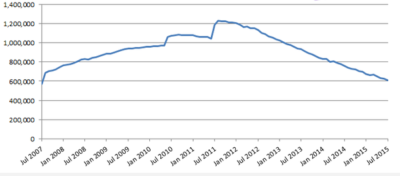
Internet services found more than 600,000 web-facing computers, together hosting millions of websites, still running the OS that Microsoft ceased supporting in July this year.

The end of support means the OS no longer receives patches against viruses, spyware and other malware that might seek to exploit the system. The US Computer Emergency Readiness Team warns that those running Windows Server 2003 risk “loss of confidentiality, integrity, and or availability of data, system resources and business assets”.

Despite these risks, 175 million websites – what it terms “one-fifth of the internet” – are hosted on machines running Windows Server 2003. The OS also appears to be in use on computers sitting behind web servers for a further 1.7 million sites.

Together accounting for 55 percent, the US and China are home to the bulk of the machines running Windows Server 2003, with 166,000 in the US and 169,000 in China.

The unsupported nature of Windows Server 2003 makes it a tempting target for attackers – which is why it is important for firms to switch away from the OS as soon as possible.

“As time goes by, there will be some vulnerabilities that affect Windows Server 2003 and if those allow things like remote code execution and so on, we’re likely to see a massive number of web-facing computers and a much larger number of websites getting hacked. These could then go on to distribute malware and even be made into botnets to enable other attacks.

“Of course, because Windows Server 2003 is now unsupported, those people who try to find vulnerabilities might even now be particularly focusing on this platform because they know it won’t be fixed.”

Windows Server 2012 R2 is the most recent version of Microsoft’s server-targeted operating system – with a variety of options for licensing. In part, the cost of moving to a more recent Microsoft OS for the proportion of machines still running Windows Server 2003.

“[That proportion] is over 10 percent of all web-facing computers, and shows the true potential cost of migration,” the report states.

Moving a server to a Linux-based OS can be difficult for organisations that have traditionally used Windows Server, Mutton said, particularly if they rely heavily on scripts written for ASP.NET, Microsoft’s server-side web application framework.

The report lists several major firms and banks still running Windows Server 2003 machines, including UK bank NatWest, part of the larger publicly-owned Royal Bank of Scotland (RBS).

However, while Microsoft is no longer supporting the OS for most users, it will offer fixes for the OS to organisations willing to pay for a custom-support deal.

Such a deal was recently struck by the US Navy, which agreed to pay at least $9m to Microsoft to provide ongoing support for Windows XP, Office 2003, Exchange 2003 and Server 2003. A spokesman for RBS said NatWest is also covered by a custom support deal with Microsoft that began in March this year.

Firms without such a custom support deal in place that use Windows Server 2003 to serve sites that handle financial information could be in breach of data security standards, which carries out security testing and assessments for companies.

The requirement under Payment Card Industry Data Security Standard (PCI DSS) 6.2 that “all system components and software to be protected from known vulnerabilities by installing vendor-supplied

“Many merchants still using Windows Server 2003 are likely to be noncompliant and could face fines, increased transaction fees, reputational damage, or other potentially disastrous penalties such as cancelled accounts.”

Microsoft advises several options for machines still running Windows Server 2003 – including switching to Windows Server 2012 R2 or its cloud platform Microsoft Azure. It provides an interactive Windows Server 2003 Migration Planning Assistant.

Have questions?

Get help from IT Experts/Microsofts Cloud Solutions Partner
Call us at: 856-745-9990 or visit: https://southjerseytechies.net/

South Jersey Techies, LLC is a full Managed Web and Technology Services Company providing IT Services, Website Design ServicesServer SupportNetwork ConsultingInternet PhonesCloud Solutions Provider and much more. Contact for More Information.

IRS launches iPhone, Android apps for taxpayers

Everyone’s favorite government agency, the Internal Revenue Service, has launched its own mobile application.

Released last week to iPhone and Android users, the free IRS2Go provides a few tidbits of information that could make April 15 a bit less stressful.

Those of us fortunate enough to qualify for a refund can find out exactly when Uncle Sam will be sending out that check. Entering your Social Security number (which the IRS says is masked and encrypted), filing status, and expected refund amount delivers the due date for your payment.

People who file their federal taxes electronically can check their refund status about 72 hours after they get an e-mail from the IRS acknowledging the receipt of their tax return. Those still doing things the old-fashioned way–on paper–will have to wait around three or four weeks after filing before they can learn when their refund check will arrive.

According to the agency, around 70 percent of the 142 million individual tax returns filed last year were done electronically.

Beyond providing the refund status, the app lets you subscribe to tax tips and updates sent each day during tax season and less frequently the rest of the year. IRS2Go also points you to the agency’s own Twitter feed where you can learn even more about filing your taxes.

“This new smart phone app reflects our commitment to modernizing the agency and engaging taxpayers where they want when they want it,” IRS Commissioner Doug Shulman said in a statement. “As technology evolves and younger taxpayers get their information in new ways, we will keep innovating to make it easy for all taxpayers to access helpful information.”

The IRS has increasingly been moving taxpayers toward e-filing and encouraging them to access more information electronically as a way to cut costs. Last year, the agency announced that it would no longer mail paper income tax packages to individuals and businesses since all of that information is freely available online or through libraries and post offices. The IRS is also looking for other ways to take advantage of technology, especially the move toward mobile.

This phone app is a first step for us,” Shulman said. “We will look for additional ways to expand and refine our use of smartphones and other new technologies to help meet the needs of taxpayers.”

To view the original article in it’s entirety, Click Here

Microsoft Office 365

Office when and where you need it

Work anywhere, anytime, on any device. Office 365 is ready when you are.

Your go-to Office—anywhere

Whether you’re working in your office or on the go, you get a familiar, top-of-the-line set of productivity tools. Office applications—always the latest versions—let you create, edit, and share from your PC/Mac or your iOS, Android™, or Windows device with anyone in real time.

Tools for the professional

Brand your business-class email address with your company name to build name recognition, and market your business with customized marketing materials that are easy to create. Connect better with customers and colleagues with a range of communication tools, fromemail and IM to social networking and video conferencing.

Tools for teamwork

With 1 TB of storage per user, you’ll have plenty of space for all your files. Plus, because your files are stored online, you can share with people in or outside your company, from wherever you’re working, whenever you need to. And with multi-party HD video, content sharing, and shared calendars, you’ll always be in sync with your team.

Easy setup and management

With step-by-step guidance, you can set up users easily and start using the services fast. You can access the easy-to-use admin center from anywhere to manage all your services. And Office 365 takes care of IT for you, so your services are always up and running and up to date.

Have questions?

Our small business team is here to help.
Call us at: 856-745-9990

South Jersey Techies, LLC is a full Managed Web and Technology Services Company providing IT Services, Website Design ServicesServer SupportNetwork ConsultingInternet PhonesCloud Solutions Provider and much more. Contact for More Information.

To read this article in its entirety click here.

The all new Office 2016.

Do your best work with Office 2016 applications. New features make it easier to create, share, and work together wherever you are, across your favorite devices.

Office 2016 Built for teamwork

Built for teamwork

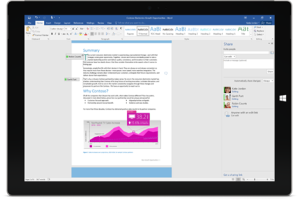
Office 2016 reduces the friction in co-creation, making it easier to share documents, work together, and use coauthoring, IM, voice and video to get things done.

Works for you

Produce professional documents fast with intelligent suggestions, information, and insights at just the right time.

The most secure Office

Store and share with confidence. With 1 TB of OneDrive for Business storage, you have the built-in, secured way to store and share all of your stuff.

The Office you know and love with new applications–across your favorite devices

Across devices

Access your documents and work whenever and wherever—with full fidelity viewing and editing—from your PC or Mac to your Windows, Apple®, and Android phones and tablets.

Coauthoring

Work together like never before in Word, PowerPoint, and OneNote. Real-time typing in Word1 lets you see others’ edits as they happen.

Online meetings

Work like you’re all in one room, even when you’re not. Use Skype for Business for HD video conferencing2, coauthoring, desktop sharing, presentations, and IM to run your meetings from anywhere.

Smart attachments

Attach documents stored in OneDrive for Business or SharePoint to an email and Outlook will automatically configure permissions for mail recipients and store the latest version in one place.

Office 2016 gives IT more control and better performance

Office 2016

Centralized control

Data loss protection, multi-factor authentication, and rights management gives admins centralized control over key security, privacy, and compliance capabilities.

Flexible click-to-run deployment

IT now has more control over how and when updates are distributed, with enhanced distribution and network traffic management.

Improved Outlook performance

Enhanced connectivity, better network performance, and faster email download equal happier users and fewer help desk calls.

Have questions?

Get help from IT Experts/Microsofts Cloud Solutions Partner
Call us at: 856-745-9990 or visit: https://southjerseytechies.net/

South Jersey Techies, LLC is a full Managed Web and Technology Services Company providing IT Services, Website Design ServicesServer SupportNetwork ConsultingInternet PhonesCloud Solutions Provider and much more. Contact for More Information.

To read this article in its entirety click here.

Microsoft will let you unlock Windows 10 with your face

Hello
With a quick glance at your Windows 10 laptop, you’ll be able to unlock it — without entering a password.

Microsoft introduced the latest new feature for Windows 10, called Windows Hello. The security tool will let you access your PC through facial recognition, an iris scan or a read of your fingerprint.

But before you get ready for your closeup, you’ll need get some special equipment — most PCs don’t come with biometric scanners installed (though some do). Windows Hello is primarily targeted at businesses and government agencies.

Microsoft opted not to rely on your webcam for facial recognition because the photos it captures are not terribly secure, and they’re easy to spoof. Instead, Microsoft got infrared cameras to do facial recognition for Windows Hello.

Facial recognition is possible on a low-grade camera. Google allows its Android phones to be unlocked with facial recognition, but the company warns that someone with a photo of you — or even someone who looks like you — will be able to unlock your phone too.

With the proper tools, faces, irises and fingerprints are possible to spoof, but it’s not easy — someone’s got to really want to break in to your PC to go through the trouble.

Microsoft opted for more robust security in Windows 10, because it wants to meet strict standards that companies and government agencies impose for secure logins. Microsoft said Windows Hello has a 1 in 100,000 false accept rate, which is very high. It’s a lot safer than a password, which, as we know, can easily be forgotten, lost, stolen or hacked.

Though it’s not necessarily aimed at the average PC buyer, consumers will be able to use the Windows Hello feature too.

Microsoft promised “plenty of exciting new Windows 10 devices to choose from which will support Windows Hello.” And if your PC already has a fingerprint reader, you’ll be able to login with a fingerprint scan.

Passport: Windows 10 will also support another new security feature, codenamed “Passport,” which lets you login to participating websites, apps or networks without a password. Microsoft said the list of sites and apps that support Passport is growing, but it didn’t say how many participate.

Microsoft is trying to position Passport as the end of passwords. Since you never enter a password to enter a website, “there is no shared password stored on their servers for a hacker to potentially compromise,” says Microsoft boldly in its press release.

But that’s not quite true. Passwords will still exist. Even if you can login to your email via Passport from your work PC, you’ll still need a password to login from your iPad. So passwords aren’t going away anytime soon — and they’ll still be stored on email providers’ servers, which means hackers could potentially still grab them in a cyberattack.

The primary way that Passport ensures that you’re you is through Windows Hello. Oddly, however, you can also enter a PIN into Passport, which is significantly less secure than a password.

Still, it’s about time that something replaces passwords, and Hello and Passport are good starts.

Have questions?

Get answers from Microsofts Cloud Solutions Partner
Call us at: 856-745-9990 or visit: https://southjerseytechies.net/

South Jersey Techies, LLC is a full Managed Web and Technology Services Company providing IT Services, Website Design ServicesServer SupportNetwork ConsultingInternet PhonesCloud Solutions Provider and much more. Contact for More Information.

To read this article in its entirety click here.

Why you’ll never buy a 3D printer

3Dprinter_image


Mattel’s ThingMaker 3D Printer and ThingMaker Design App is expected to ship later this year. Could a $300 3D printer capable of making hundreds of parts that can be assembled into toys finally place the technology next to the inkjet printer in the home?

The consumer 3D printer market, which has even tried to connect itself to video gaming, still seeks ‘killer app’3Dprinter_giff

While 3D printer sales will experience healthy growth over the next four years, consumer machines remain a technology in search of a purpose, according to researcher IDC.

3D printers, materials and services in the U.S. grew by almost 20% in 2015 compared to the year before, representing $2.5 billion market. And 3D printer shipments are expected to experience a compound annual growth rate (CAGR) of more than 16% through 2020, according to IDC’s U.S. 3D Printer Forecast, 2016-2020.

Revenue from 3D printing hardware alone is expected to grow from $815 million last year to $1.96 billion in 2020.

The largest technology segment within the 3D printing market is fused filament fabrication or fused deposition modeling (FDM/FFF). Last year, FFF or FDM printers made up 76% of the 3D printers shipped in the U.S.

While the majority of those printers are at the low end of the market, the consumer segment “has clearly not materialized as many had predicted,” IDC said. That’s pushing many 3D printer makers to shift toward producing higher-end machines aimed at the education and professional prototyping markets.
Shipments in the very low-end, where 3D printers sell for below $1,000, are still projected to grow more than 12% annually through 2020. But the market remains relatively small.

Where’s the killer app?

“I know it is a bit of a cliché, but I believe the ‘killer app’ that would drive 3D printing in the consumer space has not materialized yet,” said Tim Greene, research director for IDC’s Hardcopy Solutions. “Already the 3D printer mix in the U.S. has changed over the last 12 to 24 months. While there are still a lot of shipments into the DIY/consumer market, tremendous growth remains in the segments with a more professional and manufacturing orientation.

Simply put, 3D printers have yet to find their spot next to the inkjet printer in the home.

The sub-$1,000 3D printer category is the slowest-growing segment based on the reduced demand for consumer-type 3D printers in the U.S. market, IDC found. Many of the suppliers of lower-priced machines have added features and capabilities to their printers to move up into higher-priced hardware.

Printers in the sub-$1,000 price category are expected to go from just over 49,900 shipments in 2015 to over 90,750 printers in 2020. That’s a five-year annual growth rate of 12.7%.

In its report, IDC said it “has never been a big believer” in the consumer 3D printing market.

“This is being borne out somewhat with many of the suppliers in that segment recognizing that the consumer segment has materialized differently than expected. While some suppliers continue to sell very low-end 3D printers at prices below $300, many have recognized that consumer users will not run enough material, or won’t buy the materials from their printer manufacturer, to make up for selling printers at such low prices,” the report said.

In the hunt for the “killer application,” many 3D printer manufacturers have attempted to link the machines with video games, enabling players to print characters and scene-setting models.

“Which certainly eventually could happen, but we don’t see it in the near term,” Greene said. “So, while I’d never say never, I think the lack of the real ‘gotta have it’ application for consumer 3D printing limits the potential for the consumer side for now.”

Terry Wohlers, president of Wohlers Associates, an independent consulting firm, said the consumer 3D printer market is hampered more by a reason to exist and less by a lack of affordable technology.

“You could give away a free 3D printer to average consumers, but I doubt it would motivate them to use it. They’d give it a try, but then it’d collect dust. It’s just too difficult for them,” Wohlers said. “Heck, they don’t even want to print pictures at home because they don’t want to mess with it. A 3D printer is an order of magnitude more involved.”

Mattel to the rescue

“I would argue that a consumer 3D printer does not yet exist,” Wohlers continued. “This could change when Mattel introduces its new ThingMaker later this year.”

In February, Mattel announced it had reinvented its iconic ThingMaker at-home toy-making device, this time as a 3D printer that will cost $300.

Mattel unveiled its plug-and-play 3D printer at the New York Toy Fair, and it is already taking pre-orders for the machine, which will be available Oct. 15. (See Amazon.com pricing).

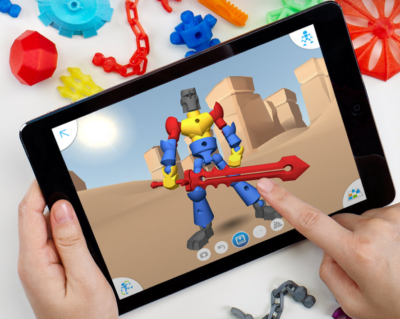
After downloading the ThingMaker Design App, which is based on software from Autodesk, families can browse through toy templates or build their own creations from hundreds of parts also offered in loadable files. Designs get uploaded from the files to the ThingMaker 3D Printer, which prints parts in batches for assembly via ball-and-socket joints.
screen-shot-3Dprinter

The ThingMaker Design App allows you to download files to iOS or Android devices and then upload them to the 3D printer to create toys.

“For 15-plus years, I’ve believed that children could become a large market because they are creative, like to make objects, and entertain themselves,” Wohlers said. “New software tools for creating 3D content, coupled with products for children, such as the ThingMaker, could change the landscape some.”

Meanwhile, Wohlers said, most consumers will purchase 3D-printed parts and products online and at shops and stores — products designed by professionals on industrial-grade machines.

In addition to a lack of use cases, the consumer 3D printer has become a low-margin product, as Chinese equipment and filament manufacturers have combined with multiple distribution channels (including Amazon.com) to create a segment where it is really hard to achieve profit margins, Greene said.

“In turn, this has made companies like 3D Systems and Ultimaker re-think some of their product and areas of focus,” Greene said. “Furthermore, there is a growing number of online 3D printing services like Sculpteo [and] Shapeways…that make it so fast and easy for consumers to get their stuff 3D printed that it seems like consumers don’t need their own 3D printer.”

In May, Ultimaker and Ultimaker added the Ultimaker 2+, which sports a price tag  more than twice the original $999 Ultimaker.

“And in a hallway conversation at a recent trade show, one of their guys told me they are ‘less interested’ in slugging it out with the other vendors in the sub-$1,000 price category,” Greene said.

3D Systems shifts gears
3D Systems is also less interested in the consumer 3D printer market, which it entered into in 2011.

At the end of 2015, 3D Systems announced the end of its $999 Cube consumer 3D printer line and said it would also shutter its Cubify.com consumer printing platform by January 31.

“We still have the Cube Pro printer — that’s sub-$5,000, but that’s kind of our entry level now on the desk tops for applications like education and desktop engineering,” said Timothy Miller, 3D Systems’ director of corporate communications.

“We’re focusing on manufacturing and the professional customer because that’s where we see near-term opportunities,” Miller added.

3D Systems was among the first 3D printer manufacturers when it was founded in 1984; its CTO, Chuck Hull, was one of the inventors of the 3D printing technology and created the widely-adopted STL (stereolighography) file format used by machines today.

Over the past two years, however, 3D Systems’ stock has dropped precipitously from a high of about $97 per share in 2014 to a low of $6.29 in May. Today, it’s trading for around $12.

And, in April, 3D Systems replaced its interim CEO with Vyomesh Joshi, the former vice president of imaging and printing at HP who is credited with doubling profits there.

Miller said while the company is will soon announce a new long-term strategy, it has already shifted toward producing more professional machines aimed at up-and-coming markets, including 3D printers for production.

Wohlers said 3D Systems’ financial issues have less to do with the industry’s downward trajectory and more to do with the company’s lack of focus and increased competition.

In 2011, for example, 31 companies worldwide produced and sold industrial 3D printers — those priced at more than $5,000. Five years later, that doubled to 62 companies, according to theWohlers Report 2016.

As with the beginning of the 3D printing industry, the highest growth markets for the technology continues to be automotive, healthcare and aerospace. However, along with rapid prototyping, 3D printing production parts is beginning to take shape.

Where the market is headed

According to IDC’s report, the fastest-growing segment in the 3D printing industry is in the $25,000 to $100,000 price category — printers that use a mix of technologies for both plastic and metal printing for use in markets including dental, medical, automotive and aerospace.

Last year, for example, HP announced it would enter the 3D printed parts manufacturing space with a machine aimed directly at production, not the consumer market. HP’s machine, a ink-jet like “materials jetting” system, is part of a market expected to grow faster than any other, according to IDC.

“As applications become more advanced and complicated, people don’t just want a prototyping printer, but a solution they can build into their workflow,” Miller said.

For example, Align Technology 3D prints 175,000 Invisalign dental braces every day.

Earlier this month, 3D printing service provider Sculpteo released its annual State of 3D Printing report, which collects survey responses from the general public from late January to late March 2016.

This year, Sculpteo received more than 1,000 respondents.

The survey found that the primary uses for 3D printing remain prototyping (50%) and proof of concept (30%), with manufacturing production coming in third (20%). Companies responding to the survey revealed that 93% of organizations believe 3D printing gives them a competitive advantage, and the top priority for professionals using 3D printers is faster product development.

“People and companies that are adopting 3D printers are routinely realizing the tremendous time and cost savings in their product creation and development cycles,” Greene said. “As printer speeds increase and the range of materials expands, a growing number of products and parts, and therefore markets, will be impacted by 3D printing/additive manufacturing.”

Have questions?

Get answers from Microsofts Cloud Solutions Partner!
Call us at: 856-745-9990 or visit: https://southjerseytechies.net/

South Jersey Techies, LL C is a full Managed Web and Technology Services Company providing IT Services, Website Design ServicesServer SupportNetwork ConsultingInternet PhonesCloud Solutions Provider and much more. Contact for More Information.

To read this article in its entirety click here.

Wawa introduces free WiFi services

PHILADELPHIA – Wawa began offering free WiFi Tuesday for customers at its 700-plus stores.

Wawa-free-xfinity


The service is available through a collaboration between the retailer and Philadelphia-based Comcast, the companies said.

To access the free service, Comcast said, “customers should log on to the ‘xfinitywifi’ SSID in the list of available networks on their devices.”

The service includes public Xfinity WiFi for Wawa customers and private access WiFi for employees and vendors.

Wawa stores operate across the tri-state area, as well as in Maryland, Virginia and Florida. The firm’s WiFi service will be available outside of Comcast’s traditional service areas, the companies said.

Wawa noted it needed “a fast and reliable WiFi solution to enable a consistent in-store experience for its mobile application.” It also said the service allows customers “to take advantage of a free connection without having to rely on their cellular service.”

Bill Stemper, president of Comcast Business, said WiFi has become a vital service for companies looking to improve “the customer experience at their branch locations.”

Have questions?

Get answers from Microsofts Cloud Solutions Partner!
Call us at: 856-745-9990 or visit: https://southjerseytechies.net/

South Jersey Techies, LL C is a full Managed Web and Technology Services Company providing IT Services, Website Design ServicesServer SupportNetwork ConsultingInternet PhonesCloud Solutions Provider and much more. Contact for More Information.

To read this article in its entirety click here.

Increase Sales & More with Site Analytics

Get the insight you need to succeed on the Web.

The key to any successful website is knowing your visitors. Site Analytics gives you the valuable, real-time data you need – information you can use to spotlight popular products, target new customers, track offer responses and much more. With over 30 detailed reports, you can find out where your visitors are coming from, what paths they take through your site, even where in the world they live.

Stats at-a-glance

  • Get the information you want – without having to click through countless screens – with our customizable dashboard view.

Real-time results

  • With Site Analytics’ real-time statistics, you don’t have to wait until tomorrow to find out if changes to your site are working. Plus, heat mapping and pinpoint functionality tell you which sections or links are getting the most attention.

In-depth reporting

  • Dig into the details and get a better understating of your customers with more than 30 reports. Find out who’s visiting, when they’re on your site, how they’re getting there and much more.

Choose your view

  • Site Analytics lets you decide how you want to view your data with three graphing options (Bar, Area and Line) as well as the ability to export to Microsoft Excel® or Adobe® PDF.

Powerful, easy-to-use features let you dig as deep as you want.

Everyone wants something different from their site statistics. Some people want a quick, birds-eye view; others want to get lost in the details. That’s the beauty of Site Analytics; it works for everyone. Our user-friendly interface and intuitive features put you in control so you can get exactly what you want.

See what’s happening

  • Get a quick overview of your site’s traffic and visitors with a selection of dashboard widgets.
  • Real-time statistics let you see, almost instantly, how changes to your site impact your traffic.
  • Improve your site’s structure and usability by seeing where people click and which links get the most attention with heat mapping.

Organize your data

  • Find the information you need with more than 30 reports in several categories: Visitor, Page, Referrer and Server.
  • Visualize the data the way you want with three different graphing options: Bar, Area and Line. Plus, set custom date ranges to target your results!
  • Share your data with co-workers and clients by exporting to Microsoft Excel® or Adobe® PDF. You can even create a schedule to email customized reports.
  • Get separate reports for each alias and subdomain — simply add them as separate Site Analytics accounts.

And much more

  • Easily collect stats on your WordPress® site with our free Site Analytics plugin.
  • Enable secure (SSL) mode to encrypt your data so it can’t be viewed by others during transmission.
  • Analyze long-term trends and improvements with up to 6 months of Log File data.
  • Use Site Analytics with any website, whether you host with us or a third party.


Our highly trained, courteous support staff is waiting to take your call. Whatever time it takes to assist you, that’s the time you’ll receive. We’ll resolve any issue to your complete satisfaction.

Call (888) 505-1532 to get started now or click here

Five Word tips that could change your life

Takeaway: Searching for ways to increase your Word productivity may get in the way of your productivity. So here are a few tricks you don’t need to go looking for. Efficient, simple to use, easy to remember.

Most of us don’t have time to discover all the ins and outs of the software we use on a daily basis. We learn on the fly, we occasionally pick up a tip or shortcut, and we grudgingly plow through the Help system when we absolutely have to.

But sometimes, just a few little tricks can make a big difference. Turning off an annoying feature, learning a keyboard trick that bypasses three dialog boxes, or taking advantage of an obscure option can save you a few headaches and a lot of time. Will they really change your life? Well that might be a stretch. But they could. Try these tips on for size and let me know.

1: Make vertical text selections

Usually, we select text horizontally — a word, a series of words, a paragraph — from left to right or vice versa. But sometimes the selection has to be vertical. For instance, suppose you wanted to delete the leading characters in Figure A.

Figure A

To make a vertical selection, hold down [Alt] as you drag down through the text you want to highlight. Figure B shows the column of unwanted characters selected using this technique. Hit [Delete] and bam, they’re gone.

Figure B


Although we selected text at the beginning of the lines in this example, you can make vertical selections anywhere on the page.

Note: Some users have reported that the Research pane appears when they try this selection technique. Here’s the secret: Release the [Alt] key before you let up on the mouse button. Word should retain the selection. If you hold down [Alt] but release the mouse button, Word may think “[Alt]-click” and open the Research pane in response.

2: Undo automatic changes you don’t want

By default, Word imposes lots of changes on the text you enter in a document. For example, it might convert a Web address to a hyperlink, replace straight apostrophes and quotation marks with their curly counterparts, or turn a pair of hyphens into an em dash. If that’s a welcome convenience, you’re in good shape. If you want to suppress those types of changes, you can disable them. See 10 annoying Word features (and how to turn them off) for details. But if you want to prevent those changes only from time to time, reach for the Undo command — [Ctrl]Z. Undo isn’t just for reversing something you’ve done; it also undoes some of the actions Word takes. Don’t want that em dash? When Word inserts it, hit [Ctrl]Z and change it back to the hyphens you intended to enter.

3: Get rid of a persistent border

This forehead-smacking solution earned considerable gratitude from stymied TechRepublic readers when Susan Harkins first provided it. Word offers a sometimes-handy option that lets you insert a border automatically. Type three hyphens on a blank line and press [Enter]. If the option is enabled, Word will replace the hyphens with a horizontal line. You can get rid of it if you press [Ctrl]Z after Word inserts it (see above). But if you try to select the border and delete it, you’re out of luck. You’re not dealing with a line object here. Word has applied the Bottom Border format to the paragraph.

To remove that format in Word 2003, click in the paragraph and choose No Border from the Borders drop-down list on the Formatting menu. In Word 2007/2010, click in the paragraph and then click the Border button in the Paragraph group of the Home tab. Just select No Border from the drop-down list (Figure C).

Figure C

If you like the automatic border feature, here’s a bonus tip: In addition to typing three hyphens to apply a bottom border (3/4-point), you can trigger different border styles. Typing:

  • Three tilde characters (~) will create a wavy line.
  • Three underscore characters (_) will create a 1.5-point line.
  • Three asterisks (*) will create a dotted line.
  • Three equal signs (=) will create a double line.
  • Three pound signs (#) will produce a “thin thick thin” line.

4: Move selected text up or down

This tip is probably most useful when you’re working in a table, although you can use it to reorder paragraphs outside a table, too. Let’s say you decide you want the third row of a table to be the top row. Just click within the third row, hold down [Alt][Shift] and press the up arrow key twice. Each time you press the arrow key, Word will move the row up one. You can select multiple contiguous rows to move them as a block, and you can use the down arrow key if you want to move text down instead of up.

Using this shortcut gets a little tricky if you’re moving big pieces of text outside a table. It’s easy to lose track of what’s being relocated where, and you might find it easier to take a standard cut-and-paste approach in those situations. But when the text is small and manageable, the shortcut is great. For example, if you need to move an item up or down within a bulleted or numbered list, you can just click in the item’s paragraph and use the [Alt][Shift] and arrow key combo to move the item to the desired spot.

5: Save changes to all open Word documents at one time

This simple technique comes in handy when you’re working in multiple documents and want to make sure you’ve saved your changes to all of them. I actually use it most often when I’ve made a change to a template and want a quick way to save that change on the fly (before I’ve had a chance to forget I made a change I want to keep).

In Word 2003 and earlier, just press the [Shift] key and pull down the File menu. Word will display the Save All command on the menu, above the Save As command. Choose Save All and Word will prompt you to save each document (or template) that has any unsaved changes. This is more efficient than having to navigate to each document individually and click Save.

If you use Word 2007/2010, this won’t work. But you can add the Save All command to your Quick Access Toolbar:

  1. Click the Office button (File in 2010) and click Word Options (Options in 2010).
  2. Click Customize in the left-hand column (Quick Access Toolbar in 2010).
  3. Select Commands Not In The Ribbon from the Choose Commands From drop-down list.
  4. Scroll down and select Save All.
  5. Click the Add button and then click OK.
CALL US NOW!