Back to Top

Tech, Web, Cloud & Cabling Services

Category: Software

Software Category

How To Remove Windows 7 Antispyware

Remove Windows 7 Antispyware 2012, Vista Antivirus 2012, and XP Security 2012 (See Uninstall Guide Below)

Win 7 Antispyware 2012, Vista Antivirus 2012, and XP Security 2012 are all names for the same rogue anti-spyware program. This family of rogues is promoted in two ways. The first is through the use of fake online antivirus scanners that state that your computer is infected and then prompt you to download a file that will install the infection. The other method are hacked web sites that attempt to exploit vulnerabilities in programs that you are running on your computer to install the infection without your knowledge or permission. Regardless of how it is installed, once it is running on your computer it will install itself as a variety of different program names and graphical user interfaces depending on the version of Windows that is running. Regardless of the name, though, they are all ultimately the same program with just a different skin on it. This rogue goes by different program names, which I have listed below based upon the version of Windows that it is installed on:

Windows XP Rogue Name Windows Vista Rogue Name Windows 7 Rogue Name
XP Antispyware 2012 Vista Antispyware 2012 Win 7 Antispyware 2012
XP Antivirus 2012 Vista Antivirus 2012 Win 7 Antivirus 2012
XP Security 2012 Vista Security 2012 Win 7 Security 2012
XP Home Security 2012 Vista Home Security 2012 Win 7 Home Security 2012
XP Internet Security 2012 Vista Internet Security 2012 Win 7 Internet Security 2012

When installed, this rogue pretends to be a security update for Windows installed via Automatic Updates. It will then install itself as a single executable that has a random consisting of three characters, such as kdn.exe, that uses very aggressive techniques to make it so that you cannot remove it. First, it makes it so that if you launch any executable it instead launches Vista Home Security 2012, XP Internet Security 2012, Win 7 Security 2012, or any of the other names it goes under. If the original program that you wanted to launch is deemed safe by the rogue, it will then launch it as well. This allows the rogue to determine what executables it wants to allow you to run in order to protect itself. It will also modify certain keys so that when you launch FireFox or Internet Explorer from the Window Start Menu it will launch the rogue instead and display a fake firewall warning stating that the program is infected.

Win 7 Antispyware 2012 Screen shot
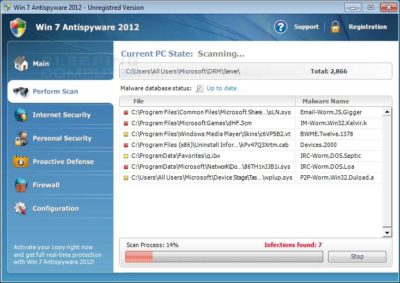
Once started, the rogue itself, like all other rogues, will scan your computer and state that there are numerous infections on it. If you attempt to use the program to remove any of these infections, though, it will state that you need to purchase the program first. In reality, though, the infections that the rogues states are on your computer are all legitimate files that if deleted could cause Windows to not operate correctly. Therefore, please do not manually delete any files based upon the results from this rogue’s scan.

While running, XP Internet Security 2012, Win 7 Antivirus 2012, and Vista Security 2012 will also display fake security alerts on the infected computer. The text of some of these alerts are:

XP Home Security 2012 Firewall Alert
XP Home Security 2012 has blocked a program from accessing the internet
Internet Explorer is infected with Trojan-BNK.Win32.Keylogger.gen
Private data can be stolen by third parties, including credit card details and passwords.

Malware Intrusion
Sensitive areas of your system were found to be under attack. Spy software attack or virus infection possible. Prevent further damage or your private data will get stolen. Run an anti-spyware scan now. Click here to start.

System danger!
Your system security is in danger. Privacy threats detected. Spyware, keyloggers or Trojans may be working the background right now. Perform an in-depth scan and removal now, click here.

System Hijack!
System security threat was detected. Viruses and/or spyware may be damaging your system now. Prevent infection and data loss or stealing by running a free security scan.

Privacy threat!
Spyware intrusion detected. Your system is infected. System integrity is at risk. Private data can be stolen by third parties, including credit card details and passwords. Click here to perform a security repair.

Stealth intrusion!
Infection detected in the background. Your computer is now attacked by spyware and rogue software. Eliminate the infection safely, perform a security scan and deletion now.

XP Antispyware 2012 Alert
Security Hole Detected!
A program is trying to exploit Windows security holes! Passwords and sensitive data may be stolen. Do you want to block this attack?

Just like the scan results, these security warnings and alerts are all fake and should be ignored.

While running, Win 7 Home Security 2012, XP Antivirus 2012, and Vista Antivirus 2012 will also hijack Internet Explorer so that you cannot visit certain sites. It does this so that you cannot receive help or information at sites like BleepingComputer.com on how to remove this infection. When you attempt to visit these sites you will instead be shown a fake alert stating that the site you are visiting is dangerous and that the rogue is blocking it for your protection. The message that you will see is:

Vista Security 2012 Alert
Internet Explorer alert. Visiting this site may pose a security threat to your system!

Possible reasons include:
– Dangerous code found in this site’s pages which installed unwanted software into your system.
– Suspicious and potentially unsafe network activity detected.
– Spyware infections in your system
– Complaints from other users about this site.
– Port and system scans performed by the site being visited.

Things you can do:
– Get a copy of Vista Security 2012 to safeguard your PC while surfing the web (RECOMMENDED)
– Run a spyware, virus and malware scan
– Continue surfing without any security measures (DANGEROUS)

Just like the fake security alerts, the browser hijack is just another attempt to make you think that your computer has a security problem so that you will then purchase the program.

Without a doubt, this rogue is designed to scam you out of your money by hijacking your computer and trying to trick you into thinking you are infected. Therefore, please do not purchase this program , and if you have, please contact your credit card company and dispute the charges stating that the program is a computer infection. Finally, to remove Win 7 Antispyware 2012, Vista Antivirus 2012, and XP Security 2012 please use the guide below, which only contains programs that are free to use.

Tools Needed for this fix:

  • Malwarebytes’ Anti-Malware


Automated Removal Instructions for Win 7 Antispyware 2012 & Vista Antivirus 2012 using Malwarebytes’ Anti-Malware:

  1. Print out these instructions as we will need to close every window that is open later in the fix.
  1. It is possible that the infection you are trying to remove will not allow you to download files on the infected computer. If this is the case, then you will need to download the files requested in this guide on another computer and then transfer them to the infected computer. You can transfer the files via a CD/DVD, external drive, or USB flash drive.
  1. This infection changes settings on your computer so that when you launch an executable, a file ending with .exe, it will instead launch the infection rather than the desired program. To fix this we must first download a Registry file that will fix these changes. From a clean computer, please download the following file and save it to a removable media such as a CD/DVD, external Drive, or USB flash drive. FixNCR.reg.  Once that file is downloaded and saved on a removable devices, insert the removable device into the infected computer and open the folder the drive letter associated with it. You should now see the FixNCR.reg file that you had downloaded onto it. Double-click on the FixNCR.regfile to fix the Registry on your infected computer. You should now be able to run your normal executable programs and can proceed to the next step.If you do not have any removable media or another clean computer that you can download the FixNCR.reg file onto, you can try and download it to your infected computer using another method. On the infected computer, right click on the Internet Explorer’s icon, or any other browser’s icon, and select Run As or Run as Administrator. If you are using Windows XP, you will be prompted to select a user and enter its password. It is suggested that you attempt to login as the Administratoruser. For Windows 7 or Windows Vista, you will be prompted to enter your Administrator account password.Once you enter the password, your browser will start and you can download the above FixNCR.reg file. When saving it, make sure you save it to a folder that can be accessed by your normal account. Remember, that you will be launching the browser as another user, so if you save it to a My Documents folder, it will not be your normal My Documents folder that it is downloaded into. Instead it will be the My Documents folder that belongs to the user you ran the browser as. Once the download has finished, close your browser and find the FixNCR.reg file that you downloaded. Now double-click on it and allow the data to be merged. You should now be able to run your normal executable programs and can proceed to the next step.
  1. Now we must first end the processes that belong to Win 7 Antispyware 2012 & Vista Antivirus 2012 and clean up some Registry settings so they do not interfere with the cleaning procedure. To do this, please download RKill to your desktop from the following link.RKill Download Link.  When at the download page, click on the Download Now button labeled iExplore.exe download link . When you are prompted where to save it, please save it on your desktop.
  1. Once it is downloaded, double-click on the iExplore.exe icon in order to automatically attempt to stop any processes associated with Win 7 Antispyware 2012 & Vista Antivirus 2012 and other Rogue programs. Please be patient while the program looks for various malware programs and ends them. When it has finished, the black window will automatically close and you can continue with the next step. If you get a message that RKill is an infection, do not be concerned. This message is just a fake warning given by Win 7 Antispyware 2012 & Vista Antivirus 2012 when it terminates programs that may potentially remove it. If you run into these infections warnings that close RKill, a trick is to leave the warning on the screen and then run RKill again. By not closing the warning, this typically will allow you to bypass the malware trying to protect itself so that rkill can terminate Win 7 Antispyware 2012 & Vista Antivirus 2012 . So, please try running RKill until the malware is no longer running. You will then be able to proceed with the rest of the guide. If you continue having problems running RKill, you can download the other renamed versions of RKill from the rkill download page. All of the files are renamed copies of RKill, which you can try instead. Please note that the download page will open in a new browser window or tab.Do not reboot your computer after running RKill as the malware programs will start again.
  1. There have been reports of this infection being bundled with the TDSS rootkit infection. To be safe you should also run a program that can be used to scan for this infection. Please follow the steps in the following guide:

How to remove Google Redirects or the TDSS, TDL3, or Alureon rootkit using TDSSKiller

If after running TDSSKiller, you are still unable to update Malwarebytes’ Anti-malware or continue to have Google search result redirects, then you should post a virus removal request using the steps in the following topic rather than continuing with this guide:

Preparation Guide For Use Before Using Malware Removal Tools and Requesting Help Topic

If TDSSKiller requires you to reboot, please allow it to do so. After you reboot, reboot back into Safe Mode with Networking again.

  1. Download Malwarebytes’ Anti-Malware, also referred to as MBAM, from the following location and save it to your desktop:Malwarebytes’ Anti-Malware Download Link (Download page will open in a new window)
  1. Once downloaded, close all programs and Windows on your computer, including this one.
  1. Double-click on the icon on your desktop named mbam-setup.exe. This will start the installation of MBAM onto your computer.
  1. When the installation begins, keep following the prompts in order to continue with the installation process. Do not make any changes to default settings and when the program has finished installing, make sure you leave both the Update Malwarebytes’ Anti-Malware and Launch Malwarebytes’ Anti-Malware checked. Then click on the Finish button.
  1. MBAM will now automatically start and you will see a message stating that you should update the program before performing a scan. As MBAM will automatically update itself after the install, you can press the OK button to close that box and you will now be at the main program as shown below.
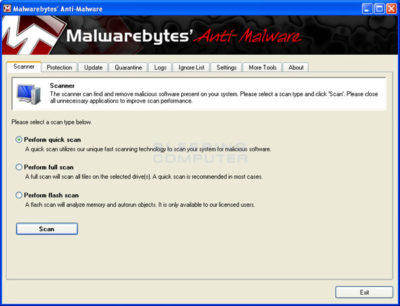


  1. On the Scanner tab, make sure the the Perform full scan option is selected and then click on the Scan button to start scanning your computer for Win 7 Antispyware 2012 & Vista Antivirus 2012 related files.
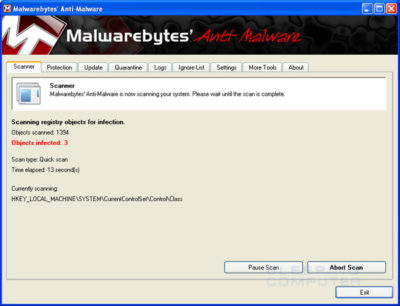
  1. MBAM will now start scanning your computer for malware. This process can take quite a while, so we suggest you go and do something else and periodically check on the status of the scan. When MBAM is scanning it will look like the image below.


  1. When the scan is finished a message box will appear as shown in the image below.
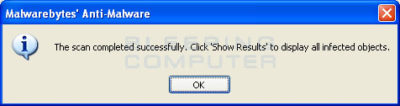
 

You should click on the OK button to close the message box and continue with the Vista AntiSpyware 2012 & Win 7 Home Security removal process.

  1. You will now be back at the main Scanner screen. At this point you should click on the Show Results button.
  2. A screen displaying all the malware that the program found will be shown as seen in the image below. Please note that the infections found may be different than what is shown in the image.
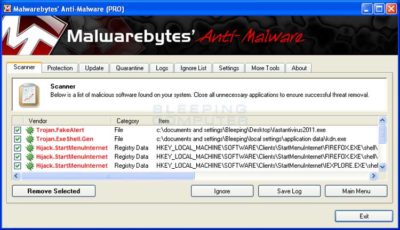
 

You should now click on the Remove Selected button to remove all the listed malware. MBAM will now delete all of the files and registry keys and add them to the programs quarantine. When removing the files, MBAM may require a reboot in order to remove some of them. If it displays a message stating that it needs to reboot, please allow it to do so. Once your computer has rebooted, and you are logged in, please continue with the rest of the steps.

  1. When MBAM has finished removing the malware, it will open the scan log and display it in Notepad. Review the log as desired, and then close the Notepad window.
  1. You can now exit the MBAM program.
  1. As many rogues and other malware are installed through vulnerabilities found in out-dated and insecure programs, it is strongly suggested that you use Secunia PSI to scan for vulnerable programs on your computer. A tutorial on how to use Secunia PSI to scan for vulnerable programs can be found here:How to detect vulnerable and out-dated programs using Secunia Personal Software Inspector

Your computer should now be free of the Vista AntiSpyware 2012 & Win 7 Home Security program. If your current anti-virus solution let this infection through, you may want to consider purchasing the PRO version of Malwarebytes’ Anti-Malware to protect against these types of threats in the future.

If you are still having problems with your computer after completing these instructions, then please follow the steps outlined in the topic linked below:

Preparation Guide For Use Before Using Malware Removal Tools and Requesting Help

To see the original article in its entirety click here.

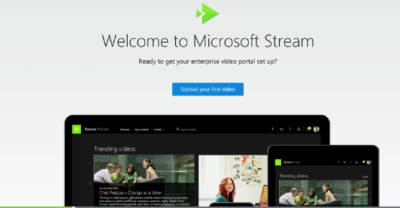
Microsoft Stream: The future of secure business video

Microsoft is previewing Stream, a new service for publishing and managing business videos. One day it will be the default video publishing system for Office 365.

MicrosoftStream


On July 18, 2016, Microsoft announced that a preview version of a new service called Microsoft Stream was available. Like most of you, I passed over the news with an indifferent “whatever” attitude. But later I realized that the news was actually more important than I had first thought.

Microsoft Stream fulfills a niche by providing a secure place to share videos created within, and for, businesses. By using a cloud-based service like this, businesses can reap the benefits of video communication without the threat of anonymous forum trolls trashing the brand or harassing employees.

Upload and forget it

While it is still a preview version, Microsoft Stream seems mostly ready for prime time. All you have to do is set up an account with a valid business email—One can use a personal domain email—and then log in. To test how easy Stream is to work with, you can make a 10-second video with a smartphone. Upload your video to Google Drive and then drag and drop it on the Stream portal website.

The web service processes the video while you give it a title and a brief description. Stream then asks if you are ready to publish and when you say yes, it publishes the video after a few seconds of grinding. It takes all of two minutes from start to finish and requires nothing more technical than knowing how to drag and drop a file.

Gone are the days of worrying about file format, aspect ratio, preferred playback applications, and all the other minutia we had to go through in years past to get a video published. You just take the video and then publish the video.

Video management

The key features of Microsoft Stream have to do with managing videos after they are published. Videos can be classified and placed into specific channels. Those channels can have their access restricted to certain individuals or certain groups, like a specific department, for instance. Access is controlled via the Azure Active Directory system.

According to the blog post, Microsoft plans to integrate Stream into the existing Office 365 Video system. Once the integration is complete, Microsoft Stream will be the default system for publishing video in an Office 365 environment.

There are plans in the works to add intelligent search to Stream by taking advantage of tools like audio transcription and face recognition. Developers are also working on ways to integrate Stream with other tools, like PowerApps, Microsoft Flow, and SharePoint.

Bottom line

We are aware of Microsoft Bookings and how that application attempts to cut out other third-party developers by integrating appointment scheduling for small businesses with the standard Office 365 subscription. By offering Stream, a secure video publishing and management service, Microsoft is attempting to execute the same strategy for video publishing.

Microsoft Stream gives businesses a secure system for publishing videos. Through Stream, businesses control access and manage who can see what and when they can see it. And because it is all handled internally, problems with anonymous forum trolls are likely to be reduced.

It seems that Microsoft’s grand strategy is to become the only software company a business needs—ever. The glaring application that Office 365 is missing now is a double-entry accounting system that includes payroll, accounts receivable, accounts payable, and the general ledger. Should we be looking for an announcement regarding those applications soon, Microsoft?

Have questions?

Get answers from Microsofts Cloud Solutions Partner!
Call us at: 856-745-9990 or visit: https://southjerseytechies.net/

South Jersey Techies, LL C is a full Managed Web and Technology Services Company providing IT Services, Website Design ServicesServer SupportNetwork ConsultingInternet PhonesCloud Solutions Provider and much more. Contact for More Information.

To read this article in its entirety click here.
Microsoft hints at September release of Windows 10’s next feature upgrade

Based on the current progress for Windows 10 version 1903, due to arrive next spring, it now looks like the fall update for the OS will arrive around Sept. 10 or Sept. 24.

Microsoft last week released the first preview of what will become Windows 10 version 1903, the opening feature upgrade of next year, slated to ship in the spring.

The debut of what Microsoft calls the “Skip Ahead” build for Windows 10 1903 also hints that the release of this fall’s upgrade, aka 1809, will take place in September. If so, it would be the first time since late-2015 that the actual delivery date matched the numerical label.

On July 25, Microsoft forked the 1809 preview of Windows 10 – as it’s done before when a feature upgrade approaches – so developers could continue to deliver betas for that build while also beginning to work on the next-in-line, 1903. (Microsoft uses a yymm labeling system to mark its Windows 10 feature upgrades; 1809 should indicate a September 2018 release, while 1903 would be a March 2019 release.)

When it forks preview code, Microsoft provides the even-further-in-the-future build, in this case, 1903, to Windows Insider participants who earlier volunteered for Skip Ahead. As the current feature upgrade gets close to release, Microsoft switches Skip Ahead users to the following upgrade, so that engineers can start collecting feedback on that version even as they keep polishing the one set to launch soon. The bulk of Insiders remain on the latter.

Think of the Skip Ahead debut as a warning bell, like the one rung at track meets when racers start the final lap: When Microsoft begins to ship Skip Ahead code, it’s close to wrapping up the impending feature upgrade.

In 2017, as Windows 10 1709 (aka “Fall Creators Update”) neared completion, Microsoft first forked the preview code and distributed a different build to Skip Aheaders on Aug. 31. Windows 10 1709 began its release cycle on Oct. 17, or 47 days later. With this year’s version 1803, Skip Ahead debuted Feb. 14, or 75 days before the April 30 release of that upgrade.

(Windows 10 1803’s original launch date, reportedly April 10 – which was one of two dates Computerworld had forecast in February – was postponed by 20 days after a deal-breaking bug was uncovered at nearly the last minute.)

For one estimate of the release date for Windows 10 1809, Computerworld added 47 days to July 25, arriving at Sept. 10. A second estimate was generated by adding 61 days – the average of the two previous Skip Ahead triggers – to July 25, resulting in a Sept. 24 rollout.

Because the last three feature upgrades launched on either a Monday or Tuesday – April 11, 2017 for version 1703; Oct. 17, 2017 for 1709; April 30, 2018 for 1803 – Sept. 10 or 11 would be the most likely release dates for 1809, absent a show-stopping problem like the bug before 1803’s launch. Computerworld’s alternate forecast would be September 24 or 25, also a Monday/Tuesday combination, because it would match the previous upgrades’ average time-between-Skip-Ahead-and-release.

If Microsoft does release Windows 10 1809 in September, it would be the first time since November 2015 that the company has matched delivery date and the upgrade’s label. Version 1511 debuted Nov. 10, 2015. The four subsequent upgrades, 1607, 1703, 1709 and 1803, all missed their release months by between 2 and 30 days. (Version 1607 came the nearest, releasing Aug. 2, 2016.)

Although Microsoft has never expressly tied itself to March and September release months – in a support document, it gives itself wiggle room by stating that feature upgrades will be released “twice per year, around March and September [emphasis added]” – the disconnect between release and numerical designation has always seemed odd.

Issuing feature upgrades during the appointed months would be a sign that Microsoft has gotten a better handle on the rapid development tempo it has at times struggled with executing. It would also be a step toward a more predictable schedule, which was the point of the pledge it made over a year ago to issue a pair of feature upgrades annually.

How to Upgrade to Windows 10

Windows 10 is now available as a free update. Here is what you can expect when you say “yes” to the update.

Here’s a step-by-step walkthrough of the upgrade process while upgrading Windows 8 machine to Windows 10.

Launch Windows 10 upgrade through Windows Update

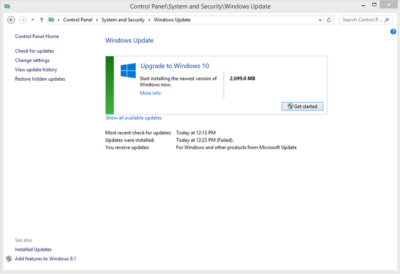
Look for the Update screen in Windows 8 and click the Check for Updates link. When the check is over, you will see the screen shown in Figure A.

Figure A

As you can see, it is a 2699.0 MB download. Click the Get Started button and then the screen shown in Figure B will appear.

Figure B

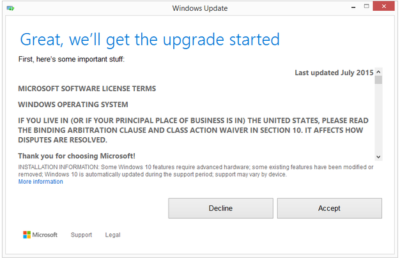
You may be able to get Windows 10 via a free update, but it still requires that you agree to a license/user agreement.

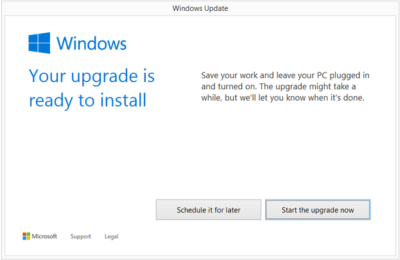
The next screen (Figure C) is very important. Updating takes about 2 hours depending upon the machine. If you cannot afford to be off your computer for that long, it may be a good idea to schedule a time when you can.

Figure C

Installation process

After you start the update process, your PC will immediately restart. From that point on you will just have to wait for the update to finish. During update the screen gets blank for over an hour, so please don’t panic and turn your PC during this seeming lack of activity.

Your PC may also restart several times during the update, but eventually you will reach a screen that asks if you want to do an Express Configuration or a Custom Configuration. Express configuration will be the best choice for most people.

Note that the update does take a bit of bandwidth, so it might be more efficient to update one PC at a time.

When the entire update procedure is complete, you will be presented with the Windows 10 desktop or tablet interface depending on your device as you can see in Figure D.

Figure D

There are new versions of OneDrive and the Snipping Tool in Windows 10. Of course, there is also the new web browser, Microsoft Edge, too.

Get Windows 10 without using Windows Update

If you would like to get Windows 10 without going through the update process, for a clean install for example, then you will have to download the Windows 10 ISO file.

If you have a Windows Vista or Windows XP PC you would like to update, you have to purchase Windows 10. Windows 10 Home will cost you $119, while Windows 10 Pro will cost $199.

As of July 29, 2015, most new devices will be available with either Windows 10 or Windows 8.1, which can be upgraded to Windows 10 for free. If your PC is more than a few years old, it might make more sense to spend money on a new device rather than to update an old one.

Have questions?

Get answers from Microsofts Cloud Solutions Partner!
Call us at: 856-745-9990 or visit: https://southjerseytechies.net/

South Jersey Techies, LLC is a full Managed Web and Technology Services Company providing IT Services, Website Design ServicesServer SupportNetwork ConsultingInternet PhonesCloud Solutions Provider and much more. Contact for More Information.

To read this article in its entirety click here.
When should businesses upgrade to Windows 10?

Looking at upgrading your business PCs to Windows 10 but not sure when to make the leap? Here are some issues to consider.

Business customers can often be years behind the state of the operating system art: right now most businesses are still running Windows 7, launched back in July 2009, having shown limited interest in Windows 8 which arrived in August 2012.Windows 10

Even when they buy new PCs, most companies today still downgrade them to Windows 7, so it’s usually home users that are first to take the plunge with the new software, whether they like it or not.

However, businesses may be significantly faster to adopt Windows 10, which arrives on 29 July (volume licensing customers will be able to download Windows 10 Enterprise and Windows 10 Education on Volume Licensing Service Center from 1 August) than previous versions of Microsoft’s operating system.

Part of the reason for the change is the huge public testing process – five million testers strong – that has preceded the arrival of Windows 10. As a result, the standard policy of waiting for the first service pack to arrive before rolling out a new OS is now longer the right one, says Stephen Kleynhans, research vice president at analyst Gartner.

However, that doesn’t mean firms should be full steam ahead with upgrades. “I’m not one who believes there is a need to rush to a new operating system. You want to let the ecosystem around the operating system mature a little bit before you jump right in,” he says.

Companies should wait until it’s clear if the line of business applications they use work happily with Windows 10, and whether they can find enough expertise to make sure any rollout is a smooth one. “All of that has to build up before you want to jump in and start running it in your production environment,” he said.

Kleynhans said businesses need to spend some time testing out Windows 10 in a controlled fashion: “Bring it into a lab, bring it into a test environment, let some folks run it for the rest of this year. Then, in 2016, get serious about it, start looking at it in a real test environment, start piloting it with some real users to see how it’s performing.”

He said that if all goes well companies should be ready to start deployments in the second half of 2016 or the beginning of 2017, depending on how large and complex their IT environment is.

“If you’re a large company nothing happens really fast. If you’re a small company the timeline is going to be a lot faster – if you’re testing with 10 people you might be testing with ten percent of the company.”

Starting the rollout a year to 18 months after the operating system is launched might seem like a long delay, but it would still be six months to a year faster than with previous upgrades.

Kleynhans said that it took most big companies 18 months of testing and remediation work before they were able to start rolling out Windows 7. In contrast, most companies will get Windows 10 testing and remediation done in less than six months.

The analyst said that some organizations are keen to get moving as soon as Windows 10 is available – such as those that are still using Windows XP or who have plans to deploy hybrid PC devices. But, for most companies, this will be too soon.

“There are pieces of the operating system targeted at the enterprise that we really haven’t had a chance to try out yet. You can’t consider significant production rollouts even in the most aggressive cases until later in the fall.”

He cited Windows Update for Business as a new tool that small and medium sized businesses will want to use, but that wasn’t part of the tech preview. There are also some other security components that haven’t been as broadly tested or available during the tech preview, he said.

As Ed Bott notes over at Tech Pro Research, other missing features will include the new unified sync client for OneDrive (the consumer cloud storage service) and OneDrive for Business (the cloud storage service for business Office 365 subscriptions). He predicts these will be wrapped up by late October, in time for Windows 10 PCs to hit the retail channel for the festive season.

Other factors to consider: at a prosaic level, the upgrade will inevitably cause disruption so don’t plan it for a busy time of year. If you’re in retail, starting the upgrade in November or December might be a career limiting decision for the CIO.

The state of your current infrastructure is another element to take into account. Gartner says that companies planning Windows 8.1 deployments should instead redirect their efforts toward earlier deployment of Windows 10.

“In almost all cases, enterprises currently planning to deploy Windows 8.1 should switch to Windows 10. Enterprises that already have Windows 8.1 deployed should continue with those deployments for the time being. Customers on Windows 7 with no plans for Windows 8.1 should begin evaluating Windows 10 for deployment in 2H16 or later,” the analyst firm said in a research note.

Equally, for some, the upgrade may never take place. David Gewirtz has no plans to upgrade any of his Windows 7 devices to Windows 10: “They work, they’re rock solid, and all their drivers are perfectly tuned to the hardware they’re running on,” he notes.

However long it takes enterprises to take the plunge, Windows 10 is likely to become widely adopted, if only because most firms will need to move off of Windows 7 eventually, while the relatively few who did move to Windows 8 will also update sooner rather than later. The pressures that forced companies to migrate off Windows XP and onto Windows 7 will eventually make them move from Windows 7 to Windows 10.

“Windows 7 comes to end of life in January 2020. That’s only four and half years away so you’re going to see the same sorts of pressures mount to get off of Windows 7. They need to go somewhere and they’ll go to Windows 10,” he said.

Have questions?

Get help from IT Experts/Microsofts Cloud Solutions Partner
Call us at: 856-745-9990 or visit: https://southjerseytechies.net/

South Jersey Techies, LLC is a full Managed Web and Technology Services Company providing IT Services, Website Design ServicesServer SupportNetwork ConsultingInternet PhonesCloud Solutions Provider and much more. Contact for More Information.

To read this article in its entirety click here.
10 Free Anti-Malware Tools to Try

Over the last few years, anti-malware software has become increasingly costly. But believe it or not, there are still ways to protect your computer for free. In this article, I will list 10 free utilities you can use to either prevent malware infections or to help clean up the mess once a PC becomes infected.

1: AVG Anti-Virus Free Edition 2011
I have been using AVG’s free antivirus product for a few years now, and although it isn’t perfect, it seems to be at least as good as most of the commercial anti-malware products. AVG’s free edition provides basic protection against viruses and spyware, but the company also offers a more comprehensive security suite called AVG Internet Security 2011. This suite offers the same anti-malware protection as the free edition, but it also provides real-time protection against Internet search and social networking sites.

2: Comodo Antivirus
Comodo Antivirus takes a different approach to virus protection than most other antivirus products do. Comodo is based on the idea that it is foolish to allow code to run without first proving itself to be benign. So Comodo implements a default denial until an executable proves itself trustworthy. To keep the software from being too chatty, Comodo executes unknown code in an isolated sandbox where its behavior can be monitored without running the risk of the executable harming the system.

3: PC Tools AntiVirus Free 2011
PC Tools AntiVirus Free 2011 is a basic antivirus / anti-spyware program that is designed to protect Windows desktops against various forms of malware. Besides its basic detection capabilities, PC Tools includes a feature called Search Defender that is designed to warn you about unsafe Web sites (or phishing sites) before you click on them. The software also includes a File Guard component that monitors the file system and blocks attempted malware infections in real time.

4: Avast Free Antivirus
Like AVG, Avast sells comprehensive security suites, but makes its basic antivirus / anti-spyware product available for free to home users. Although I have never used Avast Free Antivirus, I’ve recently noticed posts in various message boards from people who claim that Avast provides better protection than some of the commercial products.

5: Ad-Aware Free Internet Security
Although it was originally designed as a product for detecting adware, Lavasoft’s Ad-Aware has evolved into a complete anti-malware product. Ad-Aware Free Internet Security provides real-time protection against spyware, rootkits, and more. It also includes a utility called The Neutralizer, which you can use to clean a PC that has already been infected.

6: HijackThis
HijackThis is one of my favorite anti-malware utilities, but it’s not for the faint of heart. HijackThis is designed to compile a report of critical file and registry settings that are often prone to viral infections. The thing that makes HijackThis difficult to use is that it makes no distinction between malicious and legitimate entries. As a result, you can end up doing even more damage to a PC unless you know what you are doing. Even so, I consider HijackThis to be a must-have utility.

7: Microsoft Security Essentials
Microsoft provides free antivirus protection for home users through a relatively new application called Microsoft Security Essentials. Microsoft Security Essentials is based on the same ForeFront technology as Microsoft’s enterprise class anti-malware software. The difference is that Microsoft Security Essentials is available solely to home users and businesses with fewer than 10 Windows desktops.

8: Windows Defender
Microsoft’s Windows Defender is a free anti-spyware utility for Windows. It’s not comprehensive, but it does a surprisingly good job of protecting Windows as long as you install it before an infection occurs.
Windows Defender is included with Windows Vista and Windows 7, but you can also download a version for Windows XP. If you are using Windows 7 or Windows Vista, Windows Defender is disabled by default. You can enable Windows Defender by typing the word Defender into the Windows search box and then double-clicking on the Windows Defender option. When you do, Windows will tell you that Windows Defender is turned off and will give you the opportunity to enable it.

9: Malicious Software Removal Tool
Although not a comprehensive antivirus tool by any stretch of the imagination, Microsoft’s Malicious Software Removal Tool does a good job of detecting and removing the most common viruses. The Malicious Software Removal Tool works with Windows 7, Vista, XP, and Server 2003. Microsoft releases updates to this tool on the second Tuesday of each month.

10: McAfee virus removal tools
McAfee makes commercial antivirus products, but it also offers some free tools for removing viruses. Specifically, it offers tools for removing Sasser, Bagle, Zafi, Mydoom, Lovsan / Balster, Klez, and Bugbear. You can download all of these tools here

To view the original article in it’s entirety Click Here

What You Need to Know About the Big Chip Security Problem

According to Intel Corp.,most of the processors running the world’s computers and smartphones have a feature that makes them susceptible to hacker attacks. The chipmaker, working with partners and rivals, says it has already issued updates to protect most processor products introduced in the past five years, but the news sparked concern about this fundamental building block of the internet, PCs and corporate networks.

The revelation of the so-called Meltdown and Spectre vulnerabilities spurred a scramble among technology’s biggest players, from Apple Inc. to Amazon.com Inc., to enact fixes and reassure customers they were on top of the problem.

1. What’s the problem?

Modern processors guess what they’ll have to do next and fetch the data they think they’ll need. That makes everything from supercomputers to smartphones operate very fast. Unfortunately, as Google researchers discovered, it also provides a way for bad actors to read data stored in memory that had been thought to be secure. In a worst-case scenario, that would let someone access your passwords.

2. How bad is it?

The vulnerability won’t stop your computer working and doesn’t provide an avenue for hackers to put malicious software on your machine. Though it could put important data at risk, there’s been no report so far of anyone’s computer being attacked in this manner. More broadly, though, the new fears could undermine longtime assurances that hardware and chip-level security is more tamper-proof than software.

3. How was it discovered?

The weakness was discovered last year by folks Google employs to find such issues before the bad guys do. Usually, solutions are developed in private and announced in a coordinated way. This time the news leaked before the companies involved had a chance to get a fix in place.


4. What’s being done to fix it?

Chipmakers and operating system providers, such as Alphabet Inc.’s Google and Microsoft Corp., are rushing to create software patches that will close the potential window of attack. Intel said that it expects to have issued updates for more than 90 percent of recently introduced processor products. Amazon.com Inc. said “all but a small single-digit percentage” of its servers have already been protected. In a blog post, Google said its security teams immediately “mobilized to defend” its systems and user data. Some customers of Android devices, Google Chromebook laptops and its cloud services still need to take steps to patch security holes, the company said. Patches for Windows devices are out now and the company is securing its cloud services, Microsoft said in a statement.

5. Is this just an Intel problem?

No, though that seems to be what panicky investors initially thought. Intel says it’s an issue for all modern processors. But rival Advanced Micro Devices Inc. stated that its products are at “near-zero risk.” ARM Holdings, which has chip designs that support all smartphones, said that, at worst, the vulnerability could “result in small pieces of data being accessed” and advised users of its technology to keep their software up to date. Google fingered all three companies. Apple said all Mac computers and iOS devices — including iPhones and iPads — were affected, but stressed there were no known exploits impacting users and that steps taken to address the issue haven’t dented performance.

6. What will the fallout be?

Some computers, mostly older ones, could be slowed down by the software patches that will make them more secure. Intel said that in common situations software might be slowed down by as much as 3 percent or not at all. But in other rare situations, performance might be reduced as much as 30 percent. The company doesn’t expect any financial impact and said it thinks customers will keep buying. As the fixes haven’t been widely deployed yet, it’s unclear whether anyone will even notice or whether computer slowdowns will be widespread. Intel has only done lab tests.

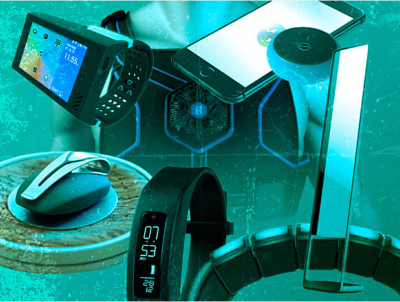
12 Upcoming Fitness Devices to Watch

If you still think Fitbit’s wristbands are the coolest wearables around, you’re behind the times. These lesser-known fitness gadgets are designed to help improve your health, and they’re all worth a look.

FitnessDevices

12 worthy wearables, activity trackers and health gadgets

Everything is “smart” these days, it seems, especially when it comes to gadgets designed to help people improve their health and boost fitness levels. Smart mirrors and body scanners, smart running socks, a smart vest, smart drinking cups, smart sleeves and smart sleep masks are all now available, or will be soon. Many of these Internet of Things things are wearables — except for the “naked 3D” full-body mirror, of course— while others are designed to be carried in a pocket or clipped to a belt or bra.

The following 12 devices, many of which aren’t yet available, are all notable for some reason. So sit back, relax, take a sip from your smart water bottle, and check them out.

FitnessDevices1

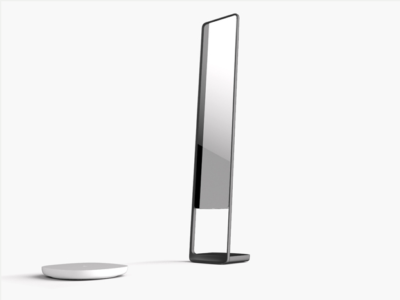
Naked 3D Fitness Tracker

What it is: Naked 3D Fitness Tracker isa full-length mirror with a built-in body scanner, and it’s “the world’s first 3D fitness tracker for consumers,” according to its manufacturer.The mirror incorporates Intel RealSense 3D sensors for body imaging, along with Wi-Fi and Bluetooth for setup and syncing data to its companion mobile app. The included turntable and scale rotates 360 degrees when you step on it. Its goal is to help you better understand your body and visualize progress toward goals.

Cool factor: Using the mobile app, you can create a “custom time lapse” of your body’s progress.

Uncool factor: It’s expensive and won’t be available for almost a year.

Price and availability: Currently available for preorder for $999 (discounted to $599 as of this writing), and it’s expected to ship in March 2017.

FitnessDevices2

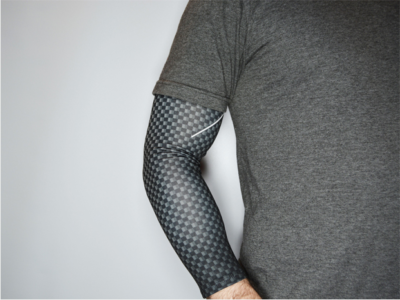
AIO Sleeve

What it is: “The world’s first activity tracking compression sleeve,” AIO Sleeve claims to be more accurate than the average fitness tracker at gathering data, such as heart rate information, because it covers the entire arm, rather than just a wrist. The developer says the sleeve’s sensors go beyond typical step, distance, sleep and heart rate tracking by using ECG and MET readings, which tell you how your body responds to physical activity while you work out, so you know whether to step it up or slow down.

Cool factor: It provides ECG readings for workouts.

Uncool factor: The sleeve can’t possibly be comfortable in hot weather.

Price and availability: Currently available for preorder for between $99 and $130, and it’s expected to ship in September 2016.

FitnessDevices3

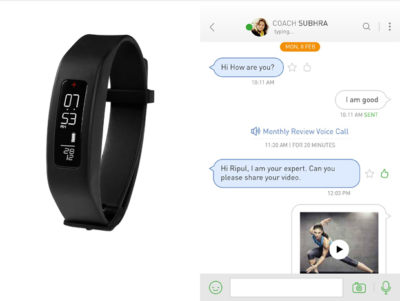
GOQii

What it is: GOQii is a digital fitness coaching service that pairs with a wearable activity tracker, and it’s designed to help you make sense of all the data your tracker collects. GOQii coaches are certified nutritionists, personal trainers and life coaches, and they aim to help you better understand your activity data, as well as use that data to make healthier choices, according to the developer.

Cool factor: The service includes a monthly call with a coach to review your data, and it lets you text message coaches from within the GOQii app. The service integrates with popular wearables from Fitbit, Jawbone, Google and Apple, so you can use it along with many different activity trackers.

Uncool factor: That name. It’s also a little pricey, but the monthly fee includes a tracker.

Price and availability: Currently available for $29 a month.

FitnessDevices4

Neuroon

What it is: A smart sleep mask, Neuroon promises to help you beat jetlag. A “smart pack” is embedded in the eye mask and contains four biometric sensors that measure EEG, EOG, pulse, motion and temperature, along with four LED lights (to help you “reschedule your body clock” when traveling across time zones) and two rechargeable lithium-ion batteries. A companion app syncs sleep data via Bluetooth.

Cool factor: It’s a sleep mask with built-in lights!

Uncool factor: How well will you really be able to sleep while wearing a sleep mask with built-in lights?

Price and availability: Currently available for $299.

FitnessDevices5

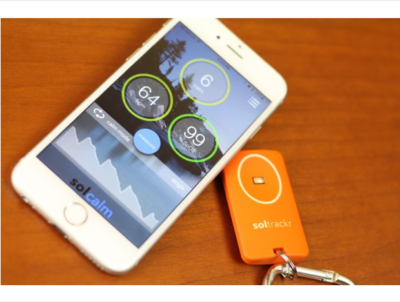
Soltrackr

What it is: Soltrackr is designed to measure UV radiation levels and provide personalized feedback via a mobile app. The device can help you determine how long you should stay in the sun, which SPF level sunscreen you need to apply, and how much vitamin D you absorb. The “wireless health companion” also promises to provide biofeedback, to optimize workouts and manage stress levels. It measures heart rate and blood oxygen levels, as well, and records improvements in cardiovascular fitness.

Cool factor: It’s reasonably priced and fits on a key ring.

Uncool factor: Does anyone really need another gadget to carry?

Availability: Now available for $49, though it’s currently backordered.

FitnessDevices6

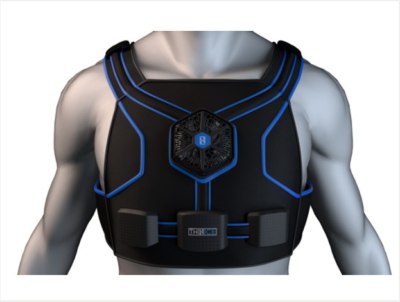
Thin Ice

What it is: Thin Ice is a piece of “smart clothing” that’s designed to be worn under clothes. Its goal is to help your body burn up to 1,000 additional calories each day, if you wear it for four hours. The garment, controlled by a mobile app, reportedly “cools parts of the body with high concentrations of thermo receptors, which stimulate the brown adipose tissue (BAT) pathway.” This specific pathway supposedly burns “bad fat,” which produces heat and eats calories in the process.

Cool factor: It’s supposed to burn calories without its user having to do anything.

Uncool factor: It sounds too good to be true, and the vest looks bulky.

Price and availability: Currently available for preorder for an “early bird” price of $99, and it’s expected to ship in November 2016.

FitnessDevices7

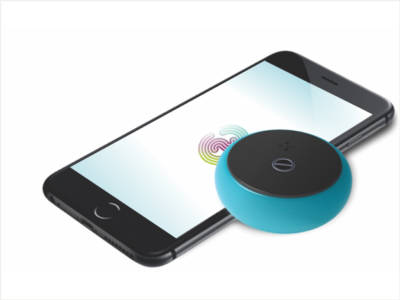
Zenytime

What it is: Zenytime is a Bluetooth-enabled puck that fits in a pocket, and you can whip it out, and then blow into it to measure two stress biomarkers: heart rate variability, and respiratory sinus arrhythmia. The developer says Zenytime checks “the actual impact of stress on [users’] brains and bodies in real-time.” The gadget, when paired with a mobile app, employs interactive breathing games to collect your baseline data and coach you toward reducing stress.

Cool factor: It’s available in multiple colors.

Uncool factor: If you don’t like games, you probably won’t like Zenytime.

Price and availability: Currently available for preorder for $99, and it’s expected to ship in June 2016.

FitnessDevices8

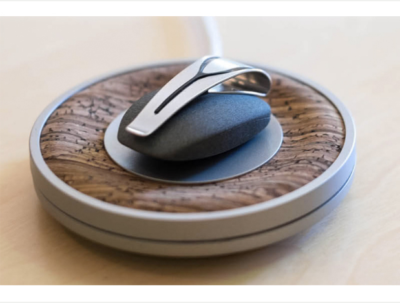
Spire

What it is: Spire is a small gadgetthat clips to a belt or bra, and it is designed to help you manage stress by monitoring your breathing patterns via the rise and fall of your chest or stomach. The device pairs with an iOS app, which charts inhales and exhales in real-time and provides alerts when your breathing patterns suggest you’re stressed. The app also provides guided meditation exercises.

Cool factor: Spire, which looks like a stone with a clip, “can tell you you’re stressed before you’re even aware of it yourself,” according to Outside magazine.

Uncool factor: A Forbes reviewer says he “occasionally got false reads.”

Price and availability: Currently available for $150.

FitnessDevices9

Rufus Cuff

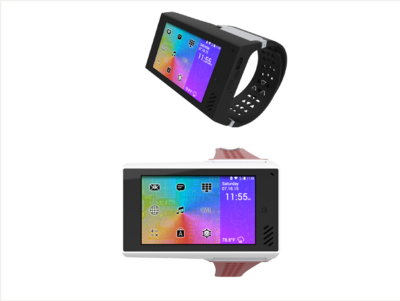
What it is: Rufus Cuff is an Android OS-based “wrist communicator” with a 3.2-inch color display that works as a standalone device for video and voice communications over Wi-Fi networks. The Cuff has an accelerometer, gyroscope and compass, as well as GPS for activity tracking. It’s designed for consumers and industrial users, and the developer says it can easily integrate into B2B communication networks that have an existing Wi-Fi infrastructure.” Rufus Cuff can also run apps, surf the Web, and do basically anything that an Android device can.

Cool factor: It’s a tiny tablet you wear on a wrist, and it’s made in the United States.

Uncool factor: Do you really want to wear a tiny tablet on your wrist?

Price and availability: Currently available for preorder for $299, and it’s expected to ship in July 2016.

FitnessDevices10

Sensoria Fitness Running System

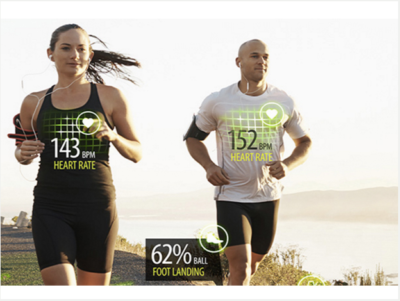
What it is: Sensoria’s Fitness Running System combines two pairs of “smart socks,” two anklets, and a sports bra for women, or a smart t-shirt for men. The system measures steps, calories and pace to provide running feedback, such as how your feet land. The sports bra and shirt both monitor heart rate. Everything connects to the Sensoria Fitness mobile app. The developer recently released a new iOS app, Sensoria Walk, that’s designed to track steps, distance and cadence, and it’s meant for use by consumers and patients in rehab following a stroke or surgical procedure.

Cool factor: You don’t need to wear a chest strap or wristband for heart rate monitoring, and you get feedback on running performance.

Uncool factor: It’s a bit pricey.

Price and availability: Available now for $399 for men, and $389 for women.

FitnessDevices11

Nex

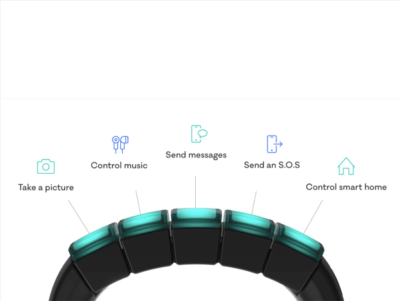
What it is: The Nex band is a modular wristband that features five touch-sensitive, LED-lit modules, called “Mods,” which snap on and off. Each Mod can be programmed using an iOS app, to do things such as track activities, control music, take pictures (via a connected smartphone), and manage smart home devices. Integration with thepopular IFTTT service lets you create other, similar “hacks,” as well. Nex’s developer offers an SDK and API to encourage third-party companies to add more functionality to its Mods.

Cool factor: The Wall Street Journal says Nex “feels like what the Apple Watch was supposed to be.”

Uncool factor: If you already wear an Apple or Android smartwatch, a Fitbit or other band, do you have any more room on your wrists for another wearable?

Price and availability: Available for preorder for $99, and it’s expected to ship during the summer of 2016.

FitnessDevices12

Vessyl

What it is: Vessyl is a”smart cup” that reportedly measures and tracks “everything you drink” from it, according to the developer. Trying to cut down on caffeine? The cup can track how much you consume. Want to lose weight? Vessyl tells you how many liquid calories you quaff. Need to cut out sugar? Vessyl monitors your liquid sweet-treat intake. Its associated mobile app shows stats and lets you set up “lenses” to track goals.

Cool factor: The cup looks sleek.

Uncool factor: It’s been in development since at least 2014 and is still not available.

Price and availability: Projected price is $199, but it’s unclear when Vessyl will be released.

Have questions?

Get answers from Microsofts Cloud Solutions Partner!
Call us at: 856-745-9990 or visit: https://southjerseytechies.net/

South Jersey Techies, LL C is a full Managed Web and Technology Services Company providing IT Services, Website Design ServicesServer SupportNetwork ConsultingInternet PhonesCloud Solutions Provider and much more. Contact for More Information.

To read this article in its entirety click here.
If Microsoft can’t install Windows 10 on your PC, it’ll give you a new one

Terms and conditions apply, but if the company’s stores can’t perform a same-day upgrade on your Windows 10-compatible PC, it’ll give you a new Dell notebook.

Windows 10- SJTechies

As the free Windows 10 upgrade offer nears its end on July 29, Microsoft is pulling out all the stops to convince users to upgrade. It’s even willing to give you a new laptop.

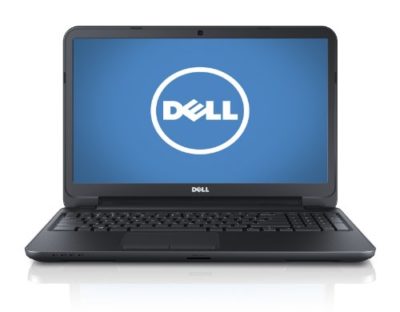
As spotted, Microsoft retail stores are offering to install Windows 10 on any compatible machine for free. If the store’s technicians don’t complete the upgrade by the end of that business day, they’ll give you a free 15-inch Dell Inspiron notebook.

The offer runs between now and July 29.

There is, of course, plenty of fine print. The free installation offer only applies to a single PC that’s capable of running Windows 10 (If it isn’t, you may be eligible for a $150 credit toward a new PC). You also need to check in your computer by noon for the offer to be valid. It’s also limited only to the US and Canada, so customers of the Microsoft Store in Sydney are out of luck.

The story behind the story: This free PC offer is the latest in a series of highly aggressive moves Microsoft has made to get its users onto Windows 10. Its deceptive, malware like pop-ups in Windows 7 and 8.1 effectively trick users into installing Windows 10, whether they want to or not. Windows 10 spiked in market share in June, seemingly as a result of these forced updates, but the company has since admitted that it likely won’t hit its goal of having Windows 10 on one billion devices by mid-2018.

Have questions?

Get answers from Microsofts Cloud Solutions Partner!
Call us at: 856-745-9990 or visit: https://southjerseytechies.net/

South Jersey Techies, LL C is a full Managed Web and Technology Services Company providing IT Services, Website Design ServicesServer SupportNetwork ConsultingInternet PhonesCloud Solutions Provider and much more. Contact for More Information.

To read this article in its entirety click here.
200M Now Use Windows 10 In The Enterprise

The latest numbers from the company show businesses are close to schedule to move away from Windows 7 before the older OS retires in early 2020.

Windows10 Enterprise

Microsoft on Tuesday said that some 200 million enterprise workers now run Windows 10, a sign that corporations and other businesses are close to schedule to scrub Windows 7 from their machines before that older OS retires in about 20 months, an analyst argued.

“The 200 million resonates with me, based on what I’m hearing from clients,” said Stephen Kleynhans of Gartner Research. Migrations to Windows 10, he added, are progressing “pretty aggressively.”

Joe Belfiore, a corporate vice president who leads the Windows 10 team, revealed the number at Microsoft’s Build developers conference Tuesday. “Right now, there are over 200 million people in corporate accounts using Windows 10,” Belfiore said as he claimed deployment is “really ramping up” in the enterprise. “We’ve seen that [Windows 10] adoption rate increase now at 79% year-over-year growth.”

The day before, Microsoft contended that “nearly 700 million” devices are running Windows 10 worldwide. On that basis, enterprises accounted for less than 30% of all copies of Windows 10.

(Although the two numbers – Belfiore’s 200 million people using Windows 10 in corporate settings and Microsoft’s 700 million devices powered by the operating system – measured two different things, it’s not uncommon for Microsoft to obfuscate this way to prevent direct comparisons. In actuality, because Microsoft typically sells licenses on a per user basis, with multiple devices allowed for each user, 200 million people may be using more than that number of Windows 10 devices.)

While neither the percentage nor the 200 million are to be sneezed at, the former is significantly less than the average overall for commercial PCs, which have historically accounted for more than half – 55% has been an often-cited figure – of all personal computers.

And while Kleynhans did not dispute Microsoft’s claim of 200 people running Windows 10 in the enterprise, he sounded a bit disappointed in the number. “Is it a low number? It’s a little behind where I thought it would be,” Kleynhans said, noting that he expected it to be around 250 million by this point, perhaps even close to 300 million.

That 2009 operating system will fall off Microsoft’s support list on Jan. 14, 2020, meaning that while Windows 7 will continue to work as before, the Redmond, Wash. will stop distributing security updates to it.

It’s unrealistic to expect that all commercial customers will have purged Windows 7 by the retirement date, Kleynhans said, pointing out that he has recently spoken with clients who still run some instances of Windows XP (retired from support in 2014) and even Windows 98 (2006).

“What we [Gartner] expect is that enterprises will get to the 85%-90% level by the deadline,” Kleynhans said of the percentage of corporate devices shifted to Windows 7, “maybe even a little higher than that.” Nothing that’s happened has changed that estimate, he added.

“There are always laggards,” Kleynhans said.

According to other metrics, there may be a considerable number of them.

Estimates from analytics vendors, including U.S.-based Net Applications, which measure user and usage shares, signal that a large resorvoir of Windows 7 users will remain after the operating system’s retirement in 20 months. Net Applications’ latest data, for example, drove a Computerworld forecast that of the world’s Windows personal computers – all the PCs, not just those in the enterprise – 42% would still be running Windows 7 in January 2020, a much larger percentage than the 29% powered by Windows XP when that edition fell off the support list in April 2014.

In the end, large organizations will do what it takes to get off Windows 7 and onto Windows 10 by the former’s support cut-off date. The 200 million touted by Belfiore this week will be quite different a year from now, Kleynhans was certain.

“The speed with which I see Windows 10 moving now, it’s not going to be an issue,” he said.

Windows 10 deployment is, like previous iterations of the OS, on a timetable not of its own making. Instead, because of the vagarities of Microsoft’s historical release schedule and corporate acceptance (or rejection) of some editions, there is a clock ticking on Windows 10 because of the impending retirement of the current corporate standard, Windows 7.

Have questions?

Get answers from Microsofts Cloud Solutions Partner!
Call us at: 856-745-9990 or visit: https://southjerseytechies.net/

South Jersey Techies, LL C is a full Managed Web and Technology Services Company providing IT Services, Website Design ServicesServer SupportNetwork ConsultingInternet PhonesCloud Solutions Provider and much more. Contact for More Information.


CALL US NOW!