Back to Top

Tech, Web, Cloud & Cabling Services

Category: BigBeagle.com

BigBeagle.com Category

Go Daddy Posts Workaround for 60-Day Lock


I just found out from fellow domain blogger Kevin Murphy of DomainIncite that domain registrar Go Daddy has finally posted a workaround to their 60-day lock. Apparently their doing this is a response to the modified ICANN transfer policies taking effect since June 1, 2012.

One of the most common complaints I’ve encountered about domain registrar Go Daddy is their arbitrary 60-day transfer lock. In case you just came in, Go Daddy can prevent your domain name from being transferred to another domain registrar for 60 days if a certain condition is met.

All domain registrars have a rule wherein you can’t move your domain name to another registrar if it’s within its first 60 days of registration or recent transfer-in from elsewhere. Go Daddy is currently the only one who puts in another 60-day transfer lock on top of those.

Initially, Go Daddy’s 60-day transfer lock kicks in if the registrant or administrative contact’s name or contact details is changed. Go Daddy since evolved their 60-day lock to only if the registrant name is changed for whatever reason.

Before I describe the workaround, it might be important to know what ICANN’s recent policy change is, and how this affected Go Daddy.

ICANN mostly made just some language changes in their transfer policy among registrars, but there is one major change relevant to this. Namely:

Upon denying a domain transfer request for any of the following reasons, the Registrar of Record must provide the Registered Name Holder and the potential Gaining Registrar with the reason for denial. The Registrar of Record may deny a domain transfer request only in the following specific instances:

Express objection to the transfer by the authorized Transfer Contact. Objection could take the form of specific request (either by paper or electronic means) by the authorized Transfer Contact to deny a particular transfer request, or a general objection to all transfer requests received by the Registrar, either temporarily or indefinitely. In all cases, the objection must be provided with the express and informed consent of the authorized Transfer Contact on an opt-in basis and upon request by the authorized Transfer Contact, the Registrar must remove the lock or provide a reasonably accessible method for the authorized Transfer Contact to remove the lock within five (5) calendar days.

I bolded the portion starting from “a general objection” to indicate ICANN’s recognizing Go Daddy’s 60-day lock. However, they’re also requiring the registrar to allow the “authorized Transfer Contact” a means to do away with that within five calendar days.

In short, Go Daddy is being allowed to maintain their 60-day thing, yet allow the domain’s registrant or so a way to get around that if ever. The wording can be argued either way, but all this is a means of balancing competing interests.

I bolded the portion starting from “a general objection” to indicate ICANN’s recognizing Go Daddy’s 60-day lock. However, they’re also requiring the domain registrar to allow the “authorized Transfer Contact” a means to do away with that within five calendar days.

In short, Go Daddy is being allowed to maintain their 60-day thing, yet allow the domain’s registrant or so a way to get around that if ever. The wording can be argued either way, but all this is a means of balancing competing interests.

Domain Name Wire also has more from Go Daddy’s director of policy planning James Bladel:

“We understand our 60 day lock has been controversial,” said James Bladel, Director, Policy Planning for Go Daddy. “What is boils down to is, while it’s a very good tool for intercepting and preventing hijacking…we recognize that our efforts to address that problem shouldn’t be a hindrance to legitimate users of domain names that want transfers to be a little more simple.”

Kevin quotes Bladel’s rationale further:

“The bad guys are not going to call and ask us to take a second look at this,” he said. “The bad guys want it to happen under the radar.”

Bladel explains the lock can be lifted after a human review unless they suspect a hijacking is going on. Additionally, the domain name’s WHOIS information is changed to its original state.

I think that second part is going to pose some problems, particularly on ownership changes after a recent sale. Time will tell how this goes, and Go Daddy is surely going to adjust to that if need be.

So step by step, here’s how it goes:

1. If you change your domain name’s registrant name at Go Daddy, it turns on their 60-day transfer lock. They do post notices of this before you make the change, and they do email about it. (unless caught by your spam filter, knock on wood…)

2. You’ll get an email with an email address to contact a team at Go Daddy to appeal the lock.

I’m sure some of you wish it’s a way to call that team directly instead. Would be nice if Go Daddy accomodates that, though I also know they “need” to control that if ever.

I wish they thought of this sooner rather than have to inconvenience a lot of people unnecessarily because of this, though I know some people want this done away instead. Like I said, it’s a matter of balancing competing interests.

In any case, at least there’s now an option to go around their 60-day lock. 

To View Full Article Click Here

Our highly trained, courteous support staff is waiting to take your call. Whatever time it takes to assist you, that’s the time you’ll receive. We’ll resolve any issue to your complete satisfaction.

Call (856) 745-9990 to get started now or click here

Increase Sales & More with Site Analytics

Get the insight you need to succeed on the Web.

The key to any successful website is knowing your visitors. Site Analytics gives you the valuable, real-time data you need – information you can use to spotlight popular products, target new customers, track offer responses and much more. With over 30 detailed reports, you can find out where your visitors are coming from, what paths they take through your site, even where in the world they live.

Stats at-a-glance

  • Get the information you want – without having to click through countless screens – with our customizable dashboard view.

Real-time results

  • With Site Analytics’ real-time statistics, you don’t have to wait until tomorrow to find out if changes to your site are working. Plus, heat mapping and pinpoint functionality tell you which sections or links are getting the most attention.

In-depth reporting

  • Dig into the details and get a better understating of your customers with more than 30 reports. Find out who’s visiting, when they’re on your site, how they’re getting there and much more.

Choose your view

  • Site Analytics lets you decide how you want to view your data with three graphing options (Bar, Area and Line) as well as the ability to export to Microsoft Excel® or Adobe® PDF.

Powerful, easy-to-use features let you dig as deep as you want.

Everyone wants something different from their site statistics. Some people want a quick, birds-eye view; others want to get lost in the details. That’s the beauty of Site Analytics; it works for everyone. Our user-friendly interface and intuitive features put you in control so you can get exactly what you want.

See what’s happening

  • Get a quick overview of your site’s traffic and visitors with a selection of dashboard widgets.
  • Real-time statistics let you see, almost instantly, how changes to your site impact your traffic.
  • Improve your site’s structure and usability by seeing where people click and which links get the most attention with heat mapping.

Organize your data

  • Find the information you need with more than 30 reports in several categories: Visitor, Page, Referrer and Server.
  • Visualize the data the way you want with three different graphing options: Bar, Area and Line. Plus, set custom date ranges to target your results!
  • Share your data with co-workers and clients by exporting to Microsoft Excel® or Adobe® PDF. You can even create a schedule to email customized reports.
  • Get separate reports for each alias and subdomain — simply add them as separate Site Analytics accounts.

And much more

  • Easily collect stats on your WordPress® site with our free Site Analytics plugin.
  • Enable secure (SSL) mode to encrypt your data so it can’t be viewed by others during transmission.
  • Analyze long-term trends and improvements with up to 6 months of Log File data.
  • Use Site Analytics with any website, whether you host with us or a third party.


Our highly trained, courteous support staff is waiting to take your call. Whatever time it takes to assist you, that’s the time you’ll receive. We’ll resolve any issue to your complete satisfaction.

Call (888) 505-1532 to get started now or click here

Uninstall now! Apple abandons QuickTime for Windows despite lingering critical flaws

Apple is giving up on QuickTime for Windows.

Yet another program is joining Java 6 and Windows XP as big-name software you do not want running on your PC. Security firmTrend Micro and the U.S. Department of Homeland Security are advising all Windows users to uninstall Apple’s QuickTime as soon as possible. (The advisory does not affect Mac users.)

The reason for getting rid of QuickTime for Windows is twofold. First, Apple told Trend Micro it is deprecating the software and will no longer deliver security updates for it. Second, there are two known critical vulnerabilities that could allow an attacker to take control of a system running QuickTime.

That’s a hellacious combo.

Apple was unavailable for comment at this writing, but a quick look at QuickTime’s download page shows the software is still publicly available. It hasn’t been updated since at least January, however.

Trend Micro says it does not yet know of any instances where the two potential security threats are being used in the wild but that could change. Trend Micro’s Zero Day Initiative recently published some technical details about the vulnerabilities. ZDI did this because its disclosure policy requires it to publish threat information when a “vendor indicates that the product is deprecated,” and thus won’t be patched.

If you’re a longtime user of iTunes you may be running QuickTime. To dump the program, open the Control Panel on your PC and then from the “category” view go to Programs > Uninstall a program. Once the list of installed programs populates, scroll down until you find QuickTime. Select it with your mouse, and then click Uninstall towards the top of the window. A pop-up window will then appear asking to confirm that you want to uninstall the program. Click Yes and you’ll be QuickTime-free in no time.

A survey published by Secunia Research in late 2015 found that Apple software is among the programs that are updated the least often by Windows users.

Why this matters: Whenever software is about to be abandoned it’s always a good idea to move away from it—or at least start planning to. That goes double for software with known flaws that allow the bad guys to execute code on your machine. QuickTime used to be an important piece of software for Windows users. But these days you don’t need it to watch movie trailers on Apple’s site and it’s no longer used by iTunes to play media on Windows. There’s little reason for the vast majority of Windows users to keep QuickTime on their PCs.

Have questions?

Get answers from Microsofts Cloud Solutions Partner!
Call us at: 856-745-9990 or visit: https://southjerseytechies.net/

South Jersey Techies, LL C is a full Managed Web and Technology Services Company providing IT Services, Website Design ServicesServer SupportNetwork ConsultingInternet PhonesCloud Solutions Provider and much more. Contact for More Information.

To read this article in its entirety click here.

Old Windows PCs can stop WannaCry ransomware with new Microsoft patch

In a rare step, Microsoft published a patch for Windows XP, Windows Server 2003 and Windows 8

Users of old Windows systems can now download a patch to protect them from this week’s massive ransomware attack.

In a rare step, Microsoft published a patch for Windows XP, Windows Server 2003 and Windows 8 — all of them operating systems for which it no longer provides mainstream support.

Users can download and find more information about the patches in Microsoft’s blog post about Friday’s attack from the WannaCry ransomware.

The ransomware, which has spread globally, has been infecting computers by exploiting a Windows vulnerability involving the Server Message Block protocol, a file-sharing feature.

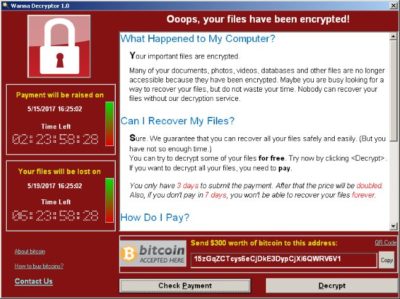
Computers infected with WannaCry will have their data encrypted, and display a ransom note demanding $300 or $600 in bitcoin to free the files.

Fortunately, Windows 10 customers were not targeted in Friday’s attack. In March, Microsoft patched the vulnerability that the ransomware exploits — but only for newer Windows systems. That’s left older Windows machines, or those users who failed to patch newer machines, vulnerable to Friday’s attack.

Researchers originally believed the ransomware was spread through attachments in email phishing campaigns. That no longer appears to be the case.

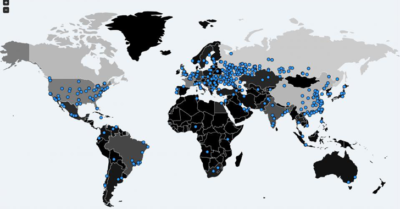
Infection attempts from the WannaCry ransomware.

Once a vulnerable PC becomes infected, the computer will attempt to spread to other machines over the local network as well as over the internet. The ransomware will specifically scan for unpatched machines that have the Server Message Block vulnerability exposed.

Businesses can prevent this by disabling the Server Message Block protocol in vulnerable PCs. They can also use a firewall to block unrecognized internet traffic from accessing the networking ports the Server Message Block uses.

Fortunately, Friday’s ransomware attack may have been contained. A security researcher who goes by the name MalwareTech has activated a sort of kill-switch in WannaCry that stops it from spreading.

As a result, over 100,000 new infections were prevented, according to U.K.’s National Cyber Security Centre. But experts also warn that WannaCry’s developers may be working on other versions that won’t be easy to disable.

“It’s very important everyone understands that all they (the hackers) need to do is change some code and start again. Patch your systems now!” MalwareTech tweeted.

Unfortunately, the kill-switch’s activation will provide no relief to existing victims. The ransomware will persist on systems already infected.

Friday’s ransomware attack appears to have spread mainly in Europe and Asia, with Russia among those nations hardest hit, according to security researchers.

Security experts are advising victims to wait before paying the ransom. It’s possible that researchers will develop a free solution that can remove the infection.

Have questions?

Get answers from Microsofts Cloud Solutions Partner!
Call us at: 856-745-9990 or visit: https://southjerseytechies.net/

South Jersey Techies, LL C is a full Managed Web and Technology Services Company providing IT Services, Website Design ServicesServer SupportNetwork ConsultingInternet PhonesCloud Solutions Provider and much more. Contact for More Information.

To read this article in its entirety click here.

Symantec Endpoint Protection (SBE)- Upgrading the cloud agent

Symantec has recently become aware of a medium vulnerability in older versions of the server agent. The latest version addresses this vulnerability in new installations and was released February 15th, 2017. Server agents that are not already upgraded will be identified in the SEP SBE cloud management console starting on March 8th. A manual upgrade will be required to ensure you have the latest protection.

Microsoft Office 2013 End of Life: What You Need to Know

Microsoft Office 2013 was a popular productivity suite that included several essential tools such as Word, Excel, PowerPoint, and Outlook. It was released in 2013 and was widely used by individuals, businesses, and organizations of all sizes. However, like all software products, Microsoft Office 2013 has reached its end of life, and users are now advised to upgrade to Microsoft 365, the cloud-based version of Microsoft Office.

drawing of a man holding a laptop in front of a very large laptop with "update" on the screen and a wrench in front

What Does End of Support Mean?

End of life, or EOL, refers to the point in time when a software product is no longer supported by the manufacturer. In the case of Microsoft Office 2013, this means that Microsoft will no longer provide technical support, bug fixes, security updates, or new features for this product. This makes the software more vulnerable to cyberattacks, viruses, and malware. Continuing to use Microsoft Office 2013 after the end of life date could result in data loss, security breaches, and other serious problems.

  • This means that Microsoft will no longer provide any updates or support for this software product beyond this date. Users who continue to use Microsoft Office 2013 after this date do so at their own risk.

If you’re using Office 2013, it’s probably a good time to upgrade your version of Microsoft Office.

Upgrade Options

The best way to protect yourself and your organization is to upgrade to a newer version of Office:

  • Cloud upgrade: Subscriptions to Microsoft 365
  • Box Version: Microsoft Home And Business 2021

Microsoft 365

Microsoft 365 is an all-in-one cloud solution with a number of different licensing options to fit your organization’s needs. The best part about cloud-based applications is that you no longer have to worry about retirements, patches, and end of support. Cloud licenses are automatically updated with new features, new applications, and security updates. Many cloud subscriptions also include installed (or desktop) versions of the application, so you can have the same look and feel of the Office applications you are accustomed to using, but built with more robust features and benefits.

Microsoft Home And Business 2021

Office Home and Business 2021 is for families and small businesses who want classic Office apps and email. It includes Word, Excel, PowerPoint, and Outlook for Windows 11 and Windows 10. A one-time purchase installed on 1 PC or Mac for use at home or work.


If you have any questions, please email us at support@sjtechies.com or call us at (856) 745-9990.

What Terms You Need to Know to Get Your Business GDPR-Ready


What Is EU GDPR? 

The EU GDPR is a law designed to protect and empower residents of the EU by guiding business usage of personal data. In essence, it is reshaping the way corporations handle personal data by controlling its collection, use, and storage. It will replace the regulations and frameworks of the existing 20-year-old directive (95/46/EC).


Who Is the GDPR Protecting and Empowering? 

The data subject: This is any individual that can be directly or indirectly identified or uniquely singled out in a group of individuals, from any stored data.


What Is the GDPR Protecting? 

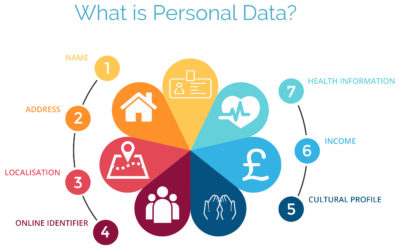
Personal data: This is any information relating to an individual, whether in reference to their private, professional, or public life. It includes things like names, photos, email addresses, location data, online identifiers, a person’s bank details, posts on social networking websites, medical information, work performance details, subscriptions, purchases, tax numbers, education or competencies, locations, usernames and passwords, hobbies, habits, lifestyles, or a person’s computer’s IP address.


Who Is the GDPR Regulating? 

The data controller: This is the person who, alone or jointly with others, determines the purposes for, and means of, processing personal data. A data controller is not responsible for the act of processing (this falls to the data processor); they can be defined as the entity that determines motivation, condition, and means of processing.

Generally, the role of the controller is derived from the organization’s functional relation with the individual. That is, a business is the controller for the customer data it processes in relation to its sales, and an employer is the controller for the employee data they process in connection with the employment relationship.


Who Else Is the GDPR Regulating? 

Data processors: This is the person who processes personal data on behalf of the controller. Typical processors are IT service providers (including hosting providers) and payroll administrators. The processor is required to process the personal data in accordance with the controller’s instructions and take adequate measures to protect the personal data. The GDPR does not allow data processors to use the personal data for other purposes beyond providing the services requested by the controller.


What Does the GDPR Consider “Processing?” 

Processing refers to any operation or set of operations performed upon personal data, whether or not by automatic means—such as collection, recording, organization, storage, adaptation or alteration, retrieval, consultation, use, disclosure by transmission, dissemination or otherwise making available, alignment or combination, blocking, erasure, or destruction. Processing must be fair and lawful, although transparency is significantly strengthened. The processor may not use the personal data for their own purposes.


What Rights Do the Data Subjects Have? 

Under the GDPR, data subjects can request the following:

  • To be informed about the data processing
  • To consent to the processing of their personal data (opt in) or object to the processing of their personal data (opt out)
  • To obtain their personal data in a structured and commonly used format in order to transfer that data, in certain circumstances, to another controller (data portability)
  • To not be subject to fully automated data processing or profiling
  • To know what data is processed (right of access)
  • To correct where any data is incorrect
  • To have data erased under certain circumstances, for example, where the retention period has lapsed or where consent for the processing has been withdrawn (referred to commonly as the “right to be forgotten”) and to register a complaint with the supervisory authority


Other Key Elements to Consider in Preparing for GDPR

We’re not done yet. There are four more important elements to consider with GDPR as you become ready.


1) Data Breach Notification

For controllers, GDPR requires that breach notice must be provided, where feasible, within 72 hours of becoming aware of a breach; processors need to provide notice to controllers without undue delay. Any data breaches must be documented.

2) Data Minimization

This requires the level and type of data being processed to be limited to the minimum amount of data necessary. This requires you to ensure that the purpose in which the data is agreed and the purpose in which the data was collected are materially similar. The processors should ensure that individuals’ privacy is considered at the outset of each new processing, product, service, or application, and only minimum amounts of data are processed for the specific purposes collected and processed.

3) Data Pseudonymization

The GDPR defines pseudonymization as “the processing of personal data in such a way that the data can no longer be attributed to a specific data subject without the use of additional information.” To pseudonymize data, the “additional information” must be “kept separately and subject to technical and organizational measures to ensure non-attribution to an identified or identifiable person.” In other words, it is a strategy designed to enhance protection and privacy for applicable identifying data.

Although similar, anonymization and pseudonymization are two distinct techniques that permit data controllers and processors to use de-identified data. The difference between the two techniques rests on whether the data can be re-identified.

4) Fair Processing of Personal Data

This requires the processing of personal data to be fair and lawful. Generally, only the level and type of data collected should be limited to the minimum amount of data necessary (see data minimization above). There are a number of methods in which the data may be processed, including: express consent (which may be withdrawn at any time), legitimate interest basis (the subject of which legitimacy may be challenged by the data subject), honoring obligations under the agreement with the data subject, or any other legal basis that may apply.


What We Can Do to Help

We know this information can be overwhelming, but taking the proper steps now will save you headaches later. SolarWinds provides products that can help you with getting ready. Our Risk Intelligence software is one of them, providing you with hard data on:

  • A business’ quantified financial risk
  • Personally identifiable information (PII)
  • Protected health information
  • Payment information located in storage
  • Access permissions for sensitive data

Search your ‘data at rest’ for risk areas and start the data mapping you need to get ready for GDPR.

Google and AT&T: Fighting Fiber with Fiber

Google fiber is coming to your town. But not without a fight. After Louisville, Kentucky approved legislation that would allow Google Fiber to piggyback on pre-existing telecommunication infrastructure, AT&T sued the city.


“The ordinance in question, known as “One Touch Make Ready,” essentially allows Google (or any other ISP) to install its equipment on existing utility poles, including those owned and maintained by AT&T. Despite strong opposition from AT&T and Time Warner Cable, the ordinance passed with a 23-0 vote.”

AT&T claimed a need to defend past infrastructure investment, and that the ordinance violates current telecommunication rules. The city of Louisville countered claiming, “gigabit fiber is too important to our city’s future.” Google pledged to support the city.

Have questions?

Get answers from Microsofts Cloud Solutions Partner!
Call us at: 856-745-9990 or visit: https://southjerseytechies.net/

South Jersey Techies, LL C is a full Managed Web and Technology Services Company providing IT Services, Website Design ServicesServer SupportNetwork ConsultingInternet PhonesCloud Solutions Provider and much more. Contact for More Information.

To read this article in its entirety click here.


Research: Apple rated highest for security on mobile devices

Mobile devices are almost universal in the enterprise in 2016. Tech Pro Research conducted a survey to see what devices employees are using for work, and how safe these devices are.

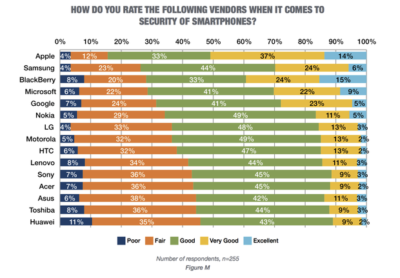
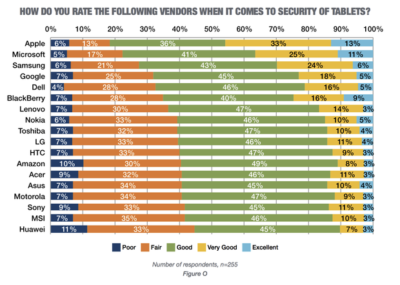
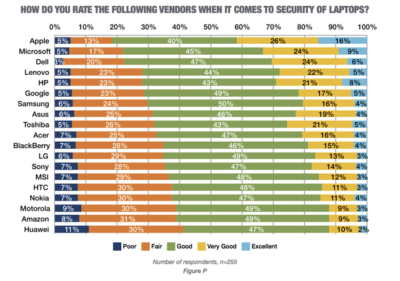
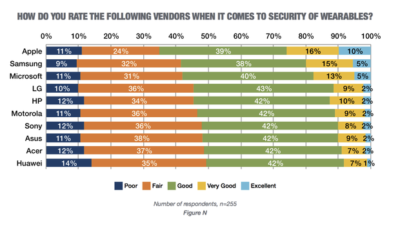
In new research conducted by Tech Pro Research, 98% of respondents said they use mobile devices for work. Smartphones and laptops were the most common, with 94% of respondents who use mobile devices using them. 74% of mobile device users said they work with tablets. Wearables haven’t found a widespread usage base in the workplace, with only 14% reporting using them. When users rated the security of devices based on vendors, Apple got the best ratings in all categories.smartphones

For smartphones Apple’s high ratings could be partially attributed to familiarity since 67% of respondents said employees at their company use iPhones. Only Samsung was close to Apple in terms of prevalence, and the company was way behind Apple in security ratings.

tablets

Apple also had the largest share of tablet use, and the highest security rankings, among respondents. 53% said they and their colleagues use iPads and 46% of users ranked security as very good or excellent.

laptops

Dell was the most popular brand among respondents, in terms of use for work, but it got third place in security ratings.

wearables

Security on wearables appears to still be developing, based on the mediocre security ratings among all brands, and the fact that security feature usage isn’t the norm for wearables yet.

Have questions?

Get answers from Microsofts Cloud Solutions Partner!
Call us at: 856-745-9990 or visit: https://southjerseytechies.net/

South Jersey Techies, LL C is a full Managed Web and Technology Services Company providing IT Services, Website Design ServicesServer SupportNetwork ConsultingInternet PhonesCloud Solutions Provider and much more. Contact for More Information.

To read this article in its entirety click here.

CALL US NOW!