Back to Top

Tech, Web, Cloud & Cabling Services

Category: Tips & Info

Tips & Info Category

Researching Your Competition for SEO

Curious about what your competition does for Search Engine Optimization (SEO)? If your answer is a resounding “yes,” then you’re ready to take your SEO to the next level.

Checking out your competition and learning which keywords they use can help you refine your strategy. This is a common form of analysis to use on any website, whether it’s your competitor’s site or your favorite website.

You can identify your competitor’s keywords in a few different places on their website:

Keywords in the Code — Start by checking out their meta tags, such as the title tag or the keywords tag. Typically, the first keyword in a title tag is usually the most important. Use these steps to view the code:

  1. Go to the website, and then right-click the page.
  2. Click View Source. A new window opens with the website’s code.

The <title>tag is near the top of the page. If the site includes it, the meta name=”keywords”tag should be a few lines below. Both of these contain your competitor’s keywords.

Keywords in the Text — Checking out your competitor’s content for keywords also helps you analyze your competition. A keyword density checker (search “keyword density checker” in any search engine) can quickly determine which keywords are prominent in their copy. Or, you can simply use “find” (press CTRL-F on your keyboard) to search for specific keywords.

Assuming your competitors follow SEO best practices, it takes only about 10-15 minutes to check these things out and learn some of the ways they handle SEO for their site.

Our highly trained, courteous support staff is waiting to take your call. Whatever time it takes to assist you, that’s the time you’ll receive. We’ll resolve any issue to your complete satisfaction.

Call (856) 745-9990 to get started now or click here

Mobile Device Management (MDM)

SJT Support helps enterprises perform mobile device management to configure and secure their mobile devices from a central place. It simplifies the work of administrators by making them perform both desktop management and mobile device management using a single console.Enterprises have to scrutinize the devices that enter inside the company. It can be a corporate owned or personal device (BYOD).

SJT Support Mobile Device Management (MDM) allows you to perform the following:

  • Enrollment of Devices
  • Profile Management
  • Asset Management
  • Application management

Supported Mobile Devices

Apple iPhone, IPad, IPod Touch running iOS 4 and above.

Enrollment:

  • Over-the-Air (OTA) enrollment of devices
  • Manually enroll mobile devices for management
  • Bulk enrollment of mobile devices using a CSV file
  • Authenticate enrollment with a one-time passcode and/or user’s Active Directory credential.

Profile Management:

  • Configure Policies/Profiles – Configure policy settings to access enterprise resources.
  • Restrict – Restrict the use of camera, youtube, safari browser, etc.
  • Corporate access – Provide access to corporate accounts like Email, Wi-Fi, VPN.
  • Device Group – Create a logical group of devices based on department, location, or to distinguish corporate and BYOD and apply policies, restrictions and distribute Apps to all devices in the group.

Asset Management:

  • Get complete information about the device like device details, certificates, installed Apps, etc.
  • Get complete visibility about the devices with out-of-the-box reports.

Application Management:

  • Manage and distribute both in-house and App Store Apps
  • Integrates with Apple Volume Purchase Program (VPP) for hassle free distribution of commercial Apps.
  • Publish the Apps in App Catalog for users to choose and install the Apps themselves.

Security Management:

  • Passcode: Enforce strict passcode to prevent unauthorized access
  • Remote Lock: To prevent misuse of misplaced/lost devices
  • Complete Wipe: To prevent data loss/theft by erasing all the device data making it as good as new.
  • Corporate Wipe: To remove only the corporate data leaving the personal data like contacts, photos, etc. Useful for BYOD when the employee leaves the company.

Audit and Reports:

  • Audit devices that are inactive or have installed a specific App
  • Check whether the devices are passcode compliant.
  • Out-of-the-box reports on Apps by Devices, Devices by Model, etc.

For more information on Mobile Device Management please contact our support team by email at sales@sjtechies.com or by telephone at (856) 745-9990.

Use AutoText to Save Multiple Return Addresses

Takeaway: If you work with multiple return addresses, you don’t have to enter those addresses manually as you use them; use Word’s AutoText feature instead.

Word uses the Mailing Address entered via the options as the return address on envelopes generated by the Envelope wizard. It’s convenient and efficient. You enter the address once, but the wizard uses it for all your envelopes, until you change or delete the address This is a great setup, unless you have more than one return address. In that case, you can delete the default address and enter the second address, when you need to, but there’s an easier way – save the second address as AutoText.

First, let’s review how to store a return address for the wizard:

  1. Click the File tab and choose Options (under Help). In Office 2007, click the Office button and then click Word Options. In Word 2003, choose Options from the Tools menu.
  2. Click Advanced in the left pane. In Word 2003, click the User Information tab.
  3. In the General section, enter the return address in the Mailing Address control.
  4. Click OK.

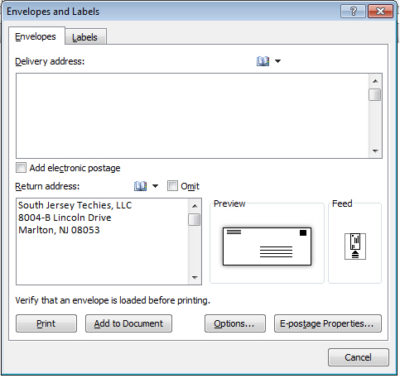
Now you’re ready to execute the wizard by clicking the Mailings tab and then clicking Envelopes in the Create group. In Word 2003, choose Letters and Mailings from the Tools menu, and then select Envelopes and Labels. In the resulting dialog, the wizard uses the address you just entered as the return address.


If you have to replace the default return address occasionally with another, it’s no big deal. If you use another address frequently, create an AutoText entry for it, as follows:

  1. Enter and format the address.
  2. Then, select the address.
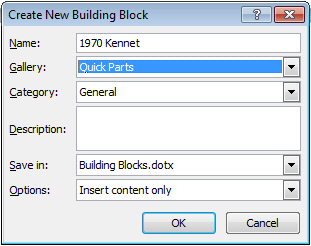
  3. Click the Insert tab, and choose Save Selection To The AutoText Gallery from the Quick Parts dropdown in the Text group. In Word 2003, choose AutoText from the Insert menu and then choose AutoText from the resulting submenu.
  4. Change the name to something simple, such as RT.
  5. If the Save In setting is the Normal.dotx, change it to Building Blocks.dotx.
  6. Click OK.


Now you can use the AutoText entry RT to quickly change the default return address in the envelope wizard, as follows:

  1. Click the mailings tab and choose Envelopes in the Create group. In Word 2003, choose Letters and Mailings from the Tools menu, and then select Envelopes and Labels.
  2. Highlight the default address and type RT.
  3. Immediately press [F3] and Word will replace RT with the AutoText entry of the same name—the second return address.
Replacing the default address with an AutoText entry is temporary. The next time you run the wizard, it will display the default address – not the one you stored as an AutoText entry. Using this simple trick, you can store several addresses as AutoText and use them in multiple spots, not just with the envelope wizard.

Customize Outlook’s To-Do Bar

Three tips for making Outlook’s To-Do bar work for you

Takeaway: If you’re tempted to hide Outlook’s new To-Do bar, stop! Customize it and put it to work for you.

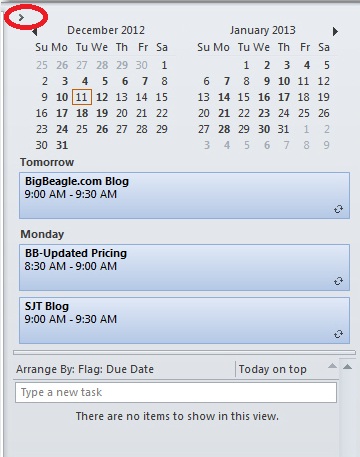
Outlook 2007 introduced the To-Do bar -a means of tracking appointments and tasks with a quick glance. The To-Do bar shows a Date Navigator with upcoming appointments and a list of tasks, but some users don’t take full advantage of it.

Most users spend most of their time in their Mail window and having quick access to other features, via the To-Do bar, without leaving their Inbox is not only convenient, it’s efficient. For instance, the Date Navigator displays upcoming appointments without opening your Calendar. If you decide to open your Calendar, simply click a date. You can also add new tasks, accept or decline meetings, and so on. These three tips will help you learn your way around so that you can customize the feature to suit your work habits.

1: Don’t dismiss it

Outlook displays the full bar, but you can free up space by collapsing it – don’t delete it! To minimize the bar, click the arrow in the top-left corner. You can then expand and collapse the bar, to suit your needs.

2: Customize the settings

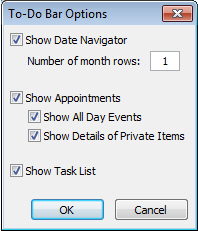
To change the default arrangement of the Date Navigator, appointments, and tasks, right-click the To-Do bar’s header. At this point, you can also turn off the display for all three To-Do bar components, but don’t to so right now. Instead, choose Options. In the resulting dialog box, you can determine the display options that work best for you. For example, you can display more than one month, hide private items, and so on.


3: Customize the Task list

Most of us will use the Task list more than the other two components, so getting this part right will really make you happy. To customize the Task list component, right-click the column header area (Arrange By) and choose View Settings (Custom in Outlook 2007). In the resulting dialog box, you can customize the task features you see. For instance, you might click Columns to add icons to the display. Or, you might want to remove the Follow Up flags.

To display more information about each task, change the single line display. Right-click the column header as before and choose View Settings (or Custom). Click Column and change this setting using the Maximum Number Of Lines dropdown.

You can temporarily filter the tasks you see by clicking the Filter button and entering specific words or choosing existing text from the dropdown. Doing so will display only those tasks that meet your criteria.

I’ve mentioned just a few of the more popular ways to customize the To-Do bar. The key to getting the most out of this feature is to explore its settings and put them to work for you!

Tip For Typing Text Into A Scanned Document

Takeaway: This great quick Microsoft Word Document trick will have you filling in scanned paper forms in just seconds.

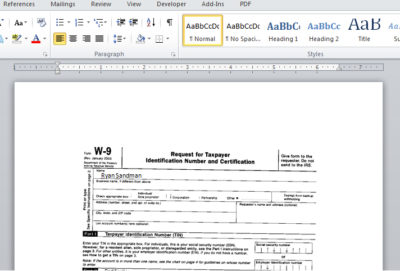
Word allows you to fill out scanned paper forms.  A quick easy trick renders most paper forms into an electronic file and isn’t a perfect solution, but works when you are in a jam. 

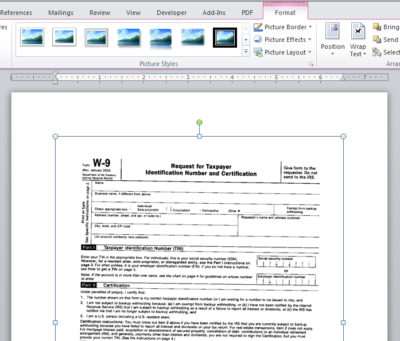
First, scan the form and save it as a graphics file.  Be sure to save the scanned form in a format that Word can use, such as jpg, png, or bmp. 

Once you have the scanned document file, insert it as a picture as follows:

  1. In a blank document, open the header section. In Word 2007 and 2010, just double-click in the top margin area. In Word 2003, choose Header and Footer from the View menu.
  2. With the header section open, click the Insert tab. Then, click Picture in the Illustrations group. In Word 2003, choose Picture from the Insert menu, and then choose From File. Browse to the file and double-click it or select it and click Insert.
  3. With the picture file selected, choose Behind Text from the Text Wrap dropdown in the Arrange group on the contextual Format tab. In Word 2003, right-click the picture, and choose Format Picture. Click the Layout tab, choose Behind Text, and click OK.
  4. Close the header section.  Don’t worry if the graphic dims a bit.


With the graphic in the header’s background, you can now type as you normally would, using the graphic as your guideline. There are no special controls or tabs to position the cursor for you. You can certainly go that route, but that takes a lot of work, and unless you’re going to reuse the form a lot, it’s probably not worth the effort.

Most likely, the form won’t align just right the first time you try. Simply open the header and adjust the position of the form as needed. You can also change the font, font size, and tab stops to accommodate the form’s fill-in positions.

Kill Your Java Plugin Now!

Java Plugin Security Information

Kill your java plugin as soon as possible.

A new Java zero-day security vulnerability is already being actively exploited to compromise PCs. The best way to defend against the attacks is to disable any Java browser plugins on your systems.

The offending bug is present in fully patched and up-to-date installations of the Java platform, now overseen by database giant Oracle, according to Jaime Blasco, head of labs at security tools firm AlienVault.

“The exploit is the same as the zero-day vulnerabilities we have been seeing in the past year in IE, Java and Flash,” Blasco stated.

“The hacker can virtually own your computer if you visit a malicious link thanks to this new vulnerability. At the moment, there is no patch for this vulnerability, so the only way to protect yourself is by disabling Java.”

The exploit targets Java 7 update 10 and prior versions. No fix is available and early indications suggest that exploitation is widespread. Brian Krebs reckons the exploit has found its way into crimeware toolkits, such as the Blackhole Exploit Kit, which will uses the hole to infect victims with software nasties.

Java vulnerabilities were abused by the infamous Flashback Trojan, creating the first botnet on Mac OS X machines in the process last year. In the years before that attacks on Java and Adobe applications have eclipsed browser bugs as hackers’ favourite way into a system.

In all but a limited number of cases Java support in web browsers is not mandatory for home users, unless required by a banking website or similar, so disabling plugins even as a temporary measure is a good idea. Businesses, on the other hand, that rely on Java for particular applications are not so fortunate.

While waiting for a patch from Oracle to plug the gaping hole, you can contact South Jersey Techies by emailing support@sjtechies.com to make sure your systems are protected.

Java Update Coming Tuesday

Oracle says Java Update Coming Tuesday!

Oracle is working on an update to address a flaw in its Java software.

The company says it will release a patch that will fix 86 vulnerabilities in Java 7 on Tuesday.

The Department of Homeland Security last week said computer users should disable the program in web browsers because hackers were using a zero-day vulnerability to attack computer systems. Criminals were using the flaw to stealthily install malware on the computers of users who visit compromised websites.

The problem, which affects Oracle Java 7 update 10 and earlier, can allow an untrusted Java applet to escalate its privileges, without requiring code signing.


Java, which is running on 850 million computers, is a computer language that lets programmers write software using just one set of codes for computers running Windows, Apple OS X and Linux. Internet browsers use it to access web content and computers and other devices use it to run a plethora of programs.


In fact, Java is so ubiquitous that the software has become a major bull’s-eye for hackers. Last year, Java overtook Adobe Reader as the most frequently attacked software, according to computer security firm Kaspersky Lab.

Mac users probably don’t have to worry because Apple already removed Java plug-ins from OS X browsers. Apple apparently learned a lesson last year when it took its time making a Java patch available and as a result more than 600,000 Macs were infected with malware.

Last February, Oracle released a fix for a targeted vulnerability identified as CVE-2012-0507 and included it in an update for the Windows version of Java. However, since Apple distributes a self-compiled version of Java for Macs, it ports Oracle’s patches to it according to its own schedule, which can be months behind the one for Java on Windows.

Mozilla also has blacklisted all current releases of Java.

Technology Trends for 2013

Tech trends to watch out for in 2013

Takeaway: IT leaders need to be smart about the decisions they make and truly leverage next-generation tools and strategies. Here are some technology trends that will shape their decision-making in 2013.

With the New Year comes a fresh set of technology imperatives, challenges and opportunities for organizations to consider. The increased innovation in the technology sector means that companies are finally in a position to be smart about the IT decisions they make and truly leverage next-generation tools and strategies to mitigate risk and shape strategies for the future. Below are trends that will shape and impact their decision-making in 2013.

Prediction #1: Cloud interoperability will take the spotlight

Cloud interoperability will be huge: private cloud adoption will continue to grow, but more organizations and MSPs will adopt a hybrid public / private approach. This hybrid approach could simply be an organization’s private cloud interfacing with other public clouds in a secure manner, or it could mean augmenting an internal private cloud with additional compute, storage or cooling resources from a public cloud. The biggest challenge with this reality will be the manageability of the hybrid environment. Generally, enterprises and MSPs don’t use the same set of tools and monitor environments in the same way. To ensure these hybrid cloud environments deliver on their promise of costs savings and productivity benefits, vendor-agnostic management and monitoring solutions are critical.

Prediction #2: Worldwide economic struggles will direct the data center world

Data centers are consuming more power, more cooling and their density continues to rise, but an organization ability to retrofit or expand the physical space is challenging and not cost effective. Private and hybrid cloud models will get traction because it saves on cost. It isn’t cost intuitive to upgrade a physical data center, so the shift to private clouds is the next logical step.

Worldwide economic struggles both in the financial sector, and more importantly in the energy sector, have the high probability of forcing data centers to close or increase prices to stay functional. While there has been a data center construction boom in the last several years, the demand for space will have to be countered by ever-rising costs in the energy industry. Depending on how the world can come together and address the energy crisis, this will continue to dramatically impact the data center world.

Prediction #3: BYOD and v Virtualization will collide

Smartphone, tablet, laptop and other mobile devices will all begin leveraging virtualization technologies, increasing virtualized BYOD, and this will become the next evolution of the mobile device. Consumers will be confident in the security and interoperability of a working profile with their personal profile on any device they choose, regardless of their location, and they will no longer need access to their specific mobile device. With virtualization, they can grab a friend’s and have access to their virtual identity no matter where they are. Service providers have already started leveraging this technology, and enterprises are not far behind, as they will benefit once they’ve addressed potential security and identity challenges and embraced the evolution.

Prediction # 4: Cloud outages by major Web hosts will gain momentum

We will continue to see cloud outages by all major cloud providers.  These outages will dramatically impact businesses and hosting customers on the cloud. Technology today is mature enough to prevent complete outage of customer assets.  The big balance has always been with hosting how much money you are willing to spend to ensure uptime.  More and more cloud and hosting customers are putting the trust in the clouds resilience without really understanding or choosing to understand that without paying for resilience you will experience some outage at some point.  As the cloud provider drive for pricing down to compete with each other and gain market share the cost of driving price down has to be found in some level of corners being cut.  Which will lead to more outages. Example: It comes down to mitigating cost vs. risk. Amazon keeps trying to drive costs down, but the tradeoff is their customers must decide how much they want to pay to mitigate their own risk. In order to lower risk, a company suffers the effect on its monthly price. However, with today’s economy and the focus on cost rather than risk, outages will still occur.

Prediction # 5: The Presidential imperative will be cybersecurity

President Obama has been elected for a second term and one thing is crystal clear: cybersecurity must be a top priority for him in 2013. There is an increased awareness around the issue of cybersecurity, and it is only set to rise further as more and more people transition information to the cloud. In 2013, the president will have to answer: how do I protect people on the Internet? We’ve had multiple bills passed but what we really need is education around how to be safe as a nation on the Internet and in the cloud. A cyber war is as dangerous as a physical one and with out a government focus on cybersecurity, we’re facing that risk head on.

Looking Ahead

When you take a step back and look at all 2013 technology predictions from industry one thing becomes clear: there are lots of moving parts for organizations to control. It will be critical next year that they have tools to manage and monitor these ever-changing environments. Organizations must be smarter about IT, proactive rather than reactive and continue to innovate.


 

RingCentral #1 Top VOIP Services

Consumer-Rankings.com Named RingCentral as the # 1 VOIP Business Service Provider!

Consumer-Rankings tested the top VoIP service providers and compared their prices, features, ease of use, call quality and more so that you can determine which of the industry leaders offers the right VoIP plan for you. Read an in-depth RingCentral VoIP review  so you can make an educated purchase.

Best for: Small and large businesses that are looking for a reliable VoIP phone solution.

RingCentral is a company that specializes in providing business VoIP services, fax services and mobile communication solutions. With plans ranging from a single user to over 20 users, RingCentral makes it clear that they can cater to both small businesses and large corporations. With a cloud-based virtual office system, RingCentral eliminates the need for technical knowledge or bulky hardware and makes it possible to enjoy your virtual office from virtually anywhere.

Professionals looking for a VoIP business solution will be drawn to the RingCentral Office plan, which combines calling and online fax features.

Features

RingCentral offers a range of professional-grade VoIP features. Surprisingly, RingCentral is one of the few business VoIP providers that offer a free 1800 toll free number that includes 1,000 minutes of talk per month in the price of the plan. Overage charges for the toll free line cost 3.9 cents per minute. RingCentral’s other features include:

  • Voicemail
  • Voicemail to email (aka Visual Voicemail)
  • Auto-attendant
  • Missed call notification
  • Outlook integration
  • Call screening
  • Call forwarding
  • Call logs
  • Call conferencing
  • Caller ID
  • Calling card (use your RingCentral account to make free calls from anywhere)
  • Music-on-hold
  • Dial-by-name extensions
  • Online fax service
  • Free softphone

Customer Support

RingCentral is one of the few business VoIP providers that offers 24/7 technical support by phone. The billing department is available by phone between 8am-10pm EST on Monday through Friday, 10am-7pm EST on Saturday, and 11am-8pm EST on Sundays. When  RingCentral’s customer support was called at various times throughout the day, and never waited on hold for more than 2 minutes for sales or technical support.

RingCentral also offers chat support, though this feature is not prominently displayed on their website. Chat support is available between 9am and 9pm Monday through Friday and is closed on Saturdays and Sundays.

A search button that is found on most of the site’s pages makes it easy to get answers to questions at any time, and we were happy to see that the search feature yielded relevant, useful results in the majority of our searches. RingCentral answers questions via email only for paying customers, and therefore, the company’s email information is not easily identifiable on the site. Still, we managed to email RingCentral and to receive a same-day response.

Tablet War-Is Microsoft The Winner?

Takeaway: Find out why Microsoft may still win the tablet war, even if its early efforts are unsuccessful.

After spending time with Microsoft’s Surface RT tablet, we were left with more questions than answers. The further we considered Microsoft’s tablet strategy, the more we wondered if it were genius or madness driving its recent moves. Depending on what we see in the next few months, it just might be the former.

Leaving the Home Court

Surface was most perplexing in that Microsoft aced the hardware of the device — an area most pundits, expected it to miss completely. The device was sleek and well-assembled, and it brought unique and noteworthy features to the table rather than simply trying to copy market leaders. If only the software were on par with the hardware.

The OS was particularly troubling, considering Microsoft essentially invented the tablet category a decade ago, only to let it languish until Apple ate its lunch and dominated the market in a matter of months. While all this is old news, and Windows RT remains what seems to be a compromised OS, there are some interesting things happening on the software front.

An Office for Everyone

Microsoft began its life as an applications software company, achieving dominance in the desktop space through luck and tenacity. People often forget that Microsoft set out to build applications for a variety of platforms rather than create the one that would dominate desktop computing for a generation. While Microsoft has released its Office suite for some competing platforms, the most interesting missing links in the Office world are mobile versions of the software for iOS and Android. There have been enough rumors and rumblings about an iOS version of Office that the rumor has a measure of credibility.

Microsoft also seems a bit more pragmatic and less dogmatic than Apple, and it has released several applications for the iOS platform, from relatively innocuous photography applications to versions of its SkyDrive cloud-based file storage platform. SkyDrive is available for all major OSs, and Microsoft’s cloud strategy points toward open platforms rather than a walled garden like Apple’s iCloud. With a Microsoft-based cloud storage service already gaining traction on a variety of platforms, mobile versions of Office don’t seem as much of a stretch as they might have been a few months ago.

Returning to its roots around application software might not be a bad strategy for Microsoft. Clearly, Surface has not lit the world afire in its first incarnation, so launching popular applications on a variety of platforms would keeps Microsoft relevant in the enterprise and personal space, no matter which tablet device an enterprise ends up selecting.

There’s also the possibility of a halo effect should Microsoft deliver a quality mobile Office experience on a variety of platforms. The iPod music player and iPhone arguably sold more Mac computers than any ad campaign, and a suite of compelling software and services might make a case for a deeper Microsoft experience, especially in the enterprise.

The End of the Platform

While the proclamations that the “desktop is dead” have not been as dire as predicted, many applications are shifting to the cloud- and browser-based interfaces. In mobile, especially, core application logic and data are cloud-based for most popular applications. Tablets and smartphones generally don’t have the “baggage” of legacy applications that have saddled our desktop computing experience, so in many ways, mobile operating systems are more likely to fade toward irrelevancy beyond running cloud-based applications. If Microsoft can rekindle its multi-platform application heritage and combine it with a strong hardware competency, it might successfully win the longer tablet war, even if its early efforts sputter.

CALL US NOW!