Back to Top

Tech, Web, Cloud & Cabling Services

Category: News

49% of Businesses Hit by Ransomware

Ransom is the top motivation behind cyber attacks, according to a report from Radware, and IT professionals are most concerned about data loss. Here’s what you need to know.

Nearly half of businesses report that they were the subject of a cyber-ransom campaign in 2016, according to Radware’s, Global Application and Network Security Report 2016-2017.

Data loss topped the list of IT professionals’ cyber attack concerns, the report found, with 27% of tech leaders reporting this as their greatest worry. It was followed by service outage (19%), reputation loss (16%), and customer or partner loss (9%).

Malware or bot attacks hit half of all organizations surveyed in the last year. One reason for the pervasive attacks? The Internet of Things (IoT). Some 55% of respondents reported that IoT ecosystems had complicated their cybersecurity detection measures, as they create more vulnerabilities.

Ransomware attacks in particular continue to increase rapidly: 41% of respondents reported that ransom was the top motivator behind the cyber attacks they experienced in 2016. Meanwhile, 27% of respondents cited insider threats, 26% said political hacktivism, and 26% said competition.

While large-scale DDoS attacks dominated the headlines of 2016, this report found that only 4% of all attacks were more than 50 Gbps, while more than 83% of DDoS attacks reported were under 1 Gbps.

“One thing is clear: Money is the top motivator in the threat landscape today,” said Carl Herberger, vice president of security solutions at Radware, in a press release. “Attackers employ an ever-increasing number of tactics to steal valuable information, from ransom attacks that can lock up a company’s data, to DDoS attacks that act as a smoke screen for information theft, to direct brute force or injection attacks that grant direct access to internal data.”

Despite the growth in attacks, some 40% of organizations reported that they do not have an incident response plan in place, the survey found.

The report listed five cybersecurity predictions for 2017:

1. IoT will become an even larger risk. The Mirai IoT Botnet code is available to the public, making it more likely that cyber criminals of all experience levels are already strengthening their capabilities. “In 2017, exponentially more devices are expected to become targeted and enslaved into IoT botnets,” the press release stated. “IoT device manufacturers will have to face the issue of securing their devices before they are brought to market, as botnet attacks from these devices can generate large-scale attacks that easily exceed 1 Tbps.”

2. Ransomware attacks will continue to grow. These attacks will target phones, laptops, and company computers, and will likely take aim at healthcare devices such as defibrillators in the future, the press release stated.

3. Permanent Denial of Service (PDoS) attacks on data centers and IoT operations will rise. PDoS attacks, sometimes called “phlashing,” damage a system to the degree that it requires hardware replacement or reinstallation. These attacks are not new, but Radware predicts they are likely to become more pervasive in 2017 with the plethora of personal devices on the market.

4. Telephony DoS (TDoS) will become more sophisticated. These attacks, which cut off communications in a crisis, “could impede first responders’ situational awareness, exacerbate suffering and pain, and potentially increase loss of life,” the press release stated.

5. Public transportation system attacks will rise. As cars, trains, and planes become more automated, they also become more vulnerable to hackers, Radware stated.

You help your business avoid ransomware attacks and other cyber threats by keeping software up to date, backing up all information every day to a secure, offsite location, segmenting your network, performing penetration testing, and training staff on cyber security practices.

Have questions?

Get answers from Microsofts Cloud Solutions Partner!
Call us at: 856-745-9990 or visit: https://southjerseytechies.net/

South Jersey Techies, LL C is a full Managed Web and Technology Services Company providing IT Services, Website Design ServicesServer SupportNetwork ConsultingInternet PhonesCloud Solutions Provider and much more. Contact for More Information.

To read this article in its entirety click here.

3 Ways to Boost Password Security

The must-read IT business eNewsletter

Encrypted passwords

“There is no such thing as perfect security,” says Jim Waldron, Senior Architect for Platform Security at HP. If you can access a website or server, consider it vulnerable to security breaches. That’s why so many businesses account for fraud in their business models—they expect to lose a certain amount each year to security leaks, lost IP, and more.

While you can never be 100% secure from hackers while connected to the internet, there are steps you can take to help protect your personal and professional data. All you need to do is activate features that are increasingly common (or easy to manage) on modern business-class PCs: Multi-factor authentication, client-based user authentication, and password best practices.

Multi-factor authentication
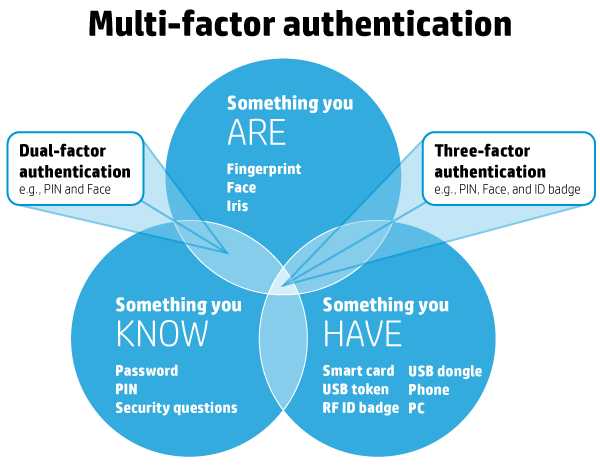
Multi-factor authentication is a simple but effective security system that involves the use of at least two factors (or methods) of authentication. It groups different factors together so that even if one is compromised, the data remains protected. Under this system, factors are divided into three domains:

HP support


  • Something you know: Password, PIN, etc.
  • Something you have: ATM card, smartcard, etc.
  • Something you are: Fingerprint, iris, etc.

For multi-factor authentication to be successful, you want to pull from at least two different domains, with a maximum of three domains. A common example of multi-factor authentication is when you withdraw cash from an ATM. To do so, you insert your ATM card (something you have) and enter your PIN (something you know). Without both factors you can’t access your account—and neither should anyone else.

Businesses are taking notice too, and multi-factor authentication’s popularity is rising. In 2014, 37% of enterprise organizations surveyed used multi-factor authentication for the majority of their employees, and that number is expected to grow to 56% by 2016.

What you can do now
If you have a business-grade PC, chances are your PC already includes the technologies you need to start using multi-factor authentication. In fact, HP offers multi-factor authentication on all of its business PCs. Consult your manual or HP Support, and identify the factors your PC supports in addition to traditional passwords, such as fingerprint or smartcard readers. Just make sure to choose factors from separate domains.

Client-based user authentication
Every time you log into a system, your identity needs to be authenticated by that system. This process occurs one of two ways: server-side authentication or client-based authentication. With server-side authentication your unencrypted information—such as your password or fingerprint—is sent to a server where it is compared against that server’s records. With client-based authentication, the authentication process—e.g., “Does this fingerprint match the one in our records?”—is performed on the client device, such as your work PC.

While client-based authentication is not as common as its counterpart, it is far more secure. In fact, “In almost all authentication scenarios it is preferable to perform the direct authentication on the client and then communicate an ‘Identity Assurance’ to the relying party,” says Waldron.

Everyone wins when it comes to client-based authentication. The client no longer has to send unencrypted, private information over the internet or store that information on another party’s server, while the relying party no longer has to store sensitive client information on their server—reducing the amount of information that can be stolen if and when a hack occurs.

What you can do now
One of the easiest ways to use client-based authentication is with a hardened fingerprint sensor. The sensor authenticates your fingerprint directly in the hardware, rather than sending it to a server or hard drive, and returns a key that can be used to decrypt password vaults.

Password best practices
As we’ve mentioned before, passwords aren’t perfect. While implementing and using the above features might not seem practical for some of us, everyone can benefit from following basic password best practices. They are quick to implement, and can save you a lot of hassle down the line.

To make the most of your password security, your passwords should be:

  • Long—at least 16 characters. Use a password manager to store unique passwords and fill out log-in forms so that you don’t have to memorize them.
  • Complex—containing symbols, numbers, uppercase letters, lowercase letters, and spaces (if possible)
  • Unique—only use a password once, don’t recycle or repeat across accounts
  • Short-lived—the National Cyber Security Alliance suggests changing your password every 60 days
  • Difficult to guess—avoid common words found in a dictionary, all or part of your name, repeated letters, or combos that align to your keyboard layout, such as “QWERTY” or “123456”

If you are uncertain whether your password is secure enough or if it meets enough of the criteria above, there are several reliable services that will check your password strength for you. Microsoft’s Safety & Security Center offers a free password checker you can access through your browser, while Mac users can access Apple’s Password Assistant through the Keychain Access utility.

What you can do now
The first thing you can do—right this second—is revise your most important passwords to align with password best practices. That includes your work accounts, personal email, bank accounts, and any other services that contain sensitive data. If you need help remembering your new passwords, consider using a password manager such as HP Password Manager. That way you only have to authenticate once to gain access to all your systems. You can also adopt a system to make your passwords easier to remember. Using acronyms, for example, you can turn the phrase “I was born in 1986 and my parents still live on Lake Street!” into “Iwbi1986ampsloLS!”—creating a strong password that’s easy to remember.

Passwords are changing, and while they will never be perfect, they can still provide an effective first layer of defense against hackers and ne’er do wells. The above features and techniques are increasingly common on modern business PCs, making it easier than ever to protect your private data. All you have to do is use them.

Have questions?

Get help from IT Experts/Microsofts Cloud Solutions Partner
Call us at: 856-745-9990 or visit: https://southjerseytechies.net/

South Jersey Techies, LLC is a full Managed Web and Technology Services Company providing IT Services, Website Design ServicesServer SupportNetwork ConsultingInternet PhonesCloud Solutions Provider and much more. Contact for More Information.

To read this article in its entirety click here.

10 Ways Office 2016 Boosts Productivity

Microsoft wants Office 2016 to be the last office productivity suite you will ever need. Here are 10 things you should know about how it plans to make that happen.

Microsoft Office 2016

On September 22, 2015, Microsoft released Office 2016 to the masses. At first glance, you may not notice much has changed since Office 2013. But when you look deeper, you will find some interesting and productivity-enhancing differences.

For years we’ve been promised wonderful benefits from cloud computing, and Microsoft Office 2016 is trying to deliver on those promises. It’s designed to meet our expectations of what a cloud-based, mobile-ready productivity suite can and should be. Only time will tell if Office 2016 actually delivers the goods, but the initial reviews are promising.

Here are 10 things Microsoft Office 2016 offers as it aspires to be the last productivity suite you are ever going to need.

1: Real-time co-authoring

Co-authoring has been around for a long time for many Office apps, but with Office 2016 that collaboration can now take place in real time. That means you will be able to see what your co-conspirators are doing in a Word document or PowerPoint presentation as they do it—and conversely they will be able to see what you are doing. It won’t even matter where you are or what device you are using.

2: OneNote notebook sharing

OneNote is one of the most useful applications available in Microsoft Office, and it is also one of the least appreciated. Office 2016 allows you to share a OneNote notebook with as many people as you want. And because OneNote works with text, images, worksheets, emails, and just about any other document type you can think of, it can be a great central resource for a team working on a project. That is, if they know to use it.

3: Simplified document sharing

Office 2016 simplifies sharing of documents by adding a Share button to the upper-right corner of your Office apps. Clicking that button will give you one-click access to share your document with anyone in your contacts list. You don’t even have to leave the document to do it. That does sound pretty simple.

4: Smart attachments

If you’re like me, you have to send email attachments just about every day. In previous versions of Office, adding attachments to an email required you to navigate to the location where the document was stored. You can still do that in Office 2016, but if the document in question was one you worked on recently, it will now show up in a list of shareable documents right there in Outlook. Essentially, Office 2016 keeps a universal recently worked on list for you.

5: Clutter for Outlook

Like most of us, you probably get a ton of email every day. Wading through the Outlook inbox to prioritize each email takes time and hampers your ability to be productive. Office 2016 adds a new category to your inbox triage toolbox, called Clutter. You can designate certain emails as low priority and they, and future similar emails, will be deposited automatically into a Clutter folder in Outlook. So now you have four categories for email: important, clutter, junk, and delete.

6: Better version history

Collaboration and creativity can be a messy process, with shared documents changing drastically over time. Office 2016 compensates for potentially lost ideas by keeping past versions of documents and making them available directly from Office applications under the History section of the File menu.

7: New chart types in Excel

The ability to visualize data with an Excel chart has always been a welcome and powerful capability. However, the list of available chart types found in previous versions of Excel needed an update. Office 2016 adds several new chart types to the templates list, including Waterfall, which is great chart if you like to track the stock market. Other new chart types include Treemap, Pareto, Histogram, Box and Whisker, and Sunburst.

8: Power BI

Between the release of Office 2013 and Office 2016, Microsoft spent a great amount of time and capital acquiring technologies that shore up its business intelligence and analytical applications. Power BI, a powerful analytics tool, now comes bundled with your Office 365 subscription. Knowing every little detail about how your business is running is essential information, and Power BI can bring it all together for you.

9: Delve

Delve is another new tool that comes with an Office 365 subscription. The best way to describe Delve is as a central location that gives you access to everything you have created, shared, or collaborated on using Office 2016. It is another recently worked on list, only this version of the list is stored in the cloud—so you can access it from anywhere with any device using the Office 365 Portal.

10: Purchase choices

Office 2016 is generally available only as a subscription. Even if you buy a boxed version of Office 2016, you are buying access to an annual subscription, with one exception. If you purchase the Office Home & Student 2016 box, you pay a one-time fee of $149.99 for just the basic Office apps.

Microsoft has definitely stacked the deck so that the best bang for the buck is a subscription to Office 365, which includes Office 2016 plus all the cloud services. Businesses should be looking at one of the Office 365 for Business subscriptions. It is also going to be your best deal.

Have questions?

Get help from IT Experts/Microsofts Cloud Solutions Partner
Call us at: 856-745-9990 or visit: https://southjerseytechies.net/

South Jersey Techies, LLC is a full Managed Web and Technology Services Company providing IT Services, Website Design ServicesServer SupportNetwork ConsultingInternet PhonesCloud Solutions Provider and much more. Contact for More Information.

To read this article in its entirety click here.

iOS 9.3: 3 Features Businesses Need

iOS 9.3 offers several features that might appeal to business-oriented Apple users.

Apple introduced a new version of iOS on Monday. The update includes several new features, including updates to CarPlay and HealthKit, as well as a feature to make it easier for iPads to be used in schools for educational purposes. There are several other new features which are particularly appealing to the business-oriented user.

Here are 3 new features business users should check out.

ios93SJTechies

Night Shift

The proliferation of devices like tablets and smartphones means that some sort of screen is never far away. For many, looking at a screen is the first and last thing they do in the morning and evening.

The problem with that is screens emit blue light, which reduces the amount of melatonin produced in the body. Melatonin is a chemical that helps people fall asleep. The light emitted from smartphones can also cause eye strain, which carries symptoms like headaches and blurred vision.

With this latest version of iOS 9, Apple introduced Night Shift, a feature that automatically adjusts the colors of your display at night. You can schedule times for it to go into effect, manually turn it on and off, and adjust colors on a scale of less warm to more warm.

You can access Night Shift through Settings | Display & Brightness, or through the menu that swipes up from the bottom of the device’s screen.

ios9SJTechies

Password-protected Notes

Notes is iOS’ app for taking, well, notes. iOS 9.3 updates it by allowing users a layer of security. Now, users can lock their notes using either a password or the Touch ID, which makes the app that much more useful.

In order to lock a note, tap the button in the top right corner (the one you might use if you were going to email the note) and then tap Lock Note. When prompted, enter a password, confirm it, and decide if you want to enable the Touch ID. A lock button will appear at the top of the note and in the future if you want to open it, enter the password or use the Touch ID.

ios92SJTechies

More personalized News

The News app now offers more personalization for users, and on a range of topics and publications. So for example, you can select a topic like mobile apps or internet privacy. You can access news by opening the News app, or by swiping right from your main screen.

Have questions?

Get answers from Microsofts Cloud Solutions Partner!
Call us at: 856-745-9990 or visit: https://southjerseytechies.net/

South Jersey Techies, LL C is a full Managed Web and Technology Services Company providing IT Services, Website Design ServicesServer SupportNetwork ConsultingInternet PhonesCloud Solutions Provider and much more. Contact for More Information.

To read this article in its entirety click here.

10 Places To Recycle Your Cell Phone

EcoAtm

Here are 10 places to take your phones so they can be refurbished, reused, or recycled and diverted from the landfill.

1. EcoATM

EcoATM is an automated kiosk that collects your unwanted cell phones and tablets and gives you cash for them. It’s made by the same people that make CoinStar, so you’ll find them by the checkout lines at various grocery store chains. It accepts devices from any era or in any condition, and offers anywhere between a few bucks to a few hundred dollars in return. EcoATM partners with R2 certified e-waste reclamation facilities to ensure they are recycled, or gives the phones a second life.

2. Eco-Cell

Eco-Cell is a Louisville, Kentucky-based e-waste recycling company. It partners with nonprofits and organizations such as the Jane Goodall Institute. Bins are located in coffee shops and other businesses around the country, where the collected phones are shipped to Eco-Cell in Louisville. If the phones are reusable, they resell them and pass some of the money back to the owner. If they are not reusable, the phones are recycled and the owner is paid the money for the value of the recycled materials.

3. Best Buy

Best Buy has recycling kiosks in their stores in the US, as well as recycling in-store for no charge to you. They typically limit it to three items per family, per day. From there, they work with recycling companies to make sure the phones and other electronics don’t end up in landfills.

4. Hope Phones

The Hope Phones campaign was started in 2009 by Medic Mobile, which works to advance health care in 16 countries by using mobile technology. Individuals, nonprofits, groups, or businesses can host a Hope Phones campaign to donate old phones. They are recycled and valued so the nonprofit can get new technology for the field. Most old models are valued at $5, but newer smartphones are regularly valued at $80, according to the website.

5. Cell Phones for Soldiers

Cell Phones for Soldiers is a nonprofit that works to provide cost-free communication services to active-duty military and veterans. New or gently used mobile phones are accepted and each device valued at $5 turns into 2.5 hours of free talk time for the soldiers.

6. Gazelle

Gazelle is one of the most popular trade-in options for old cell phones. The company is headquartered in Boston, with locations in Louisville, Kentucky and in Texas. Pick your brand, model, carrier, and plug in what kind of shape it’s in, then get an offer. Ship it for free, and receive a check or gift card to Amazon.com or PayPal after they check it out and make sure it’s worth what you say it is.

7. Call2Recycle

Call2Recyle  is a no-cost recycling program for batteries and cell phones in the US and Canada. It has collection boxes that can be placed anywhere, which have shipping permits so mailing them is easy. They also have bulk shipping if there is a large amount of recyclables.

8. Your carrier

AT&T has a trade-in program for unwanted phones and accessories regardless of manufacturer or carrier. The owner gets a “promotion card” which can then be used to take money off a new phone or other purchase. Make sure you erase all your information before you turn them in, though.

Verizon also offers a trade-in program where the owner can receive an electronic gift card once they send in the phone and have it appraised.

9. Local places

Your city undoubtedly has places to recycle old phones. Most local government websites, like New York’s, have directions of where to go to recycle phones. A lot of cities usually have nonprofits that donate old phones as well. The EPA also has an option to find out what electronics you can recycle with mail-in options.

10. Recycling for Charities

This nonprofit features one charity at a time, for which they donate money from recycling old phones. All makes and models are welcome at Recycling for Charities, and the phone condition is not an issue. They make an attempt to refurbish it first, then find recycling centers to ensure the materials won’t go into landfills if the phones cannot be reused.

These 10 services are well-researched and well-known options, but make sure to research on your own where your phone is going to make sure it is going to a certified e-waste recycler, so it doesn’t end up in a landfill despite your efforts.


Emergency Fixes for Windows Server, VPN bugs

Microsoft has released emergency out-of-band (OOB) updates to address multiple issues caused by Windows Updates issued during the January 2022 Patch Tuesday.

January 2022 Patch Tuesday

This update addresses issues related to VPN connectivity, Windows Server Domain Controllers restarting, Virtual Machines start failures, and ReFS-formatted removable media failing to mount.

All OOB updates released are available for download on the Microsoft Update Catalog, and some of them can also be installed directly through Windows Update as optional updates. You will have to manually check for updates if you want to install the emergency fixes through Windows Update because they are optional updates and will not install automatically.

Windows 10 – KB5010793
Details Here

Option 1: Run Windows Update, KB5010793 will appear under optional download.

Option 2: Download the patch from there: Microsoft Update Catalog
Please download the matching Windows 10 Version.

Windows 11 – KB5010795 or KB5008353 (may vary based on Windows Edition)
Details Here

Option 1: Run Windows Update, KB5010795 will appear under optional download. Select and install.

Option 2: Download the patch from there: Microsoft Update Catalog

If you have any questions, please call us at (856) 745-9990.


If you’ve ever owned a PC with a DVD drive, you may get a $10 settlement

Don’t expect your money anytime soon, however.

DVD drives may be a thing of the past, but the past could pay you $10 via a proposed settlement from a class-action suit.

If you purchased a DVD-ROM, DVD-RW or combination drive between April, 2003 and December 31, 2008, a collection of DVD drive manufacturers have tentatively agreed to pay you $10 per drive, whether you purchased the drive as part of a PC or by itself. You’ll simply need to visit the claim site and testify (under penalty of perjury) that you indeed purchased those drives within the given time period, and live in one of the 23 states (plus the District of Columbia) covered by the suit. The deadline to file is July 1.

Why this matters: Though the optical drive market continues to decrease—“the physical disk format is somewhat obsolete in the era of content streaming,” IDC wrote last year—that wasn’t the case fourteen years ago, when virtually all software was distributed via DVD-ROM. Fortunately, the settlement site isn’t asking for proof of purchase yet, but it reserves the right to do so. Filing a claim can take literally seconds, but don’t hold your breath—you’ll probably receive compensation, but there’s no guarantee.

The wheels of justice turn slowly

Simply put, a group of 23 plaintiffs sued virtually every DVD drive manufacturer, alleging that they collectively conspired to keep drive prices higher than they normally would be, in violation of antitrust laws. Though the defendants denied they did anything wrong, several—Hitachi-LG, Panasonic, NEC, and Sony—settled and agreed to pay a collective total of $124.5 million into four separate settlement funds.

(Note that only DVD drives for PCs are covered; a DVD player, such as the one gathering dust in your living room, isn’t.)

If you do submit a claim, however, the chances of receiving your settlement soon are slim. That’s because seventeen more defendants, including various subsidiaries of BenQ, Philips, Samsung, TEAC, and Pioneer, have yet to settle, and the suit will continue until all of the claims are resolved.

“Because other defendants remain in this litigation, the plaintiffs are proposing that distribution of the settlement funds not occur at this time,” the settlement site reads. “This is to save the expenses associated with distribution.”

In fact, the settlement hearing to finally approve the Hitachi-LG-Panasonic-NEC-Sony agreement will be held on December 8. After that, payments may begin—which means that you’ll probably receive your $10 or less a year from now. Yes, less: Payments will be “up to” $10 per drive, according to the claims site.

You should probably treat the settlement like one of those “print out your own rebate” slips from the turn of the century. Even under the best of circumstances, chances are you’ll have totally forgotten about your $10 windfall by the time the check arrives.

Have questions?

Get answers from Microsofts Cloud Solutions Partner!
Call us at: 856-745-9990 or visit: https://southjerseytechies.net/

South Jersey Techies, LL C is a full Managed Web and Technology Services Company providing IT Services, Website Design ServicesServer SupportNetwork ConsultingInternet PhonesCloud Solutions Provider and much more. Contact for More Information.

To read this article in its entirety click here.

Microsoft announced Attack Simulator for Office 365 Threat Intelligence


Admins can send simulated phishing and attack emails to find security and training weaknesses.

A few weeks ago, Microsoft released a public preview for Attack Simulator for Office 365 Threat Intelligence. On April 17th Microsoft announced that Attack Simulator is now generally available. Attack Simulator for Office 365 Threat Intelligence is available to all Office 365 E5 or Office 365 Threat Intelligence customers.

With Attack Simulator, customers can launch simulated attacks on their end users, determine how end users behave in the event of an attack, and update policies and ensure that appropriate security tools are in place to protect the organization from threats.  The GA of Attack Simulator adds a new HTML editor so realistic looking HTML emails can be sent in simulations of spear-phishing.  Also, two spear-phishing templates are available for immediate use in the spear phishing simulation.

Attack Simulator includes the three attack scenarios from our public preview.

Display Name Spear Phishing Attack: Phishing is the generic term for socially engineered attacks designed to harvest credentials or personally identifiable information (PII). Spear phishing is a subset of this phishing and is more targeted, often aimed at a specific group, individual, or organization.  These attacks are customized and tend to leverage a sender name that generates trust with the recipient.

Password Spray Attack: To prevent bad actors from constantly guessing the passwords of user accounts, often there are account lockout policies.  For example, an account will lockout after a certain number of bad passwords are guessed for a user.  However, if you were to take a single password and try it against every single account in an organization, it would not trigger any lockouts.  The password spray attack leverages commonly used passwords and targets many accounts in an organization with the hope that one of the account holder uses a common password that allows a hacker to enter the account and take control of it.  From this compromised account, a hacker can launch more attacks by assuming the identity of account holder.

Brute Force Password Attack: This type of attack consists of a hacker trying many passwords or passphrases with the hope of eventually guessing correctly. The attacker systematically checks all possible passwords and passphrases until the correct one is found.


This video demonstrates how Attack Simulator can help organizations educate users to become more secure from cyber threats.  With Attack Simulator, admins can train all their end users, and especially those who are attacked most often.  This proactive training is a powerful way to ensure that your organization can prevent the impact from advanced threats.  Over the coming months, more threat simulations will be added to Attack Simulator so organizations can simulate the most prevalent threat types from the modern threat landscape.

Experience the benefits of Attack Simulator for Office 365 Threat Intelligence by beginning an Office 365 E5 trial today.  Also, learn more about how Microsoft leverages threat intelligence and the value of threat intelligence.

The best new features coming to Microsoft’s latest OS: Windows 10

Windows10

Microsoft continues to build out Windows 10 – with a bumper crop of new features announced at its Build conference last week.

These enhancements will be pushed to to Windows 10 users over the coming months, with many arriving in summer when the OS will get a major upgrade dubbed the Windows 10 Anniversary Edition.

Here are the key upgrades heading to Windows 10.

The write stuff

ink-SJTechies

Using a digital pen to write and scribble on the screen of Windows 10 PCs and tablets will get easier.

In a boost to devices that support such pens, such as the Microsoft’s Surface tablet, the OS’ new Windows Ink feature will allow users to jot down notes on the screen without unlocking the device.

Windows Ink will also allow users to write messages on sticky notes and, if appropriate, have them automatically translated into calendar appointments and reminders.

Support for Windows Ink in Microsoft Office, Maps, the Edge browser and other apps will allow users to draw, write and annotate using their pen. Windows Ink will make using the pen in Office more satisfying than it currently is, for example tidying up highlighted marks on documents so they neatly align with text.

Windows 10 will also gain the Ink Workspace, a hub for launching apps that support writing and sketching using the Surface Pen.

Ink everywhere

win10-inking-SJTechies

Support for drawing, writing and annotating using digital pens will likely come to many apps.

Microsoft says that support for Microsoft Ink will be easily added to Universal Windows Platform apps, requiring just two lines of XAML code.

Digital ruler

win10-ruler-SJTechies

It sounds simple, but the new on-screen ruler should prove to be a useful addition for those who want to draw straight lines using a digital pen.

Smarter Cortana

cortana-SJTechies

The attraction of a virtual assistant is the simplicity with which they allow you to carry out tasks.

To ease the process of using Windows 10’s Cortana, the voice-controlled assistant will no longer require you to log into Windows, with users able to make a note, play music or set a reminder from the lock screen.

Cortana will also become more proactive and make suggestions based on a user’s past behaviour – offering to order lunch or to arrange transportation.

More apps will also be able to use Cortana to automatically complete tasks for users or to carry out actions based on context, such as the user’s current location or time of day.

Windows Hello comes to apps and the web

hello-SJTechies

Windows 10 already lets you log into the OS using your face.

The anniversary edition will extend this biometric log-in to Windows apps and websites via Microsoft Edge. As with the OS, users will be able to authenticate their identity using a facial, iris or fingerprint scan.

Another new feature will allow users to unlock a PC running Windows 10 Enterprise Edition by tapping a Windows Hello-enabled phone, although Microsoft has said the feature will only be available on “select premium phones”.

Android app notifications on Windows 10

android-SJTechies

In future, notifications on Android devices will be able to show on Windows 10 PCs.

Any notification popping up on the Android notification panel can, via the Cortana Android app, also appear as a notification on a linked Windows 10 desktop.

Microsoft demoed the ability at its recent Build conference for developers.

Browser extensions

extensions-SJTechies

Microsoft’s Edge browser will soon gain support for extensions.

Extensions are small programs that can be downloaded to add new functionality to a browser, and are already found in Chrome, Firefox and other browsers today.

Support for extensions has already been added to Edge for those testing pre-release builds of Windows 10 under the Insider program.

The first extensions to be supported by Edge are Microsoft Translator, an extension that automatically translates pages in over 50 different languages, an extension to augment mouse gestures support, and a preview version of the Reddit Enhancement Suite.

Microsoft promises more extensions will be added later this year, including AdBlock, LastPass and Evernote.

Pinned browser tabs

pinned-tabs-SJTechies

Microsoft is also adding to Edge the ability to pin your favorite sites and web apps so they always have a tab open in the browser.

Updated Maps app

maps-app-pc-SJTechies

The Maps app has several new features, as well as UI and performance improvements.

Additions include one-tap access to search and directions, the ability to view multiple searches and directions at the same time, labels for search results on the map and turn-by-turn directions read by Cortana.

The improved app is available now to those testing Windows 10 under the Insider program.

Access Linux command-line tools in Windows

bash-win10-SJTechies

More one for developers, Microsoft is also bringing the ability to run the Bash shell to Windows.

The Bash shell is a command line interpreter that is available on many different Linux distributions, as well as Mac OS X.

The shell includes a host of tools that allow power users to carry out and orchestrate complex chains of commands.

Bash will be available via a Universal Windows Platform app, which will provide an image of the Linux distribution Ubuntu and run on the Windows 10 desktop.

Users will be able to use the Bash shell to download and install programs from the command line, as they do from inside Ubuntu. Microsoft says Ubuntu software will run as fast in the Windows app as it does natively, thanks to a software subsystem for handling Linux system calls.

Microsoft has described the app as offering a developer toolset. While it has access to the files on the Windows PC, the app only provides access to a command line — not a graphical desktop — and reportedly has limits on what it can be used for, such as not being able to run a server.

Have questions?

Get answers from Microsofts Cloud Solutions Partner!
Call us at: 856-745-9990 or visit: https://southjerseytechies.net/

South Jersey Techies, LL C is a full Managed Web and Technology Services Company providing IT Services, Website Design ServicesServer SupportNetwork ConsultingInternet PhonesCloud Solutions Provider and much more. Contact for More Information.

To read this article in its entirety click here.

Wi-Fi-enabled ‘Hello Barbie’ records conversations with kids and uses AI to talk back

Today, Mattel released Hello Barbie, a WiFi-enabled doll that detects language and ‘talks back.’ But how will this high-tech toy impact real-life relationships?

Hello-barbie

She wears black flats, a motorcycle jacket, and skinny jeans. Her curly, bleach-blonde hair falls just past her shoulders. She has a permanent smile and large blue eyes. And, when you talk to her, she listens.

But this young woman isn’t an ordinary friend. “Hello Barbie” is less than a foot tall, weighs just under two pounds, and is made of plastic. And she is on sale for $74.99.

Mattel’s latest Barbie, marketed for children six and up, has just hit the shelves. She is unlike any doll before her—not only does she listen, but she can talk back.

To get started, kids simply download the Hello Barbie companion app. And to turn her on, you push a button on her silver belt buckle. Hello Barbie’s necklace is both a recorder and a microphone. Using WiFi, the jewelry will pick up a child’s questions and conversations—and transmit them back to a control center for processing. Speech-recognition software, operated through ToyTalk, will detect the input. Then, Hello Barbie will reply, using one of 8,000 pre-programmed lines. Examples include:

  • You know, I really appreciate my friends who have a completely unique sense of style…like you!
  • Here’s what’s up: I’m worried my sister Stacie is having a hard time finishing her homework. Does that ever happen to you?
  • I think Santa is real. There’s something very magical about the holiday season and I think he helps bring that magic to all of us!
  • So if you were planning the biggest, raddest, most unforgettable party of the year, what would it be like?
  • Of course we’re friends! Actually, you’re one of my best friends. I feel like we could talk about anything!

Hello Barbie’s dialogue, while perky and fashion-focused, reflects an attempt by Mattel to create a more well-rounded character than in the past. In 1992, Mattel pulled its string-operated Teen Talk Barbie from shelves after being criticized by The American Association of University Women for the inclusion of an unfortunate line: “math class is tough.” It is no mistake that Hello Barbie’s lines includes: “Oh nice! Fun with numbers! Teaching math sounds like a lot of fun. What kinds of things would you teach—Counting? Addition? Subtraction?”

Still, the implication that Barbie is being sold as a ‘friend’ is unsettling. “Hello Barbie can interact uniquely with each child by holding conversations, playing games, sharing stories, and even telling jokes!” boasts Mattel’s website. Hello Barbie, claims Mattel, is “Just like a real friend. [She] listens and remembers the user’s likes and dislikes, giving everyone their own unique experience.”

But is she really listening?

While Barbie may appear to listen and respond, “pretend empathy is not empathy,” said Sherry Turkle, professor at MIT and author of Reclaiming Conversation. Turkle worries about how children will understand their new ‘friend.’

“They are drawn into thinking that pretend empathy is the real thing,” said Turkle. “But objects that have not known the arc of a human life have no empathy to give. We put our children in a compromised position.”

Beyond the social implications of the doll, the capabilities of the recording technology raise privacy issues.

Using Hello Barbie involves recording voice data (see the privacy policy here) and requires parental consent. However, Mattel states that “parents and guardians are in control of their child’s data and can manage this data through the ToyTalk account.” The company also states that the recordings are protected under the “Children’s Online Privacy Protection Act,” and recordings containing personal information will be deleted once they “become aware of it.”

Still, the potential for misuse of this private data is a legitimate concern. “Obviously it is a security and privacy nightmare,” said Roman Yampolskiy, director of the Cybersecurity Lab at the University of Louisville. “[The] company [is] collecting data from kids—hackers [could be] getting access to private info.”

However, like Turkle, Yampolskiy is “more concerned about social development of the children interacting with it.”

“We are basically running an experiment on our kids and have no idea if it will make them socially awkward, incapable of understanding body language, tone of voice and properly empathize with others,” he said.

It all raises the question of what is meant, exactly by ‘real’ conversation? Turkle said, “Why would we take such risks with something so delicate, so crucial: Our children’s ability to relate to each other as human beings?”

Despite concerns, Hello Barbie is here, being shipped to homes across the globe beginning today. She is being turned on, spoken to, and listened to. And when children are finished with her, she is shut down, stood on a charger (Hello Barbie cannot stand on her own) and charged back up.

When she is turned on again, Barbie might ask: “Did you miss me at all?”

“Not even an itsy bitsy, eensy weensy bit?”

How children will respond remains to be seen.

Mattel did not respond to repeated requests for comment for this story.

Have questions?

Get help from IT Experts/Microsofts Cloud Solutions Partner
Call us at: 856-745-9990 or visit: https://southjerseytechies.net/

South Jersey Techies, LLC is a full Managed Web and Technology Services Company providing IT Services, Website Design ServicesServer SupportNetwork ConsultingInternet PhonesCloud Solutions Provider and much more. Contact for More Information.

To read this article in its entirety click here.

CALL US NOW!