Back to Top

Tech, Web, Cloud & Cabling Services

Category: Microsoft Office 2016

Get an early look at the new Office 365 admin center

Tracking and reporting activity in Office 365 using the built-in admin tools is about to get much better. Here’s what the revamped admin center has to offer.

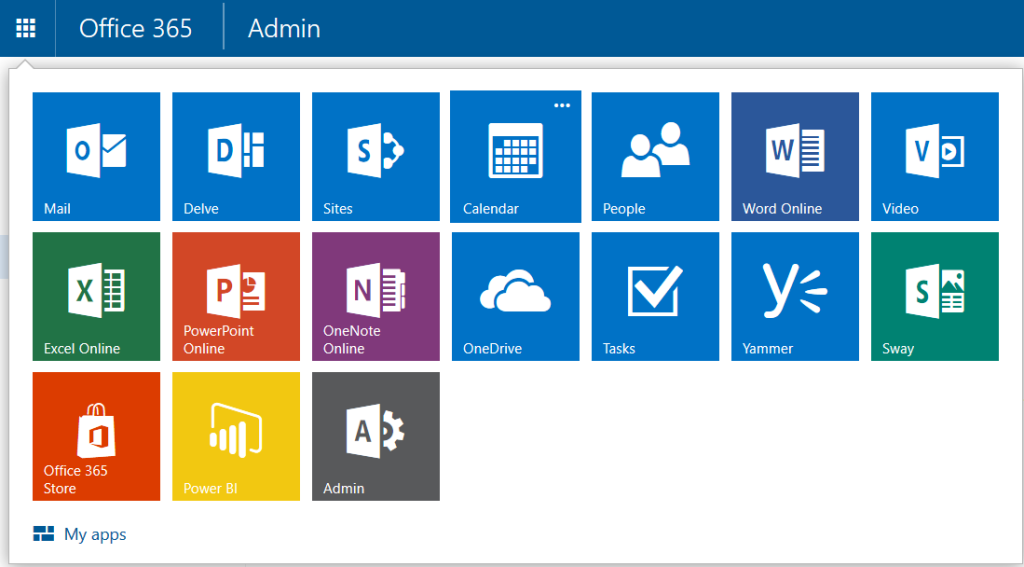
Office365adminSJTechies

Gathering usage information about Microsoft Office 365 in an enterprise is limited by the available admin tools. To make matters worse, as Microsoft adds new applications to Office 365, the ability to track if, and how, users were consuming the new features has been even more difficult. But with the rollout of the new Office 365 admin center in March 2016, those limitations are quickly disappearing.

Reporting

At first glance, you may think the main activity for any Office 365 admin is adding and subtracting employees from the active roster. But a good admin should be doing much more.

As the number of applications in Office 365 has grown substantially in recent years, the need to track all Office 365 activity has also grown. This need to track activity is especially important in larger enterprises where mishandled resources can raise overall costs significantly.

For example, knowing how many employees actually use Yammer on a weekly basis, and when, could help admins predict when resources will be taxed the most. Or tracking how users are actually using collaboration tools like Skype and Delve may lead an admin to conclude that more training on those applications is needed because the apps are underutilized. These are the sort of questions the new Office 365 admin center is looking to answer.

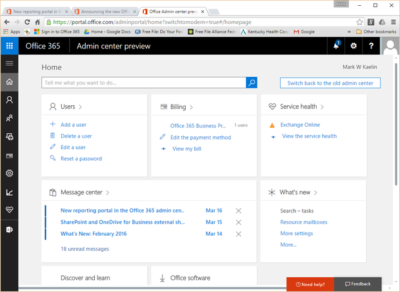
By simplifying the interface and creating ready-to-use dashboards, Microsoft is trying to streamline the reporting process. Tracking email activity and other peak usage data is just a few clicks away. And as the new Office 365 admin center is rolled out, there will also be tools admins can use to create custom reports.

Speaking from personal experience, the new admin dashboard interface is a welcome improvement. Navigation in the new admin center closely matches the familiar navigation system of other Office 365 apps. The previous admin center, with its heavy use of linked text, looked almost tacked on as an afterthought.

officeadmin365-SJTechies

Rollout

The new Office 365 admin center is rolling out in the United States right now and will be the default reporting experience very soon. The new center will roll out to other parts of the world in April 2016.

If you’re not ready for the change, you can roll back to the old admin system during this introductory phase. On the other hand, if you’re anxious for a change, you can click the Get A Sneak Peek link at the top of the old Office 365 admin center to force the installation of the new system.

Bottom line

For most users, administering Office 365 is someone else’s responsibility, but that does not diminish its importance to an enterprise.

A good admin should be able to track what activity is taking place within Office 365 and, more important, what activity is not taking place. Knowing who uses what applications for how long, and when, is essential information. Armed with that knowledge, administrators can determine how to better allocate resources and where new training for users may be required.

With the rollout of the new Office 365 admin center, Microsoft is using feedback received from its customers to create tools and dashboards that it hopes will make the tracking of vital activity data in Office 365 an easily achieved reality.

Have questions?

Get answers from Microsofts Cloud Solutions Partner!
Call us at: 856-745-9990 or visit: https://southjerseytechies.net/

South Jersey Techies, LL C is a full Managed Web and Technology Services Company providing IT Services, Website Design ServicesServer SupportNetwork ConsultingInternet PhonesCloud Solutions Provider and much more. Contact for More Information.

To read this article in its entirety click here.

Surface Book: Microsoft just made the PC cool again

The Microsoft Surface Book is the computer you always wanted to have but couldn’t. So now that it is here, will you buy it?

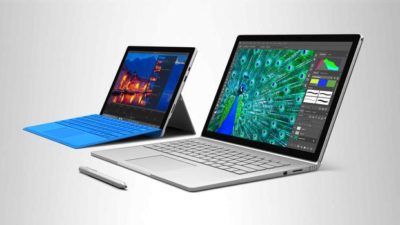
surface-4-surface-book

The latest line of Microsoft Surface personal computers is now available from both the virtual and the bricks-and-mortar Microsoft Store. By most accounts, the Surface Pro 4 and the flagship Surface Book offer impressive performance without sacrificing style or that illusive awe factor typically missing from PCs in general.

With the Surface Book in particular, Microsoft is attempting to change the narrative of the personal computer—to change perceptions in the marketplace. The Surface Book is an aspirational computer and it is intended to inspire desire in the overall PC and computing device market.

Strategic reasons

There are some solid strategic reasons why Microsoft has brought the Surface Book to market.

Giving OEMs a reference for their own hardware and increasing participation in Microsoft cloud services and the ecosystem that goes with it are certainly notable goals of the Surface Book.

But there is even more to it than that.

Hardware

It is important to understand the hardware inside the Microsoft Surface Book. These are the technical specifications of a powerful computing device. You do not buy a Surface Book so your kids can watch movies in the car while you run errands.

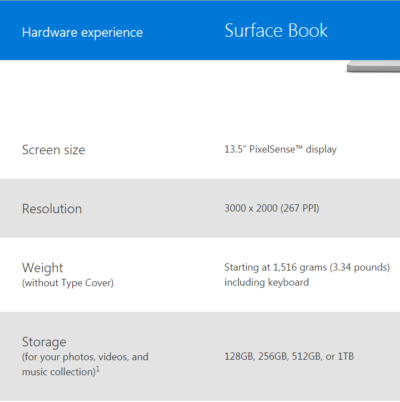
With a high resolution screen, SSD storage up to 1TB, up to 16GB RAM, an Intel I5 or I7 CPU, and a customized discreet GPU from Nvidia, the Surface Book is designed for performance and productivity. This is some serious computing power delivered in a small package.

Of course, that power comes at a premium price, but that is where the aspirational part of the strategy comes into play. Microsoft knows it will not sell millions upon millions of Surface Books. That is not its purpose. Instead, Microsoft wants millions upon millions of people to want a Surface Book—to aspire to own one someday.

Microsoft wants the Surface Book to be the notebook computer you would buy if money were not an issue. It wants the Surface Book to be a status symbol PC.

Marketing

This is a bold move by Microsoft and it goes hand-in-hand with the “PC does what?” marketing campaign produced in conjunction with its OEM partners like Dell and Lenovo. These companies are trying to make PCs cool again. They are trying to steal some of the thunder so often associated with Apple.

And while the “PC does what?” campaign gets mocked, mostly by fans of Apple, it is more effective than many believe. Remember the Mac versus PC commercials? People often mocked those as inaccurate oversimplifications of fact, but they still seemed to elevate the “cool” factor of the Mac. It didn’t matter what everyone thought of them; what mattered was the perception they produced.


Bottom line

The Microsoft Surface Book sets a high bar for every other notebook computer that comes to market. Microsoft has carefully crafted a powerful computer with hardware, features, and style no other company can currently match. In a single stroke, Microsoft has made owning a PC cool again. It has made the Windows 10 ecosystem cool again.

Let’s punctuate the point with anecdotal evidence. A number of people have spent much of their professional lives complaining about Microsoft and PCs. They have been working in the Apple’s ecosystem and hating every minute of it. They have been looking for more than what Apple offers for years now. The day Microsoft announced the Surface Book, they ordered one. They haven’t been this excited about buying a computer for a decade.

With this lineup of Surface products, Microsoft has changed the tide and established market momentum. It will be interesting to see how Google and Apple respond. We should see some serious competition now. It also wouldn’t be surprised to see a resurgence in Windows 10 mobile devices later this year. It looks to be an exciting time for consumers. Hang on to your hats.

Have questions?

Get help from IT Experts/Microsofts Cloud Solutions Partner
Call us at: 856-745-9990 or visit: https://southjerseytechies.net/

South Jersey Techies, LLC is a full Managed Web and Technology Services Company providing IT Services, Website Design ServicesServer SupportNetwork ConsultingInternet PhonesCloud Solutions Provider and much more. Contact for More Information.

To read this article in its entirety click here.

Now Microsoft Office 365 tackles ‘fake CEO’ email spoofing attacks

Microsoft is rolling out a host of new email security features for Office 365 later this quarter, as it looks to thwart hackers and criminals.

‘Insider spoofing’ or faking the CEO’s email address to trick the CFO into transferring millions to criminal bank accounts is big business. Now Microsoft is using big data and reputation filters to try and squish the threat.

According to the FBI, between October 2013 and August 2015, 7,066 US businesses have fallen prey to ‘business email compromise’, netting criminals an estimated $747m.

Non-US victims lost a further $51m over the period, with the FBI estimating a 270 percent increase in identified victims since January 2015, when it first released figures about the threat category.

As Microsoft notes, when a corporate email domain is spoofed, it makes it hard for existing filters to identify the bogus email as malicious.

However, Microsoft reckons it has achieved a 500 percent improvement in counterfeit detection using a blend of big data, strong authentication checks, and reputation filters in Exchange Online Protection for Office 365.

It’s also rolling out new phishing and trust notifications to indicate whether an email is from a known sender or if a message is from an untrusted source, and therefore could be a phishing email.

The company is also promising a faster email experience as it vets attachments for malware and new tools to auto-correct messages that are mis-classified as spam. The aim is to boost defences without impairing end-user productivity.

Malicious email attachments remain a popular way for attackers to gain a foothold in an organization and, as RSA’s disastrous SecurID breach in 2011 showed, a little social engineering can go a long way to ensuring someone opens it.

Microsoft’s new attachment scanner, called Dynamic Delivery of Safe Attachments, looks to reduce delays as it checks attachments for potential threats.

Currently it captures suspicious looking attachments in a sandbox with a ‘detonation chamber’ where it analyses it for malware in a process takes five to seven minutes.

Microsoft hasn’t figured out a faster way to analyse the attachment, but instead of holding up the email as it conducts the scan, it will send the body of the email with a placeholder attachment. If the attachment is deemed safe, it will replace the placeholder and if not, the admin can filter out the attachment.

The feature is part of Microsoft’s Office 365 Exchange Online Protection and Advanced Threat Protection services.

The company is also tackling false-positive spam, or legitimate messages that are mis-identified as spam, and vice versa, with a new feature called Zero-hour Auto Purge, which allows admins to “change that verdict”.

“If a message is delivered to your inbox and later found to be spam, Zero-hour Auto Purge moves that message from the inbox to the spam folder; the reverse is true for messages misclassified as spam,” Microsoft notes.

Microsoft is testing this approach with 50 customers and says it will be rolled out for all Exchange Online Protection global clients in the first quarter of 2016.

Have questions?

Get help from IT Experts/Microsofts Cloud Solutions Partner
Call us at: 856-745-9990 or visit: https://southjerseytechies.net/

South Jersey Techies, LLC is a full Managed Web and Technology Services Company providing IT Services, Website Design ServicesServer SupportNetwork ConsultingInternet PhonesCloud Solutions Provider and much more. Contact for More Information.

To read this article in its entirety click here.

Microsoft’s latest Windows 10 ad annoys Chrome users with taskbar pop-ups

Ads on the Windows 10 taskbar aren’t just for Microsoft Edge anymore.

Microsoft’s aggressive advertising push inside Windows 10 is going beyond pop-ups for Microsoft Edge.

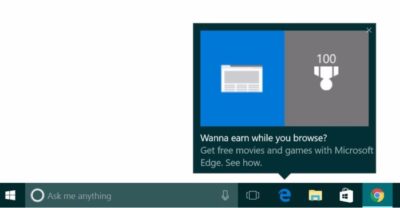
Myce recently spotted yet another pop-up ad on the taskbar in Windows 10. This time around Microsoft was advertising its extension for Chrome dubbed the Personal Shopping Assistant (Beta). The extension is a Microsoft Garage project that lets you compare prices across shopping sites.

Prior to the Chrome extension pop-up, Microsoft was advertising its rewards program for Microsoft Edge, which we spotted in early November. The earlier ad appeared to be targeted at people who didn’t use Edge that frequently.

A pop-up ad that promotes Windows 10’s Edge browser and Bing Rewards. The pop-up for the Chrome extension looks similar, as you can see on Myce.

The Chrome one, by comparison, is probably targeted at people who use Chrome as their default browser. Microsoft’s likely thinking that if people won’t stop using Chrome on Windows, at least they can use some Microsoft software while they’re doing it.

Microsoft told Thurrott.com that ads like the one for the Chrome extension are part of the company’s tests to provide, “new features and information that can help people enhance their Windows 10 experience.”

Tests or not, it’s unlikely that Microsoft will ever stop these taskbar ads even though users pay $100 or more for Windows. Thus far, Microsoft has advertised its own software and services.

The impact on you at home: If you want to make sure you don’t get pop-up ads on your taskbar you can turn them off. Open the Settings app and go to System > Notifications & Actions. On this screen under “Notifications” turn off Get tips, stricks, and suggestions as you use Windows. That’s not the only way Microsoft can advertise to you.

Have questions?

Get answers from Microsofts Cloud Solutions Partner!
Call us at: 856-745-9990 or visit: https://southjerseytechies.net/

South Jersey Techies, LL C is a full Managed Web and Technology Services Company providing IT Services, Website Design ServicesServer SupportNetwork ConsultingInternet PhonesCloud Solutions Provider and much more. Contact for More Information.

To read this article in its entirety click here.

Microsoft Office 365: The smart person’s guide

Office 365 provides the productivity tools required by a modern enterprise workforce. This guide covers key details, including available applications, system requirements, and subscription options.

Office-365-SJTechies2

For just about any enterprise of any size, the productivity of its modern workforce revolves around the basic office suite of email, calendar, word processor, and spreadsheet. But as the enterprise workforce has become more mobile, the basic productivity toolset has had to adapt and change to match new requirements. This is why Microsoft updated Office 365 to be a mobile collaborative platform ready to get work done wherever and whenever it happens.

Microsoft Office 365 is the de facto productivity suite for many enterprises and it is the suite all the other competitors are measured against. So as a leader in information technology for your enterprise, it’s in your best interest to know everything there is to know about Office 365. To help you achieve that goal, TechRepublic compiled the most important details and related resources on Microsoft Office 365 into this “living” guide, which we’ll periodically update as new information becomes available.

Executive summary

What is it? Microsoft Office 365 provides users with the basic productivity applications necessary to get work done in the modern enterprise. It includes applications like Word, Excel, Outlook, PowerPoint, OneNote, and OneDrive, just to name a few.

Why does it matter? As the standard for productivity suites, competing products are generally measured against applications from the Office 365 suite.

Who does it affect? In the modern mobile-centric enterprise, Office 365 provides the tools used to get work done. This makes Office 365 important to just about every working individual.

When is it available? The latest version of Microsoft Office 365 is available right now. The current subscription includes Office 2016 applications.

How do you get it? Enterprises can purchase a subscription to Office 365 via the Microsoft website. Subscriptions range from $8/user/month to $35/user/month.

What is it?

Microsoft Office 365 is a subscription service that provides users with the basic productivity applications necessary to get work done in the modern enterprise. Productivity applications include, but are not limited to, a word processor, a spreadsheet, an email client, a calendar, and a presentation application.

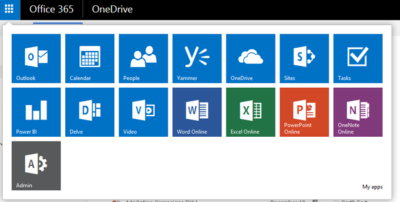
Office365-OneDrive

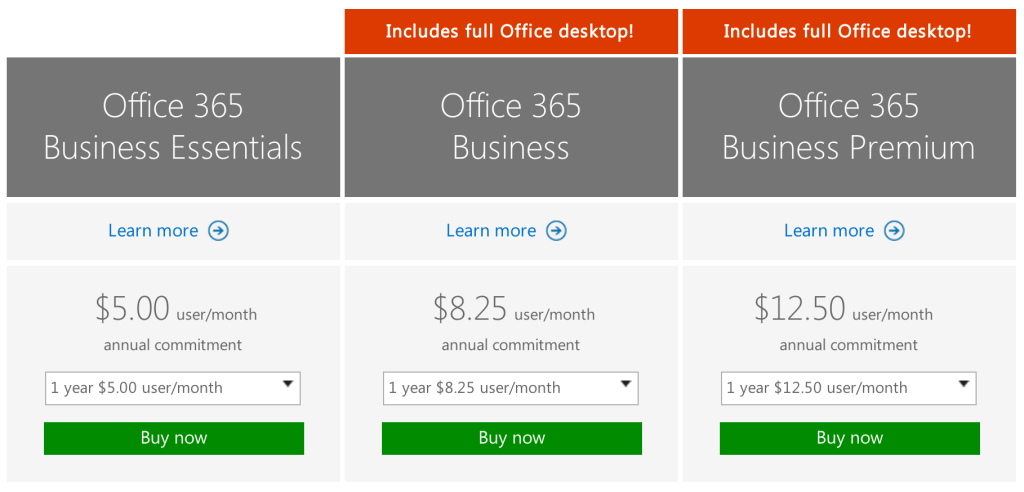
As an example, a Business Premium subscription to Office 365 ($12.50 per person per month) includes these applications:

Word: This app sets the standard for word processors and is available with Office 365 for both Business and Premium. If users in your enterprise need to create documents, this is the tool they will use.

Excel: The spreadsheet has been the workhorse for basic data analysis since its invention back in the previous century. Excel is the current standard-bearer and comes with Office 365 for Business and Premium.

Outlook: Office 365’s solution for managing email and an appointment calendar is called Outlook. The app has been around for many years and its busy interface tends to be either loved or hated by users. It’s available with both the Business and Premium subscriptions.

PowerPoint: Communicating information to a group of individuals at a meeting often involves a presentation. Office 365’s PowerPoint allows users to create, display, and disseminate information in formats ranging from the basic slide to animation to video.

Publisher: Sometimes communicating information to a broader audience requires something more permanent and more formal than a presentation at a meeting. The Publisher app in Office 365 provides users with the tools they need to publish professional-looking newsletters, brochures, and booklets.

OneNote: As the workforce has become more mobile, the need to capture information on the go has become increasingly important. Applications like OneNote allow users to take notes on any device and then retrieve those notes from any other device. It’s your basic productivity cloud app.

OneDrive: The other basic and fundamental cloud-based application is storage. With each Office 365 Business subscription, Microsoft provides users with up to 1TB of cloud storage in the form of an application called OneDrive for Business.

SharePoint: A subscription to Office 365 Business Premium also provides an enterprise with a few applications for backend infrastructure management. SharePoint, for example, can be used to host intranet websites for the enterprise. It also can be used to host smaller sites designed for smaller teams or divisions. The permissions for these sites can be designated by the users themselves or by appointed administrators.

Exchange: Each Office 365 for Business subscription includes an Exchange Server, which handles all the email management duties. By default, each user is granted 50GB of storage for email. Maintenance of the Exchange Server is generally handled at the administrator level.

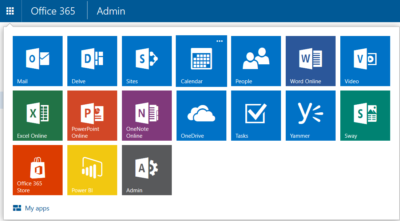
Collaboration tools: Along with the typical productivity applications, Office 365 includes many collaboration tools—like Delve, Skype, Yammer, and Sway. These tools allow users to communicate, brainstorm ideas, share documents, and have video meetings while on the go.

Power BI: One of the most powerful tools any enterprise can have, regardless of size, is reliable business intelligence gathering applications. Office 365 for Business, through its Power BI application, provides enterprises with a set of tools for collecting, sorting, and presenting business intelligence data.

Infrastructure: All Office 365 subscriptions include a reliability guarantee of 99.9% uptime. In addition, permissions for internal access control are handled by administrators designated by the enterprise using tools supplied by Active Directory. Each Office 365 subscription includes five layers of security and proactive monitoring to help safeguard your data.

System requirements

  • CPU: 1GHz or faster
  • Memory: 2GB RAM
  • Hard drive: 3GB of available space (6GB for Mac)
  • Display: 1280 X 800 screen resolution
  • Operating system: PC-Windows 7, 8, or 10. Mac-Mac OS X 10.10
  • Connectivity: Internet connection

Why does it matter?

Collaboration and communication are the key components of productivity in the modern enterprise, and productivity is the lifeblood of the enterprise. Microsoft Office 365 provides the tools necessary to bring collaboration and communication—and by extension, productivity—to each individual in an enterprise.

For many companies, Office 365 is the de facto standard for productivity software. The performance of all competing products is generally measured against applications from the Office 365 suite.

Who does it affect?

Just about every knowledge worker in every enterprise is required to have an email account and a calendar application. Beyond that, most individuals in an enterprise will need to use, at least once in a while, a word processor. And a significant number of individuals in an enterprise will also find themselves needing to use presentation software or a spreadsheet at some point in their career.

These are the productivity tools of any enterprise. These are the tools used to get work done. That means Office 365 is important to just about every working individual.

When is it available?

Microsoft Office 365 is available right now. The current subscription includes applications updated to the Office 2016 versions. Of course, the key to the subscription model is that each user will always be using the most current and most secure version of each application because each application is continuously updated.

How do you get it?

Enterprises with fewer than 300 users can purchase a subscription to Office 365 and download the appropriate applications via the Microsoft website. The Premium version costs $12.50 per user per month ($150/year). There are also versions of Office 365 available for individuals ($69.99/year) and households ($99.99/year).

Office-365-SJTechies

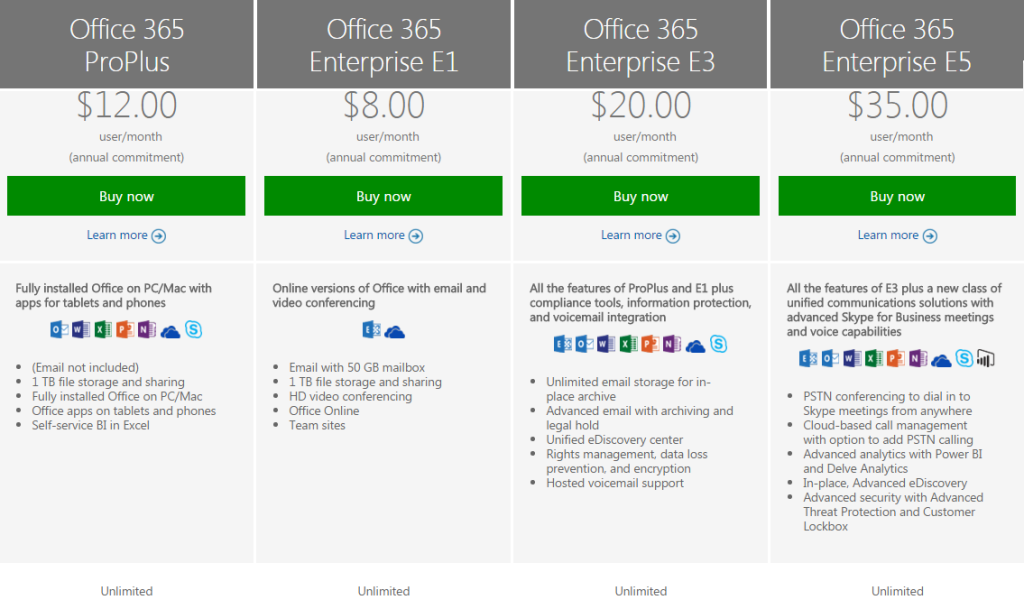
For large enterprises, unlimited user versions of Office 365 are available, ranging from $12 per person per month to $35 per person per month. Each subscription caters to a particular type of enterprise. More expensive enterprise versions of Office 365 add features like voicemail, compliance auditing, rights management, encryption, and Advanced Threat Protection.

Office-365-SJTechies1

Have questions?

Get answers from Microsofts Cloud Solutions Partner!
Call us at: 856-745-9990 or visit: https://southjerseytechies.net/

South Jersey Techies, LL C is a full Managed Web and Technology Services Company providing IT Services, Website Design ServicesServer SupportNetwork ConsultingInternet PhonesCloud Solutions Provider and much more. Contact for More Information.

To read this article in its entirety click here.

Microsoft’s new Surface Laptops unveiled

Microsoft’s most direct shot at the MacBook yet

This slideshow requires JavaScript.

The one Surface product that fans have been clamoring over for years, a straight up Surface Laptop, is finally here. But, in taking design cues from both the Surface Pro and Surface Book lines, Microsoft has set lofty expectations for its first dedicated laptop device.

Priced at $999 (about £770, AU$1,330), the Surface Laptop clearly aims to chip at the MacBook and MacBook Air models that dominate college campuses practically worldwide. In fact, Microsoft claims that its cheaper (and larger) Surface Laptop can last far longer on a charge than Apple’s 12-inch MacBook: 14.5 hours.

However, every Surface Laptop shipped will come with Windows 10 S installed, Microsoft’s new version of Windows 10 that only accepts app installs downloaded from the Windows Store.

With the ability to switch from Windows 10 S to the 100% open Windows 10 Pro for $49 if you miss the chance in 2017 for free, should you need an app outside of the Windows Store that badly (spoiler: you probably will).

Regardless, at that price, can Microsoft garner enough interest from college students (or more likely their parents), who are often already strapped from the cost of an education?

The Surface Laptop in traditional ‘Platinum’

Design

Clearly, part of Microsoft’s plan is to lure those folks in with an incredibly gorgeous, and potentially trendsetting, design. The 13.5-inch Surface Laptop may very well be Microsoft’s most attractive computing product yet.

And, with four colors to choose from – Burgundy, Platinum, Cobalt Blue and Graphite Gold – there’s bound to be one that appeals to you.

A full aluminum lid and base wrap the laptop in much the same way it does a Surface Book, but ditches the aluminum in the keyboard deck for a Alcantara fabric that surrounds every plastic key and meets with the aluminum base in a seemingly airtight seal.

The fabric, according to Microsoft, is imported from Italy and laser cut to fit every Surface Laptop. Now, while many of the design elements are the same, the 13.5-inch (2,256 x 1,504) PixelSense touch display, the smooth glass-coated Precision touchpad, the chrome logo centered on the aluminum lid, we’re told that very few parts from previous parts are found within the Surface Laptop.

That much is obvious in the nature of the felt used for this keyboard deck compared against that which the Type Covers from Microsoft utilize. It’s smoother and more plush than those Type Covers, and we’re told it’s spill resistant.
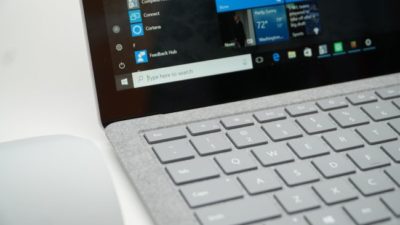
The Surface Laptop’s keyboard deck is awfully comfortable

Plus, the additional height afforded by this traditional laptop design allowed Microsoft to equip the keyboard with 1.5mm of travel, and the difference in typing between that and the Surface Pro 4 is night and day. Finally, Microsoft devised a speaker system beneath the keyboard that radiates sound through the spaces between the keys and the keyboard deck.

The result isn’t much better audio than you’d find in a MacBook Air, perhaps a bit fuller, but at least it’s consistently in an uninterrupted position. Naturally, the audio gets a bit muffled when typing, but since the sound radiates throughout the laptop base, there isn’t a major loss in audio detail.

That leaves the side of the laptop base to house Microsoft’s proprietary power and docking port found on other Surface devices, as well as a USB 3.0 and Mini DisplayPort, not to mention an audio jack. If you’re already asking, “where’s the USB-C,” we’ve already been there.

Microsoft tells us that it intends for its own port to handle concerns of connectivity expansion via the Surface Connect port and its Surface Dock, while refraining from alienating customers that have yet to completely update to USB-C.

A fine explanation, but that doesn’t tell us why USB 3.0 and not USB 3.1 at least, as you’re missing out on some major data transfer speed improvements there.

Those strange strips of plastic on the base? They’re Wi-Fi antennae

Performance and battery life

Microsoft can pack the Surface Laptop with the latest Intel Core i5 or Core i7 processors (Kaby Lake), up to 512GB of PCIe solid-state storage (SSD) and as much as 16GB of RAM.

That’s a mighty powerful laptop on paper, likely stronger than either the MacBook Air or 12-inch MacBook, while rising above even the latest 13-inch MacBook Pro that still utilizes Skylake processors.

(The $999 model comes packing a 128GB SSD and 4GB of RAM with the Intel Core i5.)

As for how Microsoft fit that kind of power a laptop just 0.57 inches (14.48mm) thin, a brand new, proprietary vapor chamber cooling system helps a whole lot. The system changes the physical state of the heat as it’s taken in through the center of a fan vent in the rear of the laptop base and spits it out of the sides of that same vent.

While we obviously weren’t able to stress-test the Surface Laptop, we were able to test out how it feels to use. For starters, at just 2.76 pounds (1.25kg), this thing is super light, which is all the more impressive considering it’s a 13.5-inch, Gorilla Glass 3 touchscreen you’re looking at.

Note the Surface Connect dock port – Microsoft’s answer to USB-C

Microsoft chalks this up to, in part, the thinnest LCD touch module ever used in a laptop design. This, in turn, helps the lid to lift with just one finger. However, perhaps the hinge design needs refinement.

While you can open the display with just a finger, that slightness in the hinge is felt when the screen bounces with every tap of the touchscreen. It’s the very reason we question the inclusion of touchscreens in traditional laptops to begin with. Unfortunately, it seems Microsoft hasn’t found a better solution here.

That said, typing on the keyboard is the best time we’ve had doing such on a Surface product yet, and the portability of the whole thing is right there with Apple’s best.

As for battery life, Microsoft is, again, claiming 14.5 hours on a single charge. Microsoft later clarified for us that this number was achieved via local video playback with all radios but Wi-Fi disabled.

That testing environment sounds very similar to how TechRadar tests for battery life, so we might see battery life results in a full review fall much closer to this claim. If so, then Surface Laptop will be very tough to beat in longevity and be a potentially major driver for sales.
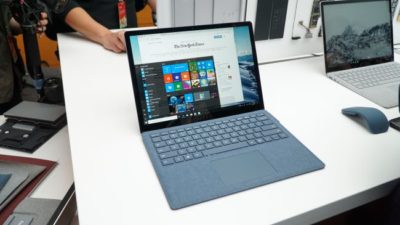
This is the Surface Laptop in Cobalt Blue

Early verdict

The fact that the Surface Laptop ships with a limited – sorry, “streamlined” – operating system and costs more than some previous Surface systems that come with full fat Windows 10 cannot go unnoticed – regardless of the free upgrade through this year. Unless Microsoft changes its tune come 2018, folks buying one of these with holiday gift money at the turn of the year would be wise to tack 50 bucks on top of whichever configuration they choose to get Windows 10 Pro.

While this switch will be free for any Surface Laptops bought in the education sector, that won’t help the Surface Laptop’s target audience come 2018: late high school and college students.

That said, the Surface Laptop’s incredible, potentially trendsetting design cannot go unnoticed either. Frankly, this is a laptop that appears to outclass the MacBook Air and 12-inch MacBook – and possibly even the 13-inch MacBook Pro – for hundreds less.

Save for a questionable platform versus pricing decision, the Surface Laptop has all the makings of yet another winning piece of hardware from Microsoft.

Have questions?

Get answers from Microsofts Cloud Solutions Partner!
Call us at: 856-745-9990 or visit: https://southjerseytechies.net/

South Jersey Techies, LL C is a full Managed Web and Technology Services Company providing IT Services, Website Design ServicesServer SupportNetwork ConsultingInternet PhonesCloud Solutions Provider and much more. Contact for More Information.

To read this article in its entirety click here.

Microsoft updates support policy: New CPUs will require Windows 10

In a change to its longstanding support policy, Microsoft says PCs based on new CPU architectures, including Intel’s Skylake chips, will require Windows 10. A list of preferred systems will support older Windows versions on new hardware, but only for 18 months.

Windows 10

Enterprise customers are still the bulwark of Microsoft’s Windows business, in both the client and server segments.

Historically, those customers have also been among the most conservative, lagging years behind the latest releases of an operating system release. Those practices have been encouraged by Microsoft’s support lifecycle, which offers a generous ten years of support for each Windows release.

Effective today, that policy is changing in a subtle but significant way, with the addition of new hardware requirements for support of pre-Windows 10 releases. The company’s also publishing a preferred list of systems that will receive special attention for updates and support.

Yes, Windows 7 (currently in the Extended support phase) will continue to receive updates until January 14, 2020, and Windows 8.1 will be supported until January 10, 2023. But in a series of “clarifications” to its support policy today, the company announced that support for those older Windows versions will be available only for “previous generations of silicon.”

Going forward, as new silicon generations are introduced, they will require the latest Windows platform at that time for support… Windows 10 will be the only supported Windows platform on Intel’s upcoming “Kaby Lake” silicon, Qualcomm’s upcoming “8996” silicon, and AMD’s upcoming “Bristol Ridge” silicon.

The policy will be phased in beginning with systems based on Intel’s new 6th-generation CPUs (code-named Skylake), which debuted a few months ago. New consumer-based Skylake devices must run Windows 10 to be supported.

For enterprise customers that want to buy “future proof” new hardware based on Skylake processors running older Windows versions, Microsoft will publish “a list of specific new Skylake devices we will support to run Windows 7 and Windows 8.1.” That support will run for a period 18 months, until July 17, 2017, after which those enterprise customers will be expected to upgrade to Windows 10.

Examples of systems that will be on the initial release of the list include Dell’s Latitude 12, Latitude 13 7000 Ultrabook, and XPS 13; HP’s EliteBook Folio, EliteBook 1040 G3; and Lenovo’s ThinkPad T460s, X1 Carbon, and P70 models.

The list will continue to be updated, Microsoft says.

Any machine that earns a place on the elite enterprise support list will get very special treatment indeed, with the idea being to reassure corporate customers that these models are especially likely to perform well on Windows 10 in the new era of continuous updates:

For the listed systems, along with our OEM partners, we will perform special testing to help future proof customers’ investments, ensure regular validation of Windows Updates with the intent of reducing potential regressions including security concerns, and ensure all drivers will be on Windows Update with published BIOS/UEFI upgrading tools, which will help unlock the security and power management benefits of Windows 10 once the systems are upgraded.

These models also get special treatment for enterprises that are still planning their Windows 10 migration, with an 18-month grace period where the older OS versions are fully supported.

Through July 17, 2017, Skylake devices on the supported list will also be supported with Windows 7 and 8.1. During the 18-month support period, these systems should be upgraded to Windows 10 to continue receiving support after the period ends. After July 2017, the most critical Windows 7 and Windows 8.1 security updates will be addressed for these configurations, and will be released if the update does not risk the reliability or compatibility of the Windows 7/8.1 platform on other devices.

Of course, enterprise customers who want to stick with earlier Windows versions beyond that mid-2017 deadline have lots and lots of options, based on current generations of Intel processors such as the Broadwell and Haswell lines. Those systems, which are based on what Microsoft calls “downlevel silicon,” will continue to be fully supported for pre-Windows 10 operating systems.

In today’s blog post, Microsoft says it’s seeing “unprecedented demand from our enterprise customers” in Windows 10. Enterprise customers are especially interested in new Windows 10 security features like Credential Guard, which uses hardware virtualization to safeguard credentials from attack.

Windows 8-era enhancements like Secure Boot, which protects systems from being compromised by rootkits and bootkits, also require new hardware.

Not surprisingly, today’s announcement contains the usual cheery statements from Microsoft’s three biggest hardware partners: Dell, HP, and Lenovo. All three companies compete aggressively in the low-margin consumer market, where virtually all new systems will run Windows 10. But enterprises will pay premium prices for the improvements in battery life and security in Skylake-based mobile systems, making this the most attractive segment to target.

Have questions?

Get help from IT Experts/Microsofts Cloud Solutions Partner
Call us at: 856-745-9990 or visit: https://southjerseytechies.net/

South Jersey Techies, LL C is a full Managed Web and Technology Services Company providing IT Services, Website Design ServicesServer SupportNetwork ConsultingInternet PhonesCloud Solutions Provider and much more. Contact for More Information.

To read this article in its entirety click here.

Microsoft prices high-end Office 365 E5 at $420 per user per year

Microsoft begins selling its new highest-end Office 365 business plan, E5, on December 1 for $420 per user per year. Here’s what’s included.

Ofice 365-Plans

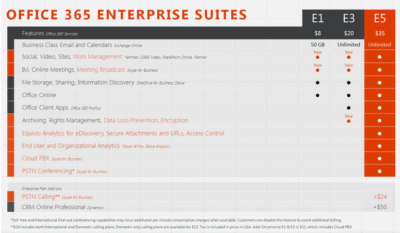
Microsoft will charge users $35 per user per month, or $420 per year, for its new highest-end Office 365 business plan.

Microsoft officials went public with the pricing for Office 365 E5, its top-of-the-line commercial Office 365 offering, on November 30 during the company’s Convergence EMEA conference. Office 365 E5 is available to customers for purchase starting, December 1.

Office 365 E4 — the current high-end version of Microsoft’s Office 365 line — sells for $22 per user per month, or $264 per user, per year.

The Office 365 E5 SKU will include Skype for Business (Lync) with support for features including Cloud PBX and Meeting Broadcast; new analytics features, like Power BI Pro and Delve Organizational Analytics; and new advanced security features, such as eDiscovery, Customer Lockbox, and Safe Attachments.

Office 365 E4 includes Skype for Business with Enterprise Voice and unified messaging; the full suite of locally downloadable Office apps; and Power BI for Office 365 (which is being superseded by Power BI pro).

Microsoft is planning to retire E4 and replace it with E5. However, Office 365 E4 will remain on the price list till June 30, 2016, Microsoft officials have said.

The E1 and E3 versions of Office 365 will retain their current prices of $8 per user per month, and $20 per user per month, respectively.

Office 365 E1 users will get new work-management capabilities, as well as Skype for Business’s Meeting Broadcast functionality added to their plans for no additional charge. Office 365 E3 users will get those same two new features, as well as the option to purchase Equivio Analytics for eDiscovery. (Microsoft bought Equivio in January 2015.)

Skype Meeting Broadcast enables users to broadcast of a Skype for Business meeting on the Internet to up to 10,000 people, who can attend in a browser.

Office 365 E5 users get all the features that E1 and E3 users get, plus other analytics and networking functionality, including Cloud PBX and PSTN Conferencing.

The Skype for Business Cloud PBX with PSTN Calling service provides users with the ability to make and receive traditional phone calls in their Skype for Business client, and to manage these calls using hold, resume, forward and transfer.

PSTN Conferencing is initially available to 15 countries on December 1, with a phased roll out to international markets in the future. Cloud PBX is available worldwide starting December 1. PSTN Calling is available in the U.S. starting December 1, with a phased roll out to international markets in the future.

The fine print: PSTN Conferencing users may incur additional per-minute consumption charges, but customer can disable this feature to avoid additional billing. PSTN Calling is paid add-on for E1, E3 and E5. For E5 users, PSTN Calling costs $24 extra (per user, per month) for international and domestic calling, and $12 for domestic calling only. For E1 and E3, the international and domestic calling plan is $32 extra.

Have questions?

Get help from IT Experts/Microsofts Cloud Solutions Partner
Call us at: 856-745-9990 or visit: https://southjerseytechies.net/

South Jersey Techies, LLC is a full Managed Web and Technology Services Company providing IT Services, Website Design ServicesServer SupportNetwork ConsultingInternet PhonesCloud Solutions Provider and much more. Contact for More Information.

To read this article in its entirety click here.
 

Office 365 – the easiest way to get the new Office.

Microsoft
Partner Network

Office 2016

Now, there’s more opportunities than ever to build your business.Office 216 is the latest addition to Office 365—taking the work out of working together. The new Office is built for teamwork. Perfect for Windows 10. Smart. Secure. Full of new features.

Consider the opportunities.

Exciting new advances in Office open new opportunities for you to deepen your role as trusted advisor and to expand your practice—and your revenue potential. Here are a few paths to consider:

  • Reach new customers by leveraging the innovative user experiences in Office 2016 apps
  • Grow your hybrid practice with cloud-inspired infrastructure in Office 2016 servers
  • Capitalize on Office 2016 launch momentum to renew or upsell Office 365

We think that Office 2016 is an important step in empowering every organization on the planet to achieve more. Action Pack and Competency partners can get started right away by using your internal use rights (IUR) benefits to download Office 365. Once you’re familiar with the new Office you can show your customers how to get the most from the new features.

Quick steps to get started:

Let’s do great work together.Your Microsoft Partner Network Team

Have questions?

Get help from IT Experts/Microsofts Cloud Solutions Partner
Call us at: 856-745-9990 or visit: https://southjerseytechies.net/

South Jersey Techies, LLC is a full Managed Web and Technology Services Company providing IT Services, Website Design ServicesServer SupportNetwork ConsultingInternet PhonesCloud Solutions Provider and much more. Contact for More Information.

How to access Compliance Manager by Office 365

Compliance Manager is now available

Compliance Manager is a cross-Microsoft-cloud services feature designed to help organizations meet complex compliance obligations, including GDPR, ISO 27001, ISO 27018, NIST 800-53, and HIPAA. Compliance Manger is rolling out and has been moved from Public Preview to General Availability.

How to access Compliance Manager?

Users can access Compliance Manager by signing into their Office 365, Dynamics 365, or Azure user account via the Service Trust Portal. This new compliance solution is designed to help organizations meet their data protection and regulatory requirements while using Microsoft cloud services. Compliance Manager enables users to perform on-going risk assessments, gain actionable insights to improve data protection capabilities, and simplifies compliance processes through its built-in control management and audit-ready reporting tools.

Compliance Manager is now generally available for Azure, Dynamics 365, and Office 365 Business and Enterprise subscribers in public clouds. Note that Office 365 GCC customers can access Compliance Manager, however, you should evaluate whether to use the document upload feature of compliance manager, as the storage for document upload is currently compliant with Office 365 Tier C only.

What do I need to do to prepare for this change?

By default, everyone in your organization with an Office 365, Dynamics 365 or Azure user account has access to Compliance Manager and can perform any action in Compliance Manager. To change the default permissions, at least one user must be added to each Compliance Manager role (see the instructions on our support page linked from Additional Information below). After a user is added to a role, the default permissions are removed and only users that have been added to a role will be able to access Compliance Manager and perform the actions allowed by that role.

Once you log into Compliance Manager you will see a number of assessments and what Microsoft has completed for the various assessments.  You will also see what controls your organization are responsible for.  You can export the assessment to excel if you need to provide it for an auditor or wish to save it for retention purposes.

Once in an assessment, you can update what your organization is doing to meet the requirements for the various supported standards.  This gives you the ability to track your compliance activities.  Some organization may already have GRC tracking software but they will find this tool useful if for no other reason to see the results of Microsoft Managed controls.

If Microsoft allowed you to have an assessment for your on-premises systems.  Like a blank questionnaire, clients could use it might be able to replace a GRC app for some companies.

When updating the Customer Managed Controls you have the ability to upload documents, lookup the related controls, assign an assessor, a test date and document the test results.

Microsoft provides you with detailed guidance for customer actions and allows you to document your control implementation details along with a test plan and any response to the assessment.

There is a Compliance Score that, “is a new intelligent scoring feature that is calculated based on an analysis of industry standard control components. Compliance Manager analyzes controls for their the impact to the confidentiality, availability, and integrity of protected data, as well as external drivers in order to weigh controls based on their impact.”

We think this is a great tool especially for small to medium businesses and local governments.  Most often these smaller organizations don’t have formal governance practices or necessary skills in-house.  This tool could help them develop those processes. We also see this as a great tool or internal auditors to use. It gives businesses a place to document the testing methods and results.


CALL US NOW!