Back to Top

Tech, Web, Cloud & Cabling Services

Category: Processor

Hardware / Processor Category

Why business-class PCs are a smart investment

Business PCs

Think back to the last time you bought a new PC or laptop for your business. Did you approach the purchase the same way you would for a personal device? And if you had a problem, were you satisfied with the level of service you received?

Many small and medium-sized businesses purchase consumer-grade PCs and notebooks by default, not realizing the amount of difference a business-class model can make. Consumer-grade devices can work fine for many organizations, but businesses with more stringent performance, reliability, and support needs can save time and frustration by moving up to business-class devices.

Think of it this way: when you purchase an economy-class plane ticket you know there’s going to be a marked difference between your experience and the experience of someone flying first class. More legroom, better menu options, more responsive service—the benefits are clear, and for many business travelers it makes sense to upgrade, especially if the flight is long.

When it comes to technology, the difference between consumer-grade and business-class PCs is just as marked as for flights—and for many businesses, the upgrade is just as worthwhile. Here’s the difference a business-class device can make for you:

  • Performance: Many modern consumer-grade processors and mobile operating systems prioritize battery life over processing power. Business-class PCs often offer both better performance and longer battery life, allowing users to work faster and longer while on the road.
  • Reliability: HP Elite PCs are designed to pass MIL STD testing and are tested for 115,000 hours to HP’s own testing standards to help ensure durability. New HP EliteBook 700 series notebooks are also made with Corning® Gorilla® Glass and a magnesium alloy chassis that’s 18 times stronger than plastic.
  • Support: Every HP Elite PC comes with HP Elite Premium Support, providing 24/7/365 dedicated service from U.S.-based specialists who are dedicated solely to supporting HP Elite products.
  • Software and security: Business-class devices help their users take advantage of their advanced features with free, bundled software that is not available (or requires an additional purchase) on consumer-grade PCs. For example, HP Elite family products come with security software and features that protect at the data, identity, and device levels to help keep proprietary data safe.

On average, small businesses hold on to their PCs for five to seven years. Your next device purchase will likely be with you for years to come. So when you consider that many of us are quick to upgrade our airline tickets—even though flights don’t last more than a day—upgrading to a business-class device can make a lot of sense. Weigh the benefits, and choose the device with the level of support and reliability that meets your business needs.

Have questions?

Get help from IT Experts/Microsofts Cloud Solutions Partner
Call us at: 856-745-9990 or visit: https://southjerseytechies.net/

South Jersey Techies, LLC is a full Managed Web and Technology Services Company providing IT Services, Website Design ServicesServer SupportNetwork ConsultingInternet PhonesCloud Solutions Provider and much more. Contact for More Information.

To read this article in its entirety click here.
Surface Book: Microsoft just made the PC cool again

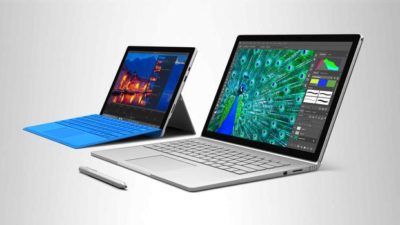
The Microsoft Surface Book is the computer you always wanted to have but couldn’t. So now that it is here, will you buy it?

surface-4-surface-book

The latest line of Microsoft Surface personal computers is now available from both the virtual and the bricks-and-mortar Microsoft Store. By most accounts, the Surface Pro 4 and the flagship Surface Book offer impressive performance without sacrificing style or that illusive awe factor typically missing from PCs in general.

With the Surface Book in particular, Microsoft is attempting to change the narrative of the personal computer—to change perceptions in the marketplace. The Surface Book is an aspirational computer and it is intended to inspire desire in the overall PC and computing device market.

Strategic reasons

There are some solid strategic reasons why Microsoft has brought the Surface Book to market.

Giving OEMs a reference for their own hardware and increasing participation in Microsoft cloud services and the ecosystem that goes with it are certainly notable goals of the Surface Book.

But there is even more to it than that.

Hardware

It is important to understand the hardware inside the Microsoft Surface Book. These are the technical specifications of a powerful computing device. You do not buy a Surface Book so your kids can watch movies in the car while you run errands.

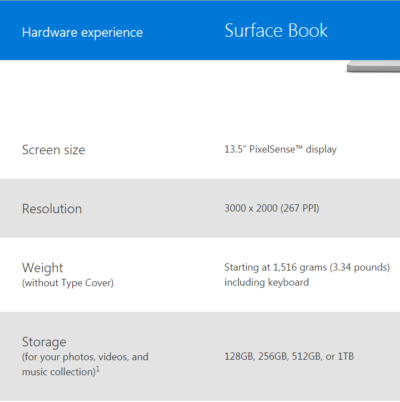
With a high resolution screen, SSD storage up to 1TB, up to 16GB RAM, an Intel I5 or I7 CPU, and a customized discreet GPU from Nvidia, the Surface Book is designed for performance and productivity. This is some serious computing power delivered in a small package.

Of course, that power comes at a premium price, but that is where the aspirational part of the strategy comes into play. Microsoft knows it will not sell millions upon millions of Surface Books. That is not its purpose. Instead, Microsoft wants millions upon millions of people to want a Surface Book—to aspire to own one someday.

Microsoft wants the Surface Book to be the notebook computer you would buy if money were not an issue. It wants the Surface Book to be a status symbol PC.

Marketing

This is a bold move by Microsoft and it goes hand-in-hand with the “PC does what?” marketing campaign produced in conjunction with its OEM partners like Dell and Lenovo. These companies are trying to make PCs cool again. They are trying to steal some of the thunder so often associated with Apple.

And while the “PC does what?” campaign gets mocked, mostly by fans of Apple, it is more effective than many believe. Remember the Mac versus PC commercials? People often mocked those as inaccurate oversimplifications of fact, but they still seemed to elevate the “cool” factor of the Mac. It didn’t matter what everyone thought of them; what mattered was the perception they produced.


Bottom line

The Microsoft Surface Book sets a high bar for every other notebook computer that comes to market. Microsoft has carefully crafted a powerful computer with hardware, features, and style no other company can currently match. In a single stroke, Microsoft has made owning a PC cool again. It has made the Windows 10 ecosystem cool again.

Let’s punctuate the point with anecdotal evidence. A number of people have spent much of their professional lives complaining about Microsoft and PCs. They have been working in the Apple’s ecosystem and hating every minute of it. They have been looking for more than what Apple offers for years now. The day Microsoft announced the Surface Book, they ordered one. They haven’t been this excited about buying a computer for a decade.

With this lineup of Surface products, Microsoft has changed the tide and established market momentum. It will be interesting to see how Google and Apple respond. We should see some serious competition now. It also wouldn’t be surprised to see a resurgence in Windows 10 mobile devices later this year. It looks to be an exciting time for consumers. Hang on to your hats.

Have questions?

Get help from IT Experts/Microsofts Cloud Solutions Partner
Call us at: 856-745-9990 or visit: https://southjerseytechies.net/

South Jersey Techies, LLC is a full Managed Web and Technology Services Company providing IT Services, Website Design ServicesServer SupportNetwork ConsultingInternet PhonesCloud Solutions Provider and much more. Contact for More Information.

To read this article in its entirety click here.
Microsoft updates support policy: New CPUs will require Windows 10

In a change to its longstanding support policy, Microsoft says PCs based on new CPU architectures, including Intel’s Skylake chips, will require Windows 10. A list of preferred systems will support older Windows versions on new hardware, but only for 18 months.

Windows 10

Enterprise customers are still the bulwark of Microsoft’s Windows business, in both the client and server segments.

Historically, those customers have also been among the most conservative, lagging years behind the latest releases of an operating system release. Those practices have been encouraged by Microsoft’s support lifecycle, which offers a generous ten years of support for each Windows release.

Effective today, that policy is changing in a subtle but significant way, with the addition of new hardware requirements for support of pre-Windows 10 releases. The company’s also publishing a preferred list of systems that will receive special attention for updates and support.

Yes, Windows 7 (currently in the Extended support phase) will continue to receive updates until January 14, 2020, and Windows 8.1 will be supported until January 10, 2023. But in a series of “clarifications” to its support policy today, the company announced that support for those older Windows versions will be available only for “previous generations of silicon.”

Going forward, as new silicon generations are introduced, they will require the latest Windows platform at that time for support… Windows 10 will be the only supported Windows platform on Intel’s upcoming “Kaby Lake” silicon, Qualcomm’s upcoming “8996” silicon, and AMD’s upcoming “Bristol Ridge” silicon.

The policy will be phased in beginning with systems based on Intel’s new 6th-generation CPUs (code-named Skylake), which debuted a few months ago. New consumer-based Skylake devices must run Windows 10 to be supported.

For enterprise customers that want to buy “future proof” new hardware based on Skylake processors running older Windows versions, Microsoft will publish “a list of specific new Skylake devices we will support to run Windows 7 and Windows 8.1.” That support will run for a period 18 months, until July 17, 2017, after which those enterprise customers will be expected to upgrade to Windows 10.

Examples of systems that will be on the initial release of the list include Dell’s Latitude 12, Latitude 13 7000 Ultrabook, and XPS 13; HP’s EliteBook Folio, EliteBook 1040 G3; and Lenovo’s ThinkPad T460s, X1 Carbon, and P70 models.

The list will continue to be updated, Microsoft says.

Any machine that earns a place on the elite enterprise support list will get very special treatment indeed, with the idea being to reassure corporate customers that these models are especially likely to perform well on Windows 10 in the new era of continuous updates:

For the listed systems, along with our OEM partners, we will perform special testing to help future proof customers’ investments, ensure regular validation of Windows Updates with the intent of reducing potential regressions including security concerns, and ensure all drivers will be on Windows Update with published BIOS/UEFI upgrading tools, which will help unlock the security and power management benefits of Windows 10 once the systems are upgraded.

These models also get special treatment for enterprises that are still planning their Windows 10 migration, with an 18-month grace period where the older OS versions are fully supported.

Through July 17, 2017, Skylake devices on the supported list will also be supported with Windows 7 and 8.1. During the 18-month support period, these systems should be upgraded to Windows 10 to continue receiving support after the period ends. After July 2017, the most critical Windows 7 and Windows 8.1 security updates will be addressed for these configurations, and will be released if the update does not risk the reliability or compatibility of the Windows 7/8.1 platform on other devices.

Of course, enterprise customers who want to stick with earlier Windows versions beyond that mid-2017 deadline have lots and lots of options, based on current generations of Intel processors such as the Broadwell and Haswell lines. Those systems, which are based on what Microsoft calls “downlevel silicon,” will continue to be fully supported for pre-Windows 10 operating systems.

In today’s blog post, Microsoft says it’s seeing “unprecedented demand from our enterprise customers” in Windows 10. Enterprise customers are especially interested in new Windows 10 security features like Credential Guard, which uses hardware virtualization to safeguard credentials from attack.

Windows 8-era enhancements like Secure Boot, which protects systems from being compromised by rootkits and bootkits, also require new hardware.

Not surprisingly, today’s announcement contains the usual cheery statements from Microsoft’s three biggest hardware partners: Dell, HP, and Lenovo. All three companies compete aggressively in the low-margin consumer market, where virtually all new systems will run Windows 10. But enterprises will pay premium prices for the improvements in battery life and security in Skylake-based mobile systems, making this the most attractive segment to target.

Have questions?

Get help from IT Experts/Microsofts Cloud Solutions Partner
Call us at: 856-745-9990 or visit: https://southjerseytechies.net/

South Jersey Techies, LL C is a full Managed Web and Technology Services Company providing IT Services, Website Design ServicesServer SupportNetwork ConsultingInternet PhonesCloud Solutions Provider and much more. Contact for More Information.

To read this article in its entirety click here.

Office 2016 Preview

Office 2016 Preview for existing Office 365 subscribers

For enterprise

Office 365 administrators with an Office 365 ProPlus subscription can now enable the Office 2016 Preview for their organization by turning on First Release. Learn how to turn on First Release.

Once First Release is turned on, users can install the Office 2016 Preview.

Enabled Office 365 ProPlus users

1. Sign in to the My Software page.

2. Go to Try the next version of Office.

3. Click Install.office2016

This will install the Office 2016 Preview on your device.

Note Enabled Office 365 ProPlus users can follow the same process above to install the Project 2016 Preview and the Visio 2016 Preview. On your Software page, select Project or Visio from the Software list. If Project and Visio are not listed, they are not included with your subscription.
Not ready to join First Release? You can still get the Office 2016 Preview,find out how.

For home

  • Go to the Office M Account page.
  • Click Language and install options.
  • Click Additional install options.
  • Open the Version drop-down menu and select the 32-bit or 64-bit Office 2016 Preview.
This will install the Office 2016 Preview on your device. You will stay on the Office 2016 Preview track until you uninstall the Office 2016 Preview or until Office 2016 is released.
CALL US NOW!