Back to Top

Tech, Web, Cloud & Cabling Services

Author Archives: Website Admin

New Features for RingCentral

RCLogo_taglineSM

RingCentral is a company that specializes in providing business VoIP services, fax services and mobile communication solutions.  RingCentral continues to offer more features to boost efficiency. 

Intercom:

intercomIntercom allows you to call an individual extension that will automatically pick up on speaker.  This is a “one-to-one” feature, not a “page-all” feature.

Intercom is available for:

  • Cisco – 303 / 502G / 504G / 508G / 509G / 525G / 525G2 
  • Polycom – 321 / 331 / 335 / 450 / 550 / 560 / 650 / 670 / VVX500

Softphone and Polycom 6000 conference phones can only initiate Intercom using the touch tone command.

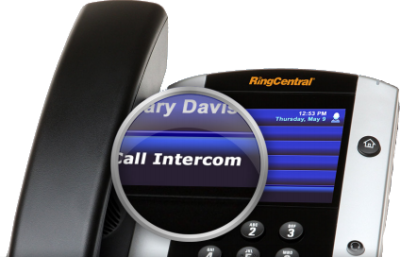
polycom_vvx500

Polycom VVX-500

The new color touchscreen IP phone with 12 touch keys that display Presence Status, speakerphone, integrated PoE, Gigabit Ethernet… etc.

sms

Business SMS:

Business SMS easily integrates with iPhone(s) and Android(s) to allows you to use your business RingCentral number to send and receive text messages from customers, colleagues and company departments.

  • Unlimited texting
  • Ability to text from multiple devices using RingCentral smartphone App

conferencing2Audio Conference Bridge:

Audio Conference Bridge allows you to setup and/or join unlimited conference calls anytime and anywhere. 

  • Dedicated conference bridge dial in number
  • Free unlimited conference calling
  • Host & Participant access codes for each RingCentral User

callrecording3Call Recording:

Call Recording can be used on your Softphone, IP phone or cell phone and allows you to record conversations on for RingCentral phone number.

  • On-demand recording
  • Recordings stored in the cloud
  • Anytime access for playback or download

callparkCall Park:

Call Park allows you to park a call (put on hold) in two ways:

  • Public Call Park – allows anyone to pick up the call
  • Directed Call Park – only allows the owner of the extension to retrieve.

For more information regarding RingCentral,

please contact us at 856-745-9990 or click here.

RingCentral’s New Pricing Editions

RingCentral is a company that specializes in providing business VoIP services, fax services and mobile communication solutions. RingCentral is moving from one (1) Office product to multiple Office editions with differentiated feature or functionality.

New Pricing Editions

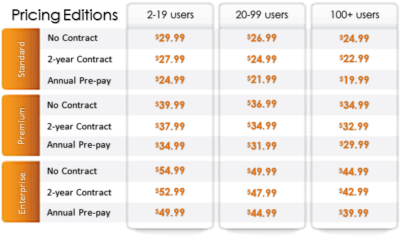
Effective July 4th, RingCentral Office has changed to an editions pricing model (US Only).  Each edition now includes specific feature sets and is priced differently.

PricingEditions2

Frequently Asked Questions

Q: Do existing Office customers get moved to new editions?

No.  Existing customers or users will continue to be granted a special exception on their current plans: Entrepreneur, Office Metered Toll-Free (MTF) and Office Unlimited.

Q:  Can existing users be upgraded to the new editions?

Yes.  They can use the upgrade wizard.

Q:  What are the benefits of these new Office editions?

The new editions offer the following:

      • Offers you flexibility to select the best feature or functionality set based on your business needs at a low monthly price.
      • Enables your large business to move up the market through enterprise level capabilities.
      • Provides one complete solution for any location and any number of employees.
      • Enables advanced call management and phone system administration.
      • Lets you manage, access, and use on smartphones and tablets.

Q:  What are the differences among the new Office editions?

There are various differences among the new editions, namely:

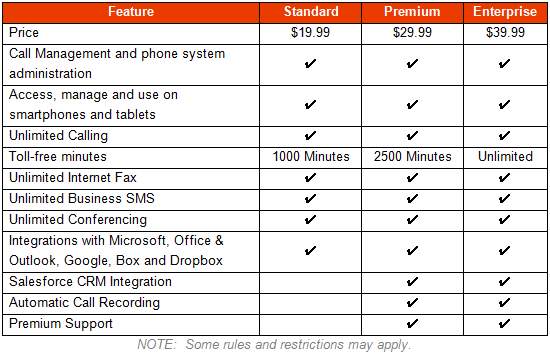
Standard:  Cloud PBX with call management features and mobile apps, unlimited calling/faxing/texting/conferencing and 1000 toll-free minutes.

Premium:  All Standard edition features, Salesforce CRM integration, Automatic call recording, Premium support for 10+ users and 2500 toll-free minutes.

Enterprise:  All Premium edition features and unlimited toll-free minutes

Refer to the table below for more information:

PricingEditions3

For answers to more frequently asked questions, click here.

For more information regarding RingCentral,

please contact us at 856-745-9990 or click here.

Introducing RingCentral Cloud Touch

I’m excited to announce the launch of our new RingCentral Cloud Touch platform, the first and only phone system that enables businesses to set up, manage and use their phone system from smartphones and tablets.

We’ve completely re-imagined the phone system, enabling businesses to turn any location into an office while giving employees the flexibility and freedom to access the system from any connected device. We help businesses, administrators and end users work the way they want to – from anywhere and on any device.

Our new platform includes three key components:
1. RingCentral Touch – Fully touch-powered platform for phone systems, enabling full management capabilities from any tablet or smartphone. Intuitive customizable settings for administrators and users provide unmatched flexibility and control.

2. RingCentral Presence – Presence is extended beyond desk phones, enabling users to see availability based on smart mobile devices. Enabled with simple controls, users can access from everywhere. Employees are better connected with presence that integrates mobile users.

3. RingCentral Connect – RingCentral integrates with Dropbox, Box and Google Docs, enabling customers to share documents and files in the cloud, providing enhanced productivity.

We’d love to hear how RingCentral Cloud Touch enables you to work from anywhere and manage your phone system with ease!

American Red Cross – Mobile Apps

Untitled

September is National Preparedness Month sponsored by the Federal Emergency Management Agency in the US Department of Homeland Security.  American Red Cross now offers Mobile Apps that include a Volunteer App, First Aid App, Shelter Finder App and multiple natural disaster Apps.  Prepare your company and family for emergency situations using ‘Make a Plan’ feature in each App.

vaVolunteer App

Team Red Cross wants you! Join Team Red Cross to help provide care and comfort to your local community when the unthinkable occurs. Team Red Cross is looking for people with various backgrounds, talents, and skill levels. Make a difference, support your community and join Team Red Cross!

taTornado App

Get your family and home ready for a tornado with the official Tornado App from the American Red Cross. The Tornado app puts everything you need to know prepare for a tornado – and all that comes with it – in the palm of your hand.

haHurricane App 

Monitor conditions in your area or throughout the storm track, prepare your family and home, find help and let others know you are safe even if the power is out – a must have for anyone who lives in an area where a hurricane may strike or has loved ones who do. 

sfaShelter Finder App 

The Red Cross Shelter Finder is available in the iTunes store and works on iOS devices. The Shelter Finder displays open Red Cross shelters and their current population on an easy to use map interface.

faaFirst Aid App

The official American Red Cross First Aid app puts expert advice for everyday emergencies in your hand. The official American Red Cross First Aid app offers videos, interactive quizzes and simple step-by-step advice it’s never been easier to know first aid. 

eaEarthquake App 

Be ready for an earthquake with Earthquake by American Red Cross. Get notified when an earthquake occurs, prepare your family and home, find help and let others know you are safe even if the power is out – a must have for anyone who lives in an earthquake-prone area or has loved ones who do.

wfaWildfire App 

Be ready for wildfires with the official Red Cross wildfire app. Blaze Warnings, Blaze Alerts” and Blaze Path Tracker are tools included with the Wildfire App. You can also let loved ones know that you are safe even if the power is out and learn what steps you should take to prepare your family, home and pets – all from the palm of your hand.

Download these Apps:  Android and Apple

Scams that Target Small Businesses and How to Spot Them

Consumers are not the only ones vulnerable to scams.  If you own a small business or are part of a nonprofit organization, you could be open to several different types of cons without even realizing it.

The Federal Trade Commission (FTC) has put together a list of some of the more common scams and posted them on the website along with plenty of resources to help you spot con artists and keep them from taking advantage of you and your business.

“Your best protection? Learn the signs of scams that target businesses,” the FTC says. “Then tell your employees and colleagues what to look for so they can avoid scams.”

From the FTC website:

Fake Invoices

Scammers create phony invoices that look like they’re for products or services your business uses — maybe office or cleaning supplies or domain name registrations. Scammers hope the person who pays your bills will assume the invoices are for things the company actually ordered. Scammers know that when the invoice is for something critical, like keeping your website up and running, you may pay first and ask questions later. Except it’s all fake and if you pay, your money may be gone.

Unordered Office Supplies and Other Products

Someone calls to confirm an existing order of office supplies or other merchandise, verify an address, or offer a free catalog or sample. If you say yes, then comes the surprise — unordered merchandise arrives at your doorstep, followed by high-pressure demands to pay for it. If you don’t pay, the scammer may even play back a tape of the earlier call as “proof” that the order was placed. Keep in mind that if you receive merchandise you didn’t order, you have a legal right to keep it for free.

Directory Listing and Advertising Scams

Con artists try to fool you into paying for nonexistent advertising or a listing in a nonexistent directory. They often pretend to be from the Yellow Pages. They may ask you to provide contact information for a “free” listing or say the call is simply to confirm your information for an existing order. Later, you’ll get a big bill, and the scammers may use details or even a recording of the earlier call to pressure you to pay.

Utility Company Imposter Scams

Scammers pretend to call from a gas, electric, or water company saying your service is about to be interrupted. They want to scare you into believing a late bill must be paid immediately, often with a wire transfer or a reloadable card or gift card. Their timing is often carefully planned to create the greatest urgency — like just before the dinner rush in a restaurant.

Government Agency Imposter Scams

Scammers impersonate government agents, threatening to suspend business licenses, impose fines, or even take legal action if you don’t pay taxes, renew government licenses or registrations, or other fees. Some businesses have been scared into buying workplace compliance posters that are available for free from the U.S. Department of Labor. Others have been tricked into paying to receive nonexistent business grants from fake government programs. Businesses have received letters, often claiming to be from the U.S. Patent and Trademark Office, warning that they’ll lose their trademarks if they don’t pay a fee immediately, or saying that they owe money for additional registration services.

Tech Support Scams

Tech support scams start with a call or an alarming pop-up message pretending to be from a well-known company, telling you there is a problem with your computer security. Their goal is to get your money, access to your computer, or both. They may ask you to pay them to fix a problem you don’t really have, or enroll your business in a nonexistent or useless computer maintenance program. They may even access sensitive data like passwords, customer records, or credit card information.

Social Engineering, Phishing and Ransomware

Cyber scammers can trick employees into giving up confidential or sensitive information, such as passwords or bank information. It often starts with a phishing email, social media contact, or a call that seems to come from a trusted source, such as a supervisor or other senior employee, but creates urgency or fear. Scammers tell employees to wire money or provide access to sensitive company information. Other emails may look like routine password update requests or other automated messages but are actually attempts to steal your information. Scammers also can use malware to lock organizations’ files and hold them for ransom.

Business Promotion and Coaching Scams

Some scammers sell bogus business coaching and internet promotion services. Using fake testimonials, videos, seminar presentations, and telemarketing calls, the scammers falsely promise amazing results and exclusive market research for people who pay their fees. They also may lure you in with low initial costs, only to ask for thousands of dollars later. In reality, the scammers leave budding entrepreneurs without the help they sought and with thousands of dollars of debt.

Changing Online Reviews

Some scammers claim they can replace negative reviews of your product or service, or boost your scores on ratings sites. However, posting fake reviews is illegal. FTC guidelines say endorsements — including reviews — must reflect the honest opinions and experiences of the endorser.

Credit Card Processing and Equipment Leasing Scams

Scammers know that small businesses are looking for ways to reduce costs. Some deceptively promise lower rates for processing credit card transactions, or better deals on equipment leasing. These scammers resort to fine print, half-truths, and flat-out lies to get a business owner’s signature on a contract. Some unscrupulous sales agents ask business owners to sign documents that still have key terms left blank. Don’t do it. Others have been known to change terms after the fact. If a sales person refuses to give you copies of all documents right then and there — or tries to put you off with a promise to send them later — that could be a sign that you’re dealing with a scammer.

Fake Check Scams

Fake check scams happen when a scammer overpays with a check and asks you to wire the extra money to a third party. Scammers always have a good story to explain the overpayment — they’re stuck out of the country, they need you to cover taxes or fees, you’ll need to buy supplies, or something else. By the time the bank discovers you’ve deposited a bad check, the scammer already has the money you sent them, and you’re stuck repaying the bank. This can happen even after the funds are made available in your account and the bank has told you the check has “cleared.”

Important: Internet Explorer Vulnerability

IEIMPORTANT INFORMATION: US-CERT and UK security agencies warn users to stop using Internet Explorer because of the severity in this security hole that has been used in “limited, targeted attacks”.

United States Computer Emergency Readiness Team released an alert on April 28, 2014 regarding vulnerabilities in Microsoft’s Internet Explorer.  Internet Explorer versions 6 through 11 are susceptible to be victims of attacks to exploit the Remote Code Execution Vulnerability.

US-CERT Vulnerability Note VU#22292

Microsoft Security Advisory 2963983

Workarounds:

Basic protection includes the installation of Anti-malware software, enabling a Firewall and applying all Windows/Microsoft updates.  In addition to basic protection, we recommend taking extra preventative steps listed below.  It is not necessary to apply all of the following workarounds, apply one to help protect your system and data.

Enable Enhanced Protection Mode

    1. Open IE 10 or IE 11.
    2. Click the Tools menu and select Internet Options.
    3. In the Internet Options window, click the Advanced tab.
    4. Scroll down the list of options until you see the Security section, click the checkbox to Enable Enhanced Protected Mode.  For IE 11 in a 64-bit version of Windows, you also need to click the checkbox to “Enable 64-bit processes for Enhanced Protected Mode”.
    5. Restart IE to force the new settings.

Change Access Control List and unregister VGX.DLL:

32-Bit Systems:

      1. Open elevated Command Prompt (Run as Administrator)
      2. Run the following command:
        “%SystemRoot%\System32\regsvr32.exe” -u “%CommonProgramFiles%\Microsoft Shared\VGX\vgx.dll”
      3. Click OK to close Dialog Box confirming un-registration has succeeded.

64-Bit Systems:

      1. Open elevated Command Prompt (Run as Administrator)
      2. Run the following command(s) separately:
        “%SystemRoot%\System32\regsvr32.exe” -u “%CommonProgramFiles%\Microsoft Shared\VGX\vgx.dll” “%SystemRoot%\System32\regsvr32.exe” -u “%CommonProgramFiles(x86)%\Microsoft Shared\VGX\vgx.dll”
      3. Click OK to close Dialog Box confirming un-registration has succeeded.

Windows XP and all other users.

For all user(s) that cannot follow recommendations from Microsoft are urged to use a different web browser.  For secure download(s) of Google Chrome or Mozilla Firefox, please follow the links provided.

For assistance with Changing IE Settings or Install a new Browser

 please contact us 856-745-9990 or click here.


New Website Design – Jay’s Landscaping, LLC

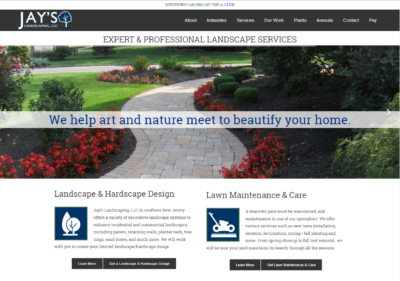
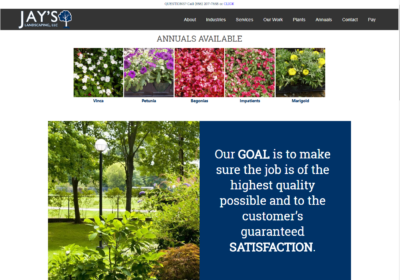
The Website Design team of South Jersey Techies has been constantly working on developing great looking websites using the latest web technologies. The most recent website developed by our team is for Jay’s Landscaping, LLC in South Jersey

Jay’s Landscaping is a full-service landscape design and installation company. Our services include lawn maintenance, installation of retaining walls, brick walkways and patios, pruning, mulching, drainage, irrigation, and chemical fertilization.

To view the Website 

Have questions?

Our Web Design team is here to help
Call us at: 856-745-9990 or visit: https://southjerseytechies.net

South Jersey Techies, LLC is a full Managed Web and IT Services Company located in Marlton, NJ providing IT ServicesManaged IT Services, Website Design ServicesServer SupportIT ConsultingVoIP PhonesCloud Solutions Provider and much more. Contact Us Today.

What’s new in search in Office 365

SharePoint now serves up search results personalized to your previous activity and permissions.

In SharePoint Online and on office.com, search is personal, and the search results are even easier to explore. Another user will see different results than you, even when you both search for the same words.

You’ll only see results that you already have access to, and other users can’t find your private documents.

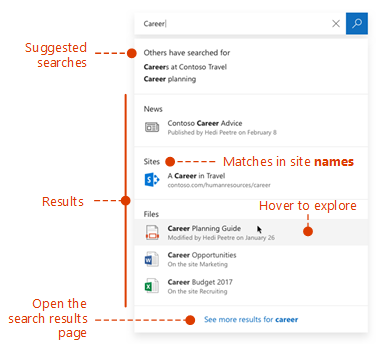
Even before you start typing, you’ll see results based on your previous activity in Office 365. The results update as you start typing.

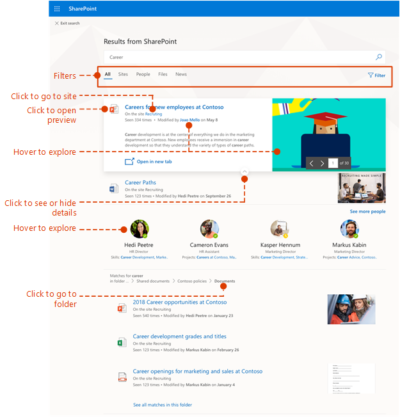
If these results aren’t what you’re looking for, click the link to see more results or press Enter to open the search results page and see and explore all the results. Here’s an example of search results from SharePoint:

Explore the search results to see more details about the people and files you’ve found, or refine your search to get other results. Here’s an expert tip to quickly see more, or less, details of a result – you can actually click anywhere in the empty space of the result.

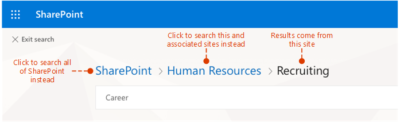
You can navigate to locations that you want to explore further and, if you’ve searched in SharePoint Online, you can change where the results come from. For example, if you searched from a site, but really meant to search all of SharePoint, then you’re just one click away. Or, if the site you searched from is associated with another site, but you want to search all the associated sites.

When you exit a search results page, you return to the page where you started your search.

Would You Trust Facebook With Your Money?

These days, brick and mortar businesses displaying some kind of signage saying “Like us on Facebook,” are nearly as common as those displaying Visa and MasterCard logos. That’s worth considering, when you think about using Faceabook as a way to pay for goods and services in the physical world.

Of course, Facebook users have developed some trust issues with the site over the years. It would be quite interesting to see if a PayPal-like service from Facebook would be widely adopted. It’s one thing to trust a third party with your status updates and photos. It’s another to trust them with your money.

Would you trust Facebook to handle your money?

Last week, Facebook announced that it is getting rid of Facebook Credits, in favor of real money. Facebook users will start paying for virtual goods using their native currencies: Dollars, Pounds, Yen, etc. This represents the beginning of users being able to treat their Facebook account like a bank account, or at least like a PayPal account and paying online. I’m not sure if Facebook is FDIC insured.

While Facebook did not say anything about using currency to pay for things in the physical world, one can simply connect the dots. For one, Facebook has over 900 million users. Many of them carry it around in their pocket all day long. Now, consider that Facebook recently acquired Tagtile, described as “your universal loyalty card,” for which you can “visit local stores, tag the Tagtile Cube with your phone, and get rewarded for being an awesome customer.”

If Facebook is going to offer a digital loyalty card to use at stores, and Facebook is going to have user account balances based on actual money, it seems only logical that users will simply be able to pay with their Facebook accounts, as long as businesses adopt the technology.

Of course it would give Facebook yet another way to compete directly with Google.

Plink co-founder Peter Vogel wrote at TechCrunch, “Last year, 15 million people bought Facebook Credits, according to their S-1 filing, so it’s assumed Facebook has close to 15 million credit cards on file. By the end of this year, once paid apps are added to Facebook’s App Center, it wouldn’t be surprising if 50 million people, or about five percent of Facebook’s users are purchasing apps and other digital good, like movies, music and TV episodes, which means Facebook would have a pool of 50 million people who have entrusted it with their credit card information.”

“At that point it’s a very short distance to a ‘Pay with Facebook’ blue box showing up every time you make an online purchase (on web sites everywhere, not just on Facebook),” he adds. “Why re-enter your credit card number when you already trust Facebook to handle the transaction and bill your card? For Facebook users this could be seen as more convenient and safer than entering their credit card number on multiple sites. Facebook is PayPal on steroids, with the strength of a billion members.”

That’s an incredibly good point. Think about how the Facebook sign-in option already works for many sites in the web (and especially from mobile devices). It is so much more convenient to simply tap the button to sign in with Facebook than having to enter a whole other account name or email address and password. Paying this way could save a lot of time and hassle.

This already exists, you know:



If Facebook can get people paying online regularly, people may start putting more of their money into Facebook accounts, which will make them a lot more likely to pay for things offline.

The Trust Factor

That trust factor could be a major obstacle for Facebook, however. Privacy issues have been rampant with the the social network’s dealings for years. Last year, as the result of a settlement with the Federal Trade Commission, regarding privacy, Facebook had to agree to regular third-party audits to make sure it remains in compliance. This all came after Facebook was found to have not kept its promises, by not warning users of privacy changes or getting their approval in advance. Essentially, changes were made an an opt out basis, rather than users opting in.

Just this week, the company switched default email addresses of users to Facebook email addresses without warning. This isn’t exactly a privacy issue, but it’s another change being made to users’ personal accounts for them. Things like this tend to irk users, and don’t do much to make users more comfortable with how the company is handling their accounts. A Lifehacker article even goes into all the reasons why the switch to a Facebook user email address is less than beneficial.

Another big Facebook story this week is about a feature that Facebook rolled out called “Find Friends Nearby,” which was quickly pulled after the CEO of Friendthem claimed Facebook has stole their idea, and threatened to sue. If you’ve seen The Social Network or read book it was based on, you’ll know that Facebook has a long history of being accused of such things. That’s not to say whether or not these things have merit, but public perception is a valuable thing. Some people already have a hard enough time trusting banks with their money.

Side note: It’s unclear, by the way, if the Friendthem situation was directly related to Facebook pulling the feature. The company claims it was only a test, and not a formal roll-out anyway. It does appear to be based on the company’s acquisition of social discovery app Glancee.

Another question worth considering is whether or not people want one company to have so much control over their lives. Do you want to keep so much personal information, photos, videos, and money all under one Internet-based account. There are major hacking stories in the news frequently these days, and many may be hesitant based on that very fact.

This month, another prominent social network, LinkedIn, fell victim to a password leak. LulzSec hackers managed to gain access to 10,000 Twitter accounts via a vulnerability in a third-party app. Consider how many third-party apps are connected to Facebook. According to the company, as of March, over 9 million apps and websites were integrated with Facebook users. How much bigger of a target would Facebook be with more people keeping their money tied up in their accounts.

Of course, people are already keeping some amount of money tied up in Facebook, on a much smaller scale than what the future may very well hold.

“People can store their payment information on Facebook in a trusted environment and then make purchases across a range of apps – without having to re-enter their payment information in each app,” Facebook says about its current Payments offering. “Payment options include credit and debit cards, PayPal, mobile payments, gift cards and numerous local payment options around the world.”

If Facebook makes a significant transition to the offline, non-app world (like its peers are also trying to do), will you make the transition along with them? Will you use your Facebook account to buy burgers, gas or other every day items?


Windows 8 Will Take Your PC To The Metro On Oct. 26

Windows 8 Release-Oct. 26!

We were told earlier this month that Microsoft had pinned down the launch of Microsoft Windows 8 to some time in late October. It was nice to finally get some confirmation about the release, but we still didn’t have an exact date – now we do.

Steven Sinofsky, President of the Windows Division at Microsoft, just announced during the company’s annual sales meeting that Windows 8 would be shipping on October 26. On that date, you’ll be able to upgrade to it, buy a physical copy in store or buy a new PC with the operating system on it. Microsoft’s Windows RT Surface tablet is also expected to launch around that time with the Windows 8 Pro version coming sometime after.

As most Windows users who are upgrading probably already have Microsoft Windows 7, you will want to take advantage of Microsoft’s insane upgrade program. For only $40, users with Windows XP or later can upgrade to Windows 8 through digital download. Those who want a physical copy can pick one up for $70. The special pricing will be available through January 31, 2013.

Windows 8 is Microsoft’s chance to prove that they still got it. Many people believe that this is their last chance before Apple gobbles them up and spits them out with Mac OS X and iOS. Microsoft Windows 8 is definitely something unique only to Microsoft as it’s the first operating system to share the same core across all devices whereas Apple requires separate operating systems for mobile and desktop.

We’ll find out on October 26 if Microsoft’s bet on the future plays out. The Metro interface was designed for portable devices, which Apple already has a strong foothold in. The hype surrounding the recently announced Surface tablet could help catapult Windows 8 to the notoriety it needs to succeed.

CALL US NOW!