Back to Top

Tech, Web, Cloud & Cabling Services

Category: Virus / Adware / Spyware Removal

Security / Virus/Adware/Spyware Removal Category

How To Remove Windows 7 Antispyware

Remove Windows 7 Antispyware 2012, Vista Antivirus 2012, and XP Security 2012 (See Uninstall Guide Below)

Win 7 Antispyware 2012, Vista Antivirus 2012, and XP Security 2012 are all names for the same rogue anti-spyware program. This family of rogues is promoted in two ways. The first is through the use of fake online antivirus scanners that state that your computer is infected and then prompt you to download a file that will install the infection. The other method are hacked web sites that attempt to exploit vulnerabilities in programs that you are running on your computer to install the infection without your knowledge or permission. Regardless of how it is installed, once it is running on your computer it will install itself as a variety of different program names and graphical user interfaces depending on the version of Windows that is running. Regardless of the name, though, they are all ultimately the same program with just a different skin on it. This rogue goes by different program names, which I have listed below based upon the version of Windows that it is installed on:

Windows XP Rogue Name Windows Vista Rogue Name Windows 7 Rogue Name
XP Antispyware 2012 Vista Antispyware 2012 Win 7 Antispyware 2012
XP Antivirus 2012 Vista Antivirus 2012 Win 7 Antivirus 2012
XP Security 2012 Vista Security 2012 Win 7 Security 2012
XP Home Security 2012 Vista Home Security 2012 Win 7 Home Security 2012
XP Internet Security 2012 Vista Internet Security 2012 Win 7 Internet Security 2012

When installed, this rogue pretends to be a security update for Windows installed via Automatic Updates. It will then install itself as a single executable that has a random consisting of three characters, such as kdn.exe, that uses very aggressive techniques to make it so that you cannot remove it. First, it makes it so that if you launch any executable it instead launches Vista Home Security 2012, XP Internet Security 2012, Win 7 Security 2012, or any of the other names it goes under. If the original program that you wanted to launch is deemed safe by the rogue, it will then launch it as well. This allows the rogue to determine what executables it wants to allow you to run in order to protect itself. It will also modify certain keys so that when you launch FireFox or Internet Explorer from the Window Start Menu it will launch the rogue instead and display a fake firewall warning stating that the program is infected.

Win 7 Antispyware 2012 Screen shot
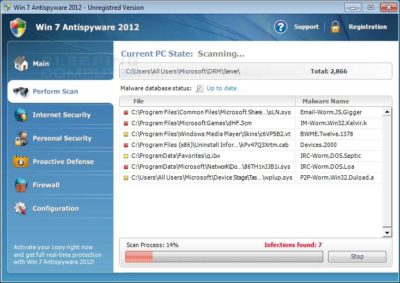
Once started, the rogue itself, like all other rogues, will scan your computer and state that there are numerous infections on it. If you attempt to use the program to remove any of these infections, though, it will state that you need to purchase the program first. In reality, though, the infections that the rogues states are on your computer are all legitimate files that if deleted could cause Windows to not operate correctly. Therefore, please do not manually delete any files based upon the results from this rogue’s scan.

While running, XP Internet Security 2012, Win 7 Antivirus 2012, and Vista Security 2012 will also display fake security alerts on the infected computer. The text of some of these alerts are:

XP Home Security 2012 Firewall Alert
XP Home Security 2012 has blocked a program from accessing the internet
Internet Explorer is infected with Trojan-BNK.Win32.Keylogger.gen
Private data can be stolen by third parties, including credit card details and passwords.

Malware Intrusion
Sensitive areas of your system were found to be under attack. Spy software attack or virus infection possible. Prevent further damage or your private data will get stolen. Run an anti-spyware scan now. Click here to start.

System danger!
Your system security is in danger. Privacy threats detected. Spyware, keyloggers or Trojans may be working the background right now. Perform an in-depth scan and removal now, click here.

System Hijack!
System security threat was detected. Viruses and/or spyware may be damaging your system now. Prevent infection and data loss or stealing by running a free security scan.

Privacy threat!
Spyware intrusion detected. Your system is infected. System integrity is at risk. Private data can be stolen by third parties, including credit card details and passwords. Click here to perform a security repair.

Stealth intrusion!
Infection detected in the background. Your computer is now attacked by spyware and rogue software. Eliminate the infection safely, perform a security scan and deletion now.

XP Antispyware 2012 Alert
Security Hole Detected!
A program is trying to exploit Windows security holes! Passwords and sensitive data may be stolen. Do you want to block this attack?

Just like the scan results, these security warnings and alerts are all fake and should be ignored.

While running, Win 7 Home Security 2012, XP Antivirus 2012, and Vista Antivirus 2012 will also hijack Internet Explorer so that you cannot visit certain sites. It does this so that you cannot receive help or information at sites like BleepingComputer.com on how to remove this infection. When you attempt to visit these sites you will instead be shown a fake alert stating that the site you are visiting is dangerous and that the rogue is blocking it for your protection. The message that you will see is:

Vista Security 2012 Alert
Internet Explorer alert. Visiting this site may pose a security threat to your system!

Possible reasons include:
– Dangerous code found in this site’s pages which installed unwanted software into your system.
– Suspicious and potentially unsafe network activity detected.
– Spyware infections in your system
– Complaints from other users about this site.
– Port and system scans performed by the site being visited.

Things you can do:
– Get a copy of Vista Security 2012 to safeguard your PC while surfing the web (RECOMMENDED)
– Run a spyware, virus and malware scan
– Continue surfing without any security measures (DANGEROUS)

Just like the fake security alerts, the browser hijack is just another attempt to make you think that your computer has a security problem so that you will then purchase the program.

Without a doubt, this rogue is designed to scam you out of your money by hijacking your computer and trying to trick you into thinking you are infected. Therefore, please do not purchase this program , and if you have, please contact your credit card company and dispute the charges stating that the program is a computer infection. Finally, to remove Win 7 Antispyware 2012, Vista Antivirus 2012, and XP Security 2012 please use the guide below, which only contains programs that are free to use.

Tools Needed for this fix:

  • Malwarebytes’ Anti-Malware


Automated Removal Instructions for Win 7 Antispyware 2012 & Vista Antivirus 2012 using Malwarebytes’ Anti-Malware:

  1. Print out these instructions as we will need to close every window that is open later in the fix.
  1. It is possible that the infection you are trying to remove will not allow you to download files on the infected computer. If this is the case, then you will need to download the files requested in this guide on another computer and then transfer them to the infected computer. You can transfer the files via a CD/DVD, external drive, or USB flash drive.
  1. This infection changes settings on your computer so that when you launch an executable, a file ending with .exe, it will instead launch the infection rather than the desired program. To fix this we must first download a Registry file that will fix these changes. From a clean computer, please download the following file and save it to a removable media such as a CD/DVD, external Drive, or USB flash drive. FixNCR.reg.  Once that file is downloaded and saved on a removable devices, insert the removable device into the infected computer and open the folder the drive letter associated with it. You should now see the FixNCR.reg file that you had downloaded onto it. Double-click on the FixNCR.regfile to fix the Registry on your infected computer. You should now be able to run your normal executable programs and can proceed to the next step.If you do not have any removable media or another clean computer that you can download the FixNCR.reg file onto, you can try and download it to your infected computer using another method. On the infected computer, right click on the Internet Explorer’s icon, or any other browser’s icon, and select Run As or Run as Administrator. If you are using Windows XP, you will be prompted to select a user and enter its password. It is suggested that you attempt to login as the Administratoruser. For Windows 7 or Windows Vista, you will be prompted to enter your Administrator account password.Once you enter the password, your browser will start and you can download the above FixNCR.reg file. When saving it, make sure you save it to a folder that can be accessed by your normal account. Remember, that you will be launching the browser as another user, so if you save it to a My Documents folder, it will not be your normal My Documents folder that it is downloaded into. Instead it will be the My Documents folder that belongs to the user you ran the browser as. Once the download has finished, close your browser and find the FixNCR.reg file that you downloaded. Now double-click on it and allow the data to be merged. You should now be able to run your normal executable programs and can proceed to the next step.
  1. Now we must first end the processes that belong to Win 7 Antispyware 2012 & Vista Antivirus 2012 and clean up some Registry settings so they do not interfere with the cleaning procedure. To do this, please download RKill to your desktop from the following link.RKill Download Link.  When at the download page, click on the Download Now button labeled iExplore.exe download link . When you are prompted where to save it, please save it on your desktop.
  1. Once it is downloaded, double-click on the iExplore.exe icon in order to automatically attempt to stop any processes associated with Win 7 Antispyware 2012 & Vista Antivirus 2012 and other Rogue programs. Please be patient while the program looks for various malware programs and ends them. When it has finished, the black window will automatically close and you can continue with the next step. If you get a message that RKill is an infection, do not be concerned. This message is just a fake warning given by Win 7 Antispyware 2012 & Vista Antivirus 2012 when it terminates programs that may potentially remove it. If you run into these infections warnings that close RKill, a trick is to leave the warning on the screen and then run RKill again. By not closing the warning, this typically will allow you to bypass the malware trying to protect itself so that rkill can terminate Win 7 Antispyware 2012 & Vista Antivirus 2012 . So, please try running RKill until the malware is no longer running. You will then be able to proceed with the rest of the guide. If you continue having problems running RKill, you can download the other renamed versions of RKill from the rkill download page. All of the files are renamed copies of RKill, which you can try instead. Please note that the download page will open in a new browser window or tab.Do not reboot your computer after running RKill as the malware programs will start again.
  1. There have been reports of this infection being bundled with the TDSS rootkit infection. To be safe you should also run a program that can be used to scan for this infection. Please follow the steps in the following guide:

How to remove Google Redirects or the TDSS, TDL3, or Alureon rootkit using TDSSKiller

If after running TDSSKiller, you are still unable to update Malwarebytes’ Anti-malware or continue to have Google search result redirects, then you should post a virus removal request using the steps in the following topic rather than continuing with this guide:

Preparation Guide For Use Before Using Malware Removal Tools and Requesting Help Topic

If TDSSKiller requires you to reboot, please allow it to do so. After you reboot, reboot back into Safe Mode with Networking again.

  1. Download Malwarebytes’ Anti-Malware, also referred to as MBAM, from the following location and save it to your desktop:Malwarebytes’ Anti-Malware Download Link (Download page will open in a new window)
  1. Once downloaded, close all programs and Windows on your computer, including this one.
  1. Double-click on the icon on your desktop named mbam-setup.exe. This will start the installation of MBAM onto your computer.
  1. When the installation begins, keep following the prompts in order to continue with the installation process. Do not make any changes to default settings and when the program has finished installing, make sure you leave both the Update Malwarebytes’ Anti-Malware and Launch Malwarebytes’ Anti-Malware checked. Then click on the Finish button.
  1. MBAM will now automatically start and you will see a message stating that you should update the program before performing a scan. As MBAM will automatically update itself after the install, you can press the OK button to close that box and you will now be at the main program as shown below.
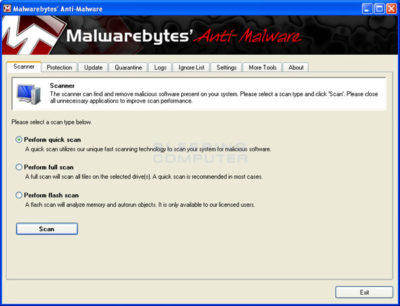


  1. On the Scanner tab, make sure the the Perform full scan option is selected and then click on the Scan button to start scanning your computer for Win 7 Antispyware 2012 & Vista Antivirus 2012 related files.
  1. MBAM will now start scanning your computer for malware. This process can take quite a while, so we suggest you go and do something else and periodically check on the status of the scan. When MBAM is scanning it will look like the image below.
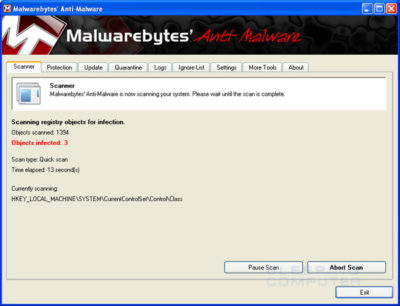


  1. When the scan is finished a message box will appear as shown in the image below.
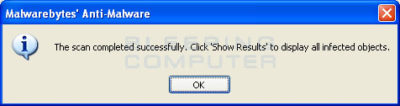
 

You should click on the OK button to close the message box and continue with the Vista AntiSpyware 2012 & Win 7 Home Security removal process.

  1. You will now be back at the main Scanner screen. At this point you should click on the Show Results button.
  2. A screen displaying all the malware that the program found will be shown as seen in the image below. Please note that the infections found may be different than what is shown in the image.
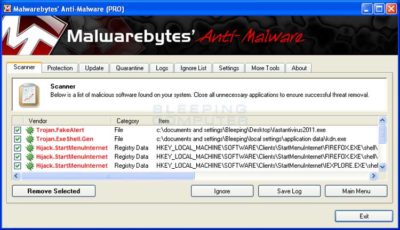
 

You should now click on the Remove Selected button to remove all the listed malware. MBAM will now delete all of the files and registry keys and add them to the programs quarantine. When removing the files, MBAM may require a reboot in order to remove some of them. If it displays a message stating that it needs to reboot, please allow it to do so. Once your computer has rebooted, and you are logged in, please continue with the rest of the steps.

  1. When MBAM has finished removing the malware, it will open the scan log and display it in Notepad. Review the log as desired, and then close the Notepad window.
  1. You can now exit the MBAM program.
  1. As many rogues and other malware are installed through vulnerabilities found in out-dated and insecure programs, it is strongly suggested that you use Secunia PSI to scan for vulnerable programs on your computer. A tutorial on how to use Secunia PSI to scan for vulnerable programs can be found here:How to detect vulnerable and out-dated programs using Secunia Personal Software Inspector

Your computer should now be free of the Vista AntiSpyware 2012 & Win 7 Home Security program. If your current anti-virus solution let this infection through, you may want to consider purchasing the PRO version of Malwarebytes’ Anti-Malware to protect against these types of threats in the future.

If you are still having problems with your computer after completing these instructions, then please follow the steps outlined in the topic linked below:

Preparation Guide For Use Before Using Malware Removal Tools and Requesting Help

To see the original article in its entirety click here.

Ransomware-as-a-service is exploding: Be ready to pay

RaaS has outgrown smaller targets and now threatens governments, NGOs, and SMBs.

ransomware

It starts with a fast click on a link in a harmless-looking email. Then your PC slows to a crawl. A message suddenly pops up and takes over your screen. “Your files and hard drive have been locked by strong encryption. Pay us a fee in 12 hours, or we will delete everything.” Then a bright red clock begins counting down. No antivirus will save your machine. Pay the fee or lose everything.

You’re the latest victim of a ransomware attack. The scary thing is, you’re not alone. The ransomware market ballooned quickly, from a $400,000 US annual haul in 2012, to nearly $18 million in 2015. The average ransom—the sweet spot of affordability for individuals and SMBs—is about $300 dollars, often paid in cash vouchers or Bitcoin.

The ransomware market scaled up so quickly, claims a recent report by Imperva, due to the rise of ransomware-as-a-service, or RaaS. Here’s how it works:

  • Ransomware authors are marketing on-demand versions of code, using traditional malware distributors in a classic affiliate model.
  • The ransomware author collects the ransom and shares it with the distributor.
  • Malware is distributed through spam email messages, malicious advertisements, and BlackHat SEO sites.
  • According to the Imperva report, “in classical affiliate marketing, the larger cut goes to the possessor of the product. In RaaS … the ransomware author gets a small cut of the funds (5%-25%) while the rest goes to the distributor (affiliate).”
  • Using the deep web, TOR, and Bitcoin, the report says, “this model, based on TOR and Bitcoins, is designed to keep the identity of the author and the distributor hidden from law enforcement agencies.”

Phishing in particular, is a highly effective tactic for malware distribution.

The well-worded email appears to come from a legitimate email address and domain name, and raises very few irregularities. The email comes with a demand for money for an arbitrary service, along with a link that purports to be an “overdue invoice.”

Click that link and open the file (which looks like a Word document), and you’ll become the latest victim of ransomware — that is, malware that encrypts your files and locks you out of your computer until you pay a ransom.

Phishing attacks have also helped ransomware move into the enterprise. In 2015 the medical records system at Hollywood Presbyterian Medical Center was attacked. The hospital paid $17,000 in Bitcoin to unlock the sensitive records. In early 2016 the Lincolnshire County Council was snagged by a phishing scheme and held up for 500 dollars.

To prevent your business from attack, make sure the IT department and communication team are in sync, keep your company’s security systems updated, and remind employees to use caution when clicking on email links from unknown addresses.

If you’ve been hacked, the ransomware rescue kit provides a suite of tools designed to help clean particularly pugnacious malware.

Businesses that suffer ransomware attacks face a tough choice. Paying the fee could restore access to mission-critical data, but there’s no guarantee the extortionists will honor the deal. And of course, paying a ransom provides incentive to hackers and validates the attack.

Have questions?

Get answers from Microsofts Cloud Solutions Partner!
Call us at: 856-745-9990 or visit: https://southjerseytechies.net/

South Jersey Techies, LL C is a full Managed Web and Technology Services Company providing IT Services, Website Design ServicesServer SupportNetwork ConsultingInternet PhonesCloud Solutions Provider and much more. Contact for More Information.

Windows 10 Privacy Settings Guide

Where do you draw the line on personal privacy? The right options are different for everyone. This guide shows the privacy settings that will help you to create the right balance of privacy and convenience in Windows 10.

Over the past year, We’ve read countless “privacy guides” for Windows 10. Most are well-intentioned, but they invariably take a simplistic approach to privacy: Just turn off every switch in the Privacy section of the Settings app.

If you do that, you’re not understanding the privacy landscape, which encompasses far more than just those settings. You’re also missing some important additional steps.

Windows 10 is a mix of software and services. With every session, a Windows 10 device exchanges a great deal of information with Microsoft’s servers. That’s neither unusual nor alarming. Microsoft’s chief rivals, Google and Apple, are also blending services into their software, with the goal of making your life easier and making that software more reliable.

So are other tech companies that you don’t think of as software companies: Amazon, with the Echo. Tesla, with its self-updating, software-driven cars. Your thermostat and your home security system.

There’s something profoundly satisfying about a service that anticipates your every move, reminding you when to leave for an appointment to arrive on time, or to pick up flowers for your anniversary tomorrow. Your digital personal assistant, whether it’s Siri or Cortana or Alexa or Google, needs to be able to see your calendar and contacts to make that magic happen.

But when that sort of personal attention goes too far, it “crosses the creepy line,” to use a phrase that Eric Schmidt probably regrets uttering when he was Google’s CEO.

The thing about that line is that it’s drawn in a different place for everyone. There are people who are thrilled at the idea that their PC or mobile device is so familiar with their actions that it can anticipate what they’ll do next. I know others who would like to build a virtual Faraday cage around their computing hardware so that none of their personal details can escape.

Both of those viewpoints, and everything in between, are perfectly valid. That’s why the software and services we use are loaded with switches and dials designed to help you take control of their potential privacy impact.

In this post, We’ll walk you through the big privacy questions for Windows 10, with enough context to help you decide which settings are right for you.

Note that this guide assumes you are using Windows 10 on a personal PC or one in your small business. If you are in an enterprise setting, or if you are in a regulated industry, you should seek professional assistance to ensure that you’re meeting proper standards.

Let’s start with the part of your PC that has the biggest impact on your personal privacy.

THE NETWORK

No one knows more about your online identity than your Internet service provider. Every packet you send or receive from anywhere online goes through their servers. When you travel and connect to Wi-Fi networks that are under the control of others, the owners of those networks can see every connection you make and can intercept their contents.

Regardless of the platform you use, that’s why it’s important you use encrypted connections for any kind of sensitive communications. Using a virtual private network whenever possible is an excellent best practice.

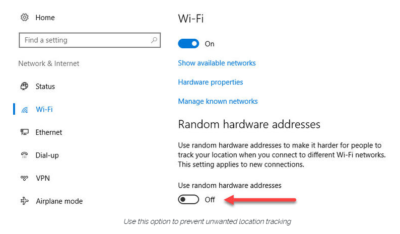
Windows 10 does offer one obscure option that can help protect third parties from tracking your movements based on your connections to Wi-Fi networks. (Note that this feature requires support from your Wi-Fi adapter, so if you don’t see this option, the most likely explanation is that your hardware doesn’t support it.) Under Settings > Network & Internet > Wi-Fi, turn the Use random hardware addresses setting to On.

windowsprivacy02

That step keeps third parties from matching your Wi-Fi adapter’s hardware address with your personal information, making it more difficult to track your location.

THE BROWSER

Countless third-party ad networks and analytics companies use cookies and other tracking technology to record your movements around the web and to correlate your online activities with your offline identity.

The result is a digital fingerprint that can be extraordinarily detailed and, unfortunately, outside of your ability to change.

To limit the amount of information that those ad and analytics companies know about you from your web browsing, consider third-party anti-tracking software such as Abine’s Blur, which is available for every web browser except Microsoft Edge. (That lack of solid support for add-ons is one reason I can’t yet recommend Edge as a full-time browser for most Windows 10 users.)

Another privacy product worth considering is Ghostery, although some are suspicious of this browser extension because of its uncomfortably close ties to the online advertising industry.

Ad-blocking software can also provide some privacy protection as a side-effect of performing its basic function. Here, too, watch out for close ties between some ad-blocking add-ins and the third-party trackers they supposedly protect you from.

Note that none of these steps is unique to Windows 10. Anti-tracking software is typically a browser add-in and works with most popular browsers.

THE OPERATING SYSTEM

With those two big, platform-independent factors out of the way, we can now turn to Windows 10 itself. When you use a Windows 10 device, it is capable of sharing the following types of information with Microsoft’s servers:

Your location

Windows 10 can determine your location to help with actions like automatically setting your current time zone. It can also record a location history on a per-device basis. Go to Settings > Privacy > Location to control the following:

  • Location on/off?Use the master switch at the top of this page to disable all location features for all users of the current device.
  • Location service on/off?If location is on for Windows, you can still turn it off for your user account here.
  • General location?This allows you to set a city, zip code, or region so that apps can deliver relevant content.
  • Default location?Click Set default to open the Maps app and specify the location you want Windows to use when a more precise location is not available.
  • Location history?Click Clear to erase the saved history for a Windows 10 device.

If location is on, a list at the bottom of the Settings > Privacy > Location page allows you to disable access to that data on a per-app basis.

Your input

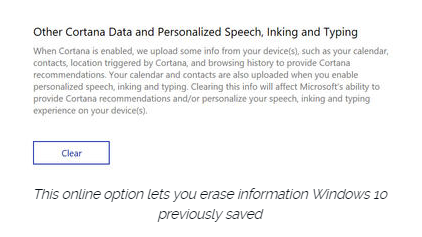
If you enable Cortana, Windows 10 uploads some info from your devices, such as your calendar, contacts, and location and browsing history, so that Cortana can make personalized recommendations. If you don’t want any accounts on your PC to use Cortana, follow the steps in this article to disable the feature completely: Turn off Cortana completely.

Windows 10 uses some feedback from the way you type, write, and speak to improve performance for you and as a way to improve the overall platform. This isn’t keystroke logging; rather, the operating system uses a very small amount of information. A separate feature uses your speech and writing history to make better suggestions in Windows and Cortana.

You can control this collection with two sets of controls:

Under Settings > Privacy > General, click Info about how I write and turn it off so that your typos aren’t used to improve things like the built-in spell checker.

Under Settings > Privacy > Speech, inking, & typing, under the Getting to know you heading, click Stop getting to know me to turn off personalization.

To clear previously saved information associated with your Microsoft account, click the first link under the Manage cloud info heading. That takes you to this Bing Personalization page, which includes this prominent button:

windows-privacy01

Click Clear to remove that saved information from the cloud.

Files and settings

When you sign in with a Microsoft account, you have the option to save files to the cloud using OneDrive. Windows 10 also syncs some settings to OneDrive, allowing you to have the same desktop background, saved passwords, and other personalized settings when you sign in with that account on multiple PCs.

If you use a local account, of course, none of your settings are synced. If you use a Microsoft account, you can turn off syncing completely or remove certain settings from the sync list by going to Settings > Accounts > Sync Your Settings.

OneDrive is an opt-in service. If you don’t sign in, it does nothing. You can’t save files to OneDrive accidentally, and no files are uploaded without your explicit permission, which you can revoke any time. To disable OneDrive for all users on your PC, follow these instructions: Shut down OneDrive completely.

Telemetry

Microsoft, like all modern software companies, uses feedback from its installed base to identify problems and improve performance. In Windows 10, this feedback mechanism produces diagnostics data (aka telemetry) that is uploaded to Microsoft at regular intervals. The data is anonymized and is not used to create a profile of you.

The default telemetry setting for all consumer and small business versions of Windows 10 is Full, which means that the uploaded data also includes details (also anonymized) about app usage. If you are concerned about possible inadvertent leakage of personal information, I recommend that you go to Settings > Privacy > Feedback & diagnostics and change the Diagnostic and usage data setting to Basic.

THE APPS

Although the number of subcategories under the Privacy heading in Settings seems daunting, most of them govern access to your information by Windows Store apps. That set of apps includes those that are preinstalled (Mail, Calendar, Groove Music, Photos, and so on) as well as those you acquire from the Store.

Most of the categories offer a single on-off switch at the top, which you can use to disable all access to that feature by all apps. If you leave the feature enabled, you can use a list of apps at the bottom of the page to enable or disable access on a per-app basis.

This capability works the same with the following categories: Camera, Microphone, Notifications, Account Info, Call History, and Radios. The Other Devices category lets apps automatically share and sync info with wireless devices that aren’t explicitly paired with your PC. Use the Background Apps category to specify which apps are allowed to work in the background.

If Location is enabled, you have the option to disable location access on a per-app basis and to disable Geofencing.

The Contacts, Calendar, Email, and Messaging categories allow you to control which apps can have access to these features. If you want to share content from an app using email or messaging, this option has to be on for that app. Note that Mail and Calendar, People, and Phone always have access to your contacts; Mail and Calendar are always allowed to access and send email and always have access to your calendar.

Finally, one horribly misunderstood setting is available under Settings > Privacy > General. Advertising ID controls whether Microsoft serves personalized ads to ad-supported apps. If you turn this option off, you still get ads, but they’re not personalized. In any case, your information is not shared with advertisers.

Have questions?

Get answers from Microsofts Cloud Solutions Partner!
Call us at: 856-745-9990 or visit: https://southjerseytechies.net/

South Jersey Techies, LL C is a full Managed Web and Technology Services Company providing IT Services, Website Design ServicesServer SupportNetwork ConsultingInternet PhonesCloud Solutions Provider and much more. Contact for More Information.

To read this article in its entirety click here.
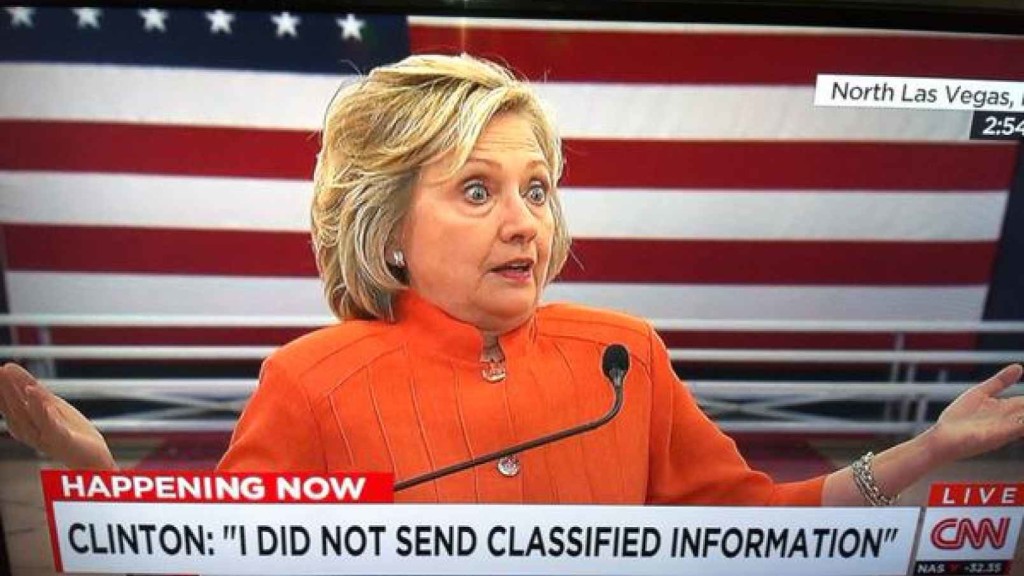
Hillary Clinton Email Server: 6 Facts

Hillary Clinton’s use of a private email server when she served as US secretary of state has been a major issue for the 2016 presidential candidate. Here are the six most critical facts about it.

hillary_clinton3_3_3

The FBI recently wrapped up its investigation into Hillary Clinton’s use of a personal email server while she was serving as secretary of state. FBI director James Comey called the actions “extremely careless,” but recommended that no charges be brought against Clinton.

She is now the presumptive Democratic nominee for the upcoming presidential election in November, and her actions relative to the email server have become a hot-button issue among her opponents. The situation, however, is nuanced; and there are a lot of details to understand about the scenario. Here are the most important facts.

1. What happened?

While serving as secretary of state under President Barack Obama, Hillary Clinton used multiple private email servers to communicate regarding government business, according to the State Department. Additionally, it was revealed that Clinton never had a government (.gov) email address while she was serving in her post—we’ll talk about which email address she used in a moment—and her aides did not take any actions to preserve the emails sent through her personal account. This prompted an investigation by the FBI to determine if Clinton intentionally put classified information at risk.

2. Why does it matter?

Clinton handed over 30,000 emails to the State Department, of which 110 contained classified information at the time they either were sent or received, according to the FBI’s findings. During the investigation, though, Clinton asserted that none of the emails she sent or received were classified at the time. The biggest implication has been the potential threat to national security. While the contents of the emails have not fully been released, if they had contained sensitive information it could have possibly fallen into the wrong hands. As noted by the New York Times, Comey said it was “possible” that enemy foreign governments had accessed Clinton’s personal email account.

The second biggest implication is that of transparency. The Federal Records Act requires that all communication in certain branches of government be recorded on government servers, and it forbids the use of a personal email account for government business, unless those emails are then copied and archived. However, there are a lot of technicalities involved, and there is evidence that other government officials had violated the act. As Alex Howardwrote for the Sunlight Foundation, there is also evidence that Clinton tried to control the discoverability of the emails under the Freedom of Information Act (FOIA), which could set a precedent for limiting public access to government records. It is also believed that Clinton deleted 31,000 emails deemed personal in nature before turning the emails over to the State Department.

3. When did it start?

When she was appointed secretary of state in 2009, Clinton began using the email address hdr22@clintonmail.com, tied to a personal server. Clinton’s personal email server was first discovered in 2012, by a House committee investigating the attack on the American Consulate in Benghazi. In 2013, hacker Guccifer claimed to have accessed Clinton’s personal email account and released emails that were allegedly related to the Benghazi attack.

The next year, in the summer of 2015, the State Department began asking Clinton for her emails correspondence, and she responded by delivering boxes containing more than 30,000 printed emails. In early 2015, the New York Times reported that Clinton had been using her personal email exclusively, and never had a government email address. A federal watchdog group issued an 83-page report condemning the “systemic weaknesses” of Clinton’s email practices in May. On Tuesday, the FBI concluded its investigation and recommended against any charges.

4. What tech was used

When Clinton was running for president in 2008, she had a private server installed at her home in Chappaqua, New York. The domains clintonemail.com, wjcoffice.com, and presidentclinton.com, which were registered to a man named Eric Hoteham, all pointed to that server. In 2013, a Denver-based IT company called Platte River Networks was hired to manage the server, but wasn’t cleared to work with classified information. The company executivesreceived death threats for taking on the contract. It was later discovered that multiple private servers were used for Clinton’s email.

Clinton used a BlackBerry phone to communicate during her tenure as secretary of state, including sending and receiving emails through her private server in New York. The State Department expressed concern about the security of the device. Clinton had requested the NSA provide a strengthened BlackBerry, similar to the one used by President Obama. But, her request was denied. Instead, the NSA requested that Clinton use a secure Windows Phone known as the Sectera Edge, but she opted to continue using her personal BlackBerry.

5. Will she be prosecuted?

Right now, it’s too early to tell whether or not Clinton will be charged for her use of private email servers. While Comey’s recommendation that no charges be brought will likely weigh in the decision, it is ultimately up to the US Department of Justice to make the call. However, a recent Politico analysis of multiple, similar cases spanning the past 20 years, seem to point to an indictment being “highly unlikely.” According to a former senior FBI official quoted in the analysis, the Justice Department tends to avoid prosecution in cases that are not “clear-cut.”

6. What can businesses and IT leaders learn?

The first lesson that IT can learn from this situation is that transparency is critical, at all levels in your business. This isn’t to say that the CEO should be broadcasting his or her emails to all employees every week, but steps should be taken to ensure that information can be accessed if need be. As part of adigital leak protection program, security expert John Pironti said that organizations need to know if users are using a personal email account to conduct business.

“This behavior is often a violation of acceptable use policies and can expose an organization’s sensitive information to unsecured systems and e-mail accounts,” Pironti said. “Without this visibility an organization may not be aware that their intellectual property, customer data, or sensitive data assets are not being protected appropriately and they also may be in violation of contractual agreements with their clients regarding the security of their data as well as regulatory requirements.”

The second takeaway for IT is that policies should be enforced from the top down. Sure, a CXO may get their support tickets expedited, but that doesn’t mean that exceptions should be made that could compromise the security or integrity of the organization for the sake of comfort or convenience. Leaders should model the policies that are in place to showcase the importance of adhering to them, especially regarding security and privacy policies.

Finally, the importance of records management should not be overlooked. In Clinton’s case, since multiple servers were used, the FBI had to piece together “millions of email fragments” before they could look into them. Proper labeling and management of all records will make for a more cohesive environment and assist in accountability.

Have questions?

Get answers from Microsofts Cloud Solutions Partner!
Call us at: 856-745-9990 or visit: https://southjerseytechies.net/

South Jersey Techies, LL C is a full Managed Web and Technology Services Company providing IT Services, Website Design ServicesServer SupportNetwork ConsultingInternet PhonesCloud Solutions Provider and much more. Contact for More Information.

To read this article in its entirety click here.
Hacker Steals 272M Emails & Passwords

Security firm announces it has persuaded fraudster to give up database of email addresses along with passwords users use to log in to websites

hacking gmail

The internet on Wednesday gave you another reminder that everyone has been hacked.

Hold Security, a Wisconsin-based security firm famous for obtaining hoards of stolen data from the hacking underworld, announced that it had persuaded a fraudster to give them a database of 272m unique email addresses along with the passwords consumers use to log in to websites. The escapade was detailed in a Reuters article.

It might sound bad, but it is also easily mitigated.

The passwords and email addresses, which include some from Gmail, Yahoo and Russia’s mail.ru service, aren’t necessarily the keys to millions of email accounts. Rather, they had been taken from various smaller, less secure websites where people use their email addresses along with a password to log in.

People who use a different password for both their email account and, say, Target.com, won’t be affected. But those who tend to use the same password for multiple sites as well as their email should change their email password.

“Some people use one key for everything in their house,” Hold Security founder Alex Holden says. “Some people have a huge set of keys that they use for each door individually.”

Holden said there is no way for consumers to check if their emails were included in his firm’s latest find. In 2014, when his firm tried to set up such a service after obtaining a billion hacked login credentials, his site crashed.

The hacker appears to have been largely targeting Russian users. Some 57m of the email addresses were for the country’s largest email provider mail.ru, which claims 100 million monthly users. Around 40m of the addresses were Yahoo Mail, 33m Hotmail and 24m for Google’s Gmail service.

In this case, the hacker had been bragging on internet chat forums that he had a treasure trove of login credentials that he was trying to sell. Holden, who is fluent in Russian, said he wouldn’t pay for the data but would give him “likes” on various social media posts in exchange.

The hacker, who apparently is quite young, agreed. “We kind of call him the collector,” Holden says in a heavy Russian accent. “Eventually, almost everyone gets breached.”

Have questions?

Get answers from Microsofts Cloud Solutions Partner!
Call us at: 856-745-9990 or visit: https://southjerseytechies.net/

South Jersey Techies, LL C is a full Managed Web and Technology Services Company providing IT Services, Website Design ServicesServer SupportNetwork ConsultingInternet PhonesCloud Solutions Provider and much more. Contact for More Information.

To read this article in its entirety click here.

Chrome Labels HTTP Sites ‘Not Secure

Google sends a nudge toward the unencrypted web

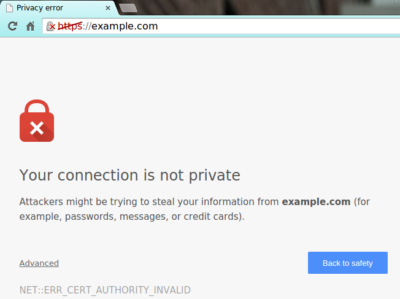
Starting in July, Google Chrome marked all HTTP sites as “not secure,” according to a blog post published today by Chrome security product manager Emily Schechter. Chrome currently displays a neutral information icon, but starting with version 68, the browser is warning users with an extra notification in the address bar. Chrome currently marks HTTPS-encrypted sites with a green lock icon and “Secure” sign.

Google has been nudging users away from unencrypted sites for years, but this is the most forceful nudge yet. Google search began down-ranking unencrypted sites in 2015, and the following year, the Chrome team instituted a similar warning for unencrypted password fields.

The Chrome team said the announcement was mostly brought on by increased HTTPS adoption. Eighty-one of the top 100 sites on the web default to HTTPS, and a strong majority of Chrome traffic is already encrypted. “Based on the awesome rate that sites have been migrating to HTTPS and the strong trajectory through this year,” Schechter said, “we think that in July the balance was tipped enough so that we can mark all HTTP sites.”

HTTPS encryption protects the channel between your browser and the website you’re visiting, ensuring no one in the middle can tamper with the traffic or spy on what you’re doing. Without that encryption, someone with access to your router or ISP could intercept information sent to websites or inject malware into otherwise legitimate pages.

HTTPS has also become much easier to implement through automated services like Let’s Encrypt, giving sites even less of an excuse not to adopt it. As part of the same post, Google pointed to its own Lighthouse tool, which includes tools for migrating a website to HTTPS.


Beware downloading some apps or risk

Popular apps on your smartphone can be convenient and fun, but some also carry malicious software known as malware, which gives hackers easy access to your personal information.

A security firm found that between 75 and 80 percent of the top free apps onAndroid phones or iPhones were breached. The number jumps as high as 97 percent among the top paid apps on those devices.

Whether these apps help advertisers target you or help hackers rip you off, you’ll want to do your homework before downloading apps, reports CBS News correspondent Anna Werner.

California’s Susan Harvey said she was a victim after she used a debit card to download a slot machine game app to her cell phone through a Google Play store account.

“It was something you purchased once, for like $15,” Harvey said.

When she went to reload the game, she found hundreds of purchases had been made — by her math, more than $5,000 worth of transactions.

“My heart sank, I just sat there looking at it… I physically, I was sick, because I didn’t know what they were,” Harvey said.

That story’s no surprise to cybersecurity expert Gary Miliefsky, whose company SnoopWall tracks malware. He said certain apps are designed to steal your personal information.

“What are the consequences for me as a consumer?” Werner asked.

“You’re gonna lose your identity. You’re gonna wonder why there was a transaction. You’re gonna wonder how someone got into your bank account and paid a bill that doesn’t exist,” Miliefsky said.

Milifesky said when you download an app, you also give permission for it to access other parts of your phone, like an alarm clock app that can also track phone calls.

“You think an alarm clock needs all those permissions? Access to the Internet over wifi, your call information, calls you’ve made, call history, your device ID? This to me is not a safe alarm clock,” Miliefsky said.

And there’s the weather and flashlight apps that he says exploit legitimate banking apps to capture information, as he showed us in a demonstration of what could happen when someone takes a photo of a check to send to their bank.

“The flashlight app spies on the camera and noticed the check and grabbed a copy of it. Shipped it off to a server somewhere far away,” Miliefsky said.

Last year the group FireEye discovered 11 malware apps being used on iPhones that gathered users’ sensitive information and send it to a remote server, including text messages, Skype calls, contacts and photos Apple fought back by removing the apps and putting stricter security measures in place.

“They get at your GPS, your contacts list…to build a profile on you,” Miliefsky said.

Some apps are simply collecting information for advertising purposes. In 2014, the Federal Trade Commission settled a lawsuit with a company over its popular Brightest Flashlight app, alleging it transmitted consumers’ personal information to third parties without telling them.

But Miliefsky said he’s found another flashlight app that can do much more troubling things.

“This one turns on your microphone in the background, listens in on you, and sends an encrypted tunnel to a server we discovered in Beijing,” Miliefsky described.

“You’re saying that they’re actually listening to people’s conversations and sending that audio back to Beijing?” Werner asked.

“Yeah, we’ve tracked it. I can show you where it does it,” he said.

Miliefsky said it can be traced to a few blocks from Tiananmen Square on Information Drive in Beijing.

He gave a report on that app to the FBI.

“Because to me, it’s spyware at the nth degree,” Miliefsky said.

His recommendation?

“We really have to look at our phone and say, ‘This is really a personal computer that fits in our pocket. Let’s shut down all the apps we don’t use. Let’s delete apps that don’t make sense and reduce the risk of being spied on,'” Miliefsky said.

The creator of the Brightest Flashlight app settled with the FTC, agreeing to change its policy and delete all the information it had gathered.

Harvey sued Google over her alleged hack, but a judge recently dismissed it, saying she and her attorney filed too late. Google said fewer than one percent of Android devices got bad apps in 2014.

Have questions?

Get answers from Microsofts Cloud Solutions Partner!
Call us at: 856-745-9990 or visit: https://southjerseytechies.net/

South Jersey Techies, LL C is a full Managed Web and Technology Services Company providing IT Services, Website Design ServicesServer SupportNetwork ConsultingInternet PhonesCloud Solutions Provider and much more. Contact for More Information.

To read this article in its entirety click here.
Critical iPhone Spyware Fix Released

Apple has updated its software for iPhones to address a critical vulnerability that independent researchers say has been exploited by notorious surveillance software to spy on a Saudi activist.

Researchers from the University of Toronto’s Citizen Lab said the software exploit has been in use since February and has been used to deploy Pegasus, the spyware made by Israeli firm NSO Group that has allegedly been used to surveil journalists and human rights advocates in multiple countries.

The urgent update that Apple (AAPL) released Monday plugs a hole in the iMessage software that allowed hackers to infiltrate a user’s phone without the user clicking on any links, according to Citizen Lab. The Saudi activist chose to remain anonymous, Citizen Lab said.

Apple credited the Citizen Lab researchers for finding the vulnerability.

“Attacks like the ones described are highly sophisticated, cost millions of dollars to develop, often have a short shelf life, and are used to target specific individuals,” Ivan Krsti?, head of Apple Security Engineering and Architecture, said in a statement.

Krsti? said Apple rapidly addressed the issue with a software fix and that the vulnerability is “not a threat to the overwhelming majority of our users.”

Still, security experts encouraged users to update their mobile devices for protection.

In a statement, NSO Group did not address the allegations, only saying, “NSO Group will continue to provide intelligence and law enforcement agencies around the world with life saving technologies to fight terror and crime.”

The firm has previously said its software is only sold to vetted customers for counterterrorism and law enforcement purposes.

Researchers, however, say they have found multiple cases in which the spyware was deployed on dissidents or journalists. In 2019, Citizen Lab analysts alleged that Pegasus was used on the mobile phone of the wife of a slain Mexican journalist.

In a lawsuit filed in 2019, Facebook accused NSO Group of being complicit in a hack of 1,400 mobile devices using WhatsApp. (NSO Group disputed the allegations at the time.)

The proliferation of easy-to-use mobile hacking tools has given governments around the world a new and stealthy means of targeting adversaries. Sophisticated spyware made by NSO Group and other vendors has been reportedly used from Uzbekistan to Morocco.

The surge in spyware prompted a United Nations panel of human rights experts in August to call for a moratorium on the sale of such surveillance tools. The UN panel said the ban should remain in place until governments have “put in place robust regulations that guarantee its use in compliance with international human rights standards.”

iPhone Wi-Fi Hack Alert: Fix Issued

If you use Wi-Fi on your iOS device, get this security update

The tech giant says there is a new cyber threat, but has taken steps to thwart the attack.  According to the reports, “Apple has now issued a critical security patch for all iOS devices and for Mac computers against a potential hack that could come remotely via Wi-Fi.”


The virus is being considered a potentially serious threat, so the company is urging users to install the updates to protect their devices.

The latest cyber threat is also a risk to Android device users, but Google has taken steps as well to block the virus.

“The vulnerability also has the potential to attack Android devices, but Google issued its own security patch earlier this month.”

Have questions?

Get answers from Microsofts Cloud Solutions Partner!
Call us at: 856-745-9990 or visit: https://southjerseytechies.net/

South Jersey Techies, LL C is a full Managed Web and Technology Services Company providing IT Services, Website Design ServicesServer SupportNetwork ConsultingInternet PhonesCloud Solutions Provider and much more. Contact for More Information.

To read this article in its entirety click here.

Tim Cook: FBI Wanted iOS Backdoor

The most important Tech Case in a Decade

Customer Letter – Apple

February 16, 2016

A Message to Our Customers

The United States government has demanded that Apple take an unprecedented step which threatens the security of our customers. We oppose this order, which has implications far beyond the legal case at hand.

This moment calls for public discussion, and we want our customers and people around the country to understand what is at stake.

Answers to your questions about privacy and security

The Need for Encryption

Smartphones, led by iPhone, have become an essential part of our lives. People use them to store an incredible amount of personal information, from our private conversations to our photos, our music, our notes, our calendars and contacts, our financial information and health data, even where we have been and where we are going.

All that information needs to be protected from hackers and criminals who want to access it, steal it, and use it without our knowledge or permission. Customers expect Apple and other technology companies to do everything in our power to protect their personal information, and at Apple we are deeply committed to safeguarding their data.

Compromising the security of our personal information can ultimately put our personal safety at risk. That is why encryption has become so important to all of us.

For many years, we have used encryption to protect our customers’ personal data because we believe it’s the only way to keep their information safe. We have even put that data out of our own reach, because we believe the contents of your iPhone are none of our business.

The San Bernardino Case

We were shocked and outraged by the deadly act of terrorism in San Bernardino last December. We mourn the loss of life and want justice for all those whose lives were affected. The FBI asked us for help in the days following the attack, and we have worked hard to support the government’s efforts to solve this horrible crime. We have no sympathy for terrorists.

When the FBI has requested data that’s in our possession, we have provided it. Apple complies with valid subpoenas and search warrants, as we have in the San Bernardino case. We have also made Apple engineers available to advise the FBI, and we’ve offered our best ideas on a number of investigative options at their disposal.

We have great respect for the professionals at the FBI, and we believe their intentions are good. Up to this point, we have done everything that is both within our power and within the law to help them. But now the U.S. government has asked us for something we simply do not have, and something we consider too dangerous to create. They have asked us to build a backdoor to the iPhone.

Specifically, the FBI wants us to make a new version of the iPhone operating system, circumventing several important security features, and install it on an iPhone recovered during the investigation. In the wrong hands, this software — which does not exist today — would have the potential to unlock any iPhone in someone’s physical possession.

The FBI may use different words to describe this tool, but make no mistake: Building a version of iOS that bypasses security in this way would undeniably create a backdoor. And while the government may argue that its use would be limited to this case, there is no way to guarantee such control.

The Threat to Data Security

Some would argue that building a backdoor for just one iPhone is a simple, clean-cut solution. But it ignores both the basics of digital security and the significance of what the government is demanding in this case.

In today’s digital world, the “key” to an encrypted system is a piece of information that unlocks the data, and it is only as secure as the protections around it. Once the information is known, or a way to bypass the code is revealed, the encryption can be defeated by anyone with that knowledge.

The government suggests this tool could only be used once, on one phone. But that’s simply not true. Once created, the technique could be used over and over again, on any number of devices. In the physical world, it would be the equivalent of a master key, capable of opening hundreds of millions of locks — from restaurants and banks to stores and homes. No reasonable person would find that acceptable.

The government is asking Apple to hack our own users and undermine decades of security advancements that protect our customers — including tens of millions of American citizens — from sophisticated hackers and cybercriminals. The same engineers who built strong encryption into the iPhone to protect our users would, ironically, be ordered to weaken those protections and make our users less safe.

We can find no precedent for an American company being forced to expose its customers to a greater risk of attack. For years, cryptologists and national security experts have been warning against weakening encryption. Doing so would hurt only the well-meaning and law-abiding citizens who rely on companies like Apple to protect their data. Criminals and bad actors will still encrypt, using tools that are readily available to them.

A Dangerous Precedent

Rather than asking for legislative action through Congress, the FBI is proposing an unprecedented use of the All Writs Act of 1789 to justify an expansion of its authority.

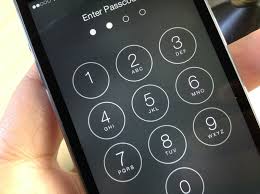
The government would have us remove security features and add new capabilities to the operating system, allowing a passcode to be input electronically. This would make it easier to unlock an iPhone by “brute force,” trying thousands or millions of combinations with the speed of a modern computer.

The implications of the government’s demands are chilling. If the government can use the All Writs Act to make it easier to unlock your iPhone, it would have the power to reach into anyone’s device to capture their data. The government could extend this breach of privacy and demand that Apple build surveillance software to intercept your messages, access your health records or financial data, track your location, or even access your phone’s microphone or camera without your knowledge.

Opposing this order is not something we take lightly. We feel we must speak up in the face of what we see as an overreach by the U.S. government.

We are challenging the FBI’s demands with the deepest respect for American democracy and a love of our country. We believe it would be in the best interest of everyone to step back and consider the implications.

While we believe the FBI’s intentions are good, it would be wrong for the government to force us to build a backdoor into our products. And ultimately, we fear that this demand would undermine the very freedoms and liberty our government is meant to protect.

Tim Cook

Answers to your questions about privacy and security

Have questions?

Get answers from Microsofts Cloud Solutions Partner!
Call us at: 856-745-9990 or visit: https://southjerseytechies.net/

South Jersey Techies, LL C is a full Managed Web and Technology Services Company providing IT Services, Website Design ServicesServer SupportNetwork ConsultingInternet PhonesCloud Solutions Provider and much more. Contact for More Information.

To read this article in its entirety click here.

CALL US NOW!