Back to Top

Tech, Web, Cloud & Cabling Services

Category: Virus / Adware / Spyware Removal

Security / Virus/Adware/Spyware Removal Category

Ransomware 2.0 is around the corner and it’s a massive threat to the enterprise

The profits from ransomware are making it one of the fastest growing types of malware and new versions could negatively impact entire industries, according to a Cisco report.

ransomware2.0

Despite the efforts made to improve cybersecurity at many organizations, there are too many systems with aging infrastructure and vulnerabilities that leave companies at risk, with ransomware one of the most sinister threats, according to a new Cisco report.

Ransomware is a top concern because it’s become an area of intense focus for cybercriminals due to its effectiveness at generating revenue. Once a cybercriminal hacks into a company’s files and encrypts them, victims have little option but to pay the asking price for the code to decrypt their files. Ransomware is becoming more ominous as new versions are continually being developed.

“The landscape is simple. Attackers can move at will. They’re shifting their tactics all the time. Defenders have a number of processes they have to go through,” said Jason Brvenik, principal engineer with Cisco’s security business group, discussing the Cisco 2016 Midyear Cybersecurity Report.

Cisco used data from its customers to create the report, since there are more than 16 billion web requests that go through the Cisco system daily, with nearly 20 billion threats blocked daily, and with more than 1.5 million unique malware samples daily, which works out to 17 new pieces of malware every second, Brvenik said.

Brvenik has the following recommendations for companies wanting to improve security:

  • Improve network hygiene – Improve aging infrastructure to limit vulnerabilities.
  • Integrate defenses – Use machine learning techniques combined with novel data views.
  • Measure time to detection – Find out how long an attacker can live in your network before they are found.
  • Protect your users everywhere they are – Protect users whether they’re on a laptop, a smartphone, or another device. Don’t just protect networks but protect users. They are the target.

The next step in the evolution of malware will be ransomware 2.0, which Brvenik said “will start replicating on its own and demand higher ransoms. You’ll come in Monday morning and 30% of your machines and 50% of your servers will be encrypted. That’s really a nightmare scenario.”

Ransomware campaigns started out primarily through email and malicious advertising, but now some attackers are using network and server-side vulnerabilities as well. Self-propagating ransomware will be the next step to create ransomware 2.0, and companies need to take steps to prepare and protect their company’s network, Brvenik said.

New modular strains of ransomware will be able to quickly switch tactics to maximize efficiency. For example, future ransomware attacks will evade detection by being able to limit CPU usage and refrain from command-and-control actions. These new ransomware strains will spread faster and self-replicate within organizations before coordinating ransom activities, according to the report.

JexBoxx, an open source tool for testing and exploiting JBoss application services, had been used to allow the attackers to gain access to networks in the targeted companies. Once the attackers had access to the network, they encrypted multiple Windows systems using SamSam.

Overall, in all aspects of cybersecurity, there are too many companies with vulnerabilities that haven’t been addressed. Out of 103,121 Cisco devices connected to the internet that were studied for the report, each device on average was running 28 known vulnerabilities. The devices were actively running known vulnerabilities for an average of 5.64 years, and more than 9 percent had known vulnerabilities older than 10 years, according to the report.

“In April, Cisco estimated that 10% of all JBoss servers worldwide were compromised. And they were compromised using readily available tools and old vulnerabilities. Adobe Flash is still a favorite. It gives a viable attack surface for them. And we see Microsoft Silverlight vulnerabilities. This means to us that people are opportunizing those that work for them,” Brvenik said.

Brevik noted that the nature of the attack is also likely to change, focusing on service-oriented technologies and systems, with teams ready to attack and try to compromise systems. Advertising is a viable model for attack.

“We saw a 300% increase in the use of HTTPS with malware over the past four months. Ad injection is the biggest contributor. Adversaries are using HTTPS traffic to expand time to operate. That’s the attacker opportunity as it exists today,” he said.

It’s no longer reasonable to expect to block 100% of threats, but being able to detect the threat fast, and limit the time the attacker is in your system is key to minimizing the damage. In December 2014, the median time before an attack was detected was 50 hours. In April 2016, it dipped to a median of 13 hours for the previous six months, Brvenik said.

“It is a living number as defenses improve and attackers change. This is good. It says that for the customers that have these systems, when they are compromised, they’re now down to 13 hours as a median time to detect it. I wouldn’t leave the door to my house open for 13 hours; and that’s what you’re doing when you leave your door open to attackers for 13 hours.”

Industries that previously thought they were immune because their business was of little interest to attackers are wrong.

“No industry is safe,” Brvenik said. “Assuming that what you do is of no interest to attackers is not a good way to think of it.”

Three takeaways for the readers

  1. Of more than 100,000 Cisco connected devices studied for the report, an average of 28 vulnerabilities were running on each one.
  2. Self-propagating ransomware is around the corner and companies need to protect themselves from the threat.
  3. Ransomware is giving massive profits to attackers, encouraging them to create even more sinister ways to attack. The average time of attack lasts 13 hours, down from 50 hours in 2014.

Have questions?

Get answers from Microsofts Cloud Solutions Partner!
Call us at: 856-745-9990 or visit: https://southjerseytechies.net/

South Jersey Techies, LL C is a full Managed Web and Technology Services Company providing IT Services, Website Design ServicesServer SupportNetwork ConsultingInternet PhonesCloud Solutions Provider and much more. Contact for More Information.
Windows 10 Anniversary Update: Watch out for these nasty surprises

A major update to Windows 10 is being rolled out. These are the gotchas that are catching out early users.

windows-10-anniversary-update

Windows 10 users are getting the first major update to the operating system in just under a year, with the release of the Anniversary Update.

But alongside the new features and fixes are some more unwelcome changes, ranging from less control for users to frozen machines.

Here are the main gotchas to look out for, as well as some fixes.

Less time to change your mind

With the arrival of the Anniversary Update, those upgrading to Windows 10 from Windows 7 or 8 have less time to switch back to the earlier OS.

Prior to the Anniversary Update, Windows 10 users had 30 days during which they could choose to reset their machine and restore their original OS. However, following the update Microsoft has reduced this period to 10 days.

Microsoft claims it reduced the period after noticing that most users who chose to switch back did so within a few days of upgrading, adding the change will free storage space on users’ machines.

The reduction also coincides with the end of period during which Windows 7 and 8 users could upgrade to Windows 10 for free – meaning those now paying $120 or more to upgrade will likely be less keen to switch back.

Frozen computers and broken systems

When you update software there is always risk that something will break, and that’s exactly what seems to be happening for some who have received the Windows 10 Anniversary Update.

The most common complaint seems to be that the update causes the computer to lock-up soon after loading the desktop.

In response to the problem, Microsoft has been advising users to run Windows 10’s Maintenance Troubleshooter and if that doesn’t work, to perform a clean boot of the system.

Meanwhile, users are reporting the most reliable fix has been to roll back to an earlier build of Windows 10.

Another repeated complaint is that Microsoft’s virtual assistant Cortana is missing from the Task Bar, replaced instead with a search box. In affected systems, Cortana also seems to be disabled inside the Edge web browser.

Some users of Avast and McAfee anti-virus – both widely used products – are also reporting problems after the upgrade, as are gamers trying to use Xbox One controllers.

Cortana is more difficult to get rid of

If you’re not a fan of Microsoft’s virtual assistant Cortana then prepare to dislike the Anniversary Update.

Following the update, it is no longer possible to turn off Cortana from the virtual assistant’s in-built Settings menu.

Instead, if users want to ditch Cortana they will need access to specific admin tools or to edit the registry.

Users can also minimise the information that Cortana collects, although thisdoes require altering various settings.

Harder for admins to block ads

Another less welcome change is that Windows 10 Pro users lose the ability to use admin tools to block ads.

Prior to the update, admins could edit Group Policy settings to stop ads for apps showing in the Start menu and on the lock screen.

However, Windows 10 Pro users will lose that ability, and, following the update, disabling these ads via Group Policy settings will only be available to those running Windows 10 Enterprise, Windows 10 Pro Education, or Windows 10 Education editions.

Individual users should be able to turn off many of these ads by disabling Windows 10 tips, tricks, and suggestions and Windows Store suggestions in the Settings app, however.

Following the Windows 10 Anniversary Update, new installs of Windows 10 will show double the number of ads for Windows Store apps in the Start Menu. Some users have also reported a possible increase in the number of ads shown on the lock screen following the update.

Have questions?

Get answers from Microsofts Cloud Solutions Partner!
Call us at: 856-745-9990 or visit: https://southjerseytechies.net/

South Jersey Techies, LL C is a full Managed Web and Technology Services Company providing IT Services, Website Design ServicesServer SupportNetwork ConsultingInternet PhonesCloud Solutions Provider and much more. Contact for More Information.
South Jersey Cyber Crime

The hackers used “ransomware” to lock the hospital out of its own medical records.

Not all kidnappers grab your loved ones.

A growing online threat – ransomware – essentially abducts your computer system, putting data and services off-limits to users and demanding a payment to restore access.

“We are seeing more cases of this – sometimes almost on a daily basis,” said New Jersey State Police Capt. Steve Jones. “And we’re not seeing all of it, because people may be too embarrassed or don’t believe it can be helped.”

Ransomware viruses are a plague. Once infected — installed to your computer by a website you’ve visited, a rogue email attachment or link, or instant message — your computer will lock up. With names like CryptoWall, these types of viruses may create a popup window or Web page warning you that you’ve broken some law and have to pay a fine, anywhere from hundreds to thousands of dollars, according to the FBI.

These scams threaten to encrypt your files forever or destroy them unless a ransom is paid, according to the FBI.

Once paid, your computer is unlocked or a code is sent to unlock the machine, authorities said.

Between April 2014 and June 2015, the FBI received 992 CryptoWall-related complaints with victims reporting a loss of more than $18 million.

The state’s top cybersecurity unit recently launched an online effort to help people guard against ransomware.

“For many organizations, preventing ransomware entirely is nearly impossible,” says the New Jersey Cybersecurity and Communications Integration Cell (NJCCIC), which introduced a Ransomware Threat Profile page at its website in February.

But it notes individuals and companies can take measures to prevent infections and to limit their impact.

Although ransomware can lock up laptops and desktop computers, the risk is particularly great for data-dependent organizations like hospitals and accounting firms, said Jones, the State Police spokesman.

So far, at least three hospitals have been hit nationwide – in California, Kentucky and the Washington, D.C., area. South Jersey hospitals are well aware of the menace.

“It’s a big concern. It’s something that has really spiked,” said Tom Handlon, chief information security officer for Kennedy Health, which operates three acute-care hospitals in South Jersey.

Handlon gave no details, but said Kennedy seeks to protect itself through protective measures inside its computer system and by promoting safe conduct by employees.
“We’re monitoring it constantly and updating as we go along,” he said. “We are really educating the staff and our entire organization that we are a target.”

A similar view came from Tom Rubino, spokesman for Cooper University Healthcare System in Camden.

“We have tracked the recent wave of ransomware attacks that have targeted hospitals across the nation,” Rubino said. He said Cooper’s IT security team “is proactively taking measures to prevent ransomware infection of our computer systems.”

“Additionally, as a critical component for preventing all computer viruses, we are increasing our employee education efforts.”

A key precaution is to back up your computer’s contents on a frequent basis, Jones said. “But you’ve got to keep the backup drives disconnected,” he warned. “Otherwise, the ransomware can migrate to the backups.”

The State Police in March 2015 investigated a hacking incident that disabled much of the computer system for the Swedesboro-Woolwich school system. In that case, a hacker demanded more than $125,000 in the form of a digital currency called bitcoins.

The district, which did not pay the ransom, had to wipe clean its email servers and cafeteria lunch-ordering system to rid itself of ransomware. Only a handful of classroom computers were infected.

Hackers exploited a gap in the district’s computer security system and a vendor’s “weak” passport to take over the computer system, Michael Procopio, Educational Information and Resource Center’s director of technology, said at the time. EIRC experts helped the district restore its system.

The district’s hacker was believed to have struck from abroad – a familiar pattern, according to the State Police.

“Many of these messages and attacks are coming through foreign servers,” Jones said. “The countries that house these servers are not often countries that have a real open relationship with law enforcement.”

Tools have been available to help decrypt older versions of ransomware, said Dave Weinstein, New Jersey’s director of cybersecurity.

“At this point, the strain has morphed to the point where there is no releasing your files,” said Al Della Fave, a spokesman for the Ocean County Prosecutor’s office. “The lock these cybercriminals put on your files is foolproof at this point.”

Unless you’ve backed up your computer prior to the infection, Della Fave said, “The only way you would get your files back is to pay.”

“Ransomware is working” for cyberthieves, said Ben Johnson, chief security strategist at Carbon Black Inc., a  computer security firm in Waltham, Massachusetts. “People are paying.”

In the last few weeks, cybercriminals have come up with some new twists, he said. For instance, one version encrypts files more quickly after someone opens up a malware-filled Microsoft Word document or some other attachment.

Other versions encrypt the computer at its most basic level so it can’t even power on, or use the computer’s own system administration tools to infect itself, he said.

The best course of action is to make sure you don’t get the virus. “You must be super careful what you click on,” Della Fave said.

Here’s what you should do, according to Johnson and the Ocean County prosecutor’s office:

  • Keep your computer’s security software up to date.
  • Keep your network firewall turned on.
  • Do not open spam email messages or links to suspicious websites.
  • Back up your files, such as documents, photos and music, to a secondary storage device.
  • Be careful when you browse the web. Use ad blockers to help protect yourself.

Have questions?

Get answers from Microsofts Cloud Solutions Partner!
Call us at: 856-745-9990 or visit: https://southjerseytechies.net/

South Jersey Techies, LL C is a full Managed Web and Technology Services Company providing IT Services, Website Design ServicesServer SupportNetwork ConsultingInternet PhonesCloud Solutions Provider and much more. Contact for More Information.

To read this article in its entirety click here.

Uninstall now! Apple abandons QuickTime for Windows despite lingering critical flaws

Apple is giving up on QuickTime for Windows.

Yet another program is joining Java 6 and Windows XP as big-name software you do not want running on your PC. Security firmTrend Micro and the U.S. Department of Homeland Security are advising all Windows users to uninstall Apple’s QuickTime as soon as possible. (The advisory does not affect Mac users.)

The reason for getting rid of QuickTime for Windows is twofold. First, Apple told Trend Micro it is deprecating the software and will no longer deliver security updates for it. Second, there are two known critical vulnerabilities that could allow an attacker to take control of a system running QuickTime.

That’s a hellacious combo.

Apple was unavailable for comment at this writing, but a quick look at QuickTime’s download page shows the software is still publicly available. It hasn’t been updated since at least January, however.

Trend Micro says it does not yet know of any instances where the two potential security threats are being used in the wild but that could change. Trend Micro’s Zero Day Initiative recently published some technical details about the vulnerabilities. ZDI did this because its disclosure policy requires it to publish threat information when a “vendor indicates that the product is deprecated,” and thus won’t be patched.

If you’re a longtime user of iTunes you may be running QuickTime. To dump the program, open the Control Panel on your PC and then from the “category” view go to Programs > Uninstall a program. Once the list of installed programs populates, scroll down until you find QuickTime. Select it with your mouse, and then click Uninstall towards the top of the window. A pop-up window will then appear asking to confirm that you want to uninstall the program. Click Yes and you’ll be QuickTime-free in no time.

A survey published by Secunia Research in late 2015 found that Apple software is among the programs that are updated the least often by Windows users.

Why this matters: Whenever software is about to be abandoned it’s always a good idea to move away from it—or at least start planning to. That goes double for software with known flaws that allow the bad guys to execute code on your machine. QuickTime used to be an important piece of software for Windows users. But these days you don’t need it to watch movie trailers on Apple’s site and it’s no longer used by iTunes to play media on Windows. There’s little reason for the vast majority of Windows users to keep QuickTime on their PCs.

Have questions?

Get answers from Microsofts Cloud Solutions Partner!
Call us at: 856-745-9990 or visit: https://southjerseytechies.net/

South Jersey Techies, LL C is a full Managed Web and Technology Services Company providing IT Services, Website Design ServicesServer SupportNetwork ConsultingInternet PhonesCloud Solutions Provider and much more. Contact for More Information.

To read this article in its entirety click here.

Old Windows PCs can stop WannaCry ransomware with new Microsoft patch

In a rare step, Microsoft published a patch for Windows XP, Windows Server 2003 and Windows 8

Users of old Windows systems can now download a patch to protect them from this week’s massive ransomware attack.

In a rare step, Microsoft published a patch for Windows XP, Windows Server 2003 and Windows 8 — all of them operating systems for which it no longer provides mainstream support.

Users can download and find more information about the patches in Microsoft’s blog post about Friday’s attack from the WannaCry ransomware.

The ransomware, which has spread globally, has been infecting computers by exploiting a Windows vulnerability involving the Server Message Block protocol, a file-sharing feature.

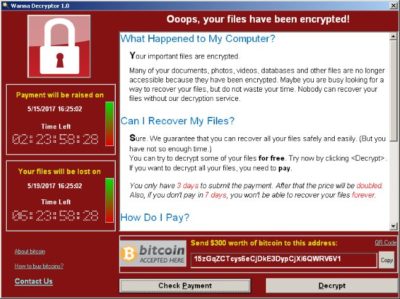
Computers infected with WannaCry will have their data encrypted, and display a ransom note demanding $300 or $600 in bitcoin to free the files.

Fortunately, Windows 10 customers were not targeted in Friday’s attack. In March, Microsoft patched the vulnerability that the ransomware exploits — but only for newer Windows systems. That’s left older Windows machines, or those users who failed to patch newer machines, vulnerable to Friday’s attack.

Researchers originally believed the ransomware was spread through attachments in email phishing campaigns. That no longer appears to be the case.

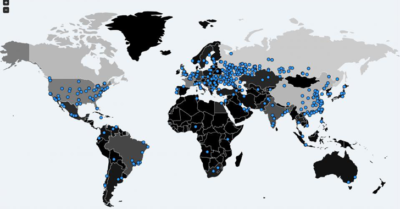
Infection attempts from the WannaCry ransomware.

Once a vulnerable PC becomes infected, the computer will attempt to spread to other machines over the local network as well as over the internet. The ransomware will specifically scan for unpatched machines that have the Server Message Block vulnerability exposed.

Businesses can prevent this by disabling the Server Message Block protocol in vulnerable PCs. They can also use a firewall to block unrecognized internet traffic from accessing the networking ports the Server Message Block uses.

Fortunately, Friday’s ransomware attack may have been contained. A security researcher who goes by the name MalwareTech has activated a sort of kill-switch in WannaCry that stops it from spreading.

As a result, over 100,000 new infections were prevented, according to U.K.’s National Cyber Security Centre. But experts also warn that WannaCry’s developers may be working on other versions that won’t be easy to disable.

“It’s very important everyone understands that all they (the hackers) need to do is change some code and start again. Patch your systems now!” MalwareTech tweeted.

Unfortunately, the kill-switch’s activation will provide no relief to existing victims. The ransomware will persist on systems already infected.

Friday’s ransomware attack appears to have spread mainly in Europe and Asia, with Russia among those nations hardest hit, according to security researchers.

Security experts are advising victims to wait before paying the ransom. It’s possible that researchers will develop a free solution that can remove the infection.

Have questions?

Get answers from Microsofts Cloud Solutions Partner!
Call us at: 856-745-9990 or visit: https://southjerseytechies.net/

South Jersey Techies, LL C is a full Managed Web and Technology Services Company providing IT Services, Website Design ServicesServer SupportNetwork ConsultingInternet PhonesCloud Solutions Provider and much more. Contact for More Information.
To read this article in its entirety click here.

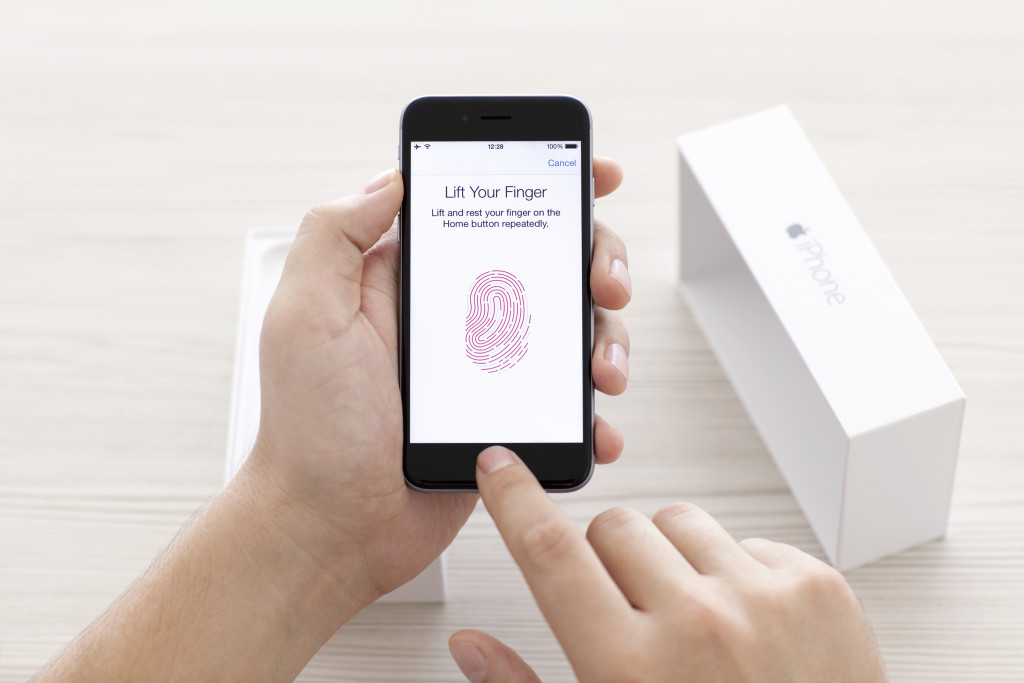
Research: Apple rated highest for security on mobile devices

Mobile devices are almost universal in the enterprise in 2016. Tech Pro Research conducted a survey to see what devices employees are using for work, and how safe these devices are.

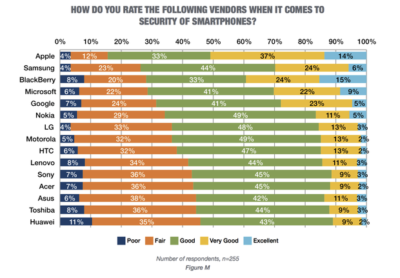
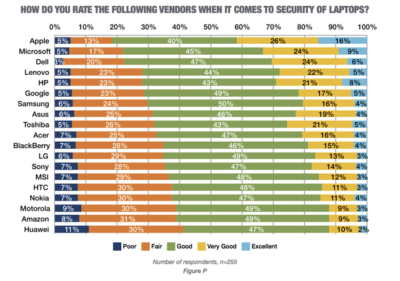
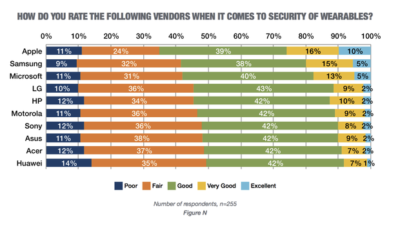
In new research conducted by Tech Pro Research, 98% of respondents said they use mobile devices for work. Smartphones and laptops were the most common, with 94% of respondents who use mobile devices using them. 74% of mobile device users said they work with tablets. Wearables haven’t found a widespread usage base in the workplace, with only 14% reporting using them. When users rated the security of devices based on vendors, Apple got the best ratings in all categories.smartphones

For smartphones Apple’s high ratings could be partially attributed to familiarity since 67% of respondents said employees at their company use iPhones. Only Samsung was close to Apple in terms of prevalence, and the company was way behind Apple in security ratings.

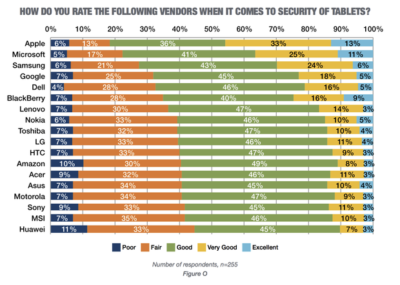
tablets

Apple also had the largest share of tablet use, and the highest security rankings, among respondents. 53% said they and their colleagues use iPads and 46% of users ranked security as very good or excellent.

laptops

Dell was the most popular brand among respondents, in terms of use for work, but it got third place in security ratings.

wearables

Security on wearables appears to still be developing, based on the mediocre security ratings among all brands, and the fact that security feature usage isn’t the norm for wearables yet.

Have questions?

Get answers from Microsofts Cloud Solutions Partner!
Call us at: 856-745-9990 or visit: https://southjerseytechies.net/

South Jersey Techies, LL C is a full Managed Web and Technology Services Company providing IT Services, Website Design ServicesServer SupportNetwork ConsultingInternet PhonesCloud Solutions Provider and much more. Contact for More Information.
To read this article in its entirety click here.

Now Microsoft Office 365 tackles ‘fake CEO’ email spoofing attacks

Microsoft is rolling out a host of new email security features for Office 365 later this quarter, as it looks to thwart hackers and criminals.

‘Insider spoofing’ or faking the CEO’s email address to trick the CFO into transferring millions to criminal bank accounts is big business. Now Microsoft is using big data and reputation filters to try and squish the threat.

According to the FBI, between October 2013 and August 2015, 7,066 US businesses have fallen prey to ‘business email compromise’, netting criminals an estimated $747m.

Non-US victims lost a further $51m over the period, with the FBI estimating a 270 percent increase in identified victims since January 2015, when it first released figures about the threat category.

As Microsoft notes, when a corporate email domain is spoofed, it makes it hard for existing filters to identify the bogus email as malicious.

However, Microsoft reckons it has achieved a 500 percent improvement in counterfeit detection using a blend of big data, strong authentication checks, and reputation filters in Exchange Online Protection for Office 365.

It’s also rolling out new phishing and trust notifications to indicate whether an email is from a known sender or if a message is from an untrusted source, and therefore could be a phishing email.

The company is also promising a faster email experience as it vets attachments for malware and new tools to auto-correct messages that are mis-classified as spam. The aim is to boost defences without impairing end-user productivity.

Malicious email attachments remain a popular way for attackers to gain a foothold in an organization and, as RSA’s disastrous SecurID breach in 2011 showed, a little social engineering can go a long way to ensuring someone opens it.

Microsoft’s new attachment scanner, called Dynamic Delivery of Safe Attachments, looks to reduce delays as it checks attachments for potential threats.

Currently it captures suspicious looking attachments in a sandbox with a ‘detonation chamber’ where it analyses it for malware in a process takes five to seven minutes.

Microsoft hasn’t figured out a faster way to analyse the attachment, but instead of holding up the email as it conducts the scan, it will send the body of the email with a placeholder attachment. If the attachment is deemed safe, it will replace the placeholder and if not, the admin can filter out the attachment.

The feature is part of Microsoft’s Office 365 Exchange Online Protection and Advanced Threat Protection services.

The company is also tackling false-positive spam, or legitimate messages that are mis-identified as spam, and vice versa, with a new feature called Zero-hour Auto Purge, which allows admins to “change that verdict”.

“If a message is delivered to your inbox and later found to be spam, Zero-hour Auto Purge moves that message from the inbox to the spam folder; the reverse is true for messages misclassified as spam,” Microsoft notes.

Microsoft is testing this approach with 50 customers and says it will be rolled out for all Exchange Online Protection global clients in the first quarter of 2016.

Have questions?

Get help from IT Experts/Microsofts Cloud Solutions Partner
Call us at: 856-745-9990 or visit: https://southjerseytechies.net/

South Jersey Techies, LLC is a full Managed Web and Technology Services Company providing IT Services, Website Design ServicesServer SupportNetwork ConsultingInternet PhonesCloud Solutions Provider and much more. Contact for More Information.
To read this article in its entirety click here.

South Jersey Techies

Protect Your Data & Backup

Not sure your are protected? Contact us, we can help!

Hackers held two school districts on Long Island hostage over the summer, forcing one of them to pay $88,000 in cryptocurrency in order retrieve student and staff information before the school year started.

Despite using an anti-virus software and other firewalls for cyber security, the School District’s encrypted files were accessed this summer by Ryuk ransomware, which can infiltrate an entire server with one click of a malicious email attachment. The virus encrypts data, essentially locking users out of access to their files, and hackers are blackmailing schools until payment is made, usually in bitcoin, through school insurance to unlock the system’s server.

The Mineola School District was also attacked by the same virus. But they didn’t have to pay because they had a backup that wasn’t compromised.

What are some tips to avoid having to pay the ransomware

The nefarious ransomware business model has turned out to be a lucrative industry for criminals. Over the years its ill repute has made law enforcement team up with international agencies to identify and bring down scam operators.

Most of the ransomware attacks that have taken place in the past have been linked to poor protection practices by employees and businesses. There are ways to prepare and steps you can take to avoid the nuances these hackers are causing.

Here are a few dos and don’ts when it comes to ransomware.

  1. Do not pay the ransom. It only encourages and funds these attackers. Even if the ransom is paid, there is no guarantee that you will be able to regain access to your files.
  2. Restore any impacted files from a known good backup. Restoration of your files from a backup is the fastest way to regain access to your data.
  3. Do not provide personal information when answering an email, unsolicited phone call, text message or instant message. Phishers will try to trick employees into installing malware, or gain intelligence for attacks by claiming to be from IT. Be sure to contact your IT department if you or your coworkers receive suspicious calls or emails.
  4. Use reputable antivirus software and a firewall. Maintaining a strong firewall and keeping your security software up to date are critical. It’s important to use antivirus software from a reputable company because of all the fake software out there.
  5. Do employ content scanning and filtering on your mail servers. Inbound e-mails should be scanned for known threats and should block any attachment types that could pose a threat.
  6. Do make sure that all systems and software are up-to-date with relevant patches. Exploit kits hosted on compromised websites are commonly used to spread malware. Regular patching of vulnerable software is necessary to help prevent infection.
  7. If traveling, alert your IT department beforehand, especially if you’re going to be using public wireless Internet. Make sure you use a trustworthy Virtual Private Network (VPN) when accessing public Wi-Fi like Norton Secure VPN.

Ransomware criminals often attack small and medium sized businesses. Among other cyber attacks, ransomware is one criminal activity that can be easily worked around with the above-mentioned solutions. South Jersey Techies coupled with education about these threats is an excellent protection plan for today’s cyber landscape.

Cyber Security Awareness

As school, socializing, and many aspects of life have moved online this year, it’s more important than ever that you protect your digital devices and steer clear of cybercriminals. Computer security threats are relentlessly inventive. Masters of disguise and manipulation, these threats constantly evolve to find new ways to annoy, steal and harm. Arm yourself with information and resources to safeguard against complex and growing computer security threats and stay safe online.

Examples of Online Cybersecurity Threats

Computer Viruses

Probably the most eminent computer security threat, a computer virus is a program written to alter the way a computer operates, without the permission or knowledge of the user. A virus replicates and executes itself, usually doing damage to your computer in the process.

What can you do to avoid computer viruses? Carefully evaluate free software, downloads from peer-to-peer file sharing sites, and emails from unknown senders. These things are critical to avoiding viruses. Most web browsers have security settings which can be configured for top defense against online threats. But, as we’ll say again and again, the single most-effective way of fending off viruses is up-to-date antivirus software and monitoring agent, like we include in our Managed Service Plans.

Spyware Threats

A serious computer security threat, spyware is any program that monitors your online activities or installs programs without your consent for profit or to capture personal information.

While many users won’t want to hear it, reading terms and conditions is a good way to build an understanding of how your activity is tracked online. As always, if a company you do not recognize is advertising for a deal that seems too good to be true, be sure you have an internet security solution in place and click with caution.

Hackers and Predators

People, not computers, create computer security threats and malware. Hackers and predators are programmers who victimize others for their own gain by breaking into computer systems to steal, change, or destroy information as a form of cyber-terrorism. These online predators can compromise credit card information, lock you out of your data, and steal your identity. As you may have guessed, online security tools with identity theft protection are one of the most effective ways to protect yourself from this brand of cybercriminal.

Phishing

Masquerading as a trustworthy person or business, phishers attempt to steal sensitive financial or personal information through fraudulent email or instant messages. Phishing attacks are some of the most successful methods for cybercriminals looking to pull off a data breach. Antivirus solutions with identity theft protection can be taught to recognize phishing threats in fractions of a second.

Cyber Safety Tips

  • Keep software systems up to date and use a good anti-virus program.
  • Examine the email address and URLs in all correspondence. Scammers often mimic a legitimate site or email address by using a slight variation in spelling.
  • If an unsolicited text message, email, or phone call asks you to update, check, or verify your account information, do not follow the link provided in the message itself or call the phone numbers provided in the message. Go to the company’s website to log into your account or call the phone number listed on the official website to see if something does in fact need your attention.
  • Do not open any attachments unless you are expecting the file, document, or invoice and have verified the sender’s email address.
  • Scrutinize all electronic requests for a payment or transfer of funds.
  • Be extra suspicious of any message that urges immediate action.
  • Confirm requests for wire transfers or payment in person or over the phone as part of a two-factor authentication process. Do not verify these requests using the phone number listed in the request for payment.


If you have any questions, please email us at support@sjtechies.com or call us at (856) 745-9990.

Symantec Security Cloud

Symantec Endpoint Protection Cloud Windows client upgrade scheduled for August 5, 2019

The SEP Cloud client for Windows is updated periodically to provide improvements and defect fixes. The next update is scheduled to start on August 5, 2019.

WHAT’S NEW ?

In this release, the SEP Cloud client for Windows will be updated to version 22.18 to provide an enhanced protection framework and client stability.

  • Fixed an issue related to the OS feature on the agent, which was randomly failing with a medium severity while applying the Management policy.
  • Fixed an issue related to the security event: “A process modified a critical system resource.” This event was erroneously displayed in the console as a threat detection/remediation event. The event is now removed and will not be displayed in the console.
  • Enhancement to process HTTP error 429 status code request. The SEP Cloud agent will not attempt to connect with the cloud when the 429 status code is returned, but instead, try to connect based on the timeout information.
  • If the timeout information is not available, then the product will retry to connect in 15 minutes by default.

IMPACT

All Windows devices that are currently enrolled in SEP Cloud will automatically be updated in the background, using LiveUpdate. This update does not affect the security of your devices.

To start, the update is distributed to a small set of clients over the first seven days of the release, and then the remaining clients will get the update. If you want to update sooner, you can run LiveUpdate from the Symantec Endpoint Protection Cloud client UI.

Action Required

  • Windows device restart
    All users with Windows devices will be prompted to restart their devices after the update. Even if they delay the restart, their Windows clients remain Protected.

If no user is logged on the device when the upgrade is made available, then the prompt is provided until the user logs on. The product update will not force the restart of the device.

  • Windows installation package refresh
    Administrators who created a Windows installation package before August 5 should create and distribute a new one after August 5 to use for new Windows package deployments.

If you have any questions, please email us at support@sjtechies.com or call us at (856) 745-9990.

CALL US NOW!