Back to Top

Tech, Web, Cloud & Cabling Services

Category: Virus / Adware / Spyware Removal

Security / Virus/Adware/Spyware Removal Category

Mozilla Joins Google and Facebook in Phasing Out Adobe Flash

Web browsers don’t like the security and stability problems that come with Flash.

Another popular web browser has had it with Adobe Flash.

Mozilla said this week that it plans to gradually wean its Firefox web browser from Adobe’s ADBE -1.07% multimedia player. In August, Firefox will no longer support “certain Flash content” that it deems “not essential to the user experience,” although Mozilla did not specify what type of Flash content it was referring to.

Mozilla will still support “legacy Flash content” for an unspecified time, but the company urged websites that use Flash or Microsoft MSFT -0.25% Silverlight, another multimedia web player similar to Flash, for their videos or online games to adopt newer “HTML technologies as soon as possible.”

In May, Google GOOG -0.59% detailed its plans to end support of Flash for its Chrome web browser, and it hopes to completely rid itself of Flash advertisements by the beginning of 2017.

Google, like Adobe, is urging website operators to switch to the HTML5 coding language to display multimedia like video on their sites.

Flash is notoriously buggy and prone to many security vulnerabilities. Firefox believes that by ending support for Flash, its users will see “enhanced security, improved battery life, faster page load, and better browser responsiveness.”

Still, Mozilla is not totally cutting ties with Adobe. Mozilla said it would “continue to work closely with Adobe to deliver the best possible Flash experience for our users” as it phases the multimedia player out, and said that an engineering partnership between the two companies has improved some performance and stability in Firefox when it displays Flash content.

Last summer, Facebook’s FB -0.27% chief security officer Alex Stamos urged Adobe via Twitter to disable Flash because of its security vulnerabilities.

In April, Adobe issued an emergency update to Flash after security researchers found a flaw that allowed hackers to distribute so-called ransomware to owners of Microsoft Windows personal computers. Ransomware is basically a form of malware that lets hackers block people from accessing their computer or related computer networks so that a hacker can demand payment in return for access.

In 2010, legendary Apple AAPL -1.32% CEO Steve Jobs wrote a 1,700 word essay on Flash and why Apple’s problems with the multimedia player, which he claimed hurt the “reliability and security of our iPhones, iPods and iPads.”

Have questions?

Get answers from Microsofts Cloud Solutions Partner!
Call us at: 856-745-9990 or visit: https://southjerseytechies.net/

South Jersey Techies, LL C is a full Managed Web and Technology Services Company providing IT Services, Website Design ServicesServer SupportNetwork ConsultingInternet PhonesCloud Solutions Provider and much more. Contact for More Information.

To read this article in its entirety click here.

Safari on iOS and Mac crashing, bug related to Safari Suggestions, here’s how to fix

A strange bug is affecting many Safari users today, causing crashes on iPhone, iPad and Mac. For many users, simply tapping in the URL bar will cause the browser app to crash completely.  The exact issue causing the crashing has not been locked down, but it appears to be related to Apple’s Safari Suggestions service. It’s a very annoying bug that is affecting a lot of people all of sudden today.

sjt-blog-safari-crash-ios

When you type a URL, Apple sends what you type to its servers, returning a response with autocomplete search queries, Top Sites and other info. There appears to be a bug in this server request that is causing Safari to randomly crash. Users are discovering some potential workarounds until Apple fixes the problem properly …

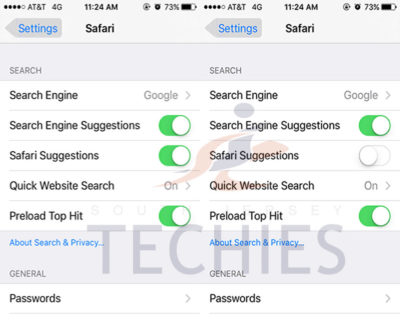
Disabling Safari Suggestions seems to be helping resolve the bug for many people on iOS. On your iPhone or iPad, go into Settings, tap Safari, and toggle off the ‘Safari Suggestions’ switch. This will fix the crashing, obviously its only a temporary fix until Apple sorts its servers out as it will disable the Safari Suggestions functionality.

Another option is to enter Private Browsing mode. In private browsing, by design Safari does not contact the suggestions server for intelligent completion options, so the server is never contacted and the crash never arises.

The bug is affecting users in many countries, but not all. It also depends on the state of your Safari, whether it has certain data cached already. The crash has been seen on iOS 8, iOS 9 and OS X 10.11. The bug could be even more widespread beyond these platforms however. It is pretty crazy flaw that is affecting so many people this morning, with many reports across European iOS customers.

We have contacted Apple about the issue for clarification, but it’s such a serious functional flaw that we expect a fix very shortly. Please note: this is an unrelated incident to the prank site CrashSafari.com.

Update: The Safari crash bug has now been fixed, according to Apple.

Have questions?

Get help from IT Experts/Microsofts Cloud Solutions Partner
Call us at: 856-745-9990 or visit: https://southjerseytechies.net/

South Jersey Techies, LL C is a full Managed Web and Technology Services Company providing IT Services, Website Design ServicesServer SupportNetwork ConsultingInternet PhonesCloud Solutions Provider and much more. Contact for More Information.

To read this article in its entirety click here.

Scams that Target Small Businesses and How to Spot Them

Consumers are not the only ones vulnerable to scams.  If you own a small business or are part of a nonprofit organization, you could be open to several different types of cons without even realizing it.

The Federal Trade Commission (FTC) has put together a list of some of the more common scams and posted them on the website along with plenty of resources to help you spot con artists and keep them from taking advantage of you and your business.

“Your best protection? Learn the signs of scams that target businesses,” the FTC says. “Then tell your employees and colleagues what to look for so they can avoid scams.”

From the FTC website:

Fake Invoices

Scammers create phony invoices that look like they’re for products or services your business uses — maybe office or cleaning supplies or domain name registrations. Scammers hope the person who pays your bills will assume the invoices are for things the company actually ordered. Scammers know that when the invoice is for something critical, like keeping your website up and running, you may pay first and ask questions later. Except it’s all fake and if you pay, your money may be gone.

Unordered Office Supplies and Other Products

Someone calls to confirm an existing order of office supplies or other merchandise, verify an address, or offer a free catalog or sample. If you say yes, then comes the surprise — unordered merchandise arrives at your doorstep, followed by high-pressure demands to pay for it. If you don’t pay, the scammer may even play back a tape of the earlier call as “proof” that the order was placed. Keep in mind that if you receive merchandise you didn’t order, you have a legal right to keep it for free.

Directory Listing and Advertising Scams

Con artists try to fool you into paying for nonexistent advertising or a listing in a nonexistent directory. They often pretend to be from the Yellow Pages. They may ask you to provide contact information for a “free” listing or say the call is simply to confirm your information for an existing order. Later, you’ll get a big bill, and the scammers may use details or even a recording of the earlier call to pressure you to pay.

Utility Company Imposter Scams

Scammers pretend to call from a gas, electric, or water company saying your service is about to be interrupted. They want to scare you into believing a late bill must be paid immediately, often with a wire transfer or a reloadable card or gift card. Their timing is often carefully planned to create the greatest urgency — like just before the dinner rush in a restaurant.

Government Agency Imposter Scams

Scammers impersonate government agents, threatening to suspend business licenses, impose fines, or even take legal action if you don’t pay taxes, renew government licenses or registrations, or other fees. Some businesses have been scared into buying workplace compliance posters that are available for free from the U.S. Department of Labor. Others have been tricked into paying to receive nonexistent business grants from fake government programs. Businesses have received letters, often claiming to be from the U.S. Patent and Trademark Office, warning that they’ll lose their trademarks if they don’t pay a fee immediately, or saying that they owe money for additional registration services.

Tech Support Scams

Tech support scams start with a call or an alarming pop-up message pretending to be from a well-known company, telling you there is a problem with your computer security. Their goal is to get your money, access to your computer, or both. They may ask you to pay them to fix a problem you don’t really have, or enroll your business in a nonexistent or useless computer maintenance program. They may even access sensitive data like passwords, customer records, or credit card information.

Social Engineering, Phishing and Ransomware

Cyber scammers can trick employees into giving up confidential or sensitive information, such as passwords or bank information. It often starts with a phishing email, social media contact, or a call that seems to come from a trusted source, such as a supervisor or other senior employee, but creates urgency or fear. Scammers tell employees to wire money or provide access to sensitive company information. Other emails may look like routine password update requests or other automated messages but are actually attempts to steal your information. Scammers also can use malware to lock organizations’ files and hold them for ransom.

Business Promotion and Coaching Scams

Some scammers sell bogus business coaching and internet promotion services. Using fake testimonials, videos, seminar presentations, and telemarketing calls, the scammers falsely promise amazing results and exclusive market research for people who pay their fees. They also may lure you in with low initial costs, only to ask for thousands of dollars later. In reality, the scammers leave budding entrepreneurs without the help they sought and with thousands of dollars of debt.

Changing Online Reviews

Some scammers claim they can replace negative reviews of your product or service, or boost your scores on ratings sites. However, posting fake reviews is illegal. FTC guidelines say endorsements — including reviews — must reflect the honest opinions and experiences of the endorser.

Credit Card Processing and Equipment Leasing Scams

Scammers know that small businesses are looking for ways to reduce costs. Some deceptively promise lower rates for processing credit card transactions, or better deals on equipment leasing. These scammers resort to fine print, half-truths, and flat-out lies to get a business owner’s signature on a contract. Some unscrupulous sales agents ask business owners to sign documents that still have key terms left blank. Don’t do it. Others have been known to change terms after the fact. If a sales person refuses to give you copies of all documents right then and there — or tries to put you off with a promise to send them later — that could be a sign that you’re dealing with a scammer.

Fake Check Scams

Fake check scams happen when a scammer overpays with a check and asks you to wire the extra money to a third party. Scammers always have a good story to explain the overpayment — they’re stuck out of the country, they need you to cover taxes or fees, you’ll need to buy supplies, or something else. By the time the bank discovers you’ve deposited a bad check, the scammer already has the money you sent them, and you’re stuck repaying the bank. This can happen even after the funds are made available in your account and the bank has told you the check has “cleared.”


What’s new in search in Office 365

SharePoint now serves up search results personalized to your previous activity and permissions.

In SharePoint Online and on office.com, search is personal, and the search results are even easier to explore. Another user will see different results than you, even when you both search for the same words.

You’ll only see results that you already have access to, and other users can’t find your private documents.

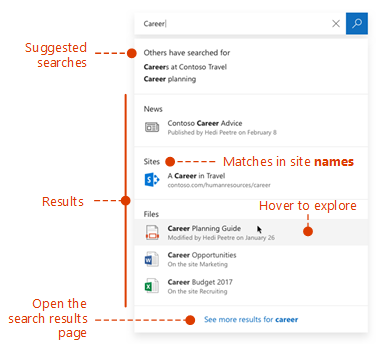
Even before you start typing, you’ll see results based on your previous activity in Office 365. The results update as you start typing.

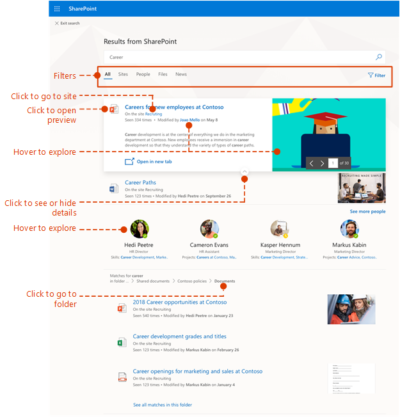
If these results aren’t what you’re looking for, click the link to see more results or press Enter to open the search results page and see and explore all the results. Here’s an example of search results from SharePoint:

Explore the search results to see more details about the people and files you’ve found, or refine your search to get other results. Here’s an expert tip to quickly see more, or less, details of a result – you can actually click anywhere in the empty space of the result.

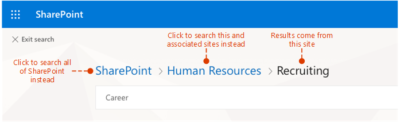
You can navigate to locations that you want to explore further and, if you’ve searched in SharePoint Online, you can change where the results come from. For example, if you searched from a site, but really meant to search all of SharePoint, then you’re just one click away. Or, if the site you searched from is associated with another site, but you want to search all the associated sites.

When you exit a search results page, you return to the page where you started your search.

Windows 10 Pro is a dead end for the enterprise, Gartner says

Recent changes by Microsoft to the Windows 10 support schedule underline why Windows 10 Pro is an ill fit for most companies.

Windows 10 Pro is a dead end for enterprises, a prominent Gartner analyst has argued.

“[We] predict that Microsoft will continue positioning Windows [10] Pro as a release that is not appropriate for enterprises by reducing … support and limiting access to enterprise management features,” Stephen Kleynhans, a research vice president at Gartner and one of the research firm’s resident Windows experts, said in a report he co-authored.

Microsoft’s Windows 10 Pro occupies the middle ground between the consumer-grade Home and the corporate-level Enterprise in features, functionality and price. Because Enterprise versions of Windows have never been available to computer makers, Pro – sometimes, as in Windows 7, tagged Professional instead – has been the most popular pre-installed OS on new business PCs. (Corporations typically re-image new personal computers with Enterprise upon receipt of the devices.)

But although Pro or Professional has a long history in business settings, Microsoft has made numerous decisions in its Windows 10 migration campaign to separate Pro and Enterprise even more, pushing them apart. In Kleynhans’ view, the gap has become unbridgeable.

The last straw was Microsoft’s on-the-fly changes to Windows 10 support.

Last year, the Redmond, Wash. developer announced a six-month support extension for Windows 10 1511, the November 2015 feature upgrade, “to help some early enterprise adopters that are still finishing their transition to Windows as a service.” In February, Microsoft added versions 1609, 1703 and 1709 – released in mid-2016, and in April and October of 2017, respectively – to the extended support list, giving each 24 months of support, not the usual 18.

“Some customers have requested an extension to the standard 18 months of support for Windows 10 releases,” a Microsoft executive said at the time.

There was a catch: Only Windows 10 Enterprise (and Windows 10 Education, a similar version for public and private school districts and universities) qualified for the extra six months of support. Users running Windows 10 Pro were still required to upgrade to a successor SKU (stock-keeping unit) within 18 months to continue receiving security patches and other bug fixes.

Windows 10 Enterprise 1709, for example, and its free “supplemental servicing,” will exhaust support in October 2019. But Windows 10 Pro 1709 runs out of support on April 9, 2019.

“The one thing that really surprised me about the added support,” said Kleynhans in an interview, “was the fact that it didn’t apply to Pro. I think that this telegraphed the fact that, for businesses, Pro is being dead-ended.”

Even though the six-month support extension ended with the 1803 feature upgrade, the one that began reaching some users late last month, in the report Kleynhans co-wrote with Gartner colleague Michael Silver, the duo made clear that they believe Pro is viewed by Microsoft as a second-class citizen.

“Customers currently using Windows 10 Pro should continue to monitor Microsoft’s life cycle announcements because they will eventually need to budget for Windows [10] Enterprise as Windows [10] Pro becomes more ‘pro-sumer’ and small-business oriented,” they wrote in a six-item list of recommendations.

Another component of Microsoft’s current Windows 10 support strategy, something the company has labeled “paid supplemental servicing,” was also out of bounds for those running Windows 10 Pro. The extra support, which Microsoft will sell at an undisclosed price, is available only to Enterprise and Education customers.

Paid supplemental servicing adds 12 months to the 18 months provided free of charge.

“The extensions and paid support option only apply to the Enterprise and Education SKUs,” Kleynhans and Silver said in their report, “Plan and Budget for Short Windows and Office Support Cycles Based on Microsoft’s February 2018 Announcements,” which was published by Gartner last month. “Customers using Windows 10 Pro will still see support end after 18 months. In this way, Microsoft is further reinforcing that it expects enterprise customers to move to the Enterprise edition of Windows 10.”


Office 365 to get enhanced Anti-spoofing capabilities

Enhanced anti-spoofing safeguards are rolling out for Office 365.

Microsoft services like OneDrive for Business, SharePoint Online, and Microsoft Teams are closely guarded by ATP (Advanced Threat Protection). Besides, there are numerous feature updates available in Office 365 threat protection service to address the evolution and advances in the threat landscape. The addition of enhanced Anti-Spoofing capability in Office ATP for protecting against spoofed emails from external domains further strengthens this security framework.

Anti-spoofing in Office 365 Advanced Threat Protection

The newest anti-spoof features help protect organizations from external domain spoof.  Office 365 recognizes emails from external domains having proper SPF, DMARC, and DKIM authentication settings as legitimate/authentic and therefore allow them to pass authentication, uninterrupted.

This normal process is however challenged when external domains do not have these settings properly configured. Without enforcement of these settings, domains show a high likelihood of being manipulated and maliciously spoofed, leaving customers vulnerable to phishing or spam attacks. The new external domain anti-spoofing capabilities help detect and block emails from external domains that do not have the following features,

  1. Correct authentication configuration
  2. An email infrastructure source with an unknown history

How does it work?

A newly enhanced filter in ATP first checks if the email from external domains, passes SPF, DKIM, and DMARC test.  If not, the filter thoroughly checks for historical sending patterns of that domain and associated infrastructure. If any suspicious behavior is noted, ATP assumes the sender does not bear a good reputation and as such, proceeds to junk the message.

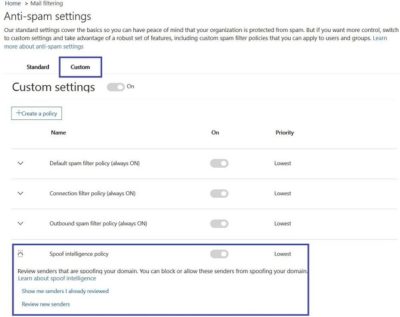
Also, a feature worth noticing about Anti-spoofing – The filter constantly evolves and enhances itself based on mail flow patterns it observes.  ATP subscribers can access the spoof intelligence report in their Antispam Policy and take necessary actions if required.

South Jersey Techies – Managed Services for Businesses

If you’re  tired of the break and fix relationship you have with technology, and would  like a proactive approach for keeping your business running smoothly…

Managed Services

South Jersey Techies, LLC offers complete Flat Rate IT management solutions that take the hassle out  of managing and maintaining your critical IT systems. We’ll customize a managed services support  plan that is tailored to your environment and meets and exceeds the specific  needs for your technology management and support.

What is Managed IT Services?

Managed IT Services is a new solution to an old problem. Instead of the traditional pay to fix a problem as it happens, you pay one  consistent monthly price and your computers, servers and network are  continuously and proactively kept running efficiently.

Automate IT Actions

Automate | Cut Costs | Boost Profits

Being more productive and proactive brings more success in your business. Automation is the key to increase productivity. Maximize  your IT budget and staff by offloading routine IT functions to South Jersey Techies, LLC.

South Jersey Techies, LLC is  always working to provide you with the tools you need to control cost, maintain  continuity, and manage change in your evolving business environment.

Cut Operational Cost

Our  Managed Services enable you to focus more on your business while South Jersey Techies, LLC  proactively manages and monitors your data, security and voice networks.

South Jersey Techies automates your repeated activities such as updating antivirus definitions, upgrading Internet Explorer, installing software, executing scripts, etc. and helps you to concentrate on things that offer more value to your business.

Automation drives to cut down operational costs and achieve higher profits. Our Operations Center will proactively monitor the desktops, servers and applications for availability and performance and reduce down times of business critical applications.


New Security Threat: CryptoWall


crypt

In October of last year news broke about a new form of malware called Cryptolocker. This malware posed a particularly large threat to many business users and led to many quick and important security updates. Now, almost a year later, it appears that the second version of this – CryptoWall – has been released and is beginning to infect users.

What is Crypto malware?

Crypto malware is a type of trojan horse that when installed onto computers or devices, holds the data and system hostage. This is done by locking valuable or important files with a strong encryption. You then see a pop-up open informing you that you have a set amount of time to pay for a key which will unlock the encryption. If you don’t pay before the deadline, your files are deleted.

When this malware surfaced last year, many users were understandably more than a little worried and took strong precautions to ensure they did not get infected. Despite these efforts, it really didn’t go away until earlier this year, when security experts introduced a number of online portals that can un-encrypt files affected by Cryptolocker, essentially neutralizing the threat, until now that is. A recently updated version is threatening users once again.

Cryptolocker 2.0, aka. CryptoWall

Possibly because of efforts by security firms to neutralize the Cryptolocker threat, the various developers of the malware have come back with an improved version, CryptoWall and it is a threat that all businesses should be aware of.

With CryptoWall, the transmission and infection methods remain the same as they did with the first version: It is most commonly found in zipped folders and PDF files sent over email. Most emails with the malware are disguised as invoices, bills, complaints, and other business messages that we are likely to open.

The developers did however make some “improvements” to the malware that make it more difficult to deal with for most users. These changes include:

  • Unique IDs are used for payment: These are addresses used to verify that the payment is unique and from one person only. If the address is used by another user, payment will now be rejected. This is different from the first version where one person who paid could share the unlock code with other infected users.
  • CryptoWall can securely delete files: In the older version of this threat, files were deleted if the ransom wasn’t paid, but they could be recovered easily. In the new version the encryption has increased security which ensures the file is deleted. This leaves you with either the option of paying the ransom or retrieving the file from a backup.
  • Payment servers can’t be blocked: With CryptoLocker, when authorities and security experts found the addresses of the servers that accepted payments they were able to add these to blacklists, thus ensuring no traffic would come from, or go to, these servers again. Essentially, this made it impossible for the malware to actually work. Now, it has been found that the developers are using their own servers and gateways which essentially makes them much, much more difficult to find and ban.

How do I prevent my systems and devices from being infected?

Unlike other viruses and malware, CryptoWall doesn’t go after passwords or account names, so the usual changing of your passwords won’t really help. The best ways to prevent this from getting onto your systems is:

  • Don’t open any suspicious attachments – Look at each and every email attachment that comes into your inbox. If you spot anything that looks odd, such as say a spelling mistake in the name, or a long string of characters together, then it is best to avoid opening it.
  • Don’t open emails from unknown sources – Be extra careful about emails from unknown sources, especially ones that say they provide business oriented information e.g., bank statements from banks you don’t have an account with or bills from a utilities company you don’t use. Chances are high that they contain some form of malware.

CALL US NOW!