Back to Top

Tech, Web, Cloud & Cabling Services

Tag Archives: iPhone

iPhone tag

Verizon officially lands iPhone

Takeaway: It’s official. Verizon is getting the iPhone. There are five big questions that we’ve been hearing in relation to the iPhone 4 launch on Verizon. Here are the answers.

It’s official. AT&T’s deal as the exclusive US carrier for the iPhone has ended (apparently the 4-year deal concluded at the end of 2010), and Verizon is the first new US telecom to add the iPhone to its roster. The long-anticipated move was announced at a Verizon press event at New York’s Lincoln Center on Tuesday in the midst of a circus atmosphere that included the tech press, all of the national news networks, and even The Daily Show.

The iPhone 4 will arrive on Verizon on February 10. Current Verizon customers will be able to pre-order online starting February 3. The price of the iPhone will remain the same: $199 for 16GB and $299 for 32GB, with a two-year Verizon contract. As for the price of Verizon data plans for the iPhone, Verizon coyly stated, “Customers will also be required to activate a data package. Pricing will be announced at a later date.”

It’s odd that the iPhone wouldn’t simply use the existing Verizon 3G data plans. This seems to indicate a couple possible scenarios. Either: 1.) Verizon is going to have a special data plan just for the iPhone (it has been rumored that Verizon would offer a truly unlimited data plan for iPhone), or 2.) Verizon is about to change the price of all of its 3G data plans in conjunction with the iPhone launch.

Beyond the basic details, here are answers to five big questions that we’ve been hearing from our audience in relation to the iPhone finally landing on Verizon:

1. Will it be CDMA or LTE?
Unfortunately, the iPhone 4 will only run on Verizon’s 3G CDMA network and not on its newly-launched 4G LTE network. This was the biggest disappointment of the Verizon iPhone announcement, especially since upcoming Android devices like the HTC Thunderbolt and Motorola Droid Bionic will be running on the LTE superhighway in a few months. At CES last week I tested the HTC Thunderbolt on the Verizon LTE network and was blown away by the desktop-like speeds for loading Web pages. At today’s press event Apple said that including LTE in the iPhone 4 would have involved “design compromises” (probably in size and battery life) and would have taken longer before it was ready to launch. However, both Apple and Verizon stated that this is just the beginning of their partnership (Translation: Expect an LTE-capable iPhone in the future).

2. Will it have mobile hotspot capability?
The biggest surprise of the Verizon iPhone announcement — and arguably the biggest news of the press conference since everything else was pretty much as expected — was that the Verizon version of the iPhone will offer the capability of turning itself into a mobile hotspot that can share its 3G Internet connection over Wi-Fi with up to five devices. Again, no information was provided on whether Verizon will charge extra for mobile hotspot capability. Verizon has wide variations in its treatment of tethering and mobile hotspot charges. It has charged Android users an additional fee for it, but threw it in for free to Palm Pre Plus users. What they do with the iPhone will probably depend on how aggressively the company wants to try to poach current AT&T iPhone customers.

3. Does new Verizon model fix iPhone 4’s antenna?
As you’ve probably heard, when the iPhone 4 first launched last June there were a bunch of customers who experienced antenna problems when holding the iPhone in a way that covered a sensitive portion of the antenna in the lower left-hand corner of the phone. The problem was drastically overblown by the tech press and drastically understated by Apple. In the end, Apple said the problem was significantly reduced if you use an iPhone case and offered free cases to buyers. A number of people have asked if Apple has fixed the problem in this new iteration of the iPhone 4 for Verizon. Naturally, Apple hasn’t said that it has changed anything with the iPhone antenna, but a closer look at the Verizon iPhone shows that it does indeed have a different antenna design and early reports indicate that the Verizon iPhone is not exhibiting the antenna problems.

4. Can you transfer an existing iPhone to Verizon?
The AT&T version of both the iPhone 3GS (which just got a price drop to $50) and iPhone 4 are built on what’s called GSM radio technology (used by both AT&T and T-Mobile in the US). Meanwhile, Verizon and Sprint use a completely different technology called CDMA. The two standards are incompatible. They use different radios and operate on different wireless frequencies. So, no, you cannot take your existing AT&T iPhone and walk into a Verizon store and simply switch networks. Even if you own an iPhone 4 you will have to purchase a completely new iPhone 4 with CDMA chips in order for it to work on Verizon.

5. Will iPhone kill Verizon’s network like it did to AT&T?
Another question that we heard a lot leading up to the expected announcement of the Verizon iPhone today was whether the influx of millions of new iPhone users would bring the Verizon network to its knees the same way it has crushed the AT&T network in areas such as New York, San Francisco, and Los Angeles and at big events like CES and SXSW. I think the answer is “no,” for several reasons. First of all, Verizon is a lot more serious than any of the other US wireless carriers when it comes to network integrity. They aggressively test and audit their own network, so I’ll think they’ll be ready. Second, they just beefed up all of their cell sites to handle additional bandwidth and network load for the launch of their 4G LTE network in 38 cities and they are in the process of upgrading the rest of the US to LTE over the next 24-36 months. Third, while there will be plenty of existing Verizon customers who jump on board with the iPhone and some die-hards who jump from AT&T to Verizon, the vast majority of iPhone customers will remain on AT&T because they are under contract and leaving would be prohibitively expensive.

To view the original article in it’s entirety, Click Here
10 Ways Mobile Devices Are Changing Life

mobile devices

Mobile Devices

Humanity is evolving in many ways thanks to mobile devices. But are all the changes for the better?

I was raking leaves in my yard the other weekend when I observed a black SUV slowly idling down the street. I didn’t recognize the vehicle and it looked out of place as though the driver were confused about where to go… or possibly casing houses to rob (hey, I’m a crime writer by nature).

The car pulled up to me and the passenger window went down. An older gentleman politely inquired if I knew where a certain nearby street was located. I told him how to get there and he thanked me profusely then drove off.

That got me thinking that I hadn’t been asked for directions in years, since most people now rely on their mobile devices for maps and directions. I reflected that I wouldn’t have had the pleasant encounter with that grateful driver if he had been using a device to guide him, and that started a train of thought about how mobile devices are changing society. What has improved us, and what are we missing out on?

1. We always know how to get there

It’s great to throw out the paper maps and not have to call people to find out how to get anywhere, nor to be called when they’re coming to my house. All we need is the address and presto! We’re there.

But… we’re also missing out on the unique dialogue we only get from people who know their own neighborhoods. Google Maps won’t tell us that our turn is right after the red mailbox and that it’s a tricky one so slow down. It can also be vague when it directs us through confusing areas like rotaries or 5-way intersections. And as someone who used to get “Triptiks” from AAA, it was pretty cool not only having the entire route for a trip laid out for us by an expert (in a visual form), but to get some one-on-one advice from them such as the best time to travel through D.C. to avoid traffic (trick question, there is no “best time.”) Sure, you can look this up online… where ten different opinions will be available, requiring you to pick and choose the most plausible.

2. We can buy almost anything immediately

Mobile devices are commonly used for purchasing, and according to Adweek.com”smartphones and tablets will account for $1.6 billion in sales on Thanksgiving, Black Friday and Cyber Monday combined.” It’s great that we can buy stuff we’re interested in as we please.

But… this can pose a problem for compulsive shoppers or people who may be less than responsible for their actions (I’m thinking inebriated college students after 2 am). Obviously this is an issue that can impact anyone with low impulse control and mobile devices are simply the conduit for their problem, not the problem itself. But I’ve also found real-life clerks can be extremely helpful in providing advice – the paint guy at my local hardware store, for instance, knows more about paint than anyone I’ve met. Sure, online advice and reviews are available to help you figure out what to buy but the human touch from knowledgeable experts you can talk to in person can’t be replaced.

3. We’re always available

Whether through a phone call, text, email, social media or some other form of communication, we’re always at the beck and call of those we know so long as we have a mobile device with us. Sure, the devices have “mute” functions and off buttons, but the constant flow of input can make many people reluctant to use these options (or to rely on them for long), especially if our mobile devices are used for work or emergency contact from loved ones. In fact, if we contact someone on their cell and they don’t pick up it can be disappointing or irritating. That’s what they’re there for, right?

But… people who want to concentrate and remain focused on a single task at a time have to exert rigid discipline on themselves (and likely those in their inner circle) lest they wander from one interruption to the next, checking that Facebook message a friend just sent or seeing if their spouses replied to that text. It’s like trying to work in an office with the door open while a big party is going on outside in the hallway. I’ve found it’s best to either close the door and focus or knock off for the day (if possible) and officially attend the party; working halfway in between is a recipe for low productivity.

4. No more waiting for the 11 p.m. news

Nowadays if something significant happens (no, but the Kardashians aren’t remotely significant) we whip out our devices and see what’s afoot, whether it’s a weather emergency, a crisis, or some historic moment. Even if the website we’re visiting is overloaded or sluggish there are plenty of others available. It’s all part of our “need to know now” mindset, right?

But… needing to know now can detract from the present moment if the news isn’t exactly earth-shattering. If it’s just another interruption it’s one more thing that takes away from what we’re doing (or trying to get done). I can’t help but feel like many news stories are played up or overemphasized as part of a “Hey! Look over here!” distraction, whether to promote ads, news sources or some other ulterior motive. This only contributes to the short attention span which is becoming a real problem for many people.

5. We’re never bored

Our mobile devices can hold or connect to an endless amount of entertainment. Thanks to streaming audio, video, copious storage capacities and zippy processors, it’s possible to listen to music, watch movies, read e-books, browse the web, engage with others and play games in just a few taps. With this much variety nobody need ever be bored again, right?

But… I think it’s important for people to learn how to handle boredom. So many of us feel like the phrase “I have nothing to do” is something to be feared rather than embraced. I’ve been guilty of it as well, such as during car trips where I was driving while my family slept and I shut the radio off since I didn’t want to disturb them. Being bored is an opportunity to reflect, consider and plan: to revisit the past or map out the future. It can be healthy, not frightening. At the time I was immersed in the TV show “LOST” and used several hours going over all the clues, details and plot elements that had yet to be unraveled (as it turned out, I never got close to the actual story behind the island).

6. We never have to take chances

My wife and I went out the other week and during the course of our evening decided on the spur of the moment to get tickets for the WWII film “Fury.” I lined up tickets on my smartphone at a theater in the next town over – the only one that still had seats for the show – and we picked them up then entered the movie. Great that we didn’t have to just drive over and hope we could get lucky by scoring a pair of seats, right?

But… there is something to be said for just gambling and taking a shot at something without using what is the real-life equivalent of a “cheat code.” Sure, it’s better than getting to the theater to find all the seats sold out, but that would have opened up some other options: see another film? Go somewhere else nearby? View a later show? Don’t get me wrong – if my smartphone can help up my odds of doing something I really want, I’ll play that card, but it does detract from the unpredictability of life with its themes of give and take or wins and losses.

7. We don’t need to know all this useless trivia

Numerous others have discussed this as well: thanks to mobile devices there’s no need to know silly little things like which planet is the sixth one from the sun, who won the War of 1812, or how many digits are in Pi (hint: a lot). We can just look it up right away, so as to save our brains for something more important like what Kim Kardashian is up to (not to beat a dead horse).

But… this access to information also has the capacity to erode our own personal knowledge stores as well as critical thinking ability. If we offload all that data elsewhere and access it only as (or if) needed, we’ll miss out on a lot of interesting and useful things that will hamstring us if we don’t have our mobile devices. In essence, we’re delegating our brain’s skills to an artificial brain, which can’t reason or meaningfully apply its talents to improve our lives or activities – other than just spitting out the facts we ask for. Information is more valuable when applied to the appropriate contexts by a brain actually engaged with what’s happening.

8. We never have to disconnect from friends or family

Social media can truly be amazing. I use it to connect with family across the country whom I’m not able to see regularly. I have built and strengthened friendships with people in my town because of it. And I’ve kept in touch with people who have literally known me all my life; in the era before social media we would simply have fallen out of touch, eventually forgetting each other’s names and all past interactions.

But… stories are rampant about social media wrecking marriages, working relationships and familial ties. Used correctly by well-adjusted folks, it’s a way to bring people together. Used inappropriately by those with underlying issues, it’s a way for them to alienate others (political battles, anyone?) or lose focus on their face-to-face loved ones in favor of their online community. I’m not blaming mobile devices or social media; as with online shopping I’m pointing out that this concept can wind up causing harm to people who misuse it, or misuse others with it.

9. We don’t have to drop off film for processing

Anyone remember Fotomats? If so, you were probably a child of the 80’s. These were drive-thru film processing kiosks where you could drop off your photo film and pick up the processed photos a day later. I haven’t seen one of these in years, and while it’s certainly true that photo film still exists and can be processed at other stores, this is usually done by professional photographers or photography enthusiasts. I’ve been using digital cameras and my smartphone for years now to take pictures; they’re easy to store on my hard drive, they are backed up automatically on my phone, and I can see how the shots turned out instantly.

But… there was something nice about dropping film off knowing it would be ready the next day (unlike in today’s instant gratification society, where we get impatient if something’s not immediately available). There was a sense of anticipation along with the hope all the shots came out OK. We had more patience. And we didn’t waste pictures goofing around, and the ones we kept were generally worth keeping.

Back in the 80’s I probably took one-tenth the pictures I do now, and, while hard drive space is cheap and plentiful, organizing photos by year or occasion (and in some case which one of my kids is involved in the shot) is tedious. I rarely delete digital photos unless they’re blurry or extremely poor quality, so there’s more of a “quantity over quality” element now, whereas it was the reverse back then, at least for me.

10. We don’t ever see payphones or telephone booths around any more

When I was a kid my elementary school had a fantastic old (even for the time) payphone which had three slots at the top for feeding in coins: a nickel slot, a dime slot and a quarter slot. Putting in money and hearing the electronic tones as the coins registered (actually I think it only cost a dime to make a call) was like seeing a magic trick. Now payphones and telephone booths – a famous landmark for Superman fans – have gone the way of the passenger pigeon; I think the last one I saw was in Europe this summer. We just make calls on our smartphones; no hunting for coins, dealing with missing phone books or finding public phones out of order. My kids will likely grow up never having used one of these artifacts.

But… actually, there is no ‘but’. This one was a tongue-in-cheek one; everyone is better off with payphones and phone booths relegated to the dust heaps of history (even the phone carriers are likely making more money off smartphone sales/data plans than they ever raked in with coin-operated telephones). Some progress is truly inarguable.
 

10 Places To Recycle Your Cell Phone

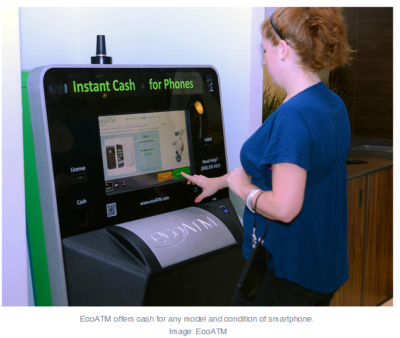
EcoAtm

Here are 10 places to take your phones so they can be refurbished, reused, or recycled and diverted from the landfill.

1. EcoATM

EcoATM is an automated kiosk that collects your unwanted cell phones and tablets and gives you cash for them. It’s made by the same people that make CoinStar, so you’ll find them by the checkout lines at various grocery store chains. It accepts devices from any era or in any condition, and offers anywhere between a few bucks to a few hundred dollars in return. EcoATM partners with R2 certified e-waste reclamation facilities to ensure they are recycled, or gives the phones a second life.

2. Eco-Cell

Eco-Cell is a Louisville, Kentucky-based e-waste recycling company. It partners with nonprofits and organizations such as the Jane Goodall Institute. Bins are located in coffee shops and other businesses around the country, where the collected phones are shipped to Eco-Cell in Louisville. If the phones are reusable, they resell them and pass some of the money back to the owner. If they are not reusable, the phones are recycled and the owner is paid the money for the value of the recycled materials.

3. Best Buy

Best Buy has recycling kiosks in their stores in the US, as well as recycling in-store for no charge to you. They typically limit it to three items per family, per day. From there, they work with recycling companies to make sure the phones and other electronics don’t end up in landfills.

4. Hope Phones

The Hope Phones campaign was started in 2009 by Medic Mobile, which works to advance health care in 16 countries by using mobile technology. Individuals, nonprofits, groups, or businesses can host a Hope Phones campaign to donate old phones. They are recycled and valued so the nonprofit can get new technology for the field. Most old models are valued at $5, but newer smartphones are regularly valued at $80, according to the website.

5. Cell Phones for Soldiers

Cell Phones for Soldiers is a nonprofit that works to provide cost-free communication services to active-duty military and veterans. New or gently used mobile phones are accepted and each device valued at $5 turns into 2.5 hours of free talk time for the soldiers.

6. Gazelle

Gazelle is one of the most popular trade-in options for old cell phones. The company is headquartered in Boston, with locations in Louisville, Kentucky and in Texas. Pick your brand, model, carrier, and plug in what kind of shape it’s in, then get an offer. Ship it for free, and receive a check or gift card to Amazon.com or PayPal after they check it out and make sure it’s worth what you say it is.

7. Call2Recycle

Call2Recyle  is a no-cost recycling program for batteries and cell phones in the US and Canada. It has collection boxes that can be placed anywhere, which have shipping permits so mailing them is easy. They also have bulk shipping if there is a large amount of recyclables.

8. Your carrier

AT&T has a trade-in program for unwanted phones and accessories regardless of manufacturer or carrier. The owner gets a “promotion card” which can then be used to take money off a new phone or other purchase. Make sure you erase all your information before you turn them in, though.

Verizon also offers a trade-in program where the owner can receive an electronic gift card once they send in the phone and have it appraised.

9. Local places

Your city undoubtedly has places to recycle old phones. Most local government websites, like New York’s, have directions of where to go to recycle phones. A lot of cities usually have nonprofits that donate old phones as well. The EPA also has an option to find out what electronics you can recycle with mail-in options.

10. Recycling for Charities

This nonprofit features one charity at a time, for which they donate money from recycling old phones. All makes and models are welcome at Recycling for Charities, and the phone condition is not an issue. They make an attempt to refurbish it first, then find recycling centers to ensure the materials won’t go into landfills if the phones cannot be reused.

These 10 services are well-researched and well-known options, but make sure to research on your own where your phone is going to make sure it is going to a certified e-waste recycler, so it doesn’t end up in a landfill despite your efforts.


IRS launches iPhone, Android apps for taxpayers

Everyone’s favorite government agency, the Internal Revenue Service, has launched its own mobile application.

Released last week to iPhone and Android users, the free IRS2Go provides a few tidbits of information that could make April 15 a bit less stressful.

Those of us fortunate enough to qualify for a refund can find out exactly when Uncle Sam will be sending out that check. Entering your Social Security number (which the IRS says is masked and encrypted), filing status, and expected refund amount delivers the due date for your payment.

People who file their federal taxes electronically can check their refund status about 72 hours after they get an e-mail from the IRS acknowledging the receipt of their tax return. Those still doing things the old-fashioned way–on paper–will have to wait around three or four weeks after filing before they can learn when their refund check will arrive.

According to the agency, around 70 percent of the 142 million individual tax returns filed last year were done electronically.

Beyond providing the refund status, the app lets you subscribe to tax tips and updates sent each day during tax season and less frequently the rest of the year. IRS2Go also points you to the agency’s own Twitter feed where you can learn even more about filing your taxes.

“This new smart phone app reflects our commitment to modernizing the agency and engaging taxpayers where they want when they want it,” IRS Commissioner Doug Shulman said in a statement. “As technology evolves and younger taxpayers get their information in new ways, we will keep innovating to make it easy for all taxpayers to access helpful information.”

The IRS has increasingly been moving taxpayers toward e-filing and encouraging them to access more information electronically as a way to cut costs. Last year, the agency announced that it would no longer mail paper income tax packages to individuals and businesses since all of that information is freely available online or through libraries and post offices. The IRS is also looking for other ways to take advantage of technology, especially the move toward mobile.

This phone app is a first step for us,” Shulman said. “We will look for additional ways to expand and refine our use of smartphones and other new technologies to help meet the needs of taxpayers.”

To view the original article in it’s entirety, Click Here

9 things you’ll love about iOS 9

Proactive Siri

Proactive Siri

Of all the upcoming iOS 9 features for the iPhone and iPad, the biggest updates are coming to Siri

Siri is going to become “proactive,” predicting what you want to know before you even ask it. It’s a feature similar to Google Now or Microsoft’s Cortana.

The new, proactive Siri will display relevant information based on your location, search history, emails, calendar and habits.

For example, the new Siri will look at your calendar and tell you when it’s time to leave for your next appointment based on traffic data. It can search through your email to identify phone numbers that you don’t recognize. And it can suggest apps to use and places to visit based on the time of day.

Transit

Transit Media

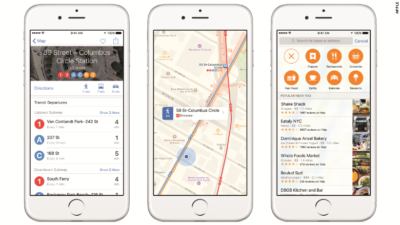
Finally, transit directions are coming to the Apple Maps app. It’s only in 12 cities to start, but Apple said it will expand its transit maps in the future.

Transit has been a long time coming. The lack of public transit information is one of the many reasons Apple CEO Tim Cook apologized for its subpar Maps app in 2012.

News

News Stand

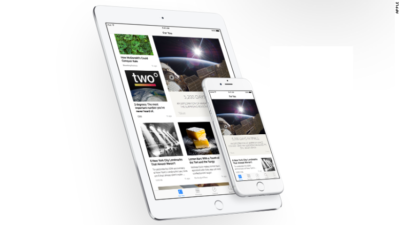
Apple’s new News app is a Flipboard-like personalized news reader that will replace the oft-ignored Newsstand store.

News will be powered by 20 publishers and 50 titles, including ESPN, CNN, Conde Nast, and The New York Times.

Apple said its app will combine “the visually rich layout of a magazine with the immediacy and customization of digital media.”

Wallet

Wallet

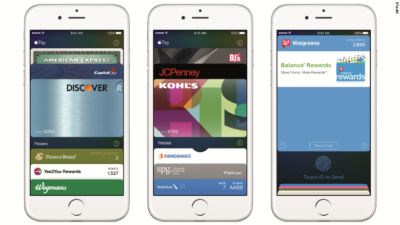
Apple’s Passbook app is getting a new name (Wallet) and some welcome new features.

In iOS 9, Wallet will store Discover credit cards, store credit cards and loyalty cards. That’s in addition to the Visa, MasterCard and American Express cards Apple Pay and Passbook customers can currently use. IPhone users will be able to double-click the home button when their iPhones are locked to access the Wallet app.

Notes

Notes

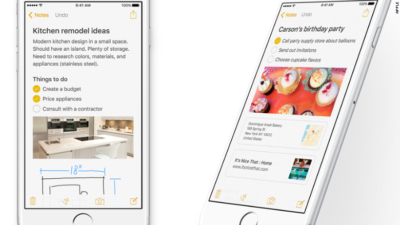
The Notes app is getting a big makeover in iOS 9, letting you draw sketches, drop in photos, maps and links and add items from other apps.

The new Notes will also let you create instant checklists and take photos from within the app.

Multitasking

Multitasking

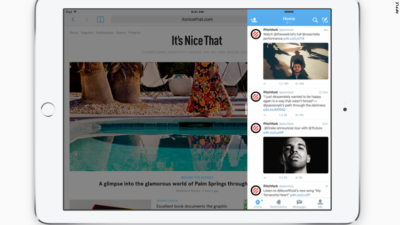
Soon, iPad owners will be able to run two apps at the same time on the same screen.

With a split-screen function, picture-in-picture video, a new app switcher and keyboard shortcuts, the iPad is getting closer to becoming a serious word-processing device.

Quicktype

Quicktype

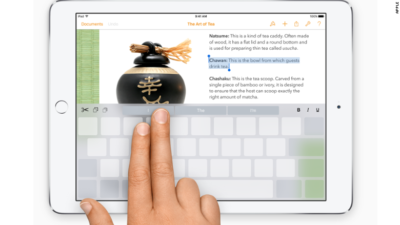
In addition to multi-tasking, Apple is introducing gestures for the iPad in iOS 9, turning the keyboard into a trackpad.

Using two fingers, iPad owners can select text and move the cursor like a mouse.

Better battery life

Better Battery Life

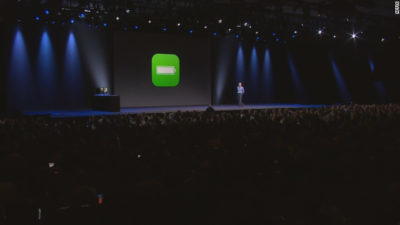
Apple says iOS 9 will give iPhones and iPads up to an hour more battery life every day. It’s also adding a low-power mode to squeeze out three extra hours of juice.

Public beta

Public beta

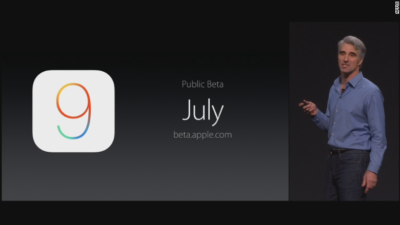
Excited about iOS 9? It doesn’t debut until the fall, but you’ll be able to get your hands on it early. For the first time ever, Apple will let anyone test out its new iPhone software — before it gets released to the general public.

In July, iOS 9 will go into “public beta,” meaning anyone with an iPhone or iPad will be able to noodle around with iOS 9.

Have questions?

Get answers from our IT Experts
Call us at: 856-745-9990 or visit: https://southjerseytechies.net/

South Jersey Techies, LLC is a full Managed Web and Technology Services Company providing IT Services, Website Design ServicesServer SupportNetwork ConsultingInternet PhonesCloud Solutions Provider and much more. Contact for More Information.

To read this article in its entirety click here.

The 10 elite smartphones of 2010

Takeaway: With the rise of Android, the reboot of BlackBerry, and the redesigned iPhone, 2010 can rightly be called the year of the smartphone. Here are the best devices of the year.

10. BlackBerry Torch

BlackBerry came under intense pressure in 2010 from the rapid growth of iPhone and Android. The smartphone incumbent fired back with the release of the BlackBerry 6 OS and a new form factor with a slide-down keyboard in the BlackBerry Torch. The device is a bit underpowered, the OS isn’t a huge step forward, and overall it hasn’t been enough to stem the losses to Apple and Google. But, there are still a lot of BlackBerry fans out there — not to mention all of the enterprises locked into BlackBerry — and for them, the Torch is now the pre-eminent device on the market.

9. Motorola Droid 2

This shows how much progress the smartphone market has made in one year. Last year, I would have ranked the original Motorola Droid and the Apple iPhone 3GS as the two best smartphones on the market. This year, the Droid got a very nice upgrade but still struggled to make the top 10. Still, due to its increased specs, solid build quality, and very usable form factor, the Droid 2 belongs on this list. Also, don’t miss its cousins, the Droid Pro and the Droid 2 Global.

8. HTC Incredible

With much the same innards as the Google Nexus One (although not nearly as strong of a build quality), the HTC Incredible was a consolation prize for those who had been salivating for the Nexus One on Verizon. Unfortunately, Google and Verizon pulled the plug on those plans and instead HTC offered the Incredible through Verizon with the traditional two-year contract. The Incredible did get one thing that the Nexus One didn’t have: HTC’s Sense UI. Some viewed that as a bonus over the stock Android OS on the Nexus One, while others saw it as a detractor.

7. Samsung Focus

Microsoft finally got itself back in the smartphone game in 2010 with the launch of Windows Phone 7, and the first widely-available WP7 device was the Samsung Focus, which didn’t disappoint. The Focus sported nice hardware specs in an attractive, futuristic form factor (albeit with a lot of plastic, similar to the Galaxy S). And, Windows Phone 7 offered a new take on smartphone UI that is a little but more polished and fluid than Android or BlackBerry, although not quite as finished as the iPhone.

6. Motorola Droid X

Verizon Wireless went all-in on Android in 2010, launching a steady stream of new Android-powered devices throughout the year and replacing BlackBerry with Android as its primary smartphone platform. The Droid X served as Verizon’s flagship Android phone, with its huge screen, 8MP camera, enterprise-class hardware, and extensive list of high-end features.

5. HTC Desire

While the HTC Incredible had the same guts as the Nexus One but a much different outer shell, the HTC Desire had similar internals and an outer shell that closely resembled the high quality metal casing on the Nexus One. The Desire quickly became one of the most popular smartphones in Europe and Australia by mid-2010 and has spread to other carriers through the globe since then. Along with the Nexus One and the iPhone 4, the Desire feels like the most substantial and high quality smartphone on the market. You should also keep an eye on the HTC Desire HD and the HTC Desire Z.

4. Samsung Galaxy S

Samsung joined the Android movement with all guns blazing in the middle of 2010 by releasing its line of Galaxy S smartphones in a variety of different form factors (and a confusing array of product names) on all four US wireless carriers and a fleet of international carriers. In the US, the Samsung Vibrant and the Samsung Epic 4G were the most impressive of the Galaxy S phones, but all of the models across the globe have same technology base and generally provide a very good Android experience.

3. Google Nexus One

The first big smartphone of 2010 was the Google Nexus One, launched just after the new year and right before CES 2010. As a product, the long-rumored “Google Phone” wasn’t a disappointment. It had excellent build quality (developed by HTC) and ran the stock Android OS, which got all of the latest Android updates directly from Google. However, the phone failed in its larger mission of moving the US telecom market toward the European model of being able to buy phones and wireless service separately. The Nexus One was sold as an unlocked device at full price ($500) through Google’s online store. Google was not well prepared to handle customer service and didn’t give US consumers enough time to warm up to the idea of buying a full price device. It also never released the promised CDMA version of the Nexus One. Eventually, Google abandoned the product altogether and replaced it in December with the Nexus S, built by Samsung and available under traditional contract with T-Mobile.

2. HTC EVO 4G

The premier Android device of 2010 was the HTC EVO 4G. It was the first major smartphone to break the 4-inch screen barrier. It was the first 4G smartphone in the US. It was the first major smartphone with an 8.0 megapixel camera. It was the first major smartphone to feature a kickstand (for video viewing). I pejoratively called it the “Hummer of smartphones” because of its massive size and the fact that it’s such as battery hog, but there’s no arguing that the EVO 4G stretched the boundaries of what was possible in a smartphone and forced all of its competitors to play catch-up.

1. Apple iPhone 4

With all of the momentum that was gathering around Android during the first half of 2010, Apple’s iPhone 3GS was starting to look pretty stale by mid-year — especially since it was only a slight upgrade over the iPhone 3G from 2008. Then, Apple unveiled iOS4 and the iPhone 4 and launched itself back to the head of the class with top-quality hardware and a software experience that still outpaces all of its rivals in terms of ease of use, responsiveness, polish, and third-party software. The iPhone 4 antenna problem, which was more severe than Apple acknowledged but a lot less severe than the tech press portrayed it, was a wart for the iPhone 4. It also still lacks the widget capability of Android (and now Windows Phone 7). But, overall, the iPhone 4 remains the gold standard of the smartphone market.

Honorable mentions

  • Motorola Droid Pro
  • HTC HD7
  • Dell Venue Pro
  • T-Mobile G2
  • BlackBerry Bold 9780
  • HTC Aria


What you need to know about iOS 5

Takeaway: The fifth generation iOS, the engine that powers Apple’s popular iPhone and iPad devices (among others), introduces several important changes and refinements.

Apple’s iOS, though only four years old, has changed the way users connect, purchase and maintain applications, collaborate, and more. The fifth generation iOS, the engine that powers Apple’s popular iPhone and iPad devices (among others), introduces several important changes and refinements. Here are the top 10 things you should know about Apple’s new iOS 5.

1: Requirements

The fall 2011-release iOS 5 upgrade works with a variety of current and legacy handsets, tablets, and devices. iOS 5 is compatible with the iPhone 3GS and iPhone 4. iOS 5 is also supported on the 3rd and 4th generation iPod Touch as well as the original iPad and iPad 2. There is no cost for the upgrade.

2: PC Free

One common complaint prior to iOS 5 has been that a computer was required to fully utilize and back up new iPads, iPhones, and iPod Touch devices. No more. iOS 5 severs the tether and makes it possible to activate and configure new devices without having to tie them to a computer. Further, with iCloud support, iOS 5 devices can be backed up automatically without having to use a computer.

3: Mail improvements

iOS 5 also introduces overdue Mail improvements. The new iOS provides indentation support, enables rich text (bold, italic, and underline) formatting, and can even flag messages. iCloud, meanwhile, helps ensure email accounts stay synchronized across multiple devices. As email’s importance continues to grow, such refinements on the iPhone and iPad platforms are a necessity.

4: Tabbed browsing

A seemingly minor innovation when originally introduced on computers, tabbed browsing enables users to maintain multiple active Web pages within a single browser instance. The feature has proven popular, especially as users have become more dependent upon Web-based applications and Web-based email. iOS 5 updates the Safari browser to bring tabbed browsing to compatible iPhones, iPod Touches, and iPads. This enables multiple concurrent Web page sessions and considerably simplifies the process of switching between open pages,.

5: Reminders

A cottage industry of iOS to-do and task list application providers has arisen over the past few years. That’s because Apple’s iOS didn’t previously do a very good job natively managing or synchronizing organizational tasks. Reminders is a new iOS 5 feature that addresses that shortcoming. With iCal, Outlook, and iCloud integration, changes automatically synchronize across multiple devices. Better yet, users can associate due dates and locations with the tasks they set. Productivity and efficiency result, while dependency upon a third-party application decreases or is eliminated altogether.

6: iCloud support

iCloud support within iOS 5 means applications, photos, music, settings, and other data isn’t lost if a compatible Apple device goes missing. Because iCloud stores data on the Web, files, configuration information, and even applications previously purchased on one device can be pushed to a replacement or other authorized device wirelessly. Calendars, contacts, and mail benefit from iCloud, which powers wireless synchronization between devices, too. iCloud even enables synchronizing iOS data with a PC, so Windows users benefit from iCloud/iOS 5 integration. And 5GB of free storage means the price is right.

7: iMessage

The simplicity and immediacy of text messaging has fueled its meteoric popularity. One can hardly even visit a neighborhood grocery or airport without hearing others’ text alert beeps. Built into the Messages app, iOS 5’s new iMessage feature enhances traditional messaging by adding support for sending photos, videos, locations, and contacts for iPad and iPod Touch users. iMessaging includes group messaging support, too, which better enables team collaboration and communication. iMessage also synchronizes iMessage conversations across multiple devices.

8: Notification Center

As iPhone and iPad use has grown within businesses and as users have loaded a veritable cornucopia of applications on those devices, mobile users sometimes feel assaulted by the number of updates, new email alerts, unread text messages, and other notifications.

Prior to iOS 5, all these different updates lived in different locations and sometimes proved distracting. iOS 5 users can take advantage of the new Notification Center to select which notifications they receive. And copping a popular feature I associate as being introduced with Microsoft Outlook 2003, new notifications appear briefly (in this case at the top center of the screen) before fading out of view. The Notification Center presentation of these messages is less distracting and doesn’t require switching applications, yet it still communicates the same information quickly.

9: AirPlay

Many users will find iOS 5’s new AirPlay innovation a critical component of the new OS. Others may never use it. But those who do will find the video mirroring feature an intriguing and convenient improvement in the mobile OS.

AirPlay enables presenters to wirelessly stream their iPad 2 display information to an HDTV via an Apple TV device. Attendees see exactly what’s on the presenter’s iPad, meaning iPads can fully replace desktop or laptop presentation systems in boardrooms, classrooms, conference rooms, and other presentation areas.

10: Calendar improvements

Calendar operations receive a needed boost within iOS 5, too. iOS 5-powered Calendars now synchronize across multiple devices leveraging Apple’s iCloud technology. Further, iPad users can display year views of their Calendar, while iPhone and iPod Touch users can display a weekly view of their calendar — previously unavailable options. Individual calendars can now be added and edited directly from iOS 5-powered iPhones, iPads, and iPod Touches. Possibly most important, though, is the fact that Calendar attachments are now viewable on compatible iOS 5 devices without having to switch applications.


To view the original article in it’s entirety, Click Here

Office Mobile for iPhones

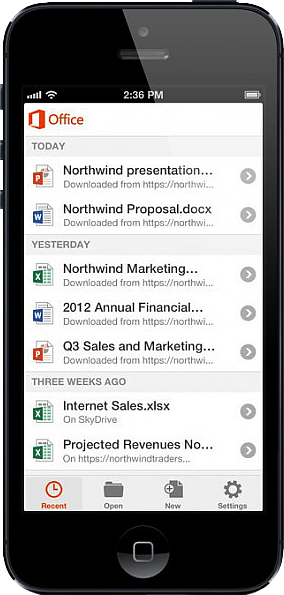
Untitled On June 14, 2013, Microsoft released Office Mobile in the Apple Store for all Office 365 users at no cost.  This app is available for iPhone 4 and up, iPad 3rd generation and up, iPad Mini and iPod Touch 5th generation.  All devices are required to run iOS 6 and up.

Office Mobile allows you to view and edit Word, Excel, and PowerPoint documents.   SkyDrive, SkyDrive Pro and SharePoint are ways to access documents.  “Recent Documents” tracks the most recent documents that you viewed or changed and makes them easily accessible.  Offline editing does not require a constant internet connection but allows you to save your changes once reconnected to a network.

On June 10, 2013 Apple announced that iWork Apps, such as Pages, Numbers and Keynote, can cross platforms to be used on Windows Systems.  Although, iWork Apps are proficient, they can not compare to the Office Suite. 

Microsoft has taken a huge step by crossing platforms with Office software and returning the upper hand to Microsoft.  Office 365 has become more valuable for businesses and home users.  

For more information on Hosted Services and Office 365

 please contact us 856-745-9990 or click here.


Office 365 ProPlus

billionphotos-1669715

ProPlus

ProPlus

Your Office instantly, wherever you go. Get the latest tools for productivity, collaboration, compliance, and BI—powerful, flexible, and delivered fast, with smooth upgrades.
 

Best experience virtually anywhere

With Office in the cloud, you always have the latest versions of your familiar Office applications right where you need them. Working on your iPhone or Android phone? Use Office Mobile to view and edit files.3 Using your tablet? Access Office through a browser to create and edit documents. And when you’re away from your own desk, you can stream Office to any Internet-connected PC.1 You get one familiar experience across all your devices, and your files are always up to date.

The flexibility to deploy and manage on your terms

Deploy the way that’s best for you—on-premises with your own tools, or with assistance from the Office 365 online service. And you can run Office 365 ProPlus side by side with earlier Office versions, so your workers can make a smooth transition. Upgrades are smooth, too, because your customizations are respected and add-ins and data files are loaded automatically. Plus, you can monitor the health and performance of your Office in real time across your organization.

Enhanced security for email and advanced compliance tools

Protecting the privacy and security of your data is essential. With Office 365, you can simplify compliance. Team members can access project-related email and documents right from their email. You can help your users avoid sending email with sensitive information to unauthorized recipients by using policy tips in email. Recording and archiving meetings, including IM conversations, is easy for IT. Plus you can scan Excel spreadsheets for errors, and view an audit trail of changes.

Advanced Business Intelligence tools that are easy to use

No matter how good your data, you need insight to make it work for you. Gain insight fast by giving everyone powerful BI tools that are easy to use. With Office 365 ProPlus you can streamline integration and manipulation of large volumes of data from various sources and perform rapid analysis. For more insight, explore different views of data in a pivot table or pivot chart with a click, and bring data to life by compiling data, charts, and graphs into one interactive visualization.

If you are interested in Office 365 ProPlus or would like to sign up for a trial please click here or contact us at 856-745-9990.

Microsoft Office Mobile

ios-office365-hero2Microsoft released Office Mobile in the Apple Store for free to all Office 365 users on June 14, 2013.  Office Mobile has a lot of stipulations and only provides the basic document editing capabilities.  Integrating Office Mobile with SkyDrive and Office 365 is a smooth process.

The first stipulation is Office Mobile is designed for iPhone.  The app is not optimized for iPad use; older iPad(s) receive errors.  The second stipulation is Office Mobile requires an Office 365 subscription.  A large percent of businesses have not switched to Office 365 which excludes potiential Office Mobile users.

For Office 365 subscribers, Office Mobile is a free app that provides the ability to view, edit and save Office documents.  All users that are not Office 365 subscribers can continue to use Office-compatible mobile apps that provide the same functionality.

Office Mobile has a similar interface to Windows phone.  After installing Office Mobile, users can view, edit and save Word, Excel and Powerpoint documents.  Users may be surprised with the limited editing abilities.  SkyDrive, SkyDrive Pro and SharePoint are ways to access documents.  ”Recent Documents” tracks the most recent documents that you viewed or changed and makes them easily accessible.

For more information on Hosted Services and Office 365

 please contact us 856-745-9990 or click here.


CALL US NOW!