Back to Top

Tech, Web, Cloud & Cabling Services

Category: News

What Terms You Need to Know to Get Your Business GDPR-Ready


What Is EU GDPR? 

The EU GDPR is a law designed to protect and empower residents of the EU by guiding business usage of personal data. In essence, it is reshaping the way corporations handle personal data by controlling its collection, use, and storage. It will replace the regulations and frameworks of the existing 20-year-old directive (95/46/EC).


Who Is the GDPR Protecting and Empowering? 

The data subject: This is any individual that can be directly or indirectly identified or uniquely singled out in a group of individuals, from any stored data.


What Is the GDPR Protecting? 

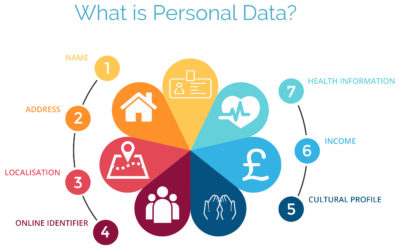
Personal data: This is any information relating to an individual, whether in reference to their private, professional, or public life. It includes things like names, photos, email addresses, location data, online identifiers, a person’s bank details, posts on social networking websites, medical information, work performance details, subscriptions, purchases, tax numbers, education or competencies, locations, usernames and passwords, hobbies, habits, lifestyles, or a person’s computer’s IP address.


Who Is the GDPR Regulating? 

The data controller: This is the person who, alone or jointly with others, determines the purposes for, and means of, processing personal data. A data controller is not responsible for the act of processing (this falls to the data processor); they can be defined as the entity that determines motivation, condition, and means of processing.

Generally, the role of the controller is derived from the organization’s functional relation with the individual. That is, a business is the controller for the customer data it processes in relation to its sales, and an employer is the controller for the employee data they process in connection with the employment relationship.


Who Else Is the GDPR Regulating? 

Data processors: This is the person who processes personal data on behalf of the controller. Typical processors are IT service providers (including hosting providers) and payroll administrators. The processor is required to process the personal data in accordance with the controller’s instructions and take adequate measures to protect the personal data. The GDPR does not allow data processors to use the personal data for other purposes beyond providing the services requested by the controller.


What Does the GDPR Consider “Processing?” 

Processing refers to any operation or set of operations performed upon personal data, whether or not by automatic means—such as collection, recording, organization, storage, adaptation or alteration, retrieval, consultation, use, disclosure by transmission, dissemination or otherwise making available, alignment or combination, blocking, erasure, or destruction. Processing must be fair and lawful, although transparency is significantly strengthened. The processor may not use the personal data for their own purposes.


What Rights Do the Data Subjects Have? 

Under the GDPR, data subjects can request the following:

  • To be informed about the data processing
  • To consent to the processing of their personal data (opt in) or object to the processing of their personal data (opt out)
  • To obtain their personal data in a structured and commonly used format in order to transfer that data, in certain circumstances, to another controller (data portability)
  • To not be subject to fully automated data processing or profiling
  • To know what data is processed (right of access)
  • To correct where any data is incorrect
  • To have data erased under certain circumstances, for example, where the retention period has lapsed or where consent for the processing has been withdrawn (referred to commonly as the “right to be forgotten”) and to register a complaint with the supervisory authority


Other Key Elements to Consider in Preparing for GDPR

We’re not done yet. There are four more important elements to consider with GDPR as you become ready.


1) Data Breach Notification

For controllers, GDPR requires that breach notice must be provided, where feasible, within 72 hours of becoming aware of a breach; processors need to provide notice to controllers without undue delay. Any data breaches must be documented.

2) Data Minimization

This requires the level and type of data being processed to be limited to the minimum amount of data necessary. This requires you to ensure that the purpose in which the data is agreed and the purpose in which the data was collected are materially similar. The processors should ensure that individuals’ privacy is considered at the outset of each new processing, product, service, or application, and only minimum amounts of data are processed for the specific purposes collected and processed.

3) Data Pseudonymization

The GDPR defines pseudonymization as “the processing of personal data in such a way that the data can no longer be attributed to a specific data subject without the use of additional information.” To pseudonymize data, the “additional information” must be “kept separately and subject to technical and organizational measures to ensure non-attribution to an identified or identifiable person.” In other words, it is a strategy designed to enhance protection and privacy for applicable identifying data.

Although similar, anonymization and pseudonymization are two distinct techniques that permit data controllers and processors to use de-identified data. The difference between the two techniques rests on whether the data can be re-identified.

4) Fair Processing of Personal Data

This requires the processing of personal data to be fair and lawful. Generally, only the level and type of data collected should be limited to the minimum amount of data necessary (see data minimization above). There are a number of methods in which the data may be processed, including: express consent (which may be withdrawn at any time), legitimate interest basis (the subject of which legitimacy may be challenged by the data subject), honoring obligations under the agreement with the data subject, or any other legal basis that may apply.


What We Can Do to Help

We know this information can be overwhelming, but taking the proper steps now will save you headaches later. SolarWinds provides products that can help you with getting ready. Our Risk Intelligence software is one of them, providing you with hard data on:

  • A business’ quantified financial risk
  • Personally identifiable information (PII)
  • Protected health information
  • Payment information located in storage
  • Access permissions for sensitive data

Search your ‘data at rest’ for risk areas and start the data mapping you need to get ready for GDPR.

Microsoft Stream: The future of secure business video

Microsoft is previewing Stream, a new service for publishing and managing business videos. One day it will be the default video publishing system for Office 365.

MicrosoftStream


On July 18, 2016, Microsoft announced that a preview version of a new service called Microsoft Stream was available. Like most of you, I passed over the news with an indifferent “whatever” attitude. But later I realized that the news was actually more important than I had first thought.

Microsoft Stream fulfills a niche by providing a secure place to share videos created within, and for, businesses. By using a cloud-based service like this, businesses can reap the benefits of video communication without the threat of anonymous forum trolls trashing the brand or harassing employees.

Upload and forget it

While it is still a preview version, Microsoft Stream seems mostly ready for prime time. All you have to do is set up an account with a valid business email—One can use a personal domain email—and then log in. To test how easy Stream is to work with, you can make a 10-second video with a smartphone. Upload your video to Google Drive and then drag and drop it on the Stream portal website.

The web service processes the video while you give it a title and a brief description. Stream then asks if you are ready to publish and when you say yes, it publishes the video after a few seconds of grinding. It takes all of two minutes from start to finish and requires nothing more technical than knowing how to drag and drop a file.

Gone are the days of worrying about file format, aspect ratio, preferred playback applications, and all the other minutia we had to go through in years past to get a video published. You just take the video and then publish the video.

Video management

The key features of Microsoft Stream have to do with managing videos after they are published. Videos can be classified and placed into specific channels. Those channels can have their access restricted to certain individuals or certain groups, like a specific department, for instance. Access is controlled via the Azure Active Directory system.

According to the blog post, Microsoft plans to integrate Stream into the existing Office 365 Video system. Once the integration is complete, Microsoft Stream will be the default system for publishing video in an Office 365 environment.

There are plans in the works to add intelligent search to Stream by taking advantage of tools like audio transcription and face recognition. Developers are also working on ways to integrate Stream with other tools, like PowerApps, Microsoft Flow, and SharePoint.

Bottom line

We are aware of Microsoft Bookings and how that application attempts to cut out other third-party developers by integrating appointment scheduling for small businesses with the standard Office 365 subscription. By offering Stream, a secure video publishing and management service, Microsoft is attempting to execute the same strategy for video publishing.

Microsoft Stream gives businesses a secure system for publishing videos. Through Stream, businesses control access and manage who can see what and when they can see it. And because it is all handled internally, problems with anonymous forum trolls are likely to be reduced.

It seems that Microsoft’s grand strategy is to become the only software company a business needs—ever. The glaring application that Office 365 is missing now is a double-entry accounting system that includes payroll, accounts receivable, accounts payable, and the general ledger. Should we be looking for an announcement regarding those applications soon, Microsoft?

Have questions?

Get answers from Microsofts Cloud Solutions Partner!
Call us at: 856-745-9990 or visit: https://southjerseytechies.net/

South Jersey Techies, LL C is a full Managed Web and Technology Services Company providing IT Services, Website Design ServicesServer SupportNetwork ConsultingInternet PhonesCloud Solutions Provider and much more. Contact for More Information.

To read this article in its entirety click here.

Surface Pro 4 and Surface Book race ahead of iPad Pro and Pixel C at the high end

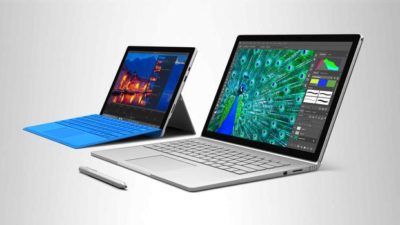
Microsoft gave its high-end Surface a leap forward on Tuesday with the unveiling of the Surface Pro 4 and the surprise launch of the Surface Book, the company’s first laptop.

surface-4-surface-book

Microsoft’s love affair with hardware just got more intense. If there were any doubts about the software juggernaut staying in the devices game, they were erased on Tuesday with one of the biggest and broadest hardware announcements in the company’s history.

Microsoft showed off a fleet of new and freshly updated Windows 10-powered devices in New York. The stars of the show were the Surface Pro 4 and the new Surface Book laptop, which were a potent answers to Apple’s recently unveiled iPad Pro and Google’s newly announed Pixel C.

According to Microsoft Devices lead engineer Panos Panay there are nearly 110 million devices running Windows 10. Most of the products Microsoft unveiled at Tuesday’s press event were intended to show how important mobile hardware and software integration with Windows 10 is to the company.

The event’s biggest surprise, the Surface Book, and the new Surface Pro 4 are powerful machines, and both aim to connect with both enterprise users and creative professionals. They succeed big time in the specs department. In terms of usability and adoption, we’ll know more after both are released on October 26.

The Surface Book is Microsoft’s first laptop, and it’s a fiery, ambitious device. The specs are decked, particularly given that the price is comparable to a Macbook Pro. The Surface Book starts at $1499, and comes with a full Intel Core i5 or i7 processor, 1TB of storage, 16GB RAM, and a GPU designed for gaming and multimedia editing by the Xbox team. Additionally, the 13.5-inch screen (3000 x 2000 resolution) can detach to become a stand-alone tablet.

The Surface Pro 4 tablet runs Windows 10 and, like its predecessors, can serve as a full-fledged laptop replacement. The Surface Pro 4 is, as expected, somewhat thinner and 30 percent faster than the previous model. It has 16GB of RAM, and comes with up to a terabyte of storage, and a 12.3-inch screen (2736 x 1824 resolution). Microsoft cloud and productivity apps Cortana, Windows Hello, Microsoft Office, and OneDrive are deeply integrated. The Surface Pro 4 starts at $899.

When the Surface debuted in 2012 running Windows 8, the tablet seemed like an awkward, out-of-place device. Today, the Surface Pro has been owning and innovating in the high-end tablet space. It’s become a favorite of design professionals, IT administrators, and others who want a productivity tablet.

Arguably, the success of the Surface Pro helped pull Apple and Google into the high-end professional tablet market. Google’s comparable new Pixel C is similarly powerful, features a keyboard cover, and is deeply tied to the Google cloud ecosystem. Yet, Google’s device does not feel as durable as the Surface Pro 4, and Office is still often an essential tool for business users looking for a full laptop replacement.

Apple’s iPad Pro is a powerful professional and creative tool. Apple’s high-end tablet is larger and slightly more expensive than the Surface Pro 4. Microsoft is banking that the integration of Windows 10 and universal apps will help the Surface stand on par with the iPad Pro.

Microsoft’s attention to detail with peripheral devices like the Type Pro cover and the Surface Pen stylus may lend them a slight edge in the professional tablet market. The new Surface Pro Type Cover, notable for its “precision glass trackpad” is a significant refinement over the previous generation. The cover still costs 130 dollars, but is lighter, more responsive, and features more space between the keys than the previous version.

Microsoft has worked hard to make the stylus seem useful and cool. The new Surface Pen is intended to feel like writing on paper. The stylus features a tip with 1,024 points of pressure sensitivity, an eraser (yes, an eraser!), year-long battery life, and comes in five colors. When not in use the pen is held snugly to the top of the tablet by magnets. Microsoft took great care to display the tablet tilted in portrait mode like a clipboard, with a pen resting on top. The company emphasized the tablet itself “just fades into the background” when used by office workers, doctors, architects, and musicians.

surface-book-two

As with the Surface Pro 4 and Surface Book, the new Lumia 950 and 950 XL phones are powered by Windows 10, with special consideration to mobile productivity. The devices measure at 5.2 and 5.7 inches respectively, and feature an upgraded camera with a dedicated shutter release button.

The most unique and innovative announcement from Microsoft may have been the Display Doc. Intended to maximize workplace flexibility, and uncouple the enterprise user from the constraints of a laptop, the Microsoft Display Doc was initially announced at last spring’s Build conference as the Continuum docking station. The Display Doc is a small, square device that connects to any compatible Windows 10 mobile device like the Lumia 950 using three USB Type-3 ports, a DisplayPort and HDMI. When connected to a monitor using Display Doc, the phone will present a traditional Windows home screen, complete with the familiar Start button and icon tray. Though not as robust as a true desktop PC, the experience resembles desktop Windows and is able to manage productivity tasks like mail and messaging, document creation and sharing, and web browsing.

Windows 10 is at the core of the new Microsoft device environment. The company also announced updates to the Windows 10 universal app ecosystem [LINK], and a launch partnership with Facebook to expand the core Facebook, Messenger, and Instagram applications.

CEO Satya Nadella closed the event by stressing the importance of Windows 10 as a unified platform. Every device Microsoft released on Tuesday is a step towards fulfilling that vision. As impressive as the devices were, the biggest thing standing in their way perhaps is the stability of Windows 10

Have questions?

Get help from IT Experts/Microsofts Cloud Solutions Partner
Call us at: 856-745-9990 or visit: https://southjerseytechies.net/

South Jersey Techies, LLC is a full Managed Web and Technology Services Company providing IT Services, Website Design ServicesServer SupportNetwork ConsultingInternet PhonesCloud Solutions Provider and much more. Contact for More Information.

To read this article in its entirety click here.

Patience will be the key to a successful Windows 10 upgrade

let the dust settle before you attempt the free Windows 10 upgrade.

Windows 10

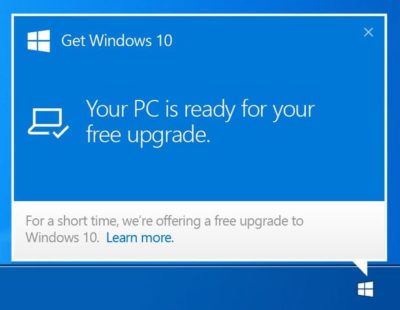
With the official Windows 10 launch and Microsoft’s promise that the upgrade for Windows 7/8.1 systems will be free for the first year after launch, you’ll have until July 29, 2016, to make your move. Just because it’s free doesn’t mean you have to rush to get your copy—unless, of course, it’s a status thing.

For the ordinary Windows user, there really isn’t any immediate need to be one of the first people to download Windows 10. In fact, you’ll probably have a better upgrade experience if you hold off for a bit. Wait for the hype to die down, wait for the load on the Windows Update servers to wane, and more importantly, wait for the first wave of updates to make their way out to the masses of Windows users who had to be the first.

Besides, unless you’re a Windows Insider program participant, chances are that you won’t be able to get Windows 10 right away anyhow.

In his July 2nd blog post, “Windows 10: Preparing to Upgrade One Billion Devices,” Terry Myerson stated:

“We want to make sure all of you have a great upgrade experience, so we’ll roll-out Windows 10 in phases to help manage the demand.”

He then goes on to say:

“Starting on July 29, we will start rolling out Windows 10 to our Windows Insiders. From there, we will start notifying reserved systems in waves, slowly scaling up after July 29th. Each day of the roll-out, we will listen, learn and update the experience for all Windows 10 users.”

That last sentence hints at the fact that the Microsoft is anticipating the possibility that there may be some glitches in the first wave of the roll out.

To be sure, I’m not suggesting that you hold out for months before you upgrade—rather, I’m saying that you may want to give it a couple of weeks just to see how others are faring with Windows 10. With Microsoft’s Windows as a service model, the ongoing testing via the extension of the Windows Insider program, and the rapid update system developed during the Windows Insider preview program, the hope is that any issues that crop up in the first weeks after initial availability will be quickly resolved.

Have questions?

Get help from IT Experts/Microsofts Cloud Solutions Partner
Call us at: 856-745-9990 or visit: https://southjerseytechies.net/

South Jersey Techies, LLC is a full Managed Web and Technology Services Company providing IT Services, Website Design ServicesServer SupportNetwork ConsultingInternet PhonesCloud Solutions Provider and much more. Contact for More Information.

To read this article in its entirety click here.

Google and AT&T: Fighting Fiber with Fiber

Google fiber is coming to your town. But not without a fight. After Louisville, Kentucky approved legislation that would allow Google Fiber to piggyback on pre-existing telecommunication infrastructure, AT&T sued the city.


“The ordinance in question, known as “One Touch Make Ready,” essentially allows Google (or any other ISP) to install its equipment on existing utility poles, including those owned and maintained by AT&T. Despite strong opposition from AT&T and Time Warner Cable, the ordinance passed with a 23-0 vote.”

AT&T claimed a need to defend past infrastructure investment, and that the ordinance violates current telecommunication rules. The city of Louisville countered claiming, “gigabit fiber is too important to our city’s future.” Google pledged to support the city.

Have questions?

Get answers from Microsofts Cloud Solutions Partner!
Call us at: 856-745-9990 or visit: https://southjerseytechies.net/

South Jersey Techies, LL C is a full Managed Web and Technology Services Company providing IT Services, Website Design ServicesServer SupportNetwork ConsultingInternet PhonesCloud Solutions Provider and much more. Contact for More Information.

To read this article in its entirety click here.


The BlackBerry platform’s slow fade to black

blackberry-logo-SJTechiesBlackBerry’s operating system was recently dealt blow by Facebook. Find out how this could be the final nail in the BB10 coffin.
The only reason this headline should surprise anyone is the fact that BlackBerry OS is actually still alive. End of story, right? Truth be told, most assumed BlackBerry’s operating system dead when the company decided to release a device running the Android platform. It seemed to be the only logical step forward for BlackBerry Limited. And yet, BB continues on.

Only now, they continue on without Whatsapp and Facebook support.

When pressed for the reason why they are pulling support, Facebook made their case quite simple, stating that 99.5 % of all smartphone sales are of the Android, iOS, and Windows Mobile platforms.

Makes sense.

What doesn’t make sense is the fact that the BlackBerry OS is still alive and kicking. Yes, I understand BlackBerry was the platform for business users for a very long time, but that time has come and gone and the only relevant platforms are obvious. In fact, even Windows Mobile is barely hanging on to any semblance of relevancy.

What can you expect

If you happen to be a BlackBerry user, you already knew that Whatsapp pulled the plug. Now you can count on the Facebook app functioning (sans updates) until the end of the year. Once 2016 passes, the app will cease to be available in any form.

My guess is, once the Facebook app no longer functions on the platform, the Grim Reaper will swoop into the offices of the BB10 developers and have a field day. Facebook holds a powerful sway over the ebb and flow of the consumer. No Facebook, no platform.

And you may be saying to yourself, “BB10 is a business-centric platform, there’s no need for a Facebook app”. That assumption is false for at least two reasons. First, businesses actually use Facebook as a form of marketing. Second, you’re assuming that business users do not spend any amount of time on Facebook. According to comScore, the average American citizen spends 40 minutes a day on the social network platform. Relatively speaking, that’s a significant amount of time (considering users tend to work on Facebook in a sort of “hit and run” style). And if you factor in the peak Facebook hours of 1 p.m. – 3 p.m., it’s clear that business users do spend time on Facebook.

BlackBerry’s reaction

Of this separation, BlackBerry said:

“We are extremely disappointed in their decision as we know so many users love these apps. We fought back to work with WhatsApp and Facebook to change their minds, but at this time, their decision stands,”

BlackBerry even started a Twitter campaign to change Facebook’s mind, with the hashtag #ILoveBB10Apps. I did a quick Twitter search for that hashtag and found the hashtag (somewhat) backfired on BlackBerry. Tweets ranging from angry users (one user asking how his BlackBerry device could be showing 0% battery, yet still be functioning), to the usual flood of memes and spam. Some users did proclaim they’d be sticking with BlackBerry by way of the PRIV (which, if we’re being honest, at that point you are as much in support of Android as you are BlackBerry). Of course, there were the BlackBerry faithful, extolling the values of BlackBerry 10 multitasking, security, and such to convince Facebook to not pull the plug.

The truth is in the numbers

You really shouldn’t need anything more than that telling number 99.5. That is beyond significant. We’ve watched new (and promising) platforms come and go, thanks to the might that is Android and iOS. Because BlackBerry has been around for a while, doesn’t give them a special hall pass to avoid the apple flavored robotic death hammer.

If BlackBerry wants to continue on, their only hope clearly lies in Android. The BlackBerry faithful will gladly continue on, with their physical keyboards and Android platform. Either that, or they can say goodbye to BlackBerry altogether, because Facebook pulling support could well be the killing blow to the little platform.

Have questions?

Get answers from Microsofts Cloud Solutions Partner!
Call us at: 856-745-9990 or visit: https://southjerseytechies.net/

South Jersey Techies, LL C is a full Managed Web and Technology Services Company providing IT Services, Website Design ServicesServer SupportNetwork ConsultingInternet PhonesCloud Solutions Provider and much more. Contact for More Information.

To read this article in its entirety click here.

Microsoft Surface Studio: The smart person’s guide

Everything you need to know about the Surface Studio, Microsoft’s new all-in-one PC designed to tempt professional artists and designers over to Windows.

microsoft-surface-studio

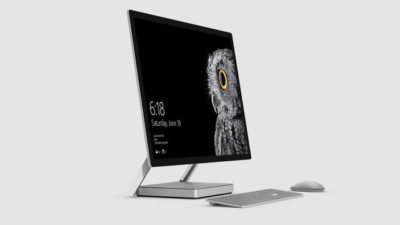
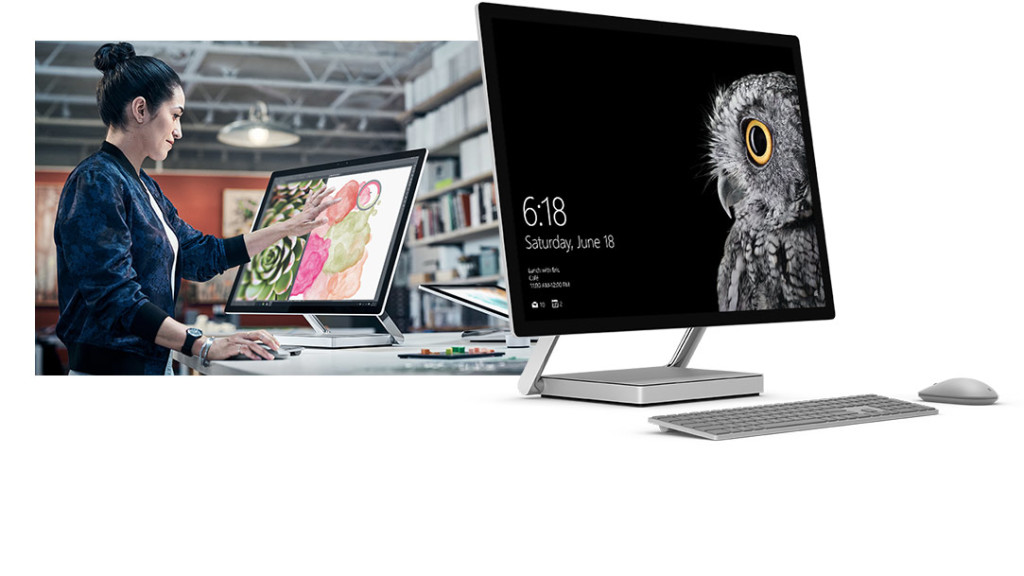
The Surface Studio is an all-in-one PC with premium specs, designed to wow professional artists, designers, architects and other creatives.

While the $2,999 price tag will deter most consumers, Microsoft seems to be targeting the Studio at design professionals, who would otherwise be using Apple Macs alongside specialist devices like Wacom’s Cintiq drawing tablet.

The Studio is a machine with a lot to recommend it, but one that could still be a leap too far for creatives already heavily invested in alternative tech.

Executive summary

  • What it is: The Surface Studio is a high-end, all-in-one PC aimed at being a drafting table and canvas for creatives.
  • Why it matters: The machine marks Microsoft’s first venture into designing desktop PCs and may put pressure on Apple and other manufacturers to crank up specs on competing machines.
  • Who it is for: Artists, designers, architects — creative professionals who want a machine that shows off their work at its best.
  • Why you should get it: For its super sleek, razor-sharp display that lets users draw straight onto the screen.
  • Why you shouldn’t get it: The price is too high or you’re a professional already heavily invested in alternative software and hardware.
  • How to get it: Pre-order online, although stock is limited according to Microsoft

What it is

An all-in-one, Windows 10 PC designed to dazzle users with its superlative display.

The screen, a 28-inch touchscreen LCD monitor, is ‘the thinnest in the world’ according to Microsoft, and sits on a counterbalanced hinge that makes it easy to push down onto the desk, and start drawing on with a digital pen.

The monitor’s 4K+ resolution and ability to display more than one billion colors, as well as to show drawings and documents at 1:1 scale with their paper equivalents, is designed to give professionals the ability to see how their creations would look in the real world.

Sketching on the screen with the Surface Pen is made easier when the Studio is used with the newly released Surface Dial, a brushed silver knob that can be rotated to select a new color when drawing on the screen or to turn the image.

Why it matters

From the point of view of artists and designers, the Studio offers a high-end computer built around their creative needs, which does away with having to use a separate drawing tablet and computer.

Even if creatives ignore the Surface Studio, its release is good news, likely to prompt incumbents like Apple and Wacom to spec up and cut the prices of new machines — in particular for the iMac, which the Studio has been compared to many times, despite the iMac lacking a touchscreen.

By following up the immaculately designed Surface Book laptop with a striking machine like the Surface Studio, Microsoft also appears to be trying to establish itself as a competitor to Apple on the design front.

Who it is for

Broadly, the Studio seems to be aimed at anyone who draws or designs for a living.

In launch videos, the Studio was seen being used by artists, architects and product designers.

The multi-purpose nature of the Studio, a machine that combines a Windows desktop PC with the functionality of a separate digital drawing tablet, such as the Cintiq 27 QHD Touch, will likely make the $2,999 price tag easier to swallow among those in the creative industries.

Why you should get it

If you draw or design for a living there are plenty of reasons why you might want the Studio. For example, there’s the quality of the display and the ease with which the Surface Pen draws on the screen. Microsoft describes this experience as virtually as fluid as drawing on paper. Then there’s the Studio’s significant graphical processing power, the ability to view documents and drawings actual size on screen and the ease with which you can switch push down the monitor and begin drawing.

Why you shouldn’t get it

Despite the Studio’s looks, its high price makes it hard to recommend as a consumer purchase, particularly when an iMac with a higher resolution, and only very slightly smaller screen, will cost less money.

Even professional creators are unlikely to abandon their current expensive setup for a Studio, as Mikako Kitagawa, principal research analyst with Gartner, pointed out.

“An all-in-one device is not the most cost-effective device, as the users pay for both the computing unit and monitor at the same time,” she said.

“Creative professionals have already invested heavily in hardware and software. For instance, many professional illustrators use a high-end drawing tablet and high-resolution monitor at the same time.”

If those same professionals exclusively use macOS, as is the case in some creative outlets, then the high cost of switching to Windows will also be a deterrent, she said.

There is also Microsoft’s odd decision not to include the $99 Surface Dial with the Studio, despite the peripheral featuring so heavily in demos of the machine, and being particularly useful for tasks like changing colors while drawing with the Surface Pen.

How to get it

The Surface Studio is available to pre-order from Microsoft, with prices starting at $2,999 and shipping starting from 12 December. Microsoft has warned the machine will be available in limited quantities.

Tech specs:

$2,999: 1TB drive; Intel Core i5 CPU; 8GB RAM; 2GB GPU

$3,499: 1TB drive; Intel Core i7 CPU; 16GB RAM; 2GB GPU

$4,199: 2TB drive; Intel Core i7 CPU; 32GB RAM; 4GB GPU

Display: 28″ PixelSense Display; 4500 x 3000 resolution; 192 DPI; Color settings: Adobe sRGB, DCI-P3 and Vivid Color Profiles; Touch: 10-point multi-touch; Aspect ratio: 3:2 TB drive; Intel Core i5 CPU; 8GB RAM; 2GB GPU

Processor: Quad-core 6th Gen Intel Core i5 or i7

Graphics: NVIDIA GeForce GTX 965M 2GB GPU GDDR5 memory or NVIDIA GeForce GTX 980M 4GB GPU GDDR5 memory

Storage: 1TB or 2TB ‘rapid hybrid drive’

Memory: 8GB, 16GB, or 32GB RAM

Wireless: 802.11ac Wi-Fi; Bluetooth 4.0; Xbox Wireless built-in3

Dimensions: Display: 25.09 x 17.27 x 0.44 in (637.35 x 438.90 x 11.4 mm); Base: 9.84 x 8.66 x 1.26 in (250.00 x 220.00 x 32.20 mm)

Weight: 21.07 lbs max (9.56 kg)

Connections: 4 USB 3.0; Full-size SD card reader (SDXC compatible); Mini Displayport; 3.5mm headset jack; Compatible with Surface Dial onscreen interaction

Cameras: 5.0MP front-facing camera with 1080p HD video

Audio: Dual microphones; Stereo 2.1 speakers with Dolby Audio Premium

Buttons: Volume and power

Surface Pen

Surface Keyboard

Surface Mouse

Power cord with grip-release cable

Security: TPM chip for enterprise security; Enterprise-grade protection with Windows Hello face sign-in

Have questions?

Get answers from Microsofts Cloud Solutions Partner!
Call us at: 856-745-9990 or visit: https://southjerseytechies.net/

South Jersey Techies, LL C is a full Managed Web and Technology Services Company providing IT ServicesWebsite Design ServicesServer SupportNetwork ConsultingInternet PhonesCloud Solutions Provider and much more. Contact for More Information.

To read this article in its entirety click here.

Microsoft Office 2016: Lots of upgrade questions and some answers

Microsoft began rolling out Office 2016 for Windows on September 22. Since then, there have been a lot of questions around timing and installation techniques from those attempting to move to the latest version of Microsoft’s Office suite.

Office 2016

It turns out that not everyone has been able to upgrade to the latest release this week, in spite of Microsoft declaring the suite generally available. Instead, as many have discovered, the Office 2016 rollout is a staggered one, and one which has resulted in some OneDrive, Skype for Business and other app and service installation and compatibility issues.

While Microsoft officials did say a week ago that the company would be moving to a servicing/branch model with Office 2016 similar to the one the Windows 10 team is using, details on exactly how that would play out for Office users were scarce. But thanks to Microsoft pages and KB articles — we now know more.

Office 2016

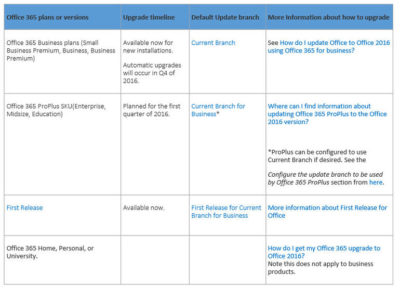
It turns out anyone in the Office 365 First Release program was able to get the latest Office 2016 apps for Windows as of this week. The same is true of those on the existing Office 365 Small Business Premium, Business and/or Business Premium — but only for those who are buying new subscriptions, according to the chart from a Microsoft community answers post, embedded above. Automatic updates to Office 2016 for those on these three plans won’t begin until the fourth quarter of 2016..

Just to add a little more complexity to this already complex set of rules, Microsoft is in the midst of replacing its Office 365 Small Business, Small Business Premium and Midsize Busines plans with three new ones. The three: Office 365 Business, Business Essentials and Business Premium. Microsoft has pushed the suggested migration date kick-off for these new plans back from October 1 to December 1, 2015, The reason for the date change: “The renewal experience will be best for users who have the latest version of Office,” meaning Office 2016.

Those with Office 365 ProPlus SKUs — meaning Office 365 Enterprise, Midsize and Education — are on the Current Branch for Business. This means these users cannot upgrade to the new Office 2016 for Windows bits right now unless the administrators change the update branch to be used by some/all of their users to Current Branch.

“For Office 365 ProPlus subscribers, administrators can opt to upgrade by manually rolling out to their users with Office deployment tools available today, September 22. Automatic updates for Office 365 ProPlus customers will begin early next year,” a Microsoft spokesperson confirmed when I asked.

Here are some more links that might help those interested in making the move to Office 2016:

Microsoft made the Office 2016 for Windows release available to MSDN subscribers on September 22. Volume licensees will have access to the new release via the Volume License Servicing Center (VLSC) as of October 1.

DreamSpark users got access to Office 2016 on September 22. Microsoft Action Pack and MPN subscribers will get access on October 1. And Home Use Rights for Office 2016 for Windows and Mac, both, will be available as of October 7, according to Microsoft.

Have questions?

Get help from IT Experts/Microsofts Cloud Solutions Partner
Call us at: 856-745-9990 or visit: https://southjerseytechies.net/

South Jersey Techies, LLC is a full Managed Web and Technology Services Company providing IT Services, Website Design ServicesServer SupportNetwork ConsultingInternet PhonesCloud Solutions Provider and much more. Contact for More Information.

To read this article in its entirety click here.

Surface Book pre-orders sold out at Microsoft’s online store

If you were still thinking about placing an order for a new Microsoft Surface Book, then you will have to look somewhere other than the Microsoft store.

surfacebook

While there doesn’t seem to be a massive supply issue with the new Apple iPhone 6s smartphone, in the past we have seen Apple products sell out quickly and deliveries move from days, to weeks, to months. It seems that Microsoft’s new Surface Book may be generating more interest than planned.

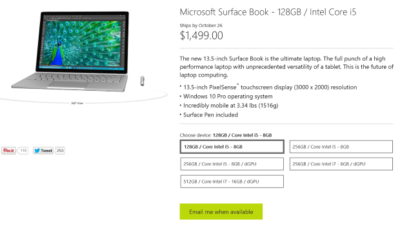
Last night I went to the online Microsoft Store to place an order for a base model Surface Book. I found that the only available status when choosing that model was, “Email me when available.” I jumped through the other four models and discovered the same thing. It seems Microsoft is sold out of pre-order stock for all models at its online store.

We reached out to Microsoft to try to find out more about stock status and when buyers could expect to place pre-orders. I also asked if there will be units in Microsoft retail stores on launch day, 26 October. Given that units are sold out online, we may even see people queue up for possible stock in stores.

A Microsoft spokesperson provided the following statement, “We’ve seen strong demand for Surface Book and have sold out of pre-order supply for October 26 availability. We will have limited quantities of Surface Book available in store on October 26 and will be updating online availability with new product ship dates soon.”

UPDATE: Microsoft updated its store and is no allowing customers to pre-order the five Surface Book variations. What you will find instead of an email me when available button is updated delivery expectations, ranging from five to six weeks for three models and seven to eight weeks for two models.

While I was disappointed that I couldn’t purchase a Surface Book through Microsoft directly, I found that Best Buy and Amazon will also be selling this new computer. Best Buy did not appear to be taking pre-orders, but I was able to purchase the Intel Core i5, 8GB, 128GB model from Amazon for $1,499.

The Amazon website does not appear to carry the 256GB i5 without dGPU or 256GB i7 models. The 256GB i5 with dGPU looks to be the only other model available for pre-order. The 512GB i7 model is on the site as an option, but redirects you to the Microsoft Store for purchase and it’s not avaialable there.

Have questions?

Get help from IT Experts/Microsofts Cloud Solutions Partner
Call us at: 856-745-9990 or visit: https://southjerseytechies.net/

South Jersey Techies, LLC is a full Managed Web and Technology Services Company providing IT Services, Website Design ServicesServer SupportNetwork ConsultingInternet PhonesCloud Solutions Provider and much more. Contact for More Information.

To read this article in its entirety click here.

Microsoft teases Windows 10’s sleek new look for the future

“Project Neon” will give your Windows 10 PC a fresh coat of paint later in 2017.

Microsoft’s planning a sleek visual refresh for Windows 10, and the company quietly teased its first official glimpse of what’s coming in the future during the Windows Developer Day keynote on Wednesday.

There aren’t many details being shared about “Project Neon” right now—as the refresh was called in earlier leaks—but the new visual look will focus on animations and transitions. The basic concept is “to add fluidity, animation, and blur to apps and the operating system,” as first reported by Windows Central. The new design language also hopes to make it easier for developers to create attractive apps.

The design refresh should extend to all Windows 10 devices including PCs and tablets, HoloLens, Xbox, and the few surviving Windows Phones, according to Windows Central.

Twitter user Tom Hounsell shared a clean version of Microsoft’s first look at Windows 10’s forthcoming design tweaks. The image shown on the livestream had large text overlaid on top of the screenshot.

As you can see, this isn’t a huge change, but the visual refresh gives Windows 10 a sleeker, more modern feel. The taskbar icons look a little more dynamic and bolder. Cortana is using the icon instead of the search box, though it’s not clear if this will be the default look. The clock on the taskbar is also bolder, and the usual notification area icons including the Action Center are notably absent. The open Groove Music window itself looks more polished and Aero-esque as well, with no title bar to be seen—just unobtrusive options in the app’s upper-right corner.

The impact on you at home: Windows Central says that some of the code for Project Neon is already available in recent Insider Preview builds of Windows 10; however, it’s unlikely the visual refresh will be ready in time for the massive Creators Update this spring. Microsoft is expected to share more information about Neon during the Build conference in May. The Creators Update is expected to roll out in late March or early April, followed by a second major update later in 2017.

Have questions?

Get answers from Microsofts Cloud Solutions Partner!
Call us at: 856-745-9990 or visit: https://southjerseytechies.net/

South Jersey Techies, LL C is a full Managed Web and Technology Services Company providing IT Services, Website Design ServicesServer SupportNetwork ConsultingInternet PhonesCloud Solutions Provider and much more. Contact for More Information.

To read this article in its entirety click here.

CALL US NOW!