Back to Top

Tech, Web, Cloud & Cabling Services

Category: News

Verizon reaches deal with 36,000 striking workers, ending 6-week strike

Verizon and its striking labor unions reached a tentative deal on Friday, potentially ending a six-week labor dispute involving 36,000 workers.

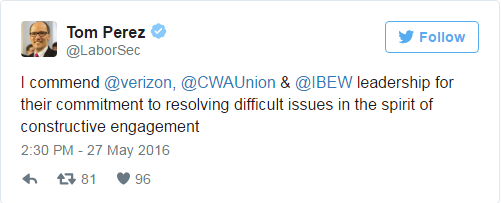
U.S. Labor Secretary Thomas Perez announced that Verizon and the unions have reached an “agreement in principle” on a four-year contract. He said he expects Verizon’s (VZ, Tech30) striking workers to be “back on the job next week.”

Verizon and its unions confirmed the deal but did not release specific details. However, the Communications Workers of America said Verizon has agreed to add “good union jobs” on the East Coast as part of the agreement. The CWA also said the agreement will improve the living standards of working families, and paves the way for the first contract for wireless retail store workers.

“This proves that when we stand together we can raise up working families, improve our communities and protect the American middle class.” Chris Shelton, president of the CWA, said in a statement.

The International Brotherhood of Electrical Workers said it plans to share details on the agreement with its members in the coming days.

The deal was reached after 13 days of talks at the Department of Labor aimed at ending the impasse. Perez said the parties are working to get the deal in writing, and will then submit it to union members for ratification.

“This tentative resolution is a testament to the power of collective bargaining,” Perez said in a statement.

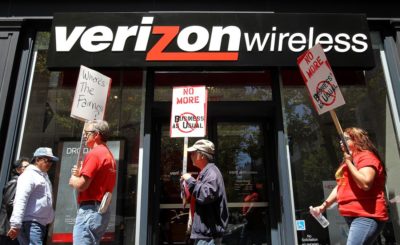
After working without a contract since August, Verizon union workers walked off the job on April 13. The main sticking points were complaints about poor working conditions, pensions being capped at 30 years of service and jobs getting shipped overseas.

The strike, which is the biggest in the U.S. since a 2011 Verizon dispute, mostly involved workers who service the company’s landline phone business and FiOS broadband services.

VerizonStrike

The labor dispute has taken a toll on Verizon’s business. Lowell McAdam, Verizon’s CEO, said earlier this week it’s been harder for the company to sign up as many new customers as before the strike began.

Verizon stock has also lagged behind the broader market as well as peers AT&T (T, Tech30) andComcast (CMCSA). News of an agreement helped send Verizon stock 1% higher on Friday.

Two weeks after the strike began, Verizon said it was investigating 57 instances of network sabotage and suggested striking workers were to blame.

Have questions?

Get answers from Microsofts Cloud Solutions Partner!
Call us at: 856-745-9990 or visit: https://southjerseytechies.net/

South Jersey Techies, LL C is a full Managed Web and Technology Services Company providing IT Services, Website Design ServicesServer SupportNetwork ConsultingInternet PhonesCloud Solutions Provider and much more. Contact for More Information.

To read this article in its entirety click here.

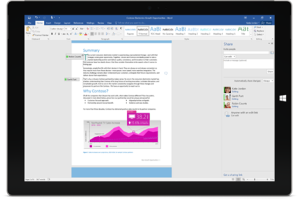
The all new Office 2016.

Do your best work with Office 2016 applications. New features make it easier to create, share, and work together wherever you are, across your favorite devices.

Office 2016 Built for teamwork

Built for teamwork

Office 2016 reduces the friction in co-creation, making it easier to share documents, work together, and use coauthoring, IM, voice and video to get things done.

Works for you

Produce professional documents fast with intelligent suggestions, information, and insights at just the right time.

The most secure Office

Store and share with confidence. With 1 TB of OneDrive for Business storage, you have the built-in, secured way to store and share all of your stuff.

The Office you know and love with new applications–across your favorite devices

Across devices

Access your documents and work whenever and wherever—with full fidelity viewing and editing—from your PC or Mac to your Windows, Apple®, and Android phones and tablets.

Coauthoring

Work together like never before in Word, PowerPoint, and OneNote. Real-time typing in Word1 lets you see others’ edits as they happen.

Online meetings

Work like you’re all in one room, even when you’re not. Use Skype for Business for HD video conferencing2, coauthoring, desktop sharing, presentations, and IM to run your meetings from anywhere.

Smart attachments

Attach documents stored in OneDrive for Business or SharePoint to an email and Outlook will automatically configure permissions for mail recipients and store the latest version in one place.

Office 2016 gives IT more control and better performance

Office 2016

Centralized control

Data loss protection, multi-factor authentication, and rights management gives admins centralized control over key security, privacy, and compliance capabilities.

Flexible click-to-run deployment

IT now has more control over how and when updates are distributed, with enhanced distribution and network traffic management.

Improved Outlook performance

Enhanced connectivity, better network performance, and faster email download equal happier users and fewer help desk calls.

Have questions?

Get help from IT Experts/Microsofts Cloud Solutions Partner
Call us at: 856-745-9990 or visit: https://southjerseytechies.net/

South Jersey Techies, LLC is a full Managed Web and Technology Services Company providing IT Services, Website Design ServicesServer SupportNetwork ConsultingInternet PhonesCloud Solutions Provider and much more. Contact for More Information.

To read this article in its entirety click here.

Microsoft will let you unlock Windows 10 with your face

Hello
With a quick glance at your Windows 10 laptop, you’ll be able to unlock it — without entering a password.

Microsoft introduced the latest new feature for Windows 10, called Windows Hello. The security tool will let you access your PC through facial recognition, an iris scan or a read of your fingerprint.

But before you get ready for your closeup, you’ll need get some special equipment — most PCs don’t come with biometric scanners installed (though some do). Windows Hello is primarily targeted at businesses and government agencies.

Microsoft opted not to rely on your webcam for facial recognition because the photos it captures are not terribly secure, and they’re easy to spoof. Instead, Microsoft got infrared cameras to do facial recognition for Windows Hello.

Facial recognition is possible on a low-grade camera. Google allows its Android phones to be unlocked with facial recognition, but the company warns that someone with a photo of you — or even someone who looks like you — will be able to unlock your phone too.

With the proper tools, faces, irises and fingerprints are possible to spoof, but it’s not easy — someone’s got to really want to break in to your PC to go through the trouble.

Microsoft opted for more robust security in Windows 10, because it wants to meet strict standards that companies and government agencies impose for secure logins. Microsoft said Windows Hello has a 1 in 100,000 false accept rate, which is very high. It’s a lot safer than a password, which, as we know, can easily be forgotten, lost, stolen or hacked.

Though it’s not necessarily aimed at the average PC buyer, consumers will be able to use the Windows Hello feature too.

Microsoft promised “plenty of exciting new Windows 10 devices to choose from which will support Windows Hello.” And if your PC already has a fingerprint reader, you’ll be able to login with a fingerprint scan.

Passport: Windows 10 will also support another new security feature, codenamed “Passport,” which lets you login to participating websites, apps or networks without a password. Microsoft said the list of sites and apps that support Passport is growing, but it didn’t say how many participate.

Microsoft is trying to position Passport as the end of passwords. Since you never enter a password to enter a website, “there is no shared password stored on their servers for a hacker to potentially compromise,” says Microsoft boldly in its press release.

But that’s not quite true. Passwords will still exist. Even if you can login to your email via Passport from your work PC, you’ll still need a password to login from your iPad. So passwords aren’t going away anytime soon — and they’ll still be stored on email providers’ servers, which means hackers could potentially still grab them in a cyberattack.

The primary way that Passport ensures that you’re you is through Windows Hello. Oddly, however, you can also enter a PIN into Passport, which is significantly less secure than a password.

Still, it’s about time that something replaces passwords, and Hello and Passport are good starts.

Have questions?

Get answers from Microsofts Cloud Solutions Partner
Call us at: 856-745-9990 or visit: https://southjerseytechies.net/

South Jersey Techies, LLC is a full Managed Web and Technology Services Company providing IT Services, Website Design ServicesServer SupportNetwork ConsultingInternet PhonesCloud Solutions Provider and much more. Contact for More Information.

To read this article in its entirety click here.

Wawa introduces free WiFi services

PHILADELPHIA – Wawa began offering free WiFi Tuesday for customers at its 700-plus stores.

Wawa-free-xfinity


The service is available through a collaboration between the retailer and Philadelphia-based Comcast, the companies said.

To access the free service, Comcast said, “customers should log on to the ‘xfinitywifi’ SSID in the list of available networks on their devices.”

The service includes public Xfinity WiFi for Wawa customers and private access WiFi for employees and vendors.

Wawa stores operate across the tri-state area, as well as in Maryland, Virginia and Florida. The firm’s WiFi service will be available outside of Comcast’s traditional service areas, the companies said.

Wawa noted it needed “a fast and reliable WiFi solution to enable a consistent in-store experience for its mobile application.” It also said the service allows customers “to take advantage of a free connection without having to rely on their cellular service.”

Bill Stemper, president of Comcast Business, said WiFi has become a vital service for companies looking to improve “the customer experience at their branch locations.”

Have questions?

Get answers from Microsofts Cloud Solutions Partner!
Call us at: 856-745-9990 or visit: https://southjerseytechies.net/

South Jersey Techies, LL C is a full Managed Web and Technology Services Company providing IT Services, Website Design ServicesServer SupportNetwork ConsultingInternet PhonesCloud Solutions Provider and much more. Contact for More Information.

To read this article in its entirety click here.

South Jersey Cyber Crime

The hackers used “ransomware” to lock the hospital out of its own medical records.

Not all kidnappers grab your loved ones.

A growing online threat – ransomware – essentially abducts your computer system, putting data and services off-limits to users and demanding a payment to restore access.

“We are seeing more cases of this – sometimes almost on a daily basis,” said New Jersey State Police Capt. Steve Jones. “And we’re not seeing all of it, because people may be too embarrassed or don’t believe it can be helped.”

Ransomware viruses are a plague. Once infected — installed to your computer by a website you’ve visited, a rogue email attachment or link, or instant message — your computer will lock up. With names like CryptoWall, these types of viruses may create a popup window or Web page warning you that you’ve broken some law and have to pay a fine, anywhere from hundreds to thousands of dollars, according to the FBI.

These scams threaten to encrypt your files forever or destroy them unless a ransom is paid, according to the FBI.

Once paid, your computer is unlocked or a code is sent to unlock the machine, authorities said.

Between April 2014 and June 2015, the FBI received 992 CryptoWall-related complaints with victims reporting a loss of more than $18 million.

The state’s top cybersecurity unit recently launched an online effort to help people guard against ransomware.

“For many organizations, preventing ransomware entirely is nearly impossible,” says the New Jersey Cybersecurity and Communications Integration Cell (NJCCIC), which introduced a Ransomware Threat Profile page at its website in February.

But it notes individuals and companies can take measures to prevent infections and to limit their impact.

Although ransomware can lock up laptops and desktop computers, the risk is particularly great for data-dependent organizations like hospitals and accounting firms, said Jones, the State Police spokesman.

So far, at least three hospitals have been hit nationwide – in California, Kentucky and the Washington, D.C., area. South Jersey hospitals are well aware of the menace.

“It’s a big concern. It’s something that has really spiked,” said Tom Handlon, chief information security officer for Kennedy Health, which operates three acute-care hospitals in South Jersey.

Handlon gave no details, but said Kennedy seeks to protect itself through protective measures inside its computer system and by promoting safe conduct by employees.
“We’re monitoring it constantly and updating as we go along,” he said. “We are really educating the staff and our entire organization that we are a target.”

A similar view came from Tom Rubino, spokesman for Cooper University Healthcare System in Camden.

“We have tracked the recent wave of ransomware attacks that have targeted hospitals across the nation,” Rubino said. He said Cooper’s IT security team “is proactively taking measures to prevent ransomware infection of our computer systems.”

“Additionally, as a critical component for preventing all computer viruses, we are increasing our employee education efforts.”

A key precaution is to back up your computer’s contents on a frequent basis, Jones said. “But you’ve got to keep the backup drives disconnected,” he warned. “Otherwise, the ransomware can migrate to the backups.”

The State Police in March 2015 investigated a hacking incident that disabled much of the computer system for the Swedesboro-Woolwich school system. In that case, a hacker demanded more than $125,000 in the form of a digital currency called bitcoins.

The district, which did not pay the ransom, had to wipe clean its email servers and cafeteria lunch-ordering system to rid itself of ransomware. Only a handful of classroom computers were infected.

Hackers exploited a gap in the district’s computer security system and a vendor’s “weak” passport to take over the computer system, Michael Procopio, Educational Information and Resource Center’s director of technology, said at the time. EIRC experts helped the district restore its system.

The district’s hacker was believed to have struck from abroad – a familiar pattern, according to the State Police.

“Many of these messages and attacks are coming through foreign servers,” Jones said. “The countries that house these servers are not often countries that have a real open relationship with law enforcement.”

Tools have been available to help decrypt older versions of ransomware, said Dave Weinstein, New Jersey’s director of cybersecurity.

“At this point, the strain has morphed to the point where there is no releasing your files,” said Al Della Fave, a spokesman for the Ocean County Prosecutor’s office. “The lock these cybercriminals put on your files is foolproof at this point.”

Unless you’ve backed up your computer prior to the infection, Della Fave said, “The only way you would get your files back is to pay.”

“Ransomware is working” for cyberthieves, said Ben Johnson, chief security strategist at Carbon Black Inc., a  computer security firm in Waltham, Massachusetts. “People are paying.”

In the last few weeks, cybercriminals have come up with some new twists, he said. For instance, one version encrypts files more quickly after someone opens up a malware-filled Microsoft Word document or some other attachment.

Other versions encrypt the computer at its most basic level so it can’t even power on, or use the computer’s own system administration tools to infect itself, he said.

The best course of action is to make sure you don’t get the virus. “You must be super careful what you click on,” Della Fave said.

Here’s what you should do, according to Johnson and the Ocean County prosecutor’s office:

  • Keep your computer’s security software up to date.
  • Keep your network firewall turned on.
  • Do not open spam email messages or links to suspicious websites.
  • Back up your files, such as documents, photos and music, to a secondary storage device.
  • Be careful when you browse the web. Use ad blockers to help protect yourself.

Have questions?

Get answers from Microsofts Cloud Solutions Partner!
Call us at: 856-745-9990 or visit: https://southjerseytechies.net/

South Jersey Techies, LL C is a full Managed Web and Technology Services Company providing IT Services, Website Design ServicesServer SupportNetwork ConsultingInternet PhonesCloud Solutions Provider and much more. Contact for More Information.

To read this article in its entirety click here.
Save Big on Toner!

toner

TECHIEDEPOT.COM

Your #1 Source for the Best Printer Ink Cartridges

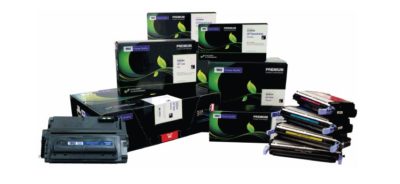
Looking to save on toner ?  Save upto 35% when you order Re-manufactured Toner Cartridges with TECHIE DEPOT. Our toner cartridges are intelligently re-engineered and environmentally friendly.   We offer a 3 year 100% warranty whereas most OEMs only offer a 1 year warranty.

We guarantee our products will perform better than any other aftermarket imaging product.  Rest assure you never have to worry about leaking cartridges because of our Patented Ultrasonic and Gasket Seal Technologies.  Our Secondary cleaning System also eliminates streaking.  Our toner cartridges are ISO Certified for OEM page yield and quality.  With our Extended Yield Cartridges you will get up to 100% more yield.

You will find that we are different because everyone is not as committed to quality like we are and our product is better built and more consistent.  Our cartridges have a documented 99.2% success rate and for 7 consecutive years we were awarded the best quality supplier in the aftermarket  by Recharger Magazine.

Pay less for great quality, we are sure you won’t be disappointed with our product.  Contact us and place your order today!

End of Life Windows 7, Server 2008 R2, & Small Business Server 2011

The End of Life for Windows 7, Server 2008 R2, & Small Business Server 2008 + 2011

End of Life Windows 7, Server 2008 R2, & Small Business Server 2011
[wpdevart_countdown text_for_day=”Days” text_for_hour=”Hours” text_for_minut=”Minutes” text_for_second=”Seconds” countdown_end_type=”date” end_date=”13-01-2020 23:59″ start_time=”1556805309″ end_time=”0,1,1″ action_end_time=”hide” content_position=”center” top_ditance=”10″ bottom_distance=”10″ countdown_type=”button” font_color=”#000000″ button_bg_color=”#3DA8CC” circle_size=”130″ circle_border=”5″ border_radius=”8″ font_size=”30″ countdown_font_famaly=”monospace” animation_type=””][/wpdevart_countdown]

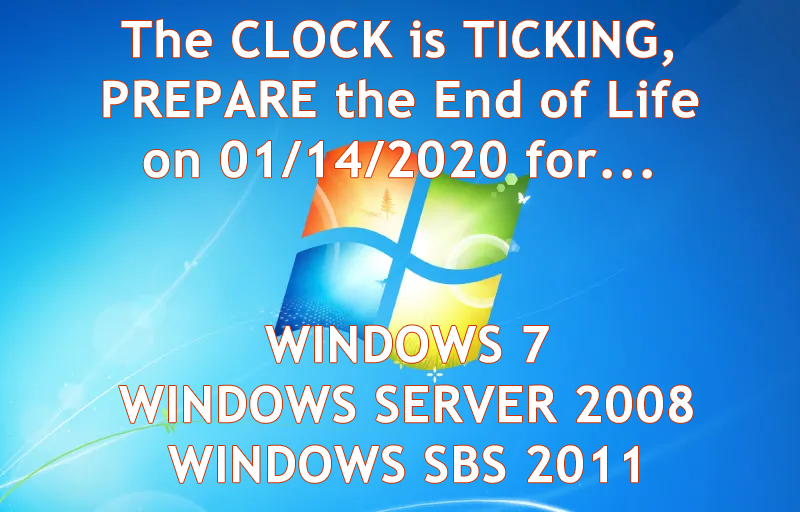
Microsoft has announced that its support for Windows 7, Windows Server 2008 R2, and Small Business Server (SBS) 2011 will be coming to an end on January 14, 2020.

What does that mean for you? First, security patches and updates will no longer be implemented, leaving Windows 7 workstations and servers susceptible to security breaches. On January 13, 2015, Microsoft ended mainstream support for Windows 7, but now extended support is ending as well. Extended support is still safe to use until 2020 currently. Normally Microsoft would add new features during the mainstream support phase, but they will not be being doing this anymore. They will however, continue to patch any security treats. South Jersey Techie’s strongly recommends upgrading your business’s servers and workstations before the January 2020 deadline- and to start planning now to avoid the urgency of the deadline. Businesses in the healthcare industry will be impacted by the changes in relation to HIPPA violations if their server isn’t updated before the deadline. The deadline will be here before you know it and updating an IT infrastructure is a large task and shouldn’t be put off until the last minute.

What are the next steps for your business? Many of our clients are starting to upgrade now or are planning to include the upgrades in their 2019 budget. Send us an email or give us a call and we will evaluate your line of business software for Windows 10 and upgraded server compatibility. If your company decides to upgrade its old server and workstations to meet the January 2020 deadline, South Jersey Techie’s has the reliable solutions and experienced technicians you need for managing the data migration and even the retired hardware. You can have peace of mind knowing your old data will be securely erased and destroyed.

Unsure if this deadline will affect your business? South Jersey Techie’s can review your server for you and determine its end of life date or if it will be affected by the 2020 end of support date. If you have any questions or concerns about your office and the 2020 end of support date, please give us a call today: (856)745-9990.

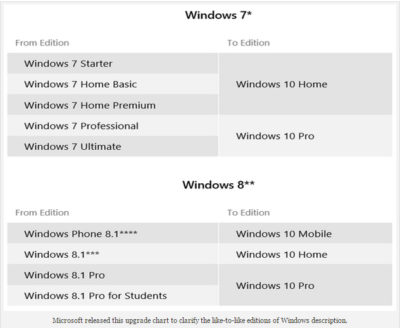
GET STARTED WITH A NEW WINDOWS 10 PC

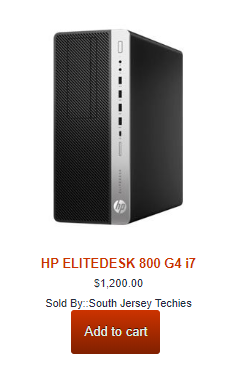
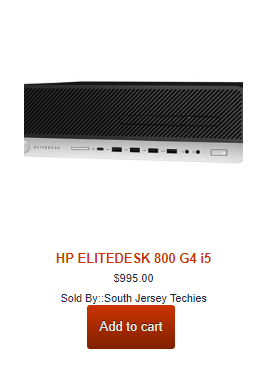
HP ELITEDESK 800 G4 – SFF – CORE I7
HP ELITEDESK 800 G4 – SFF – CORE I5
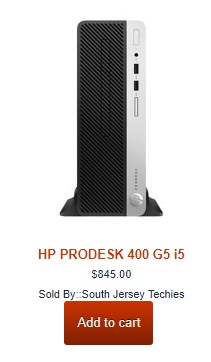
HP ProDesk 400 G5 – SFF – Core i5 8500

Can’t Find What You’re Looking For?

Whether you are upgrading an existing device, buying a new one, or just need support deploying, we have the help you need.


Here are the top features of iOS 11

The 10 best features you won’t be able to live without

Ready for some new iPhone and iPad features? iOS 11 is now out of beta and ready for the public. Here are the best features that came with it.

Get ready to back up your iPhone and iPad: iOS 11 is here. Apple released the latest version of its mobile operating system on Tuesday, introducing us to a handful of brand-new features. In fact, this version of iOS feels like the most ambitious version of iOS that Apple has launched in a while. Here are the best new features that we already can’t live without. 

Siri’s new tricks

Siri is one of those features that keeps getting better with each software upgrade, and iOS 11 is no exception. This time, Siri gets a new voice, plus a super-helpful visual interface that lets you even edit your voice request with text input. And now, Siri is able to translate phrases for you—it can process English to Chinese, French, German, Italian, and Spanish. Apple said that it will add more languages in the months to come.


Customizable Control Center

Currently, Control Center in iOS 10 takes up two panels, so you have to navigate to the second panel to access volume controls. However, iOS 11 brings everything back to a single screen and relies more on 3D Touch. Not only that, but you can also customize which controls you’d like to have on there. You can add new controls to quickly access your Wallet, turn on Low Power Mode, and even start Screen Recording—an all-new feature for iOS.


New Live Photo effects

Apple has given us more reasons to want to take Live Photos, those GIF-like moving images. In iOS 11, you can add effects to your Live Photos after you take them. Find a Live Photo on your camera roll and then swipe up. You will be able to add a looping effect to your photo or make it “bounce” back-and-forth, similar to an Instagram Boomerang. You can also make it a long exposure shot for better photos of low-lit scenarios.


Drag-and-drop on iPad

iOS 11 makes for better multitasking on iPad. Now you can drag-and-drop images, links, and files between apps that are open side-by-side, either in Split View or Side Bar mode. In fact, you can drag-and-drop an app from Dock onto Side Bar mode, and drag that secondary app from the right to the left side of the screen.


Markup your screenshots

Everytime you take a screenshot in iOS 11, it will automatically remain floating on the lower left. You can swipe it offscreen to save it to your camera roll as per usual, or you can tap on it to go into Markup. So now, you can add handwritten notes or comments either with your finger or with your Apple Pencil if you’re using an iPad Pro.


Social profiles in Apple Music

Apple Music gets social in iOS 11. Taking a page from Spotify, Apple Music members now have a profile on the streaming app. You can use your profile page to showcase your favorite playlists, as well as the albums you’ve recently listened to. You can also follow friends on Apple Music, and their profile photo will show up next to the albums they’ve listened to. However, there is currently no way to listen to music on private or secret mode, so be ready for your Apple Music followers to get a glimpse at all your guilty pleasures.


Do Not Disturb While Driving

This feature could be a real life-saver. iOS 11 also introduces “Do Not Disturb While Driving” so that the screen goes totally dark when you’re on the road. You can activate this mode manually via Control Center or have it turn on automatically whenever you’re connected to CarPlay or a car’s Bluetooth. In addition, you can go into your Do Not Disturb Settings to setup an automatic response to all your incoming texts to alert people that you’re driving and will get back to them as soon as you arrive.


Document scanner in Notes

There’s no reason to run to the office scanner anymore, thanks to iOS 11. Using the Notes app you can now press the plus (+) sign to access an all-new document scanner. You can scan several documents at once and apply different filters. The scans can be saved inside your Notes, and you can also export them as PDF files that are Markup-friendly, so you can add your signature and send it back.


Search for handwritten Notes

Another cool feature that iOS 11 brings to Notes is the ability to search for things you’ve written our by hand. If you prefer to take notes using your finger or your Apple Pencil on iPad Pro, they are now searchable. 


QuickType keyboard improvements

iOS 11 also makes significant improvements to the software keyboard. On iPhone, you can press-down on the globe icon and choose one-handed mode. This will bring all the keys closer to either the left or right side of the screen to make it easier to type with one hand. You can also make one-handed mode your default keyboard by going into Settings. For iPad, you can now type numbers, symbols, and punctuation marks without switching to a secondary keyboard. Simply flick down on the key to insert the character you need. 

What we’re still waiting for

Apple previewed a lot of new features for iOS 11, but not all of them are yet available. Here’s a quick look at what’s to come later this fall.

1. Apple Pay Cash for sending or receiving cash within Messages

2. Indoor maps for Apple Maps to help you navigate popular shopping centers and major airports worldwide. 

Have questions?

Get answers from Microsofts Cloud Solutions Partner!
Call us at: 856-745-9990 or visit: https://southjerseytechies.net/

South Jersey Techies, LL C is a full Managed Web and Technology Services Company providing IT Services, Website Design ServicesServer SupportNetwork ConsultingInternet PhonesCloud Solutions Provider and much more. Contact for More Information.

To read this article in its entirety click here.
Uninstall now! Apple abandons QuickTime for Windows despite lingering critical flaws

Apple is giving up on QuickTime for Windows.

Yet another program is joining Java 6 and Windows XP as big-name software you do not want running on your PC. Security firmTrend Micro and the U.S. Department of Homeland Security are advising all Windows users to uninstall Apple’s QuickTime as soon as possible. (The advisory does not affect Mac users.)

The reason for getting rid of QuickTime for Windows is twofold. First, Apple told Trend Micro it is deprecating the software and will no longer deliver security updates for it. Second, there are two known critical vulnerabilities that could allow an attacker to take control of a system running QuickTime.

That’s a hellacious combo.

Apple was unavailable for comment at this writing, but a quick look at QuickTime’s download page shows the software is still publicly available. It hasn’t been updated since at least January, however.

Trend Micro says it does not yet know of any instances where the two potential security threats are being used in the wild but that could change. Trend Micro’s Zero Day Initiative recently published some technical details about the vulnerabilities. ZDI did this because its disclosure policy requires it to publish threat information when a “vendor indicates that the product is deprecated,” and thus won’t be patched.

If you’re a longtime user of iTunes you may be running QuickTime. To dump the program, open the Control Panel on your PC and then from the “category” view go to Programs > Uninstall a program. Once the list of installed programs populates, scroll down until you find QuickTime. Select it with your mouse, and then click Uninstall towards the top of the window. A pop-up window will then appear asking to confirm that you want to uninstall the program. Click Yes and you’ll be QuickTime-free in no time.

A survey published by Secunia Research in late 2015 found that Apple software is among the programs that are updated the least often by Windows users.

Why this matters: Whenever software is about to be abandoned it’s always a good idea to move away from it—or at least start planning to. That goes double for software with known flaws that allow the bad guys to execute code on your machine. QuickTime used to be an important piece of software for Windows users. But these days you don’t need it to watch movie trailers on Apple’s site and it’s no longer used by iTunes to play media on Windows. There’s little reason for the vast majority of Windows users to keep QuickTime on their PCs.

Have questions?

Get answers from Microsofts Cloud Solutions Partner!
Call us at: 856-745-9990 or visit: https://southjerseytechies.net/

South Jersey Techies, LL C is a full Managed Web and Technology Services Company providing IT Services, Website Design ServicesServer SupportNetwork ConsultingInternet PhonesCloud Solutions Provider and much more. Contact for More Information.

To read this article in its entirety click here.

What’s new (and still to come) in Microsoft’s Office 2016 for Windows

Microsoft’s Office 2016 suite for Windows 7, 8 and 10 PCs and tablets is available since September 22, 2015. Here’s what’s new and what’s still to come for Office users.


Microsoft made a first public preview of the suite — which runs on Windows 7, Windows 8 and Windows 10 PCs and laptops — back in March of 2015. Testers had been working with private previews of the suite since 2014.

The full Office for Windows 2016 suite includes new versions of Word, Excel, PowerPoint, OneNote, Outlook, Project, Visio and Access.

There are not a lot of major new features in this release. Microsoft’s main focus with the new version of Office for Windows has been on adding team-collaboration functionality. Among some of the new features in the suite are coauthoring for Word, PowerPoint and OneNote; real-time typing in Word; new integrated Power BI publishing functionality in Excel; and updated search and navigational capabilities in Outlook.

Users who subscribe via Office 365 consumer and/or business plans which include rights to the Office apps also get will get additional, supplemental services and features, including Microsoft’s Sway digital-storytelling app/service; new Office 365 Groups functionality; and more.

As is the case with Windows 10, Microsoft is planning to fill out some of the partially baked Office 2016 features in the suite with regular updates in the coming months. Microsoft is still working on improving and syncing its OneDrive online-storage service. The promised new sync clients for Windows and Mac are due later this year. Built-in coauthoring for the other Office 2016 apps beyond Word is also still in the works. And Enterprise Data Protection, a security feature that Microsoft has promised for Windows 10, also will be coming for Office 2016 for Windows in early 2016, and the Office Mobile apps later this year, company officials said.

Starting with the Office 2016 for Windows release, Microsoft is moving to a new servicing model for Office 365 which is similar to the one it has put in place for Windows 10, with different servicing “branches” providing users with new Office features and fixes on a regular basis.

While on the subject of dates, here’s what Microsoft officials are saying in terms of availability for Office 2016 for Windows (and other related Office apps and services).

The Office 2016 apps are available in 40 languages starting today. Office 365 Office 2016subscribers can choose to download manually the new Office 2016 apps as part of their subscription starting today. Automatic updates of the Office 2016 apps will begin rolling out to consumer and small business subscribers in October 2015, and to commercial customers early next year. Office 2016 is also available today as a one-time purchase for both PCs and Macs.

Update:

A Microsoft spokesperson said MSDN subscribers will have access to both Office 2016 for Mac and Windows today, starting at about 9 am PT/noon ET. Volume Licensing Service Center (VLSC) availability for Office 2016 for Windows will be October 1. (VLSC customers got Office 2016 for Mac in August.)

Office 365 Planner, the lightweight project-management service (formerly codenamed “Highlander”), which Microsoft is building into its Office 365 business subscriptions, will be available in preview to Office 365 First Release customers starting next quarter. And GigJam — a new task-completion service which Microsoft demonstrated earlier this summer — is in private preview as of today, and will be available to Office 365 business subscribers in 2016.

Office 2016 for Windows and Office 2016 for Mac are Microsoft’s two fully-featured Office desktop suites. The company also offers a variety of universal’ and/or mobile Office mobile apps for iPhones, iPads, Android phones and tablets, Windows Phones and Windows PCs and tablets.

Have questions?

Get help from IT Experts/Microsofts Cloud Solutions Partner
Call us at: 856-745-9990 or visit: https://southjerseytechies.net/

South Jersey Techies, LLC is a full Managed Web and Technology Services Company providing IT Services, Website Design ServicesServer SupportNetwork ConsultingInternet PhonesCloud Solutions Provider and much more. Contact for More Information.

To read this article in its entirety click here.
 

CALL US NOW!