Back to Top

Tech, Web, Cloud & Cabling Services

Category: Microsoft Office 2016

The best new features coming to Microsoft’s latest OS: Windows 10

Windows10

Microsoft continues to build out Windows 10 – with a bumper crop of new features announced at its Build conference last week.

These enhancements will be pushed to to Windows 10 users over the coming months, with many arriving in summer when the OS will get a major upgrade dubbed the Windows 10 Anniversary Edition.

Here are the key upgrades heading to Windows 10.

The write stuff
ink-SJTechies

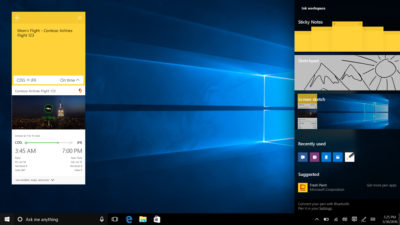
Using a digital pen to write and scribble on the screen of Windows 10 PCs and tablets will get easier.

In a boost to devices that support such pens, such as the Microsoft’s Surface tablet, the OS’ new Windows Ink feature will allow users to jot down notes on the screen without unlocking the device.

Windows Ink will also allow users to write messages on sticky notes and, if appropriate, have them automatically translated into calendar appointments and reminders.

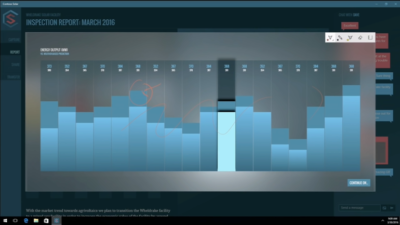
Support for Windows Ink in Microsoft Office, Maps, the Edge browser and other apps will allow users to draw, write and annotate using their pen. Windows Ink will make using the pen in Office more satisfying than it currently is, for example tidying up highlighted marks on documents so they neatly align with text.

Windows 10 will also gain the Ink Workspace, a hub for launching apps that support writing and sketching using the Surface Pen.

Ink everywhere
win10-inking-SJTechies

Support for drawing, writing and annotating using digital pens will likely come to many apps.

Microsoft says that support for Microsoft Ink will be easily added to Universal Windows Platform apps, requiring just two lines of XAML code.

Digital ruler
win10-ruler-SJTechies

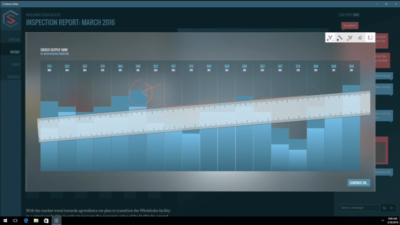
It sounds simple, but the new on-screen ruler should prove to be a useful addition for those who want to draw straight lines using a digital pen.

Smarter Cortana
cortana-SJTechies

The attraction of a virtual assistant is the simplicity with which they allow you to carry out tasks.

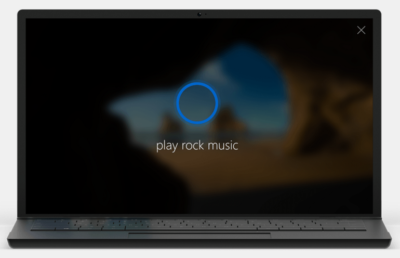
To ease the process of using Windows 10’s Cortana, the voice-controlled assistant will no longer require you to log into Windows, with users able to make a note, play music or set a reminder from the lock screen.

Cortana will also become more proactive and make suggestions based on a user’s past behaviour – offering to order lunch or to arrange transportation.

More apps will also be able to use Cortana to automatically complete tasks for users or to carry out actions based on context, such as the user’s current location or time of day.

Windows Hello comes to apps and the web
hello-SJTechies

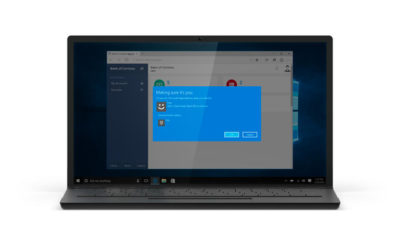
Windows 10 already lets you log into the OS using your face.

The anniversary edition will extend this biometric log-in to Windows apps and websites via Microsoft Edge. As with the OS, users will be able to authenticate their identity using a facial, iris or fingerprint scan.

Another new feature will allow users to unlock a PC running Windows 10 Enterprise Edition by tapping a Windows Hello-enabled phone, although Microsoft has said the feature will only be available on “select premium phones”.

Android app notifications on Windows 10
android-SJTechies

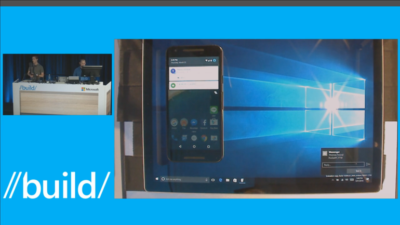
In future, notifications on Android devices will be able to show on Windows 10 PCs.

Any notification popping up on the Android notification panel can, via the Cortana Android app, also appear as a notification on a linked Windows 10 desktop.

Microsoft demoed the ability at its recent Build conference for developers.

Browser extensions
extensions-SJTechies

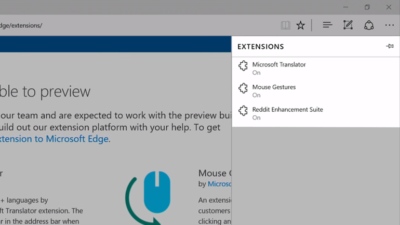
Microsoft’s Edge browser will soon gain support for extensions.

Extensions are small programs that can be downloaded to add new functionality to a browser, and are already found in Chrome, Firefox and other browsers today.

Support for extensions has already been added to Edge for those testing pre-release builds of Windows 10 under the Insider program.

The first extensions to be supported by Edge are Microsoft Translator, an extension that automatically translates pages in over 50 different languages, an extension to augment mouse gestures support, and a preview version of the Reddit Enhancement Suite.

Microsoft promises more extensions will be added later this year, including AdBlock, LastPass and Evernote.

Pinned browser tabs
pinned-tabs-SJTechies

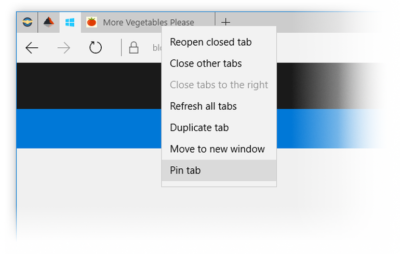
Microsoft is also adding to Edge the ability to pin your favorite sites and web apps so they always have a tab open in the browser.

Updated Maps app

maps-app-pc-SJTechies

The Maps app has several new features, as well as UI and performance improvements.

Additions include one-tap access to search and directions, the ability to view multiple searches and directions at the same time, labels for search results on the map and turn-by-turn directions read by Cortana.

The improved app is available now to those testing Windows 10 under the Insider program.

Access Linux command-line tools in Windows
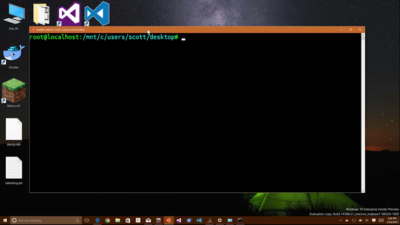
bash-win10-SJTechies

More one for developers, Microsoft is also bringing the ability to run the Bash shell to Windows.

The Bash shell is a command line interpreter that is available on many different Linux distributions, as well as Mac OS X.

The shell includes a host of tools that allow power users to carry out and orchestrate complex chains of commands.

Bash will be available via a Universal Windows Platform app, which will provide an image of the Linux distribution Ubuntu and run on the Windows 10 desktop.

Users will be able to use the Bash shell to download and install programs from the command line, as they do from inside Ubuntu. Microsoft says Ubuntu software will run as fast in the Windows app as it does natively, thanks to a software subsystem for handling Linux system calls.

Microsoft has described the app as offering a developer toolset. While it has access to the files on the Windows PC, the app only provides access to a command line — not a graphical desktop — and reportedly has limits on what it can be used for, such as not being able to run a server.

Have questions?

Get answers from Microsofts Cloud Solutions Partner!
Call us at: 856-745-9990 or visit: https://southjerseytechies.net/

South Jersey Techies, LL C is a full Managed Web and Technology Services Company providing IT Services, Website Design ServicesServer SupportNetwork ConsultingInternet PhonesCloud Solutions Provider and much more. Contact for More Information.

To read this article in its entirety click here.
What did Microsoft get right in 2016?

2016 was a very good year for Microsoft in terms of decision making. Here is a  list of five things the company got right.

Since its inception way back in the ancient epoch known as the 1970s, Microsoft has often been ridiculed for making mistakes. Whether it was for bad business strategies, poor products, or unscrupulous practices, Microsoft seemed to bring out the passionate ire in many people.

But what often gets overlooked is what Microsoft does right each year. And by just about any measurement, 2016 was a remarkable year for the company. Under the leadership of Satya Nadella, Microsoft has changed its business strategy to reflect what it describes as a mobile-first, cloud-first business world. And in 2016, that strategy began show results.

Here, in no particular order, are five things Microsoft got right in 2016.

1. Windows 10 Anniversary Update

To mark the one-year anniversary of Windows 10, Microsoft released a large patch it dubbed the Windows 10 Anniversary Update. Okay, so Microsoft is not very clever in naming things. But the patch itself was well received. It included new security measures, new program features, Microsoft Edge browser extensions, and advanced support for digital pens, among many other enhancements. If you were already using Windows 10, the Anniversary Update was a must.

2. Surface Studio

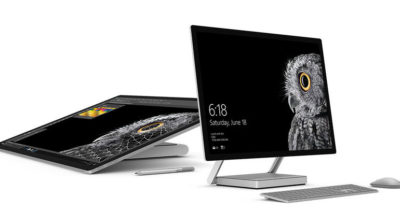
While not its primary business, Microsoft has been developing some noteworthy pieces of hardware the past few years and in 2016, the company generated a large amount of buzz with the release of the Surface Studio. This elegant computer combines the best of the desktop, laptop, and tablet to create a unique and innovative platform perfect for artists, designers, and other creative people. With data visualization becoming ever more important, Microsoft may have invented the perfect tool for the big data generation.

3. Microsoft Office 365

I have been wondering aloud if it is a bit too much, but there can be no doubt that with the dozens of program and feature updates released in 2016, Microsoft Office 365 is the alpha and omega of productivity software. Rather than trying to name all of the new features, it would be best to concentrate on the underlying theme: collaboration. Whether it is Yammer, Skype for Business, or the intelligent cloud, Microsoft is concentrating on features necessary for success in a collaborative environment.

4. LinkedIn

In 2016, Microsoft made several acquisitions of both companies and their technologies. Perhaps the most high-profile of these acquisitions was LinkedIn. Despite all of its efforts to create a collaboration platform with Office 365, the one thing Microsoft needed was a social networking component. LinkedIn gives the company a jump start toward establishing a social networking presence that can compete with the likes of Twitter and Facebook. It will be interesting to see what Microsoft does with this acquisition.

5. IoT, AI, and machine learning

While we may live in a mobile-first, cloud-first world right now, the future may very well revolve around the Internet of Things (IoT), artificial intelligence, and machine learning. To its credit, Microsoft sees the potential of these technologies and has taken steps to get ahead of the curve. In terms of recent history, getting ahead of the curve is not something Microsoft has done very well, so it is difficult to know where the research will lead, but it should prove to be worth watching closely.

Despite what some people may tell you, Microsoft does do some things right. In fact, for the most part, the company does more things right than it does wrong. In 2016, Microsoft did many things right and consumers and businesses have been the beneficiaries. Let’s hope Microsoft can continue the trend in 2017.

Have questions?

Get answers from Microsofts Cloud Solutions Partner!
Call us at: 856-745-9990 or visit: https://southjerseytechies.net/

South Jersey Techies, LL C is a full Managed Web and Technology Services Company providing IT Services, Website Design ServicesServer SupportNetwork ConsultingInternet PhonesCloud Solutions Provider and much more. Contact for More Information.

To read this article in its entirety click here.

The end is near: Say goodbye to the Windows 10 free upgrade

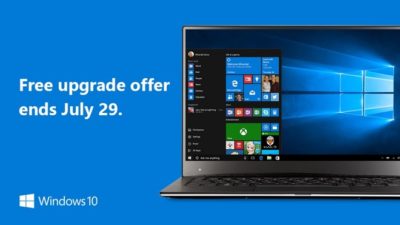
The deadline for a free Windows 10 upgrade is right around the corner. Find out what happens after the offer expires.

Windows 10-July29

Don’t look now, but July 29, 2016, is coming up fast. That is the one-year anniversary of the release of Windows 10, which means the ability to upgrade to the new operating system for FREE will soon expire. (If you are interested, you can take a look at the official countdown here.)

In a January 21, 2015, Windows Experience blog post titled The next generation of Windows: Windows 10, we learned that Windows 10 would be a free upgrade. Author Terry Myerson said:

Today was a monumental day for us on the Windows team because we shared our desire to redefine the relationship we have with you—our customers. We announced that a free upgrade for Windows 10 will be made available to customers running Windows 7, Windows 8.1, and Windows Phone 8.1 who upgrade in the first year after launch.

A little over six months later, on July 28, 2015, Myerson penned another Windows Experience blog post, titled Windows 10 Free Upgrade Available in 190 Countries Today, in which he reiterated the free upgrade policy:

From the beginning, Windows 10 has been unique—built with feedback from five million Windows Insiders, delivered as a service with ongoing innovations and security updates, and offered as a free upgrade to genuine Windows 7, Windows 8.1 and Windows Phone 8.1 customers.

If you’ve been reading articles by Woody Leonhard or Paul Thurrott in recent months, you know that Microsoft has been upping its game with the Get Windows 10, or GWX, program it built into Windows 7 and Windows 8.1. It really wants every Windows user everywhere to be running Windows 10.

Any holdouts—Windows 7 or Windows 8.1 users who have been sticking to their guns so far—have only a few more weeks to go before losing their chance to get Windows 10 for free.

In a recent Windows Experience blog post titled Windows 10 Now on 300 Million Active Devices – Free Upgrade Offer to End Soon, Yusuf Mehdi, the corporate vice president of Microsoft’s Windows and Devices Group, said:

…we want to remind you that if you haven’t taken advantage of the free upgrade offer, now is the time. The free upgrade offer to Windows 10 was a first for Microsoft, helping people upgrade faster than ever before. And time is running out. The free upgrade offer will end on July 29 and we want to make sure you don’t miss out. After July 29th, you’ll be able to continue to get Windows 10 on a new device, or purchase a full version of Windows 10 Home for $119.

What will Windows 10 cost after July 29?

As Mehdi pointed out in his post, you will be able to purchase a full version of Windows 10 Home for $119.

But how much will Windows 10 Pro cost?

Well, if you head over to the Microsoft Store right now, you’ll find that you can purchase both Windows 10 Home and Windows 10 Pro as a download or on a USB flash drive. Windows 10 Pro will cost you $199.99. And moving past the July 29 deadline for the free upgrade, it’s a pretty safe bet that prices will remain the same—especially since they’re the same price points that the full versions of Windows 8.1 Home and Pro sold for when that operating system was new.

Will there be upgrade versions of Windows 10 after July 29?

Since Microsoft provided free upgrades for a full year, I wonder if there will be upgrade packages for Windows 7 and Windows 8.1 users who decide to upgrade to Windows 10 after July 29. I suppose that it’s possible, but then again, maybe not. When Microsoft introduced Windows 8.1 packages, it offered only the full versions—there were no upgrade versions of Windows 8.1. With that in mind, it’s easy to speculate that this may also be the case with Windows 10.

Have questions?

Get answers from Microsofts Cloud Solutions Partner!
Call us at: 856-745-9990 or visit: https://southjerseytechies.net/

South Jersey Techies, LL C is a full Managed Web and Technology Services Company providing IT Services, Website Design ServicesServer SupportNetwork ConsultingInternet PhonesCloud Solutions Provider and much more. Contact for More Information.

Microsoft makes it easier for firms to keep running Windows 7

The technology giant releases a bundle of updates for the seven-year-old operating system in the latest move designed to appeal to businesses in no rush to move to Windows 10.

windows-7prof-logo

Microsoft has taken another decision that should make it easier for businesses to continue running Windows 7.

The technology giant announced the release of the Windows 7 SP1 convenience rollup, a collection of security and other updates for the seven-year-old operating system. The release includes core Windows fixes, security fixes and hot fixes that have been issued since Service Pack 1 was released in 2011 and is designed to simplify the updating process.

Microsoft’s decision to release the bundle is a departure from the firm’s stance earlier this year, when it said it had no news on the promised convenience rollup of fixes for Windows 7, stressing instead “the success our customers are experiencing upgrading to Windows 10”.

The release follows another recent choice by Microsoft to dial back pressure on businesses to move to Windows 10. At the beginning of the year, Microsoft announced it would phase out support for Windows 7 and 8 on new PC hardware. The move seemed designed to encourage businesses not to downgrade new Windows 10 machines to an earlier OS, as has been common in the past in order to standardize corporate hardware. However, Microsoft later watered down the plans, pushing back the point at which it will end full extended support for Windows 7 and 8.1 machines running on Intel’s Skylake CPUs.

Richard Edwards, principal analyst for Enterprise ICT at Ovum, said Microsoft’s recent decisions are an acknowledgement of how many businesses still run Windows 7 and how long it will likely take them to switch.

“Most organizations are still in the early planning stage when it comes to Windows 10. This means that most of the PCs running Windows 10 today are in the consumer segment of the market, and thus Windows 7 is probably running on 80 percent-plus business Windows PCs,” he said.

Inside enterprises, Windows 7 is “going to be around for many years to come,” he said. “Microsoft has to find ways to please and delight these enterprise customers, and easing the burden on IT departments is one way to do this.”

While Edwards believes the release of the Anniversary Edition update to Windows 10 will drive upgrades by early adopters, he predicted that mass adoption is still some way off, forecasting that the bulk of firms will migrate from mid-2017 through to 2020.

“Organizations will only upgrade to Windows 10 if they have a clear insight into its business value,” said Edwards, adding that key business features such as Enterprise Data Protection were still not in place.

Microsoft’s focus on driving customers to Windows 10 has earned it criticism from small businesses, which recently complained about the decision to push the aggressive Get Windows icons and pop-ups to domain-joined PCs.

Analyst house Gartner had predicted that adoption of Windows 10 by business would be “significantly more rapid” than that of Windows 7 but this year was more cautious, claiming that flat IT budgets are pushing the start of enterprise migrations back to 2017.

“It’s to do with current budget restrictions as much as anything. They [budgets] are not being made available,” said Gartner research director Ranjit Antwal at the time.

There is little third-party data on the rate of adoption of Windows 10 by business, although Microsoft claims enterprises are switching more rapidly than they did to Windows 7.

Have questions?

Get answers from Microsofts Cloud Solutions Partner!
Call us at: 856-745-9990 or visit: https://southjerseytechies.net/

South Jersey Techies, LL C is a full Managed Web and Technology Services Company providing IT Services, Website Design ServicesServer SupportNetwork ConsultingInternet PhonesCloud Solutions Provider and much more. Contact for More Information.

To read this article in its entirety click here.
Windows 10: Here’s Microsoft’s new look Start menu

Microsoft has changed the look of the Start menu in Windows 10.

The revamped Start menu is due to be added to Windows 10 this summer, as part of a major update coined the ‘Windows 10 Anniversary Edition’.

Microsoft revealed the updated appearance in an early build of the OS, which it released to testers in the Windows 10 Insider program on Friday.

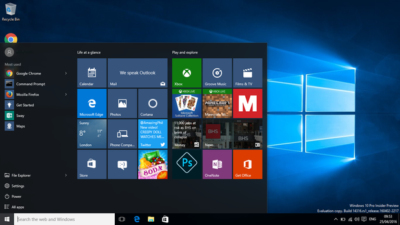
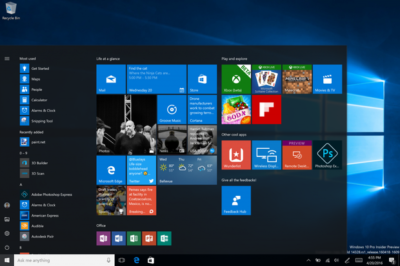
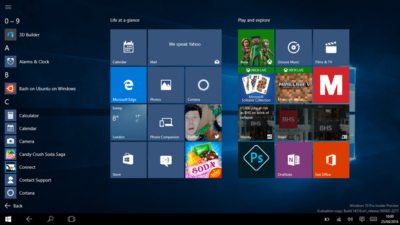
The new look Start menu makes the ‘All Apps’ list visible by default on the left-hand side. In another new addition, a selection of the user’s ‘Most-used’ apps are shown at the top of this permanently visible ‘All Apps’ list. Microsoft says the change should reduce the clicking and scrolling needed to access apps.

The Power, Settings and File Explorer icons are also always visible in the left rail of the Start menu and the ‘Recently added’ section will display three entries, instead of one. Any folders that users have added to the Start menu are now immediately accessible without having to click the hamburger icon.

win10

The old look start menu

updated-startmenu-windows10

The new look start menu

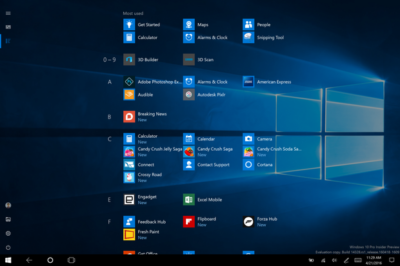
The look of the Start menu in tablet mode has also been overhauled, turning the ‘All Apps’ list into a fullscreen menu, reminiscent of the Windows 8.1 Start screen. Gabe Aul, VP for Microsoft’s engineering systems team, says the switch to fullscreen was a ‘top request from Windows Insiders’, adding that ‘the grid-like implementation of the full-screen ‘All Apps’ list aims to provide efficiency while taking advantage of the additional real estate on the Start screen on a tablet’.

win10tab

The old look ‘All Apps’ list in tablet mode.

full-screen-allapps-windows10

The new look ‘All Apps’ list in tablet mode.

The final Start menu change is designed to make it easier to toggle between pinned tiles and the ‘All Apps’ list, by providing the option to do so in the menu’s left rail.

More helpful Cortana and other changes

The latest Windows Insider build, 14328, also includes a raft of features that will be available to all users following the Anniversary Update.

These new components include Windows Ink, which allows users to more easily write notes on touchscreen PCs and tablets using a digital pen. The addition of Windows Ink to Windows 10 allows users to write on digital sticky notes, draw on digital whiteboards and annotate content in a variety of apps, including Maps, Microsoft Edge, and Office. Microsoft wants support for drawing and writing using a digital pen to be present in many Windows 10 apps and says that adding support for Windows Ink only requires developers to write two lines of code.

Windows 10’s digital assistant Cortana has also been tweaked. Users will no longer have to log into Windows to use Cortana and instead will be able to use voice commands to get Cortana to make notes, play music or set a reminder from the lock screen.

Cortana can now also be used to set photo reminders, for example the user could take a picture of a cheese they want to buy next time they’re in a store, and add reminders based on content from another Windows 10 app, for example telling a user to read an article they flagged as interesting in the Edge browser. Cortana is now also accessible to all users, with Windows 10 no longer requiring users to sign-in before they can ask simple questions of the digital assistant.

Other changes include the ability to search files on OneDrive cloud storage that aren’t synced locally, tweaks to the look of and what is displayed in the Action Center and via notifications, various changes to the Taskbar — including easier access to the calendar and the removal of the File Explorer icon, as well as updates to the Settings app and lock screen.

As this is an early build of Windows 10, some of these features may change before reaching the general public, based on feedback from testers in the Windows Insider program.

Have questions?

Get answers from Microsofts Cloud Solutions Partner!
Call us at: 856-745-9990 or visit: https://southjerseytechies.net/

South Jersey Techies, LL C is a full Managed Web and Technology Services Company providing IT Services, Website Design ServicesServer SupportNetwork ConsultingInternet PhonesCloud Solutions Provider and much more. Contact for More Information.

Office 365 gets Six new Excel Functions

Microsoft made several new updates to Office 365 in February, including the addition of six useful functions for Excel.

EcxelOffice365

When it comes to general updates to Microsoft Office 365, February 2016 was a fairly significant month. Microsoft rolled out numerous improvements to Office 365, like better pen annotation integration, the ability to pin documents to the Start menu, a new feature that allows images to be inserted into documents directly from the camera, and the best—adding more functions to Excel.

Six new functions

Using, combining, and creating formulas in Microsoft Excel is where true Excel gurus separate themselves from the pretenders and wannabes. For an Excel aficionado, the satisfaction of creating the perfect nested formula is second to none when it comes to Excel coding. So when Microsoft adds six new functions to Excel in one month it is a very big deal.

Of course, while there is great satisfaction when you figure out the perfect formula, a certain amount of despair also goes with it—because now you have to apply that complicated nested formula over and over again. This is where the six new functions are supposed to help.

The first updated functions are TEXTJOIN and CONCAT, and they are replacements for the old concatenate function, which gave the user the power to join strings of separate text into one cell. This comes up with addresses all the time—a common task for spreadsheets since they were invented.

In the past, the formula would look something like this:

=CONCATENATE(A3, “, “, B3, “, “, C3,”, “, D3, “, “, E3)

With the new TEXTJOIN formula, the same process would look something like this:

=TEXTJOIN(“, “, TRUE, A3:E3)

This is just one example of how these new functions are designed to simplify users’ lives when it comes to advanced Excel tasks.

The next two new functions are IFS and SWITCH, which provide an alternative to using the infamous series of nested IF functions. The old IF function was the mainstay for Excel coders looking to apply logic to sets of data. You know what I mean: If this is larger than this, than this; but if it is larger than this but less than that, then this, etc. The more nested IF functions the more complicated the formula and the more likely you are to make a mistake.

The last two new functions are MAXIFS and MINIFS. They are designed to supplement the MAX and MIN functions by allowing users to apply conditions to the maximum and minimum calculations and thereby filter results. In the past you may have had to use the IF function to create your filtered conditions. These new functions eliminate the need and make your life just that much simpler.

Office365

Bottom line

When Microsoft began trying to convince us that subscribing to Office 365 was a better idea than repurchasing new versions every few years, the ability to update the productivity suite regularly at no extra cost was one of the main selling points. As the new six functions illustrate, that was not a false promise.

These functions are just the tip of the iceberg when it comes to Office 365 improvements. However, the problem with continuous updates to the software is that users have to try to keep up.

Even though there are some users out there who will keep using nested IF functions no matter what improvements come along, for example. But for the rest of us, it would seem to be worthwhile to pay attention to whatever improvements Microsoft rolls out each month. Because for better or worse, changes to Office 365 are going to keep coming.

Have questions?

Get answers from Microsofts Cloud Solutions Partner!
Call us at: 856-745-9990 or visit: https://southjerseytechies.net/

South Jersey Techies, LL C is a full Managed Web and Technology Services Company providing IT Services, Website Design ServicesServer SupportNetwork ConsultingInternet PhonesCloud Solutions Provider and much more. Contact for More Information.

Yammer is on the way to Office 365: Are you ready?

Microsoft is activating Yammer for every Office 365 subscription. But is this one collaboration tool too many?

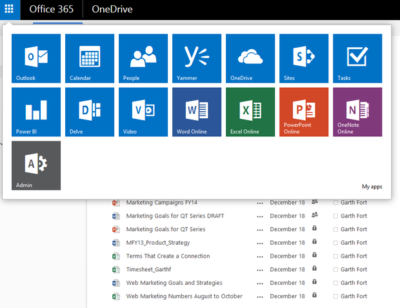
On February 2, 2016, Kirk Koenigsbauer announced in the official Microsoft Office 365 blog that Yammer is now being activated for every eligible Office 365 subscription. In a nutshell, that means Yammer is going to be another app on the Office 365 app list unless an admin specifically turns off access. Your enterprise should plan accordingly.

Yammer

For those of you unfamiliar with the product, Yammer bills itself as an enterprise internal social network. It mixes the typical chat messenger application with collaboration tools available in Office 365.

Similar to the Delve tool we looked at last week, Yammer can serve as the central hub for team collaboration. From within a Yammer discussion, teams can set up meeting appointments using Outlook, switch to a full-fledged Skype for Business video meeting, and access OneDrive for Business to create collaborative documents.

The initial rollout of Yammer took place on February 2, 2016; the rest of the rollout will take place in stages. The next release is March 1, 2016, and the last is April 1, 2016. According to the blog post, the first wave is for “Office 365 customers with a business subscription who purchased fewer than 150 licenses that includes Yammer and who have zero or one custom domains for Yammer.”

The second wave is for “Office 365 customers with a business subscription who purchased fewer than 5,000 licenses that includes Yammer.” Customers with an education subscription are not included.

The final wave is for “remaining customers with a business subscription and all customers with an education subscription.” For subscribers who have never had a Yammer account, the rollout will take place last, in April. Alas, that is the wave I’ll have to wait for.

Collaboration

Yammer is the latest, and perhaps the last, major teamwork collaboration app to be added to Office 365. In Microsoft’s vision of a mobile-first, cloud-first enterprise, teams collaborate across distances using shared documents, video conferencing, and applications that tie it all together in one virtual location.

YammerForOffice365

With the addition of Yammer, Microsoft is offering several tools teams can use to manage and organize their collaboration activities. Teams can use Yammer, Delve, Groups, Sites, SharePoint, and OneNote to manage their shared conversations and documents across the enterprise. One of those tools should be able to satisfy even the most persnickety of teams.

Bottom line

But then again, that may be where we run into problems. One could argue that there are too many collaboration tools available in Microsoft Office 365. While all these wonderful choices may seem good at first glance, it is possible that subscribers may become overwhelmed.

Microsoft’s idea that teams can choose the best tool for them or for the project they are working on sounds all well and good, but it does still require someone to make an important initial decision. For some people, making a decision that will affect a project from start to finish can be a daunting task.

In the long run, it may be beneficial for organizations to establish guidelines for when each of the collaboration tools works best. They may even decide to block some of the tools from use altogether in favor of a recommended best practice.

Having myriad collaboration tools is generally a good thing, but it might help move things along if the enterprise establishes some well thought out guidelines.

Have questions?

Get answers from Microsofts Cloud Solutions Partner!
Call us at: 856-745-9990 or visit: https://southjerseytechies.net/

South Jersey Techies, LL C is a full Managed Web and Technology Services Company providing IT Services, Website Design ServicesServer SupportNetwork ConsultingInternet PhonesCloud Solutions Provider and much more. Contact for More Information.

Windows 10 is being adopted by business at nearly twice the rate of Windows 8

Microsoft’s latest OS is proving more attractive to firms than Windows 8 – particularly among larger businesses.

Windows 10


Businesses are proving far more willing to experiment with Windows 10 than they were with Windows 8.

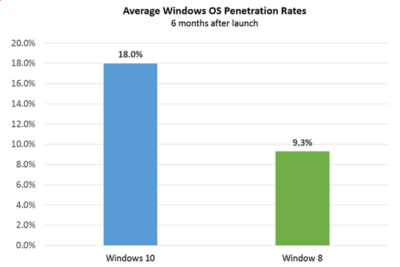
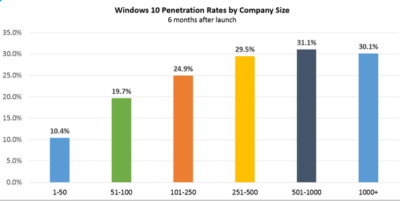
Six months after Windows 10’s launch nearly one in five firms, 18 percent, appear to be testing the OS, research by professional IT network Spiceworks found. In contrast, at the same point after Windows 8’s release, the OS was only being trialled by just over nine percent of businesses.

The anonymised data on what proportion of firms are using at least one Windows 10 machine was gathered from the millions of IT pros that use its software. Spiceworks says businesses of all sizes use the software to inventory devices connected to their networks.

This faster pace of enterprise adoption is backed up by figures from IT asset management company Samanage, told that 62.4 percent of its enterprise customers have at least one managed PC running Windows 10. These are sizeable businesses, with each of Samanage’s enterprise customers having an average of more than 1,000 seats. Microsoft also claims that 76 percent of its enterprise customers are piloting its new OS.

“Our data shows that IT pros were most excited about the return of the familiar start button experience in Windows 10, which reduces the need for end-user training required for Windows 8,” said Peter Tsai, IT analyst at Spiceworks in his assessment of why the new OS is proving more popular than Windows 8.

“Many IT pros also liked the free upgrade offer via Windows Update, which makes it easy for many to test the new OS. And lastly, they were looking forward to new security features that promise to make Windows 10 a more secure operating system than previous versions.”

Windows 10 is benefiting from a comparison to an unpopular OS, demand for Windows 8 was so weak that analyst firm Canalys warned in 2014 that “Microsoft risks losing momentum unless it does something drastic to turn its Windows business around”.

And while a significant proportion of businesses may be experimenting with Windows 10, it is likely to be some time before a large number move to the OS, as business typically lag behind consumers due to the complexity of managing such upgrades at scale. Of those firms testing Windows 10, about 40 percent have three or more devices running the OS, according to Spiceworks’ data.

Medium and large businesses were the most likely to have at least one Windows 10 machine Spiceworks found – with 31 percent of firms with more than 500 people trialling the OS, compared to 10 percent of companies with 50 employees or fewer.

Windows 10


“We also know from many conversations with IT pros that smaller companies tend to have fewer resources for OS migration, so many SMBs could be holding off on Windows 10 until they have the time and manpower to adequately test the OS for hardware and application compatibility,” said Tsai.

Last year, half of the 500 IT pros surveyed by Spiceworks expressed an interest in adopting Windows 10 inside their business.

Microsoft’s decision to phase out support for Windows 7 and 8 on new PC hardware will also put pressure on businesses not to downgrade new Windows 10 machines to an earlier OS, as has been common in the past in order to standardize corporate hardware.

Microsoft is also reporting rapid adoption of Windows 10 by home users, with more than 200 million devices worldwide running the OS.

The popularity of the OS may, in part, be a result of Microsoft’s tactics to get consumers to upgrade. This aggressive approach includes recently implementing changes that will trigger the free upgrade to Windows 10 to begin automatically installing on many Windows 7 and Windows 8.1 PCs used in homes. Microsoft is making this push as part of its drive to get one billion devices running Windows 10 by 2018.

Have questions?

Get help from IT Experts/Microsofts Cloud Solutions Partner
Call us at: 856-745-9990 or visit: https://southjerseytechies.net/

South Jersey Techies, LL C is a full Managed Web and Technology Services Company providing IT Services, Website Design ServicesServer SupportNetwork ConsultingInternet PhonesCloud Solutions Provider and much more. Contact for More Information.

To read this article in its entirety click here.
Windows 10: Ten big things to watch for in 2016

This year will mark the first full year of release for Microsoft’s new OS. A look at what’s in store for Windows 10 this year.

Windows

Windows 10 was described as the “last version of Windows” – an OS that would evolve over time rather than be superceded.

In the few months since Windows 10’s launch Microsoft says it has been installed on more than 110 million devices. But just what lies in store for the OS in 2016, how will it get better and what new devices will it find its way onto?

1. Windows 10 will begin automatically installing on your old machine

Windows 10 is available as a free upgrade to Windows 7 and 8.1 users and Microsoft is getting increasingly aggressive about moving these users to the new OS.

From this year Windows 10 will automatically begin installing on most Windows 7 and 8.1 machines.

Users will still need to confirm the installation manually for it to continue. However, if they choose not to proceed it’s unclear if they can cancel it altogether, with Jeremy Korst, general manager of the Windows and Devices team at Microsoft, saying only that “the customer will have the ability to delay it for some period”.

If users do upgrade but don’t like Windows 10 they will have 31 days to roll back to their previous OS.

The automatic installation, the result of Microsoft changing the status of the Windows 10 upgrade to a Recommended update, will be preceded by increasingly insistent nag messages to upgrade. These notices are already being shown to some Windows users and have been criticised for not offering an easy opt-out.

2. Microsoft Edge will get extensions

Windows 10 launched with Microsoft Edge, a new browser that cast off a lot of the legacy code holding Internet Explorer back.

However, while speedy and capable on paper, the browser suffers from its share of bugs and is missing support for extensions, a key feature found in competitors such as Chrome and Firefox.

Microsoft will rectify this omission “early next year” when Korst said it will add extensions to Edge in test builds of Windows 10, ahead of being made generally available.

Extensions are small software programs, typically written using HTML, CSS and JavaScript, that augment the functionality of a browser.

Earlier this month, Microsoft accidentally published a website announcing the introduction of extensions to test builds of Windows 10. The site, which was taken down, referenced extensions for Pinterest and Reddit.

Microsoft originally planned to add support for extensions to Edge this year.

3. Windows 10 will blur the virtual and real world

Microsoft’s Windows 10-powered augmented reality headset HoloLens will ship to developers in the first quarter of 2016.

The augmented reality headset places 3D virtual images in the wearer’s vision so that they appear part of the real world – for instance, a Minecraft landscape sits on a coffee table or a Skype video sits on the wall.

After trying a demo of the headset this week, TechRepublic senior writer Dan Patterson said that though the headset had a limited “field of vision”, “the 3D animations are smooth, easy to interactive with, and result in only marginal eyestrain”.

The HoloLens doesn’t come cheap, with the developer kit priced at $3,000 – although Microsoft says this early release is meant for developers and commercial customers.

Although HoloLens has obvious consumer and gaming uses, Microsoft is stressing its use for business and is working with NASA, AutoDesk, Volvo, Dassault Aviation, Case Western Reserve University, and other large organisations to develop applications for it.

4. More security for enterprise

The coming year will also see some notable new features added to the enterprise version of Windows 10.

Key among these additions is Enterprise Data Protection, which will allow companies to separate work and personal data on devices using containerisation file techniques. It will also encrypt data as it moves around the organisation – helping to ensure that information isn’t accessed by the wrong people.

The feature will be rolled out to people testing Windows under the Insider Program “early this year”.

5. Testers will get a peek at even earlier builds

Those testing early releases of Windows 10 under the Windows Insider Program will be able to get earlier access to new features from January this year.

Those who choose to be in the “fast” ring of the Insider Program will receive builds of Windows 10 more frequently in 2016, according to Microsoft VP Gabe Aul.

The price of testers getting their hands on early builds more regularly will be that this software will likely include more bugs, he said. Those testers who prefer stability to early access should opt for the “slow” ring, he said.

6. Cortana will be everywhere

Microsoft is planning a major upgrade to Windows 10, codenamed Redstone, next year – with reports the upgrade will put Microsoft’s virtual assistant Cortana at the core of the OS.

An unnamed source told The Verge the new Cortana will help users with a much wider range of tasks inside Windows 10, appearing contextually in documents to provide “information and assistance” and giving Cortana control over a wider range of notifications.

The other major upgrade to Cortana will reportedly be an ability to start a task on one device and pick it up on another, for instance if you get a missed call on an Android phone running the Cortana app you could reply from your Windows 10 PC via text.

7. Microsoft doubles down on Windows 10 phones as desktops

A much touted feature of Windows 10 is its ability to run a desktop OS from a phone.

Microsoft’s new Lumia 950 and 950XL handsets can – wirelessly or via a dock – be hooked up to a monitor, mouse and keyboard and used to run a Windows desktop.

The Windows 10 OS can change the look and feel of certain apps, as well as its own appearance, to suit the phone or the desktop, as well as coping with everyday desktop tasks, such as multitasking and copying files from a USB stick.

The expectation is that Microsoft will further commit to this idea of using your phone as a desktop in 2016, with rumours that Panos Panay and the team behind the high-end Surface Book laptop are working on a Surface Phone that will release next year.

8. No more free upgrade

Windows 10 is available as a free upgrade to everyone running Windows 7 or 8.1 but only for a limited time.

The offer of a free upgrade will expire on 29 July 2016 – after which point it seems that users will have to buy a Windows 10 licence.

However, due to the in-your-face tactics that Microsoft is adopting to persuade people to upgrade, it seems unlikely that Windows 7 and 8.1 users will inadvertently miss out on the offer.

9. Windows 10 replaces its predecessors on new PCs

If you’re not a fan of Windows 10 then you should buy a new PC before October.

From the end of October 2016, PC makers will have to sell new machines with Windows 10, rather than Windows 7 or 8.1.

After that point businesses that want to run older Windows versions on new machines will have to rely on downgrade rights or software assurance rights under volume license agreements.

10. Windows 10 Surface Hub arrives

From January 2016 Windows 10 will power another new piece of hardware,Microsoft’s touchscreen computer the Surface Hub.

The successor to its large-screen Perceptive Pixel displays, the Surface Hub will run a custom version of Windows 10 and various apps needed for workplace communication and collaboration, including OneNote, Skype for Business and Office.

The 55-inch, Intel Core i5-based Surface Hub model will sell for $6,999 (estimated retail price), and the Intel Core i7-based 84-inch version for $19,999 ERP.

Have questions?

Get help from IT Experts/Microsofts Cloud Solutions Partner
Call us at: 856-745-9990 or visit: https://southjerseytechies.net/

South Jersey Techies, LLC is a full Managed Web and Technology Services Company providing IT Services, Website Design ServicesServer SupportNetwork ConsultingInternet PhonesCloud Solutions Provider and much more. Contact for More Information.

To read this article in its entirety click here.

Uninstall now! Apple abandons QuickTime for Windows despite lingering critical flaws

Apple is giving up on QuickTime for Windows.

Yet another program is joining Java 6 and Windows XP as big-name software you do not want running on your PC. Security firmTrend Micro and the U.S. Department of Homeland Security are advising all Windows users to uninstall Apple’s QuickTime as soon as possible. (The advisory does not affect Mac users.)

The reason for getting rid of QuickTime for Windows is twofold. First, Apple told Trend Micro it is deprecating the software and will no longer deliver security updates for it. Second, there are two known critical vulnerabilities that could allow an attacker to take control of a system running QuickTime.

That’s a hellacious combo.

Apple was unavailable for comment at this writing, but a quick look at QuickTime’s download page shows the software is still publicly available. It hasn’t been updated since at least January, however.

Trend Micro says it does not yet know of any instances where the two potential security threats are being used in the wild but that could change. Trend Micro’s Zero Day Initiative recently published some technical details about the vulnerabilities. ZDI did this because its disclosure policy requires it to publish threat information when a “vendor indicates that the product is deprecated,” and thus won’t be patched.

If you’re a longtime user of iTunes you may be running QuickTime. To dump the program, open the Control Panel on your PC and then from the “category” view go to Programs > Uninstall a program. Once the list of installed programs populates, scroll down until you find QuickTime. Select it with your mouse, and then click Uninstall towards the top of the window. A pop-up window will then appear asking to confirm that you want to uninstall the program. Click Yes and you’ll be QuickTime-free in no time.

A survey published by Secunia Research in late 2015 found that Apple software is among the programs that are updated the least often by Windows users.

Why this matters: Whenever software is about to be abandoned it’s always a good idea to move away from it—or at least start planning to. That goes double for software with known flaws that allow the bad guys to execute code on your machine. QuickTime used to be an important piece of software for Windows users. But these days you don’t need it to watch movie trailers on Apple’s site and it’s no longer used by iTunes to play media on Windows. There’s little reason for the vast majority of Windows users to keep QuickTime on their PCs.

Have questions?

Get answers from Microsofts Cloud Solutions Partner!
Call us at: 856-745-9990 or visit: https://southjerseytechies.net/

South Jersey Techies, LL C is a full Managed Web and Technology Services Company providing IT Services, Website Design ServicesServer SupportNetwork ConsultingInternet PhonesCloud Solutions Provider and much more. Contact for More Information.

To read this article in its entirety click here.
CALL US NOW!