Back to Top

Tech, Web, Cloud & Cabling Services

Category: BigBeagle.com

BigBeagle.com Category

Misunderstanding Cloud Computing

Cloud1Takeaway:  Understanding Cloud Computing for technological infrastructures.

Cloud computing is the delivery of computing resources as a service over the Internet.  The varieties of services offered are Infrastructure as a Service (IaaS), Platform as a Service (PaaS), Software as a Service (SaaS) Desktop as a Service (DaaS) and Network as a Service (NaaS).

Scalability, fast provisioning and agility help all organizations, big and small, reach monetary growth.  

There are a few major misunderstandings associated with joining the Cloud Computing revolution, such as:

It’s A Trend:

Cloud computing is a credible and efficient tool with longevity.  If you use social media, eBay, Gmail or Online Banking, you are already using Cloud Computing.

It’s not as Secure:

Cloud computing is a significantly safe way to store, share and secure your data.  Client’s are highly recommended to use the Cloud’s host-based firewall.  Also available are host-based intrusion protection programs specialized for virtual machines and Cloud Clients

(Example –  Trend Micro Deep Security or Symantec O3). 

It’s Costly:

Even with the move to the cloud and monthly costs, organizations could save money long term on IT Management Services.

It’s Complicated:

There are many different types of Cloud Computing to choose from that should make executing hassle-free.

It’s only for Large Organizations:

The Cloud is not reserved for Large Organizations only.  Virtual Desktop Infrastructure (SaaS or DaaS) can be a cost-effective solution for organizations of any size. 

Changes are not strategic:

Plans are setup to acquire full benefits offered by Cloud Computing by integrating corporate strategy and technology with the advantage of using internal resources.

Cloud is inoperable if the Internet goes down:

Having another provider with a secondary connection is a logical setup for all companies.  Most organizations already operate with a connectivity “safety net”.


To migrate your business to Cloud Computing, please visit BigBeagle.com


Incredible Discounted Web Hosting Plans

Web Hosting

All Plans Include:

  • 24/7 FTP access
  • Our World-Class Data Center
  • Daily Backups
  • Best-of-Breed Routers and Servers
  • Web site statistics
  • FREE Email Addresses
  • Google® Webmaster Tools
  • FREE Up to $100 Bing™ / Yahoo!® Search Credits
  • FREE $50 Facebook® Ad Credits
  • Fotolia® Photo Credits
  • Key Technical Features

Enjoy FREE access to our Exclusive Value Applications!

Top Hosting Applications, Over 50 Applications Available!

Word Press

Harness the combined power of WordPress® and BigBeagle.com Web Hosting to create your own personal, state-of-the-art blog. The WordPress publishing platform has thousands of free plugins, hundreds of free themes and is completely customizable, while BigBeagle.com hosting is powered by Grid Technology, which spreads traffic spikes across multiple servers so your site is always up and running at top speed.

Virtual Server

Our virtual servers grow as your needs grow.

Get all the power and control of your own Dedicated Server for less! With a BigBeagle.com Virtual Dedicated Server, your RAM and storage are guaranteed – we never overload. Plus, you can add more capacity anytime with just a few clicks*. Not sure how to set it up? Our experts will help get your server up and running fast! Just choose the plan that’s right for you, customize your bandwidth, control panel (Parallels® Plesk Panel or cPanel®) and backup options and leave the rest to us.

Blogcast

Get your voice on the Internet! Blogging lets you post your thoughts and photos on the ‘Net and interact with your web site’s visitors. Whether you’re writing your own personal journal or looking to influence audiences, Quick Blogcast® is the must-have blogging tool for you.

  • Publish your thoughts, opinions, comments, and videos in your own blog podcast-or both-anytime, day or night! Supports multiple authors and multiple blogs or podcasts.
  • Generate and publish RSS feeds for iTunes® and other directories.
  • Post photos, images, animations or videos-create a truly personal blog site.
  • Get feedback and have conversations with visitors to your site. (Tell Me More)
  • Personalize your Blogcast with your own unique domain name-or integrate it with your existing site by setting it up as a subdomain.
  • NEW! Password protection to make your blog or podcast private (Deluxe and Premium plans only)
Dedicated Hosting IP

Get the solution for your advanced hosting needs.  A Dedicated Hosting IP gives your hosting account and website a unique IP address, one that’s not shared by any other accounts on the same server. So if you need direct access to your site, even when your DNS records are being propagated, or are planning to add a 3rd-party SSL Certificate, a Dedicated Hosting IP may be for you.

Call (888) 505-1532 to get started now or click here

BigBeagle.com – Finders Keepers Sale!

Finders Keepers Sale!

You Found It, Now Claim It.

15% off your order of $75 or more.

TEST

Visit:  www.bigbeagle.com

Offer expires Sunday, July 21, 2013.  Coupon Code: rsa751a

Office 2010 is Retiring

The popular Microsoft Office 2010 is reaching end of support in a few months. To avoid security risks, it’s time to upgrade to a newer version of Office. The good news is that you have options.

drawing of a man holding a laptop in front of a very large laptop with "update" on the screen and a wrench in front

What Does End of Support Mean?

Microsoft Office 2010 has been a popular version of the application over the last decade. The unfortunate news is that support for it ends this fall — on October 13, 2020, to be exact. All of your Office 2010 apps will continue to function. However, using an unsupported version of any software exposes your computer to serious and potentially harmful security risks. Microsoft will no longer provide technical support, bug fixes, or security fixes for Office 2010 vulnerabilities that may be subsequently reported or discovered. This includes security updates that help protect your PC from harmful viruses, spyware, and other malicious software.

  • You’ll no longer receive Office 2010 software updates from Microsoft Update.
  • You’ll no longer receive phone or chat technical support.
  • No further updates to support content will be provided, and most online help content will be retired.
  • Another difficulty you may face is incompatibility with some of the newer programs and file formats.

If you’re using Office 2010, it’s probably a good time to upgrade your version of Microsoft Office.

Upgrade Options

The best way to protect yourself and your organization is to upgrade to a newer version of Office:

  • Cloud upgrade: Subscriptions to Microsoft 365
  • On-premises upgrade: Office Standard 2019

Microsoft 365

Microsoft 365 is an all-in-one cloud solution with a number of different licensing options to fit your organization’s needs. The best part about cloud-based applications is that you no longer have to worry about retirements, patches, and end of support. Cloud licenses are automatically updated with new features, new applications, and security updates. Many cloud subscriptions also include installed (or desktop) versions of the application, so you can have the same look and feel of the Office applications you are accustomed to using, but built with more robust features and benefits.

Microsoft Office Standard 2019

Microsoft Office Standard 2019 is the latest version of the on-premises version of the office suite and is a good option for you if you are not ready for the cloud version at this time. This version of Office includes Word, Excel, PowerPoint, Outlook, OneNote, and Publisher.

If you have any questions, please email us at support@sjtechies.com or call us at (856) 745-9990.

Cyber Security Awareness

As school, socializing, and many aspects of life have moved online this year, it’s more important than ever that you protect your digital devices and steer clear of cybercriminals. Computer security threats are relentlessly inventive. Masters of disguise and manipulation, these threats constantly evolve to find new ways to annoy, steal and harm. Arm yourself with information and resources to safeguard against complex and growing computer security threats and stay safe online.

Examples of Online Cybersecurity Threats

Computer Viruses

Probably the most eminent computer security threat, a computer virus is a program written to alter the way a computer operates, without the permission or knowledge of the user. A virus replicates and executes itself, usually doing damage to your computer in the process.

What can you do to avoid computer viruses? Carefully evaluate free software, downloads from peer-to-peer file sharing sites, and emails from unknown senders. These things are critical to avoiding viruses. Most web browsers have security settings which can be configured for top defense against online threats. But, as we’ll say again and again, the single most-effective way of fending off viruses is up-to-date antivirus software and monitoring agent, like we include in our Managed Service Plans.

Spyware Threats

A serious computer security threat, spyware is any program that monitors your online activities or installs programs without your consent for profit or to capture personal information.

While many users won’t want to hear it, reading terms and conditions is a good way to build an understanding of how your activity is tracked online. As always, if a company you do not recognize is advertising for a deal that seems too good to be true, be sure you have an internet security solution in place and click with caution.

Hackers and Predators

People, not computers, create computer security threats and malware. Hackers and predators are programmers who victimize others for their own gain by breaking into computer systems to steal, change, or destroy information as a form of cyber-terrorism. These online predators can compromise credit card information, lock you out of your data, and steal your identity. As you may have guessed, online security tools with identity theft protection are one of the most effective ways to protect yourself from this brand of cybercriminal.

Phishing

Masquerading as a trustworthy person or business, phishers attempt to steal sensitive financial or personal information through fraudulent email or instant messages. Phishing attacks are some of the most successful methods for cybercriminals looking to pull off a data breach. Antivirus solutions with identity theft protection can be taught to recognize phishing threats in fractions of a second.

Cyber Safety Tips

  • Keep software systems up to date and use a good anti-virus program.
  • Examine the email address and URLs in all correspondence. Scammers often mimic a legitimate site or email address by using a slight variation in spelling.
  • If an unsolicited text message, email, or phone call asks you to update, check, or verify your account information, do not follow the link provided in the message itself or call the phone numbers provided in the message. Go to the company’s website to log into your account or call the phone number listed on the official website to see if something does in fact need your attention.
  • Do not open any attachments unless you are expecting the file, document, or invoice and have verified the sender’s email address.
  • Scrutinize all electronic requests for a payment or transfer of funds.
  • Be extra suspicious of any message that urges immediate action.
  • Confirm requests for wire transfers or payment in person or over the phone as part of a two-factor authentication process. Do not verify these requests using the phone number listed in the request for payment.


If you have any questions, please email us at support@sjtechies.com or call us at (856) 745-9990.

Changes to SSL Certificates Industry Wide

SSL Certificate Industry Change

There’s a pretty big change coming for SSL Certificates. And, we think it’s really important to keep you in the loop on these changes.

The biggest change you need to be aware of: if you have an active SSL certificate with an intranet name (e.g.’server1?, ‘mail’, ‘www’, ‘server2.local’, etc.), or a reserved IP address, it’s going to be revoked by October 1, 2016.

Also, on July 1, 2012, customers will no longer be able to purchase, renew, rekey, or manage their SSLs with intranet names or IP addresses that expire past November 1, 2015.

This is an industry-wide decision, not one specific to our company.

For more information on the Certification Authorities Browser Forum guidelines, go here.

For more information on which IPv4 Addresses are reserved, go here. We do not support any certificates using IPv6.

Our highly trained, courteous support staff is waiting to take your call. Whatever time it takes to assist you, that’s the time you’ll receive. We’ll resolve any issue to your complete satisfaction.

Call (888) 505-1532 to get started now

Is Your Organization Using SHA-1 SSL Certificates? If so here’s what you need to know and do:

ssl


Following a recommendation by the National Institute of Standards and Technology (NIST), Microsoft will block Windows from accepting SSL certificates encrypted with the Secure Hash Algorithm-1 (SHA-1) algorithm after 2016. Given the number of mission-critical SSL certificates that are allowed to expire from inattention, administrators have their work cut out for them. By knowing what will happen, why it’s happening, and what you need to do, you won’t be surprised by these important policy changes.

What’s Happening?

On November 12, 2013, Microsoft announced that it’s deprecating the use of the SHA-1 algorithm in SSL and code signing certificates. The Windows PKI blog post “SHA1 Deprecation Policy” states that Windows will stop accepting SHA-1 end-entity certificates by January 1, 2017, and will stop accepting SHA-1 code signing certificates without timestamps after January 1, 2016. This policy officially applies to Windows Vista and later, and Windows Server 2008 and later, but it will also affect Windows XP and Windows Server 2003.

SHA-1 is currently the most widely used digest algorithm. In total, more than 98 percent of all SSL certificates in use on the Web are still using the SHA-1 algorithm and more than 92 percent of the certificates issued in the past year were issued using SHA-1.

Website operators should be aware that Google Chrome has started warning end users when they connect to a secure website using SSL certificates encrypted with the SHA-1 algorithm. Beginning in November 2014 with Chrome 39, end users will see visual indicators in the HTTP Secure (HTTPS) address bar when the site to which they’re connecting doesn’t meet the SHA-2 requirement. Figure 1 shows those indicators.


Figure 1: Visual Indicators in the HTTPS Address Bar


Google is doing this to raise end users’ awareness and to help guide other members of the Internet community to replace their SHA-1 certificates with SHA-2 certificates.

Why Is Microsoft Deprecating SHA-1?

SHA-1 has been in use among Certificate Authorities (CAs) since the U.S. National Security Agency (NSA) and NIST first published the specification in 1995. In January 2011, NIST released Special Publication 800-131A, “Transitions: Recommendation for Transitioning the Use of Cryptographic Algorithms and Key Lengths.” This publication noted that SHA-1 shouldn’t be trusted past January 2016 because of the increasing practicality that a well-funded attacker or government could find a SHA-1 hash collision, allowing them to impersonate any SSL website.

Realizing that it’s highly unlikely that CAs and the industry at large will adopt more powerful encryption algorithms on their own, Microsoft is leading the charge by making Windows reject certificates using SHA-1 after January 1, 2017. Doing this will lead website operators to upgrade to stronger SHA-2 certificates for the betterment of all Windows users and the broader public key infrastructure (PKI) community. The Windows PKI blog post “SHA1 Deprecation Policy” noted that, “The quicker we can make such a transition, the fewer SHA-1 certificates there will be when collisions attacks occur and the sooner we can disable SHA1 certificates.”

In the end, the issue isn’t if SHA-1 encryption will be cracked but rather when it will be cracked.

What Do I Need to Do?

January 1, 2017, might seem like a long way away, but now is the time to understand the problem and how to mitigate it.

As per Microsoft’s SHA-1 deprecation policy, Windows users don’t need to do anything in response to this new technical requirement. XP Service Pack 3 (SP3) and later versions support SHA-2 SSL certificates. Server 2003 SP2 and later versions add SHA-2 functionality to SSL certificates by applying hotfixes (KB968730 and KB938397).

Web administrators must request new certificates to replace SHA-1 SSL and code-signing certificates that expire after January 1, 2017. As of this writing, that would probably affect only public SHA-1 certificates that were purchased with a long expiration date (three years or more) or long-duration certificates issued by internal SHA-1 CAs. Most third-party CAs will rekey their certificates for free, so you simply need to contact the CA to request a rekeyed certificate that uses the SHA-2 algorithm.

When ordering new SSL certificates, you should confirm with the CA that they’re being issued with the SHA-2 algorithm. New certificates with expiration dates after January 1, 2017, can only use SHA-2. Code-signing certificates with expiration dates after December 31, 2015, must also use SHA-2.

Note that the algorithm used in SHA-2 certificates is actually encoded to use SHA-256, SHA-384, or SHA-512. All of these are SHA-2 algorithms; the SHA number (e.g., 256) specifies the number of bits in the hash. The larger the hash, the more secure the certificate but possibly with less compatibility.

It’s important that the certificate chain be encrypted with SHA-2 certificates. (A certificate chain consists of all the certificates needed to certify the end certificate.) This means that any intermediate certificates must also use SHA-2 after January 1, 2017. Typically, your CA will provide the intermediate and root CA certificates when they provide the SHA-2 certificate. Sometimes they provide a link for you to download the certificate chain. It’s important that you update this chain with SHA-2 certificates. Otherwise, Windows might not trust your new SHA-2 certificate.

Root certificates are a different story. These can actually be SHA-1 certificates because Windows implicitly trusts these certificates since the OS trusts the root certificate public key directly. A root certificate is self-signed and isn’t signed by another entity that has been given authority.

For the same reason, any self-signed certificate can use the SHA-1 algorithm. For example, Microsoft Exchange Server generates self-signed SHA-1 certificates during installation. These certificates are exempt from the new SHA-2 policy since they aren’t chained to a CA. I expect, however, that future releases of Exchange will use SHA-2 in self-signed certificates.

What About My Enterprise CAs?

If your organization has its own internal CA PKI, you’ll want to ensure that it’s generating SHA-2 certificates. How this is done depends on whether the CA is running Windows Server 2008 R2 or later and if your CA has subordinate CAs.

If you have a Server 2008 R2 or later single-root CA without subordinates, you should update the CA to use SHA-2. Doing so will ensure that subsequent certificates generated will use the SHA-2 algorithm. To check which hash algorithm is being used, you can right-click the CA and go to the General tab. If SHA-1 is listed, you can run the following certutil command to configure the CA to use the SHA-256 algorithm:

certutil -setreg ca\csp\CNGHashAlgorithm SHA256

You must restart the CertSvc service to apply the change. Now when you view the CA properties, you’ll see that the hash algorithm is SHA-256. All future certificates issued by this CA will use SHA-256, but keep in mind that existing certificates will still be using SHA-1. You need to renew any SHA-1 certificates issued by this CA to upgrade them to SHA-2 certificates.

If your CA is older than Server 2008 R2, you can’t upgrade the CA to use SHA-2. You’ll need to rebuild it with a newer version.

If your organization’s internal CA is multi-tiered with one or more subordinate CAs, you’ll need to reconfigure them to use SHA-2. This is done using the same certutil command just given on each subordinate or issuing CA. Keep in mind that if you use subordinate CAs, you’re not required to update the root CA to SHA-2 since that certificate is at the top of the certificate chain, but it won’t cause any problems if you do. You still need to renew any SHA-1 certificates issued by the subordinate CAs to upgrade them to SHA-2 certificates.

Take Action Now

Administrators and website operators should identify all the SSL certificates used in their organizations and take action, as follows:

  • SHA-1 SSL certificates expiring before January 1, 2017, will need to be replaced with a SHA-2 equivalent certificate.
  • SHA-1 SSL certificates expiring after January 1, 2017, should be replaced with a SHA-2 certificate at the earliest convenience.
  • Any SHA-2 certificate chained to an SHA-1 intermediate certificate should be replaced with another one chained to an SHA-2 intermediate certificate.

The following tools and websites are useful for testing and for further information about SHA-1 remediation:

  • Microsoft Security Advisory 2880823. This website discusses the deprecation policy for the SHA-1 hashing algorithm for the Microsoft Root Certificate Program.
  • Migrating a Certification Authority Key from a Cryptographic Service Provider (CSP) to a Key Storage Provider (KSP). The section “How to migrate a CA from a CSP to a KSP and optionally, from SHA-1 to SHA-2” in this TechNet web page provides detailed instructions for upgrading a CA to use SHA-2.
  • Gradually sunsetting SHA-1.” This Google Online Security Blog post explains how the transition to SHA-2 affects Chrome and details Google’s rollout schedule.
  • SHA-256 Compatibility. This GlobalSign web page lists OS, browser, server, and signing support for SHA-256 certificates.
  • DigiCert SHA-1 Sunset Tool. This free web application tests public websites for SHA-1 certificates that expire after January 1, 2016.
  • DigiCert Certificate Inspector. This tool discovers and analyzes all certificates in an enterprise. It’s free, even if you don’t have a DigiCert account.
  • Qualys SSL Labs’ SSL Server Test. This free online service analyzes the configuration of any SSL web server on the public Internet.


Exclusive offer from BigBeagle.com

Exclusive offer from: BigBeagle.com  |  24/7 Support: (888) 505-1532

Don’t forget to visit our coupon page at http://bigbeagle.com/coupons for the latest and greatest promotions.

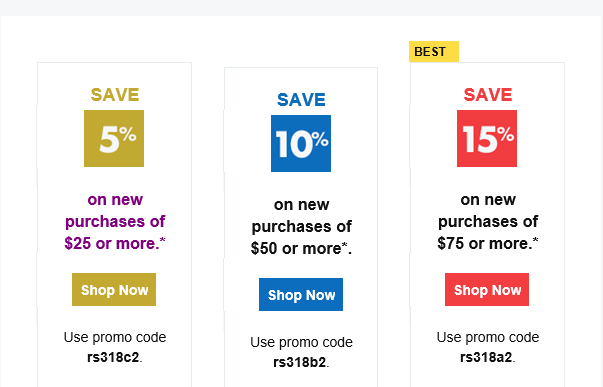
Save upto 15% and more on all new purchases. Great products just for you. Hurry before the offer expires.

Use promo code in your cart when you order.

*Some limitations apply. Applicable to new purchases only. Enter promo code into shopping cart to see full details. Offer expires Wednesday, August 15, 2018 at midnight (Mountain Time).

Copyright © 2018 BigBeagle.com. All rights reserved.

Exclusive offer from BigBeagle.com

Exclusive offer from: BigBeagle.com  |  24/7 Support: (888) 505-1532

Don’t forget to visit our coupon page at http://bigbeagle.com/coupons for the latest and greatest promotions.

Save upto 15% and more on all new purchases. Great products just for you. Hurry before the offer expires.


Use promo code in your cart when you order.

*Some limitations apply. Applicable to new purchases only. Enter promo code into shopping cart to see full details. Offer expires Tuesday, September 11, 2018 at midnight (Mountain Time).

Copyright © 2018 BigBeagle.com. All rights reserved.

Exclusive offer from BigBeagle.com

Exclusive offer from: BigBeagle.com  |  24/7 Support: 8885051532

Don’t forget to visit our coupon page at http://bigbeagle.com/coupons for the latest and greatest promotions.

Save 10% on all new purchases of $40 or more. Great products just for you. Hurry before the offer expires.

Use promo code rs317a5 in your cart when you order.

*Some limitations apply. Applicable to new purchases only. Enter promo code into shopping cart to see full details. Minimum purchase of $40 required. Offer expires Wednesday, September 27, 2017 at midnight (Mountain Time).

Copyright © 2017 BigBeagle.com. All rights reserved.

CALL US NOW!