Back to Top

Tech, Web, Cloud & Cabling Services

Category: Internet Security

BigBeagle.com / Internet Security Category

South Jersey Techies

Shark Tank host, Barbara Corcoran loses $388,700 in phishing scam

Barbara Corcoran of ABC’s “Shark Tank” has lost nearly $400,000 in a phishing scam this week. Corcoran told “People” that she was tricked as a result of an email scheme sent to her team.

The high-powered businesswoman told People that she received a scam invoice approving a real estate renovation, but she didn’t think twice about verifying it because she invests in real estate. It was only until her bookkeeper caught Corcoran’s assistant’s email was misspelled by 1 letter and it was later found to be the address used by the scammer.

“I was upset at first, but then remembered it was only money,” Corcoran told the magazine.

Corcoran’s assistant Emily Burke told CNN Business that the “Shark Tank” star wouldn’t provide any additional comment “at the advisement of her attorneys until the authorities are done investigating.”

However, Corcoran tweeted: “Lesson learned: Be careful when you wire money!” with a link to a TMZ story.

In addition to being an investor and a judge on the hit ABC show, Corcoran formerly owned the global real estate agency that shares her name. She sold it for $66 million in 2001.

Corcoran fell for a phishing scam. It’s common, too: Nearly 30,000 people reported being a victim of that type of scam last year. Together they reported nearly $50 million in losses, according to the FBI’s 2018 Internet Crime Report.

Phishing attacks are common methods of stealing usernames, passwords and money. Hackers pretend to be a trustworthy source to convince you to share personal data. To be safe, it’s important to make sure the sender is authentic before clicking on a link. Google has rolled out security protections that warns people of potential unsafe emails.

If you or your team have any questions or concerns please contact support at (856) 745-9990.


Microsoft will let you unlock Windows 10 with your face

Hello
With a quick glance at your Windows 10 laptop, you’ll be able to unlock it — without entering a password.

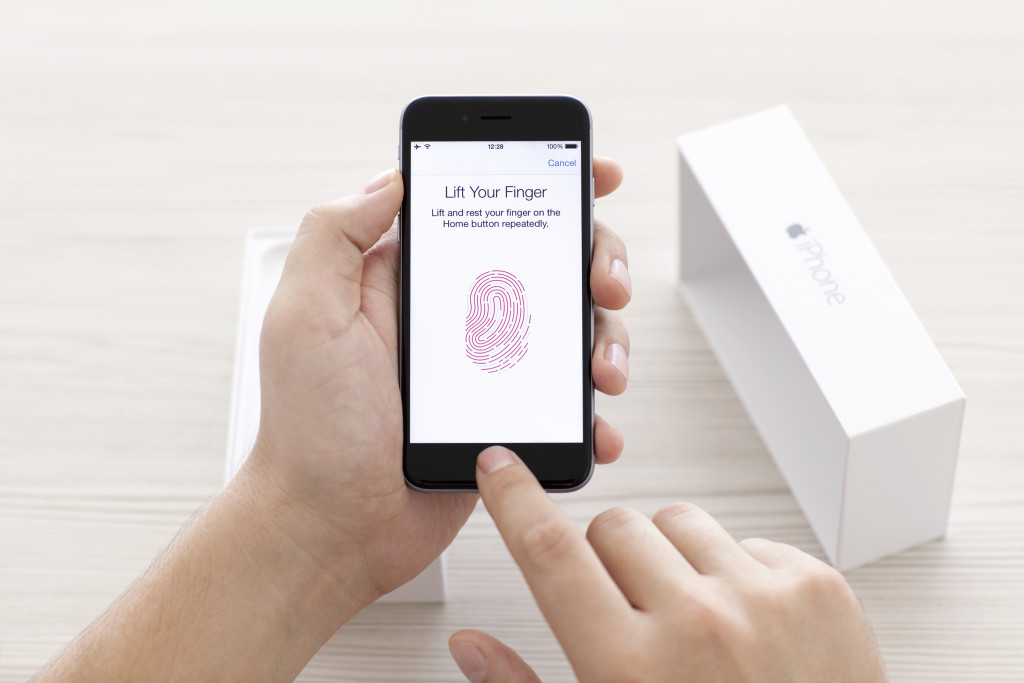
Microsoft introduced the latest new feature for Windows 10, called Windows Hello. The security tool will let you access your PC through facial recognition, an iris scan or a read of your fingerprint.

But before you get ready for your closeup, you’ll need get some special equipment — most PCs don’t come with biometric scanners installed (though some do). Windows Hello is primarily targeted at businesses and government agencies.

Microsoft opted not to rely on your webcam for facial recognition because the photos it captures are not terribly secure, and they’re easy to spoof. Instead, Microsoft got infrared cameras to do facial recognition for Windows Hello.

Facial recognition is possible on a low-grade camera. Google allows its Android phones to be unlocked with facial recognition, but the company warns that someone with a photo of you — or even someone who looks like you — will be able to unlock your phone too.

With the proper tools, faces, irises and fingerprints are possible to spoof, but it’s not easy — someone’s got to really want to break in to your PC to go through the trouble.

Microsoft opted for more robust security in Windows 10, because it wants to meet strict standards that companies and government agencies impose for secure logins. Microsoft said Windows Hello has a 1 in 100,000 false accept rate, which is very high. It’s a lot safer than a password, which, as we know, can easily be forgotten, lost, stolen or hacked.

Though it’s not necessarily aimed at the average PC buyer, consumers will be able to use the Windows Hello feature too.

Microsoft promised “plenty of exciting new Windows 10 devices to choose from which will support Windows Hello.” And if your PC already has a fingerprint reader, you’ll be able to login with a fingerprint scan.

Passport: Windows 10 will also support another new security feature, codenamed “Passport,” which lets you login to participating websites, apps or networks without a password. Microsoft said the list of sites and apps that support Passport is growing, but it didn’t say how many participate.

Microsoft is trying to position Passport as the end of passwords. Since you never enter a password to enter a website, “there is no shared password stored on their servers for a hacker to potentially compromise,” says Microsoft boldly in its press release.

But that’s not quite true. Passwords will still exist. Even if you can login to your email via Passport from your work PC, you’ll still need a password to login from your iPad. So passwords aren’t going away anytime soon — and they’ll still be stored on email providers’ servers, which means hackers could potentially still grab them in a cyberattack.

The primary way that Passport ensures that you’re you is through Windows Hello. Oddly, however, you can also enter a PIN into Passport, which is significantly less secure than a password.

Still, it’s about time that something replaces passwords, and Hello and Passport are good starts.

Have questions?

Get answers from Microsofts Cloud Solutions Partner
Call us at: 856-745-9990 or visit: https://southjerseytechies.net/

South Jersey Techies, LLC is a full Managed Web and Technology Services Company providing IT Services, Website Design ServicesServer SupportNetwork ConsultingInternet PhonesCloud Solutions Provider and much more. Contact for More Information.

To read this article in its entirety click here.

Office 365 Exchange Online


Work smarter, anywhere, with hosted email for business.

Security and reliability

Exchange Online helps protect your information with advanced capabilities. Anti-malware and anti-spam filtering protect mailboxes. Get a Exchange Online Protection Trial or Office 365 Professional Trial to see how good it works. Data loss prevention capabilities prevent users from mistakenly sending sensitive information to unauthorized people. Globally redundant servers, premier disaster recovery capabilities, and a team of security experts monitoring Exchange Online around the clock safeguard your data. And with a guaranteed 99.9% uptime, financially-backed service level agreement, you can count on your email always being up and running.

Stay in control

Maintain control over your environment while gaining the advantage of hosting your email on Microsoft servers. Manage your organization efficiently with the Exchange admin center, an easy-to-use, web-based interface. Run In-Place eDiscovery across Exchange, SharePoint, and Skype for Business data from a single interface through the eDiscovery Center. With mobile device policies, you can create approved mobile device lists, enforce PIN lock, and remove confidential company data from lost phones. And IT-level phone support is available to you 24 hours a day, 7 days a week.

Easy to use and maintain

It’s easier than ever to provide your users with the business email they need to stay productive. Automatic patching eliminates the time and effort of maintaining your system. Give your users an In-Place Archive, so they can keep all their important data in one place. And provide them with anywhere access to email, calendar, and contacts on all major browsers and across devices. Integration with Outlook means they’ll enjoy a rich, familiar email experience with offline access.

Have questions?

Our Hosted Cloud Solution team is here to help.

Call us at: 856-745-9990 or Visit: https://southjerseytechies.net/

To learn more and how Office 365 Exchange Online can benefit your business please contact South Jersey Techies, LLC. South Jersey Techies, LLC is a certified Small and Midmarket Cloud Solutions Microsoft Partner.

To read this article in its entirety click here.

South Jersey Cyber Crime

The hackers used “ransomware” to lock the hospital out of its own medical records.

Not all kidnappers grab your loved ones.

A growing online threat – ransomware – essentially abducts your computer system, putting data and services off-limits to users and demanding a payment to restore access.

“We are seeing more cases of this – sometimes almost on a daily basis,” said New Jersey State Police Capt. Steve Jones. “And we’re not seeing all of it, because people may be too embarrassed or don’t believe it can be helped.”

Ransomware viruses are a plague. Once infected — installed to your computer by a website you’ve visited, a rogue email attachment or link, or instant message — your computer will lock up. With names like CryptoWall, these types of viruses may create a popup window or Web page warning you that you’ve broken some law and have to pay a fine, anywhere from hundreds to thousands of dollars, according to the FBI.

These scams threaten to encrypt your files forever or destroy them unless a ransom is paid, according to the FBI.

Once paid, your computer is unlocked or a code is sent to unlock the machine, authorities said.

Between April 2014 and June 2015, the FBI received 992 CryptoWall-related complaints with victims reporting a loss of more than $18 million.

The state’s top cybersecurity unit recently launched an online effort to help people guard against ransomware.

“For many organizations, preventing ransomware entirely is nearly impossible,” says the New Jersey Cybersecurity and Communications Integration Cell (NJCCIC), which introduced a Ransomware Threat Profile page at its website in February.

But it notes individuals and companies can take measures to prevent infections and to limit their impact.

Although ransomware can lock up laptops and desktop computers, the risk is particularly great for data-dependent organizations like hospitals and accounting firms, said Jones, the State Police spokesman.

So far, at least three hospitals have been hit nationwide – in California, Kentucky and the Washington, D.C., area. South Jersey hospitals are well aware of the menace.

“It’s a big concern. It’s something that has really spiked,” said Tom Handlon, chief information security officer for Kennedy Health, which operates three acute-care hospitals in South Jersey.

Handlon gave no details, but said Kennedy seeks to protect itself through protective measures inside its computer system and by promoting safe conduct by employees.
“We’re monitoring it constantly and updating as we go along,” he said. “We are really educating the staff and our entire organization that we are a target.”

A similar view came from Tom Rubino, spokesman for Cooper University Healthcare System in Camden.

“We have tracked the recent wave of ransomware attacks that have targeted hospitals across the nation,” Rubino said. He said Cooper’s IT security team “is proactively taking measures to prevent ransomware infection of our computer systems.”

“Additionally, as a critical component for preventing all computer viruses, we are increasing our employee education efforts.”

A key precaution is to back up your computer’s contents on a frequent basis, Jones said. “But you’ve got to keep the backup drives disconnected,” he warned. “Otherwise, the ransomware can migrate to the backups.”

The State Police in March 2015 investigated a hacking incident that disabled much of the computer system for the Swedesboro-Woolwich school system. In that case, a hacker demanded more than $125,000 in the form of a digital currency called bitcoins.

The district, which did not pay the ransom, had to wipe clean its email servers and cafeteria lunch-ordering system to rid itself of ransomware. Only a handful of classroom computers were infected.

Hackers exploited a gap in the district’s computer security system and a vendor’s “weak” passport to take over the computer system, Michael Procopio, Educational Information and Resource Center’s director of technology, said at the time. EIRC experts helped the district restore its system.

The district’s hacker was believed to have struck from abroad – a familiar pattern, according to the State Police.

“Many of these messages and attacks are coming through foreign servers,” Jones said. “The countries that house these servers are not often countries that have a real open relationship with law enforcement.”

Tools have been available to help decrypt older versions of ransomware, said Dave Weinstein, New Jersey’s director of cybersecurity.

“At this point, the strain has morphed to the point where there is no releasing your files,” said Al Della Fave, a spokesman for the Ocean County Prosecutor’s office. “The lock these cybercriminals put on your files is foolproof at this point.”

Unless you’ve backed up your computer prior to the infection, Della Fave said, “The only way you would get your files back is to pay.”

“Ransomware is working” for cyberthieves, said Ben Johnson, chief security strategist at Carbon Black Inc., a  computer security firm in Waltham, Massachusetts. “People are paying.”

In the last few weeks, cybercriminals have come up with some new twists, he said. For instance, one version encrypts files more quickly after someone opens up a malware-filled Microsoft Word document or some other attachment.

Other versions encrypt the computer at its most basic level so it can’t even power on, or use the computer’s own system administration tools to infect itself, he said.

The best course of action is to make sure you don’t get the virus. “You must be super careful what you click on,” Della Fave said.

Here’s what you should do, according to Johnson and the Ocean County prosecutor’s office:

  • Keep your computer’s security software up to date.
  • Keep your network firewall turned on.
  • Do not open spam email messages or links to suspicious websites.
  • Back up your files, such as documents, photos and music, to a secondary storage device.
  • Be careful when you browse the web. Use ad blockers to help protect yourself.

Have questions?

Get answers from Microsofts Cloud Solutions Partner!
Call us at: 856-745-9990 or visit: https://southjerseytechies.net/

South Jersey Techies, LL C is a full Managed Web and Technology Services Company providing IT Services, Website Design ServicesServer SupportNetwork ConsultingInternet PhonesCloud Solutions Provider and much more. Contact for More Information.

To read this article in its entirety click here.

Uninstall now! Apple abandons QuickTime for Windows despite lingering critical flaws

Apple is giving up on QuickTime for Windows.

Yet another program is joining Java 6 and Windows XP as big-name software you do not want running on your PC. Security firmTrend Micro and the U.S. Department of Homeland Security are advising all Windows users to uninstall Apple’s QuickTime as soon as possible. (The advisory does not affect Mac users.)

The reason for getting rid of QuickTime for Windows is twofold. First, Apple told Trend Micro it is deprecating the software and will no longer deliver security updates for it. Second, there are two known critical vulnerabilities that could allow an attacker to take control of a system running QuickTime.

That’s a hellacious combo.

Apple was unavailable for comment at this writing, but a quick look at QuickTime’s download page shows the software is still publicly available. It hasn’t been updated since at least January, however.

Trend Micro says it does not yet know of any instances where the two potential security threats are being used in the wild but that could change. Trend Micro’s Zero Day Initiative recently published some technical details about the vulnerabilities. ZDI did this because its disclosure policy requires it to publish threat information when a “vendor indicates that the product is deprecated,” and thus won’t be patched.

If you’re a longtime user of iTunes you may be running QuickTime. To dump the program, open the Control Panel on your PC and then from the “category” view go to Programs > Uninstall a program. Once the list of installed programs populates, scroll down until you find QuickTime. Select it with your mouse, and then click Uninstall towards the top of the window. A pop-up window will then appear asking to confirm that you want to uninstall the program. Click Yes and you’ll be QuickTime-free in no time.

A survey published by Secunia Research in late 2015 found that Apple software is among the programs that are updated the least often by Windows users.

Why this matters: Whenever software is about to be abandoned it’s always a good idea to move away from it—or at least start planning to. That goes double for software with known flaws that allow the bad guys to execute code on your machine. QuickTime used to be an important piece of software for Windows users. But these days you don’t need it to watch movie trailers on Apple’s site and it’s no longer used by iTunes to play media on Windows. There’s little reason for the vast majority of Windows users to keep QuickTime on their PCs.

Have questions?

Get answers from Microsofts Cloud Solutions Partner!
Call us at: 856-745-9990 or visit: https://southjerseytechies.net/

South Jersey Techies, LL C is a full Managed Web and Technology Services Company providing IT Services, Website Design ServicesServer SupportNetwork ConsultingInternet PhonesCloud Solutions Provider and much more. Contact for More Information.

To read this article in its entirety click here.

Old Windows PCs can stop WannaCry ransomware with new Microsoft patch

In a rare step, Microsoft published a patch for Windows XP, Windows Server 2003 and Windows 8

Users of old Windows systems can now download a patch to protect them from this week’s massive ransomware attack.

In a rare step, Microsoft published a patch for Windows XP, Windows Server 2003 and Windows 8 — all of them operating systems for which it no longer provides mainstream support.

Users can download and find more information about the patches in Microsoft’s blog post about Friday’s attack from the WannaCry ransomware.

The ransomware, which has spread globally, has been infecting computers by exploiting a Windows vulnerability involving the Server Message Block protocol, a file-sharing feature.

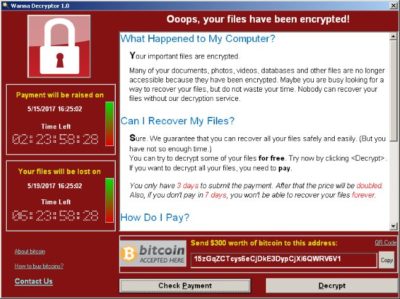
Computers infected with WannaCry will have their data encrypted, and display a ransom note demanding $300 or $600 in bitcoin to free the files.

Fortunately, Windows 10 customers were not targeted in Friday’s attack. In March, Microsoft patched the vulnerability that the ransomware exploits — but only for newer Windows systems. That’s left older Windows machines, or those users who failed to patch newer machines, vulnerable to Friday’s attack.

Researchers originally believed the ransomware was spread through attachments in email phishing campaigns. That no longer appears to be the case.

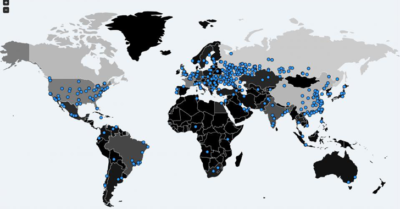
Infection attempts from the WannaCry ransomware.

Once a vulnerable PC becomes infected, the computer will attempt to spread to other machines over the local network as well as over the internet. The ransomware will specifically scan for unpatched machines that have the Server Message Block vulnerability exposed.

Businesses can prevent this by disabling the Server Message Block protocol in vulnerable PCs. They can also use a firewall to block unrecognized internet traffic from accessing the networking ports the Server Message Block uses.

Fortunately, Friday’s ransomware attack may have been contained. A security researcher who goes by the name MalwareTech has activated a sort of kill-switch in WannaCry that stops it from spreading.

As a result, over 100,000 new infections were prevented, according to U.K.’s National Cyber Security Centre. But experts also warn that WannaCry’s developers may be working on other versions that won’t be easy to disable.

“It’s very important everyone understands that all they (the hackers) need to do is change some code and start again. Patch your systems now!” MalwareTech tweeted.

Unfortunately, the kill-switch’s activation will provide no relief to existing victims. The ransomware will persist on systems already infected.

Friday’s ransomware attack appears to have spread mainly in Europe and Asia, with Russia among those nations hardest hit, according to security researchers.

Security experts are advising victims to wait before paying the ransom. It’s possible that researchers will develop a free solution that can remove the infection.

Have questions?

Get answers from Microsofts Cloud Solutions Partner!
Call us at: 856-745-9990 or visit: https://southjerseytechies.net/

South Jersey Techies, LL C is a full Managed Web and Technology Services Company providing IT Services, Website Design ServicesServer SupportNetwork ConsultingInternet PhonesCloud Solutions Provider and much more. Contact for More Information.

To read this article in its entirety click here.

What Terms You Need to Know to Get Your Business GDPR-Ready


What Is EU GDPR? 

The EU GDPR is a law designed to protect and empower residents of the EU by guiding business usage of personal data. In essence, it is reshaping the way corporations handle personal data by controlling its collection, use, and storage. It will replace the regulations and frameworks of the existing 20-year-old directive (95/46/EC).


Who Is the GDPR Protecting and Empowering? 

The data subject: This is any individual that can be directly or indirectly identified or uniquely singled out in a group of individuals, from any stored data.


What Is the GDPR Protecting? 

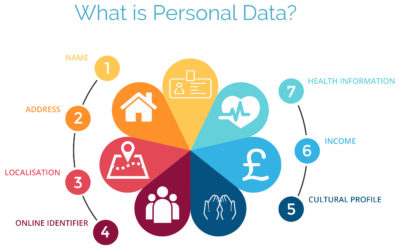
Personal data: This is any information relating to an individual, whether in reference to their private, professional, or public life. It includes things like names, photos, email addresses, location data, online identifiers, a person’s bank details, posts on social networking websites, medical information, work performance details, subscriptions, purchases, tax numbers, education or competencies, locations, usernames and passwords, hobbies, habits, lifestyles, or a person’s computer’s IP address.


Who Is the GDPR Regulating? 

The data controller: This is the person who, alone or jointly with others, determines the purposes for, and means of, processing personal data. A data controller is not responsible for the act of processing (this falls to the data processor); they can be defined as the entity that determines motivation, condition, and means of processing.

Generally, the role of the controller is derived from the organization’s functional relation with the individual. That is, a business is the controller for the customer data it processes in relation to its sales, and an employer is the controller for the employee data they process in connection with the employment relationship.


Who Else Is the GDPR Regulating? 

Data processors: This is the person who processes personal data on behalf of the controller. Typical processors are IT service providers (including hosting providers) and payroll administrators. The processor is required to process the personal data in accordance with the controller’s instructions and take adequate measures to protect the personal data. The GDPR does not allow data processors to use the personal data for other purposes beyond providing the services requested by the controller.


What Does the GDPR Consider “Processing?” 

Processing refers to any operation or set of operations performed upon personal data, whether or not by automatic means—such as collection, recording, organization, storage, adaptation or alteration, retrieval, consultation, use, disclosure by transmission, dissemination or otherwise making available, alignment or combination, blocking, erasure, or destruction. Processing must be fair and lawful, although transparency is significantly strengthened. The processor may not use the personal data for their own purposes.


What Rights Do the Data Subjects Have? 

Under the GDPR, data subjects can request the following:

  • To be informed about the data processing
  • To consent to the processing of their personal data (opt in) or object to the processing of their personal data (opt out)
  • To obtain their personal data in a structured and commonly used format in order to transfer that data, in certain circumstances, to another controller (data portability)
  • To not be subject to fully automated data processing or profiling
  • To know what data is processed (right of access)
  • To correct where any data is incorrect
  • To have data erased under certain circumstances, for example, where the retention period has lapsed or where consent for the processing has been withdrawn (referred to commonly as the “right to be forgotten”) and to register a complaint with the supervisory authority


Other Key Elements to Consider in Preparing for GDPR

We’re not done yet. There are four more important elements to consider with GDPR as you become ready.


1) Data Breach Notification

For controllers, GDPR requires that breach notice must be provided, where feasible, within 72 hours of becoming aware of a breach; processors need to provide notice to controllers without undue delay. Any data breaches must be documented.

2) Data Minimization

This requires the level and type of data being processed to be limited to the minimum amount of data necessary. This requires you to ensure that the purpose in which the data is agreed and the purpose in which the data was collected are materially similar. The processors should ensure that individuals’ privacy is considered at the outset of each new processing, product, service, or application, and only minimum amounts of data are processed for the specific purposes collected and processed.

3) Data Pseudonymization

The GDPR defines pseudonymization as “the processing of personal data in such a way that the data can no longer be attributed to a specific data subject without the use of additional information.” To pseudonymize data, the “additional information” must be “kept separately and subject to technical and organizational measures to ensure non-attribution to an identified or identifiable person.” In other words, it is a strategy designed to enhance protection and privacy for applicable identifying data.

Although similar, anonymization and pseudonymization are two distinct techniques that permit data controllers and processors to use de-identified data. The difference between the two techniques rests on whether the data can be re-identified.

4) Fair Processing of Personal Data

This requires the processing of personal data to be fair and lawful. Generally, only the level and type of data collected should be limited to the minimum amount of data necessary (see data minimization above). There are a number of methods in which the data may be processed, including: express consent (which may be withdrawn at any time), legitimate interest basis (the subject of which legitimacy may be challenged by the data subject), honoring obligations under the agreement with the data subject, or any other legal basis that may apply.


What We Can Do to Help

We know this information can be overwhelming, but taking the proper steps now will save you headaches later. SolarWinds provides products that can help you with getting ready. Our Risk Intelligence software is one of them, providing you with hard data on:

  • A business’ quantified financial risk
  • Personally identifiable information (PII)
  • Protected health information
  • Payment information located in storage
  • Access permissions for sensitive data

Search your ‘data at rest’ for risk areas and start the data mapping you need to get ready for GDPR.

Google and AT&T: Fighting Fiber with Fiber

Google fiber is coming to your town. But not without a fight. After Louisville, Kentucky approved legislation that would allow Google Fiber to piggyback on pre-existing telecommunication infrastructure, AT&T sued the city.


“The ordinance in question, known as “One Touch Make Ready,” essentially allows Google (or any other ISP) to install its equipment on existing utility poles, including those owned and maintained by AT&T. Despite strong opposition from AT&T and Time Warner Cable, the ordinance passed with a 23-0 vote.”

AT&T claimed a need to defend past infrastructure investment, and that the ordinance violates current telecommunication rules. The city of Louisville countered claiming, “gigabit fiber is too important to our city’s future.” Google pledged to support the city.

Have questions?

Get answers from Microsofts Cloud Solutions Partner!
Call us at: 856-745-9990 or visit: https://southjerseytechies.net/

South Jersey Techies, LL C is a full Managed Web and Technology Services Company providing IT Services, Website Design ServicesServer SupportNetwork ConsultingInternet PhonesCloud Solutions Provider and much more. Contact for More Information.

To read this article in its entirety click here.


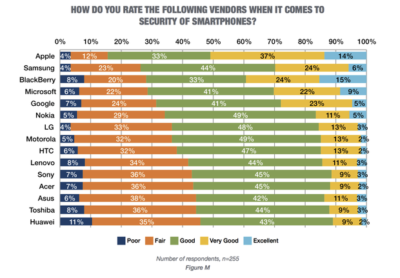
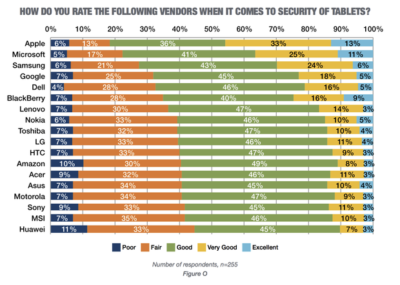
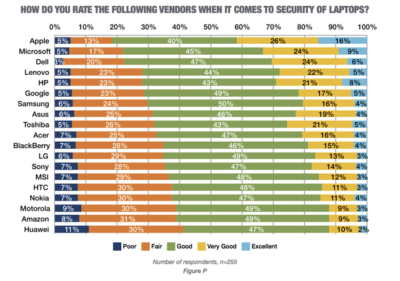
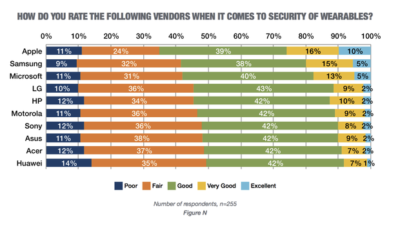
Research: Apple rated highest for security on mobile devices

Mobile devices are almost universal in the enterprise in 2016. Tech Pro Research conducted a survey to see what devices employees are using for work, and how safe these devices are.

In new research conducted by Tech Pro Research, 98% of respondents said they use mobile devices for work. Smartphones and laptops were the most common, with 94% of respondents who use mobile devices using them. 74% of mobile device users said they work with tablets. Wearables haven’t found a widespread usage base in the workplace, with only 14% reporting using them. When users rated the security of devices based on vendors, Apple got the best ratings in all categories.smartphones

For smartphones Apple’s high ratings could be partially attributed to familiarity since 67% of respondents said employees at their company use iPhones. Only Samsung was close to Apple in terms of prevalence, and the company was way behind Apple in security ratings.

tablets

Apple also had the largest share of tablet use, and the highest security rankings, among respondents. 53% said they and their colleagues use iPads and 46% of users ranked security as very good or excellent.

laptops

Dell was the most popular brand among respondents, in terms of use for work, but it got third place in security ratings.

wearables

Security on wearables appears to still be developing, based on the mediocre security ratings among all brands, and the fact that security feature usage isn’t the norm for wearables yet.

Have questions?

Get answers from Microsofts Cloud Solutions Partner!
Call us at: 856-745-9990 or visit: https://southjerseytechies.net/

South Jersey Techies, LL C is a full Managed Web and Technology Services Company providing IT Services, Website Design ServicesServer SupportNetwork ConsultingInternet PhonesCloud Solutions Provider and much more. Contact for More Information.

To read this article in its entirety click here.

Now Microsoft Office 365 tackles ‘fake CEO’ email spoofing attacks

Microsoft is rolling out a host of new email security features for Office 365 later this quarter, as it looks to thwart hackers and criminals.

‘Insider spoofing’ or faking the CEO’s email address to trick the CFO into transferring millions to criminal bank accounts is big business. Now Microsoft is using big data and reputation filters to try and squish the threat.

According to the FBI, between October 2013 and August 2015, 7,066 US businesses have fallen prey to ‘business email compromise’, netting criminals an estimated $747m.

Non-US victims lost a further $51m over the period, with the FBI estimating a 270 percent increase in identified victims since January 2015, when it first released figures about the threat category.

As Microsoft notes, when a corporate email domain is spoofed, it makes it hard for existing filters to identify the bogus email as malicious.

However, Microsoft reckons it has achieved a 500 percent improvement in counterfeit detection using a blend of big data, strong authentication checks, and reputation filters in Exchange Online Protection for Office 365.

It’s also rolling out new phishing and trust notifications to indicate whether an email is from a known sender or if a message is from an untrusted source, and therefore could be a phishing email.

The company is also promising a faster email experience as it vets attachments for malware and new tools to auto-correct messages that are mis-classified as spam. The aim is to boost defences without impairing end-user productivity.

Malicious email attachments remain a popular way for attackers to gain a foothold in an organization and, as RSA’s disastrous SecurID breach in 2011 showed, a little social engineering can go a long way to ensuring someone opens it.

Microsoft’s new attachment scanner, called Dynamic Delivery of Safe Attachments, looks to reduce delays as it checks attachments for potential threats.

Currently it captures suspicious looking attachments in a sandbox with a ‘detonation chamber’ where it analyses it for malware in a process takes five to seven minutes.

Microsoft hasn’t figured out a faster way to analyse the attachment, but instead of holding up the email as it conducts the scan, it will send the body of the email with a placeholder attachment. If the attachment is deemed safe, it will replace the placeholder and if not, the admin can filter out the attachment.

The feature is part of Microsoft’s Office 365 Exchange Online Protection and Advanced Threat Protection services.

The company is also tackling false-positive spam, or legitimate messages that are mis-identified as spam, and vice versa, with a new feature called Zero-hour Auto Purge, which allows admins to “change that verdict”.

“If a message is delivered to your inbox and later found to be spam, Zero-hour Auto Purge moves that message from the inbox to the spam folder; the reverse is true for messages misclassified as spam,” Microsoft notes.

Microsoft is testing this approach with 50 customers and says it will be rolled out for all Exchange Online Protection global clients in the first quarter of 2016.

Have questions?

Get help from IT Experts/Microsofts Cloud Solutions Partner
Call us at: 856-745-9990 or visit: https://southjerseytechies.net/

South Jersey Techies, LLC is a full Managed Web and Technology Services Company providing IT Services, Website Design ServicesServer SupportNetwork ConsultingInternet PhonesCloud Solutions Provider and much more. Contact for More Information.

To read this article in its entirety click here.

CALL US NOW!