Back to Top

Tech, Web, Cloud & Cabling Services

Category: Social Networking

Social Networking Category

Google+ Social Network Launches

Google’s long expected second shot at taking on Facebook in the social networking space has arrived in the form of the Google+ Project. It has some interesting twists on the social networking model but is far from a Facebook-killer.

That Name

The terrible name is a bad start. Google+? Google+! I can’t even question or exclaim about the bad name without it looking bad in writing.

Pronounced “Google Plus,” the product is officially written as Google+ — making placing any punctuation after the name fairly awkward.

Seriously, I’m cursing whoever made the final decision to go with Google+ as a name. Wasn’t the Google +1 sharing service bad enough?

Now we have Google+, which in turn allows you to +1 things that you’ve Google+’d. My head hurts from writing that.

In this article, I’ll generally stick with the Google+ name except where Google Plus is more legible, due to punctuation.

The Google+ Project

What about the product itself? Google dubs Google+ as a “project” rather than a product, stressing it’s part of making Google itself more social rather than being a standalone social network to take on Facebook.

“It’s ‘Plus’ because it takes products from Google and makes them better and ‘project’ because it’s an ongoing set of products,” said Vic Gundotra, the senior vice president who oversees Google’s social products.

But is it Facebook competitor, I asked in a follow-up question. Google emailed back:

No. We realize that today people are increasingly connecting with one another on the web. But the ways in which we connect online are limited and don’t mimic our real-life relationships. The Google+ project is our attempt to make online sharing even better. We aren’t trying to replace what’s currently available, we just want to introduce a new way to connect online with the people that matter to you.

OK, but as the saying goes, if it looks like a duck and quacks like a duck, it’s probably a duck. And Google+ looks like and quacks like Facebook in several ways.

Circles

Most important, Google+ is a social network of your friends, family and other contacts, a way to connect to these people, just like Facebook.

Unlike Facebook, Google+ is built from the ground up around the concept of sharing material with groups of people, called “Circles.” Here’s an example of how they look:

The idea is that you can easily drag-and-drop people into different types of Circles, which you can then use for sharing different types of things.

For example, you can create a “Family” circle where you might chose to share things only with family members in it, while another “Work” circle might contain work colleagues who only see what you share to that.

Google+ Circles Vs Facebook Lists & Groups

While Facebook might not have been built from the beginning with a Circles-like sharing concept, Facebook does currently have two features that are similar: Friend Lists & Groups.

Added in December 2007, Friend Lists allow you to share some of your Facebook information with specific groups of friends (or other selected contacts) that you create. They’re also supposed to allow you to group message people in a list, though I couldn’t get this to work, when I tested it today.

Friend Lists don’t allow for selective sharing. But the updated Facebook Groups feature that came out last October does provide this, a way to share what you want with whom you want.

How does Circles weight up against these? I can’t say first hand. The Google+ product wasn’t live for me to test when I wrote this (our hands-on review will come later today).

Friend Lists are nice in that if you pick one person, such as below where I selected Facebook communications chief Elliott Schrage, you get relevant suggestions that appear (other Facebook execs who’ve friended me on Facebook):

But that list can’t be used, as best I can tell, to start an associated group to share just to these people. Instead, when I tested today, I was still forced to make a group, then pick people individually to add to that.

So, the drag-and-drop interface of Circles looks appealing. Then again, if you have hundreds of “friends,” it still might turn into too much organization. Maybe people will use it to create some select groups that they really want (family, close friends, those in a club, etc.). But if it turns into a wonderful tool, it’s hard to imagine that Facebook couldn’t easily match it.

Who’s In Your Circle?

There’s no limit to the number of circles you can create. But where do the people come from who will be in your circles?

First, any contacts you’ve stored through the Google Contacts service will be available. If you have no contacts, you can import them through the CSV format, which many contact services will export out to.

Google also said that it is looking into ways to directly important contacts from Yahoo and Microsoft. Facebook wasn’t mentioned.

That’s not surprising. Facebook hasn’t allowed the export of friends’ email addresses, except to … Yahoo and Microsoft. The stories below explains more about this:

What’s all this mean in practical terms? Everyone in Google+ will effectively be starting from scratch.

If you already use things like Gmail, you probably have Google Contacts that give you email addresses of your social network. If you don’t, you can import — and Yahoo and Microsoft may serve as go-betweens to help you bring information from Facebook into Google Plus.

From Email To Virtual Person

The bigger issue is that your contacts — be that from within Google or imported from Facebook — are basically just email addresses. The won’t have any social connection information with them.

Google Contacts won’t know that a particular person whose email address you have is friends with other people you know. A Facebook import won’t turn email addresses gathered from there into links with other people who use Facebook.

Instead, what will really jump start Google+ is if a significant number of people come into the system and start claiming profiles within it, effectively turning those email addresses into virtual people who have connections within Google Plus.

That’s a big if. If you’re already happy using Facebook, you may have no more incentive to use Google’s new social network than someone already happy using Google has to switch over to Bing. What you’re using is doing the job just fine.

Buzz Off Google Buzz

When people do get into the system, that does open up another way to add contacts. You’ll be able to search through other members who have registered.

But here’s the crazy thing. Those connections you may have already formed using Google Buzz? Remember, Google’s last attempt to take on Facebook from February 2010? None of that is being used for Google Plus. The two products are being kept completely separate.

I suspect Google’s trying to be as cautious as possible, in the wake of its settlement with the US Federal Trade Commission (see Google Settles FTC Charges Over Buzz, Agrees To 20 Years Of Privacy Audits). Buzz seems tainted, so keeping Google+ isolated from that may be deemed the most prudent course.

And what’s the future for Buzz, with Google+ coming out? Google told me in a follow-up email:

The short answer is it won’t have any major impact on Buzz at launch. Buzz users will still see a Buzz tab on their Google profile, and Buzz will continue working as it always has. Google+ users can also be Buzz users or can decide to just share their content using one of the products. Over time, we’ll determine what makes the most sense in terms of integrating the products.

Google+ Stream

Now let’s talk about how you see what’s being shared by those in your network, as well as what you can specifically share.

Information appears in your “Stream,” which is akin to Facebook’s news feed. At the top of your stream is a sharing box. Actually, two sharing boxes:

In the new black navigation bar that began showing up for some people this week, there’s a “Share” area to the right side. That bar, by the way, has been dubbed the “One Google” bar, Google told me. No matter where you are on Google, you’ll have the ability to share something out to Google Plus.

In the Stream itself, there’s a longer box, where you can enter a status update or use icons to upload and share photo and videos. You can also share links or your location, if you’ve allowed Google to track that for you. On mobile devices, you can select from a drop-down of nearby places to check-in.

The check-in feature also raises questions about Google Latitude — does it get absorbed into Google+ eventually? What about HotPot?

What do you see from others? Here’s an example:

In this screenshot, the person is viewing what’s been shared only by people in their “Bike Geeks” groups, as highlighted on the left side. By selecting another circle that’s listed, they would see only information being shared by that group.

Friends, Followers & Off-Network Friends

As with Twitter (or with Facebook, when it comes to fan pages), it’s possible with Google+ to follow other people on the network, even if they don’t reciprocate and follow you or friend you back.

Google says that if you follow someone this way, you’ll only see what they choose to share with everyone publicly. If they share some things more restrictively, with particular circles, for example, those outside of those circles won’t see that.

Somewhat related, you can be friends with people who aren’t formally part of Google Plus. If they’re an email-only contact and never formally join the service, you can still add them to circles and share with them.

When you do this, they’ll apparently be sent an email with whatever you wanted to share, a picture, an update and so on.

The downside is that if they’re not on Google Plus, they’ll get a notification anytime you share anything. So if you’re a big sharer, potentially you might hit some of your friends with a lot of email.

Where’s +1?

In the stream example above, there was a +1 button at the bottom of the photo. Yes, anything you like within Google+ can be +1?d, in the way that anything you like on Facebook can be liked with Facebook Like buttons.

If you do that, do your friends on Google+ see that action, in the way that friends on Facebook may see what you like? Nope. Not to my understanding,

Further more, all those Google +1 buttons that are now starting to appear on Google search worldwide? Those Google +1 buttons that publishers have diligently been adding to their sites since they were released earlier this month? Nothing from those button clicks flows back into Google Plus.

It’s crazy. It makes no sense. It’s as if Facebook launched its Like buttons but forgot to hook them up to flow information back into Facebook.

Right now, it remains the case that if you want to see what someone has +1?d, then you have to remember to go to their Google Profile page on a regular basis, then hope they’ve enabled the +1 tab on that profile, then rinse and repeat for other people.

Google told me that it would be “logical” to see +1 flow into Google+ and that “one could guess eventually” it will happen. So, I’m pretty sure we will see this happen. But when it will launch is unclear, and it really feels like an incredible mistake that it’s not part of the launch.

Google Sparks: Tips On What To Share

Time for more features. What if you started a social network and no one knew what to share? That’s a problem that Google Sparks is intended to solve.

Think of it like Google Alerts made to flow into Google Plus. Google Sparks lets you follow topics of interest:

You can browse suggestions or set up your own keyword-based searches. Then when you select a “Sparks” link, you’ll get a feed of search results that you might wish to share. Here’s an example of what Sparks might show for a fashion topic:

The relevancy is supposed to be tweaked to find especially sharable content that people are already clicking on, things that are very visual with photo and pictures.

I got a brief demo trying two searches, and the results didn’t thrill me. They were OK, but they didn’t feel particularly shareable. Still, the feature will probably be useful to some, and I can’t really assess the relevancy either way on such limited testing.

Hangouts: Group Video Chat

Google seems to be hanging most of its hopes that Google+ will attract people from Facebook on two main features, I’d say. One is the aforementioned Circles sharing feature. The other is the Hangout video chat feature.

With Hangouts, up to 10 people at a time can all interact through video:

The demo I saw of the system was compelling. As one participant spoke, the main image automatically changed to that person. You can also play video that everyone watches.

Gundotra spent some time talking with me about how Google has examined the social dynamics of video chat, to get people more comfortable participating. The key is to get several people all involved casually, rather than to barge in with a solitary invite.

He used a “talking to your neighbor” analogy to explain more. You’re probably are hesitant to knock a neighbor’s door and disturb them just because you want to talk. But if you saw them outside on their porch, Gundotra said, you’d probably feel better saying “Hi” when passing by. If two neighbors were sitting and talking, you’d probably feel rude not also stopping and chatting.

Hence the Hangouts name. When someone launches a Hangout, this shows up on the feed that goes out to their friends. As more people join, the notifications get updated to show the number participating. As that number rises, Google says even more people are compelled to take part.

The party ends at 10, however. No more can participate for scale reasons and also because the group dynamics get too hard, Gundotra said. If someone leaves, others can come in.

The puzzling thing to me is that Google’s not made it possible for anyone to stream the chat out to non-participants. If you have a group of friends, and not all can take part at once, others might be interested just to listen in.

Beyond that, Hangouts seems like a pretty awesome tool for those who wanted to record video shows. But there’s no way to save what happens.

Huddle: Group Text Chat

Somewhat related to Hangouts is Huddle, a group text chat service. I can’t really tell you more than that. Google didn’t cover this during my talk with them about Google Plus last week, so I’ve only got a screenshot for you and a promise will cover it more in our coming hands-on piece:

Huddle is for Android 2.0+ phones, iPhone 4.0+ phones and SMS, Google tells me.

Instant Upload

The last major feature of Google+ is called “Instant Upload.”

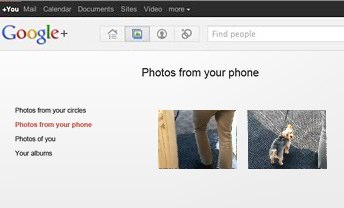
For those with Android phones, you can have any picture you take be uploaded to a centralized — and private — photo album area.

Google tells me they hope to bring it to other phones, as well.

Getting Google+

Want to try the service? Right now, it’s strictly invite only. Some press are being allowed in, along with others that Google hand picks. There’s no ETA on when wider invites will be available.

Unusually, this isn’t being called a beta test or an experiment but rather a “field trial” that’s meant to finally gather some feedback from outside Google itself.

The limited test is probably wise. It’ll give Google more time to discover things it might not have anticipated being problems, as was the case with Buzz.

As for a wider release, and possible success, it’s anyone’s guess. As I said earlier, if you’re happy using Facebook, there seems relatively little to make you want to switch over to Google Plus, at the moment.

Perhaps with further Google +1 integration, that might change. Perhaps if there are people who want a Facebook alternative, Google’s now got a core to build on for them. At least the guessing about what Google might be doing is over.
Business Case: Employee Social Media

What’s your company’s policy on employees using social media in the workplace?

Many companies today are still fearful of employees using social media, especially while at work. Employer concerns range from loss of productivity, industry espionage, confidentiality breaches, and public complaints about the company and/or its managers. As a result, some companies have requested access to employee (or potential employee) Facebook profiles, as well as blocked access to social networking sites while at the office.

In contrast, other companies — for example RingCentral — encourage employee engagement on social media. There are multiple benefits to embracing employees using social media in the workplace, as illustrated by the below infographic from SilkRoad, a cloud-based social talent management solution. At RingCentral, we prefer that employees get involved with our social media channels, and we encourage them to share news about the company through their personal social networks. To prevent any confusion, we implemented a social media corporate policy that clarifies the dos and don’ts of participating in social networks as a RingCentral employee. The net net? The benefits of employees on social networks far outweigh the negatives.

Is your company supportive of employees using social media?

Migrate Facebook Data to Google+

You may not be ready to ditch Facebook for good, but now that you’ve had a chance to kick the tires on Google+, you might be ready to make it your go-to social network. The problem: You’ve built up a lot of friends, photos, videos, and other data on Facebook over the years, and you don’t want to simply lose all that data. Here’s how to migrate it all from Facebook to Google+.

Photo remixed from an original by Shutterstock.

When Google+ came out, it’s success was very much up in the air (remember Google Buzz?). However, it seems a lot of people have already thrown themselves into Google+ full force—Facebook may have 750 million users, but Google+ has already crossed the 20 million user milestone in only 30 days. If you’re ready to give it a shot as your main network, here’s what you need to do.

Migrate Your Friends

A social network is nothing without a group of friends with whom to talk, so the first thing you’ll want to do is migrate your friends. Not everyone you know is going to be on Google+ yet, but it’s a good idea to make sure you don’t leave anybody out—and you can always send those other late adopters an invite to encourage them.

The easiest way to migrate your Facebook friends is to import them through a Yahoo email address. I know that sounds awful, but hear me out: While a few people have created browser extensions and other migration methods, Facebook shuts them down pretty quickly, since they don’t like non-partners pulling friend data. In addition, the non-Yahoo methods usually add your Facebook friends to Google Contacts, which you probably don’t want. You may not have a Yahoo account, but that’s what makes this method great—no need to fill up your main address book with Facebook junk. Plus, it really does only take a few minutes.

To do this, head to mail.yahoo.com and click the Create New Account button (if you already have a Yahoo or Flickr account, you can skip this step). Once you’ve created an account, sign in and head to the Contacts tab. Click on “Import Contacts” and choose the Facebook option. You should now see all your Facebook friends in your Yahoo address book.

Lastly, head to Google+ and go to the Circles tab. Click “Find and Invite” and click the Yahoo button. It’ll add all your Yahoo Contacts (or Facebook Friends, in this case), to the Find and Invite page and you can add your Facebook friends to your circles. I, for one, was shocked at how many of my friends were already using Google+ without me knowing.

Migrate Your Photos

Migrating your photos is ridiculously easy with the previously mentioned Move Your Photos Chrome extension. Install it, click on its icon in the extension bar, and log in to your Facebook account. Select the photos you want to transfer and click the upload button at the very bottom of the page. You’ll see the progress in the lower right-hand corner. Don’t log out while it works, just let it do its thing.

When it’s done, you’ll see those albums in Google+. By default, they won’t be public, and you can adjust each album’s privacy settings by going into them and clicking on the “Edit” link under “Visible To”.

If you don’t want to use Chrome, you can grab a similar extension for Firefox, but you have to transfer albums one by one. If you have Chrome installed, I recommend using the Chrome extension just this once because it’s much faster.

Migrate Your Videos

The only way to migrate your videos, unfortunately, is to download the entirety of your Facebook data and re-upload them. To do this, head to Account > Account Settings, and scroll down to “Download Your Information”. Hit the “learn more” link and hit he Download button. It will take awhile to gather your info, but you’ll receive an email when it’s done, and you can download a ZIP file full of your photos, videos, and profile information.

Strangely, when I did this, one of my two videos was missing from the “videos” folder in the ZIP file. However, I was still able to download that video from Facebook by installing the Video Download Helper extension for Firefox, navigating to the video you want to download, playing it, and clicking the arrow next to Download Helper’s icon in the add-on bar.

Once you’ve wrangled all the videos you want to move to Google+, you’ll just have to upload them one by one. Head into Google+, click on your profile, and go to “Videos”. Hit the “Upload New Videos” link and re-upload your videos to your Google+ profile.

Update and View Both Networks at Once

Now that all your data’s been migrated, you can enjoy using Google+ as your main social network. However, chances are you still have a few friends on Facebook you want to keep up with. The best way to do this is with the Start Google Plus extension for both Chrome and Firefox. Once you install it, you’ll see a Facebook and Twitter icon in the upper right-hand corner, which you can click on to connect your other accounts. Once your Facebook account’s been linked, every status update you make on Google+ will have the option of posting to Facebook as well, just by clicking on the Facebook icon. It’ll take with it any links, pictures, or other data that the status contains.

Start Google Plus will also plug your Facebook feed into your Google+ feed, so you don’t even need to check Facebook anymore. Just check your Google+ feed, and it’ll show you all of Facebook’s news feed as well, with links to comment if you so desire.

If you prefer to not use an extension, you can also update your status on both networks at once using Facebook’s “Upload via Email” feature. Just head to Facebook’s mobile page, copy your Upload via Email email address, and add it to its own “Facebook” circle on Google+. From now on, when you update your status on Google+, you can just include your Facebook circle to send that status to Facebook as well. This method isn’t perfect, however: it’ll only work with statuses of up to 50 characters, and it doesn’t work with photos. However, it does work over mobile, which is nice, and without any extensions.

It’s also worth mentioning the previously mentioned Google+Facebook extension. While it’s a much easier way to update both statuses at once, it’s been hit by a bit of controversy, which you can read more about over at our post and on this Reddit thread. The company has responded to accusations of malware injection, and it seems more accidental than something that was actually of malicious intent, but we still recommending you use this at your own risk. The “update by email” method is still the safest, but this is a possibility as well. With other extensions out there like Start Google Plus, there’s really no reason to take the risk.


There isn’t a foolproof, one-step way to migrate your data, but this should help make the process quite a bit easier for you Google+ fans out there. Got any of your own migration tips to share? Let us know in the comments.


You can contact Whitson Gordon, the author of this post, at whitson@lifehacker.com. You can also find him on Twitter, Facebook, and lurking around our #tips page.


Google vs Microsoft: Office 365 Battle?

Microsoft Office 365 has taken market share from Google Apps and Google isn’t taking it lying down. Are we looking at the start of a price war?

Google apps vs Microsoft

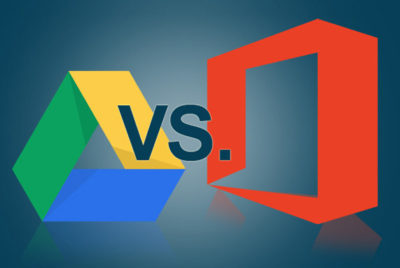
According to an August 2015 report, Microsoft Office 365 has surpassed Google Apps and now controls more than 25% of the enterprise market—triple the enterprise market share the company held just a year ago. That is some serious growth and it hasn’t gone unnoticed by the folks at Alphabet (aka Google).

Details

On October 19, 2015, Rich Rao, head of global sales for Google Apps for Work announced a new program specifically designed to turn the tide against Microsoft Office 365’s advance.

In a nutshell, enterprises with preexisting contracts for a competitor’s office suite (read Office 365) looking to switch to Google Apps can do so and not pay any additional fees until the competitor’s contract has run its course. In essence, switching enterprises will pay Microsoft’s contract while they use Google Apps.

When the preexisting contract is over, enterprises sign a new contract with Google Apps. The announcement also suggests that Google will pay some of the transition costs through a special program offered by its Google for Work Partners service.

This is a bold move by Google and it signals that the company is reeling from the sudden surge of Microsoft Office 365. I don’t think Google was expecting this level of competition for its Google Apps suite.

Microsoft’s response

The ball is now in Microsoft’s court. There should be some kind of serious strategic response offered by Microsoft—that is, if it intends to maintain the growth of Office 365 in the enterprise market. Letting the tremendous advances in its market share over the last year erode would be irresponsible.

One strategy Microsoft may consider is lower subscription prices.

The basic enterprise version of Google Apps carries a subscription price of $5 per user. The basic enterprise version of Office 365 carries a subscription price of $8 per user. That $3 difference can really add up for a large enterprise and there may be some wiggle room for Microsoft to lower the per-user price for its service.

Cola wars. Pizza wars. We have seen major international companies take part in price wars in the past, and in the end, not much has been resolved. So I don’t think lowering their subscription prices is really the best strategy for Microsoft.

There is another way.

It’s all about collaboration

The basic applications offered by Office 365 and Google Apps—word processing, spreadsheets, emails, calendar, etc.—are similar. Office 365’s applications do have more features and deeper capabilities. Of course, Google Apps claims its lack of features is a good thing because its apps are simpler to use.

However, in this day and age, the real battleground for enterprise markets exists in features outside the basic office suite. The real battleground lies in cloud and collaboration services, including collaboration tools, storage, video communication, and document sharing. The cloud is where Microsoft and Google are going to fight their battle for productivity suite superiority.

And cloud is where Microsoft has been winning handily for the past year or so. I believe the new cloud and collaboration emphasis of Office 365 has taken Google by surprise. I think Google has realized that Microsoft has upped its game and that it can’t coast into increased enterprise market share by merely offering a lower-price, simpler productivity suite.

It may have been an indirect battle before, but Microsoft and Google are now engaged in a mano a mano fight for enterprise market share in the productivity software category. It will be interesting to see how this strategic battle between two superpowers plays out. I just hope each side takes appropriate steps to avoid collateral damage.

Have questions?

Get help from IT Experts/Microsofts Cloud Solutions Partner
Call us at: 856-745-9990 or visit: https://southjerseytechies.net/

South Jersey Techies, LLC is a full Managed Web and Technology Services Company providing IT Services, Website Design ServicesServer SupportNetwork ConsultingInternet PhonesCloud Solutions Provider and much more. Contact for More Information.

To read this article in its entirety click here.

Facebook Debuts Separate Chat App

(Credit: CNET)

Facebook today doubled down on its mobile efforts with a new mobile application that breaks out its messaging service into a single app.

Dubbed “Messenger,” Facebook is making the app available for both Apple’s iOS and Google’s Android. Users can log in with their Facebook credentials to get access to existing chats and message threads from Facebook for interacting with them on the go. Included is group messaging, along with a component that lets users share photos and their location.

“The Messenger app is an extension of Facebook messages, so all your conversations are in one place, including your texts, chats, e-mails, and messages. Whether you’re on your phone or on the Web, you can see the full history of all your messages,” Lucy Zhang, Beluga co-founder and Facebook engineer, said in a post on Facebook’s blog.

For all intents and purposes, the app is the same as Beluga, a group-messaging app Facebook acquired in March. In fact, the team that made Facebook Messenger is the same one that made that application, and the feature set reflects that. Nonetheless, this app is not replacing Beluga, according to Facebook.

“Nothing is going to change for Beluga right now,” a Facebook representative told CNET. “The apps will remain separate. We’re considering ways to possibly migrate Beluga messages over to Facebook Messenger but have no specifics to announce at the moment.”

The move to break out messaging is of special note, given the murmurs of Facebook doing something similar for photo sharing. A report in June from TechCrunch pulled together screenshots of such an app in the works that would combine sharing elements akin to apps like Instagram, Color, Picplz, and others, while tapping into Facebook’s photo servers. That differs substantially from Facebook’s existing mobile strategy, which has been to pull the various site features together into one experience, similar to what’s available for desktop users.

Notably missing from this iteration, and Facebook’s other apps, is video chat–a feature it launched as part of a partnership with Skype last month. In a question-and-answer session following the unveiling of that feature at Facebook’s headquarters, CEO Mark Zuckerberg said the two companies would begin work to bring that feature to mobile phones immediately.

Update at 2:25 p.m. PT: You can grab the app from iTunes here. Android users, can get it here. The company is also offering to send download links directly to your device from its Messenger home page.


Read more: http://news.cnet.com/8301-1023_3-20090207-93/facebook-rolls-out-standalone-mobile-chat-app/#ixzz1UeJ2DzJ9


CES 2016: Fitbit Takes on Apple Watch

Step aside, Apple, there’s a new watch in town. At CES 2016, Fitbit unveiled the Blaze, a smartwatch that does things the Apple Watch can’t, and at a lower price point.

fitbit-blaze

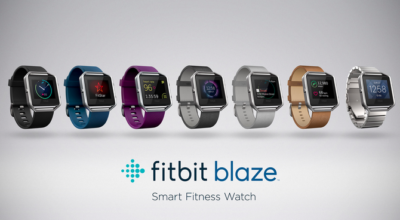
The new Fitbit Blaze is a smart fitness watch unveiled at CES 2016. Image: Fitbit

The basic utilitarian look of Fitbit is so last week, with today’s CES 2016 debut of Fitbit Blaze, a smart fitness watch with a color touchscreen that heralds in the next generation of the company’s popular fitness device line.

Fitbit Blaze does many of the same things as more expensive smartwatches, such as the Apple Watch, but it does it at a lower price point. The basic Fitbit Blaze comes with an elastomer band and will be available for retail sales in March 2016 with a $199 price tag. It tracks fitness and sleep stats and provides notifications for calls, texts, calendar alerts and music control. It’s compatible with Windows, iOS, and Android platforms.

One of the main features of the watch is how the bands are interchangeable to go from the gym to the office and out for the evening. Accessories will include additional elastomer bands for $29.95 each, leather bands for $99.95 each, and a steel link band for $129.95 each. The device is available for presale beginning today at Fitbit.com and tomorrow at various major retailers. For those who want to see the watch in person before ordering, on February 20 customers can go into Best Buy to try on the watch and pre-order.

“The product is about the balance of fitness and style. While it may look like a smartwatch, we think we’ve gotten it right. It has a distinct focus on fitness. That’s why we’re calling it a smart fitness watch. It puts fitness first,” said James Park, CEO and co-founder of Fitbit, at the CES 2016 press conference.

Fashion and style have long been a sore spot in the world of wearables and smartwatches. Because, even if a device has a stylish appearance, oftentimes it’s not feasible to wear the same product 24/7 for every occasion. The Fitbit Blaze eliminates this issue with the range of affordable interchangeable bands.

Fitbit Blaze includes many of the same features as previous Fitbit wearable fitness devices, such as all-day activity stats, but it also includes a color touchscreen, along with a partnership with FitStar for an onscreen workout. It also includes connected GPS for real-time exercise stats and PurePulse wrist-based heart rate tracking, which the company introduced last year.

The watch has a substantial battery life, lasting up to five days and nights, according to Fitbit Chief Business Officer Woody Scal.

Park said the Fitbit Charge, which was introduced last year, is the number one selling activity tracking device in North America, and the Fitbit Surge is the number one selling GPS tracking watch. On Christmas Day and the day after, Fitbit was the number one free app download.

“We are one of the larger technology IPOs of 2015. We are still trading about offering price which we think is rare. We’re pretty proud of that,” Park said.

Park took the opportunity at the press conference to point out how Fitbit is mentioned in the media, such as numerous photos with President Obama wearing a Fitbit Surge.

“For me it’s been really fun to see Fitbit mentioned on popular TV shows such as Big Bang Theory,” he said.

One of the biggest challenges that Fitbit faces is that its products have a 50% abandonment rate, compared to 6% for the Apple Watch. That makes the Blaze a strategically important move for Fitbit. The early reaction to the Blaze has been mixed as Fitbit’s stock dropped 13% following the announcement.

Have questions?

Get help from IT Experts/Microsofts Cloud Solutions Partner
Call us at: 856-745-9990 or visit: https://southjerseytechies.net/

South Jersey Techies, LL C is a full Managed Web and Technology Services Company providing IT Services, Website Design ServicesServer SupportNetwork ConsultingInternet PhonesCloud Solutions Provider and much more. Contact for More Information.

To read this article in its entirety click here.

7 Google Chrome Tweaks for Efficiency

If you spend most of your workday with Google’s browser, you’ll want to put these Chrome tips to work so you can get more done in less time.

Live your best Chrome life

You probably live most of your computing day inside Google’s browser. Despite its tendency to be a resource hog, it’s still the most capable browser for its speed and optimization on the web’s most important sites.

But there’s always room to improve, especially given Chrome’s flexibility and strong feature set. This collection of tips will help you start the day off with just the sites you want, work quicker with keyboard commands, and ensure you can save the stuff you need for later use.

Stick a pin in it

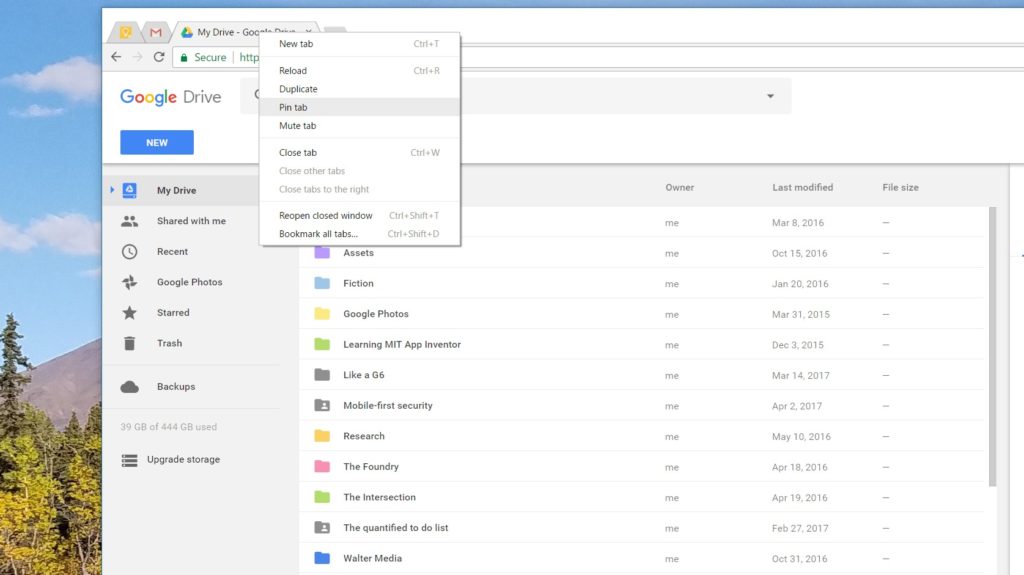
Pinning tabs that you use throughout the day saves you screen real estate and keeps you from having to reopen tabs several times over. Right-click on a tab and select Pin tab to minimize it to the left side of the browser. It’ll be identifiable by the page’s favicon.

Keep in mind, when you close the browser, those tabs will reopen as pinned tabs when you relaunch Chrome. So if you don’t want to start your next session with 10 pinned tabs, you’ll need to unpin them by right-clicking and then selecting Unpin tab before closing the browser.

Reopen that tab you didn’t mean to close

There’s one, specific hotkey command that saves my bacon about 25 times a day: Control-Shift-T, which reopens the last tab closed. When you’ve got 70 or so different tabs open, you’re bound to close the wrong one from time to time.

That’s why it behooves you to memorize this command. Better yet, take a few moments to learn some of the other hotkeys shown here that will help you zip through your tabs, close them all, or quit Chrome altogether. Just as hotkeys help you work faster in Windows, the same level of convenience applies to Chrome.

Grab a Chrome extension

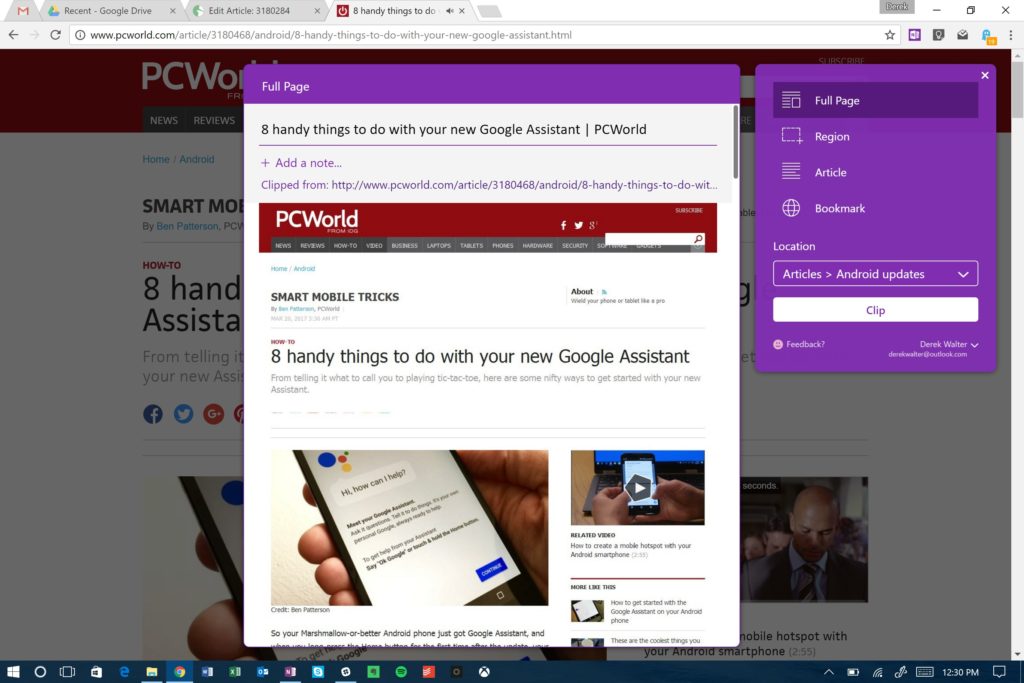
It’s very likely that your favorite desktop software has an accompanying Chrome extension that let’s you perform related tasks within the browser. If so, grab it. After all, the web touches a lot of aspects of the work you do. For example, Microsoft’s OneNote offers a useful Chrome extension for grabbing articles and other bits of the internet for later retrieval. Same goes for Evernote, another popular note-taking solution. And there’s a Chrome extension that notifies you of Skype alerts. Head to the Chrome Web Store to find the extensions you need.

Embrace Google Cloud Print

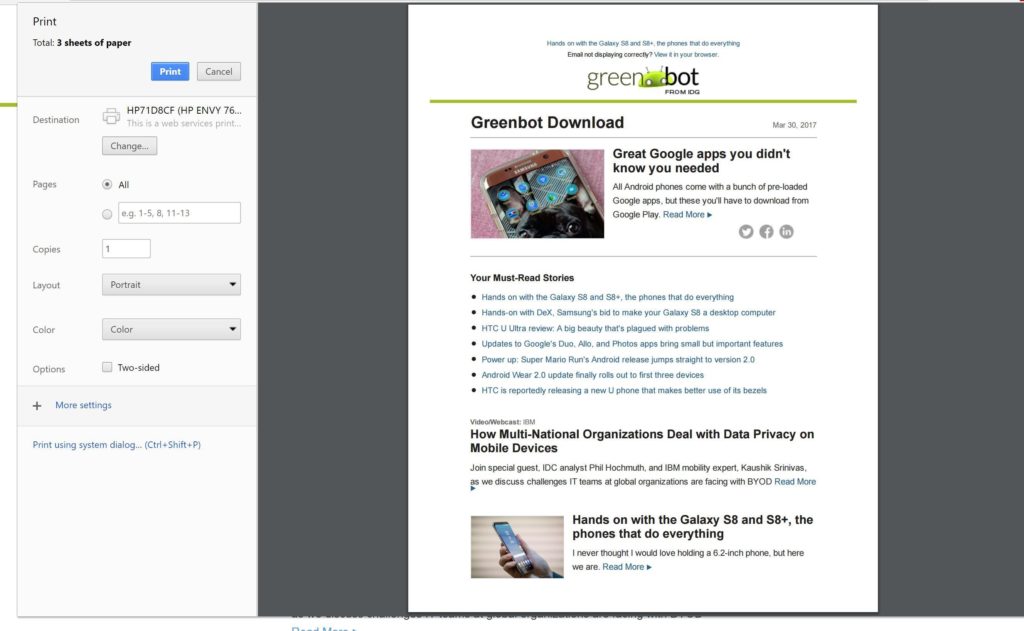
Google Cloud Print may still have that annoying beta tag, but it’s vastly improved since the service’s early days. It’s now reliable, and the fastest way to print a document without needing to futz with the Windows print menu.

Most printers can be added quite easily, so head to the Cloud Print site to enroll yours. Another great feature is that you can also save files right to Google Drive, helping you keep track of tax-payment confirmations or other key documents.

Know your history

Macs and iOS devices talk together very well through a feature called Handoff. Open a browser tab on the iPhone, and you can pull it up right away on your Mac.

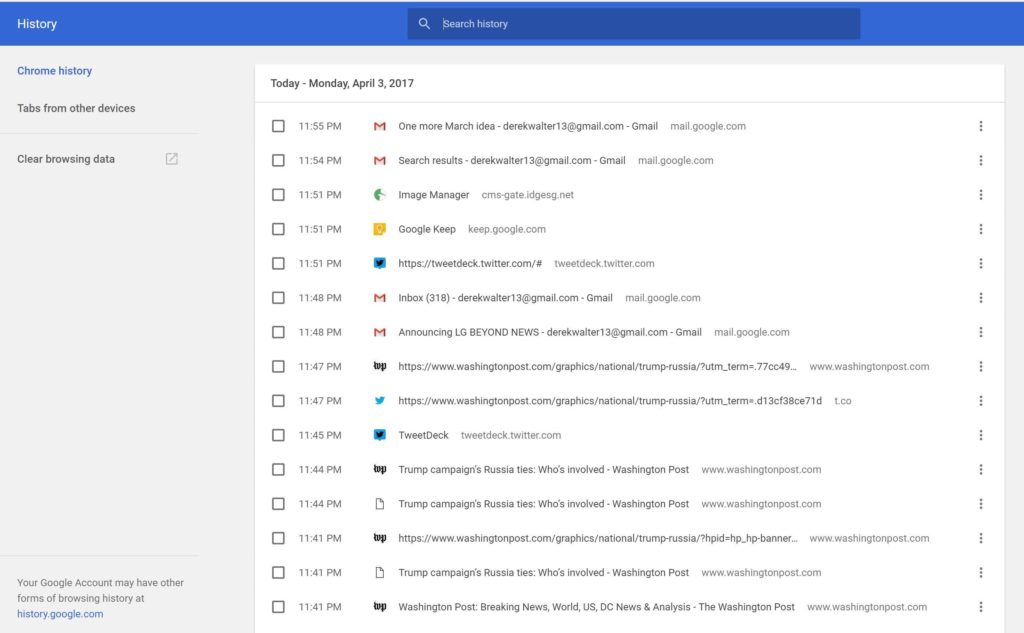
Chrome has created something that’s not quite as seamless, but gets the job done for those of us who live outside of Fortress Apple. Control-H pulls up a list of your most recent tabs from all your devices. Next, touch Tabs from other devices to choose the site you want to check out. You can select what you were just looking at or something from a while back.

Go big (with text)

Save your eyes from strain. You can expand the text on a browser page in a couple of different ways. Hit Control+ to zoom in, and Control- to zoom out. Alternatively, pinching-and-zooming on a PC with a touchscreen will do the trick and gives you a more direct feel for what you want to see.

Control 0 will return you to the normal page size once you’re done with the close inspection.

Start off right

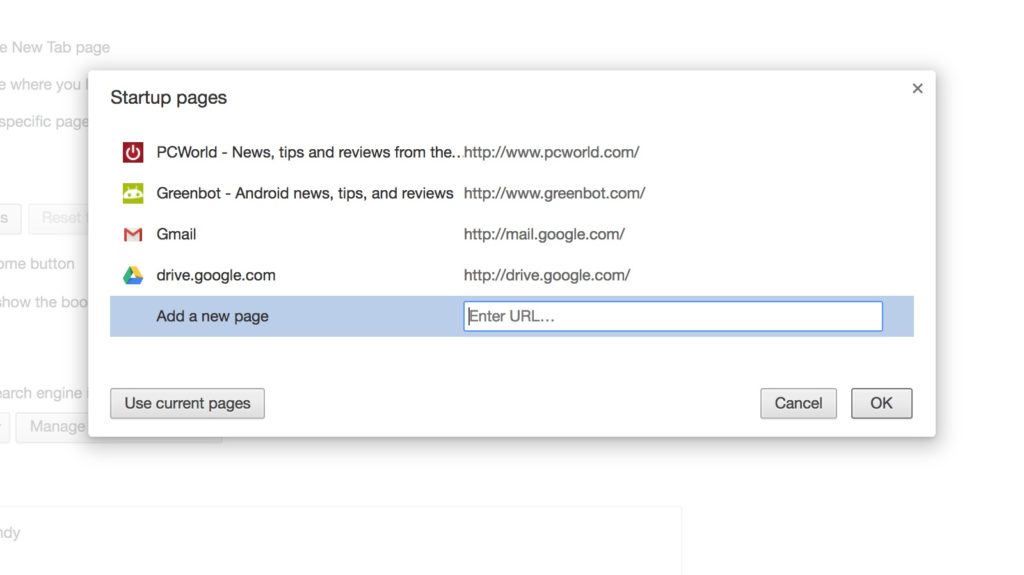
You can get right to work more quickly if you launch your browsing session with the sites you use most often. Go to Settings > On Startup and choose Open a specific page or set of pages.

Then, you can add your favorite pages by typing in the URLs or clicking the button for Use current pages. This’ll ensure that next time you launch Chrome, you can get right to work with the pages you need.

Have questions?

Get answers from Microsofts Cloud Solutions Partner!
Call us at: 856-745-9990 or visit: https://southjerseytechies.net/

South Jersey Techies, LL C is a full Managed Web and Technology Services Company providing IT Services, Website Design ServicesServer SupportNetwork ConsultingInternet PhonesCloud Solutions Provider and much more. Contact for More Information.

To read this article in its entirety click here.

Top 10 Things to Love About Google Plus

Takeaway: Google+ includes several attention-grabbing items — like Circles, Google Takeout, and Sparks — but there are some great subtle features you should know about as well.

Have you heard about all the nifty things the new Google Plus social network can do? Of course you have. But have you dug around to see what’s really good beyond the headline items? Well we have, and we’ve brought back some small yet superb details to crow about.

1: Automatic photo uploading from your phone

At first, the Android app for Google+ seems like a nice way to check activity, post about how awesome it is to skip work for a ball game, and so on. But head into the app’s settings, enable Instant Upload, and the way you use your phone, and Google+, changes entirely. Everything you shoot is almost instantaneously synced to a private album in Google+. From there, it’s just one click to sharing the photo, but you’ll want to type out a sentence. Even if you don’t share your stuff, Google+ is basically freeing you from the need to find a cord, fire up a program, and monkey around with your phone storage — everything you shoot is in Google+, too. But you decide whether to put it out there.

2: Unlimited photo storage (pretty much) in Picasa

To make Google+ a place where people want to share their photos, among many, many competitors, Google had to pull out the big guns. In this case, those guns are server storage, something Google has more of than anybody else, by a good long shot. Google can offer almost unlimited photo storage in Picasa, so that photos smaller than 2048 by 2048 in pixels and videos less than 15 minutes long don’t “count” against your storage space. Shoot and shoot and share and shoot again, and Google just keeps smiling at your feeble attempts to take up space.

3: Quick, easy, undo-able photo editing, with I’m Feeling Lucky

Photo presentation in Google+ is a nice, content-forward experience, with a black backdrop and easy sharing or deletion. Even nicer is that Google threw a few of the most helpful photo filters and editing tools in there, too. Click the Actions button just underneath a photo, and you’ll get rotation tools — and more important, Edit Photo. A right-hand sidebar pops up with some Instagram-like filters: cross-process, Orton, and black-and-white. There’s auto-color and auto-contrast and the ever-helpful I’m Feeling Lucky button, which helps non-photo-nerds by applying the most common light and color corrections to your shots.

4: Profiles for better Google search results

Sensing some need to let actual people have a say over the machine math that produces search results, Google previously offered Google Profiles as a dedicated spot where you, the person, could have a say and show up in searches. But like the best advice about vegetables and tax receipts, Profiles weren’t widely adopted by the general user. As Google+ gains users, it’s making the Profile an essential tool in connecting to others and discovering interests, which in turn is causing users to more accurately and fully fill out their Profile. It’s a sweet syrup that helps us swallow the bitter bill of self-promotion, with the healthy result of having a say in what Google says about us.

5: Keyboard shortcuts, both built-in and add-on

Like most Google products, Google+ has a good built-in list of keyboard shortcuts that let you run through stream items, start a new post, and generally navigate the social realm without reaching for your mouse or moving your fingers onto the trackpad. If you want even more no-pointer-needed functionality, try the Google+ Manager for Firefox or Goo Plus Manager in Chrome.

6: Simultaneous YouTube video watching for groups

The group video chat Hangouts inside Google+ have received lots of attention and rave reviews, and for good reason. Hangouts are like group Skype chats, just with Google helping on the server side and with a more polite single-focus video window. But the part that gets less play is how everyone in the Hangout can see the same YouTube video at once, watching it in real time and commenting on specific moments (in text by default, but by voice if you’d like). That’s handy for training, presentation critiques, and other moments when you can’t all be around the same screen.

7: Drag-and-drop sharing

Technically, yes, you can grab links from other Web pages and drop them into Facebook or Twitter for sharing. But Google+ lets you snag photos, links, YouTube videos, and other items and just drag them into the sharing panel. You can even drag Web items into the Share box on that black Google toolbar we mentioned above for truly lazy content making.

8: The universal Google toolbar

Once you’ve activated Google+, nearly every Google Web service shows a kind of universal toolbar, black and seemingly bolted to the top of your viewing window. It provides universal notifications about new Google+ happenings in a little red number square, quick posting to your Google+ stream, and a quick click to see your profile. But it also somewhat normalizes the links to other Google services you’ll see (Gmail, Calendar, Documents, etc.) and provides a consistent feeling to Google’s Web services, a win/win for both the search giant and its most dedicated users.

9: Handy chat client to unburden Gmail

Google+ has the same kind of built-in Gmail/AIM chat window in its lower-left corner that Gmail offers. Gmail, which now does far more than it was originally built for (including free phone calls), could use some help lightening its loading time and memory bulk. So consider keeping Gmail for email and opening Google+ when you are available to be social.

10: Post-publish editing… Enough said

Inspiration comes a lot faster than clean, conscientious copy. On most social networks, that’s just too bad. Twitter and Facebook don’t let you clean up your words or remove photos — you have to delete your post entirely and destroy the comment or reply chain. Google+ provides a little arrow in the upper-right corner of all your posts that drops down to offer editing — as well as comment striking, turning off comments, and yes, post deletion if things really went the wrong way.

Wi-Fi-enabled ‘Hello Barbie’ records conversations with kids and uses AI to talk back

Today, Mattel released Hello Barbie, a WiFi-enabled doll that detects language and ‘talks back.’ But how will this high-tech toy impact real-life relationships?

Hello-barbie

She wears black flats, a motorcycle jacket, and skinny jeans. Her curly, bleach-blonde hair falls just past her shoulders. She has a permanent smile and large blue eyes. And, when you talk to her, she listens.

But this young woman isn’t an ordinary friend. “Hello Barbie” is less than a foot tall, weighs just under two pounds, and is made of plastic. And she is on sale for $74.99.

Mattel’s latest Barbie, marketed for children six and up, has just hit the shelves. She is unlike any doll before her—not only does she listen, but she can talk back.

To get started, kids simply download the Hello Barbie companion app. And to turn her on, you push a button on her silver belt buckle. Hello Barbie’s necklace is both a recorder and a microphone. Using WiFi, the jewelry will pick up a child’s questions and conversations—and transmit them back to a control center for processing. Speech-recognition software, operated through ToyTalk, will detect the input. Then, Hello Barbie will reply, using one of 8,000 pre-programmed lines. Examples include:

  • You know, I really appreciate my friends who have a completely unique sense of style…like you!
  • Here’s what’s up: I’m worried my sister Stacie is having a hard time finishing her homework. Does that ever happen to you?
  • I think Santa is real. There’s something very magical about the holiday season and I think he helps bring that magic to all of us!
  • So if you were planning the biggest, raddest, most unforgettable party of the year, what would it be like?
  • Of course we’re friends! Actually, you’re one of my best friends. I feel like we could talk about anything!

Hello Barbie’s dialogue, while perky and fashion-focused, reflects an attempt by Mattel to create a more well-rounded character than in the past. In 1992, Mattel pulled its string-operated Teen Talk Barbie from shelves after being criticized by The American Association of University Women for the inclusion of an unfortunate line: “math class is tough.” It is no mistake that Hello Barbie’s lines includes: “Oh nice! Fun with numbers! Teaching math sounds like a lot of fun. What kinds of things would you teach—Counting? Addition? Subtraction?”

Still, the implication that Barbie is being sold as a ‘friend’ is unsettling. “Hello Barbie can interact uniquely with each child by holding conversations, playing games, sharing stories, and even telling jokes!” boasts Mattel’s website. Hello Barbie, claims Mattel, is “Just like a real friend. [She] listens and remembers the user’s likes and dislikes, giving everyone their own unique experience.”

But is she really listening?

While Barbie may appear to listen and respond, “pretend empathy is not empathy,” said Sherry Turkle, professor at MIT and author of Reclaiming Conversation. Turkle worries about how children will understand their new ‘friend.’

“They are drawn into thinking that pretend empathy is the real thing,” said Turkle. “But objects that have not known the arc of a human life have no empathy to give. We put our children in a compromised position.”

Beyond the social implications of the doll, the capabilities of the recording technology raise privacy issues.

Using Hello Barbie involves recording voice data (see the privacy policy here) and requires parental consent. However, Mattel states that “parents and guardians are in control of their child’s data and can manage this data through the ToyTalk account.” The company also states that the recordings are protected under the “Children’s Online Privacy Protection Act,” and recordings containing personal information will be deleted once they “become aware of it.”

Still, the potential for misuse of this private data is a legitimate concern. “Obviously it is a security and privacy nightmare,” said Roman Yampolskiy, director of the Cybersecurity Lab at the University of Louisville. “[The] company [is] collecting data from kids—hackers [could be] getting access to private info.”

However, like Turkle, Yampolskiy is “more concerned about social development of the children interacting with it.”

“We are basically running an experiment on our kids and have no idea if it will make them socially awkward, incapable of understanding body language, tone of voice and properly empathize with others,” he said.

It all raises the question of what is meant, exactly by ‘real’ conversation? Turkle said, “Why would we take such risks with something so delicate, so crucial: Our children’s ability to relate to each other as human beings?”

Despite concerns, Hello Barbie is here, being shipped to homes across the globe beginning today. She is being turned on, spoken to, and listened to. And when children are finished with her, she is shut down, stood on a charger (Hello Barbie cannot stand on her own) and charged back up.

When she is turned on again, Barbie might ask: “Did you miss me at all?”

“Not even an itsy bitsy, eensy weensy bit?”

How children will respond remains to be seen.

Mattel did not respond to repeated requests for comment for this story.

Have questions?

Get help from IT Experts/Microsofts Cloud Solutions Partner
Call us at: 856-745-9990 or visit: https://southjerseytechies.net/

South Jersey Techies, LLC is a full Managed Web and Technology Services Company providing IT Services, Website Design ServicesServer SupportNetwork ConsultingInternet PhonesCloud Solutions Provider and much more. Contact for More Information.

To read this article in its entirety click here.

Microsoft is buying LinkedIn for a whopping $26.2 billion in big data push

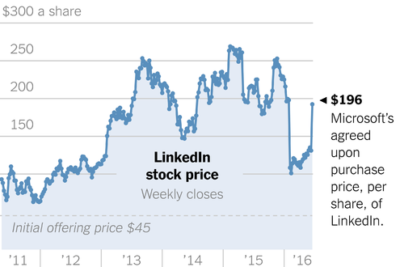
Microsoft announced that it will be acquiring LinkedIn Corporation for $196 per share in an all-cash deal, gaining access to the social platform and its data.

linkedin


Microsoft announced that it will be purchasing LinkedIn, the social network for professionals, for $26.2 billion. The all-cash deal will bolster Microsoft’s social media presence among professionals and could potentially give LinkedIn more analytics resources.

In the official press release announcing the acquisition, it was noted that LinkedIn will remain its own entity and CEO Jeff Weiner will stay at the helm. Weiner will report to Microsoft CEO Satya Nadella.

Despite the astronomical price, one of the most basic reasons for Microsoft’s pursuit of LinkedIn is to grow its appeal among business users. LinkedIn is the world’s biggest site for networking and job searches with roughly 400 million users, and Microsoft will get direct access to that audience and the data it is creating.

Speaking of data, LinkedIn stands to benefit from this deal as well. Microsoft’s press release, pointed out that LinkedIn has updated its mobile app to help “deliver better business insights,” which it could continue to do with Microsoft’s help.

Of course, a big part of LinkedIn’s publishing platform was built around its acquisition of Pulse in 2013. And, in 2015, LinkedIn announced analytics for publishing to help brands and professionals better understand the reach of their posts.

After Microsoft bought Yammer in 2012, it is integrating a host of Yammer capabilities into Office 365 and we may see the same thing from the LinkedIn deal. In a letter written by Nadella to employees explaining the deal, he cited growth in “Office 365 commercial and Dynamics” as one of the goals of the deal, as well as growth in cloud services.

microsoft-linkedin-

“This deal brings together the world’s leading professional cloud with the world’s leading professional network,” Nadella wrote. “I have been learning about LinkedIn for some time while also reflecting on how networks can truly differentiate cloud services.”

Additionally, Nadella noted that the combination could lead to an interesting overlap between the two brands relative to specific projects or tasks.

“This combination will make it possible for new experiences such as a LinkedIn newsfeed that serves up articles based on the project you are working on and Office suggesting an expert to connect with via LinkedIn to help with a task you’re trying to complete,” Nadella wrote. “As these experiences get more intelligent and delightful, the LinkedIn and Office 365 engagement will grow. And in turn, new opportunities will be created for monetization through individual and organization subscriptions and targeted advertising.”

One other option could be for Skype integration for LinkedIn to help with video interviews for job candidates, but also to assist with learning through the Lynda.com brand. LinkedIn bought Lynda.com back in 2015, which means that Microsoft gets access to the popular training platform and its audience as well.

The deal is expected to be completed sometime in 2016. Microsoft expects that LinkedIn’s financials will be reported as part of its Productivity and Business Processes segment.

The 3 big takeaways for readers

  1. Microsoft announced that it has purchased LinkedIn, the professional social network, for $26.2 billion dollars in order to further integrate the two companies’ technologies.
  2. In a letter penned by Microsoft CEO Satya Nadella, he specifically pointed out the integration will focus on “insights” and “cloud platforms.”
  3. Microsoft also gets access to the data generated by LinkedIn users around job searches, as well as access to LinkedIn’s training platform, Lynda.com, and its audience and data.

Have questions?

Get answers from Microsofts Cloud Solutions Partner!
Call us at: 856-745-9990 or visit: https://southjerseytechies.net/

South Jersey Techies, LL C is a full Managed Web and Technology Services Company providing IT Services, Website Design ServicesServer SupportNetwork ConsultingInternet PhonesCloud Solutions Provider and much more. Contact for More Information.

To read this article in its entirety click here.

CALL US NOW!