Back to Top

Tech, Web, Cloud & Cabling Services

Category: Microsoft Windows 8 Pro

Windows / Microsoft Windows 8 Pro Category

Windows 8 Will Take Your PC To The Metro On Oct. 26

Windows 8 Release-Oct. 26!

We were told earlier this month that Microsoft had pinned down the launch of Microsoft Windows 8 to some time in late October. It was nice to finally get some confirmation about the release, but we still didn’t have an exact date – now we do.

Steven Sinofsky, President of the Windows Division at Microsoft, just announced during the company’s annual sales meeting that Windows 8 would be shipping on October 26. On that date, you’ll be able to upgrade to it, buy a physical copy in store or buy a new PC with the operating system on it. Microsoft’s Windows RT Surface tablet is also expected to launch around that time with the Windows 8 Pro version coming sometime after.

As most Windows users who are upgrading probably already have Microsoft Windows 7, you will want to take advantage of Microsoft’s insane upgrade program. For only $40, users with Windows XP or later can upgrade to Windows 8 through digital download. Those who want a physical copy can pick one up for $70. The special pricing will be available through January 31, 2013.

Windows 8 is Microsoft’s chance to prove that they still got it. Many people believe that this is their last chance before Apple gobbles them up and spits them out with Mac OS X and iOS. Microsoft Windows 8 is definitely something unique only to Microsoft as it’s the first operating system to share the same core across all devices whereas Apple requires separate operating systems for mobile and desktop.

We’ll find out on October 26 if Microsoft’s bet on the future plays out. The Metro interface was designed for portable devices, which Apple already has a strong foothold in. The hype surrounding the recently announced Surface tablet could help catapult Windows 8 to the notoriety it needs to succeed.
Microsoft Launches Windows 8 Today

Microsoft kicks off Windows 8, on sale today

Microsoft hopes it can capture the imaginations of tech consumers again, as Apple has.

That was the subtext Thursday for a splashy launch of Microsoft’s Windows 8, the new operating system upgrade on sale today.

“What you’ve seen and heard should leave no doubt that Microsoft’s Windows 8 shatters perceptions of what a PC truly is,” said Microsoft CEO Steve Ballmer. “We’ve re imagined Windows and kicked off a new era for Microsoft and our customers.”

For the first time, the new Windows has a touch-screen interface, with movable tiles, instead of the traditional “Start Menu” and screen. For older computers that upgrade, the touch-screen will not be accessible, but the tiles can be accessed by mouse or touch-pad.

Microsoft says that 1 billion people use its Windows operating system, with 670 million on Microsoft’s Windows 7, which was introduced in 2009.

At Thursday’s launch party, PC partners — including Lenovo, Sony, Toshiba, Dell and Hewlett-Packard — showed off new computers sporting Microsoft’s Windows 8. Many of the laptops have splashy new designs with removable screens that morph into portable tablets.

Microsoft’s new operating system works on tablets and traditional PCs and laptops. Despite twin versions, Windows 8 and Windows RT, Microsoft is taking a notably different course than Apple by providing the same look and feel to both types of devices.

Apple still markets separate operating systems for Macintosh computers (OS X Mountain Lion) and for the iPhone, iPad and iPod Touch (iOS 6), even though some features are common to both operating systems.

“I think they did a really good job of reintroducing themselves to the consumer today, Microsoft, not just Windows,” says Michael Gartenberg, analyst for technology research firm Gartner.

He says part of Microsoft’s challenge is to explain to consumers why the radically different approach is better.

“Consumers have shown a willingness to learn. They learned how to use mice and keyboards. They learned how to use touch and pinch-to-zoom. They can learn how to do this, too,” he says.

Microsoft’s unified approach to the operating system is based on its belief that touch-screens will soon dominate PCs, says Ross Rubin, principal analyst at Reticle Research.

“Rather than come to market with another tablet operating system — seeing how (Google’s) Android has struggled in that space — they (Microsoft) decided to leverage the high shipping volumes of PCs every year in order to build developer support for a tablet operating system,” he says.

To View Full Article Click Here

Microsoft Offers $40 Windows 8 Pro Upgrade

We set out to make it as easy as possible for everyone to upgrade to Windows 8. Starting at general availability, if your PC is running Windows XP, Windows Vista, or Windows 7 you will qualify to download an upgrade to Windows 8 Pro for just $39.99 in 131 markets. And if you want, you can add Windows Media Center for free through the “add features” option within Windows 8 Pro after your upgrade.

When you use Windows.com to purchase an upgrade to Windows 8 Pro, the Windows 8 Upgrade Assistant makes upgrading simple by walking you through the upgrade process step-by-step from purchase to download and then of course installation.

The Windows 8 Upgrade Assistant will check to make sure your PC is ready for Windows 8. It will provide a detailed compatibility report that lets you know of anything you may have to address before or after the upgrade and outlines actions to take.

It will also inform you of any application or device compatibility issues. It will ask you what you want to keep from your current Windows installation. You will be able to upgrade from any consumer edition of Windows 7 to Windows 8 Pro and bring everything along which includes your Windows settings, personal files, and apps. If you are upgrading from Windows Vista, you will be able to bring along your Windows settings and personal files, and if you are upgrading from Windows XP you will only be able to bring along your personal files. Of course, if you want to start fresh, you can choose to bring nothing along. Or if you prefer to format your hard drive as part of your upgrade experience, you can do so as long as you boot from media and then format your hard drive from within the setup experience for installing Windows 8, not prior to it.

Once you purchase your upgrade, the Windows 8 Upgrade Assistant kicks off your download. It has a built-in download manager that allows you to pause and continue your download at any time as well as a check to ensure your download completes successfully.

After your download finishes, you can choose to proceed with the upgrade (“Install now”) or install later either from your desktop or by creating your own media. If you choose to create your own media, you will be able to create your own bootable USB or .ISO file which can be burned onto a DVD for upgrade and backup purposes. If you prefer, you also have the option of purchasing a backup DVD for $15 plus shipping and handling.

We believe that your upgrade experience in Windows 8 will be a breeze by offering a faster experience, a single upgrade path, and compatibility from prior versions of Windows. We’ve continued to listen to our customers and have expanded the ability to download to over 100 countries and 37 languages. We have simplified the Windows upgrade experience with the Windows 8 Upgrade Assistant which supports you during your upgrade with everything from selecting your language to pausing your download to built-in compatibility checks – it’s seamless. And if you’re an enthusiast you will have the flexibility to download and control how you upgrade.

If you prefer to shop at a local store, a packaged DVD version of the upgrade to Windows 8 Pro will be available for $69.99 during this promotion.

This upgrade promotion for Windows 8 Pro both online and at retail runs through January 31st, 2013.

Oh, and by the way – if you’re not upgrading from a prior version of Windows and are building your own PC or installing Windows 8 in a virtual machine or a separate partition, you will be able to purchase and install the Windows 8 and Windows 8 Pro System Builder product.

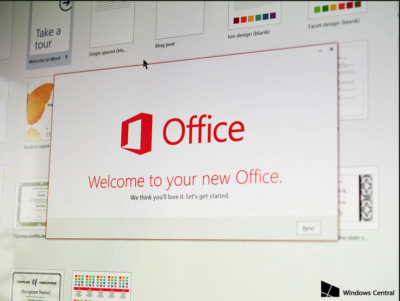
Office 2016 Preview

Office 2016 Preview for existing Office 365 subscribers

For enterprise

Office 365 administrators with an Office 365 ProPlus subscription can now enable the Office 2016 Preview for their organization by turning on First Release. Learn how to turn on First Release.

Once First Release is turned on, users can install the Office 2016 Preview.

Enabled Office 365 ProPlus users

1. Sign in to the My Software page.

2. Go to Try the next version of Office.

3. Click Install.office2016

This will install the Office 2016 Preview on your device.

Note Enabled Office 365 ProPlus users can follow the same process above to install the Project 2016 Preview and the Visio 2016 Preview. On your Software page, select Project or Visio from the Software list. If Project and Visio are not listed, they are not included with your subscription.
Not ready to join First Release? You can still get the Office 2016 Preview,find out how.

For home

  • Go to the Office M Account page.
  • Click Language and install options.
  • Click Additional install options.
  • Open the Version drop-down menu and select the 32-bit or 64-bit Office 2016 Preview.
This will install the Office 2016 Preview on your device. You will stay on the Office 2016 Preview track until you uninstall the Office 2016 Preview or until Office 2016 is released.

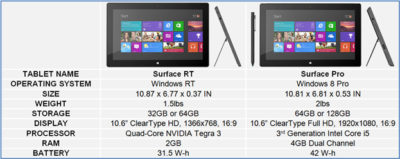
Surface vs Surface Pro

final

Surface RT

Surface RT was released on October 26, 2012.  Running Windows RT Operating System on a Quad-Core NVIDIA Tegra 3 Processor.  Storage options are 32 GB or 64 GB.  According to recent news, only 16 GB available for the 32 GB hard drive and 46 GB available for 64 GB hard drive.  Bundled with the Surface RT is Office Home & Student 2013 RT Preview.

Office Home & Student 2013 RT includes Word, Excel, PowerPoint and OneNote.  Surface RT does not support Outlook.

The price for the Surface RT is $499.00.

Surface Pro

Surface Pro was release on February 9, 2013.  Running Windows 8 Pro Operating System on Dual-Core Intel i5 Processor.  Storage options are 64 GB or 128 GB.  According to recent news, only 23 GB available for the 64GB hard drive and 83 GB for the 128 GB hard drive.  Bundled with the Surface Pro is Full Office Suite Preview.

Surface Pro is a Business tablet that includes a pen and the pen digitizer.  The stylus helps make taking notes, drawing and marking up documents easy.  The price for the Surface Pen is $29.99.

The price for the Surface Pro is $899.00.

table2

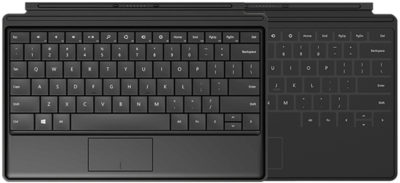
Not included with the purchase of the Surface RT or the Surface Pro is a keyboard.  Microsoft offers two options, Touch cover and Type Cover.  The Touch Cover is a pressure-sensitive keyboard and tablet cover; available in Red, Black, Cyan, White and Magenta.  The price of the Touch Cover is $119.99.  The Type Cover is thin “classic” keyboard and tablet cover; only available in Black.  The price of the Type Cover is $129.99.

typetouchcover2

Type Cover and Touch Cover

Microsoft – What went wrong?

ET83-screen[1]Touch 10 MonitorMicrosoft has always been key player in the Technology world.  In 2009, Microsoft released Windows 7, for many users it became the best operating system yet.  Not too long after the release of Windows 7, Microsoft predicted that “touch-screens” were the future of technology and focused all of their resources in one place.

On October 26, 2012, Microsoft released their Windows 8 OS and their first tablet, the Surface RT.  Shortly thereafter, on February 9, 2013, Microsoft released the second tablet, the Surface Pro.  For more information regarding the Surface RT or the Surface Pro, click here

“A Windows 8-based PC is really a new kind of device, one that scales from touch-only small screens through to large screens, with or without a keyboard and mouse,” said Julie Larson-Green from Microsoft.

Apple and Android touchscreen devices have been very successful because they are useful on-the-go.  Trying to compete with Apple and Android, Microsoft developed Windows 8, a touch-oriented OS.  Many desktop and laptop users have had problems adjusting to the new OS.   Also, the Surface Tablet users are having trouble adjusting to this device and OS because it is a touch-enabled laptop.  Using the touchscreen features on a laptop is not convenient and very uncomfortable.

How long will it take for Microsoft to regain its position in the technology world?


CALL US NOW!