Back to Top

Tech, Web, Cloud & Cabling Services

Category: Telecommunication

Telecommunication Category

Apple iOS 7

FINALiOS7.2

Apple iOS 7 is expected to be released this Fall for both, iPhone and iPad users.  Apple created a simple and more useful experience with iOS 7 that includes many new features.

Control Center

Control Center allows access to common controls and apps from any screen with just one swipe.  Controls included are turning on/off Wi-Fi, turning on/off Bluetooth and adjusting the display brightness.  Apps included are Camera, Flashlight, Calculator and many more.

Notification Center

Notification Center allows you to view new messages, mail, to-dos and missed calls from any screen with just one swipe.  The Notification Center has a new feature called Today.  Today allows you to view everything for “Today” including weather, appointments and local traffic.  Also, this feature gives you a glance at Tomorrow. 

Multitasking

Multitasking is smart way to switch between apps quickly.  To access “Multitasking” press the “Home” button twice.  Multitasking with iOS 7 is more efficient because it learns how you use your apps.  If you check a specific app every day at the same time, your app will be waiting for you.

AirDrop

AirDrop allows you to easily share photos, videos, contacts with the app and a Share button.  AirDrop transfers are encrypted and use Wi-Fi or Bluetooth to share data securely.

Siri

Siri has a redesigned user interface with a new sound and many new capabilities.  Siri has a more natural sounding voice (female/male) and is easier to understand.  Siri’s great new look fades on top of your screen.  Additionally, Siri can answer questions using Bing and Wikipedia, control iTunes radio, return phone calls, play voicemails and many more.

Mail

Mail has a redesigned user interface with many new features and controls.  New features  include the ability to view PDF comments and annotations, add/reorganize the mailbox list, and Mac and PC users with Microsoft Exchange 2010 can also now sync notes.


Set Up Microsoft Exchange E-Mail on iPhone

Set Up Microsoft Exchange E-Mail on an Apple iPhone, iPad, or iPod Touch3

You can set up Exchange e-mail on an Apple iPhone, iPad, or iPod Touch. When you set up an Exchange account on your device, you’ll be able to access and synchronize your e-mail, calendar, and contacts. If you have a different device, or if you want to connect using POP or IMAP.

How do I set up Microsoft Exchange e-mail on an Apple iPhone, iPad, or iPod Touch?


  1. Tap Settings > Mail, Contacts, Calendars > Add Account.
  2. Tap Microsoft Exchange.
  3. You don’t need to enter anything in the Domain box. Enter the information requested in the Email,Username, and Password boxes. You need to enter your full e-mail address in the Email and Usernameboxes (for example, tony@contoso.com).
  4. Tap Next on the upper-right corner of the screen. Your iPhone will try to find the settings it needs to set up your account. Go to step 7 if your iPhone finds your settings.
  5. If your iPhone can’t find your settings, you’ll need to manually look up your Exchange ActiveSync server name. For instructions for how to determine your Exchange ActiveSync server name, see the Finding My Server Name section below.
  6. In the Server box, enter your server name, and then tap Next.
  7. Choose the type of information you want to synchronize between your account and your device, and then touch Save. By default, Mail, Contacts, and Calendar information are synchronized.
    Caution:
    If you’re prompted to create a passcode, tap Continue and enter a numeric passcode. If you don’t set up a passcode, you can’t view your e-mail account on your iPhone. You can set up a passcode later in iPhone Settings.

Finding My Server Name


If your email program isn’t able to automatically find your Exchange ActiveSync server name, you may need to look it up.

  1. Sign in to your e-mail account using Outlook Web App. For help signing in, see How to Sign In to Outlook Web App.
  2. If you’re connecting to an Exchange mailbox, your Exchange ActiveSync server name is contained in the address bar in your browser when you are signed in to Outlook Web App, but without the leadinghttps:// and without the trailing /owa. For example, if the address you use to access Outlook Web App is https://mail.contoso.com/owa, your Exchange ActiveSync server name is mail.contoso.com.
  3. If you’re unable to connect to your mailbox using the information earlier in this section, you can try using the server name value that you can view in Outlook Web App options. Do the following:
    1. In Outlook Web App, click Options > See All Options > Account > My Account > Settings for POP, IMAP, and SMTP access.
      Note:
      Although you’re not setting up a POP3 account, you will use this value to determine your Exchange ActiveSync server name.
    2. Under POP setting, view the value for Server name.
    3. Try setting up your email using the server name listed on your options page. For example if the value for Server name under POP setting is mail.contoso.com, try using mail.contoso.com as your Exchange server name.

What else do I need to know?

  • If you’re prompted to create a passcode and don’t create one, you won’t be able to send and receive e-mail.

Small Business Phone Services

I have a small business that is growing rapidly- I hope to double my payroll
this year. My need for comprehensive business services is going to grow even
faster than my staff. We are a technical company that offers services over the
phone, as well as personal service right to our client’s locations. That means
we need to be able to receive calls, transfer them to our reps in the field, and
have them be able to transfer calls right back to the office all on the same
phone system. Up until now, we have been using a plan from a business cell phone
company, but as we grow, we are going to need a service to handle our own PBX.
That’s a private branch exchange- basically our own internal business phone
service. The days of ‘family plan,’ style business phone services are
(thankfully) behind us.

We are going to be moving into a multi- floor office building, so we will
need a service that can provide my people with business phone lines at their
desks, but also with cell phones that are part of the same system. I need to be
able to monitor and record calls, direct clients to the right place with a
short, simple automated system, and even make automated message calls to clients
at their request. Basically, I’m pretty sure we need everything a business phone service
could offer. I need one that does it all- but don’t let that fool you; we’re
still a small business with only about one hundred regular clients.

I have been looking into enterprise business services for business cell phones, and it is a
complicated world. There are a lot of companies that make bold, vague promises
about ‘providing solutions,’ ‘business services,’ etc. There’s lots of smug,
high-brow language that does not say very much. I won’t know if a company can
help me, and for how much, until I actually tell them what I need. We are in a
precarious position- needing a lot of different services but still being
relatively small, so I want to avoid the big companies. I don’t want to get
locked into a service that has an attractive introductory deal and then held in
by a complicated contract. I want a company that just handles business phones. I
want a small, dedicated company like mine to handle our phone system for
life.

Cloud Based Telecommunications

The Genie in the Phone Cloud: Top 5 Small Biz Features

Entrepreneurship is at an all-time high and innovative small businesses are sprouting and flourishing. Personal service, attention to detail, and feeling good about supporting local and sustainable companies are some of the most popular reasons people choose the little guy over big, aggressive brands.
Maybe you sell delectable gluten-free scones out of a food truck, or are a general housing contractor with a small team of employees. Being great at your trade is one thing, but there’s also the matter of managing communications and connecting smoothly with your customers. With a cloud-based phone system from RingCentral, small businesses are able to walk (and talk) in big business shoes. You can become the wizard behind the curtain, orchestrating spectacular feats with ingenuity and some smart technology.

The Auto-Receptionist is always in and on

Your Auto-Receptionist is the personal assistant that never calls in sick! You or your administrator set the parameters so you can be reached anytime and everyplace. Define the routing criteria, and you’re connected to customers, vendors, and your cycling group, with calls forwarded to multiple numbers and devices, text-to-speech translation of messages, and department-specific messaging. Want someone with a crisp English accent orating your menus for callers? Greetings are customizable, and you can even source professional talent for your recordings. Your three-person organization can perform with the finesse and functionality of a traditionally larger and more established operation.

Unlimited Toll-Free, Local, and Vanity Numbers

Your phone number says a lot about you. Literally it could spell out a memorable word or two. A standard toll-free number, including the classic 1-800 number, tells your customers you’re well established and ensures that your customers can reach you at no cost to themselves. Choose a few local numbers for areas you want to service and instantly become a hot, new, neighborhood business.

Yes, that’s my Department

Getting dumped into a general voicemail box or simply not being able to reach someone in a timely manner is alienating for callers and can send potential customers searching for a more responsive and better-prepared business. Instead, create virtual departments with a group of extensions as a fantastic way to add real structure to your business and make it easy for your contacts to connect with you. For example, create the ‘Sales’ department and when the designated reps aren’t available, the system puts callers on hold until someone can take the call. Hold times can be customized as well, so your callers never feel lost or unimportant.

Get ahead with Call Forwarding

So what happened to the caller on hold for sales? Realizing every second counts and all’s fair in love and brand loyalty, you set Call Forwarding to reach you or another contact after, say, a 30-second hold time. The call instantly goes to your business partner’s mobile phone. If they’re also not available, the call finds the next contact and, as a last resort, it routes to the extension at your poolside cabana in Orlando. You can set specific parameters for After Hours as well and avoid the cost (and antiquated style) of an outside answering service.

The thrill of the (easy) chase

You want your business to be pursued and easily caught. FindMe-FollowMe is the cyber stalker you’re glad to have on your side. You control connectivity by directing incoming calls to any and all your phones, whenever you want. You can even set it to call multiple phones simultaneously, in a specific order and even by date, time, the caller’s Caller ID, or the number dialed.

You had the vision and grit to launch your business, and the progressive thinking to ditch the room full of obsolete and costly phone system hardware. Your contacts will be amazed at how you always seem to magically appear when they need you. Building a successful business starts with the basic steps like establishing a phone system, and being easily reachable by customers whenever they need to reach you.

To View Full Article Click Here

Nokia Lumia 1020 vs. iPhone 5s

Takeaway:  Before rushing out to buy the new iPhone 5s, take a look at the Nokia Lumia Specifications compared to the iPhone 5s.
wa2

Nokia Lumia 1020 is equipt with dynamic live tiles, Office Mobile, a 4.5 Puremotion HD+ AMOLED display and is the winner of the Best Smartphone Camera Award by Gizmodo for the 41-megapixel camera.

Apple’s iPhone 5s will be released on Today, September 20, 2013. The iPhone 5s is available in three colors and will run the recently released, iOS 7.

Compare the iPhone 5s to Nokia Lumia 1020:

iPhone 5s

Nokia Lumia 1020

Price (2-YR Contract) $199.99 – $399 $199.99
Carrier Verizon, AT&T, Sprint, T-Mobile AT&T
Operating System iOS 7 Windows Phone 8
Dimensions 4.87 x 2.31 x .30 5.13 x 2.81 x .41
Weight 3.95 ounces 5.57 ounces
Display 4 inch, 326 ppi, 1136×640 4.5 inch, 334 ppi, 1280×768
Battery Life 10 hours Browsing, 10 hours Talking and 10.4 days Standby 6.7 hours Browsing, 12.5 hours Talking and 16 days Standby
Camera (Back) 8 MP, f/2.2 aperture, LED Flash, 5-Element Lens, 3X Zoom, Digital Image Stabilization, Backside Illumination Sensor 41 MP, f/2.2 aperture, Xenon Flash, 6-Element Lens, 3X Zoom, Optical Image Stabilization, Backside Illumination Sensor
Camera (Front) 1.2 MP, 1280×960, Backside Illumination Sensor 1.2 MP, f/2.4 aperture, 1280×960, Backside Illumination Sensor
Colors  Gold, Gray, Silver Yellow, White, Black
Audio iTune Store for music, Support AAC, Protected AAC, HE-AAC, MP3, MP3 VBR, AIFF, WAV, Apple Losssless and Audible (2, 3, 4, Enhanched Audio, AAX and AAX+) Xbox music or Nokia music; Supports MP3, AMR-NB, ASF, MP4, AAC, AMR, MP3, M4A, WMA, 3GP, 3G2, WMA 10 Pro, GSM FR, WMA 9, AAC LC, AAC+/HEAAC and eAAC+/HEAACv2 codecs
Video 1080p, Full HD, 1920×1080 at 60 frames per second, 3X Zoom, Slow-Motion video, Video Stabilization, Face Detection, Geotagging, Still Photos while Recording 1080p, Full HD, 1920×1080 at 30 frames per second, 6X Zoom, Video Streaming, Five White Balance Modes, Video Stabilization, Autofocus
Memory  N/A  2 GB
Storage 16, 32 or 64 GB local (5 GB Free – Cloud) 32 GB local (7 GB Free – Cloud)
Processor Apple A7, dual-core, 1.7 GHz Qualcomm Snapdragon S4, dual-core, 1.5 GHz
Connectivity Lightning (Charge), Nano SIM (Storage), 3.5 mm audio, USB, Bluetooth 4.0, 802.11 a/b/g/n Wi-Fi Micro USB (Charge), Micro SIM (Storage), 3.5 mm audio, USB 2.0, Bluetooth 3.0, 802.11 a/b/g/n Wi-Fi

South Jersey Techies A High Quality VOIP Provider

VOIP

South Jersey Techies


South Jersey Techies is a high quality VOIP provider.

Our VOIP Solutions let you combine voice and data into a single, easy to manage service and helps you focus on your business, not your network and phone systems.

You can control how your calls are routed from a simple, web based portal accessible from any browser in the world. Use the Find-me/Follow-me feature to make sure you never miss another important call, no matter where you are. With this premium level feature, you get to decide which business calls get through to you at your desk, your cell phone or even at home if you like. You also get to decide which callers go directly to voice mail without even ringing your line.

South Jersey Techies offers a wide range of VOIP Phone Services.  We also offer cheaper, simpler plans that include both local and nationwide long distance calling.

With our hosted VoIP solution there is no expensive PBX equipment in your office to go down, fail or get damaged during a storm. Only your IP phone handsets reside in your office, and those can be easily taken out and moved at any time.

Go VOIP – Go Green – it has a good ring to it don’t you think

South Jersey Techies VoIP systems are more energy efficient and help reduce the need for work related travel and car usage.  Our VOIP Solutions also help reduce paper usage. A great example of this is the fax to e-mail system enabling your company to save on paper usage as the fax no longer has to be printed out, and this applies to both incoming and outgoing faxes.

South Jersey Techies VOIP Advantages:

  • Lower Costs: Save money by combining your phone and data networks
  • Greater Functionality
  • Less maintenance
  • Excellent Voice Clarity and Call quality
  • Free calling features with optional advanced features
  • Mobility: The ability to use your smartphone as an extension of the office phone system, including the ability to have business calls automatically directed to your cell phone and make outbound calls from your smartphone as your office number.
  • Portability: The ability to use any computer or office phone as your personal extension.
  • Flexibility: The ability to redesign your phone system on the fly by simply logging into your VoIP provider’s dashboard.

For more information please visit out websites below, we look forward to serving you:

http://southjerseytechies.net/voip.php

http://www.sjtechies.com/voip-phone-services/

Microsoft Office Coming to Android and Apple

Microsoft Office coming to Android and Apple devices in early 2013

Summary: A Microsoft executive let slip in the Czech Republic that the long-rumored Microsoft Office for Android smartphones and tablets and Apple iPad and iPhones will be arriving in early 2013. Microsoft now denies that their executive was speaking accurately.

We’ve known for months that Microsoft was bringing a version of Microsoft Office 2013 to Android tablets and Apple’s iPad family. Now, according to the Czech tech news site, IHNED, Microsoft product manager Petr Bobek has said that Microsoft is planning to release native iOS and Android versions of Microsoft Office 2013 in the first quarter of 2013

Bobek, a Microsoft Office portfolio manager in the Czech Republic, said that these new versions of Office will be available to larger companies and Microsoft partners In December 2012. small-office/home-office (SOHO) and household users will have to wait until at least February. The online version of Office 365 edition for mobile devices and tablets will appear in early 2013.

In an e-mail, the author of the INHED story clarified that the release would be after March 2013. “We had a slight miscommunication with the MS guys and the timeline for Office for iOS and Android is not a March release, but release sometime after March.”

Officially, the only thing Microsoft had to say at first was that “As we shared previously, Office Mobile will work across Windows Phones, Android phones and iOS, and we have nothing additional to announce today about retail availability of the new Office.”

Later the same day, Microsoft’s head of corporate communications, Frank X. Shaw, denied the whole story. Shaw tweeted, “The information shared by our Czech Republic subsidiary is not accurate. We have nothing further to share.”

No matter when Microsoft delivers the Android and iOS goods, Microsoft’s support of any version of Office on a non-Windows smartphone or tablet strikes me as an odd move. In a shareholder letter, Microsoft CEO Steve Ballmer said that Microsoft is shifting its model to focus on devices and services. This is a radical and dangerous shift for a company that’s always made it money from software licensing. And, now, instead of using Office as a crowbar to pry users from iPads and Android tablets to its Surface tablets, Microsoft is going to offer Microsoft Office 2013 on its device rivals? Odd. Very odd.

Historically, Microsoft has locked its customers into its software ecosystem. Since Microsoft is a non-starter in the mobile space, I find it surprising that they’re not trying to exploit its Office suite in a similar manner in this new market.

That said, given the early reports of Office 2013, which didn’t even have touch enabled for its tablet versions by default, I don’t see Google, with Google Docs and QuickOffice, being worried about Microsoft being a rival on either devices or services anytime soon.

Mobile Application Management (MAM)

Mobile Device Management does not stop with configuring policies, getting asset information, and securing a mobile device. The MDM solution should also provide the administrators the ability to manage the Apps that are installed on the devices.

SJT Support also provides the Mobile Application Management (MAM) capability that helps administrators perform the following management functions:

  • App Management
  • App Distribution
  • VPP Integration
  • Reports 

App management:

  • Manage the Apps over the Air (OTA) to groups/devices.
  • Automatically get App information from App Store
  • Maintain a repository of all Apps used in the network
  • View the list of Apps and their installation count on mobile devices.

App distribution:

  • Seamless distribution of both in-house and App Store Apps to devices and group of devices
  • Advertise Apps on App Catalog and make user choose to install themselves
  • Get the status of the deployed Apps on the users’ devices
  • Remove Apps when not required anymore

Integrate with Volume Purchase Program (VPP):

  • Integrates with Apple Volume Purchase Program to install commercial apps.
  • Automatically assign redemption codes to users upon installation or revoke when not installed
  • Get notified on insufficient redemption codes

Reports:

  • Comprehensive reports helps to monitor apps installed in device.
  • Specific reports can be extracted like:
    • Apps by Devices – Generates the report based on apps available in the device.
    • Devices with/without specific app – Generates report based on specific app.

RingCentral #1 Top VOIP Services

Consumer-Rankings.com Named RingCentral as the # 1 VOIP Business Service Provider!

Consumer-Rankings tested the top VoIP service providers and compared their prices, features, ease of use, call quality and more so that you can determine which of the industry leaders offers the right VoIP plan for you. Read an in-depth RingCentral VoIP review  so you can make an educated purchase.

Best for: Small and large businesses that are looking for a reliable VoIP phone solution.

RingCentral is a company that specializes in providing business VoIP services, fax services and mobile communication solutions. With plans ranging from a single user to over 20 users, RingCentral makes it clear that they can cater to both small businesses and large corporations. With a cloud-based virtual office system, RingCentral eliminates the need for technical knowledge or bulky hardware and makes it possible to enjoy your virtual office from virtually anywhere.

Professionals looking for a VoIP business solution will be drawn to the RingCentral Office plan, which combines calling and online fax features.

Features

RingCentral offers a range of professional-grade VoIP features. Surprisingly, RingCentral is one of the few business VoIP providers that offer a free 1800 toll free number that includes 1,000 minutes of talk per month in the price of the plan. Overage charges for the toll free line cost 3.9 cents per minute. RingCentral’s other features include:

  • Voicemail
  • Voicemail to email (aka Visual Voicemail)
  • Auto-attendant
  • Missed call notification
  • Outlook integration
  • Call screening
  • Call forwarding
  • Call logs
  • Call conferencing
  • Caller ID
  • Calling card (use your RingCentral account to make free calls from anywhere)
  • Music-on-hold
  • Dial-by-name extensions
  • Online fax service
  • Free softphone

Customer Support

RingCentral is one of the few business VoIP providers that offers 24/7 technical support by phone. The billing department is available by phone between 8am-10pm EST on Monday through Friday, 10am-7pm EST on Saturday, and 11am-8pm EST on Sundays. When  RingCentral’s customer support was called at various times throughout the day, and never waited on hold for more than 2 minutes for sales or technical support.

RingCentral also offers chat support, though this feature is not prominently displayed on their website. Chat support is available between 9am and 9pm Monday through Friday and is closed on Saturdays and Sundays.

A search button that is found on most of the site’s pages makes it easy to get answers to questions at any time, and we were happy to see that the search feature yielded relevant, useful results in the majority of our searches. RingCentral answers questions via email only for paying customers, and therefore, the company’s email information is not easily identifiable on the site. Still, we managed to email RingCentral and to receive a same-day response.

Top 4 Smartphones

Takeaway:  Specifications break down of the top four prominent smartphones.

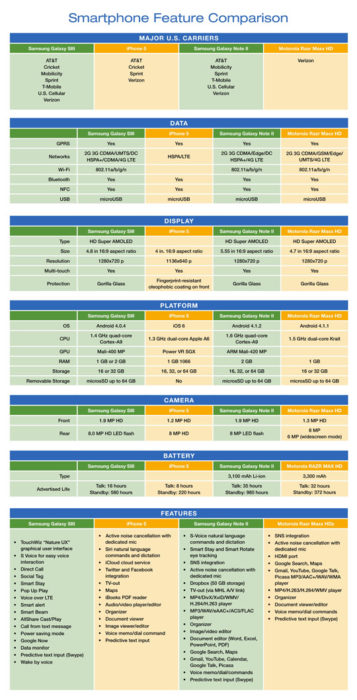
In the United States the top four smartphones are Samsung Galaxy SIII, iPhone 5, Samsung Galaxy Note II and Motorola Razr Maxx HD.  The chart compares mobile carriers, platform, hardware, networks/ Wi-Fi, display, camera and battery for all four leading phones.

If you’re thinking about buying a new smartphone, the chart below will be a quick guide with the necessary feature-to-feature comparisons to make a worthy choice.

Smartphone_Blog_040813_2


CALL US NOW!