Back to Top

Tech, Web, Cloud & Cabling Services

Category: iPhone

Telecommunication / iPhone Category

Apple iOS 7

FINALiOS7.2

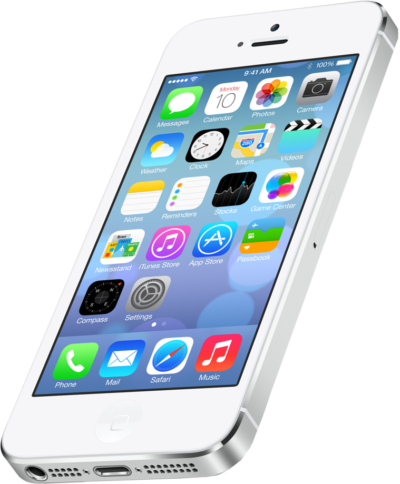
Apple iOS 7 is expected to be released this Fall for both, iPhone and iPad users.  Apple created a simple and more useful experience with iOS 7 that includes many new features.

Control Center

Control Center allows access to common controls and apps from any screen with just one swipe.  Controls included are turning on/off Wi-Fi, turning on/off Bluetooth and adjusting the display brightness.  Apps included are Camera, Flashlight, Calculator and many more.

Notification Center

Notification Center allows you to view new messages, mail, to-dos and missed calls from any screen with just one swipe.  The Notification Center has a new feature called Today.  Today allows you to view everything for “Today” including weather, appointments and local traffic.  Also, this feature gives you a glance at Tomorrow. 

Multitasking

Multitasking is smart way to switch between apps quickly.  To access “Multitasking” press the “Home” button twice.  Multitasking with iOS 7 is more efficient because it learns how you use your apps.  If you check a specific app every day at the same time, your app will be waiting for you.

AirDrop

AirDrop allows you to easily share photos, videos, contacts with the app and a Share button.  AirDrop transfers are encrypted and use Wi-Fi or Bluetooth to share data securely.

Siri

Siri has a redesigned user interface with a new sound and many new capabilities.  Siri has a more natural sounding voice (female/male) and is easier to understand.  Siri’s great new look fades on top of your screen.  Additionally, Siri can answer questions using Bing and Wikipedia, control iTunes radio, return phone calls, play voicemails and many more.

Mail

Mail has a redesigned user interface with many new features and controls.  New features  include the ability to view PDF comments and annotations, add/reorganize the mailbox list, and Mac and PC users with Microsoft Exchange 2010 can also now sync notes.

 

Set Up Microsoft Exchange E-Mail on iPhone

Set Up Microsoft Exchange E-Mail on an Apple iPhone, iPad, or iPod Touch3

You can set up Exchange e-mail on an Apple iPhone, iPad, or iPod Touch. When you set up an Exchange account on your device, you’ll be able to access and synchronize your e-mail, calendar, and contacts. If you have a different device, or if you want to connect using POP or IMAP.

How do I set up Microsoft Exchange e-mail on an Apple iPhone, iPad, or iPod Touch?


  1. Tap Settings > Mail, Contacts, Calendars > Add Account.
  2. Tap Microsoft Exchange.
  3. You don’t need to enter anything in the Domain box. Enter the information requested in the Email,Username, and Password boxes. You need to enter your full e-mail address in the Email and Usernameboxes (for example, tony@contoso.com).
  4. Tap Next on the upper-right corner of the screen. Your iPhone will try to find the settings it needs to set up your account. Go to step 7 if your iPhone finds your settings.
  5. If your iPhone can’t find your settings, you’ll need to manually look up your Exchange ActiveSync server name. For instructions for how to determine your Exchange ActiveSync server name, see the Finding My Server Name section below.
  6. In the Server box, enter your server name, and then tap Next.
  7. Choose the type of information you want to synchronize between your account and your device, and then touch Save. By default, Mail, Contacts, and Calendar information are synchronized.
    Caution:
    If you’re prompted to create a passcode, tap Continue and enter a numeric passcode. If you don’t set up a passcode, you can’t view your e-mail account on your iPhone. You can set up a passcode later in iPhone Settings.

Finding My Server Name


If your email program isn’t able to automatically find your Exchange ActiveSync server name, you may need to look it up.

  1. Sign in to your e-mail account using Outlook Web App. For help signing in, see How to Sign In to Outlook Web App.
  2. If you’re connecting to an Exchange mailbox, your Exchange ActiveSync server name is contained in the address bar in your browser when you are signed in to Outlook Web App, but without the leadinghttps:// and without the trailing /owa. For example, if the address you use to access Outlook Web App is https://mail.contoso.com/owa, your Exchange ActiveSync server name is mail.contoso.com.
  3. If you’re unable to connect to your mailbox using the information earlier in this section, you can try using the server name value that you can view in Outlook Web App options. Do the following:
    1. In Outlook Web App, click Options > See All Options > Account > My Account > Settings for POP, IMAP, and SMTP access.
      Note:
      Although you’re not setting up a POP3 account, you will use this value to determine your Exchange ActiveSync server name.
    2. Under POP setting, view the value for Server name.
    3. Try setting up your email using the server name listed on your options page. For example if the value for Server name under POP setting is mail.contoso.com, try using mail.contoso.com as your Exchange server name.

What else do I need to know?

  • If you’re prompted to create a passcode and don’t create one, you won’t be able to send and receive e-mail.

Nokia Lumia 1020 vs. iPhone 5s

Takeaway:  Before rushing out to buy the new iPhone 5s, take a look at the Nokia Lumia Specifications compared to the iPhone 5s.
wa2

Nokia Lumia 1020 is equipt with dynamic live tiles, Office Mobile, a 4.5 Puremotion HD+ AMOLED display and is the winner of the Best Smartphone Camera Award by Gizmodo for the 41-megapixel camera.

Apple’s iPhone 5s will be released on Today, September 20, 2013. The iPhone 5s is available in three colors and will run the recently released, iOS 7.

Compare the iPhone 5s to Nokia Lumia 1020:

iPhone 5s

Nokia Lumia 1020

Price (2-YR Contract) $199.99 – $399 $199.99
Carrier Verizon, AT&T, Sprint, T-Mobile AT&T
Operating System iOS 7 Windows Phone 8
Dimensions 4.87 x 2.31 x .30 5.13 x 2.81 x .41
Weight 3.95 ounces 5.57 ounces
Display 4 inch, 326 ppi, 1136×640 4.5 inch, 334 ppi, 1280×768
Battery Life 10 hours Browsing, 10 hours Talking and 10.4 days Standby 6.7 hours Browsing, 12.5 hours Talking and 16 days Standby
Camera (Back) 8 MP, f/2.2 aperture, LED Flash, 5-Element Lens, 3X Zoom, Digital Image Stabilization, Backside Illumination Sensor 41 MP, f/2.2 aperture, Xenon Flash, 6-Element Lens, 3X Zoom, Optical Image Stabilization, Backside Illumination Sensor
Camera (Front) 1.2 MP, 1280×960, Backside Illumination Sensor 1.2 MP, f/2.4 aperture, 1280×960, Backside Illumination Sensor
Colors  Gold, Gray, Silver Yellow, White, Black
Audio iTune Store for music, Support AAC, Protected AAC, HE-AAC, MP3, MP3 VBR, AIFF, WAV, Apple Losssless and Audible (2, 3, 4, Enhanched Audio, AAX and AAX+) Xbox music or Nokia music; Supports MP3, AMR-NB, ASF, MP4, AAC, AMR, MP3, M4A, WMA, 3GP, 3G2, WMA 10 Pro, GSM FR, WMA 9, AAC LC, AAC+/HEAAC and eAAC+/HEAACv2 codecs
Video 1080p, Full HD, 1920×1080 at 60 frames per second, 3X Zoom, Slow-Motion video, Video Stabilization, Face Detection, Geotagging, Still Photos while Recording 1080p, Full HD, 1920×1080 at 30 frames per second, 6X Zoom, Video Streaming, Five White Balance Modes, Video Stabilization, Autofocus
Memory  N/A  2 GB
Storage 16, 32 or 64 GB local (5 GB Free – Cloud) 32 GB local (7 GB Free – Cloud)
Processor Apple A7, dual-core, 1.7 GHz Qualcomm Snapdragon S4, dual-core, 1.5 GHz
Connectivity Lightning (Charge), Nano SIM (Storage), 3.5 mm audio, USB, Bluetooth 4.0, 802.11 a/b/g/n Wi-Fi Micro USB (Charge), Micro SIM (Storage), 3.5 mm audio, USB 2.0, Bluetooth 3.0, 802.11 a/b/g/n Wi-Fi

Microsoft Office Coming to Android and Apple

Microsoft Office coming to Android and Apple devices in early 2013

Summary: A Microsoft executive let slip in the Czech Republic that the long-rumored Microsoft Office for Android smartphones and tablets and Apple iPad and iPhones will be arriving in early 2013. Microsoft now denies that their executive was speaking accurately.

We’ve known for months that Microsoft was bringing a version of Microsoft Office 2013 to Android tablets and Apple’s iPad family. Now, according to the Czech tech news site, IHNED, Microsoft product manager Petr Bobek has said that Microsoft is planning to release native iOS and Android versions of Microsoft Office 2013 in the first quarter of 2013

Bobek, a Microsoft Office portfolio manager in the Czech Republic, said that these new versions of Office will be available to larger companies and Microsoft partners In December 2012. small-office/home-office (SOHO) and household users will have to wait until at least February. The online version of Office 365 edition for mobile devices and tablets will appear in early 2013.

In an e-mail, the author of the INHED story clarified that the release would be after March 2013. “We had a slight miscommunication with the MS guys and the timeline for Office for iOS and Android is not a March release, but release sometime after March.”

Officially, the only thing Microsoft had to say at first was that “As we shared previously, Office Mobile will work across Windows Phones, Android phones and iOS, and we have nothing additional to announce today about retail availability of the new Office.”

Later the same day, Microsoft’s head of corporate communications, Frank X. Shaw, denied the whole story. Shaw tweeted, “The information shared by our Czech Republic subsidiary is not accurate. We have nothing further to share.”

No matter when Microsoft delivers the Android and iOS goods, Microsoft’s support of any version of Office on a non-Windows smartphone or tablet strikes me as an odd move. In a shareholder letter, Microsoft CEO Steve Ballmer said that Microsoft is shifting its model to focus on devices and services. This is a radical and dangerous shift for a company that’s always made it money from software licensing. And, now, instead of using Office as a crowbar to pry users from iPads and Android tablets to its Surface tablets, Microsoft is going to offer Microsoft Office 2013 on its device rivals? Odd. Very odd.

Historically, Microsoft has locked its customers into its software ecosystem. Since Microsoft is a non-starter in the mobile space, I find it surprising that they’re not trying to exploit its Office suite in a similar manner in this new market.

That said, given the early reports of Office 2013, which didn’t even have touch enabled for its tablet versions by default, I don’t see Google, with Google Docs and QuickOffice, being worried about Microsoft being a rival on either devices or services anytime soon.

Mobile Application Management (MAM)

Mobile Device Management does not stop with configuring policies, getting asset information, and securing a mobile device. The MDM solution should also provide the administrators the ability to manage the Apps that are installed on the devices.

SJT Support also provides the Mobile Application Management (MAM) capability that helps administrators perform the following management functions:

  • App Management
  • App Distribution
  • VPP Integration
  • Reports 

App management:

  • Manage the Apps over the Air (OTA) to groups/devices.
  • Automatically get App information from App Store
  • Maintain a repository of all Apps used in the network
  • View the list of Apps and their installation count on mobile devices.

App distribution:

  • Seamless distribution of both in-house and App Store Apps to devices and group of devices
  • Advertise Apps on App Catalog and make user choose to install themselves
  • Get the status of the deployed Apps on the users’ devices
  • Remove Apps when not required anymore

Integrate with Volume Purchase Program (VPP):

  • Integrates with Apple Volume Purchase Program to install commercial apps.
  • Automatically assign redemption codes to users upon installation or revoke when not installed
  • Get notified on insufficient redemption codes

Reports:

  • Comprehensive reports helps to monitor apps installed in device.
  • Specific reports can be extracted like:
    • Apps by Devices – Generates the report based on apps available in the device.
    • Devices with/without specific app – Generates report based on specific app.

Top 4 Smartphones

Takeaway:  Specifications break down of the top four prominent smartphones.

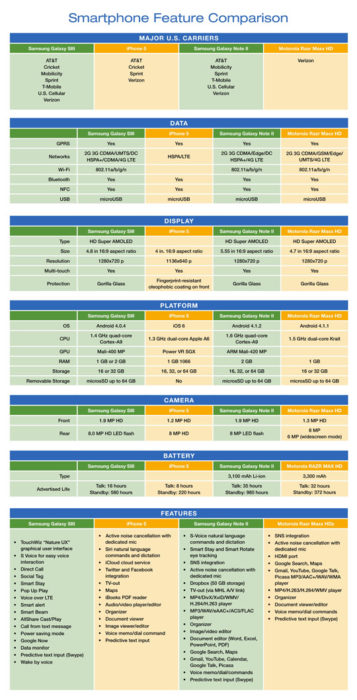
In the United States the top four smartphones are Samsung Galaxy SIII, iPhone 5, Samsung Galaxy Note II and Motorola Razr Maxx HD.  The chart compares mobile carriers, platform, hardware, networks/ Wi-Fi, display, camera and battery for all four leading phones.

If you’re thinking about buying a new smartphone, the chart below will be a quick guide with the necessary feature-to-feature comparisons to make a worthy choice.

Smartphone_Blog_040813_2


Windows Phone 8

WP8_2

Takeaway:  Information for and against Windows Phone 8.

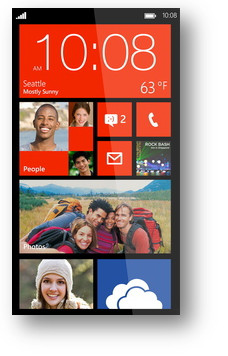
The second generation Windows Phone was release in October 2012.  Windows Phone 8 bundles essential functionality including navigation, storage, sharing and apps.

Windows Phone 8 runs Modern UI (Metro) which is typography-style layout also known as Swiss Style.  Microsoft added several new colors as additional options for users such as Cobalt, Olive, Amber, Steel and many others.

The apps collection does not include popular apps such as YouTube, Flash, HBOGO and several others.  Lastly, Windows Phone 8 does not have vocal turn-by-turn navigation.

Unlike iOS and Android, the core of social media, such as Facebook and Twitter, are built-in to the operating system.  Windows Phone 8 does not have a notification bar (Android) or disrupting notifications (iOS).  Checking social media updates, e-mail and weather will be a simple task after setting up your home screen by arranging live tiles.


Surface 2 for 2014

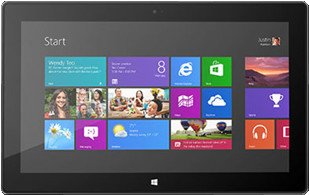
surface2Technology is a fast paced industry; current technology and devices are just making way for tomorrow’s new technology. With that said, Microsoft is developing their second generation tablet, Surface 2.

Although in the Top Five Tablets for the first quarter of 2013, Microsoft has not been as successful as planned with the Surface Tablets, only selling half of the units required for their intended goal.

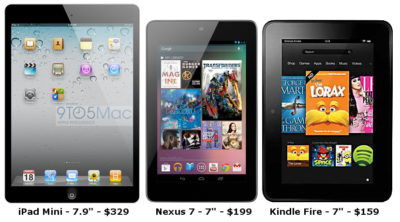
inkTo conquer the growing demand for smaller tablets, Surface 2 will have a 7-9 inch display with a higher screen resolution than its competitors, iPad Mini, Nexus 7 and Kindle Fir..  The iPad Mini offers 1024×768 resolution, the Nexus 7 offers 1280×800 resolution and Kindle Fire offers 1024×600 resolution.  Microsoft expects Surface 2 to offer 1400×1050 resolution.

Partners from the Surface RT and Surface Pro development are working together including Pegatron Technology, Ju Teng, Samsung, LG, Corning, Intel and NVIDIA to build the second generation.

The rumored price of the Surface 2 will be approximately $400.  Microsoft’s Build Developer Conference at the end of June will announce more information regarding the Surface 2 including a possible release date, specifications and features.


Apple iOS 7

ios7_2On Monday, June 10, 2013 Apple exposed iOS 7 at the Worldwide Developers Conference.  The new OS will be available for multiple devices including  iPhone 4 and up, iPad 2 and up and the iPad Mini.

New features for iOS 7 include:

Control Center:  By swiping from the bottom to the top will now allow you to adjust your settings

AirDrop:  For Apps that allow sharing, AirDrop will encrypt data that a user shares to friends within a close distance.

Activation Lock:  To prevent smartphone crimes, when disabling “Find My iPhone” the phone will be locked and only the correct Apple credentials will unlock the phone.

Multitasking:  Apps can develop patterns based on usage.  These patterns will allow the iOS 7 to update apps in the background based on network connections.

Car integrated iOS:  For 2014, many car manufacturers are integrating iOS with the car display.

Safari:  Safari has been updated with navigation, smart search and iCloud Keychain.

Siri:  Siri can now operate more of the iPhone including voicemail, Wikipedia, Twitter, Bing and many others.

Camera:  Photos are well-organized as Moments.  Also, the camera has new photo filter options.

App Store:  The App Store can organize Apps based on age and geographical location.  Also, background updating will eliminate manual updating. 

Music:  Music, Movies and TV Shows are now stored together in your Library.  

iTunes Radio:  A streaming music service that will be available with iOS 7.


Apple: Larger Screens for iPhones & iPads

Apple-LogoApple, Inc. offers innovative products that continue to grow its customer base.  Testing new designs for current products is a consistent task for Apple, Inc.

“Apple has been slow to react to consumer desire for larger smartphone screens, [and] entry level price points on new phones,” said BGC Financial’s Colin Gillis. “Waiting and waiting, for the new products to launch, has become painful,” he wrote.

Currently, Apple is testing various sizes for iPhone and iPad screens.  Samsung has become the world’s largest smartphone maker because Samsung offers a variety of smartphones with display sizes that range up to 5.5-inches.   Continuing to compete with Samsung, Apple is testing for a 5-inch iPhone screen expected to be released in 2014.

A new tablet design is also being tested by Apple with a display that is a little less than 13-inches.  This would be a great addition to the iPad that has a 9.7-inch display and the iPad Mini that has a 7.8-inch display.

Lastly, Apple has been developing an iPhone that would be cheaper than the current iPhone.  According to many articles, the cheaper iPhone will be made from plastic instead of the traditional metal casing that will be available in different colors.

Apple, Inc. could climb back to the top of both smartphone and tablet sales by releasing a larger display for the iPhone/iPad and releasing an iPhone that is reasonably priced.


CALL US NOW!