Back to Top

Tech, Web, Cloud & Cabling Services

Category: News

Windows Server 2003 end of life guide

How to organize your migration from Windows Server 2003


Following on from end of support for Windows XP in April 2014, we are now rapidly approaching Windows Server 2003 end of life.

Despite Microsoft warning about end of life for Windows Server 2003 as early as April 2013, many organisations are yet to begin their migration away from the server platform. Worse still, many organisations and IT pros are unaware of the huge financial costs and security risks should they continue running Windows Server 2003 past the end of life date.

Reports from HP claim that more than 11 million systems are still running Windows Server 2003. With fewer than 240 days left until end of life, this a huge problem as the estimated time required to migrate a datacentre of 100 or more servers can range from a minimum of three months and upwards of 18 months.

If you own even one of those 11 million servers and you have yet to begin migration, you should be worried. Luck for you, the following guide will migrate you to a position of safety. We will cover the following:

• Windows Server 2003 End of Life date
• Understanding what end of support means for Windows Server 2003 and the associated impacts
• An outline of how to migrate Windows Server 2003
• Resources to aid migration

Windows Server 2003 End of Life date

According to the Microsoft Support Lifecyle section on 14 July 2015, Microsoft will end extended support on all versions of Windows Server 2003/R2.

Understanding what end of support means for Windows Server 2003

From then on, this means no more updates or patches from Microsoft, which can result a less secure and less stable infrastructure for your business. What this really means:

• Maintenance Costs – running legacy servers is expensive. Intrusion detection systems, advanced firewalls and network segmentation are required to protect a now vulnerable Windows Server 2003 platform. You will also have increasing cost from maintaining aging hardware. Current estimates in a TechNet post from Alex Fu place the cost of custom support post end of life at US$200,000 on average. In a Q&A with David Mayer, practice director of Microsoft Solutions for Insight Enterprises, he estimated a support cost of $1500 per server per year.

• No Updates – there will be no more updates to fix bugs, performance issues and security vulnerabilities. To put this into perspective, 2013 saw the release of 37 critical updates for Windows Server 2003/R2. Past the end of life date, these critical issues will remain unfixed leaving you open to cybersecurity dangers such as malicious attacks or electronic data loss.

• No Compliance – once support ends, your organisation will almost certainly fail to meet industry wide compliance standards. Regulations such as HIPAA, PCI, SOX & Dodd-Frank all require regulated industries to run on supported platforms. The impact is twofold: Non-compliance could result in the loss of business, while high transaction fees and penalties from non-compliance could dramatically increase the cost of doing business.

• Software and Hardware Compatibility Issues – new software and hardware devices will not be built to integrate with Windows Server 2003. Sticking with a legacy server means you will likely run into compatibility issues and may not be able to run new instances of software or communicate with the latest devices.

• No Safe Haven – without continued support from Microsoft, virtualized and physical instances of Windows Server 2003/R2 and Microsoft Small Business Server (SBS) 2003 will not pass a compliance audit.

How to migrate from Windows Server 2003

Do not underestimate the task that lies ahead. Migrating applications and server workloads is no easy task. Worryingly, a study by App Zero suggests that 62 per cent of organisations do not have a plan to upgrade or migrate, or even know that EOS is coming.

• Discover – first up is discovering and cataloguing all the software and workloads that are running on Windows Server 2003/R2 at present. Download the Microsoft Assessment and Planning toolkit as this will be a worthy support document.

• Assess – now you have a list it’s time to analyse and categorise all your applications and workloads based on type, criticality, complexity and risk. This helps you prioritise for migration as well as identify issues and opportunities.

• Target – in this step, you must choose a destination for each application and workload. This could be the perfect time to evolve your organisation to the next level and embrace the cloud. Microsoft offers a series of destinations for each application or workload which could include:

billionphotos-1008218 (1)

o Windows Server 2012 R2
o System Center 2012 R2 (Private Cloud)
o Microsoft Azure (Public Cloud)
o SQL Server 2014
o Office 365

• Migrate – now is the time choose a migration plan. Microsoft offers a fantastic Migration Planning Assistant which covers all four steps. Look for official Microsoft training courses to give you an in-depth understanding of the new platforms you are planning to migrate to.

Resources to aid migration

Due to the widespread requirement to migrate, there is a range of fantastic resources to aid migration. These include:

Microsoft Virtual Academy – arguably the largest and best collection of free self-study resources from Microsoft experts including videos, slide decks and self-assessments. Check out the section on migrating to Windows Server 2012, or the Microsoft zure JumpStart.

Windows Server 2003 Roles Migration Processdownload this document and turn it into an A3 poster, stick it on your wall and use it to visualise the whole process.

Microsoft Deployment Toolkitdownload this fantastic resource, which provides a collection of processes, tools and guidance for automating new desktop and server deployments.

Free Software Trials – Microsoft have a series of trials so you can check out the new software. Here they are:

Windows Server 2012 R2 trial
System Center 2012 R2 trial
Microsoft Azure one-month trial
Office 365 trial
SQL Server 2014 trial

Windows Server Migration Services – there are a series of organisations that offer assistance in migrating away from Windows Server 2003. Big players include:

• Dell
• RackSpace
• HP

Time is running out — start your migration away from Windows Server 2003 today. Fail to do so and you find yourself facing some organisation-crippling consequences

Have questions?

Our Business IT Server Migration Specialists in NJ, PA & DE are here to help.
Call us at: 856-745-9990 or visit: https://southjerseytechies.net/server-support/

South Jersey Techies, LLC is a full Managed Web and Technology Services Company providing IT Services, Website Design ServicesServer SupportNetwork ConsultingInternet PhonesCloud Solutions Provider and much more. Contact for More Information.

To read this article in its entirety click here.

Announcing Extended Support Hours

To better serve our customers, we are pleased to announce that beginning Tuesday, March 1st, 2022, we will be extending our regular office hours to 8am-8pm, Monday-Friday. We will continue to have emergency support technicians available after-hours from 8pm-8am and weekends.

We appreciate our clients’ loyalty to South Jersey Techies over the last 18+ years. Whether a new, existing or soon-to-be client, we value your support and business to our team. As our business has grown, so has our team. This has given us the capacity to extend our regular office hours to provide your company the best possible support throughout the day.

Our hope is that the new extended hours will be more convenient for some of your users and allow us to provide support to those users at the regular rate.

If you or someone from the team needs support during those hours, please email support at support@sjtechies.com or call (856) 745-9990 to get scheduled with a member of our team

L2TP VPN Connections Break as part of January 2022 Patch Tuesday

Update 1/28/2022: South Jersey Techies has released OOB updates to fix the Windows L2TP VPN connection issues.

Microsoft released Windows updates to fix security vulnerabilities and bugs as part of the January 2022 Patch Tuesday that came with fixes for six zero-day vulnerabilities and a total of 97 flaws.

These updates also included KB5009566 for Windows 11 and KB5009543 for Windows 10 2004, 20H1, and 21H1.

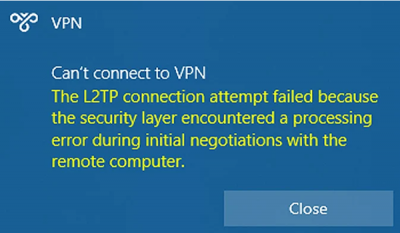
Problems are being reported rapidly from Windows 10 users and administrators who are trying to make L2TP VPN connections after installing the recent Windows 10 KB5009543 and Windows 11 KB5009566 cumulative updates and receiving the error below. L2TP VPN connections are being reported as broken when attempting to connect using the Windows VPN client by Windows users.

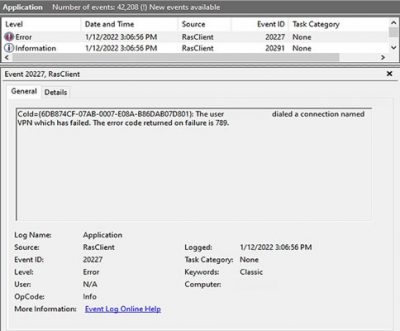
You will also receive an error code in the Event Log entries, code 789, stating that the connection to the VPN failed.

The bug is not affecting all VPN devices and seems only to be affecting users using the built-in Windows VPN client to make the connection. Some users have reported the bug affecting their Ubiquiti Site-to-Site VPN connections for those using the Windows VPN client. The bug also affects connections to SonicWall, Cisco Meraki, and WatchGuard Firewalls, with the latter’s client also affected by the bug.

How to fix the break?

Admins have been forced to remove the KB5009566 and KB5009543 updates, which immediately fixes the L2TP VPN connections on reboot.

However, you face the risk of removing all fixes for vulnerabilities patches released during the January 2022 Patch Tuesday when removing the update due to Microsoft’s bundling of all security updates in a single Windows cumulative update.

Weighing the risks of unpatched vulnerabilities versus the disruption caused by the inability to connect to VPN connections is something all Windows admins need to consider, carefully.

Microsoft’s January 2022 Patch Tuesday fixed numerous vulnerabilities in the Windows Internet Key Exchange (IKE) protocol (CVE-2022-21843, CVE-2022-21890, CVE-2022-21883, CVE-2022-21889, CVE-2022-21848, and CVE-2022-21849) and in the Windows Remote Access Connection Manager (CVE-2022-21914 and CVE-2022-21885) that could be causing the problems.

Unfortunately, there is no known fix or workaround for the L2TP VPN connection issues at this time.

If you have any questions, please email us at support@sjtechies.com or call us at (856) 745-9990.

Here’s what’s coming next from Sling TV

Sling TV CEO Roger Lynch talks pricing, DVR, and certified hardware.
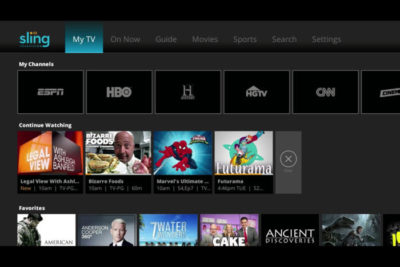
A lot’s changed in the two years since Sling TV made its grand debut at CES 2015. Instead of being the only streaming option for cable channels like ESPN and CNN, Sling is now one of three options alongside PlayStation Vue and DirecTV Now, and it will soon have a fourth competitor in Hulu.

Accordingly, Sling has changed with the times. The company, a subsidiary of Dish Network, has added new channels, created a second base package with a different mix of channels, and is working on a cloud DVR feature.

What else is in store for Sling this year? Here’s what we learned from Roger Lynch, Sling’s CEO, during CES 2017:

On DVR, which is “months” away

Sling began testing DVR service in an invite-only beta on Roku devices last month, and while it’s clearly a work in progress, Lynch says feedback has been positive. “The only feedback that isn’t positive is, ‘I wish I had this feature or that feature,’ all of which are being built already anyway,” Lynch says.

For now, Sling is prioritizing simple improvements like grouping recordings from a series into a folder, rather than listing them all separately. The eventual goal is to list all episodes from a series—whether it’s on-demand, recorded, or live—in a single window.

Still, Lynch gave only a rough time frame for when DVR might launch publicly, “It’s not in weeks. It’s not in years. It’s in months,” he says. “We want to get it out as quickly as possible.”

On AirTV and “Optimized for Sling TV”

Just before CES began, Dish announced a new brand called AirTV. Its first product, the AirTV player, puts Sling TV front-and-center, while integrating over-the-air channels and Netflix recommendations into the Sling guide.

Lynch sees AirTV as an example for other device makers to follow. “I’m hopeful that other device partners will make devices similar to this, and do similar types of integrations for Sling, and that it’ll spur innovation in the ecosystem,” he says.

To that end, Sling’s sole CES announcement was an “Optimized for Sling TV” certification program, which will help consumers know whether a device works well with the service. With streaming devices, for instance, criteria could include a Sling button on the remote control, integration with over-the-air broadcasts in the Sling guide, and a way to auto-launch Sling when users turn on the device.

Lynch says Sling is still finalizing how it’ll enforce those criteria. Roku, for instance, pre-loads the Sling app and includes a quick-launch remote button on some models, and that might be enough to earn Sling’s approval. Other types of devices may have different criteria.

“There’s router companies that are looking to be optimized for Sling. So what does that mean for router companies? It doesn’t meant they’re going to integrate OTA and put a button on the remote. It means they’re going to do something to optimize for the experience,” Lynch says.

On separating Sling Orange and Blue

Last year, Sling introduced a second base package, separate from its original $20-per-month plan. The newer plan is called Sling Blue, and it starts at $25 per month, while the original is now called Sling Orange. (Subscribers can bundle the two plans, which have different channel lineups with some overlap, for $40 per month.)

Might Sling eventually try to merge these two plans?

“We work really, really hard not to combine them,” Lynch says. “The problem with combining them is, you end up with a $35 to $40 package because there’s so much content, and you price yourself out of the market from where I think the big opportunities [are].”

That sounds like a shot at rivals like PlayStation Vue, DirecTV Now, and Hulu, none of whom are attempting to match Sling’s base prices. “For us, the Sling Orange product is the perfect cord-cutter product. It’s great for people who use antennas because you’re not forced to buy locals, and locals are really expensive,” Lynch says.

Sling Blue, meanwhile, will likely compete more directly with those larger bundles over time. “That’ll become a broader content package at a higher price point,” Lynch says.

On getting what it wants from TV networks

Since its launch in 2015, Sling has offered a “Replay” feature that lets users rewind live TV and watch several days’ worth of past programming. It’s a nice alternative to setting up a DVR, but not every channel supports the feature.

As you might expect, that’s partly because of issues with streaming rights. But Sling is working on accommodating those issues so it can support Replay on more channels.

“Every program has different requirements, like, can you fast forward, can you not fast forward, yes you can fast forward, but not through commercials,” Lynch says. “There are channels that have granted us rights to Replay, but we haven’t made Replay available on the channel yet, because we still have to put in some technology to enable that, because of the business rules that channel has.”

On the whole, though, negotiating those sorts of features with TV networks is getting easier. Lynch notes that two years ago, Sling was scrambling just to get a basic package together—the service launched with a mere 11 channels—but now TV networks are much more interested.

“When we first launched,” Lynch says, “we didn’t have as much leverage to demand things like that as we do now.”

Have questions?

Get answers from Microsofts Cloud Solutions Partner!
Call us at: 856-745-9990 or visit: https://southjerseytechies.net/

South Jersey Techies, LL C is a full Managed Web and Technology Services Company providing IT Services, Website Design ServicesServer SupportNetwork ConsultingInternet PhonesCloud Solutions Provider and much more. Contact for More Information.

To read this article in its entirety click here.

South Jersey Techies

Protect Your Data & Backup

Not sure your are protected? Contact us, we can help!

Hackers held two school districts on Long Island hostage over the summer, forcing one of them to pay $88,000 in cryptocurrency in order retrieve student and staff information before the school year started.

Despite using an anti-virus software and other firewalls for cyber security, the School District’s encrypted files were accessed this summer by Ryuk ransomware, which can infiltrate an entire server with one click of a malicious email attachment. The virus encrypts data, essentially locking users out of access to their files, and hackers are blackmailing schools until payment is made, usually in bitcoin, through school insurance to unlock the system’s server.

The Mineola School District was also attacked by the same virus. But they didn’t have to pay because they had a backup that wasn’t compromised.

What are some tips to avoid having to pay the ransomware

The nefarious ransomware business model has turned out to be a lucrative industry for criminals. Over the years its ill repute has made law enforcement team up with international agencies to identify and bring down scam operators.

Most of the ransomware attacks that have taken place in the past have been linked to poor protection practices by employees and businesses. There are ways to prepare and steps you can take to avoid the nuances these hackers are causing.

Here are a few dos and don’ts when it comes to ransomware.

  1. Do not pay the ransom. It only encourages and funds these attackers. Even if the ransom is paid, there is no guarantee that you will be able to regain access to your files.
  2. Restore any impacted files from a known good backup. Restoration of your files from a backup is the fastest way to regain access to your data.
  3. Do not provide personal information when answering an email, unsolicited phone call, text message or instant message. Phishers will try to trick employees into installing malware, or gain intelligence for attacks by claiming to be from IT. Be sure to contact your IT department if you or your coworkers receive suspicious calls or emails.
  4. Use reputable antivirus software and a firewall. Maintaining a strong firewall and keeping your security software up to date are critical. It’s important to use antivirus software from a reputable company because of all the fake software out there.
  5. Do employ content scanning and filtering on your mail servers. Inbound e-mails should be scanned for known threats and should block any attachment types that could pose a threat.
  6. Do make sure that all systems and software are up-to-date with relevant patches. Exploit kits hosted on compromised websites are commonly used to spread malware. Regular patching of vulnerable software is necessary to help prevent infection.
  7. If traveling, alert your IT department beforehand, especially if you’re going to be using public wireless Internet. Make sure you use a trustworthy Virtual Private Network (VPN) when accessing public Wi-Fi like Norton Secure VPN.

Ransomware criminals often attack small and medium sized businesses. Among other cyber attacks, ransomware is one criminal activity that can be easily worked around with the above-mentioned solutions. South Jersey Techies coupled with education about these threats is an excellent protection plan for today’s cyber landscape.

Office 2010 is Retiring

The popular Microsoft Office 2010 is reaching end of support in a few months. To avoid security risks, it’s time to upgrade to a newer version of Office. The good news is that you have options.

drawing of a man holding a laptop in front of a very large laptop with "update" on the screen and a wrench in front

What Does End of Support Mean?

Microsoft Office 2010 has been a popular version of the application over the last decade. The unfortunate news is that support for it ends this fall — on October 13, 2020, to be exact. All of your Office 2010 apps will continue to function. However, using an unsupported version of any software exposes your computer to serious and potentially harmful security risks. Microsoft will no longer provide technical support, bug fixes, or security fixes for Office 2010 vulnerabilities that may be subsequently reported or discovered. This includes security updates that help protect your PC from harmful viruses, spyware, and other malicious software.

  • You’ll no longer receive Office 2010 software updates from Microsoft Update.
  • You’ll no longer receive phone or chat technical support.
  • No further updates to support content will be provided, and most online help content will be retired.
  • Another difficulty you may face is incompatibility with some of the newer programs and file formats.

If you’re using Office 2010, it’s probably a good time to upgrade your version of Microsoft Office.

Upgrade Options

The best way to protect yourself and your organization is to upgrade to a newer version of Office:

  • Cloud upgrade: Subscriptions to Microsoft 365
  • On-premises upgrade: Office Standard 2019

Microsoft 365

Microsoft 365 is an all-in-one cloud solution with a number of different licensing options to fit your organization’s needs. The best part about cloud-based applications is that you no longer have to worry about retirements, patches, and end of support. Cloud licenses are automatically updated with new features, new applications, and security updates. Many cloud subscriptions also include installed (or desktop) versions of the application, so you can have the same look and feel of the Office applications you are accustomed to using, but built with more robust features and benefits.

Microsoft Office Standard 2019

Microsoft Office Standard 2019 is the latest version of the on-premises version of the office suite and is a good option for you if you are not ready for the cloud version at this time. This version of Office includes Word, Excel, PowerPoint, Outlook, OneNote, and Publisher.

If you have any questions, please email us at support@sjtechies.com or call us at (856) 745-9990.

Cyber Security Awareness

As school, socializing, and many aspects of life have moved online this year, it’s more important than ever that you protect your digital devices and steer clear of cybercriminals. Computer security threats are relentlessly inventive. Masters of disguise and manipulation, these threats constantly evolve to find new ways to annoy, steal and harm. Arm yourself with information and resources to safeguard against complex and growing computer security threats and stay safe online.

Examples of Online Cybersecurity Threats

Computer Viruses

Probably the most eminent computer security threat, a computer virus is a program written to alter the way a computer operates, without the permission or knowledge of the user. A virus replicates and executes itself, usually doing damage to your computer in the process.

What can you do to avoid computer viruses? Carefully evaluate free software, downloads from peer-to-peer file sharing sites, and emails from unknown senders. These things are critical to avoiding viruses. Most web browsers have security settings which can be configured for top defense against online threats. But, as we’ll say again and again, the single most-effective way of fending off viruses is up-to-date antivirus software and monitoring agent, like we include in our Managed Service Plans.

Spyware Threats

A serious computer security threat, spyware is any program that monitors your online activities or installs programs without your consent for profit or to capture personal information.

While many users won’t want to hear it, reading terms and conditions is a good way to build an understanding of how your activity is tracked online. As always, if a company you do not recognize is advertising for a deal that seems too good to be true, be sure you have an internet security solution in place and click with caution.

Hackers and Predators

People, not computers, create computer security threats and malware. Hackers and predators are programmers who victimize others for their own gain by breaking into computer systems to steal, change, or destroy information as a form of cyber-terrorism. These online predators can compromise credit card information, lock you out of your data, and steal your identity. As you may have guessed, online security tools with identity theft protection are one of the most effective ways to protect yourself from this brand of cybercriminal.

Phishing

Masquerading as a trustworthy person or business, phishers attempt to steal sensitive financial or personal information through fraudulent email or instant messages. Phishing attacks are some of the most successful methods for cybercriminals looking to pull off a data breach. Antivirus solutions with identity theft protection can be taught to recognize phishing threats in fractions of a second.

Cyber Safety Tips

  • Keep software systems up to date and use a good anti-virus program.
  • Examine the email address and URLs in all correspondence. Scammers often mimic a legitimate site or email address by using a slight variation in spelling.
  • If an unsolicited text message, email, or phone call asks you to update, check, or verify your account information, do not follow the link provided in the message itself or call the phone numbers provided in the message. Go to the company’s website to log into your account or call the phone number listed on the official website to see if something does in fact need your attention.
  • Do not open any attachments unless you are expecting the file, document, or invoice and have verified the sender’s email address.
  • Scrutinize all electronic requests for a payment or transfer of funds.
  • Be extra suspicious of any message that urges immediate action.
  • Confirm requests for wire transfers or payment in person or over the phone as part of a two-factor authentication process. Do not verify these requests using the phone number listed in the request for payment.


If you have any questions, please email us at support@sjtechies.com or call us at (856) 745-9990.

Teams Vs. Zoom

6 Microsoft Teams features Zoom doesn’t have

One of the major news in March 2016 was that Microsoft was considering bidding $8 billion to purchase Slack. However, Bill Gates and the team decided that instead of buying Slack, they would develop their own chat app tool. Teams is mostly a Slack alternative, but it’s also meant to replace Skype for Business, which up until recently was Microsoft’s corporate video conferencing service. The app’s main functionality is the group chat that comes with plenty of features. Some of these features include editing, deleting, pinning messages, as well as starting a new thread and sharing files. You can even send .gif images, as well as emojis. Possibly due to Skype’s legacy, Teams includes a bunch of video features that Zoom doesn’t. There are real-time captions, built-in meeting notes, and a bizarre feature where you can pretend you’re in the same room as your coworkers!

To be clear: Zoom is a perfectly capable and liked solution. That doesn’t mean other apps are not offering anything interesting, and Microsoft in particular is trying a bunch of new things in the space. Here are a few highlights.

  1. Built-in meeting notes
  2. Persistent chat with rich formatting
  3. Blurred background
  4. Virtual classroom with your coworkers
  5. Live captions
  6. Included with Microsoft subscription

1. Built-in meeting notes

Zoom is a video conferencing app—and that’s about it. What happens if you’re in the middle of an important meeting, but need a way to take some notes? You think you’d have to use Microsoft Word or another program, but did you know that Teams has its own meeting notes feature, too? Microsoft Teams is built around the idea that it will be the all in one tool you use for all collaboration: team chat, video calls, and even internal documentation.

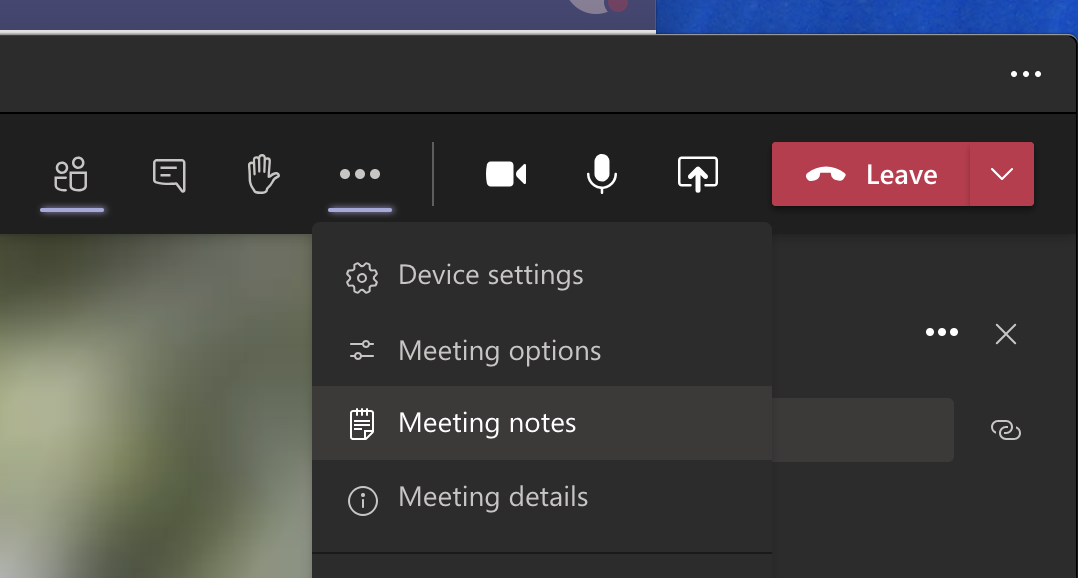
Meeting Notes in Microsoft Teams

Click Meeting notes, and a new tab for meeting minutes will be created in the current channel.

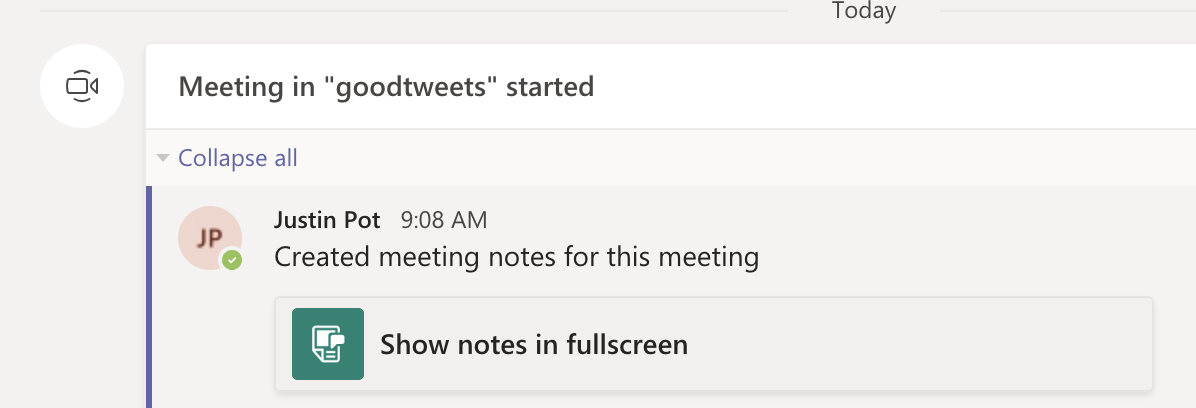
Notes get saved as part of the meeting itself, and can go anywhere with you, and will be saved for later or for sharing with your coworkers.

Meeting notes link in the Teams channel

This is a quick way to ensure there’s a written record of the meeting in a place where everyone can access it, which is very slick.

2. Persistent chat with rich formatting 

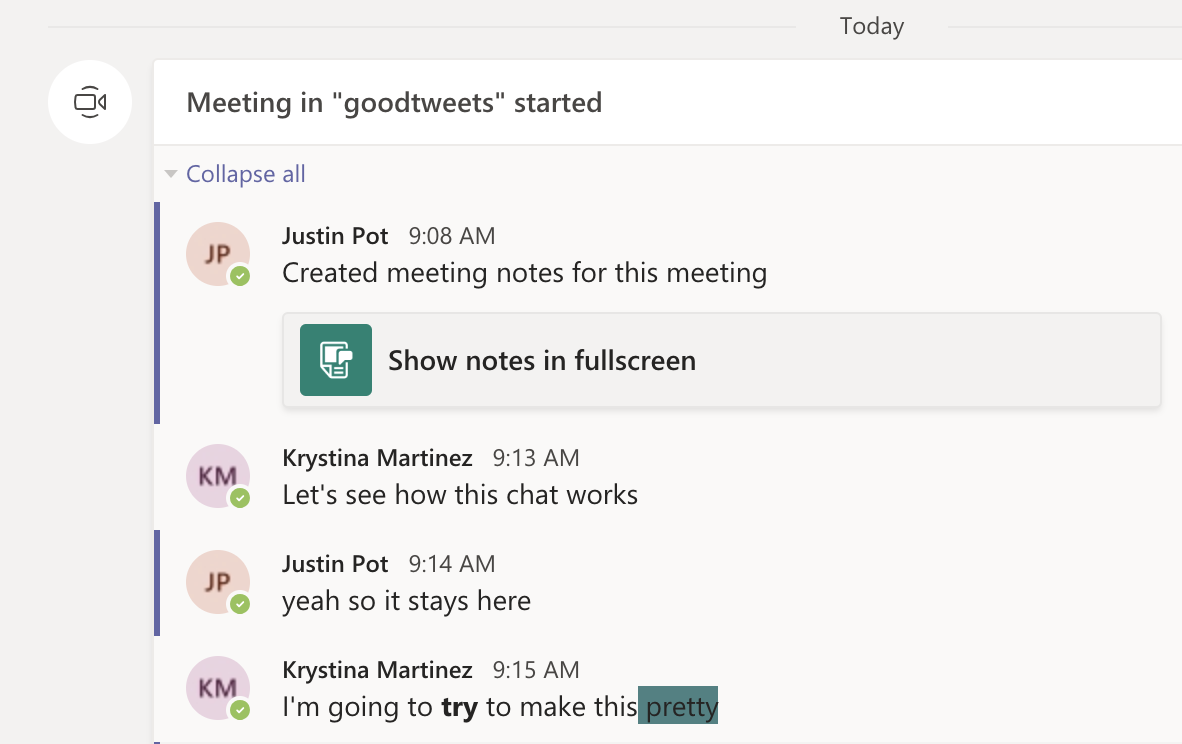
Zoom chat is very simple. Microsoft Teams’ chat for meetings, on the other hand, has more formatting features than AIM.

Formatting in Teams' meeting chat

We’re not sure if you have the multitasking skills to format text during a meeting, but it’s there if you want it. And this is just the beginning—there’s a large sticker collection and, for some reason, a meme creator. Imagine how much fun this can make your meetings!

Meme generator in Microsoft Teams

Microsoft Teams also keeps a record of the chat from every meeting and posts all comments in the channel.

Meeting chat record in Microsoft Teams

Have you ever lost track of helpful links and information during a Zoom meeting? With Teams, you can review the comments after the meeting, and any points made there can be found using search alongside the rest of your chats. It’s easy to see why this is useful.

3. Blur your background

Zoom backgrounds are, at this point, an important part of our collective human culture—the ultimate form of self-expression. With this best practice, you can have your meeting almost anywhere, and disguise whatever happens in the background around you. Naturally, Microsoft Teams offers custom backgrounds for meetings.

4. Pretend you’re in the same room as your coworkers

Zoom  has two views that you can switch between. Speaker View and Gallery View: essentially, you can see the person talking right now or see everyone at once. Microsoft Teams adds another: Together Mode. Everyone on the call is shown as though they’re sitting next to each other in some kind of classroom, or sporting event like we’ve seen on TV with the NBA,MLB, NHS and NFL.

Together Mode in Microsoft Teams

This is optional, and turning it on only changes things on your screen. 

Is this useful? No. Will it make you feel slightly less alone during a year in which in-person interaction is rare? No. Is it somewhat amusing? Yes.

5. Live captions

Teams can detect what’s said in a meeting and present real-time captions. And, if you’ve turned on the new meeting experience, your captions will include speaker attribution—so you’ll see not only what’s being said, but who’s saying it. 

Zoom offers a closed captioning feature, but someone has to manually type them out. Microsoft’s system recognizes speech automatically. Live captions can make your meeting more inclusive to participants who are deaf or hard-of-hearing, people with different levels of language proficiency, and participants in loud places by giving them another way to follow along.

6. There’s a good chance you’re already paying for it

Zoom is free, but the free version limits meetings to 40 minutes. Microsoft Teams’ free version has no such restrictions for video meetings.

There’s also a good chance you’re already paying for the full version. Microsoft Teams is included with every version of Microsoft 365 for business. This means that, if your company pays for a Microsoft Office subscription, you already have access to Teams. You should probably give it a chance and consider not paying for Zoom and/or Slack on top of it.

Features

  • Group and private chat.
  • Video calling, audio calling, and screen sharing.
  • Schedule video calling.
  • Thread messaging.
  • Works seamlessly with any other Office app.
  • Up to 250 people per video call.
  • Over 270 integrations.
  • Available in 53 languages.

Best for

  • Microsoft-centric teams.
  • Organizations that want to keep ideas organized and compartmentalized.

If you have any questions, please email us at support@sjtechies.com or call us at (856) 745-9990.


Is Your Organization Using SHA-1 SSL Certificates? If so here’s what you need to know and do:

ssl


Following a recommendation by the National Institute of Standards and Technology (NIST), Microsoft will block Windows from accepting SSL certificates encrypted with the Secure Hash Algorithm-1 (SHA-1) algorithm after 2016. Given the number of mission-critical SSL certificates that are allowed to expire from inattention, administrators have their work cut out for them. By knowing what will happen, why it’s happening, and what you need to do, you won’t be surprised by these important policy changes.

What’s Happening?

On November 12, 2013, Microsoft announced that it’s deprecating the use of the SHA-1 algorithm in SSL and code signing certificates. The Windows PKI blog post “SHA1 Deprecation Policy” states that Windows will stop accepting SHA-1 end-entity certificates by January 1, 2017, and will stop accepting SHA-1 code signing certificates without timestamps after January 1, 2016. This policy officially applies to Windows Vista and later, and Windows Server 2008 and later, but it will also affect Windows XP and Windows Server 2003.

SHA-1 is currently the most widely used digest algorithm. In total, more than 98 percent of all SSL certificates in use on the Web are still using the SHA-1 algorithm and more than 92 percent of the certificates issued in the past year were issued using SHA-1.

Website operators should be aware that Google Chrome has started warning end users when they connect to a secure website using SSL certificates encrypted with the SHA-1 algorithm. Beginning in November 2014 with Chrome 39, end users will see visual indicators in the HTTP Secure (HTTPS) address bar when the site to which they’re connecting doesn’t meet the SHA-2 requirement. Figure 1 shows those indicators.


Figure 1: Visual Indicators in the HTTPS Address Bar


Google is doing this to raise end users’ awareness and to help guide other members of the Internet community to replace their SHA-1 certificates with SHA-2 certificates.

Why Is Microsoft Deprecating SHA-1?

SHA-1 has been in use among Certificate Authorities (CAs) since the U.S. National Security Agency (NSA) and NIST first published the specification in 1995. In January 2011, NIST released Special Publication 800-131A, “Transitions: Recommendation for Transitioning the Use of Cryptographic Algorithms and Key Lengths.” This publication noted that SHA-1 shouldn’t be trusted past January 2016 because of the increasing practicality that a well-funded attacker or government could find a SHA-1 hash collision, allowing them to impersonate any SSL website.

Realizing that it’s highly unlikely that CAs and the industry at large will adopt more powerful encryption algorithms on their own, Microsoft is leading the charge by making Windows reject certificates using SHA-1 after January 1, 2017. Doing this will lead website operators to upgrade to stronger SHA-2 certificates for the betterment of all Windows users and the broader public key infrastructure (PKI) community. The Windows PKI blog post “SHA1 Deprecation Policy” noted that, “The quicker we can make such a transition, the fewer SHA-1 certificates there will be when collisions attacks occur and the sooner we can disable SHA1 certificates.”

In the end, the issue isn’t if SHA-1 encryption will be cracked but rather when it will be cracked.

What Do I Need to Do?

January 1, 2017, might seem like a long way away, but now is the time to understand the problem and how to mitigate it.

As per Microsoft’s SHA-1 deprecation policy, Windows users don’t need to do anything in response to this new technical requirement. XP Service Pack 3 (SP3) and later versions support SHA-2 SSL certificates. Server 2003 SP2 and later versions add SHA-2 functionality to SSL certificates by applying hotfixes (KB968730 and KB938397).

Web administrators must request new certificates to replace SHA-1 SSL and code-signing certificates that expire after January 1, 2017. As of this writing, that would probably affect only public SHA-1 certificates that were purchased with a long expiration date (three years or more) or long-duration certificates issued by internal SHA-1 CAs. Most third-party CAs will rekey their certificates for free, so you simply need to contact the CA to request a rekeyed certificate that uses the SHA-2 algorithm.

When ordering new SSL certificates, you should confirm with the CA that they’re being issued with the SHA-2 algorithm. New certificates with expiration dates after January 1, 2017, can only use SHA-2. Code-signing certificates with expiration dates after December 31, 2015, must also use SHA-2.

Note that the algorithm used in SHA-2 certificates is actually encoded to use SHA-256, SHA-384, or SHA-512. All of these are SHA-2 algorithms; the SHA number (e.g., 256) specifies the number of bits in the hash. The larger the hash, the more secure the certificate but possibly with less compatibility.

It’s important that the certificate chain be encrypted with SHA-2 certificates. (A certificate chain consists of all the certificates needed to certify the end certificate.) This means that any intermediate certificates must also use SHA-2 after January 1, 2017. Typically, your CA will provide the intermediate and root CA certificates when they provide the SHA-2 certificate. Sometimes they provide a link for you to download the certificate chain. It’s important that you update this chain with SHA-2 certificates. Otherwise, Windows might not trust your new SHA-2 certificate.

Root certificates are a different story. These can actually be SHA-1 certificates because Windows implicitly trusts these certificates since the OS trusts the root certificate public key directly. A root certificate is self-signed and isn’t signed by another entity that has been given authority.

For the same reason, any self-signed certificate can use the SHA-1 algorithm. For example, Microsoft Exchange Server generates self-signed SHA-1 certificates during installation. These certificates are exempt from the new SHA-2 policy since they aren’t chained to a CA. I expect, however, that future releases of Exchange will use SHA-2 in self-signed certificates.

What About My Enterprise CAs?

If your organization has its own internal CA PKI, you’ll want to ensure that it’s generating SHA-2 certificates. How this is done depends on whether the CA is running Windows Server 2008 R2 or later and if your CA has subordinate CAs.

If you have a Server 2008 R2 or later single-root CA without subordinates, you should update the CA to use SHA-2. Doing so will ensure that subsequent certificates generated will use the SHA-2 algorithm. To check which hash algorithm is being used, you can right-click the CA and go to the General tab. If SHA-1 is listed, you can run the following certutil command to configure the CA to use the SHA-256 algorithm:

certutil -setreg ca\csp\CNGHashAlgorithm SHA256

You must restart the CertSvc service to apply the change. Now when you view the CA properties, you’ll see that the hash algorithm is SHA-256. All future certificates issued by this CA will use SHA-256, but keep in mind that existing certificates will still be using SHA-1. You need to renew any SHA-1 certificates issued by this CA to upgrade them to SHA-2 certificates.

If your CA is older than Server 2008 R2, you can’t upgrade the CA to use SHA-2. You’ll need to rebuild it with a newer version.

If your organization’s internal CA is multi-tiered with one or more subordinate CAs, you’ll need to reconfigure them to use SHA-2. This is done using the same certutil command just given on each subordinate or issuing CA. Keep in mind that if you use subordinate CAs, you’re not required to update the root CA to SHA-2 since that certificate is at the top of the certificate chain, but it won’t cause any problems if you do. You still need to renew any SHA-1 certificates issued by the subordinate CAs to upgrade them to SHA-2 certificates.

Take Action Now

Administrators and website operators should identify all the SSL certificates used in their organizations and take action, as follows:

  • SHA-1 SSL certificates expiring before January 1, 2017, will need to be replaced with a SHA-2 equivalent certificate.
  • SHA-1 SSL certificates expiring after January 1, 2017, should be replaced with a SHA-2 certificate at the earliest convenience.
  • Any SHA-2 certificate chained to an SHA-1 intermediate certificate should be replaced with another one chained to an SHA-2 intermediate certificate.

The following tools and websites are useful for testing and for further information about SHA-1 remediation:

  • Microsoft Security Advisory 2880823. This website discusses the deprecation policy for the SHA-1 hashing algorithm for the Microsoft Root Certificate Program.
  • Migrating a Certification Authority Key from a Cryptographic Service Provider (CSP) to a Key Storage Provider (KSP). The section “How to migrate a CA from a CSP to a KSP and optionally, from SHA-1 to SHA-2” in this TechNet web page provides detailed instructions for upgrading a CA to use SHA-2.
  • Gradually sunsetting SHA-1.” This Google Online Security Blog post explains how the transition to SHA-2 affects Chrome and details Google’s rollout schedule.
  • SHA-256 Compatibility. This GlobalSign web page lists OS, browser, server, and signing support for SHA-256 certificates.
  • DigiCert SHA-1 Sunset Tool. This free web application tests public websites for SHA-1 certificates that expire after January 1, 2016.
  • DigiCert Certificate Inspector. This tool discovers and analyzes all certificates in an enterprise. It’s free, even if you don’t have a DigiCert account.
  • Qualys SSL Labs’ SSL Server Test. This free online service analyzes the configuration of any SSL web server on the public Internet.

New Apple TV release date, specs, price and news

For the fourth generation Apple TV, the possibilities are endless

Update: The new Apple TV is finally here and available to buy right now in all Apple Stores. Here’s the final pricing: $149 and $199 pricing for the 32GB and 64GB versions in the US respectively, £129 and £169 in the UK, while in Australia the cost is AU$269 and AU$349 for the different versions.

Apple TV


Original story below…

Three years of waiting for a major upgrade and six months of rumors have lead to this point: the new Apple TV, announced earlier in September at the company’s iPhone 6S event.

When it came time to think about the upgrade to the Cupertino company’s seminal streamer, it seems one Steve Jobs-ian point made it through the chopping board: the new Apple TV needs to be just as smart if its predecessor and just as easy to use. It needs to offer a slew of contemporary features but still remain relatively clean looking.

Perhaps unsurprisingly, the new Apple TV is all of those things.

Now, before you go down into the comments and leave a nasty retort, we know that “new Apple TV” is a fairly confusing name. But Apple bows to no numerical and/or logic system, and since the Apple TV has yet to see a true sequel until now, instead receiving iteration after iteration of internal upgrades, this is just the way the Apple peels.

It’s been about two years since the last minor change to the Apple TV and three since the last major one. Which, for a company that’s bound and determined to release a new iPhone every 12 months, seems a little strange that Apple’s popular streamer has been MIA since the iPhone 5.

But our patience has been rewarded, and Apple has delivered the next iteration of a great streaming device. It packs a faster processor than its predecessor, a great-looking UI, too. It has an all-new remote that comes with a built-in microphone and works with Siri, not to mention the fact that it doubles as a Wii-like motion game controller.

It has a sharp new OS – a hybrid of OSX and iOS – and comes with a loaded app store that Tim Cook says will usher in a new age of television. It’s ostentatious and bold vision packed into a tiny box. But that’s Apple for you.

Cut to the chase
What is it? The next generation of Apple’s set-top box, the Apple TV
When is it out? Monday October 26 2015 in over 80 countries worldwide
How much does it cost? The 32GB version will cost $149 (£129, AU$269) while the 64GB version will come in at $199 (£169, AU$349)
Why is it better? It has a faster processor, better interface, more apps, a Wii-esque remote and has voice search functionality

When WWDC 2015 came and went without an Apple TV announcement, we were a little disappointed. But when rumors started to circulate about the Cupertino company’s September 9 event, our hopes and dreams for a brand-new set-top box started to solidify into reality. It turns out it wasn’t all wishful thinking, either. Rumors of Apple’s next set-top box practically boiled over until most, if not all, of the Apple’s big secrets saw the light of day before the 9th. (You can find the key points highlighted in bold!)

New Apple TV user interface

AppleTV


User interfaces are absolutely crucial, and Apple built its reputation on putting together some of the sleekest, most easy-to-use pieces of software on the market. The new Apple TV harnesses that long tradition of doing things right and wildly improves the old model’s layout into something more modern.

The new UI is purposefully flat, with top-level boxes for music and movies on the iTunes store, your most used apps like Netflix and Hulu, as well as the recently added App Store – which is like to pack TV-optimized games alongside Apple Music and its music-streaming kin.

It’s all built on top of a new OS called tvOS that works like a hybrid of iOS and OSX. There are 11 million developers on the platform according to Apple senior vice president of Internet Software and Services, Eddy Cue, which means you can expect a ton of third-party apps available on the first day.

tvOS will support Siri and include universal search results that enable searches across multiple streaming video services as well as Apple’s iTunes Store. That means instead of searching for a movie on each individual app, you’ll be able to see a select number of services in every search (think Netflix, Amazon Prime Instant Video, Hulu, YouTube, Vimeo, etc).

New Apple TV remote

apple-tv-remote


Also, we know that the New Apple TV will include an updated remote control (goodbye, boring aluminum IR remote) that operates over Bluetooth and features a mix of physical buttons and a touchpad.

Inside the remote, Apple looks to be packing in some Wii-esque motion sensors, which would make playing games on the App Store that require tilt easy. Speaking of Bluetooth, we’ve heard whispers that you might be able to connect any console-style controller made for iOS to the Apple TV if the new remote doesn’t do it for you.

Of course the remote will include an internal microphone so you can chat withSiri, meaning that the new Apple TV might be fully operable just with your voice.

Apps shown off so far that use the remote are a new-and-improved Crossy Road, Beats Sports – a Wii-like game from the Rock Band developers, MLB At Bat andApple Music. And for fans of the old-fashioned Home Shopping Network, Gilt will allow you to shop for deals from the comfort of your couch.

There are thousands more apps in the works, and techradar has confirmed with a handful of developers that even though the store looks sparse, many more apps are right around the corner.

New Apple TV hardware

apple-tv-specs

But like my mama always said, it’s what’s on the inside that counts. And inside the New Apple TV is packing a 64-bit A8 processor, currently found in the iPhone 6 Plus. It’s several times more powerful than the current Apple TV, and gives it the necessary horsepower to truck through the latest wave of graphically intense games. Does this mean that your Apple TV will become the premier spot to play the latest Call of Duty or Madden game? Most likely not. But for fans of casual or semi-casual gaming, the New Apple TV will be a pretty mean gaming machine.

It will support Bluetooth 4.0 (necessary to work with the all-new Siri remote),802.11ac WiFi with MIMO and come with either 32GB or 64GB of internal flash storage. None of this, however, is going to come cheap.

New Apple TV price

As expected, the 32GB will cost $149 (£129, AU$269) while the 64GB version will come in at $199 (£169, AU$349). It’s about three times the cost of the current Apple set-top box, but that price feels justified with all the new bells and whistles.

The only thing that would’ve sweetened the deal? A subscription to the purported cable alternative Apple has been working on for the past few months. This feature is likely to be coming, but we can now confirm that it missed the Apple TV announcement on September 9.

New Apple TV release date

So when can you get it? Apple launched the new Apple TV in over 80 countries on Monday October 26, and will expand to over 100 by the end of 2015.

New Apple TV competition

Looks like the new Apple TV isn’t the only shiny new set-top box on the market this holiday season. Recently Amazon launched a 4K version of the Amazon Fire TV, while Google has recently shipped out a Chromecast 2.

Finally, after techradar caught wind of the new Roku 4 thanks to a filing with the FCC in late September, Roku launched its stellar new streaming box at the tail end of October.

So far the consensus among reviewers is that the Chromecast 2 offers a faster response time and extremely affordable price tag if you can stand living without a user interface, while the the 4K Amazon Fire TV is great, but ultimately too dependent on a Prime subscription to do much good.

Conversely, the Roku 4 brings one of the best operating systems and universal search functions to the table, however the unit is noticeably louder and hotter than the Roku 3.

The first rumors of an Apple owned and operated cable service was given life on the web around the same time Sling TV made a splash in the US. The only problem with this plan is that Apple would need a lot of partners – FOX, NBC, ABC, Viacom, etc… – within a short time period.

The potential package in question would have a number of channels you know and love from cable but streamed over your Internet service for a lower monthly cost than traditional vendors like Sky, Virgin, Verizon or Time Warner Cable.

A service like that, exclusive to Apple TV, could be a huge differentiator and killer app for Cupertino. Whether Apple’s TV streaming dreams come to fruition – or actually exist at all – however, remains to be seen.

Apple pulls the plug on TV

After 10 years of research and development, Apple has officially stopped working on the fabled Apple television set, according to The Wall Street Journal.

According to a source familiar to the situation, because it was unable to add anything new to the world of flat-panels and 4K Ultra-HD TVs, Apple has thrown in the towel once and for all.

Apple is still expected to release both an updated version of the traditional set-top box as well as an over-the-top streaming service like Sling TV at its World Wide Developers Conference which starts on June 8.

The history of Apple TV

The first Apple TV launched back in 2006 and stuck out from the crowd by boasting its own hard drive and composite cables to hook up to then-new SD TV sets. It had a measly Intel Crofton Premium M processor and 256MB of DDR2 memory.

Apple_TV_first_gen

Version 2 ditched the internal storage for a better 802.11a/b/g/n Wi-Fi antenna, upgraded Apple A4 processor and favored streaming media over anything stored on physical drives. While some lamented the disappearance of a HDD, some appreciated the Apple TV’s smaller size as a result of the change.

Launching in 2012, Apple TV Version 3, the latest version of the Apple TV, didn’t offer much of an upgrade over its predecessor. It still streamed media and had a streamlined user-interface based on iOS (at that time it was iOS7). Of course the processor got a bump to the A5 to handle 1080p video and it finally doubled down on RAM to a solid 512MB.

apple_tv

Starting on March 9, 2015, the currently available Apple TV will drop to $69 (about £45, AU$90) and has first-dibs on HBO’s new standalone streaming service, HBO Now.

Have questions?

Get help from IT Experts/Microsofts Cloud Solutions Partner
Call us at: 856-745-9990 or visit: https://southjerseytechies.net/

South Jersey Techies, LLC is a full Managed Web and Technology Services Company providing IT Services, Website Design ServicesServer SupportNetwork ConsultingInternet PhonesCloud Solutions Provider and much more. Contact for More Information.

To read this article in its entirety click here.

CALL US NOW!