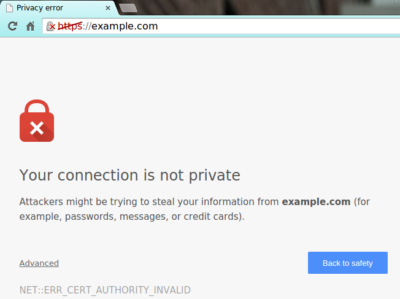
Starting in July, Google Chrome marked all HTTP sites as “not secure,” according to a blog post published today by Chrome security product manager Emily Schechter. Chrome currently displays a neutral information icon, but starting with version 68, the browser is warning users with an extra notification in the address bar. Chrome currently marks HTTPS-encrypted sites with a green lock icon and “Secure” sign.
Google has been nudging users away from unencrypted sites for years, but this is the most forceful nudge yet. Google search began down-ranking unencrypted sites in 2015, and the following year, the Chrome team instituted a similar warning for unencrypted password fields.
The Chrome team said the announcement was mostly brought on by increased HTTPS adoption. Eighty-one of the top 100 sites on the web default to HTTPS, and a strong majority of Chrome traffic is already encrypted. “Based on the awesome rate that sites have been migrating to HTTPS and the strong trajectory through this year,” Schechter said, “we think that in July the balance was tipped enough so that we can mark all HTTP sites.”
HTTPS encryption protects the channel between your browser and the website you’re visiting, ensuring no one in the middle can tamper with the traffic or spy on what you’re doing. Without that encryption, someone with access to your router or ISP could intercept information sent to websites or inject malware into otherwise legitimate pages.
HTTPS has also become much easier to implement through automated services like Let’s Encrypt, giving sites even less of an excuse not to adopt it. As part of the same post, Google pointed to its own Lighthouse tool, which includes tools for migrating a website to HTTPS.
Hopefully, why you should never trust Facebook is obvious by now. Perhaps you feel like you still need it, though — or stubbornly refuse to believe it is really all that bad, whether because you think it is not much of a risk or just do not believe the evidence.
You may take all reasonable precautions, including using no personally identifiable or sensitive information in your account or profile data. Maybe you use a password and email address for the account that you use for nothing else, and refuse to communicate with anyone who actually knows any personally identifiable information or secrets about you on Facebook. Even so, there are risks.
Facebook clearly is not concerned with your privacy any more than the absolute minimum required to keep itself in business. There’s no such thing as a trusted brand, but there is certainly such a thing as a brand that is thoroughly suspicious — and Facebook seems to fit the description when it comes to personal privacy. Any time Facebook appears to care about your privacy, keep in mind that it took Congressional posturing to keep the corporation in line even to that small degree.
It is clear that even when Facebook offers something that looks like some kind of privacy protection, the offer is not a promise, and relying on it is a recipe for disappointment. With that in mind, the problem of protecting even the most minimal sense of privacy while using Facebook seems insurmountable. Thanks to the efforts of a number of hackers and entrepreneurs who actually care about privacy — not only theirs, but that of others as well, even if only because it serves as a convenient business model — there are some options that can help at least a little.
In no particular order:
1. SaveFace
Untangle offers the SaveFace bookmarklet, a script that can be saved as a bookmark in your browser. When you click a bookmarklet, it does “something” — usually involving whatever page you happen to be visiting at that moment. In the case of SaveFace, you can visit your Facebook page then click on the bookmarklet to rest your privacy settings to Private. According to Untangle, it currently covers Contact Information; Search Settings; Friends, Tags, and Connections; and Personal Information and Posts.
2. ReclaimPrivacy.org
A similar bookmarklet is offered by ReclaimPrivacy.org. Unlike SaveFace, the purpose of ReclaimPrivacy.org’s tool is to scan your Facebook settings and detect certain types of privacy vulnerabilities in your account settings. In theory, at least, it should be more thorough than SaveFace — but less automated as a means of protecting yourself.
3. Connect In Private
At ConnectInPrivate there is an annoying tablike thing floating over the left-hand side of the page. Take a closer look: it reads “Secure Your Facebook Profile”. If you click on that, it takes you to a Facebook application that offers a fairly comprehensive Facebook privacy feature set. Of course, what it provides is little more than a convenience layer over manually adjusting your own Facebook privacy settings, but it can be used for free and, if you like that kind of thing, you might find it valuable.
Using Connect In Private’s Facebook privacy scanner is a remarkably tedious and uncomfortable process for something so simple. It involves reading, and thinking about, a series of questions about what kind of privacy preferences you have — in ways that are poorly defined, and requiring Facebook account access that should make the average security concerned user hesitate. Access to the source code is not exactly a matter of easy access the way it is with the JavaScript in the ReclaimPrivacy.org bookmarklet and the .js page it references, either.
A final word
Connect In Private has one definite advantage over the other tools, though: it is more actively maintained. As of this writing, ReclaimPrivacy.org’s script is not compatible with current Facebook privacy settings, and there is a note on the page to that effect. SaveFace is far from a complete solution, for that matter. None of them are perfect, and there is always a risk if you trust your private data to a site like Facebook. Each of them might help a little, though.
In the end, I for one find it difficult to trust the Facebook application offered by Connect In Private. Your mileage may vary.
To read the original article in it’s entirety Click Here
In this edition of the Windows Vista and Windows 7 Report, we show you how to change Windows 7’s Logon screen wallpaper.
While experimenting with several Microsoft Windows 7 systems recently, we spent a lot of time staring at the Logon screen. During that time, we began to think about changing the Logon screen wallpaper. Now, we have changed the Logon screen wallpaper in just about every version of Windows we’ve used, so we know that there had to be a way to do so.
When we began to investigate the procedure in Windows 7, we discovered that changing the Logon screen wallpaper in the newest version of the Windows operating system is easy, once you know the steps — and you don’t even need any third-party software to do it.
In order to make it easy for OEMs to customize Windows 7, Microsoft built the ability to change the Logon screen wallpaper right in to the operating system. In this edition of the Windows Vista and Windows 7 Report, we’ll show you how to change Windows 7’s Logon screen wallpaper.
A Registry tweak
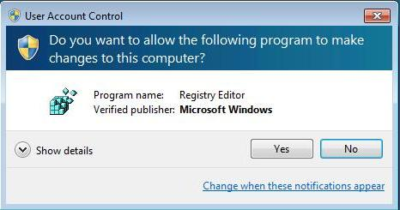
The process begins with a very minor Registry tweak. Even for those who would not normally feel comfortable editing the Registry, this one’s a piece of cake. To begin, click the Start button and type Regedit in the Search box. Then, select the appropriate result and press [Enter]. When you do, you’ll see the User Account Control, shown in Figure A, and will need to click the Yes button.Note: Editing the Windows Registry file is not without its risks, so be sure you have a verified backup before making any changes.
Figure A
You will encounter a UAC when you launch the Registry Editor.
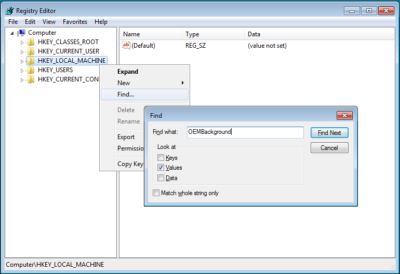
Once the Registry Editor launches, locate and right-click on HKEY_LOCAL_MACHINE key and select the Find command. When you see the Find dialog box, type OEMBackground in the text box and make sure that only the Values check box is selected, as shown in Figure B.
Figure B
Type OEMBackground in the Find dialog box.
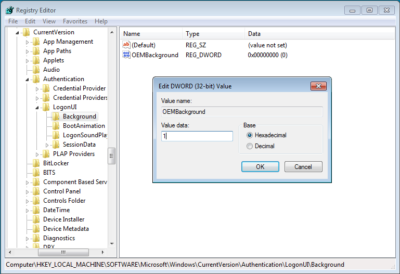
When the HKEY_LOCAL_MACHINE\SOFTWARE\Microsoft\Windows\CurrentVersion\Authentication\LogonUI\Background key opens, locate and double-click the OEMBackground value. When you see the Edit DWORD dialog box, change the value data from 0 to 1, as shown in Figure C. (If the OEMBackground value doesn’t exist in the Background key, you’ll need to pull down the Edit menu from that key and select New | DWORD (32-bit) Value).
Figure C
Change the value data from 0 to 1.
To complete this part of the operation, click OK to close the Edit DWORD dialog box and then close the Registry Editor.
Creating folders
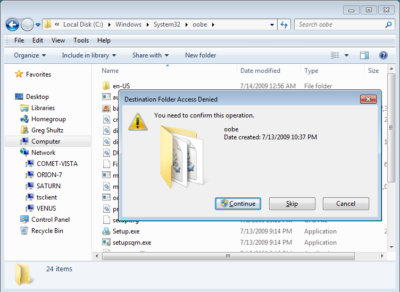
In the second part of the operation, you’ll need to create a couple of folders. To begin, launch Windows Explorer. Then navigate to the C:\Windows\System32\Oobe folder. Once you access the Oobe folder, click the New Folder button in the Windows Explorer toolbar. You’ll see a confirmation dialog box, like the one shown in Figure D. When you click Continue, the new folder will be created and you can name it info.
Figure D
When you click the New Folder button, you’ll encounter a confirmation dialog box.
Then, open the info folder, click the New Folder button again, work through the confirmation dialog box, and then name the second new folder backgrounds.
Configuring the wallpaper
You can use any image that you want for your new Logon screen wallpaper. However, the image has to be in JPG format and you need to name it backgroundDefault.jpg. When you copy your file to the Windows\System32\Oobe\info\backgrounds folder, you’ll encounter and will need to work through a confirmation dialog box similar to the one shown in Figure D.
Two other things to keep in mind: First, the actual file size of backgroundDefault.jpg cannot exceed 256 KB. Second, you’ll want to use an image whose dimensions match the screen resolution that you are using. If you use a file whose dimensions are smaller, the image will be stretched and may appear distorted.
Altering shadows
As you know, the button and the text used to identify your user account on the Logon screen have shadows behind them to give them a 3D-like look, and these shadows work well with the default Logon screen wallpaper. Depending on what image you use for your new Logon screen wallpaper, these shadows might not work so well.
In addition to making it easy to change the Logon screen wallpaper, Microsoft also made it easy to adjust or disable the text and button shadows to accommodate your particular image.
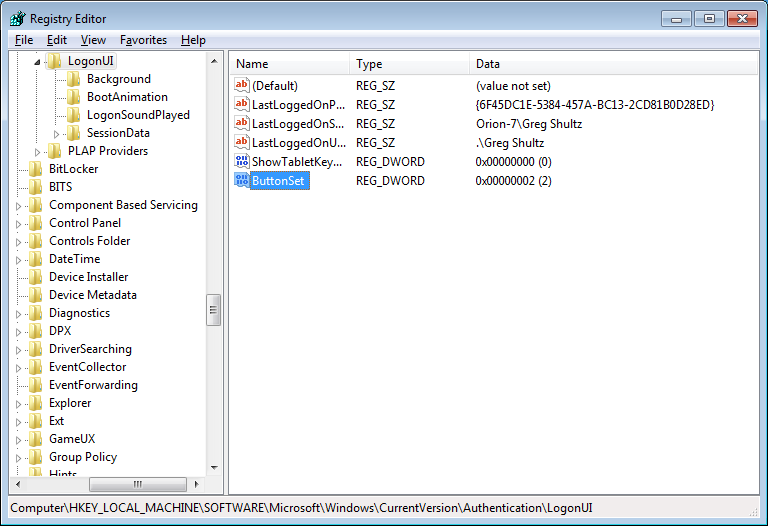
To alter the shadows, launch the Registry Editor again as described above and access the
Once you open the LogonUI folder, you’ll create a new DWORD value called ButtonSet, as shown in Figure E. You can then configure the shadow by setting the value data to one of the following numbers:
0 — Light shadow
1 — Dark shadow
2 — No shadow
Figure E
The ButtonSet value allows you to adjust or disable the text and button shadows.
Step aside, Apple, there’s a new watch in town. At CES 2016, Fitbit unveiled the Blaze, a smartwatch that does things the Apple Watch can’t, and at a lower price point.
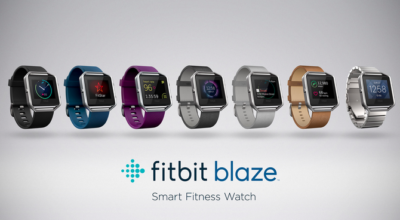
The new Fitbit Blaze is a smart fitness watch unveiled at CES 2016. Image: Fitbit
The basic utilitarian look of Fitbit is so last week, with today’s CES 2016 debut of Fitbit Blaze, a smart fitness watch with a color touchscreen that heralds in the next generation of the company’s popular fitness device line.
Fitbit Blaze does many of the same things as more expensive smartwatches, such as the Apple Watch, but it does it at a lower price point. The basic Fitbit Blaze comes with an elastomer band and will be available for retail sales in March 2016 with a $199 price tag. It tracks fitness and sleep stats and provides notifications for calls, texts, calendar alerts and music control. It’s compatible with Windows, iOS, and Android platforms.
One of the main features of the watch is how the bands are interchangeable to go from the gym to the office and out for the evening. Accessories will include additional elastomer bands for $29.95 each, leather bands for $99.95 each, and a steel link band for $129.95 each. The device is available for presale beginning today at Fitbit.com and tomorrow at various major retailers. For those who want to see the watch in person before ordering, on February 20 customers can go into Best Buy to try on the watch and pre-order.
“The product is about the balance of fitness and style. While it may look like a smartwatch, we think we’ve gotten it right. It has a distinct focus on fitness. That’s why we’re calling it a smart fitness watch. It puts fitness first,” said James Park, CEO and co-founder of Fitbit, at the CES 2016 press conference.
Fashion and style have long been a sore spot in the world of wearables and smartwatches. Because, even if a device has a stylish appearance, oftentimes it’s not feasible to wear the same product 24/7 for every occasion. The Fitbit Blaze eliminates this issue with the range of affordable interchangeable bands.
Fitbit Blaze includes many of the same features as previous Fitbit wearable fitness devices, such as all-day activity stats, but it also includes a color touchscreen, along with a partnership with FitStar for an onscreen workout. It also includes connected GPS for real-time exercise stats and PurePulse wrist-based heart rate tracking, which the company introduced last year.
The watch has a substantial battery life, lasting up to five days and nights, according to Fitbit Chief Business Officer Woody Scal.
Park said the Fitbit Charge, which was introduced last year, is the number one selling activity tracking device in North America, and the Fitbit Surge is the number one selling GPS tracking watch. On Christmas Day and the day after, Fitbit was the number one free app download.
“We are one of the larger technology IPOs of 2015. We are still trading about offering price which we think is rare. We’re pretty proud of that,” Park said.
Park took the opportunity at the press conference to point out how Fitbit is mentioned in the media, such as numerous photos with President Obama wearing a Fitbit Surge.
“For me it’s been really fun to see Fitbit mentioned on popular TV shows such as Big Bang Theory,” he said.
One of the biggest challenges that Fitbit faces is that its products have a 50% abandonment rate, compared to 6% for the Apple Watch. That makes the Blaze a strategically important move for Fitbit. The early reaction to the Blaze has been mixed as Fitbit’s stock dropped 13% following the announcement.
Have questions?
Get help from IT Experts/Microsofts Cloud Solutions Partner
Call us at: 856-745-9990 or visit: https://southjerseytechies.net/
Sandy Relief: ABC’s “Day of Giving” Will Include Dancing With the Stars, Jimmy Kimmel and More
ABC is giving back.
Today Monday, November 5, 2012, the ABC Network is hosting a “Day of Giving” across the network, which will encourage their viewers to help those impacted by Hurricane Sandy.
ABC’s programming, ranging from Good Morning America in the morning to Dancing With the Stars in the evening, will engage viewers with the relief efforts for Hurricane Sandy.
While Dancing With the Stars is planning to personalize sections of Monday night’s performance show with “Day of Giving” messaging (by including stories of how several of the show’s dancers were impacted by the storm), Good Morning America will kick off the “Day of Giving” by dedicating the 8 a.m. hour to raising money, followed by Live with Kelly and Michael, which will integrate the message into their Halloween episode. (It was postponed due to the storm.)
Next, The View‘s ladies and The Chew will discuss the “Day of Giving” and encourage the audience to donate to the American Red Cross Relief efforts. Katie Couric will engage Katieviewers in the relief efforts as well.
Rounding out the “Day of Giving” will be Nightline, which will devote time to the message and the impact of Hurricane Sandy, and Jimmy Kimmel Live, which will encourage viewers to give to the American Red Cross.
“The effects of Hurricane Sandy have impacted millions of people across the entire North East, including many of our co-workers, friends and families. This unprecedented devastation demanded an unprecedented response, so our team came up with the ‘Day of Giving,” Anne Sweeney, co-chair, Disney Media Networks and president, Disney-ABC Television Group, said in a statement. “This coordinated effort between network and syndicated programming spanning News, Daytime, Primetime and Late-Night will reach tens of millions of viewers with a specific call to action…to do what Americans do best, and pull together in support of those who are suffering. I’m incredibly proud of the team and all of our programs for this amazing response.”
Earlier in the day, ABC announced that it will donate $2 million to Hurricane Sandy relief and rebuilding efforts. ABC will donate $1 million to the American Red Cross for immediate, critical assistance, and another $1 million will be designated for organizations working on rebuilding efforts.
Would you like to help? Text REDCROSS to 90999 ($10 donation) or visit http://redcross.org
Popular apps on your smartphone can be convenient and fun, but some also carry malicious software known as malware, which gives hackers easy access to your personal information.
A security firm found that between 75 and 80 percent of the top free apps onAndroid phones or iPhones were breached. The number jumps as high as 97 percent among the top paid apps on those devices.
Whether these apps help advertisers target you or help hackers rip you off, you’ll want to do your homework before downloading apps, reports CBS News correspondent Anna Werner.
California’s Susan Harvey said she was a victim after she used a debit card to download a slot machine game app to her cell phone through a Google Play store account.
“It was something you purchased once, for like $15,” Harvey said.
When she went to reload the game, she found hundreds of purchases had been made — by her math, more than $5,000 worth of transactions.
“My heart sank, I just sat there looking at it… I physically, I was sick, because I didn’t know what they were,” Harvey said.
That story’s no surprise to cybersecurity expert Gary Miliefsky, whose company SnoopWall tracks malware. He said certain apps are designed to steal your personal information.
“What are the consequences for me as a consumer?” Werner asked.
“You’re gonna lose your identity. You’re gonna wonder why there was a transaction. You’re gonna wonder how someone got into your bank account and paid a bill that doesn’t exist,” Miliefsky said.
Milifesky said when you download an app, you also give permission for it to access other parts of your phone, like an alarm clock app that can also track phone calls.
“You think an alarm clock needs all those permissions? Access to the Internet over wifi, your call information, calls you’ve made, call history, your device ID? This to me is not a safe alarm clock,” Miliefsky said.
And there’s the weather and flashlight apps that he says exploit legitimate banking apps to capture information, as he showed us in a demonstration of what could happen when someone takes a photo of a check to send to their bank.
“The flashlight app spies on the camera and noticed the check and grabbed a copy of it. Shipped it off to a server somewhere far away,” Miliefsky said.
Last year the group FireEye discovered 11 malware apps being used on iPhones that gathered users’ sensitive information and send it to a remote server, including text messages, Skype calls, contacts and photos Apple fought back by removing the apps and putting stricter security measures in place.
“They get at your GPS, your contacts list…to build a profile on you,” Miliefsky said.
Some apps are simply collecting information for advertising purposes. In 2014, the Federal Trade Commission settled a lawsuit with a company over its popular Brightest Flashlight app, alleging it transmitted consumers’ personal information to third parties without telling them.
But Miliefsky said he’s found another flashlight app that can do much more troubling things.
“This one turns on your microphone in the background, listens in on you, and sends an encrypted tunnel to a server we discovered in Beijing,” Miliefsky described.
“You’re saying that they’re actually listening to people’s conversations and sending that audio back to Beijing?” Werner asked.
“Yeah, we’ve tracked it. I can show you where it does it,” he said.
Miliefsky said it can be traced to a few blocks from Tiananmen Square on Information Drive in Beijing.
He gave a report on that app to the FBI.
“Because to me, it’s spyware at the nth degree,” Miliefsky said.
His recommendation?
“We really have to look at our phone and say, ‘This is really a personal computer that fits in our pocket. Let’s shut down all the apps we don’t use. Let’s delete apps that don’t make sense and reduce the risk of being spied on,'” Miliefsky said.
The creator of the Brightest Flashlight app settled with the FTC, agreeing to change its policy and delete all the information it had gathered.
Harvey sued Google over her alleged hack, but a judge recently dismissed it, saying she and her attorney filed too late. Google said fewer than one percent of Android devices got bad apps in 2014.
If you’ve been watching the coverage of Hurricane Sandy and wondering how to help, you’ll have a chance to pitch in on Friday.
“Hurricane Sandy: Coming Together,” a benefit concert to aid victims of the storm that devastated the Northeast, will air at 8 p.m. ET on the networks of NBC Universal.
Bruce Springsteen and the E Street Band, Jon Bon Jovi, Sting, Christina Aguilera and Billy Joel will perform in the show, which will be hosted by TODAY’s Matt Lauer. Brian Williams and Jimmy Fallon will make appearances, too.
Money collected will be donated to the American Red Cross relief efforts. The special will air Friday at 8 p.m. ET on NBC, USA Network, SyFy, MSNBC, CNBC, Bravo, E!, Style Network, G4 and more. It will also be live streamed on NBC.com.
The American Red Cross is providing shelter, food, emotional support and other assistance to those affected by disasters like Hurricane Sandy. To donate, visit RedCross.org, call 1-800-RED-CROSS or text the word REDCROSS to 90999 to make a $10 donation.
Protecting your identity is important and with Wi-Fi networks popping up nearly everywhere, many consumers don’t realize the dangers that come with using a Wi-Fi connection that is not their own. According to a recent poll conducted by Wakefield Research and Wi-Fi Alliance, 32 percent of respondents said they have tried to get on a Wi-Fi network that was not their own, a startling 18 percent more than a December 2008 poll. The Better Business Bureau, along with the Federal Trade Commission (FTC), urges consumers to think ahead before surfing the Web on a Wi-Fi hotspot.
Wi-Fi hotpots like coffee shops, libraries, airports, hotels and universities are all breeding grounds for hackers. According to the FTC, new hacking tools—available for free online—make hacking easy, even for users with limited technical know-how.
Consumers should be cautious before using a non-secure wireless network and before sending personal information via unencrypted websites. When surfing on a non-secure Internet connection, an individual’s personal information, private documents, contacts, photos and even login information can be up for grabs as other users on the network have the capability of seeing what is being sent.
Steve Cox, President and CEO of the Council of Better Business Bureaus, warns consumers against two popular security scams that can be associated with using an unsecure Internet connection. “Many consumers don’t realize the repercussions that come from using a Wi-Fi hotspot. Phishing, a popular e-mailing scam, and smishing, a SMS texting scam, grow exponentially when hackers obtain access to personal information on the Web via an unsecure Wi-Fi network.” BBB urges consumers to protect themselves from such scams by securing their Internet surfing.
In order to confirm that an Internet connection is secure, BBB advises consumers to follow the FTC’s top Wi-Fi tips:
• Make sure the connection is protected by a unique password. If a Wi-Fi hotspot doesn’t ask for a password, the Internet connection is not secure. If a hotspot asks for a password just to grant access, consumers should proceed as if the connection were unsecured. Only trust home and work internet connections that are protected by a customized user password. Wi-Fi hotspot connections with generic passwords are vulnerable to hackers.
• Transmitted information should be encrypted. When sending personal information like addresses, credit card numbers and Social Security numbers over the Internet, make sure the website is fully encrypted and the network is secure. Look for https (the “s” stands for secure) at the beginning of the URL address to confirm its security.
• Don’t stay permanently logged-in to wireless hotspots. Never leave your Internet connection running while your computer is unattended and make sure to log-off after every use.
• Change your passwords frequently. When creating new accounts, make sure you use different passwords. Do not use the same password for different sites. If one password is hacked, the chances of other accounts being hacked becomes greater with repeated passwords.