Back to Top

Tech, Web, Cloud & Cabling Services

Facebook Debuts Separate Chat App

(Credit: CNET)

Facebook today doubled down on its mobile efforts with a new mobile application that breaks out its messaging service into a single app.

Dubbed “Messenger,” Facebook is making the app available for both Apple’s iOS and Google’s Android. Users can log in with their Facebook credentials to get access to existing chats and message threads from Facebook for interacting with them on the go. Included is group messaging, along with a component that lets users share photos and their location.

“The Messenger app is an extension of Facebook messages, so all your conversations are in one place, including your texts, chats, e-mails, and messages. Whether you’re on your phone or on the Web, you can see the full history of all your messages,” Lucy Zhang, Beluga co-founder and Facebook engineer, said in a post on Facebook’s blog.

For all intents and purposes, the app is the same as Beluga, a group-messaging app Facebook acquired in March. In fact, the team that made Facebook Messenger is the same one that made that application, and the feature set reflects that. Nonetheless, this app is not replacing Beluga, according to Facebook.

“Nothing is going to change for Beluga right now,” a Facebook representative told CNET. “The apps will remain separate. We’re considering ways to possibly migrate Beluga messages over to Facebook Messenger but have no specifics to announce at the moment.”

The move to break out messaging is of special note, given the murmurs of Facebook doing something similar for photo sharing. A report in June from TechCrunch pulled together screenshots of such an app in the works that would combine sharing elements akin to apps like Instagram, Color, Picplz, and others, while tapping into Facebook’s photo servers. That differs substantially from Facebook’s existing mobile strategy, which has been to pull the various site features together into one experience, similar to what’s available for desktop users.

Notably missing from this iteration, and Facebook’s other apps, is video chat–a feature it launched as part of a partnership with Skype last month. In a question-and-answer session following the unveiling of that feature at Facebook’s headquarters, CEO Mark Zuckerberg said the two companies would begin work to bring that feature to mobile phones immediately.

Update at 2:25 p.m. PT: You can grab the app from iTunes here. Android users, can get it here. The company is also offering to send download links directly to your device from its Messenger home page.


Read more: http://news.cnet.com/8301-1023_3-20090207-93/facebook-rolls-out-standalone-mobile-chat-app/#ixzz1UeJ2DzJ9


BigBeagle.com: Save 15% Today

This is your chance to stock up on everything you need.  Save 15% on new web products. Offer expires November 30, 2014 at midnight (Mountain Time).


save 15


Please Visit BigBeagle.com.

Surface Studio, Win10 Creators & More

Microsoft announced a slew of new goodies at its Windows event in New York. Catch up on everything from the Surface Studio all-in-one to the Windows 10 Creators Update here.

microsoft1
One Windows

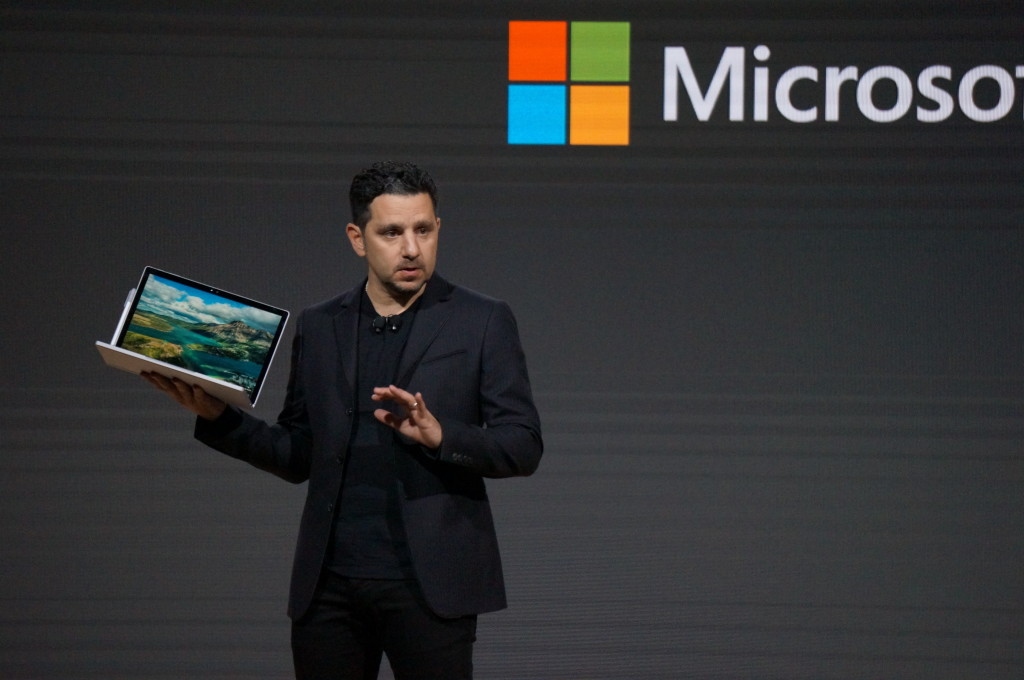
Microsoft’s big event in New York on Tuesday included plenty of new Surface hardware, but nevertheless, it’s easy to see why the company called this a Windows event rather than a Surface shindig.

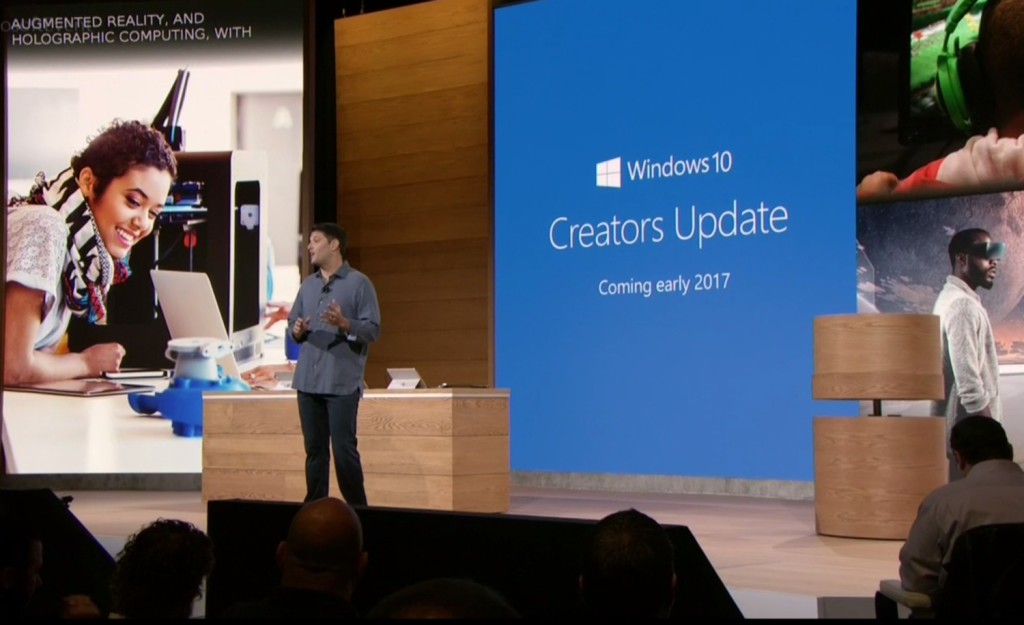
Windows and devices chief Terry Myerson kicked things off with a tantalizing glimpse of the features that will debut with the new Windows 10 Creators Update, scheduled to release in the spring. The rest of event was dedicated to new Surface gear designed specifically to marry powerful, thoughtful hardware with the best of those new software features. But don’t take my word for it! Here’s everything Microsoft announced at its October 26 Windows event.


microsoft2
Windows 10 Creators Update

As I said, the freshly revealed Windows 10 Creators Update, scheduled to arrive in early 2017, kicked off the show. The update’s built around three key pillars: the creation and manipulation of 3D content, sharing your Xbox Live gaming experiences, and easily communicating with others—hence the name.


microsoft3
Surface Studio

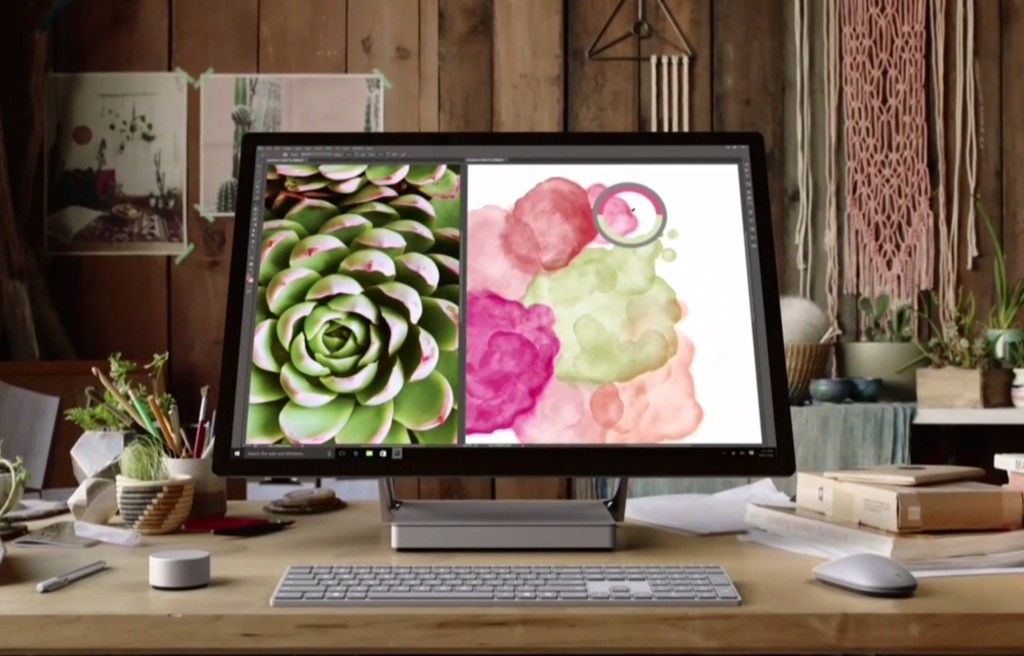
Microsoft’s first-ever desktop PC is the paragon for all those Windows ideals. The Surface Studio all-in-one mixes stunning physical design and impressive internal hardware, focused on creating the best experience possible for professionals and content creators. From an ultra-slim 4,500×3,000-resolution screen with “True Scale” 1:1 image recreation, to the ability to lay at a 20-degree angle for natural positioning while sketching, to the 6th-gen (Skylake) Core i7 CPU and Nvidia GPU powering it all, the Surface Studio is laser-focused on helping you get things done. (And showing off Windows in the best possible light, naturally.)

These tidbits are just the tip of the iceberg. If you like what you see, the Surface Studio starts at $3,000 and is available for preorder now.


microsoft4
Surface Dial

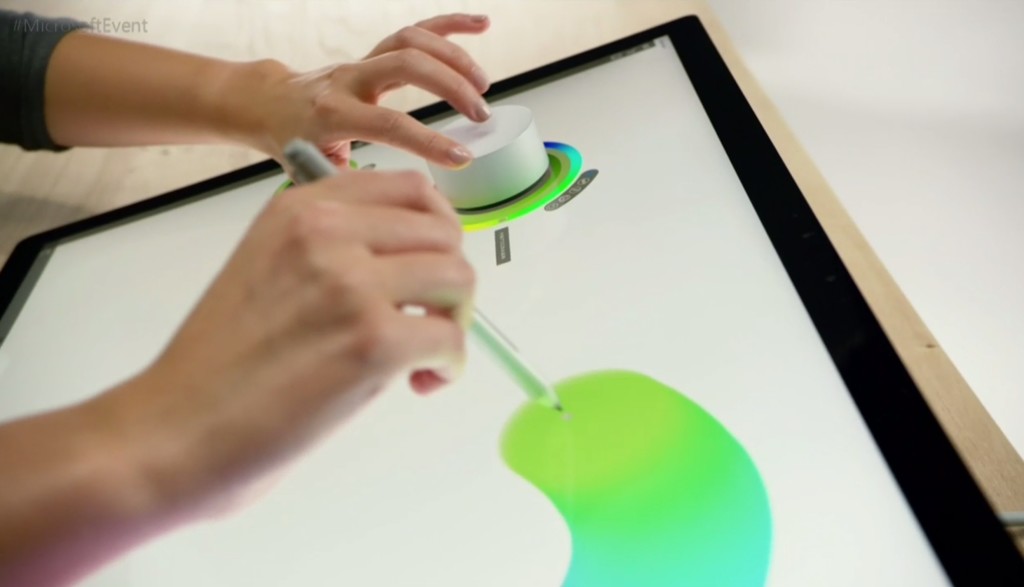
The Surface Studio’s content-friendly design and Windows 10’s new content creation tools are amplified by the Surface Dial, a radical puck that can control Microsoft’s new PC. It’s primarily designed to work in conjunction with Microsoft’s Surface Pen. Priced at $100, you can preorder it now.

The Surface Dial doesn’t have any buttons of its own. Instead, using it reveals an interface wheel customized for specific applications, with selections occurring as you twist the device back and forth. You may cycle through tool-tip brushes in an image editing app, for instance, or rewind and fast-forward through written notes in Office. A virtual version of the Dial appears even if you don’t place the puck directly onscreen, letting you zoom, scroll, and adjust various options like screen brightness and volume. Mark Hachman’s Surface Dial hands-on explains it all.

Support for the Surface Dial will be baked right into Windows 10, and the accessory will be compatible with the existing Surface Pro 3, Surface Pro 4, and Surface Book.


microsoft5
Surface Book i7

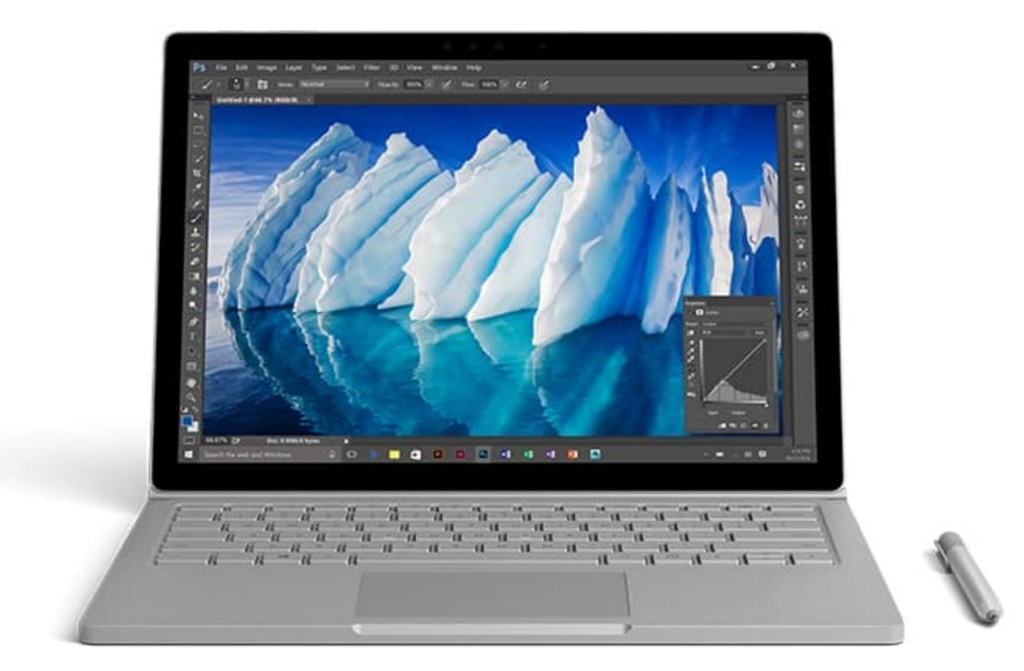
Handily enough, Microsoft also revealed a newer, more powerful version of the Surface Book, the aptly named Surface Book i7. The Surface Book i7 swaps in a sixth-gen Skylake Intel Core i7 processor and an Nvidia GTX 965M GPU to deliver twice the power of the most potent original Surface Book, and (Microsoft claims) three times the power of the beefiest 13-inch MacBook Pro—though Apple’s expected to roll out new Macs tomorrow.

Microsoft also managed to up the Surface Book i7’s battery life to a claimed 15 hours, despite the additional firepower, thanks to a redesigned cooling system and, well, more batteries. The Surface Book i7 starts at $2,400 and is available to preorder now.


microsoft6
Paint 3D

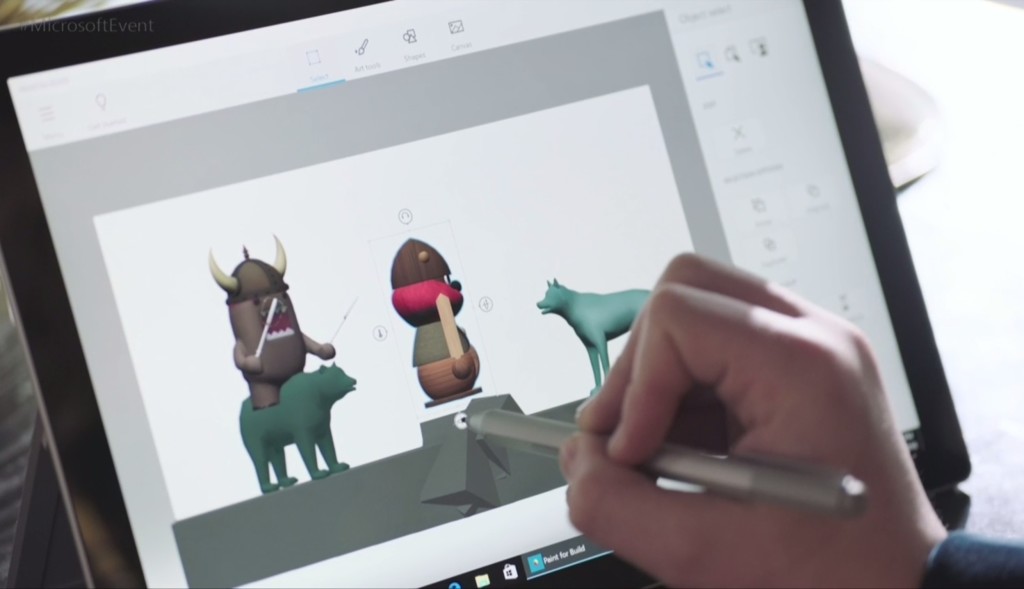
Windows’ venerable Paint app is being dragged into the 21st century. The Windows 10 Creators Update adds Paint 3D, a Windows Store app designed from the ground up to create 3D images even out of 2D pictures.

Paint 3D includes numerous tools for editing three-dimensional images. It also integrates with a new Windows 10 3D-scanning app dubbed Windows Capture 3D, which allows you to digitize real-world objects. Microsoft plans to introduce a “community” hub on Remix3D.com for shared 3D images, plus it’ll let you drag your creations out of Minecraft. Microsoft Office applications will also support 3D images after the Windows 10 Creators Update rolls out.

You have to wonder how many non-professionals are interested in 3D image creation, but there’s no doubting that Paint 3D looks mighty nifty—and like a perfect match for the Surface Studio and Surface Dial’s capabilities.


microsoft7
Windows Holographic VR headsets

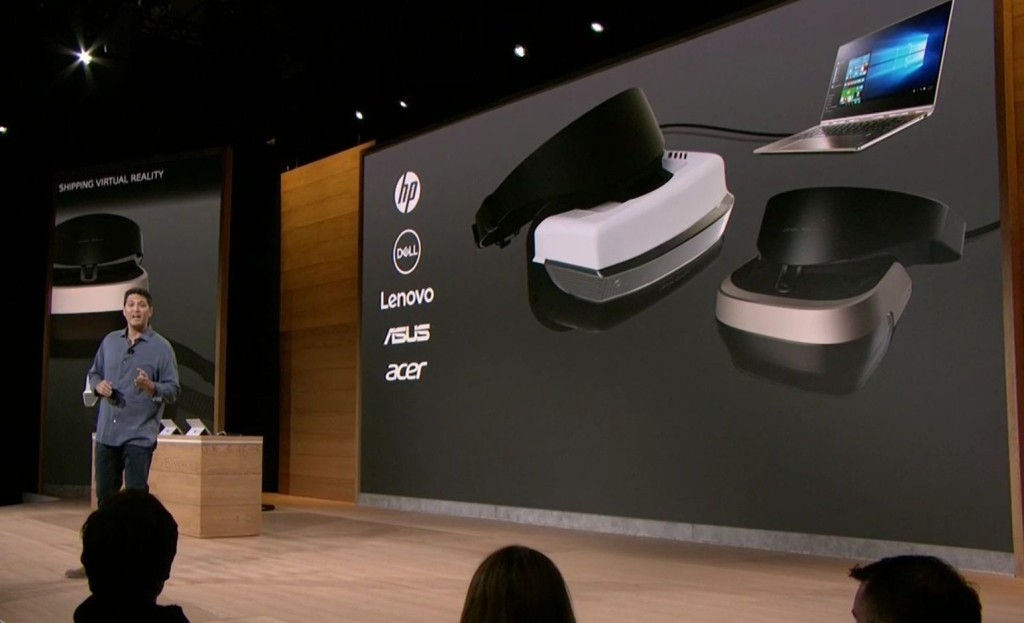
You’ll be able to view those 3D creations through Microsoft’s own HoloLens, or via an onslaught of Windows Holographic-compatible VR headsets apparently coming from Dell, HP, Lenovo, Asus, and Acer.

“These headsets will be the first and only to ship with inside-out, six-degree-of-freedom sensors,” said Microsoft’s Terry Myerson. “Unlike every other VR headset on the market today, this means there will be zero need for a separate room. Zero need for a complicated setup.”


microsoft8
My People

Microsoft wants to make your friends the center of your Windows experience with My People, a feature that borrows from Android and iOS. In the Creators Update, five important contacts will appear as profile images in your taskbar. You’ll be able to drop files onto these contacts to immediately share items, or click the contact to interact in a specific app like Mail, Skype, SMS, or Xbox Live. Handy!


microsoft9
Live PC game streaming

Microsoft’s muscling in on Twitch. The Windows 10 Creators Update adds the ability to easily start broadcasting your Xbox Live games via the operating system’s Game DVR toolbar, sending notifications out to your pals and fellow club members to let them know when you’re online. Once they hop into your stream they’ll be able to chat with you, as with every other streaming service out there.

The service is powered by Microsoft’s recent Beam acquisition and looks dead-simple to use. It’s easy to envision Windows 10 Game DVR livestreaming becoming popular on consoles, but Microsoft faces an uphill battle on PCs, where Twitch and tools like Nvidia Shadowplay and OBS already enjoy massive, entrenched user bases.


microsoft10
Custom tournaments and fancy audio

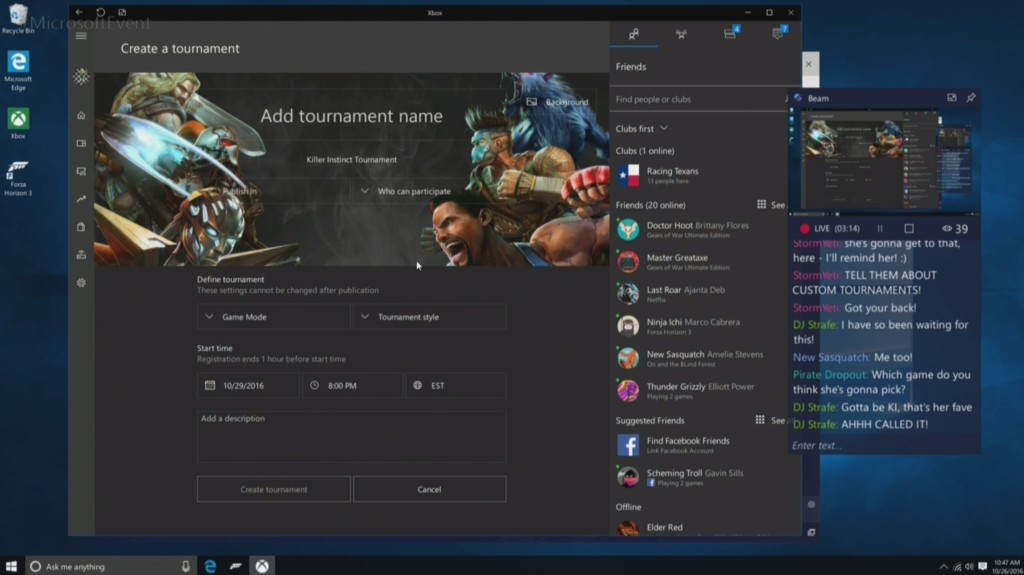
Microsoft’s tying console and PC users closer together with custom tournaments powered by Xbox Live’s Arena platform. Next year, you’ll be able to create your own custom gaming tournaments, controlling everything from the games, to the rules, to the players, to the start times. Previously, Area tournaments were only created by Microsoft and its official partners.

The Xbox One S, which is itself powered by Windows 10, is adding support for bitstreaming Blu-ray audio pass-through and Dolby Atmos. Soon, those 4K videos and games will sound just as glorious as they look.


microsoft11
Surface Mouse and keyboards

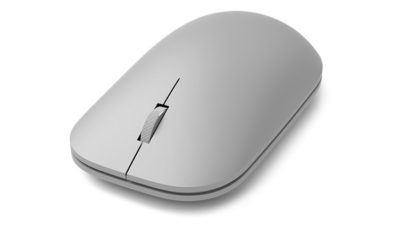
The niche Surface Dial isn’t the only Studio peripheral Microsoft announced today, though none of the others made it onto the stage during the big event. Microsoft quietly launched a Surface Mouse and a pair of desktop Surface keyboards—one standard, the other ergonomic—to complement its premium all-in-one PC. All three match the gray aesthetic of Microsoft first-ever desktop PC. The Surface Studio includes a Surface Mouse and basic Surface Keyboard, however.

You can preorder all three on Microsoft’s Surface accessories page, with shipments scheduled for early November.

Have questions?

Get answers from Microsofts Cloud Solutions Partner!
Call us at: 856-745-9990 or visit: https://southjerseytechies.net/

South Jersey Techies, LL C is a full Managed Web and Technology Services Company providing IT Services, Website Design ServicesServer SupportNetwork ConsultingInternet PhonesCloud Solutions Provider and much more. Contact for More Information.

To read this article in its entirety click here.

VPN Error 850: EAP Authentication Issue

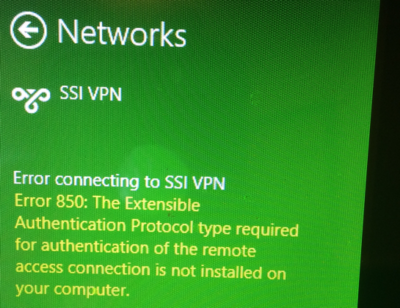
Are you getting this error message when connecting to a virtual private network (VPN) from a Windows 8 Machine?

Error connecting to VPN NAME.

Error 850: The Extensible Authentication Protocol type required for authentication of the remote access connection is not installed on your computer.

VPN-Error850

The Authentication method need to be fix in a view quick steps.

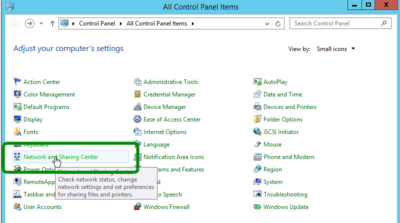
  1. Go to the Control Panel and in the top right corner, set View by: Small Icons
  2. Open Network and Sharing CenterNetwork and Sharing Center
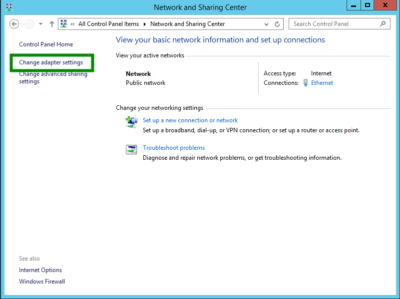
  3. Then Click Change adapter Settings
    Change adapter Settings
  4. Right Click the VPN Connection and click Properties
    VPN-Error850-1
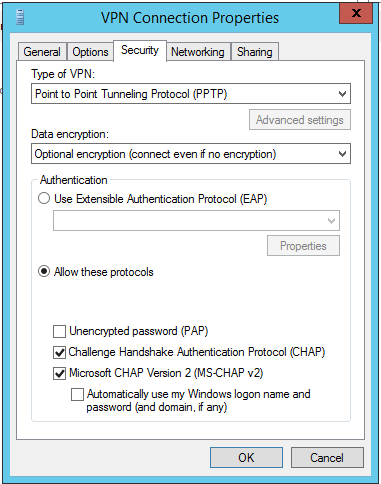
  5. Click the Security tab
  6. Select the correct authentication protocol. If it is a Microsoft PPTP implementation then try the following configuration.  Enable the radio button for Allow these protocols and enable CHAP and CHAP v2: VPN-Error850-1
  7. Click Ok and Try the VPN again.

Have questions?

Our small business team is here to help.
Call us at: 856-745-9990

South Jersey Techies, LLC is a full Managed Web and Technology Services Company providing IT Services, Website Design ServicesServer SupportNetwork ConsultingInternet PhonesCloud Solutions Provider and much more. Contact for More Information.

End of Support: Server 2003

end windows server 2003


A large number of businesses still run Microsoft MSFT -1.71% Windows Server 2003 and it’s unlikely they all will upgrade before Microsoft Corp. ends support on July 14, 2015, say analysts. Companies that don’t upgrade increase their cyber security risks because the company will no longer issue security updates and these systems will be more vulnerable to hackers.

Businesses worldwide run an estimated 23.8 million physical and virtual instances of Windows Server 2003, according to data released by Microsoft in July 2014. Analysts say the technology is more prevalent in industries such as health care, utilities and government. Yet it’s also still used in about 7% of retail point of sale systems, according to a report Thursday by Trend Micro Inc.4704.TO -1.11%

“Microsoft does not plan to extend support for Windows Server 2003 and encourages customers who currently run Windows Server 2003 and have not yet begun migration planning to do so immediately,” said Vivecka Budden, a Microsoft spokesperson, in an email.

South Jersey Techies offers various migration options to include Windows Server 2012 R2, Microsoft Azure, hosting partners and Office 365.

“It is going to be difficult to get this done in time,” said David Mayer, practice director of Microsoft Solutions at Insight Enterprises Inc.NSIT -1.12%, a provider of IT hardware, software and services.

Many of these same industries were impacted by the end of service for the Windows XP operating system on April 8.  Microsoft broadcasts these sorts of moves years in advance, so it shouldn’t come as a surprise to anyone. But, the product was stable and for many companies there simply wasn’t incentive to update.

“In general, everyone has been slow to migrate, especially those with servers that are running applications,” said Rob Helm, vice president of research at Directions on Microsoft consulting firm.

The problem in industries such as health care and utilities is that companies run legacy apps written by vendors who still require Windows Server 2003. For example, there are smaller vendors in health care that have not kept up with development and application modernization, said a health-care CIO who asked not to be identified. A hospital may have an inventory of 100 to 500 different applications and many applications will still require Windows Server 2003, he added.

Electric utilities, for example, widely use Windows Server 2003. There hasn’t been much movement to upgrade those systems, said Patrick C. Miller, founder of the nonprofit Energy Sector Security Consortium and a managing partner at The Anfield Group, a security consulting firm. Instead, utilities are working to better secure and isolate those systems.

“I’m concerned about directory services such as application authentication and user permissions,” said Mr. Miller. “If you compromise an Active Directory server, you get access to everything.”

For now, analysts are recommending that companies work out their risk of exposure and make plans to first migrate those applications that will be most difficult. Companies should make plans to harden servers that can’t be updated. That might entail putting those systems on an isolated network, where they’d be less prone to outside attack, said Mr. Helm.

To protect and upgrade your home or business

 please contact us 856-745-9990 or click here.


VPNFilter Malware Hits 500,000 Routers

FBI warns against VPNFilter malware that targets over 500,000 routers

If you have a home or office Internet router, the FBI has issued an urgent request for consumers to reboot now to help disrupt a massive foreign-based malware attack.

Foreign cybercriminals have compromised hundreds of thousands of home and office routers and other networked devices worldwide, the FBI said in a May 25 announcement.

How to help defend yourself from VPNFilter malware:

Turn your router off, then back on. This may temporarily disrupt
the malware and potentially help identify already-infected devices.

Secure the device with a strong, unique, new password.

Upgrade firmware to the latest available version.

Consider getting the Norton™Core Secure Wi-Fi Router designed to
help defend against a variety of possible cyber threats,
including the VPNFilter attack, and is also designed to automatically
update its knowledge of known viruses and other threats.

Fifth-Generation Wi-Fi Is Coming

We’re on the verge of the biggest change in wireless networking since 2007. Fifth-generation Wi-Fi technology promises to deliver faster-than-cable speed–without the cables.

If your business has kept pace with changes in wireless networking, you’ve deployed dual-band routers and client adapters that can stream encrypted data over the airwaves at speeds greater than 100 megabits per second at relatively close range.

But no good deed goes unpunished. New hardware based on the nearly finished 802.11ac standard is about to debut, and it will make your existing wireless infrastructure feel as though it’s mired in molasses.

Though the standards body responsible for defining 802.11ac hasn’t finished dotting all the i’s and crossing all the t’s yet, semiconductor manufacturers Broadcom and Qualcomm Atheros are already sampling 802.11ac chipsets (Broadcom has labeled its effort “5G Wi-Fi”). Both companies are closely involved in defining the standard, and they promise to deliver firmware updates to correct for any minor changes that may creep into the standard between now and the moment it is ratified (probably later this year or early in 2013).

Wondering how the IEEE moved from 802.11n to 802.11ac? The standards body uses a new letter suffix to identify each new technical paper related to the 802.11 project, so the logical follow-ons to 802.11z were 802.11aa, 802.11ab, and now 802.11ac. The standard is dubbed “fifth-generation Wi-Fi” because it’s the fifth generation of the technology that will be certified by the Wi-Fi Alliance marketing consortium. At the risk of muddying the waters, there is an 802.11ad standard in the works, but it’s not the next step in mainstream wireless networking. WiGig, as that standard is known, is a short-range, line-of-site technology that uses the 60GHz frequency band to stream media.

Unlike 802.11n networking hardware, which can use either the 2.4GHz or the 5GHz frequency bands, 802.11ac devices will operate exclusively on the 5GHz band. The 2.4GHz band delivers better range, but Wi-Fi data streams that use it must compete with a multitude of other devices that operate at the same frequency–everything from microwave ovens to Bluetooth headsets). The 5GHz band contains many more available channels; and in the 802.11ac standard, each of those channels is 80MHz wide, versus the 40MHz width specified for channels under the 802.11n standard.

Trendnet’s TEW-811DR router will support 802.11ac.What’s more, 802.11ac will use a modulation scheme that quadruples the amount of data that will fit on an encoded carrier signal. The maximum bandwidth per spatial stream in 802.11n is 150 mbps, which means that an 802.11n router outfitted with three transmit and three receive antennas can deliver maximum theoretical throughput of 450 mbps. In contrast, the maximum bandwidth in 802.11ac jumps to 433 mbps per spatial stream, and the maximum number of spatial streams increases from three to eight. So the theoretical maximum throughput on an 802.11ac network will eventually be several times that of gigabit ethernet. First-generation devices, however, will be limited to using either two or three transmit and receive antennas to deliver a theoretical throughput maximum of 866 mbps or 1.3 gbps).

As we’ve seen with 802.11n networks, real-world throughput will likely be one-third to one-half as fast as the theoretical maximums. Still, even mobile devices outfitted with 802.11ac chipsets and just one transmit and one receive antenna–think smartphones and tablets–should be able to handle more than twice the bandwidth that today’s devices with 802.11n chipsets can manage. With bandwidth-intensive applications such as videoconferencing and Customer Relationship Management (CRM) moving from the desktop to smartphones and tablets, 802.11ac networks will become essential infrastructure elements for businesses large and small.

One means of overcoming the 5GHz band’s shorter range with 802.11ac chipsets will be to utilize transmit and receive beam-forming technology. Beam forming was an optional and non-standardized element of the 802.11n spec. In the 802.11ac standard, beam-forming will remain an optional feature, but its implementation will be standardized. Most of today’s 802.11n devices use omnidirectional signal transmission and reception. Signals propagate in a series of concentric rings, like the ripples you create by dropping a stone in a pond.
With beam forming, the router and its clients develop an awareness of each other’s relative location, so they can coherently focus their transmission streams at each other. Without beam forming, reflected signals may arrive out-of-phase and cancel each other out, reducing total bandwidth. A beam-forming chipset can adjust the signals’ phase to overcome that problem, thereby substantially increasing usable bandwidth.

The first generation of 802.11ac routers, such as the Trendnet TEW-811DR, will be concurrent dual-band models that support 802.11n clients on the 2.4GHz frequency band and 802.11ac clients on the 5GHz band. These devices are likely to reach the market in the third quarter of this year. Laptops with 802.11ac chipsets should arrive in time for the winter holiday season, with mobile devices such as smartphones and tablets following in early 2013. The Wi-Fi Alliance, which has assumed responsibility for ensuring that wireless networking products interoperate properly, plans to begin its 802.11ac certification program in early 2013.

To View Full Article Click Here

Mac Office 2011 Support Ends Oct 10

End of support is sneaking up on enterprise employees running Office on a Mac

Companies that have employees running Office for Mac 2011 have just over 100 days to replace the suite’s applications with those from last year’s upgrade, Office for Mac 2016.

Support ends for Office for Mac 2011 on Oct. 10, a date that Microsoft first stamped on the calendar two years ago, but has not widely publicized since. As of that date, the Redmond, Wash., developer will cease supplying patches for security vulnerabilities or fixes for other bugs.

The individual applications — Excel, PowerPoint, Outlook and Word — will continue to operate after support ends, but companies will be taking a risk, however small, that malware exploiting an unpatched flaw will surface and compromise systems.

To receive security and non-security updates after Oct. 10, IT administrators must deploy Office for Mac 2016 or instruct workers covered by Office 365 to download and install the newer suite’s applications from the subscription service’s portal.

Office for Mac 2011’s end-of-support deadline was originally slated for January 2016, approximately five years after the productivity package’s release. But in the summer of 2015, when it was clear that 2011’s successor would not be ready by early 2016, Microsoft extended its lifespan by 21 months. At the time, Microsoft cited the long-standing policy of supporting a to-be-retired product for “2 years after the successor product is released” when it added time to 2011.

Mac users: Steerage Class

The impending cutoff for Office for Mac 2011 is an issue only because Microsoft shortchanges Office for Mac users. Unlike the Windows version of Office, which receives 10 years of security support, those that run on macOS are allotted half that. Microsoft has repeatedly classified Office for Mac as a consumer product to justify the half-measure, even for the edition labeled “Home and Business.”

Nor does Microsoft update and service Office for Mac for corporate customers as it does the far more popular Windows SKU (stock-keeping unit). The latter will be upgraded with new features, Microsoft said in April, twice each year for enterprise subscribers to Office 365 ProPlus, with each release supported for 18 months before giving way to a pair of successors.

Mac editions, however, are refreshed with new tools at irregular intervals, often long after the same feature debuts in the same Windows application. (Recently, for example, Microsoft added a delivery-and/or-read receipt option to the Mac version of Outlook; that functionality has been in Outlook on Windows since 2013.) And because there are no regular, large-scale feature upgrades to Office for Mac, support is not curtailed by the release schedule as with Windows.

The difference between Offices — the behemoth Windows on one side, the niche Mac on the other — has been put into even starker relief recently: Microsoft has adopted March and September dates for launching new upgrades to Windows 10, Office 365 ProPlus, and last week, Windows Server, but made no similar promises for Office for Mac 2016.

It’s clearly the odd app out.

Have questions?

Get answers from Microsofts Cloud Solutions Partner!
Call us at: 856-745-9990 or visit: https://southjerseytechies.net/

South Jersey Techies, LL C is a full Managed Web and Technology Services Company providing IT Services, Website Design ServicesServer SupportNetwork ConsultingInternet PhonesCloud Solutions Provider and much more. Contact for More Information.

To read this article in its entirety click here.

Microsoft Dictate Lets You Type by Voice

Dictate with your voice in Office

This feature is available to Office 365 Subscribers only.


Dictate in Word or PowerPoint

1) Turn on your microphone and make sure it works. Troubleshoot microphone settings

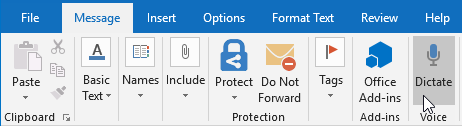
2) In Word 2016 or PowerPoint 2016, select Home > Dictate.

3) Wait for the icon to turn red.

4) Start talking. As you talk, text appears in your document or slide.

5) Speak clearly and conversationally. Insert punctuation by saying the name of the punctuation mark you want to add.

6) If you make a mistake while dictating, move your cursor to the mistake and fix it with your keyboard. No need to turn off the microphone.

7) When finished, select Dictate again to stop typing.


Dictate in Outlook

1) Turn on your microphone and make sure it works. Troubleshoot microphone settings

2) Open a new email message and select Message > Dictate.

3) Wait for the icon to turn red.

4) Start talking. As you talk, text appears in your email message.

5) Speak clearly and conversationally. Insert punctuation, by saying the name of the punctuation mark you want to add.

6) If you make a mistake while dictating, move your cursor to the mistake and fix it with your keyboard. No need to turn off the microphone.

7) When finished, select Dictate again to stop typing.


Troubleshooting

I don’t see Dictate, or it’s not working

If Dictate isn’t working, make sure you’re connected to the Internet.

You can enable or disable Dictate by going to File > Options and look for Office intelligent services on the General tab.


Important information about Dictate

Dictate is one of the Office Intelligent Services, bringing the power of the cloud to Office apps to help save you time and produce better results.

Your speech utterances will be sent to Microsoft to provide you with this service, and may also be used to improve speech recognition services. For more information see, What are Intelligent Services?

Office Dictate is not HIPAA (Health Insurance Portability and Accountability Act) compliant.

Disable SSL 3.0 on Your Server


Due to a critical security vulnerability with SSL 3.0  (an 18-year-old, outdated technology), we recommend disabling it on your server. We have instructions on how to do that in the Updating section but recommend reading the entire document to understand the scope of what this does.

What does POODLE do?
In short, it’s a way attackers can compromise SSL certificates if they’re on the same network as the target if (and only if) the server the target is communicating with supports SSL 3.0.

Google has a lot more detail on their security blog here.

Does POODLE affect my server/sites?
Because POODLE is a vulnerability in SSL technology, it only impacts sites using SSL certificates. If your server or your sites don’t use an SSL certificate, you don’t need to update your server. However, we recommend doing it now in case you do end up installing an SSL certificate at a later date.

Updating
How you update your server depends on whether your server uses a Linux® distribution or Windows® and if it uses cPanel.

cPanel

cPanel requires slightly different steps from any other control panel/operating system configuration.

To Configure cPanel to Prevent POODLE Vulnerability on HTTP

1. Log in to your cPanel (more info).
2. In the Service Configuration section, click Apache Configuration.
3. Click Include Editor.
4. In the Pre Main Include section, from the Select an Apache Version menu, select All Versions.
5. In the field that displays, type the following, depending on which version of CentOS you’re using:

CentOS Version Type this…
Cent OS/RHEL 6.x
SSLHonorCipherOrder On
SSLProtocol -All +TLSv1 +TLSv1.1 +TLSv1.2
Cent OS/RHEL 5.x
SSLHonorCipherOrder On
SSLProtocol -All +TLSv1

If you encounter errors while applying this update, please review this forum post at cPanel that discusses potential fixes.

6. Click Update.

Preventing POODLE on Other Protocols (FTP, etc.)

Right now, only servers using RHEL can protect themselves against POODLE on non-HTTPS protocols. They can do this by updating the latest version of OpenSSL, and then implementing TLS_FALLBACK_SCSV.

Servers using CentOS do not yet have a known fix for the vulnerability on non-HTTPS protocols. However, we will update this article with those instructions as soon as we do.

Linux (Apache)

Modify your Apache configuration to include the following line:

SSLProtocol All -SSLv2 -SSLv3

For more information on how to do that, view Apache’s documentation.

Windows (IIS)

Modify your server’s registry (which removes access SSL 3.0 support from IIS) using Microsoft’s document here. You can jump down to the Disable SSL 3.0 in Windows section.

CALL US NOW!