
Tech, Web, Cloud & Cabling Services

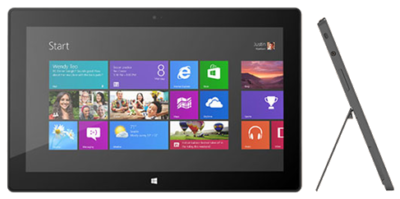
Takeaway: Microsoft Surface RT is the first Tablet equipped for enterprise.
Apple and Android are dominant for consumer consumption, but Windows RT is the best candidate for enterprise use.
The Surface by Microsoft is a crossover between a laptop and a tablet. The Surface RT is a slim tablet with a kickstand and the option of a Touch Cover or a Type Cover.
Surface RT is running Windows RT Operating System on a Quad-Core NVIDIA Tegra 3 Processor. Storage options are 32 GB or 64 GB. According to recent news, only 16 GB available for the 32 GB hard drive and 46 GB available for 64 GB hard drive.
Surface RT is pre-loaded with touch-enhanced versions of Microsoft Office Suite (Word, Excel, PowerPoint, and OneNote). Unlike the iPad, the RT has the ability to increase storage with a USB port and MicroSDXC card slot.
Effortlessly join and integrate a Surface RT into a Windows environment; with the capability to retrieve and share network resources. Providing a “true desktop browser” and the basic functionality, commonly used with a desktop computer, allow the transition from desktop to tablet to be easy.
This simple solutions works with the current list only. If you add to this list, Word will remember the indent. When you start a new list later in the document, it won’t.
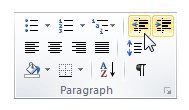
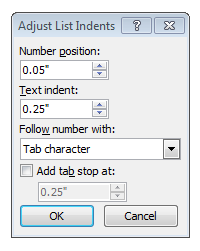
The entire document solution will adjust the settings for all numbered/bulleted lists in the document. Instructions below will default the list to be aligned at the left margin (0), you can adjust accordingly.

 Apple, Inc. offers innovative products that continue to grow its customer base. Testing new designs for current products is a consistent task for Apple, Inc.
“Apple has been slow to react to consumer desire for larger smartphone screens, [and] entry level price points on new phones,” said BGC Financial’s Colin Gillis. “Waiting and waiting, for the new products to launch, has become painful,” he wrote.
Currently, Apple is testing various sizes for iPhone and iPad screens. Samsung has become the world’s largest smartphone maker because Samsung offers a variety of smartphones with display sizes that range up to 5.5-inches. Continuing to compete with Samsung, Apple is testing for a 5-inch iPhone screen expected to be released in 2014.
A new tablet design is also being tested by Apple with a display that is a little less than 13-inches. This would be a great addition to the iPad that has a 9.7-inch display and the iPad Mini that has a 7.8-inch display.
Lastly, Apple has been developing an iPhone that would be cheaper than the current iPhone. According to many articles, the cheaper iPhone will be made from plastic instead of the traditional metal casing that will be available in different colors.
Apple, Inc. could climb back to the top of both smartphone and tablet sales by releasing a larger display for the iPhone/iPad and releasing an iPhone that is reasonably priced.
![ET83-screen[1]Touch 10 Monitor](http://southjerseytechies.net/blog/wp-content/uploads/2013/08/ET83-screen1Touch-10-Monitor-300x209.jpg) Microsoft has always been key player in the Technology world. In 2009, Microsoft released Windows 7, for many users it became the best operating system yet. Not too long after the release of Windows 7, Microsoft predicted that “touch-screens” were the future of technology and focused all of their resources in one place.
Microsoft has always been key player in the Technology world. In 2009, Microsoft released Windows 7, for many users it became the best operating system yet. Not too long after the release of Windows 7, Microsoft predicted that “touch-screens” were the future of technology and focused all of their resources in one place.
On October 26, 2012, Microsoft released their Windows 8 OS and their first tablet, the Surface RT. Shortly thereafter, on February 9, 2013, Microsoft released the second tablet, the Surface Pro. For more information regarding the Surface RT or the Surface Pro, click here.
“A Windows 8-based PC is really a new kind of device, one that scales from touch-only small screens through to large screens, with or without a keyboard and mouse,” said Julie Larson-Green from Microsoft.
Apple and Android touchscreen devices have been very successful because they are useful on-the-go. Trying to compete with Apple and Android, Microsoft developed Windows 8, a touch-oriented OS. Many desktop and laptop users have had problems adjusting to the new OS. Also, the Surface Tablet users are having trouble adjusting to this device and OS because it is a touch-enabled laptop. Using the touchscreen features on a laptop is not convenient and very uncomfortable.
How long will it take for Microsoft to regain its position in the technology world?
 “As the amount of personal information increases multifold, individuals and their personal data will increasingly become a security target. And, yet in most scenarios the organization is still ultimately accountable for the personal data on its IT systems,” said Carsten Casper, research vice president at Gartner, Inc.
Gartner, Inc. has a five step plan to create an exit strategy:
The first step to preparing a strategy for transporting personal data is to distinguish personal data from non-personal data.
Once personal data is distinguished, it will need protection. Ways to protect data are:
Next step is to use Human Resource (HR), Customer Relationship Managment (CRM) and Enterprise Resource Planning (ERP) programs that specialize in organizing and storing personal data.
The most problematic task is guaranteeing that an organization will obey privacy standards for the transfer of personal data which is Gartner’s fourth step.
Create a practical method of discussing Cloud computing including laws and jurisdictions for the physical location and logical location of stored personal data.

Exchange 2010 Service Pack 1 restricts the number of ActiveSync devices (=EAS PartnerShips) by setting the default to allow up to only 10 devices. This default helps eliminate resources from being monopolized.
Limiting ActiveSync devices is for the new feature “Throttling” which manages Exchange performance. Throttling enforces bandwidth limits by tracking consumed resources per user.
Set-ThrottlingPolicy –EASMaxDevices # –Identity DefaultThrottlingPolicy_hex_string

Apple prefers to use Passbook system instead of Near Field Communication (NFC). Passbook is not capable of performing all tasks that NFC can handle such as the ability to beam content by touching devices or send money via PayPal wirelessly.
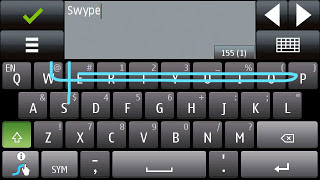
“Swype is a faster and easier way to input text on any screen.”
Swype gives your phone the capability to input text by sliding your finger from letter to letter accross the screen. Only Android smartphones offer this input ability.
iPhone’s are not built to extend device storage using external SD Cards, Micro SD Cards or Mini SD Cards.
Many iPhone user’s have replaced their iPod’s with their smartphone. The storage capacity for an iPhone (64GB) versus an iPod Classic (160GB) is not comparable.
iPhones have never used a standard USB cable to sync. Currently, iPhone 5 uses a new MicroDock connection that will not allow older sync cables to connect without a specific adapter.
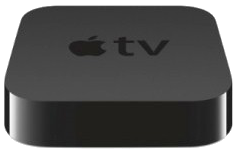
Android devices have a Micro-HDMI port for retrieving video from your phone. iPhone 5 requires a special adapter or an Apple TV to retrieve video.
Although, iPhone 5 provides a stronger battery, some users require more power but replacing an iPhone battery is challenging. To replace the battery it requires a special screw driver and special tools to lift the screen 90°.
While the iPhone 5’s battery is larger that the iPhone 4S, it produces the same battery life because of the bigger screen and power to run 4G LTE.
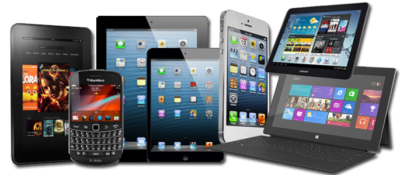
Bring-Your-Own-Device (BYOD) is permitting employees to bring personal devices (laptops, tablets, and smart phones) to their workplace, and use those devices to access company information and applications.
Designing a private App Store provides the ability to manage custom and purchased apps. Businesses can manage apps by pushing mandatory apps, approving recommended apps and blocking rouge or unrelated apps.
Policies ensure security, productivity, protection of resources and reduce risks. Implementing a location-based service (LBS) such as Geo-Fencing and GPS will set limitations on access to data based on location.
There are many layers of security for a BYOD environment. Device enrollment can be a one-time passcode and/or Active Directory credentials. Applying user profiles will distribute policies, restrictions and Apps based on logical groups (department/location/device type). Other types of security are tracking device locations, Remote Lock, Complete Wipe and Corporate Wipe.
Usage thresholds can be monitored based on talk, text, data and roaming for each user. Setting up alerts and reports for misuse, excessive bandwidth, additional charges and security exposures will help track usage appropriately.
Compromised devices such as “jail broken” iPhone or a rooted Android should be restricted from accessing enterprise data and resources. Compromised devices are susceptible to virus attacks.

On April 10, 2012, Microsoft officially announced that as of April 8, 2014 they will end extended support for Windows XP and Office 2003, after which no new updates, hotfixes, patches or support will be issued. “Since a security update will never become available for Windows XP to address these vulnerabilities, Windows XP will essentially have a “zero day” vulnerability forever” said Tim Rains from Microsoft. Zero-day attacks are when attackers exploit a vulnerability before the developer is aware or can fix the problem.
Windows XP already has a notably higher infection rate than its successors Windows 7 and Windows 8. Those preparing to continue using XP after the cut-off date, are going to be in a unpleasant situation trying to protect their intellectual property. With Microsoft ending their support, the vendors for applications running on it will most likely end support.
Attackers will have the upper hand once Microsoft cuts off XP support and presumably will have more information than the defenders about system and application vulnerabilities. Also, attackers will have the possibility of compromising the system and applications if they exploit the zero-day vulnerabilities.
For more information regarding Windows XP End of Life, click here.
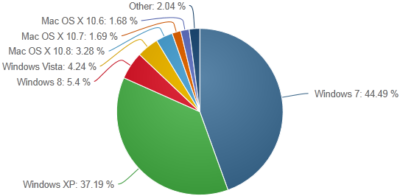
According to NetMarketShare.com, Windows XP still has about 37 percent desktop operating system share as of June 2013. Although it is the second most used operating system, Microsoft said that they will not be extending support for XP after April 8, 2014.
 CALL US NOW!