Back to Top

Tech, Web, Cloud & Cabling Services

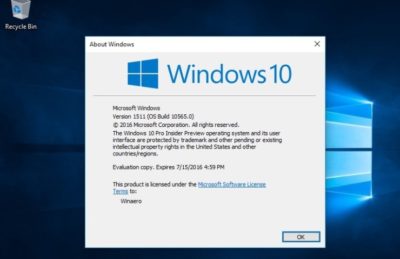
Microsoft finally retired Windows 10 1511


The company also ended support for 1607 to users of Windows 10 Home and Pro.

Microsoft finally retired a 2015 version of Windows 10, marking 29 months of support for the untitled feature upgrade, nearly as long a stretch as the time between the releases of Windows 8 and Windows 10.

Windows 10 1511 – Microsoft labels its feature upgrades in a yymm format – received a final set of security patches on April 10.

The retirement date had originally been slated for Oct. 10, 2017, but last November Microsoft extended it an additional six months, albeit only for commercial customers. “To help some early enterprise adopters that are still finishing their transition to Windows as a service, we will be providing a supplemental servicing package for Windows 10, version 1511, for an additional six months, until April 2018,” Michael Niehaus, at the time a director of product marketing for Windows, said in a 2017 post to a company blog.

Customers running Windows 10 Enterprise or Windows 10 Education were given the support reprieve; those operating lesser SKUs (stock-keeping units), including Windows 10 Home and Windows 10 Pro, had their support curtailed last October.

Earlier this year, Microsoft added six months of support to all versions of Enterprise and Education, raising the support roof from 18 months to 24 for not only 1511, but also for 1607, 1703 and 1709. The less expensive, less expansive, Home and Pro, however, retained the 18-month support timeline.

Also destined for an April 10 retirement party was Windows 10 1607, the mid-2016 feature upgrade that received its last security patches that day on Windows 10 Home and Windows 10 Pro. Meanwhile, version 1607 on Enterprise and Education will continue receiving fixes until Oct. 9.

Windows 10’s bifurcated support timelines – 18 months for some SKUs, 24 months for others – complicate what had been an easy-to-understand practice of patching versions for a year and a half. Period.

Microsoft has tried to inform customers of the support due them by reminding them in January’s and February’s cumulative updates that patches end for Enterprise and Education, version 1511. “The additional servicing offer for Windows 10, version 1511 ends on April 10, 2018, and doesn’t extend beyond this date. To continue receiving security and quality updates, Microsoft recommends updating to the latest version of Windows 10,” the March documentation said.

The company has extended the lifespan of other software previously, including the original version of Windows 10, tagged as 1507. In February 2017, it added six weeks to the timetable. Generally, however, Microsoft has been hard-nosed about support deadlines, and for good reason.

“The danger is that customers won’t believe Microsoft will end support when they say [they will],” said Gartner analyst Michael Silver in a 2017 interview. “It would set a bad precedent if organizations think that they can rely on Microsoft to constantly extend [support].”

By hewing to the once-revised deadline for 1511, Microsoft had drawn a line in the sand, showing commercial customers that while it may bend to their demands, it will not break with critical policies, like these, which are foundation to its Windows-as-a-service concept.

Faxing Through Email Made Easy

Fax Thru Email

Replace your bulky old fax machine with a fast, paper-free solution. It’s eco-friendly!

Forget the waste and expense of a fax machine – with Fax Through Email, you send and receive faxes over the Web, using your own unique fax number. Incoming faxes go directly to your email inbox; you send outgoing faxes right from your email or by logging on to FaxThruEmail.com.

Why Choose Fax Thru Email?

  • Save money. There’s no need to install or maintain a landline or fax machine – we give you your own, personal fax number.
  • Save trees. Cut down on paper use and increase privacy – no paper copies left lying around for someone else to read.
  • Two easy ways to fax. Fax from your email account – just put the receiver’s fax number in the Subject line. You can also send your fax from FaxThruEmail.com
  • Add attachments with one click. Attach a file from your computer or your Online Storage® account.
  • No activation or per-fax fees. Choose your plan based on how many pages you think you’ll need. Change it at any time.
  • Want to increase your page limit? It’s easy. Just buy additional Page Packs once you purchase a Fax Through Email plan.

Technology makes it fast, our features make it easy.

Fax Through Email uses the Internet, rather than a phone line, to send and receive faxes. There’s no equipment to buy or phone line to install –you send faxes directly from any device you use for email or browsing the Internet*. View and manage your fax history, including sent/received logs, account information, help and billing details from our easy Web-based manager.

All Plans Include:

  • Dedicated fax number
  • Ability to send files from any device with a Web connection
  • Fax to multiple numbers at one time
  • 3-step Cover Sheet Wizard
  • Ability to block numbers, even international
  • FREE support

Call (888) 505-1532 to get started now

Stay Organized With Easy Access to Online Calendars

Calendar

Stay organized and in control with 24/7 access  with Personal or Group Online Calendar.

Never forget an appointment, birthday or anniversary again. Now it’s easy to keep track of family activities, events and important dates. Need help at the office? Personal and Group Online Calendar makes it a snap to share your calendar, projects and files so all your employees are informed and up to date. Find times when everyone is available to meet, manage company resources, and much more!

Overview

  • Easy, 24/7 Access – Access your online calendar anytime, anywhere you have an Internet connection.
  • Password Protect – Keep personal information and details of your calendar private and secure.
  • Upload Files – Share files with group members or individuals invited to an event.
  • Event Reminder – Schedule automatic reminder messages via email or pop-up notification.
  • Task Management – Create and manage your own personal “To Do” list – or keep track of business projects. Set start and end dates and track tasks to completion.
  • Task Sharing – For projects that require work from multiple people, Task Sharing keeps everyone “up to speed” on project status.
  • Email Integration – Send and receive meeting requests and easily add them to your Microsoft Outlook calendar.
  • NEW! Integrate with popular 3rd party calendars – Easily add your events to Google Calendar, iCal or even your iPhone calendar.
  • Email Invitation – Invite individuals to attend meetings or events.
  • Print Options – Choose from multiple print formats for your schedule: daily, weekly, monthly and more!
  • Schedule Resources – No more wasting time tracking down available meeting rooms or other equipment like laptops and projectors.
  • Check User Availability – Easily see when others in your group have free time.
  • Administrator Control – Delegate control by choosing which members have full administrative access to all Group Calendars.
  • Time Zones – Supports 547 Time Zones.
  • Holidays – Automatically add major holidays to your personal calendar. Choose from 14 holiday collections suited to various countries and nationalities – or create and customize your own favorite days!

3 Online Calendar Plans To Choose From

Online Calendar Plan

Call (888) 505-1532 to get started now

Pros and Cons of Web Hosting for Data Storage

Web hosting for data storage can offer several advantages.

Web hosting for online storage was once a high-priced option. Now, with the cost of web hosting dropping, many companies are offering what’s come to be called cloud storage: Web-based third-party data storage. Your data is stored on on a network of servers that are owned and maintained by other companies and housed on their sites rather than at your home or place of business.

Backups

Lost laptops and damaged hard drives are less of a disaster if you make regular backups, and having a Web storage system in place can make this easier. You can even automate your backups so that copies of your data are made regularly without you needing to do anything.

Data Loss

While the backup services they offer can be very useful, cloud hosting firms can lose data just like any other company. Firms can suffer fires, thefts, server malfunctions and other incidents that could result in data loss. They can also go out of business, potentially taking your valuable data with them if you don’t have any other copies.

Ease Of Access

Ease of access is one of the main selling points of cloud storage. You can access your data from any computer with an Internet connection, making it easier to work off-site or from multiple different locations. People working on the same project from different physical sites can easily access and share information.

Security Risks

The downside of easier access for you or your staff is that unauthorized access is potentially easier, too. Your information may be less secure than it would be if you restricted it to physical media. Unless you encrypt your data so that it can only be read by authorized personnel, your data is only as secure as your hosting company’s systems. This is a particular concern if you want to store sensitive information such as your clients’ personal details.

Space And Resources

Storage space is generally less of an issue for private individuals, but if your organization handles a lot of data, storage and servers can take up a lot of space. If you have a great deal of storage equipment it can require dedicated climate-controlled rooms. Factors such as insulation and cooling systems mean these may be costly to construct. Increased power consumption can also mean increased costs. There’s also the headache of maintenance and technical support; you may have to take on extra staff, or you might find that your current IT staff have less time available for other duties. If your needs vary, with heavier demand at some times than at others, the lack of flexibility can mean waste. Using online storage and third-party servers allows you to save valuable space and leave the maintenance to a dedicated firm’s (hopefully) expert staff. Cloud storage can also help keep costs down because most companies only charge you for what you use in terms of space and bandwidth.

Cloud Storage Costs

Inevitably your Web-based storage space comes with a price tag—one that gets larger as your needs increase. The more data you store and the more bandwidth you use to upload and download your data from the hosting company’s servers, the more you’ll have to pay. If your storage needs are fairly predictable, it may be more cost-effective to set up your own on-site storage systems.

Call (888) 505-1532 to get started now

Save Face at Work with Outlook


1. Save face with MailtipsHave you ever hit “Reply All” to an email when you didn’t mean to? Or sent important information to someone and never gotten a response, only to learn later their email address was invalid? Microsoft Exchange 2010 and MailTips, a new Microsoft Outlook 2010 feature, can help prevent embarrassing mistakes, save you time, and alleviate frustration.Learn more: Turn on or off MailTips
2. Share your scheduleYou can share your calendar with others on a Microsoft Exchange Server—with permission, of course. Or you can publish your default Outlook 2010 to the web, which can allow more people to view it. If you publish your calendar to the web, you don’t have to have an Exchange account, and anyone can see it, even if they don’t have an Exchange account, either.Learn more: Introduction to calendar sharing
3. Stop repeating yourselfDo you do a lot of the same things over and over with emails? Like frequently move messages to a specific folder that you’ve set up? Or often forward messages to your team? Quick Steps in Outlook 2010 can help by turning commands and procedures that you use most often into one click actions.Learn more: Automate common or repetitive tasks with Quick Steps
4. Get in on the conversation—and manage itAt work you may often have conversations over email, where several people are weighing in on important issues. Have you ever missed someone’s response in one of these email conversations? Now you can see your email within the context of the conversation, with Conversation View. See the overall conversation, including your responses, find the most recent response, and easily figure out the message that is most important to you.Learn more: View email messages by conversation
5. Get in on the conversation—and ignore itMaybe you are no longer needed in an ongoing email conversation—or maybe the subject matter is no longer important to you. Whatever the reason, you can prevent additional responses from appearing in your inbox. The Ignore command moves the whole conversation and any future messages that arrive in the conversation to the Deleted Items folder.Learn more: Ignore all email messages in a conversation
6. Let colleagues know when you aren’t aroundIf you’re going to be heading out on vacation or even just away for the day, you can let your colleagues know your schedule and when they can expect to hear from you again. Customize automatic responses to emails you receive whenever you are unavailable.Learn more: Automatically reply to email messages with an Exchange account.
7. Protect what you sendIt’s easy to communicate with pretty much anyone via email. But there are times when you don’t want email you send to be forwarded to others, or printed out, or copied. You can use Information Rights Management (IRM) to help prevent sensitive email from being read, printed, forwarded, or copied by unauthorized people.Learn more: Introduction to IRM for email messages
8. Have it all in one place—and hear it, tooWith Unified Messaging (UM), you can receive email, voice, and fax messages in your Outlook Inbox. If you have an Exchange Server 2010 account, you can get Voice Mail Preview, which delivers both a recording and text that’s been created from the voice recording using automatic speech recognition.Learn more: Introduction to Microsoft Exchange Unified Messaging
9. Contact info is at your fingertipsThanks to the Microsoft Outlook Global Address List (GAL), you no longer have to keep your contacts’ information stored on your computer–where it takes up space and gets out of date before you can manually update it. The Global Address List (GAL) tracks it all for you: phone numbers, building location, email addresses, and more.
10. Make sure they get itNeed to make sure your boss reads an email that you send her? Want to get your team to vote on their favorite restaurant for your team outing? You can add many different types of tracking to your email messages, including delivery and read receipts, voting buttons and follow-up actions.Learn more: Add tracking to email messages
11. Meet anywhere, anytimeGrab them for a meeting–just once or every week–find a meeting room, and even schedule meetings in a different time zone. Clicking the New Meeting button gives you access to everything you need to set up meetings with one or many.Learn more: Schedule a meeting with other people
12. Let someone else mind your calendarYou need to hand over your scheduling responsibilities to someone else—for just a bit, or for a good while. Or maybe you need to manage someone else’s schedule. The Delegate Access feature in Outlook lets meeting requests be received, accepted, and even sent for you by someone else.Learn more: Delegate access: Let someone else mind your calendar
13. Check email from any computerDon’t worry about dragging your laptop with you everywhere you go anymore: You can access your email from any computer connected to the Internet using any major web browser—even if it doesn’t have Microsoft Outlook on it. Outlook Web App (OWA) is a web-based version of Outlook that lets you access and send email, manage your calendar, and more.Learn more: Outlook Web App in Exchange 2010
14. It’s on your phone!Did we say forget about dragging your laptop with you? Well, forget about even needing to have a computer—Windows Phone 7 automatically comes with Office Mobile so you can check and send email, update your calendar, and keep on top of all that you need to.Learn more: Office Mobile site
15. No more extra gearIt used to be that when you were outside of your organization’s firewall, like when you were working from home or traveling, you’d need to log in to Outlook using a virtual private network (VPN) connection, which often required a smartcard or special tokens. Now Outlook offers Outlook Anywhere, an alternative to VPN connections that lets you use Outlook just as you normally do at your organization, without the need for special connections or hardware.Learn more: Use Outlook Anywhere to connect to your Exchange Server without a VPN
Hassman Research Institute

Website Design – Hassman Research Institute

The Website Design team of South Jersey Techies has been constantly working on developing great looking websites using the latest web technologies. The most recent website developed by our team is for Hassman Research Institute in Berlin, NJ.


Hassman Research Institute


Have questions?

Our Web Design team is here to help, call us at: 856-745-9990 or visit: https://southjerseytechies.net

South Jersey Techies, LLC is a full Managed Web and IT Services Company located in Marlton, NJ providing IT ServicesManaged IT Services, Website Design ServicesServer SupportIT ConsultingVoIP PhonesCloud Solutions Provider and much more. Contact Us Today.

Website Design – Event Medical Staffing Solutions

The Website Design team of South Jersey Techies has been constantly working on developing great looking websites using the latest web technologies. The most recent website developed by our team is for Event Medical Staffing Solutions in Sharon Hill, PA.

Event Medical Staffing Solutions (EMSS) has a nationwide network of emergency medical professionals focusing on special events, sporting events, construction sites, medical escort services and the television and film industry.

Event Medical Staffing Solutions specialize in on-site medical needs for any duration at any location, and any type of event. They have teams on standby 24/7 to respond to your last minute needs.


Have questions?

Our Web Design team is here to help
Call us at: 856-745-9990 or visit: https://southjerseytechies.net

South Jersey Techies, LLC is a full Managed Web and IT Services Company located in Marlton, NJ providing IT ServicesManaged IT Services, Website Design ServicesServer SupportIT ConsultingVoIP PhonesCloud Solutions Provider and much more. Contact Us Today.

New Website Design – W.J. Wallace Paving

The Website Design team of South Jersey Techies has been constantly working on developing great looking websites using the latest web technologies. The most recent website developed by our team is for W.J. Wallace Paving in Delanco, NJ.

W.J. Wallace Paving is a trusted asphalt paving company serving in South Jersey. W.J. Wallace Paving has been consistently providing exceptional value, superior customer service and the highest workmanship in South Jersey for over 30 years.

We specialize in Commercial, Industrial, Municipal and Residential Asphalt paving in South Jersey. Whether it’s paving, patching, resurfacing, seal coating or site clearing, W.J. Wallace Paving is a name you can trust and rely on. W.J. Wallace Paving carries full liability insurance and workers compensation insurance on all employees with one of the best experience modifiers in our industry for safety.

Have questions?

Our Web Design team is here to help
Call us at: 856-745-9990 or visit: https://southjerseytechies.net

South Jersey Techies, LLC is a full Managed Web and IT Services Company located in Marlton, NJ providing IT ServicesManaged IT Services, Website Design ServicesServer SupportIT ConsultingVoIP PhonesCloud Solutions Provider and much more. Contact Us Today.

Apple iOS 7

FINALiOS7.2

Apple iOS 7 is expected to be released this Fall for both, iPhone and iPad users.  Apple created a simple and more useful experience with iOS 7 that includes many new features.

Control Center

Control Center allows access to common controls and apps from any screen with just one swipe.  Controls included are turning on/off Wi-Fi, turning on/off Bluetooth and adjusting the display brightness.  Apps included are Camera, Flashlight, Calculator and many more.

Notification Center

Notification Center allows you to view new messages, mail, to-dos and missed calls from any screen with just one swipe.  The Notification Center has a new feature called Today.  Today allows you to view everything for “Today” including weather, appointments and local traffic.  Also, this feature gives you a glance at Tomorrow. 

Multitasking

Multitasking is smart way to switch between apps quickly.  To access “Multitasking” press the “Home” button twice.  Multitasking with iOS 7 is more efficient because it learns how you use your apps.  If you check a specific app every day at the same time, your app will be waiting for you.

AirDrop

AirDrop allows you to easily share photos, videos, contacts with the app and a Share button.  AirDrop transfers are encrypted and use Wi-Fi or Bluetooth to share data securely.

Siri

Siri has a redesigned user interface with a new sound and many new capabilities.  Siri has a more natural sounding voice (female/male) and is easier to understand.  Siri’s great new look fades on top of your screen.  Additionally, Siri can answer questions using Bing and Wikipedia, control iTunes radio, return phone calls, play voicemails and many more.

Mail

Mail has a redesigned user interface with many new features and controls.  New features  include the ability to view PDF comments and annotations, add/reorganize the mailbox list, and Mac and PC users with Microsoft Exchange 2010 can also now sync notes.


Second Generation Surface Tablets

mss2_1

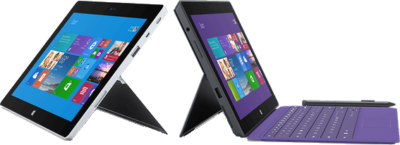
Microsoft has offically announced that the release date for the second generation surface tablets, Surface 2 and Surface Pro 2, will be October 22, 2013.  Pre-order for Surface 2 and Surface Pro 2 is available.

Both new Surface tablets will have a dual-angle kickstand and multiple connectivity options such as Bluetooth 4.0, Wi-Fi 802.11, USB 3.0, micro-SD expansion and HD video-out port.

The new Type and Touch Covers will be released with both tablets.  Both Covers include backlighting and additional sensors.  Also, Microsoft has designed a Power cover that is designed to add additional battery life to both Tablets.

mss21

The Surface 2 has a 10.6 Clear Type Full HD (1920×1080) Display and will run Windows RT 8.1 Operating System on an nVidia Tegra 4 Processor. The Surface Pro 2 has two storage options including, 32 GB and 64 GB.  Surface 2 is priced at $449.

sur2

Pre-order a Surface 2 Tablet.

mss22

The Surface Pro 2 has a 10.6 Clear Type Full HD (1920×1080) Display and will run Windows 8.1 Pro Operating System on an Intel Core i5 Processor. The Surface Pro 2 has multiple storage options including 64 GB, 128 GB, 256 GB and 512 GB.  Surface Pro 2 is priced at $899.  

surp2

Pre-order a Surface Pro 2 Tablet.

CALL US NOW!