Back to Top

Tech, Web, Cloud & Cabling Services

Important: Internet Explorer Vulnerability

IEIMPORTANT INFORMATION: US-CERT and UK security agencies warn users to stop using Internet Explorer because of the severity in this security hole that has been used in “limited, targeted attacks”.

United States Computer Emergency Readiness Team released an alert on April 28, 2014 regarding vulnerabilities in Microsoft’s Internet Explorer.  Internet Explorer versions 6 through 11 are susceptible to be victims of attacks to exploit the Remote Code Execution Vulnerability.

US-CERT Vulnerability Note VU#22292

Microsoft Security Advisory 2963983

Workarounds:

Basic protection includes the installation of Anti-malware software, enabling a Firewall and applying all Windows/Microsoft updates.  In addition to basic protection, we recommend taking extra preventative steps listed below.  It is not necessary to apply all of the following workarounds, apply one to help protect your system and data.

Enable Enhanced Protection Mode

    1. Open IE 10 or IE 11.
    2. Click the Tools menu and select Internet Options.
    3. In the Internet Options window, click the Advanced tab.
    4. Scroll down the list of options until you see the Security section, click the checkbox to Enable Enhanced Protected Mode.  For IE 11 in a 64-bit version of Windows, you also need to click the checkbox to “Enable 64-bit processes for Enhanced Protected Mode”.
    5. Restart IE to force the new settings.

Change Access Control List and unregister VGX.DLL:

32-Bit Systems:

      1. Open elevated Command Prompt (Run as Administrator)
      2. Run the following command:
        “%SystemRoot%\System32\regsvr32.exe” -u “%CommonProgramFiles%\Microsoft Shared\VGX\vgx.dll”
      3. Click OK to close Dialog Box confirming un-registration has succeeded.

64-Bit Systems:

      1. Open elevated Command Prompt (Run as Administrator)
      2. Run the following command(s) separately:
        “%SystemRoot%\System32\regsvr32.exe” -u “%CommonProgramFiles%\Microsoft Shared\VGX\vgx.dll” “%SystemRoot%\System32\regsvr32.exe” -u “%CommonProgramFiles(x86)%\Microsoft Shared\VGX\vgx.dll”
      3. Click OK to close Dialog Box confirming un-registration has succeeded.

Windows XP and all other users.

For all user(s) that cannot follow recommendations from Microsoft are urged to use a different web browser.  For secure download(s) of Google Chrome or Mozilla Firefox, please follow the links provided.

For assistance with Changing IE Settings or Install a new Browser

 please contact us 856-745-9990 or click here.


New Website Design – Jay’s Landscaping, LLC

The Website Design team of South Jersey Techies has been constantly working on developing great looking websites using the latest web technologies. The most recent website developed by our team is for Jay’s Landscaping, LLC in South Jersey

Jay’s Landscaping is a full-service landscape design and installation company. Our services include lawn maintenance, installation of retaining walls, brick walkways and patios, pruning, mulching, drainage, irrigation, and chemical fertilization.

To view the Website 

Have questions?

Our Web Design team is here to help
Call us at: 856-745-9990 or visit: https://southjerseytechies.net

South Jersey Techies, LLC is a full Managed Web and IT Services Company located in Marlton, NJ providing IT ServicesManaged IT Services, Website Design ServicesServer SupportIT ConsultingVoIP PhonesCloud Solutions Provider and much more. Contact Us Today.

What’s new in search in Office 365

SharePoint now serves up search results personalized to your previous activity and permissions.

In SharePoint Online and on office.com, search is personal, and the search results are even easier to explore. Another user will see different results than you, even when you both search for the same words.

You’ll only see results that you already have access to, and other users can’t find your private documents.

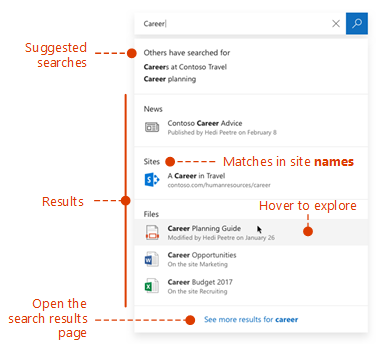
Even before you start typing, you’ll see results based on your previous activity in Office 365. The results update as you start typing.

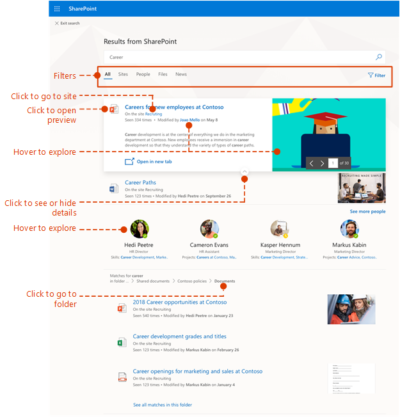
If these results aren’t what you’re looking for, click the link to see more results or press Enter to open the search results page and see and explore all the results. Here’s an example of search results from SharePoint:

Explore the search results to see more details about the people and files you’ve found, or refine your search to get other results. Here’s an expert tip to quickly see more, or less, details of a result – you can actually click anywhere in the empty space of the result.

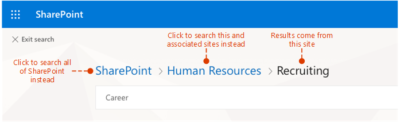
You can navigate to locations that you want to explore further and, if you’ve searched in SharePoint Online, you can change where the results come from. For example, if you searched from a site, but really meant to search all of SharePoint, then you’re just one click away. Or, if the site you searched from is associated with another site, but you want to search all the associated sites.

When you exit a search results page, you return to the page where you started your search.

Would You Trust Facebook With Your Money?

These days, brick and mortar businesses displaying some kind of signage saying “Like us on Facebook,” are nearly as common as those displaying Visa and MasterCard logos. That’s worth considering, when you think about using Faceabook as a way to pay for goods and services in the physical world.

Of course, Facebook users have developed some trust issues with the site over the years. It would be quite interesting to see if a PayPal-like service from Facebook would be widely adopted. It’s one thing to trust a third party with your status updates and photos. It’s another to trust them with your money.

Would you trust Facebook to handle your money?

Last week, Facebook announced that it is getting rid of Facebook Credits, in favor of real money. Facebook users will start paying for virtual goods using their native currencies: Dollars, Pounds, Yen, etc. This represents the beginning of users being able to treat their Facebook account like a bank account, or at least like a PayPal account and paying online. I’m not sure if Facebook is FDIC insured.

While Facebook did not say anything about using currency to pay for things in the physical world, one can simply connect the dots. For one, Facebook has over 900 million users. Many of them carry it around in their pocket all day long. Now, consider that Facebook recently acquired Tagtile, described as “your universal loyalty card,” for which you can “visit local stores, tag the Tagtile Cube with your phone, and get rewarded for being an awesome customer.”

If Facebook is going to offer a digital loyalty card to use at stores, and Facebook is going to have user account balances based on actual money, it seems only logical that users will simply be able to pay with their Facebook accounts, as long as businesses adopt the technology.

Of course it would give Facebook yet another way to compete directly with Google.

Plink co-founder Peter Vogel wrote at TechCrunch, “Last year, 15 million people bought Facebook Credits, according to their S-1 filing, so it’s assumed Facebook has close to 15 million credit cards on file. By the end of this year, once paid apps are added to Facebook’s App Center, it wouldn’t be surprising if 50 million people, or about five percent of Facebook’s users are purchasing apps and other digital good, like movies, music and TV episodes, which means Facebook would have a pool of 50 million people who have entrusted it with their credit card information.”

“At that point it’s a very short distance to a ‘Pay with Facebook’ blue box showing up every time you make an online purchase (on web sites everywhere, not just on Facebook),” he adds. “Why re-enter your credit card number when you already trust Facebook to handle the transaction and bill your card? For Facebook users this could be seen as more convenient and safer than entering their credit card number on multiple sites. Facebook is PayPal on steroids, with the strength of a billion members.”

That’s an incredibly good point. Think about how the Facebook sign-in option already works for many sites in the web (and especially from mobile devices). It is so much more convenient to simply tap the button to sign in with Facebook than having to enter a whole other account name or email address and password. Paying this way could save a lot of time and hassle.

This already exists, you know:



If Facebook can get people paying online regularly, people may start putting more of their money into Facebook accounts, which will make them a lot more likely to pay for things offline.

The Trust Factor

That trust factor could be a major obstacle for Facebook, however. Privacy issues have been rampant with the the social network’s dealings for years. Last year, as the result of a settlement with the Federal Trade Commission, regarding privacy, Facebook had to agree to regular third-party audits to make sure it remains in compliance. This all came after Facebook was found to have not kept its promises, by not warning users of privacy changes or getting their approval in advance. Essentially, changes were made an an opt out basis, rather than users opting in.

Just this week, the company switched default email addresses of users to Facebook email addresses without warning. This isn’t exactly a privacy issue, but it’s another change being made to users’ personal accounts for them. Things like this tend to irk users, and don’t do much to make users more comfortable with how the company is handling their accounts. A Lifehacker article even goes into all the reasons why the switch to a Facebook user email address is less than beneficial.

Another big Facebook story this week is about a feature that Facebook rolled out called “Find Friends Nearby,” which was quickly pulled after the CEO of Friendthem claimed Facebook has stole their idea, and threatened to sue. If you’ve seen The Social Network or read book it was based on, you’ll know that Facebook has a long history of being accused of such things. That’s not to say whether or not these things have merit, but public perception is a valuable thing. Some people already have a hard enough time trusting banks with their money.

Side note: It’s unclear, by the way, if the Friendthem situation was directly related to Facebook pulling the feature. The company claims it was only a test, and not a formal roll-out anyway. It does appear to be based on the company’s acquisition of social discovery app Glancee.

Another question worth considering is whether or not people want one company to have so much control over their lives. Do you want to keep so much personal information, photos, videos, and money all under one Internet-based account. There are major hacking stories in the news frequently these days, and many may be hesitant based on that very fact.

This month, another prominent social network, LinkedIn, fell victim to a password leak. LulzSec hackers managed to gain access to 10,000 Twitter accounts via a vulnerability in a third-party app. Consider how many third-party apps are connected to Facebook. According to the company, as of March, over 9 million apps and websites were integrated with Facebook users. How much bigger of a target would Facebook be with more people keeping their money tied up in their accounts.

Of course, people are already keeping some amount of money tied up in Facebook, on a much smaller scale than what the future may very well hold.

“People can store their payment information on Facebook in a trusted environment and then make purchases across a range of apps – without having to re-enter their payment information in each app,” Facebook says about its current Payments offering. “Payment options include credit and debit cards, PayPal, mobile payments, gift cards and numerous local payment options around the world.”

If Facebook makes a significant transition to the offline, non-app world (like its peers are also trying to do), will you make the transition along with them? Will you use your Facebook account to buy burgers, gas or other every day items?


Windows 8 Will Take Your PC To The Metro On Oct. 26

Windows 8 Release-Oct. 26!

We were told earlier this month that Microsoft had pinned down the launch of Microsoft Windows 8 to some time in late October. It was nice to finally get some confirmation about the release, but we still didn’t have an exact date – now we do.

Steven Sinofsky, President of the Windows Division at Microsoft, just announced during the company’s annual sales meeting that Windows 8 would be shipping on October 26. On that date, you’ll be able to upgrade to it, buy a physical copy in store or buy a new PC with the operating system on it. Microsoft’s Windows RT Surface tablet is also expected to launch around that time with the Windows 8 Pro version coming sometime after.

As most Windows users who are upgrading probably already have Microsoft Windows 7, you will want to take advantage of Microsoft’s insane upgrade program. For only $40, users with Windows XP or later can upgrade to Windows 8 through digital download. Those who want a physical copy can pick one up for $70. The special pricing will be available through January 31, 2013.

Windows 8 is Microsoft’s chance to prove that they still got it. Many people believe that this is their last chance before Apple gobbles them up and spits them out with Mac OS X and iOS. Microsoft Windows 8 is definitely something unique only to Microsoft as it’s the first operating system to share the same core across all devices whereas Apple requires separate operating systems for mobile and desktop.

We’ll find out on October 26 if Microsoft’s bet on the future plays out. The Metro interface was designed for portable devices, which Apple already has a strong foothold in. The hype surrounding the recently announced Surface tablet could help catapult Windows 8 to the notoriety it needs to succeed.

Windows 10 Pro is a dead end for the enterprise, Gartner says

Recent changes by Microsoft to the Windows 10 support schedule underline why Windows 10 Pro is an ill fit for most companies.

Windows 10 Pro is a dead end for enterprises, a prominent Gartner analyst has argued.

“[We] predict that Microsoft will continue positioning Windows [10] Pro as a release that is not appropriate for enterprises by reducing … support and limiting access to enterprise management features,” Stephen Kleynhans, a research vice president at Gartner and one of the research firm’s resident Windows experts, said in a report he co-authored.

Microsoft’s Windows 10 Pro occupies the middle ground between the consumer-grade Home and the corporate-level Enterprise in features, functionality and price. Because Enterprise versions of Windows have never been available to computer makers, Pro – sometimes, as in Windows 7, tagged Professional instead – has been the most popular pre-installed OS on new business PCs. (Corporations typically re-image new personal computers with Enterprise upon receipt of the devices.)

But although Pro or Professional has a long history in business settings, Microsoft has made numerous decisions in its Windows 10 migration campaign to separate Pro and Enterprise even more, pushing them apart. In Kleynhans’ view, the gap has become unbridgeable.

The last straw was Microsoft’s on-the-fly changes to Windows 10 support.

Last year, the Redmond, Wash. developer announced a six-month support extension for Windows 10 1511, the November 2015 feature upgrade, “to help some early enterprise adopters that are still finishing their transition to Windows as a service.” In February, Microsoft added versions 1609, 1703 and 1709 – released in mid-2016, and in April and October of 2017, respectively – to the extended support list, giving each 24 months of support, not the usual 18.

“Some customers have requested an extension to the standard 18 months of support for Windows 10 releases,” a Microsoft executive said at the time.

There was a catch: Only Windows 10 Enterprise (and Windows 10 Education, a similar version for public and private school districts and universities) qualified for the extra six months of support. Users running Windows 10 Pro were still required to upgrade to a successor SKU (stock-keeping unit) within 18 months to continue receiving security patches and other bug fixes.

Windows 10 Enterprise 1709, for example, and its free “supplemental servicing,” will exhaust support in October 2019. But Windows 10 Pro 1709 runs out of support on April 9, 2019.

“The one thing that really surprised me about the added support,” said Kleynhans in an interview, “was the fact that it didn’t apply to Pro. I think that this telegraphed the fact that, for businesses, Pro is being dead-ended.”

Even though the six-month support extension ended with the 1803 feature upgrade, the one that began reaching some users late last month, in the report Kleynhans co-wrote with Gartner colleague Michael Silver, the duo made clear that they believe Pro is viewed by Microsoft as a second-class citizen.

“Customers currently using Windows 10 Pro should continue to monitor Microsoft’s life cycle announcements because they will eventually need to budget for Windows [10] Enterprise as Windows [10] Pro becomes more ‘pro-sumer’ and small-business oriented,” they wrote in a six-item list of recommendations.

Another component of Microsoft’s current Windows 10 support strategy, something the company has labeled “paid supplemental servicing,” was also out of bounds for those running Windows 10 Pro. The extra support, which Microsoft will sell at an undisclosed price, is available only to Enterprise and Education customers.

Paid supplemental servicing adds 12 months to the 18 months provided free of charge.

“The extensions and paid support option only apply to the Enterprise and Education SKUs,” Kleynhans and Silver said in their report, “Plan and Budget for Short Windows and Office Support Cycles Based on Microsoft’s February 2018 Announcements,” which was published by Gartner last month. “Customers using Windows 10 Pro will still see support end after 18 months. In this way, Microsoft is further reinforcing that it expects enterprise customers to move to the Enterprise edition of Windows 10.”


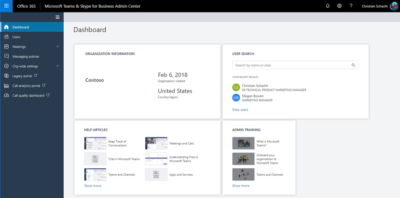
Microsoft announces the new Teams & Skype for Business Admin Center

To enable IT admins to better manage the various aspects of Microsoft Teams and Skype for Business services, Microsoft is announcing the new Microsoft Teams & Skype for Business Admin Center.

Now, there’s an admin center just for calling and messaging.

This new portal will offer a unified experience to manage both Teams and Skype for Business and will also include Call Analytics and the Call Quality Dashboard. Admins can also get end-to-end insights and the ability to manage Teams settings on a user level in this new portal.

Following features are available in this release:

Microsoft Teams messaging policy: Create custom policies for messaging scenarios for your users.

User management: Assign policies and configure your users.

Microsoft Teams guest messaging settings: Control the messaging capabilities for guest accounts in Microsoft Teams.

Federation settings: Manage federation between tenants for Microsoft Teams and Skype for Business. (Please note that federation for Microsoft Teams and Skype for Business will roll out in stages and this setting might not be visible for you during the initial rollout.)

Audio conferencing: Configure dial-in numbers and settings for Microsoft Teams and Skype for Business.

Office 365 to get enhanced Anti-spoofing capabilities

Enhanced anti-spoofing safeguards are rolling out for Office 365.

Microsoft services like OneDrive for Business, SharePoint Online, and Microsoft Teams are closely guarded by ATP (Advanced Threat Protection). Besides, there are numerous feature updates available in Office 365 threat protection service to address the evolution and advances in the threat landscape. The addition of enhanced Anti-Spoofing capability in Office ATP for protecting against spoofed emails from external domains further strengthens this security framework.

Anti-spoofing in Office 365 Advanced Threat Protection

The newest anti-spoof features help protect organizations from external domain spoof.  Office 365 recognizes emails from external domains having proper SPF, DMARC, and DKIM authentication settings as legitimate/authentic and therefore allow them to pass authentication, uninterrupted.

This normal process is however challenged when external domains do not have these settings properly configured. Without enforcement of these settings, domains show a high likelihood of being manipulated and maliciously spoofed, leaving customers vulnerable to phishing or spam attacks. The new external domain anti-spoofing capabilities help detect and block emails from external domains that do not have the following features,

  1. Correct authentication configuration
  2. An email infrastructure source with an unknown history

How does it work?

A newly enhanced filter in ATP first checks if the email from external domains, passes SPF, DKIM, and DMARC test.  If not, the filter thoroughly checks for historical sending patterns of that domain and associated infrastructure. If any suspicious behavior is noted, ATP assumes the sender does not bear a good reputation and as such, proceeds to junk the message.

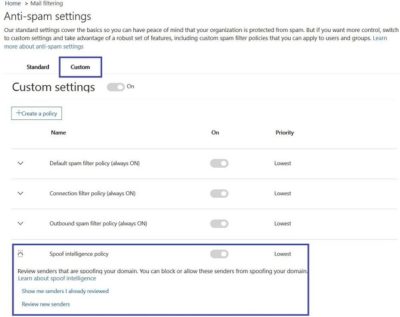
Also, a feature worth noticing about Anti-spoofing – The filter constantly evolves and enhances itself based on mail flow patterns it observes.  ATP subscribers can access the spoof intelligence report in their Antispam Policy and take necessary actions if required.

How to access Compliance Manager by Office 365

Compliance Manager is now available

Compliance Manager is a cross-Microsoft-cloud services feature designed to help organizations meet complex compliance obligations, including GDPR, ISO 27001, ISO 27018, NIST 800-53, and HIPAA. Compliance Manger is rolling out and has been moved from Public Preview to General Availability.

How to access Compliance Manager?

Users can access Compliance Manager by signing into their Office 365, Dynamics 365, or Azure user account via the Service Trust Portal. This new compliance solution is designed to help organizations meet their data protection and regulatory requirements while using Microsoft cloud services. Compliance Manager enables users to perform on-going risk assessments, gain actionable insights to improve data protection capabilities, and simplifies compliance processes through its built-in control management and audit-ready reporting tools.

Compliance Manager is now generally available for Azure, Dynamics 365, and Office 365 Business and Enterprise subscribers in public clouds. Note that Office 365 GCC customers can access Compliance Manager, however, you should evaluate whether to use the document upload feature of compliance manager, as the storage for document upload is currently compliant with Office 365 Tier C only.

What do I need to do to prepare for this change?

By default, everyone in your organization with an Office 365, Dynamics 365 or Azure user account has access to Compliance Manager and can perform any action in Compliance Manager. To change the default permissions, at least one user must be added to each Compliance Manager role (see the instructions on our support page linked from Additional Information below). After a user is added to a role, the default permissions are removed and only users that have been added to a role will be able to access Compliance Manager and perform the actions allowed by that role.

Once you log into Compliance Manager you will see a number of assessments and what Microsoft has completed for the various assessments.  You will also see what controls your organization are responsible for.  You can export the assessment to excel if you need to provide it for an auditor or wish to save it for retention purposes.

Once in an assessment, you can update what your organization is doing to meet the requirements for the various supported standards.  This gives you the ability to track your compliance activities.  Some organization may already have GRC tracking software but they will find this tool useful if for no other reason to see the results of Microsoft Managed controls.

If Microsoft allowed you to have an assessment for your on-premises systems.  Like a blank questionnaire, clients could use it might be able to replace a GRC app for some companies.

When updating the Customer Managed Controls you have the ability to upload documents, lookup the related controls, assign an assessor, a test date and document the test results.

Microsoft provides you with detailed guidance for customer actions and allows you to document your control implementation details along with a test plan and any response to the assessment.

There is a Compliance Score that, “is a new intelligent scoring feature that is calculated based on an analysis of industry standard control components. Compliance Manager analyzes controls for their the impact to the confidentiality, availability, and integrity of protected data, as well as external drivers in order to weigh controls based on their impact.”

We think this is a great tool especially for small to medium businesses and local governments.  Most often these smaller organizations don’t have formal governance practices or necessary skills in-house.  This tool could help them develop those processes. We also see this as a great tool or internal auditors to use. It gives businesses a place to document the testing methods and results.


Office 365: New capabilities for iPad and iPhone

New features make Office and OneDrive the best place to work on iPad and iPhone

More and more, people around the world are working on the go, changing locations and devices as they create and collaborate with others throughout their day. As they work across their PCs, Macs and mobile devices, they expect an uncompromising experience that is familiar yet optimized for the device they are using.

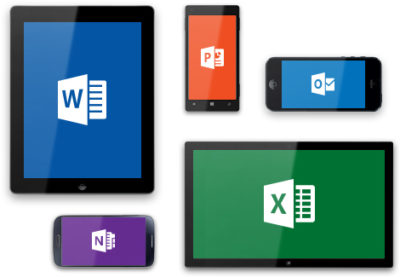
Microsoft is committed to providing best in class experiences on all devices, and today, we are proud to share with you a set of new Office capabilities across Word, Excel, PowerPoint, and OneDrive on iOS that will delight and make iPad and iPhone users more productive than ever before.

Real-time co-authoring in Word, Excel, and PowerPoint on iOS – We live in a world where we’re often collaborating with multiple people in different locations and Office 365 provides the broadest and deepest toolkit for collaboration between individuals, teams, and entire organizations. Using real-time co-authoring, colleagues, friends, and family can contribute to and edit documents simultaneously in the Word, Excel and PowerPoint iOS apps. This allows you to know who else is working with you in a document, see where they’re working, and view changes automatically within seconds. The co-authoring experiences are also available in Office Online and the latest versions of Word, Excel and PowerPoint on the PC and Mac, all made possible by storing your documents in OneDrive or SharePoint.

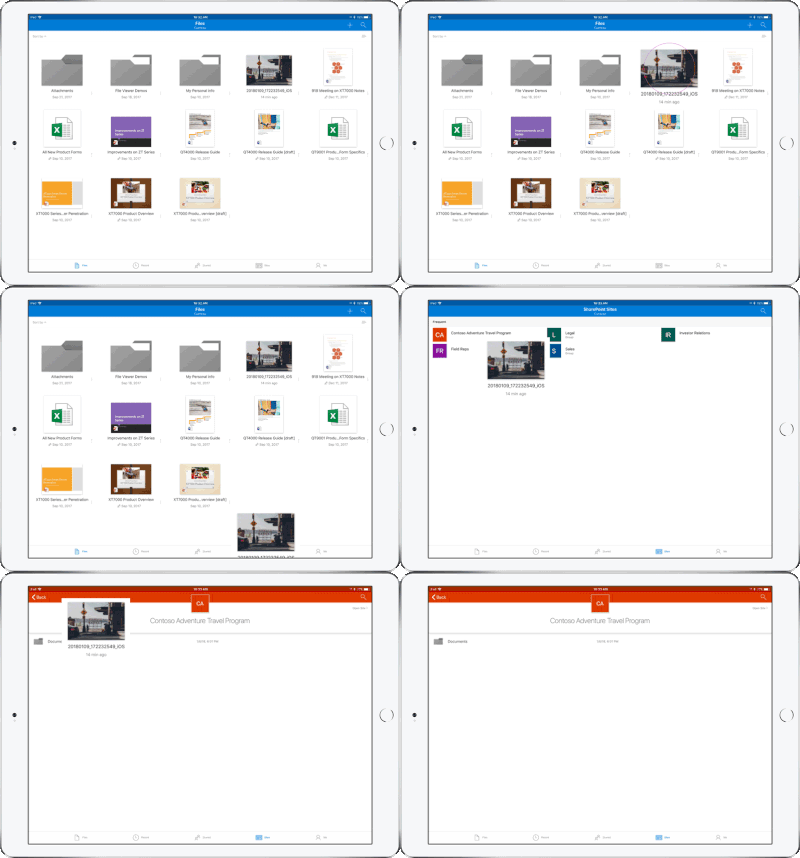
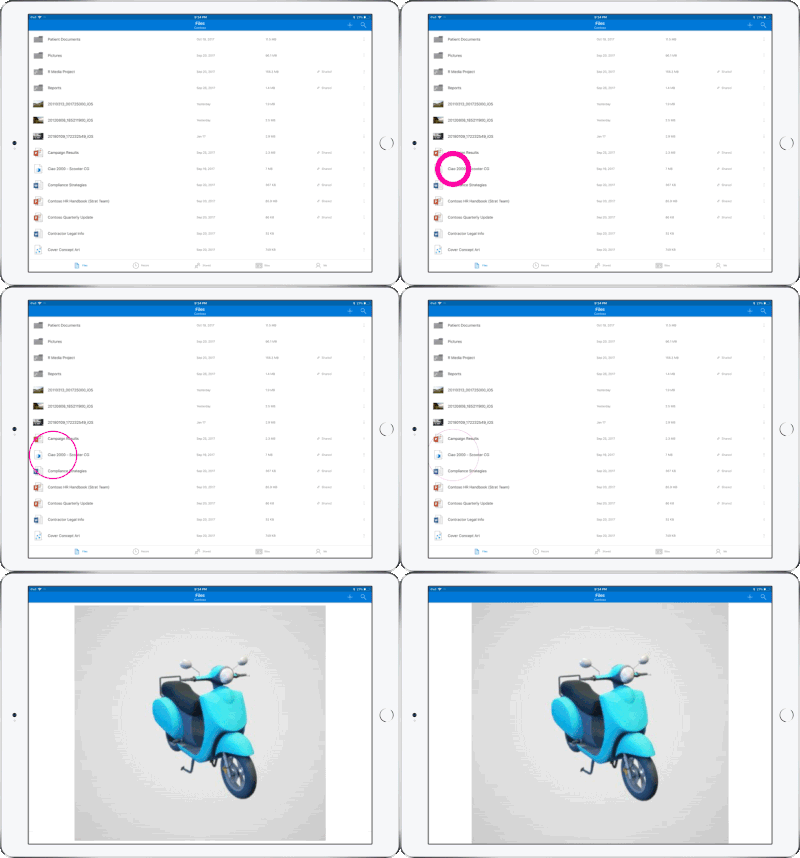
Drag and drop files anywhere with OneDrive – Sometimes your files can get scattered between different folders or even services and applications. Now it’s easier than ever to organize and rearrange your files. You can drag files in between folders in OneDrive and, if your teammates use SharePoint to work together, you can even drag OneDrive files to a SharePoint site giving them immediate access. On iPad, you can also drag files from other apps, such as iMessage, into your OneDrive and drag files out of your OneDrive to other apps.

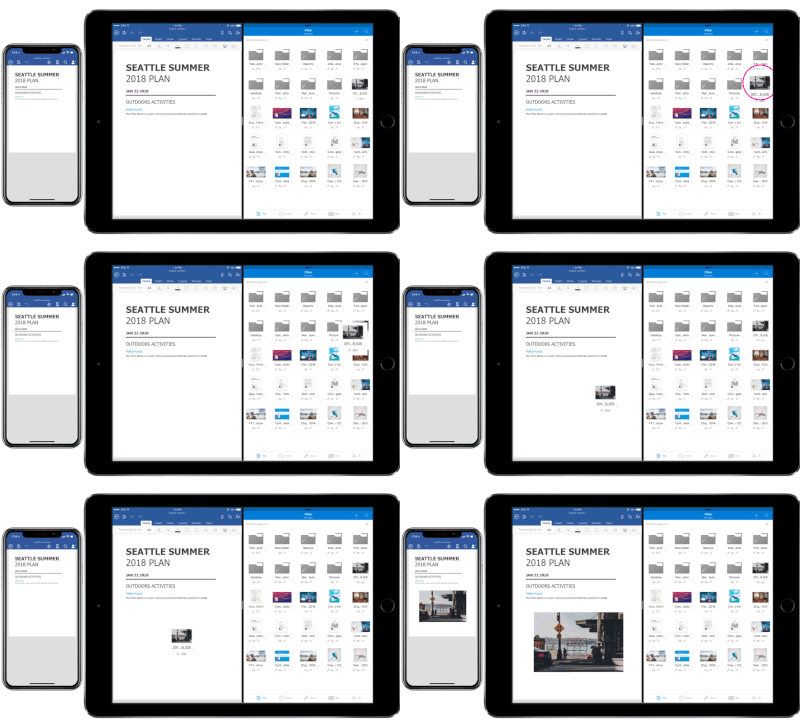
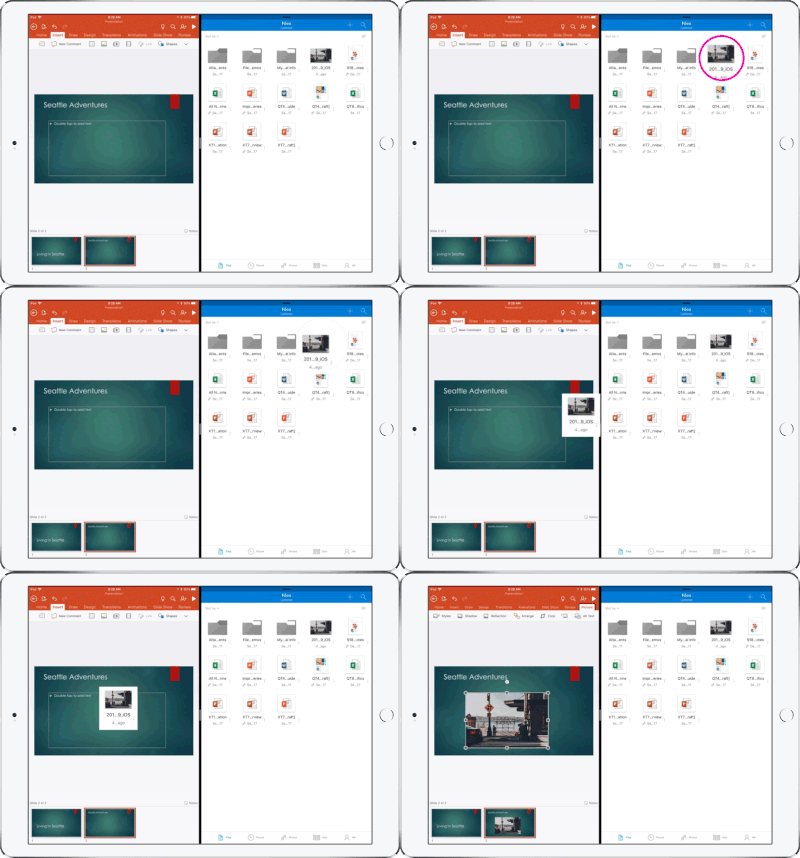
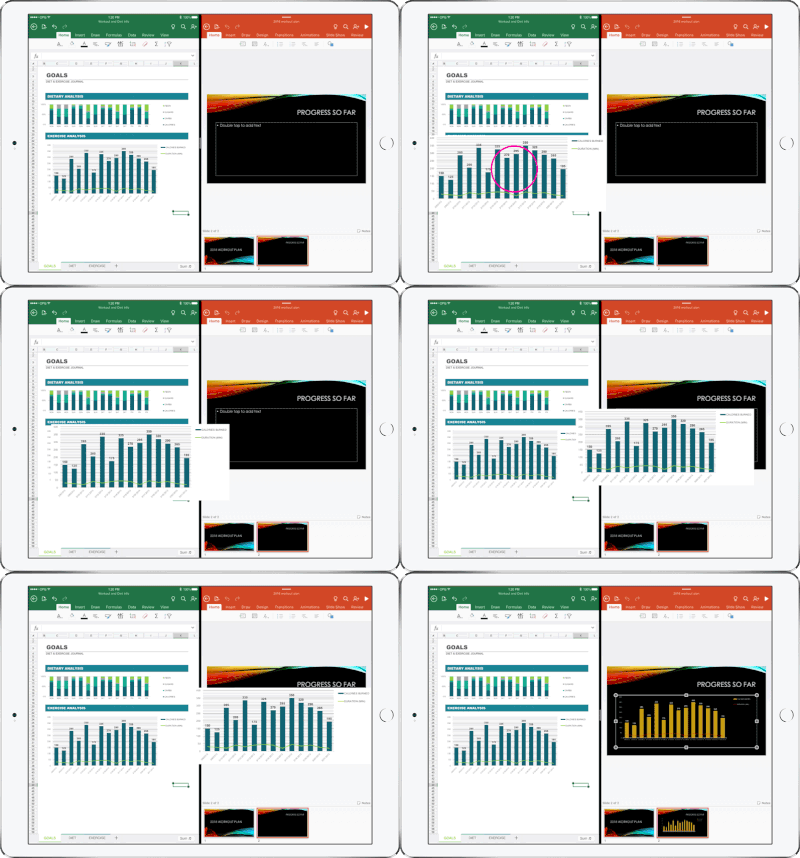
Drag and drop content between Word, Excel, PowerPoint, and OneDrive on iPad – One of the most common and powerful tasks when creating content is pulling in text, photos, graphs, and other objects from different sources. Now you can pull in content with ease on your iPad with drag and drop support in Office and OneDrive. Easily drag and drop objects from OneDrive or from one Office app to another.

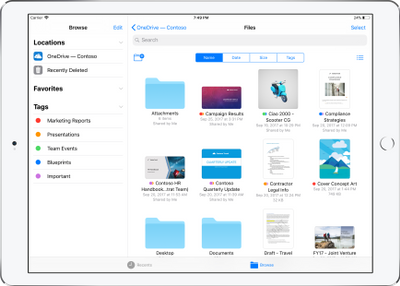
OneDrive Files app support – Today we’re also announcing native support for the Files app in iOS 11. OneDrive integration with the Files app allows you to access, upload, edit, and save your content to OneDrive or SharePoint from apps that support Files app integration. You can also tag and favorite your OneDrive and SharePoint files from within the Files app.

OneDrive redesigned to find the files that matter – The OneDrive iOS app has been redesigned from the ground up with a new layout that uses your screen space more efficiently allowing you to find your files faster. It’s easier to scan across file names, see the information that matters to you, and sort files how you want. New metadata is visible in the list view, so you can easily identify new files and files that have been shared.

Universal link support for shared files – Being able to seamlessly share and securely access files is essential for teamwork. Previously when you received a link to a shared file, you would be directed to a browser and prompted to re-authenticate. Today, we are announcing universal link support, which will open the document directly in the Word, Excel, or PowerPoint iOS apps. Further, if you don’t have a supporting application for the file, you’ll be directed to the OneDrive app to preview the file.

Preview 130+ file types in your OneDrive app – You and the people you work with use a variety of different file formats, but when you’re on your mobile device you might not have access to the native applications for those files. Now, the OneDrive iOS app creates crisp thumbnails and supports large previews of over 130 file types, including Adobe Photoshop and Illustrator, RAW, 3D objects, and high-precision DICOM images. OneDrive lets you open, view, and share all of your files without leaving the app.

New accessibility features for Word, Excel and PowerPoint on iOS 11
The VoiceOver rotor in iOS improves navigation and the accessibility of content. For example, you can use the built-in rotor on iOS to navigate line-by-line or word-by-word and change the speed at which VoiceOver speaks. The new Office-specific rotors also let people with vision impairments navigate more efficiently in Word across tables and links, slides in PowerPoint, and sheets in Excel.

Users can also leverage larger text options in accessibility settings to modify the text size in the core Office apps. Visit the support pages for Excel, Word, and PowerPoint to learn more.

You can use take advantage of these new capabilities in the coming days by updating the Word, Excel, PowerPoint, and OneDrive apps in the Apple App Store.

CALL US NOW!