Back to Top

Tech, Web, Cloud & Cabling Services

Express Email Marketing

Increase sales through email and social marketing. Up to 70% less than our competition!
billionphotos-2146670

PRODUCT OVERVIEW

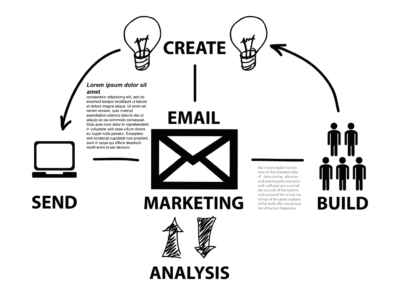
Email and social marketing made easy: Express Email Marketing makes it easy to grow and manage your mailing list, create and track your own eye-catching email campaigns, even market your business to millions on social networks.

Create unique emails fast: Choose a professionally designed template from a variety of categories to create the perfect email in minutes. Or start from scratch and make your own special email templates.

Customize your email campaigns: Making changes to your campaign is as simple as drag and drop with our Easy Email Editor. Plus, our image gallery features over 20,000 quality images for any occasion – or upload your own image for that unique, one-of-a-kind touch.

Schedule and send your emails: Create email campaigns to manage subscribers and view drafted, scheduled or sent campaigns

See email results in real time: In-depth reporting gives you real-time stats on your email campaigns — open rates, click-thrus, bounce rates and more — so you know what’s working and can change what isn’t.

Get connected with Social Marketing: Help your best customers spread the word about your business! Manage profiles and updates on all the major social media networks — including Facebook®, Twitter®, LinkedIn® and MySpace®— all from one place.

The most cost-effective way to connect with customers and prospects: Email is one of the most effective promotional tools around, returning about $40 on every $1 you spend*. Combine that with social marketing where 4 out of 5 Internet users visit social networks or blogs, and the returns look even better.

Send, post, tweet, share and more: With Express Email Marketing, you’re a master of communication. Design and send an eye-catching email. Post your latest sale on Facebook. Send a tweet about a new product. Reach out to new and current customers, no matter where they are.

Get subscribers

  • Gather email addresses, efficiently and legally, by adding our sign-up form to your website.
  • Add the sign-up link to your email signature, your Twitter or Facebook account – even the closing line on your eBay® or Craigslist® entries.
Send your email
  • Create great-looking emails. Choose from a truly stunning collection of over 160 ready-to-use designs.
  • Add text and photos from our image library or upload your own – they automatically resize to fit your email!

Track the results

  • Easily generate reports that tell you how many emails you sent, how many were opened, how many people responded to individual offers or promotions, and more.

Get social

  • Increase results by automatically announcing your email offers on the top social networks.
  • Maximize big announcements by updating all of your social media profiles at once.
  • Track the activity on your Facebook, Twitter, LinkedIn®, and MySpace® pages all from one screen.

Collect valuable feedback

  • Find out what your customers really want – create, send, and tabulate surveys with the survey tool.

Everything you need to market your business like a pro.

You don’t need to be a design expert to create captivating emails. And you don’t need to be on the Web 24/7 to be a social media wiz. All you need is a passion for your business and Express Email Marketing can do the rest with a rich collection of powerful features.

Email campaigns

  • Over 160 ready-made designs
  • Huge 20,000+ image library
  • Option to upload your own images
  • HTML & text emails
  • Auto Save feature
  • Easy Email Editor, with drag-and-drop functionality
  • Now-or-later scheduling
  • Ability to tailor emails to various interest groups

Social marketing

  • Broadcast to multiple social networks with one click
  • Review and respond to your social contacts with a real–time Social Feed
  • Get the most out of your updates by easily adding images
  • See the activity on all your social networks from one screen

Survey builder

  • Write, send, and tabulate customer satisfaction surveys
  • 9 unique question types
  • Custom design features
  • Link generator (text & button)

List manager

  • Keep names, addresses, and campaign history at your fingertips
  • Unlimited list segmentation to send targeted offers to different audiences
  • View reports on subscriber responses
  • Easy import/export feature

Real-time reports

  • Undeliverable emails
  • Unsubscribe requests
  • Number opened
  • Click-through rates to your website

Sign-up forms

  • Easily add your sign-up form to any website
  • Standard & custom questions
  • Question sorting
  • Custom design features
  • Return links
  • Form preview
  • Link generator (text & button)
  • HTML code for link

Other features

  • Bounce handling
  • Unsubscribe handling
  • Opt-in confirmation
  • Anti-spam protection
  • Spam reporting links
  • Custom e-mail messages

Use email and social media marketing to get more business.

Business advertising has never been so easy! Regular emails and weekly posts to Facebook, Twitter, and other social media sites keep customers coming back again and again. What’s more, they increase website visitors, help close sales, and reduce marketing costs over time.

Email gets the word out

  • Start making more money from current customers now. Just import your mailing list into our List Manager and go!
  • Tell customers about upcoming promotions, special offers, and new products and services.
  • Real-time reports show you how many people received, opened, and acted on your emails.

Social media multiplies your efforts

  • Show you care about customers by meeting them in their favorite online hangouts.
  • Communicate with thousands at once – when someone asks a question on Facebook or Twitter, everyone can see your answer.
  • Multiply your promotional efforts – each fan or follower shares your messages with their own personal network of friends.

Have questions?

Get the best Email Marketing Software
Call us at: 856-745-9990 or Visit: https://southjerseytechies.net/

South Jersey Techies, LLC is a full Managed Web and Technology Services Company providing IT Services, Website Design ServicesServer SupportNetwork ConsultingInternet PhonesCloud Solutions Provider and much more. Contact for More Information.
Windows 10’s features

The new Windows 10 notifications will follow you everywhere

Windows 10 has a new notifications center for your apps — even the ones from your Windows Phone.

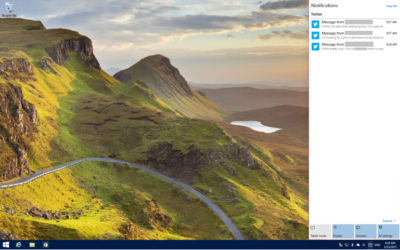
When you’re poking around Windows 10, you’ll notice something new: A small taskbar button that, when clicked, reveals a sidebar full of app notifications.

Welcome to the new notifications center, which is basically the Windows 10 version of the Action center in Windows Phone 8.1. The notifications center is part of Microsoft’s dream of “Windows everywhere” — it’s a universal notifications center that will pop up your app notifications across multiple platforms. Because who doesn’t want to be alerted about new Twitter followers on their phone, tablet, and now PC?

The new notifications center consists of two parts: The notifications area at the top, and the “quick actions” bar at the bottom. In the notifications area you’ll see notifications from various apps, including Twitter, Facebook, and your email account, as well as notifications from phone apps (e.g. alarms) if applicable.


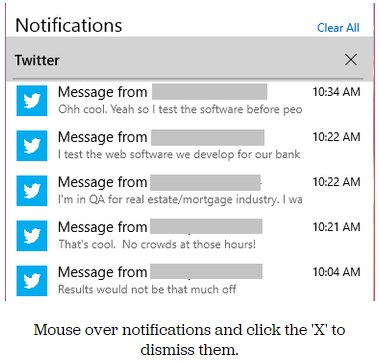
Mouse over notifications and click the ‘X’ to dismiss them.

You can dismiss notifications three different ways: You can mouse over the app name (e.g. Twitter) and click the ‘X’ next to it to dismiss all notifications from that app. You can also mouse over each individual notification and click the ‘X’ next to it to dismiss that specific notification. Or you can click Clear All in the upper right corner of the notifications center to dismiss all notifications from all apps. Because this is a “Windows everywhere” feature, notifications you dismiss in the notifications center will also be dismissed on your other Windows devices, such as your phone.

In the quick actions bar, you’ll see four quick-access buttons as well as an Expand link. Click Expand to see all quick actions. Actions include things like a Tablet Mode toggle button, a link to the Display settings, a link to all settings, and toggle buttons for Location and Wi-Fi. Tap a quick action button to toggle a setting (tablet mode, location, Wi-Fi) on or off, or to go directly to the settings menu so you can configure your display, connection, or VPN.

x4
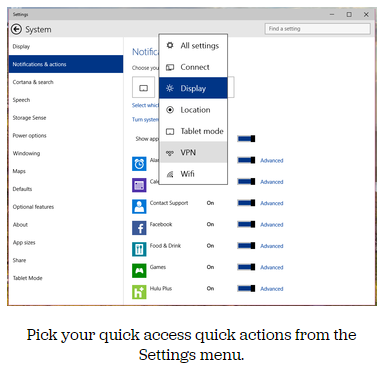
Pick your quick access quick actions from the Settings menu.

To choose which quick actions appear above the break, go to Settings > Notifications & actions > Choose your quick actions. Here, you’ll see four small buttons that you can click on to swap out actions. If you’d prefer to have your Wi-Fi toggle on hand whenever you open the notifications bar, you can switch it for the Display button. Of course, you’ll always be able to see all of the quick actions by clicking Expand in the notifications bar.

x5
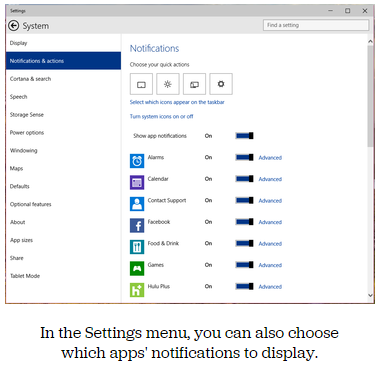
In the Settings menu, you can also choose which apps’ notifications to display.

Here, you can also pick and choose which app notifications you’ll see in the notifications bar. If you want to turn all notifications off, you can simply click the toggle next to Show App Notifications. You’ll no longer see pop-up banner notifications, nor will you see app notifications when you open the notifications center.

If you’d prefer to just turn off notifications for specific apps, you can do that, too — find the app in the list and click its toggle to Off. Next to each app in the list you’ll see a link to Advanced notifications settings for that app. Go into Advanced to turn off specific notifications for that app — either banner notifications (pop-ups in the lower right corner of your screen) or notifications in the notifications center.

Want to turn your clock off? You can do that, too.

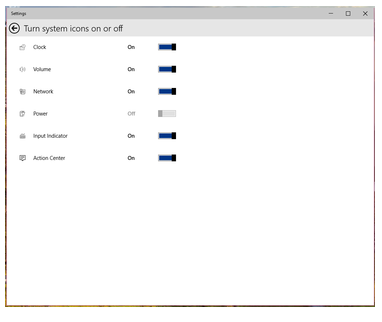
In the Notifications & Actions section, you can also clean up your taskbar by clicking “Select which icons to appear in the taskbar” (you can turn on and off things like the Network icon and the Volume icon), or by clicking “Turn system icons on or off.” In “Turn system icons on or off,” you can turn off the clock, input indicator or action center — in other words, you can turn off all system tray icons and have a completely icon-less system tray, if you so choose.

Have questions?

Want to get Windows 10?

Contact Our Expert IT business team
Call us at: 856-745-9990 or Visit: https://southjerseytechies.net/

South Jersey Techies, LLC is a full Managed Web and Technology Services Company providing IT Services, Website Design ServicesServer SupportNetwork ConsultingInternet PhonesCloud Solutions Provider and much more. Contact for More Information.
To read this article in its entirety click here.

Windows 10’s new features, how they work and how you can make them work for you.

The final version of Windows 10 won’t be available until 2015, but that doesn’t mean you can’t live the Windows 10 experience — the extremely pre-final experience — right now.

The technical preview is available right now and although things will likely change drastically between now and release, now’s a good chance to get acquainted.

And keep checking back. As the months close in on the new OS’s final release, expect all our How To coverage to be posted right here.

Windows 10 Technical Preview: 1

spartan

Build 10049 of the Windows 10 Pro Technical Preview just dropped, and with it comes Microsoft’s sexy, speedy new browser: Project Spartan.

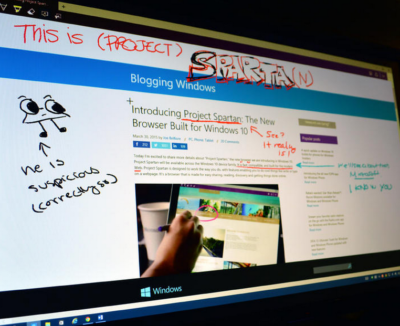
The next-gen browser has several new features to try out, including a distraction-free reading view and a fast, secure rendering engine (which was available as an experimental feature in Build 9926). But the coolest new feature is inking — the ability to draw, write on, and generally mark up Web pages from directly within the browser. You can share your marked-up creations via email or through social networks, or you can save them to OneNote.

Start inking

When you see a Web page you want to “ink,” click the small icon that looks like a pen and paper in the upper right corner of the browser window. There are only about five icons total, so this shouldn’t be too difficult to find.

The Web page will refresh and the inking toolbar will appear over the regular toolbar. On the left side of the inking toolbar, you’ll see five icons: Pen, highlighter, eraser, text, and clip. The pen tool is selected by default, so you can just start scribbling away if you’d like (in medium thickness, light blue ink). If you want to change the color of your pen, click the pen icon to choose from 12 colors and three sizes.

To use a highlighter, which will let you highlight text and images instead of drawing over them, click the highlighter button. Click the highlighter button a second time to select your highlighter color and shape (six colors, three shapes).

Type some comments

Drop a connect pin

If you prefer typing to writing or drawing, you can use the text tool to make comments on the webpage. The text tool is a little different from the pen and highlighter tools: Instead of letting you put text wherever you want on the page, this tool lets you drop a comment pin and type text in a corresponding text box on the right side of the page. You can minimize the text box (the pin will remain visible) for less clutter.

When you select the text tool, your pointer will turn into a cross-hair. Click anywhere on the page to drop a comment pin. The pin will appear where you click, and a thin line will connect it to a corresponding text box on the right side of the page.

Click inside the text box to type your comment. To minimize the box, you can either click the minus sign in the upper right corner of the box, or you can click the corresponding comment pin. To delete both the comment pin and the text box, click the trash can icon in the lower right corner of the text box.

The clipping tool will also turn your cursor into a cross-hair, so you can clip out a section of the page. It works similar to the Snipping Tool — click the clipping tool icon, and the page will fade out until you select a section of it. Once you have a section selected, you’ll see a small copy icon in the lower right corner; click this to copy your clip (you can paste it into another program, such as Microsoft Paint, if you want to save it).

Don’t make any mistakes

As of right now, the eraser tool doesn’t do much. If you click on it, nothing happens. If you click on it again, a “Clear All” box appears, which you can click to clear the Web page of annotations.

I assume the eraser tool will be fixed before Project Spartan goes public, because right now there’s no way to fix an annotation mistake without clearing the entire page and starting over.

Share or save your masterpiece

On the right side of the inking toolbar, you’ll see a save icon and a share icon. To save your newly-annotated webpage, click the save icon.

Right now, Project Spartan will let you save your marked-up page as an HTML file – that is, you can add it to your Favorites or your reading list. In the future, you’ll also be able to save your projects in OneNote.

To share your work, click the share icon to open up Windows 10’s sharing sidebar. Because this is such a new build, Project Spartan’s sharing capabilities don’t appear to be turned on – but when they are, you’ll be able to share your creation with any app that supports Windows’ sharing sidebar.

Have questions?

Our small business team is here to help.
Call us at: 856-745-9990

South Jersey Techies, LLC is a full Managed Web and Technology Services Company providing IT Services, Website Design ServicesServer SupportNetwork ConsultingInternet PhonesCloud Solutions Provider and much more. Contact for More Information.
To read this article in its entirety click here.

Lync Online

lync

Microsoft Lync

Lync Online

Overview

Lync Online connects people everywhere, on devices running Windows 8 and other operating systems, as part of their everyday productivity experience. Lync provides a consistent, single client experience for presence, instant messaging, voice, video and a great meeting experience. Lync enables instant messaging (IM) and voice calling with the hundreds of millions of people around the world who use Skype.

How it works

Organizations can purchase Lync Online as a standalone service from Microsoft Office 365 or as part of an Office 365 for enterprises suite that includes Lync Online, Microsoft Exchange Online, Microsoft SharePoint Online, Microsoft Office Professional Plus, and Microsoft Office Online. Organizations that subscribe to Lync Online retain control over the collaboration services they offer to users, but they do not have the operational burden of on-premises server software. With the Lync Online multi-tenant hosted plans, Lync is hosted on multi-tenant servers that support multiple customers simultaneously. These servers are housed in Microsoft data centers and are accessible to users on a wide range of devices from inside a corporate network or over the Internet.

Lync Online features

  • Get real-time presence information—including photos, availability status, and location—and enhanced instant messaging (IM) to connect efficiently and effectively.
  • Make voice calls through your computer to other Lync or Skype users in your organization or in other organizations that use Lync or Skype.
  • Create, moderate, and join pre-planned and on-the-fly audio, video, and web meetings with people inside and outside your organization.
  • Enhance online presentations with screen-sharing and virtual whiteboards.
  • Let customers participate in your Lync conference calls even if they are not Office 365 or Lync Online customers.

Office 365 FastTrack and adoption offer

FastTrack is the onboarding service benefit included for qualified Office 365 customers. South Jersey Techies experts will provide personalized assistance ensuring the service is ready to use company-wide.

If you are interested in Lync Online or would like to sign up for a trial please click here or contact us at 856-745-9990.

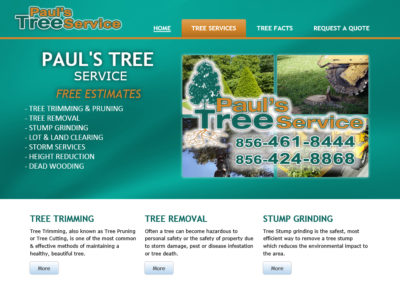
Paul’s Tree Service

Check out a recently developed and designed website by South Jersey Techies Website Team for Paul‘s Tree Service in Delran, NJ.

Paul's Tree Services

Have questions?

Our small business team is here to help.
Call us at: 856-745-9990

South Jersey Techies, LLC is a full Managed Web and Technology Services Company providing IT Services, Website Design ServicesServer SupportNetwork ConsultingInternet PhonesCloud Solutions Provider and much more. Contact for More Information.
Office 365 ProPlus

billionphotos-1669715

ProPlus

ProPlus

Your Office instantly, wherever you go. Get the latest tools for productivity, collaboration, compliance, and BI—powerful, flexible, and delivered fast, with smooth upgrades.
 

Best experience virtually anywhere

With Office in the cloud, you always have the latest versions of your familiar Office applications right where you need them. Working on your iPhone or Android phone? Use Office Mobile to view and edit files.3 Using your tablet? Access Office through a browser to create and edit documents. And when you’re away from your own desk, you can stream Office to any Internet-connected PC.1 You get one familiar experience across all your devices, and your files are always up to date.

The flexibility to deploy and manage on your terms

Deploy the way that’s best for you—on-premises with your own tools, or with assistance from the Office 365 online service. And you can run Office 365 ProPlus side by side with earlier Office versions, so your workers can make a smooth transition. Upgrades are smooth, too, because your customizations are respected and add-ins and data files are loaded automatically. Plus, you can monitor the health and performance of your Office in real time across your organization.

Enhanced security for email and advanced compliance tools

Protecting the privacy and security of your data is essential. With Office 365, you can simplify compliance. Team members can access project-related email and documents right from their email. You can help your users avoid sending email with sensitive information to unauthorized recipients by using policy tips in email. Recording and archiving meetings, including IM conversations, is easy for IT. Plus you can scan Excel spreadsheets for errors, and view an audit trail of changes.

Advanced Business Intelligence tools that are easy to use

No matter how good your data, you need insight to make it work for you. Gain insight fast by giving everyone powerful BI tools that are easy to use. With Office 365 ProPlus you can streamline integration and manipulation of large volumes of data from various sources and perform rapid analysis. For more insight, explore different views of data in a pivot table or pivot chart with a click, and bring data to life by compiling data, charts, and graphs into one interactive visualization.

If you are interested in Office 365 ProPlus or would like to sign up for a trial please click here or contact us at 856-745-9990.

Microsoft overhauls Outlook with move to Office 365

Th new tweaks include 13 new themes, Clutter and search U

Microsoft has announced a new-look Outlook.comas it prepares to move the service to its Office 365 productivity suite.

Microsoft is taking personalisation seriously in this update, adding 13 new themes for the email application and learning what you want to see and what you don’t.

“Your inbox is part of your daily routine. It’s where you keep in touch with family and friends, check the shipping status of packages and find deals from your favourite companies. These new inbox features are aimed at creating a richer and more engaging inbox, while maintaining the same look and feel you love,” the company said in a blog post.

This first new feature is called Clutter and it will sort your inbox into the emails you normally ignore (the clutter) and those you want to read, which it will surface in the main inbox. Any emails it thinks are clutter will be moved into a separate folder. You can move emails you want to see out of the clutter and in time, the machine will get to know exactly what should be in each mailbox.

Search has also been boosted in the latest iteration of Outlook. If you start searching for a particular email, the application will highlight emails from the people you email most often when searching for content. Refiners helps you filter out the irrelevant content by allowing you to search based on sender, folder, date, and attachments.

For those who are sent lots of videos or richer content, Microsoft has implemented a link preview function that will show a snippet of the link’s content when yu open the email. If you send a lot of images, you can now just copy and paste these directly into the body of an email.

Messages can be popped out in a new windows, to make it easy for you to compose more than one email at once and add-ins allow you to see information while you’re writing an email so you don’t have to keep switching whole apps.

You can also now pin the most important of your emails to the top of your inbox so they’re always there when you need them and flags mean you can mark messages for following up later.

Microsoft also announced the ability to switch between email and Skype easily if you want to take a conversation into IM mode and better sharing with OneDrive.

The Outlook update has been rolled out to select users as a preview already, but made available to others in the coming weeks, the company said.

Have Questions?
Contact Microsoft’s Cloud Solution Partner now!
Call 856-745-9990 or visit: http://southjerseytechies.net/

SharePoint Online

sponline

Share Point Online

SharePoint Online

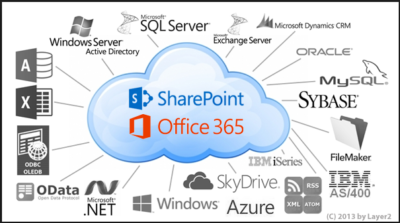
You can also get SharePoint Online with Office 365.  SharePoint Online delivers the powerful features of SharePoint without the associated overhead of managing the infrastructure on your own. Flexible management options ensure that you still retain the control you need to meet the compliance requirements of your organization. You can purchase SharePoint in the cloud as a standalone offering or as part of an Office 365 suite where you could also get access to Exchange, Lync, the Office clients and web apps.

Cross device availability

Easily access and interact with your SharePoint news feed, wherever you go using the SharePoint mobile apps available across various devices.

Easy to Manage

You can get setup in virtually no time! The powerful admin console allows your organization to easily manage capabilities, policies and security for all the content and features within SharePoint. Automated maintenance of the servers ensure that you are always up to date with the latest features with minimal downtime.

Enterprise grade reliability and standards

Safeguard your data by hosting it in geographically distributed data centers with continuous data backup, premier disaster recovery capabilities and a team of experts monitoring the servers around the clock.

Office 365 FastTrack and adoption offer

FastTrack is the onboarding service benefit included for qualified Office 365 customers. Microsoft onboarding experts will provide personalized assistance ensuring the service is ready to use company-wide.

To see all the features that are included, view the detailed service descriptions.

If you are interested in SharePoint Online please contact us at 856-745-9990.

Tips for Switching to Office 365

Office-365-Logo-ThumbTakeaway:  Moving to Office 365 will provide anywhere access for Microsoft features but before you decide to switch there are 10 things everyone should consider.

Migrating

Starting fresh or merging Active Directory from a local machine are options when switching to Office 365.  Exchange 2010 SP2 can minimize the process of merging an existing Active Directory environment by using the included wizard.

Spam Filtering

Microsoft Forefront Online Protection is the spam filter that will need to be setup and configured when switching to Office 365.

Outbound Addressing

Switching to Office 365 you will have to configure user accounts because the e-mail addresses will add ‘.onmicrosoft.com’ to the end of the addresses.

Utilities

For on-site Exchange servers there are additional utilities that can be installed, for Office 365 you cannot install additional software on 365 servers.

DNS Issues

When switching to Office 365 you will have to confirm a list of DNS entries and create SRV records for Microsoft Lync.  If you have a Microsoft DNS server this shouldn’t be an issue.

Management Tools

If there are no longer on-site Exchange servers, Exchange Management Console and ADUC will no longer be used.   Exchange Control Panel is the primary management tool for Office 365.

File Server Permissions

Prior to switching to Office 365, decide how users will access on-site File Servers without on-site Domain Controllers and permissions to manage file access.  There are a few options before switching your network to Office 365.

Mobile Devices

Connecting mobile devices to Office 365 could take several days.  If you chose to start fresh but would like to keep your existing contacts, calendar and mail, you will need to merge the existing PST file to the Office 365 mailbox.  If you have merged your organization to Office 365 this should not be a problem.

Control Issues

Office 365 takes control of common administrative tasks such as:

  • Software upgrades
  • Patch Management
  • & many others.

Microsoft Communication

Microsoft will continue to reach out to your organization via e-mail and phone calls to answer any questions and to ensure that everything works out during the switch.

For more information on Hosted Services and Office 365

 please contact us 856-745-9990 or click here.


Microsoft Office Mobile

ios-office365-hero2Microsoft released Office Mobile in the Apple Store for free to all Office 365 users on June 14, 2013.  Office Mobile has a lot of stipulations and only provides the basic document editing capabilities.  Integrating Office Mobile with SkyDrive and Office 365 is a smooth process.

The first stipulation is Office Mobile is designed for iPhone.  The app is not optimized for iPad use; older iPad(s) receive errors.  The second stipulation is Office Mobile requires an Office 365 subscription.  A large percent of businesses have not switched to Office 365 which excludes potiential Office Mobile users.

For Office 365 subscribers, Office Mobile is a free app that provides the ability to view, edit and save Office documents.  All users that are not Office 365 subscribers can continue to use Office-compatible mobile apps that provide the same functionality.

Office Mobile has a similar interface to Windows phone.  After installing Office Mobile, users can view, edit and save Word, Excel and Powerpoint documents.  Users may be surprised with the limited editing abilities.  SkyDrive, SkyDrive Pro and SharePoint are ways to access documents.  ”Recent Documents” tracks the most recent documents that you viewed or changed and makes them easily accessible.

For more information on Hosted Services and Office 365

 please contact us 856-745-9990 or click here.


CALL US NOW!