Back to Top

Tech, Web, Cloud & Cabling Services

Safari on iOS and Mac crashing, bug related to Safari Suggestions, here’s how to fix

A strange bug is affecting many Safari users today, causing crashes on iPhone, iPad and Mac. For many users, simply tapping in the URL bar will cause the browser app to crash completely.  The exact issue causing the crashing has not been locked down, but it appears to be related to Apple’s Safari Suggestions service. It’s a very annoying bug that is affecting a lot of people all of sudden today.

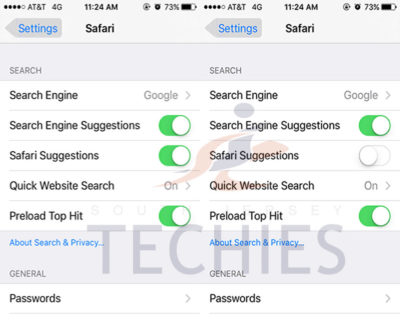
sjt-blog-safari-crash-ios

When you type a URL, Apple sends what you type to its servers, returning a response with autocomplete search queries, Top Sites and other info. There appears to be a bug in this server request that is causing Safari to randomly crash. Users are discovering some potential workarounds until Apple fixes the problem properly …

Disabling Safari Suggestions seems to be helping resolve the bug for many people on iOS. On your iPhone or iPad, go into Settings, tap Safari, and toggle off the ‘Safari Suggestions’ switch. This will fix the crashing, obviously its only a temporary fix until Apple sorts its servers out as it will disable the Safari Suggestions functionality.

Another option is to enter Private Browsing mode. In private browsing, by design Safari does not contact the suggestions server for intelligent completion options, so the server is never contacted and the crash never arises.

The bug is affecting users in many countries, but not all. It also depends on the state of your Safari, whether it has certain data cached already. The crash has been seen on iOS 8, iOS 9 and OS X 10.11. The bug could be even more widespread beyond these platforms however. It is pretty crazy flaw that is affecting so many people this morning, with many reports across European iOS customers.

We have contacted Apple about the issue for clarification, but it’s such a serious functional flaw that we expect a fix very shortly. Please note: this is an unrelated incident to the prank site CrashSafari.com.

Update: The Safari crash bug has now been fixed, according to Apple.

Have questions?

Get help from IT Experts/Microsofts Cloud Solutions Partner
Call us at: 856-745-9990 or visit: https://southjerseytechies.net/

South Jersey Techies, LL C is a full Managed Web and Technology Services Company providing IT Services, Website Design ServicesServer SupportNetwork ConsultingInternet PhonesCloud Solutions Provider and much more. Contact for More Information.

To read this article in its entirety click here.

Microsoft updates support policy: New CPUs will require Windows 10

In a change to its longstanding support policy, Microsoft says PCs based on new CPU architectures, including Intel’s Skylake chips, will require Windows 10. A list of preferred systems will support older Windows versions on new hardware, but only for 18 months.

Windows 10

Enterprise customers are still the bulwark of Microsoft’s Windows business, in both the client and server segments.

Historically, those customers have also been among the most conservative, lagging years behind the latest releases of an operating system release. Those practices have been encouraged by Microsoft’s support lifecycle, which offers a generous ten years of support for each Windows release.

Effective today, that policy is changing in a subtle but significant way, with the addition of new hardware requirements for support of pre-Windows 10 releases. The company’s also publishing a preferred list of systems that will receive special attention for updates and support.

Yes, Windows 7 (currently in the Extended support phase) will continue to receive updates until January 14, 2020, and Windows 8.1 will be supported until January 10, 2023. But in a series of “clarifications” to its support policy today, the company announced that support for those older Windows versions will be available only for “previous generations of silicon.”

Going forward, as new silicon generations are introduced, they will require the latest Windows platform at that time for support… Windows 10 will be the only supported Windows platform on Intel’s upcoming “Kaby Lake” silicon, Qualcomm’s upcoming “8996” silicon, and AMD’s upcoming “Bristol Ridge” silicon.

The policy will be phased in beginning with systems based on Intel’s new 6th-generation CPUs (code-named Skylake), which debuted a few months ago. New consumer-based Skylake devices must run Windows 10 to be supported.

For enterprise customers that want to buy “future proof” new hardware based on Skylake processors running older Windows versions, Microsoft will publish “a list of specific new Skylake devices we will support to run Windows 7 and Windows 8.1.” That support will run for a period 18 months, until July 17, 2017, after which those enterprise customers will be expected to upgrade to Windows 10.

Examples of systems that will be on the initial release of the list include Dell’s Latitude 12, Latitude 13 7000 Ultrabook, and XPS 13; HP’s EliteBook Folio, EliteBook 1040 G3; and Lenovo’s ThinkPad T460s, X1 Carbon, and P70 models.

The list will continue to be updated, Microsoft says.

Any machine that earns a place on the elite enterprise support list will get very special treatment indeed, with the idea being to reassure corporate customers that these models are especially likely to perform well on Windows 10 in the new era of continuous updates:

For the listed systems, along with our OEM partners, we will perform special testing to help future proof customers’ investments, ensure regular validation of Windows Updates with the intent of reducing potential regressions including security concerns, and ensure all drivers will be on Windows Update with published BIOS/UEFI upgrading tools, which will help unlock the security and power management benefits of Windows 10 once the systems are upgraded.

These models also get special treatment for enterprises that are still planning their Windows 10 migration, with an 18-month grace period where the older OS versions are fully supported.

Through July 17, 2017, Skylake devices on the supported list will also be supported with Windows 7 and 8.1. During the 18-month support period, these systems should be upgraded to Windows 10 to continue receiving support after the period ends. After July 2017, the most critical Windows 7 and Windows 8.1 security updates will be addressed for these configurations, and will be released if the update does not risk the reliability or compatibility of the Windows 7/8.1 platform on other devices.

Of course, enterprise customers who want to stick with earlier Windows versions beyond that mid-2017 deadline have lots and lots of options, based on current generations of Intel processors such as the Broadwell and Haswell lines. Those systems, which are based on what Microsoft calls “downlevel silicon,” will continue to be fully supported for pre-Windows 10 operating systems.

In today’s blog post, Microsoft says it’s seeing “unprecedented demand from our enterprise customers” in Windows 10. Enterprise customers are especially interested in new Windows 10 security features like Credential Guard, which uses hardware virtualization to safeguard credentials from attack.

Windows 8-era enhancements like Secure Boot, which protects systems from being compromised by rootkits and bootkits, also require new hardware.

Not surprisingly, today’s announcement contains the usual cheery statements from Microsoft’s three biggest hardware partners: Dell, HP, and Lenovo. All three companies compete aggressively in the low-margin consumer market, where virtually all new systems will run Windows 10. But enterprises will pay premium prices for the improvements in battery life and security in Skylake-based mobile systems, making this the most attractive segment to target.

Have questions?

Get help from IT Experts/Microsofts Cloud Solutions Partner
Call us at: 856-745-9990 or visit: https://southjerseytechies.net/

South Jersey Techies, LL C is a full Managed Web and Technology Services Company providing IT Services, Website Design ServicesServer SupportNetwork ConsultingInternet PhonesCloud Solutions Provider and much more. Contact for More Information.

To read this article in its entirety click here.

Microsoft prices high-end Office 365 E5 at $420 per user per year

Microsoft begins selling its new highest-end Office 365 business plan, E5, on December 1 for $420 per user per year. Here’s what’s included.

Ofice 365-Plans

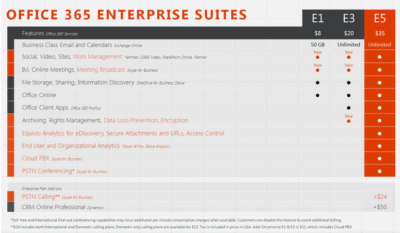
Microsoft will charge users $35 per user per month, or $420 per year, for its new highest-end Office 365 business plan.

Microsoft officials went public with the pricing for Office 365 E5, its top-of-the-line commercial Office 365 offering, on November 30 during the company’s Convergence EMEA conference. Office 365 E5 is available to customers for purchase starting, December 1.

Office 365 E4 — the current high-end version of Microsoft’s Office 365 line — sells for $22 per user per month, or $264 per user, per year.

The Office 365 E5 SKU will include Skype for Business (Lync) with support for features including Cloud PBX and Meeting Broadcast; new analytics features, like Power BI Pro and Delve Organizational Analytics; and new advanced security features, such as eDiscovery, Customer Lockbox, and Safe Attachments.

Office 365 E4 includes Skype for Business with Enterprise Voice and unified messaging; the full suite of locally downloadable Office apps; and Power BI for Office 365 (which is being superseded by Power BI pro).

Microsoft is planning to retire E4 and replace it with E5. However, Office 365 E4 will remain on the price list till June 30, 2016, Microsoft officials have said.

The E1 and E3 versions of Office 365 will retain their current prices of $8 per user per month, and $20 per user per month, respectively.

Office 365 E1 users will get new work-management capabilities, as well as Skype for Business’s Meeting Broadcast functionality added to their plans for no additional charge. Office 365 E3 users will get those same two new features, as well as the option to purchase Equivio Analytics for eDiscovery. (Microsoft bought Equivio in January 2015.)

Skype Meeting Broadcast enables users to broadcast of a Skype for Business meeting on the Internet to up to 10,000 people, who can attend in a browser.

Office 365 E5 users get all the features that E1 and E3 users get, plus other analytics and networking functionality, including Cloud PBX and PSTN Conferencing.

The Skype for Business Cloud PBX with PSTN Calling service provides users with the ability to make and receive traditional phone calls in their Skype for Business client, and to manage these calls using hold, resume, forward and transfer.

PSTN Conferencing is initially available to 15 countries on December 1, with a phased roll out to international markets in the future. Cloud PBX is available worldwide starting December 1. PSTN Calling is available in the U.S. starting December 1, with a phased roll out to international markets in the future.

The fine print: PSTN Conferencing users may incur additional per-minute consumption charges, but customer can disable this feature to avoid additional billing. PSTN Calling is paid add-on for E1, E3 and E5. For E5 users, PSTN Calling costs $24 extra (per user, per month) for international and domestic calling, and $12 for domestic calling only. For E1 and E3, the international and domestic calling plan is $32 extra.

Have questions?

Get help from IT Experts/Microsofts Cloud Solutions Partner
Call us at: 856-745-9990 or visit: https://southjerseytechies.net/

South Jersey Techies, LLC is a full Managed Web and Technology Services Company providing IT Services, Website Design ServicesServer SupportNetwork ConsultingInternet PhonesCloud Solutions Provider and much more. Contact for More Information.

To read this article in its entirety click here.


Bailey Landscape Services

Developed by,
South Jersey Techies, LLC.

The Web Design team of South Jersey Techies has been constantly working on developing the best websites including easy mobile approach and the latest website developed by the team is Bailey Landscape Services which are a family owned and operated full service landscape design and construction company serving all of South Jersey and the surrounding area.

bls01

The image below gives an idea how the website developed by our team looks on your smartphone.

bls02

Have questions?

Our Web Design team is here to help
Call us at: 856-745-9990 or visit: https://www.sjtechies.com

South Jersey Techies, LLC is a full Managed Web and Technology Services Company providing IT Services, Website Design ServicesServer SupportNetwork ConsultingInternet PhonesCloud Solutions Provider and much more. Contact for More Information.

Office 365 – the easiest way to get the new Office.

Microsoft
Partner Network

Office 2016

Now, there’s more opportunities than ever to build your business.Office 216 is the latest addition to Office 365—taking the work out of working together. The new Office is built for teamwork. Perfect for Windows 10. Smart. Secure. Full of new features.

Consider the opportunities.

Exciting new advances in Office open new opportunities for you to deepen your role as trusted advisor and to expand your practice—and your revenue potential. Here are a few paths to consider:

  • Reach new customers by leveraging the innovative user experiences in Office 2016 apps
  • Grow your hybrid practice with cloud-inspired infrastructure in Office 2016 servers
  • Capitalize on Office 2016 launch momentum to renew or upsell Office 365

We think that Office 2016 is an important step in empowering every organization on the planet to achieve more. Action Pack and Competency partners can get started right away by using your internal use rights (IUR) benefits to download Office 365. Once you’re familiar with the new Office you can show your customers how to get the most from the new features.

Quick steps to get started:

Let’s do great work together.Your Microsoft Partner Network Team

Have questions?

Get help from IT Experts/Microsofts Cloud Solutions Partner
Call us at: 856-745-9990 or visit: https://southjerseytechies.net/

South Jersey Techies, LLC is a full Managed Web and Technology Services Company providing IT Services, Website Design ServicesServer SupportNetwork ConsultingInternet PhonesCloud Solutions Provider and much more. Contact for More Information.

Tech Tip

Cisco ASA – How to View pre-shared keys in plain text

Tech Tip

As engineers, you don’t always document things as well as we should OR someone you work with is always “too busy” to document their work. This little trick will show you how to recover pre-shared keys on a Cisco Pix or ASA firewall.

Normally, you use the ’show run’ command to view the running configuration. Pre-shared keys are marked with an asterisk (*). To view the password unencrypted, type ‘more system:running-config’. This will display the full configuration with unencrypted passwords.

To bad actually that the pre-shared key of an Cisco VPN Client doesn’t show up in the latest ASA software version 8.2.2. the pre-shared keys of the VPN Tunnels are showed.

Have questions?

Get answers from Microsofts Cloud Solutions Partner!
Call us at: 856-745-9990 or visit: https://southjerseytechies.net/

South Jersey Techies, LLC is a full Managed Web and Technology Services Company providing IT Services, Website Design ServicesServer SupportNetwork ConsultingInternet PhonesCloud Solutions Provider and much more. Contact for More Information.

Narberth Ambulance

Developed by,
South Jersey Techies, LLC.

This month our website team launched a website for Narberth Ambulance. Narberth Ambulance is an organization built on the countless hour of work over 70 years and now responds to over 6100 calls a year and provides most qualified EMT’s and Paramedics. Like the majority of websites we develop, Narberth Ambulance is fully responsive and is helping thousands of people.

Narberth Ambulance

Have questions?

Our Web Design team is here to help
Call us at: 856-745-9990 or visit: https://southjerseytechies.net/

South Jersey Techies, LLC is a full Managed Web and Technology Services Company providing IT Services, Website Design ServicesServer SupportNetwork ConsultingInternet PhonesCloud Solutions Provider and much more. Contact for More Information.

Windows 10 & network share access denied – Solution

Network Share access denial is another issue that users are facing with Windows 10.

Recent upgrade to Windows 10 all of a sudden makes network share no longer accessible on Windows machines you may have in your environment.

Here is the tutorial that solves the issue.

Problem

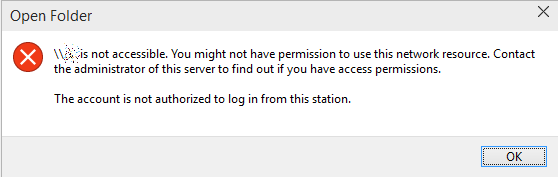
This is what you see when you try to go to any \\something network share:

\\something is not accessible. You might not have permission to use this network resource. Contact the administrator of this server to find out if you have access permissions. The account is not authorized to log in from this station.

open folder

There’s some changes in the Windows 10 internals which results in the access denial. The new build does not allow anonymous (guest) access to shares by default, as a security measure.It can be resolved by creating a new registry key in the right hive and rebooting.

Solution

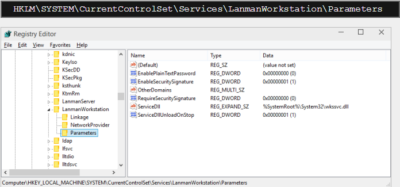
Fire up the registry editor (regedit). Navigate to:

Registry editor

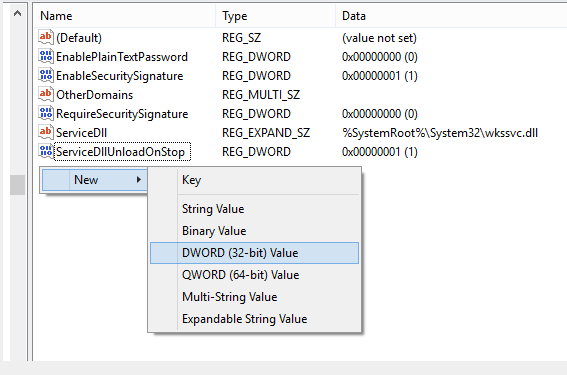
Here, you will need to create a new parameter (32-bit DWORD). Right-click:

Parameter

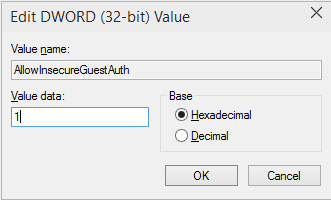
Then, name it AllowInsecureGuestAuth and assign it a value of 1.

DWORD

The hive should look thusly:

Registry Editor

And you’re done. Reboot, and enjoy your network access.

Have questions?

Get answers from Microsofts Cloud Solutions Partner!
Call us at: 856-745-9990 or visit: https://southjerseytechies.net/

South Jersey Techies, LLC is a full Managed Web and Technology Services Company providing IT Services, Website Design ServicesServer SupportNetwork ConsultingInternet PhonesCloud Solutions Provider and much more. Contact for More Information.

To read this article in its entirety click here.

Apple Updates iPod Touch

New iPod uses same chip as iPhone 6 and will come in an array of colors

Varieties of the new iPod Touch

Apple Inc. introduced its updated iPod Touch that features the same chip used in the iPhone 6 and other upgrades that bring the device’s capabilities more in line with those of its smartphones.

The update also includes a new color lineup—including space gray, silver, gold, pink and blue—for the iPod Touch, as well as the iPod Nano and iPod Shuffle models.

The iPod was a breakthrough portable music player when it was introduced in 2001, but it has been displaced by smartphones in recent years.

Starting at $199, Apple said the iPod Touch has 10-times faster graphics performance and improved fitness tracking. The company said the upgraded iPod also offers three-times faster Wi-Fi connectivity.

Apple also touted the iPod Touch’s new 8-megapixel iSight camera and an improved FaceTime HD camera, with features including slo-mo and burst mode, as well as improved face detection for higher quality selfies.

Have questions?

Call us at: 856-745-9990 or Visit: https://southjerseytechies.net/

South Jersey Techies, LLC is a full Managed Web and Technology Services Company providing IT Services, Website Design ServicesServer SupportNetwork ConsultingInternet PhonesCloud Solutions Provider and much more. Contact for More Information.

To read thsi article in its entirety click here.

Office 2016 for Mac is here!

Kirk Koenigsbauer, corporate vice president for the Office Client Applications and Services team said “Today we are taking a big step forward for Mac® users—Office 2016 for Mac is now available in 139 countries and 16 languages. Based on feedback from the great Mac Office community, we’ve made major updates to each of the apps, and we couldn’t be more pleased to deliver it first to our Office 365 customers.”

Unmistakably Office, designed for Mac

The new versions of Word, Excel, PowerPoint, Outlook and OneNote provide the best of both worlds for Mac users—the familiar Office experience paired with the best of Mac.

If you already use Office on a PC or iPad, you will find yourself right at home in Office 2016 for Mac. It works the way you expect, with the familiar ribbon interface and powerful task panes. Mac users will appreciate the modernized Office experience and the integration of Mac capabilities like Full Screen view and Multi-TouchTM gestures. With full Retina® display support, your Office documents look sharper and more vibrant than ever.

Office for Mac is cloud-connected, so you can quickly get to the documents you’ve recently used on other devices and pick up where you left off. New, built-in document sharing tools make it easy to invite teammates to work on a document together. When sharing documents, you won’t have to worry about losing content or formatting, as Office for Mac offers unparalleled compatibility with Office on PCs, tablets, phones and online.

Five modern, first-class applications
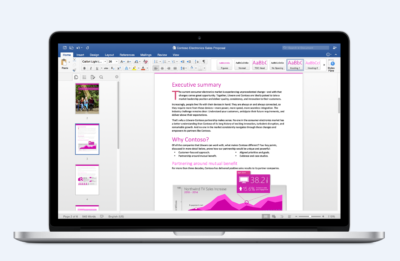
Word for Mac


Word for Mac—Word’s powerful writing and reviewing tools make it easy to create great-looking documents. The new Design tab lets you easily apply designer-quality layouts, colors and fonts throughout your document. You can work on the same document simultaneously with your teammates and use threaded comments to have a conversation right next to the corresponding text.
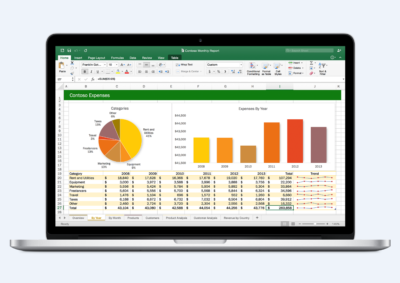
 

Excel for Mac


Excel for Mac—The new Excel for Mac helps you visualize your information by recommending charts best suited for your data with chart previews. Familiar keyboard shortcuts, autocomplete and an improved formula builder save you time when creating spreadsheets or entering data. For deeper analysis, new PivotTable Slicers help you filter large volumes of data and discover patterns.
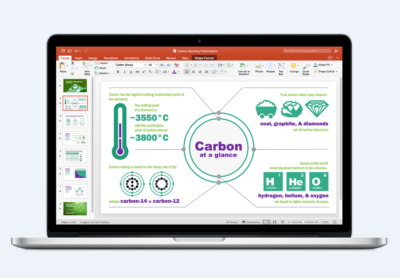
PowerPoint for Mac

PowerPoint for Mac—PowerPoint’s improved Presenter View gives you full control when you present by showing you the current slide, next slide, speaker notes and a timer on your Mac screen, while the audience only sees your presentation on the big screen. The new animation pane helps you design and fine-tune animations, and the latest set of slide transitions add polish to your presentations.
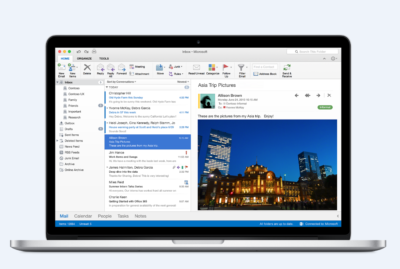
Outlook for Mac

Outlook for Mac—Managing your email, calendar, contacts and tasks has never been easier. The new Outlook for Mac has push mail support so your inbox is always up-to-date. The improved conversation view automatically organizes your inbox around threaded conversations, so you won’t have to hunt for related messages. And the new message preview shows you the first sentence of an email just below the subject line so you can quickly decide if you want to read it now or come back later.
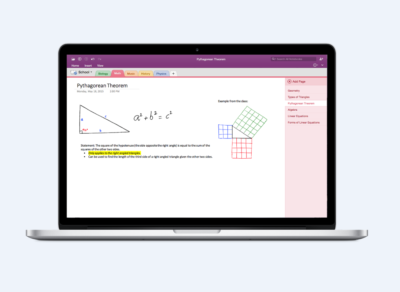
One Notebook for Mac

OneNote for Mac—OneNote is the newest addition to Office for Mac. You can capture your ideas in digital notebooks and access them on any device. Find things quickly with the OneNote search engine that tracks your tags, indexes your typed notes and recognizes text in images and handwritten notes. Bold, italicize, underline or highlight notes, insert files, pictures and tables and organize your notes however you want. You can also share notebooks with friends, family or colleagues so everyone can work together on travel plans, household tasks or work projects.

Made better by Mac users

The customer participation in Office for Mac preview since its launch in March exceeded expectations, making it largest Office for Mac beta ever. Thanks to everyone who participated in the preview program and helped improve the product.

Mac preview participants provided with over 100,000 pieces of feedback. Based on this feedback, Office released seven updates in four months with significant improvements in performance and stability. Also added features like improved Mail Merge in Word, Propose New Time in Outlook and support for External Data Connections in Excel.

And the best news is that Office for Mac will continue to see ongoing improvements over time. With released updates and new features for Office 365 customers at least once per quarter.

Available today for Office 365 customers

Office 365 subscribers can get the newest version of Office for Mac today. All you need is an Office 365 subscription (Office 365 Home, Personal, Business, Business Premium, E3 or ProPlus), which includes the rights and access to use Office applications on Mac, Windows, iOS and Android devices, along with additional value in OneDrive and Skype.

Here are a few different ways to get Office 2016 for Mac today:

  • Already an Office 365 customer? On your Mac, just browse to your account page (office.com/myaccount), sign in and follow the installation instructions. If you have Office 365 through your organization, go to portal.office.com/OLS/MySoftware.aspx.
  • Are you a student? You may get Office 2016 for Mac for free or at a substantial discount. It takes only 30 seconds to find out at office.com/student.
  • Otherwise, go to office.com/mac or buy an Office 365 subscription at your local retailer.

Office 2016 for Mac will become available as a one-time purchase option this September.

We hope you’re as excited as we are about the new Office for Mac. It’s one of many important releases this summer. “We released Word, Excel and PowerPoint for Android phones just two weeks ago, which join Outlook and OneNote for Android phones, and we are just weeks away from delivering Office Mobile apps for Windows 10.” said Kirk Koenigsbauer

Have questions?

Get help from Microsoft’s Cloud Solutions Partner.
Call us at: 856-745-9990 or visit: https://southjerseytechies.net/

South Jersey Techies, LLC is a full Managed Web and Technology Services Company providing IT Services, Website Design ServicesServer SupportNetwork ConsultingInternet PhonesCloud Solutions Provider and much more. Contact for More Information.

To read this article in its entirety click here.

CALL US NOW!