Back to Top

Tech, Web, Cloud & Cabling Services

Microsoft Windows 7 Service Pack 1 released

Takeaway: On February 22, 2011, Microsoft released Service Pack 1 for Windows 7 to the general public. Should you download and install it?

As of February 22, 2011, Service Pack 1 for Windows 7 is available to the general public from the Microsoft Service Pack Center. Windows 7 SP1 includes previously released security, performance, and stability updates, plus some improvements to features and services.

Microsoft suggests that individuals just let the normal Windows update system handle installation of the service pack. However, if you’d like to accelerate the process you can download the file and install it manually. The install will take around 30 minutes and you will have to reboot the PC during the process.

Depending on what method is used to install the service pack, you will need anywhere from 750MB to 7400MB of available disk space storage to complete the installation procedure, so plan accordingly. If you have a pre-release version of SP1 installed, you will have to uninstall it before you install the latest version.

Also note that some antivirus software will prevent SP1 from being installed properly, so you may want to temporarily turn off your antivirus while the installation takes place

To view the original article in it’s entirety Click Here

What you need to know about iOS 5

Takeaway: The fifth generation iOS, the engine that powers Apple’s popular iPhone and iPad devices (among others), introduces several important changes and refinements.

Apple’s iOS, though only four years old, has changed the way users connect, purchase and maintain applications, collaborate, and more. The fifth generation iOS, the engine that powers Apple’s popular iPhone and iPad devices (among others), introduces several important changes and refinements. Here are the top 10 things you should know about Apple’s new iOS 5.

1: Requirements

The fall 2011-release iOS 5 upgrade works with a variety of current and legacy handsets, tablets, and devices. iOS 5 is compatible with the iPhone 3GS and iPhone 4. iOS 5 is also supported on the 3rd and 4th generation iPod Touch as well as the original iPad and iPad 2. There is no cost for the upgrade.

2: PC Free

One common complaint prior to iOS 5 has been that a computer was required to fully utilize and back up new iPads, iPhones, and iPod Touch devices. No more. iOS 5 severs the tether and makes it possible to activate and configure new devices without having to tie them to a computer. Further, with iCloud support, iOS 5 devices can be backed up automatically without having to use a computer.

3: Mail improvements

iOS 5 also introduces overdue Mail improvements. The new iOS provides indentation support, enables rich text (bold, italic, and underline) formatting, and can even flag messages. iCloud, meanwhile, helps ensure email accounts stay synchronized across multiple devices. As email’s importance continues to grow, such refinements on the iPhone and iPad platforms are a necessity.

4: Tabbed browsing

A seemingly minor innovation when originally introduced on computers, tabbed browsing enables users to maintain multiple active Web pages within a single browser instance. The feature has proven popular, especially as users have become more dependent upon Web-based applications and Web-based email. iOS 5 updates the Safari browser to bring tabbed browsing to compatible iPhones, iPod Touches, and iPads. This enables multiple concurrent Web page sessions and considerably simplifies the process of switching between open pages,.

5: Reminders

A cottage industry of iOS to-do and task list application providers has arisen over the past few years. That’s because Apple’s iOS didn’t previously do a very good job natively managing or synchronizing organizational tasks. Reminders is a new iOS 5 feature that addresses that shortcoming. With iCal, Outlook, and iCloud integration, changes automatically synchronize across multiple devices. Better yet, users can associate due dates and locations with the tasks they set. Productivity and efficiency result, while dependency upon a third-party application decreases or is eliminated altogether.

6: iCloud support

iCloud support within iOS 5 means applications, photos, music, settings, and other data isn’t lost if a compatible Apple device goes missing. Because iCloud stores data on the Web, files, configuration information, and even applications previously purchased on one device can be pushed to a replacement or other authorized device wirelessly. Calendars, contacts, and mail benefit from iCloud, which powers wireless synchronization between devices, too. iCloud even enables synchronizing iOS data with a PC, so Windows users benefit from iCloud/iOS 5 integration. And 5GB of free storage means the price is right.

7: iMessage

The simplicity and immediacy of text messaging has fueled its meteoric popularity. One can hardly even visit a neighborhood grocery or airport without hearing others’ text alert beeps. Built into the Messages app, iOS 5’s new iMessage feature enhances traditional messaging by adding support for sending photos, videos, locations, and contacts for iPad and iPod Touch users. iMessaging includes group messaging support, too, which better enables team collaboration and communication. iMessage also synchronizes iMessage conversations across multiple devices.

8: Notification Center

As iPhone and iPad use has grown within businesses and as users have loaded a veritable cornucopia of applications on those devices, mobile users sometimes feel assaulted by the number of updates, new email alerts, unread text messages, and other notifications.

Prior to iOS 5, all these different updates lived in different locations and sometimes proved distracting. iOS 5 users can take advantage of the new Notification Center to select which notifications they receive. And copping a popular feature I associate as being introduced with Microsoft Outlook 2003, new notifications appear briefly (in this case at the top center of the screen) before fading out of view. The Notification Center presentation of these messages is less distracting and doesn’t require switching applications, yet it still communicates the same information quickly.

9: AirPlay

Many users will find iOS 5’s new AirPlay innovation a critical component of the new OS. Others may never use it. But those who do will find the video mirroring feature an intriguing and convenient improvement in the mobile OS.

AirPlay enables presenters to wirelessly stream their iPad 2 display information to an HDTV via an Apple TV device. Attendees see exactly what’s on the presenter’s iPad, meaning iPads can fully replace desktop or laptop presentation systems in boardrooms, classrooms, conference rooms, and other presentation areas.

10: Calendar improvements

Calendar operations receive a needed boost within iOS 5, too. iOS 5-powered Calendars now synchronize across multiple devices leveraging Apple’s iCloud technology. Further, iPad users can display year views of their Calendar, while iPhone and iPod Touch users can display a weekly view of their calendar — previously unavailable options. Individual calendars can now be added and edited directly from iOS 5-powered iPhones, iPads, and iPod Touches. Possibly most important, though, is the fact that Calendar attachments are now viewable on compatible iOS 5 devices without having to switch applications.


To view the original article in it’s entirety, Click Here

Five Uninstall Tools That Really Work

Takeaway: Remove all traces of unwanted programs with the help of these uninstall tools.

It never ceases to amaze me how many applications include built-in uninstallers, yet leave fragments behind when you remove them. Fortunately, you don’t have to be at the mercy of an application’s own uninstall tool. A number of commercial uninstall tools are available that do a good job cleaning up your computer. Here are five to consider.

1. Revo Uninstaller:

When you launch Revo Uninstaller, it automatically displays a list of the applications it can uninstall (Figure A). However, this is far from being the software’s only useful function. The Tools section provides access to commonly used operating system tools, such as the Registry Editor, Group Policy Editor, and the System Properties Sheet. Even better, the software offers an option for getting rid of junk files. This includes things like temporary files that were created upon opening Microsoft Office documents but that were never removed. The software also features something called Hunter Mode, in which you can drag a bull’s-eye icon over a file or an icon and then click the mouse to remove that particular item. You can download a free trial of Revo Uninstaller.

2: Your Uninstall Tool

Another uninstall tool worth considering is Your Uninstaller. As with the Revo Uninstall Tool, launching Your Uninstaller displays a list of the items that can be removed. On my lab system, however, your uninstall tool found significantly more software than The Revo Uninstall Tool did.

In addition to its software removal capabilities, Your Uninstaller contains a disk cleaner, which gets rid of junk files. There is also a feature called Trace Erase, which helps protect your privacy by clearing your history.

My two personal favorite features are the File Shredder, which securely deletes files, and the Startup Manager. The Startup Manager allows you to control what gets launched at system startup. This feature could prove invaluable in cleaning malware infections. You can download a trial version of Your Uninstall tool.

3: IObit Uninstaller

Like the other uninstall tools, IObit Uninstaller starts by listing all the programs that can be uninstalled. Although this program lacks the bells and whistles of some of the other utilities, it has two features that make it worthwhile. One is the Forced Uninstall button, which is great for removing stubborn applications. The other is the way that IOBit Uninstaller categorizes applications. The software will tell you which applications are rarely used, recently installed, or consume a lot of disk space. IOBit Uninstaller is FREE.

4: Advanced Uninstaller Pro

Advanced Uninstaller Pro is a more comprehensive software removal application than some of the others. In addition to offering basic removal capabilities, this free tool can monitor the installation of an application to ensure that the application can be completely removed later on without leaving behind any fragments. Advanced Uninstaller Pro also offers several specialized cleaning utilities that are designed to clean up things like the Windows Start menu, the registry, and even your fonts.

5: Cleanse Uninstaller Pro

Cleanse Uninstaller Pro offers basic software removal capabilities, along with a number of other useful features. It includes a Force Uninstall option and a Startup Manager, as well as a junk finder. It also provides some more unusual features, such as registry backup capabilities (as well as the ability to do a system-level restore) and even a file burner that lets you burn files to disk prior to removing them. You can download a free trial of Cleanse Uninstaller Pro.

To View Full Article Click Here

Ribbon Hero 2: Clippy’s Second Chance

It’s a fun game! No, it’s an Office Tutorial! No, it’s both!

Welcome to Ribbon Hero 2!

You’ve tried games that test your card playing, your imaginary farming skills, and your ability to hurl small birds. Finally there’s a game that will make you better at your job.

Do you feel like you’re using Word, Excel, PowerPoint, and OneNote the same way version after version, or have you avoided using one of these apps because you don’t know how? And you know there’s so much more Office could be doing for you if only you knew how to access it? No more! Straight from the secret lairs of Office Labs we present Ribbon Hero 2: Clippy’s Second Chance.

Yes, we turned Office into a game! If you’re going to spend time immersed in the inner workings of Office, by golly it should be fun. In Ribbon Hero 2, you’ll hop on board Clippy’s stolen time machine and explore different time periods. With each time period, you get to explore a new game board with challenges you must complete to get to the next level. Each challenge takes you into Word, Excel, PowerPoint, or OneNote to complete a task. Discover new Office features by actually using them, with a hint button to fall back on in case you get stuck. Race for a high score with colleagues, classmates and friends, or even put your score on your resume to show off your Office skills!

For those of you who have been paying attention, we’ve done this before. That’s how we got the “2” on the end of the title. So what’s different? *deep breath* Clippy, comic strips, colorful graphics, surprise animations, multiple levels, time travel, upside-down Clippy, space ships, Greek Gods, bow-and-arrow battles, and a ton of useful Office features.

Need more convincing? Get a sneak peek of Ribbon Hero 2 in this video:

Have FUN!

Announcing Extended Support Hours

To better serve our customers, we are pleased to announce that beginning Tuesday, March 1st, 2022, we will be extending our regular office hours to 8am-8pm, Monday-Friday. We will continue to have emergency support technicians available after-hours from 8pm-8am and weekends.

We appreciate our clients’ loyalty to South Jersey Techies over the last 18+ years. Whether a new, existing or soon-to-be client, we value your support and business to our team. As our business has grown, so has our team. This has given us the capacity to extend our regular office hours to provide your company the best possible support throughout the day.

Our hope is that the new extended hours will be more convenient for some of your users and allow us to provide support to those users at the regular rate.

If you or someone from the team needs support during those hours, please email support at support@sjtechies.com or call (856) 745-9990 to get scheduled with a member of our team

Microsoft Office 365: The smart person’s guide

Office 365 provides the productivity tools required by a modern enterprise workforce. This guide covers key details, including available applications, system requirements, and subscription options.

Office-365-SJTechies2

For just about any enterprise of any size, the productivity of its modern workforce revolves around the basic office suite of email, calendar, word processor, and spreadsheet. But as the enterprise workforce has become more mobile, the basic productivity toolset has had to adapt and change to match new requirements. This is why Microsoft updated Office 365 to be a mobile collaborative platform ready to get work done wherever and whenever it happens.

Microsoft Office 365 is the de facto productivity suite for many enterprises and it is the suite all the other competitors are measured against. So as a leader in information technology for your enterprise, it’s in your best interest to know everything there is to know about Office 365. To help you achieve that goal, TechRepublic compiled the most important details and related resources on Microsoft Office 365 into this “living” guide, which we’ll periodically update as new information becomes available.

Executive summary

What is it? Microsoft Office 365 provides users with the basic productivity applications necessary to get work done in the modern enterprise. It includes applications like Word, Excel, Outlook, PowerPoint, OneNote, and OneDrive, just to name a few.

Why does it matter? As the standard for productivity suites, competing products are generally measured against applications from the Office 365 suite.

Who does it affect? In the modern mobile-centric enterprise, Office 365 provides the tools used to get work done. This makes Office 365 important to just about every working individual.

When is it available? The latest version of Microsoft Office 365 is available right now. The current subscription includes Office 2016 applications.

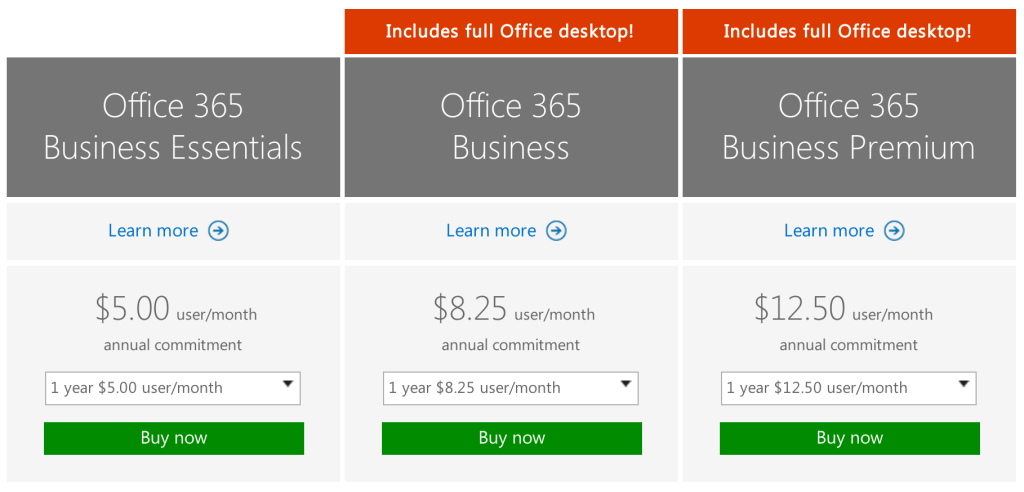
How do you get it? Enterprises can purchase a subscription to Office 365 via the Microsoft website. Subscriptions range from $8/user/month to $35/user/month.

What is it?

Microsoft Office 365 is a subscription service that provides users with the basic productivity applications necessary to get work done in the modern enterprise. Productivity applications include, but are not limited to, a word processor, a spreadsheet, an email client, a calendar, and a presentation application.
Office365-OneDrive

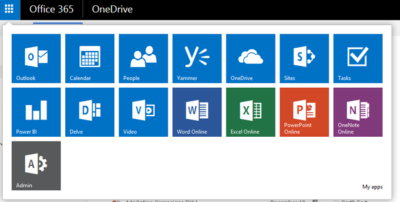
As an example, a Business Premium subscription to Office 365 ($12.50 per person per month) includes these applications:

Word: This app sets the standard for word processors and is available with Office 365 for both Business and Premium. If users in your enterprise need to create documents, this is the tool they will use.

Excel: The spreadsheet has been the workhorse for basic data analysis since its invention back in the previous century. Excel is the current standard-bearer and comes with Office 365 for Business and Premium.

Outlook: Office 365’s solution for managing email and an appointment calendar is called Outlook. The app has been around for many years and its busy interface tends to be either loved or hated by users. It’s available with both the Business and Premium subscriptions.

PowerPoint: Communicating information to a group of individuals at a meeting often involves a presentation. Office 365’s PowerPoint allows users to create, display, and disseminate information in formats ranging from the basic slide to animation to video.

Publisher: Sometimes communicating information to a broader audience requires something more permanent and more formal than a presentation at a meeting. The Publisher app in Office 365 provides users with the tools they need to publish professional-looking newsletters, brochures, and booklets.

OneNote: As the workforce has become more mobile, the need to capture information on the go has become increasingly important. Applications like OneNote allow users to take notes on any device and then retrieve those notes from any other device. It’s your basic productivity cloud app.

OneDrive: The other basic and fundamental cloud-based application is storage. With each Office 365 Business subscription, Microsoft provides users with up to 1TB of cloud storage in the form of an application called OneDrive for Business.

SharePoint: A subscription to Office 365 Business Premium also provides an enterprise with a few applications for backend infrastructure management. SharePoint, for example, can be used to host intranet websites for the enterprise. It also can be used to host smaller sites designed for smaller teams or divisions. The permissions for these sites can be designated by the users themselves or by appointed administrators.

Exchange: Each Office 365 for Business subscription includes an Exchange Server, which handles all the email management duties. By default, each user is granted 50GB of storage for email. Maintenance of the Exchange Server is generally handled at the administrator level.

Collaboration tools: Along with the typical productivity applications, Office 365 includes many collaboration tools—like Delve, Skype, Yammer, and Sway. These tools allow users to communicate, brainstorm ideas, share documents, and have video meetings while on the go.

Power BI: One of the most powerful tools any enterprise can have, regardless of size, is reliable business intelligence gathering applications. Office 365 for Business, through its Power BI application, provides enterprises with a set of tools for collecting, sorting, and presenting business intelligence data.

Infrastructure: All Office 365 subscriptions include a reliability guarantee of 99.9% uptime. In addition, permissions for internal access control are handled by administrators designated by the enterprise using tools supplied by Active Directory. Each Office 365 subscription includes five layers of security and proactive monitoring to help safeguard your data.

System requirements

  • CPU: 1GHz or faster
  • Memory: 2GB RAM
  • Hard drive: 3GB of available space (6GB for Mac)
  • Display: 1280 X 800 screen resolution
  • Operating system: PC-Windows 7, 8, or 10. Mac-Mac OS X 10.10
  • Connectivity: Internet connection

Why does it matter?

Collaboration and communication are the key components of productivity in the modern enterprise, and productivity is the lifeblood of the enterprise. Microsoft Office 365 provides the tools necessary to bring collaboration and communication—and by extension, productivity—to each individual in an enterprise.

For many companies, Office 365 is the de facto standard for productivity software. The performance of all competing products is generally measured against applications from the Office 365 suite.

Who does it affect?

Just about every knowledge worker in every enterprise is required to have an email account and a calendar application. Beyond that, most individuals in an enterprise will need to use, at least once in a while, a word processor. And a significant number of individuals in an enterprise will also find themselves needing to use presentation software or a spreadsheet at some point in their career.

These are the productivity tools of any enterprise. These are the tools used to get work done. That means Office 365 is important to just about every working individual.

When is it available?

Microsoft Office 365 is available right now. The current subscription includes applications updated to the Office 2016 versions. Of course, the key to the subscription model is that each user will always be using the most current and most secure version of each application because each application is continuously updated.

How do you get it?

Enterprises with fewer than 300 users can purchase a subscription to Office 365 and download the appropriate applications via the Microsoft website. The Premium version costs $12.50 per user per month ($150/year). There are also versions of Office 365 available for individuals ($69.99/year) and households ($99.99/year).
Office-365-SJTechies

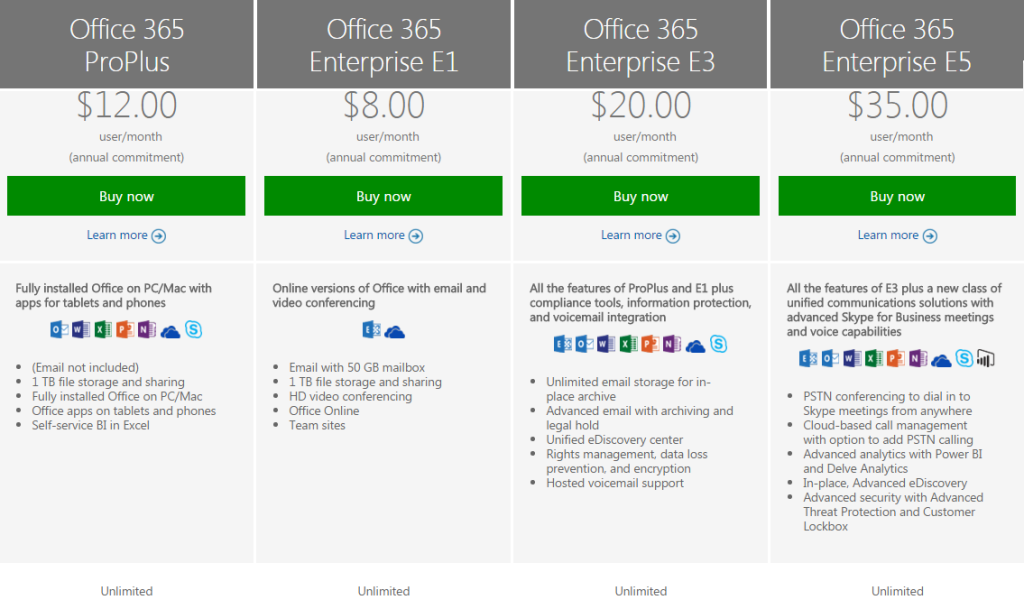
For large enterprises, unlimited user versions of Office 365 are available, ranging from $12 per person per month to $35 per person per month. Each subscription caters to a particular type of enterprise. More expensive enterprise versions of Office 365 add features like voicemail, compliance auditing, rights management, encryption, and Advanced Threat Protection.
Office-365-SJTechies1

Have questions?

Get answers from Microsofts Cloud Solutions Partner!
Call us at: 856-745-9990 or visit: https://southjerseytechies.net/

South Jersey Techies, LL C is a full Managed Web and Technology Services Company providing IT Services, Website Design ServicesServer SupportNetwork ConsultingInternet PhonesCloud Solutions Provider and much more. Contact for More Information.

To read this article in its entirety click here.

Cheaper Is Not Always Better In IT!

Are we allowed to mention cheaper is not always better?

Takeaway: IT in general becomes a better value with improving technology every single year, but that does not equate to cheaper being best.

The register has published a couple of articles recently that have been gnawing away at me. Brid-Aine Parnell reports that just 5 percent of UK CIOs surveyed by the Corporate IT Forum consider Google a credible supplier to business, citing “missing features” when compared with mainstream offerings from companies like Microsoft.

For the last couple of years it’s seemed that talking disrespectfully about any element of cloud computing was corporate suicide. I’ve sat in meetings where organizations with anywhere from 40 to 100 users have asked us why they can’t use Google docs rather than Office with a fileserver, why we recommend laptops and workstations when PC World or Comet have alternatives for sale that may be hundreds of pounds cheaper, and why, on one occasion, we were recommending a phone system that was costly when Skype did everything an office phone did and cost nothing.

On the September 3, Rik Myslewski commented on Net Applications’ monthly ‘Net Market Share’ survey, which calculates Desktop Operating System Market Share based on internet usage reported by 40,000 websites worldwide.

Microsoft Windows 7 has just overtaken XP with 42.76% of the market share against 42.52% for XP. That’s over 85% of worldwide desktop computers running either Windows 7, the version of Windows currently in the shops and that a number of IT departments have, possibly reluctantly, upgraded their workforce to, or Windows XP, the version that shipped on PC’s between 2003 and 2007 and that plenty of large IT departments still choose to deploy.

Of the remaining 14.72 percent, Vista, reviled by users and IT departments everywhere, claims 6.15%. All flavors of OS X account for 7.13% (the largest single contributor was Lion, with 2.45%) leaving Linux with 1.10%.

Most IT pros have used Linux at some point; its appeal is too great not to. It’s powerful, stable and incredibly configurable, and costs either nothing or very little. Linux is fun to get working and to work with. So why 1.10%? It most likely comes down to the fact that most PC users are not prepared to put much learning time into using their operating system, and Linux is far enough removed from Windows that, other than for standard tasks, navigating the OS will demand at least some investment. Also, the variety of builds and hardware, support (professional or otherwise) has to be more awkward. It’s easy to overlook that one of Apple’s greatest strengths is the benefit of designing both the hardware and software and knowing they function well with the other. Support is simplified.

Most people, particularly those making IT purchasing decisions, will have used a PC. Discussing whether Linux is a good fit for them, especially in a corporate environment, would be fairly straightforward. So why do we struggle with convincing people that Skype is not an alternative to a fully-featured phone system, or that Gmail can only be compared to Microsoft Exchange in the most basic of functions?

Part of the answer lies in the hype of the cloud, promoted as all things to all men (at least IT-wise) while saving money too. Has a concept, gadget, or major software release ever generated the same buzz? The triumvirate of newtechnically advanced and cheap is an extremely powerful lure. The cloud will change how we work and will have relatively low-cost elements, but is not an entity in its own right. Gartner industry analysts report that cloud computing has passed through the hype stage and is now entrenched in the “trough of disillusionment.” This is not a comment on the state of IT in 2012, it’s the expected reaction to the hype created by those intent on making a buck in the short term. In the middle of difficult trading conditions, it was easy for decision makers to be seduced by the promise of better and cheaper, without needing to test a product in action.

This last point is pertinent in the small- and medium-sized business (up to perhaps 500 workstations) marketplace. We can tell our clients where we think cloud solutions will suit them and where they won’t. Actually giving them a working demonstration is significantly harder; there are numerous difficulties to moving an office, department or team over to Gmail, or certain folders off the file server to Google docs. We’ve done it and it’s awkward and clients don’t want awkward from their IT; they want the additional benefits and lower costs advertised.

There’s also an issue with IT departments being reluctant to say no. In those meetings where decision makers are pushing for Skype and Gmail, or cheap laptops and workstations, we want to be as helpful as possible and it’s absolutely our duty to recognize the benefits of lower cost and to either provide an agreed solution (specification and features) at the lowest price, or to be perfectly clear about the different feature sets at different price points. It’s rarely our place to set the budget, but we must be able to deliver the best option at any price point or to demonstrate why a cheaper option may be of lesser value.

That can be a more obvious problem during a recession when companies are receiving dozens of calls every week from IT providers pitching for business offering what they claim is both better and cheaper. We’re in no doubt that the cloud will continue to be a huge benefit at a huge number of price points. A $1,600 workstation will be better value to some users than a $320 netbook, while plenty of users will find Gmail does exactly what they need at a fraction of the cost of Exchange 2010. IT in general becomes a better value with improving technology every single year, but that does not equate to cheaper being best.

To View Full Article Click Here

Exclusive offer from BigBeagle.com

Exclusive offer from: BigBeagle.com  |  24/7 Support: 8885051532

BigBeagle is a reseller of GoDaddy and offers GoDaddy products at a discounted price. Don’t forget to visit our coupon page at http://bigbeagle.com/coupons for the latest and greatest promotions.

Save upto 10% on all new purchases of $40 or more, great products just for you. Hurry before the offer expires.

Use promo code rs217a5 in your cart when you order.

*Some limitations apply. Applicable to new purchases only. Enter promo code into shopping cart to see full details. Minimum purchase of $40 required. Offer expires Tuesday, July 11, 2017 at midnight (Mountain Time).

Copyright © 2017 BigBeagle.com. All rights reserved.

Exclusive offer from BigBeagle.com

Exclusive offer from: BigBeagle.com  |  24/7 Support: 8885051532
Amit Shah — Customer Number: 57156051

BigBeagle is a reseller of GoDaddy and offers GoDaddy products at a discounted price. Don’t forget to visit our coupon page at http://bigbeagle.com/coupons for the latest and greatest promotions.

Save upto 10% on all new purchases of $50 or more, great products just for you. Hurry before the offer expires.

Use promo code rs217a1 in your cart when you order.

*Some limitations apply. Applicable to new purchases only. Enter promo code into shopping cart to see full details. Minimum purchase of $50 required. Offer expires Wednesday, May 03, 2017 at midnight (Mountain Time).

Copyright © 2017 BigBeagle.com. All rights reserved.

Exclusive offer from BigBeagle.com

Exclusive offer from: BigBeagle.com  |  24/7 Support: 8885051532

BigBeagle is a reseller of GoDaddy and offers GoDaddy products at a discounted price. Don’t forget to visit our coupon page at http://bigbeagle.com/coupons for the latest and greatest promotions.

Save upto 5% on all new purchases of $20 or more. Hurry before the offer expires.

Use promo code rs217a6 in your cart when you order.

*Some limitations apply. Applicable to new purchases only. Enter promo code into shopping cart to see full details. Minimum purchase of $20 required. Offer expires Wednesday, July 19, 2017 at midnight (Mountain Time).

Copyright © 2017 BigBeagle.com. All rights reserved.

CALL US NOW!