Back to Top

Tech, Web, Cloud & Cabling Services

The 10 most important lessons IT learned in 2015

Every year brings with it new challenges, and new lessons, for IT in the enterprise. Here are 10 of the lessons IT learned this past year.

IT lessons


The end of a year is always a good time for reflection, especially so if you’re evaluating what your business did right and what you can improve upon. In an increasingly digital world, IT has quickly become one of, if not the most, important aspects of an organization. So, it should be with great care that executives and admins look back on their year and try to glean some wisdom about what can be done differently in the year to come.

Here are 10 of the most important lessons that IT learned in 2015.

1. BYOX is here to stay

As smartphone use grew to near ubiquity in the enterprise, it brought with it the trend of BYOD, or, bring your own device. While that originally referred to mobile devices such as smartphones and tablets, it spawned as host of “bring your own” everything else.

“BYOX is the new mantra with consumers bringing their own applications, cloud sharing tools, social media into the enterprise; essentially bringing their own expectations of which technology they want to use and how and where they want to work in a corporate environment,” said Chuck Pol, president of Vodafone Americas.

2. DevOps is no longer just a buzzword

The term “DevOps” gained huge popularity in 2015 as a reference to an agile method that stresses the collaboration of development and operations. The goal is to connect the writers of the code with those who maintain the systems that run it. However, DevOps continues to evolve and, although it has its own set of challenges, it could be poised to become the method of choice for enterprise IT starting in 2016.

3. Data is currency

Data, especially as it relates to big data has been steadily growing in value but 2015 felt like a tipping point. Tools for both structured and unstructured data exploded in popularity and major data service providers went public, adding credibility to the field and likely creating a better inroad into the enterprise. Also, businesses got better at distinguishing between relevant and irrelevant data.

“It is no longer credible to look at data as big static objects in a deep lake, but rather be considered a set of fast moving assets in a raging river,” said Neil Jarvis, CIO of Fujitsu America. “In 2016 and beyond, companies need to look at the data that creates business-relevant information for today and tomorrow.”

4. Finding talent is problematic

Talent shortages don’t just affect startups on the West Coast. CompTIA CIO Randy Gross said that current estimates suggest there are more than one million IT job opening across the US alone, ranging across skill level from support specialists to network admins. Enterprises are going to have to work harder to attract and retain talent.

“Wise employers with IT jobs to fill have engaged in a self-examination of the tactics and strategies they’re using to attract new talent—and adjusting accordingly,” Gross said. “For some companies, new telecommuting and remote work options have helped them fill their talent gaps.”

5. SMAC is still relevant

The SMAC stack, which stands for social, mobile, analytics, and cloud, is also known by some as the “third platform.” As all of these individual components continue to grow and thrive in the workplace, their interdependencies will grow along with them.

“Senior management must become well versed about these technologies and their possibilities to create new value and new competitive advantages in their own business and markets,” Pol said.

6. Cloud lost its fear factor

Cloud acceptance was a mixed bag for a long time, but 2015 brought a more widespread embrace of cloud technologies and services in the enterprise. In fact, some trends are making it almost a necessity.

“The complete adoption of virtualization, as well as investigation into cloud and other strategies, is far more advanced than expected—particularly amongst SMBs,” said Patrick Hubbard, technical product marketing director at SolarWinds. “Making operating systems and applications truly mobile is redefining how companies think about their IT infrastructure.”

7. The security mindset is changing

Anthem BlueCross BlueShield and Harvard University were among the major organizations that dealt with a public security breach in 2015. With today’s social media, you can almost guarantee any data breach that occurs in the enterprise won’t stay a secret. And, with the risk of a breach high, Intel Security CTO Steve Grobman said that teams must adopt a new way of thinking.

“IT must embrace the mindset that they have already been breached, now how do you protect your environment with this new default outlook?,” Grobman said.

8. Shadow IT is a line item

Shadow IT carries nowhere near the same amount of scorn it once did in the enterprise. Some organizations are even openly embracing it, and making it a foundational part of their IT strategy. And, as shadow IT continues to grow, Pol said, it needs to be properly accounted for in the budget.

“As technology continues to transform business, IT infrastructure will become more complex and more difficult to have a complete view of technology across the business,” Pol said. “The role of IT will need to become more strategic and set clear lines of accountability between IT and line of business budget holders.”

9. Employees are the biggest security risk

When most people think about security risks to their organization, the image of the hooded hacker furiously typing away in a dark room. However, employees themselves pose a real threat to the security of an organization as well. Issues such as poor password practices and using unsecured networks with company devices are a real problem. Kelly Ricker, senior vice president of events and education at CompTIA, said mobile, while helping with agility and productivity, is a cybersecurity nightmare.IT

“Every device that employees use to conduct business—smartphones and smartwatches, tablets and laptops—is a potential security vulnerability,” Ricker said. “Companies that fail to acknowledge and address this fact face the very real risk of becoming a victim of cyber criminals and hackers.”

10. Commoditization is a threat

With the plethora of tools available to build and replicate popular tech, it is increasingly important for organizations to guard against the threat of commoditization.

“As development cycles become shorter and the potential for intellectual property to be recreated and copied increases, it is becoming more difficult to create a sustainable competitive advantage for your products and services,” Pol said.

Have questions?

Get help from IT Experts/Microsofts Cloud Solutions Partner
Call us at: 856-745-9990 or visit: https://southjerseytechies.net/

South Jersey Techies, LLC is a full Managed Web and Technology Services Company providing IT Services, Website Design ServicesServer SupportNetwork ConsultingInternet PhonesCloud Solutions Provider and much more. Contact for More Information.

To read this article in its entirety click here.

How to Upgrade to Windows 10

Windows 10 is now available as a free update. Here is what you can expect when you say “yes” to the update.

Here’s a step-by-step walkthrough of the upgrade process while upgrading Windows 8 machine to Windows 10.

Launch Windows 10 upgrade through Windows Update

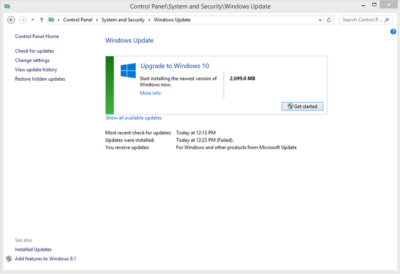
Look for the Update screen in Windows 8 and click the Check for Updates link. When the check is over, you will see the screen shown in Figure A.

Figure A

As you can see, it is a 2699.0 MB download. Click the Get Started button and then the screen shown in Figure B will appear.

Figure B

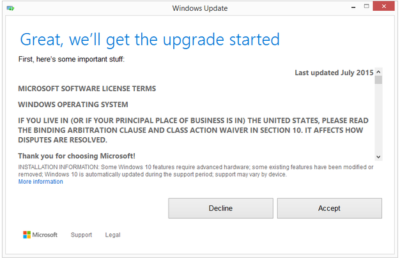
You may be able to get Windows 10 via a free update, but it still requires that you agree to a license/user agreement.

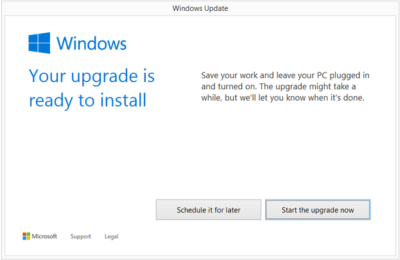
The next screen (Figure C) is very important. Updating takes about 2 hours depending upon the machine. If you cannot afford to be off your computer for that long, it may be a good idea to schedule a time when you can.

Figure C

Installation process

After you start the update process, your PC will immediately restart. From that point on you will just have to wait for the update to finish. During update the screen gets blank for over an hour, so please don’t panic and turn your PC during this seeming lack of activity.

Your PC may also restart several times during the update, but eventually you will reach a screen that asks if you want to do an Express Configuration or a Custom Configuration. Express configuration will be the best choice for most people.

Note that the update does take a bit of bandwidth, so it might be more efficient to update one PC at a time.

When the entire update procedure is complete, you will be presented with the Windows 10 desktop or tablet interface depending on your device as you can see in Figure D.

Figure D

There are new versions of OneDrive and the Snipping Tool in Windows 10. Of course, there is also the new web browser, Microsoft Edge, too.

Get Windows 10 without using Windows Update

If you would like to get Windows 10 without going through the update process, for a clean install for example, then you will have to download the Windows 10 ISO file.

If you have a Windows Vista or Windows XP PC you would like to update, you have to purchase Windows 10. Windows 10 Home will cost you $119, while Windows 10 Pro will cost $199.

As of July 29, 2015, most new devices will be available with either Windows 10 or Windows 8.1, which can be upgraded to Windows 10 for free. If your PC is more than a few years old, it might make more sense to spend money on a new device rather than to update an old one.

Have questions?

Get answers from Microsofts Cloud Solutions Partner!
Call us at: 856-745-9990 or visit: https://southjerseytechies.net/

South Jersey Techies, LLC is a full Managed Web and Technology Services Company providing IT Services, Website Design ServicesServer SupportNetwork ConsultingInternet PhonesCloud Solutions Provider and much more. Contact for More Information.

To read this article in its entirety click here.

When should businesses upgrade to Windows 10?

Looking at upgrading your business PCs to Windows 10 but not sure when to make the leap? Here are some issues to consider.

Business customers can often be years behind the state of the operating system art: right now most businesses are still running Windows 7, launched back in July 2009, having shown limited interest in Windows 8 which arrived in August 2012.Windows 10

Even when they buy new PCs, most companies today still downgrade them to Windows 7, so it’s usually home users that are first to take the plunge with the new software, whether they like it or not.

However, businesses may be significantly faster to adopt Windows 10, which arrives on 29 July (volume licensing customers will be able to download Windows 10 Enterprise and Windows 10 Education on Volume Licensing Service Center from 1 August) than previous versions of Microsoft’s operating system.

Part of the reason for the change is the huge public testing process – five million testers strong – that has preceded the arrival of Windows 10. As a result, the standard policy of waiting for the first service pack to arrive before rolling out a new OS is now longer the right one, says Stephen Kleynhans, research vice president at analyst Gartner.

However, that doesn’t mean firms should be full steam ahead with upgrades. “I’m not one who believes there is a need to rush to a new operating system. You want to let the ecosystem around the operating system mature a little bit before you jump right in,” he says.

Companies should wait until it’s clear if the line of business applications they use work happily with Windows 10, and whether they can find enough expertise to make sure any rollout is a smooth one. “All of that has to build up before you want to jump in and start running it in your production environment,” he said.

Kleynhans said businesses need to spend some time testing out Windows 10 in a controlled fashion: “Bring it into a lab, bring it into a test environment, let some folks run it for the rest of this year. Then, in 2016, get serious about it, start looking at it in a real test environment, start piloting it with some real users to see how it’s performing.”

He said that if all goes well companies should be ready to start deployments in the second half of 2016 or the beginning of 2017, depending on how large and complex their IT environment is.

“If you’re a large company nothing happens really fast. If you’re a small company the timeline is going to be a lot faster – if you’re testing with 10 people you might be testing with ten percent of the company.”

Starting the rollout a year to 18 months after the operating system is launched might seem like a long delay, but it would still be six months to a year faster than with previous upgrades.

Kleynhans said that it took most big companies 18 months of testing and remediation work before they were able to start rolling out Windows 7. In contrast, most companies will get Windows 10 testing and remediation done in less than six months.

The analyst said that some organizations are keen to get moving as soon as Windows 10 is available – such as those that are still using Windows XP or who have plans to deploy hybrid PC devices. But, for most companies, this will be too soon.

“There are pieces of the operating system targeted at the enterprise that we really haven’t had a chance to try out yet. You can’t consider significant production rollouts even in the most aggressive cases until later in the fall.”

He cited Windows Update for Business as a new tool that small and medium sized businesses will want to use, but that wasn’t part of the tech preview. There are also some other security components that haven’t been as broadly tested or available during the tech preview, he said.

As Ed Bott notes over at Tech Pro Research, other missing features will include the new unified sync client for OneDrive (the consumer cloud storage service) and OneDrive for Business (the cloud storage service for business Office 365 subscriptions). He predicts these will be wrapped up by late October, in time for Windows 10 PCs to hit the retail channel for the festive season.

Other factors to consider: at a prosaic level, the upgrade will inevitably cause disruption so don’t plan it for a busy time of year. If you’re in retail, starting the upgrade in November or December might be a career limiting decision for the CIO.

The state of your current infrastructure is another element to take into account. Gartner says that companies planning Windows 8.1 deployments should instead redirect their efforts toward earlier deployment of Windows 10.

“In almost all cases, enterprises currently planning to deploy Windows 8.1 should switch to Windows 10. Enterprises that already have Windows 8.1 deployed should continue with those deployments for the time being. Customers on Windows 7 with no plans for Windows 8.1 should begin evaluating Windows 10 for deployment in 2H16 or later,” the analyst firm said in a research note.

Equally, for some, the upgrade may never take place. David Gewirtz has no plans to upgrade any of his Windows 7 devices to Windows 10: “They work, they’re rock solid, and all their drivers are perfectly tuned to the hardware they’re running on,” he notes.

However long it takes enterprises to take the plunge, Windows 10 is likely to become widely adopted, if only because most firms will need to move off of Windows 7 eventually, while the relatively few who did move to Windows 8 will also update sooner rather than later. The pressures that forced companies to migrate off Windows XP and onto Windows 7 will eventually make them move from Windows 7 to Windows 10.

“Windows 7 comes to end of life in January 2020. That’s only four and half years away so you’re going to see the same sorts of pressures mount to get off of Windows 7. They need to go somewhere and they’ll go to Windows 10,” he said.

Have questions?

Get help from IT Experts/Microsofts Cloud Solutions Partner
Call us at: 856-745-9990 or visit: https://southjerseytechies.net/

South Jersey Techies, LLC is a full Managed Web and Technology Services Company providing IT Services, Website Design ServicesServer SupportNetwork ConsultingInternet PhonesCloud Solutions Provider and much more. Contact for More Information.

To read this article in its entirety click here.

Microsoft Surface: iPad knockoff for enterprise?

As I’ve said many times, I barely have any use for the new iPad. Most technologists I know feel the same way about tablets. However, most of us understand that we’re an anomaly. For tens of millions of people, using a tablet like the iPad is infinitely easier and less frustrating that dealing with a Windows laptop. That’s why tablets are eating the bottom out of the PC market, and the trend is accelerating.

Microsoft knows this. It also knows that an alarming number of companies are allowing their employees to use iPads and some are even running trials to hand out the new iPads to lots of highly mobile employees. What’s even worse for Microsoft is that most of these employees are loving it and are gladly chucking their Windows laptops aside.


While a lot of these employees will still periodically use Windows machines for some of their work, they’re using them less frequently and that means slower PC upgrades and less urgency to jump to Microsoft Windows 8. We’re still only talking about a fraction of the market — iPad will sell 60 million units in 2012 versus 400 million PCs, according to Gartner. Nevertheless, it has Microsoft freaked out because it’s been just a little over two years since the iPad debuted.

That’s a lot of disruption in a short period of time.

Of course, that brings us to the announcement of the Microsoft Surface tablet this week. Microsoft turned a lot of heads by revealing that it is going to build its own line of Microsoft Windows 8 tablet devices, à la Zune and Xbox. The hardware design for the Surface that Microsoft showed off on Monday was impressive enough to pique the interest of the tech press and the public.

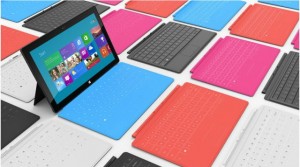
The tablet itself looks a lot like the new iPad and many of the high-end Android tablets, but there were a pair of features that stood out. The first was a sturdy built-in kickstand that stealthily pops out from the back of the tablet. The second is the magnetic cover that doubles as a keyboard and touchpad. When you put these two features together you suddenly have a tablet that easily doubles as a laptop. That eliminates the need for someone to have two devices.

Sure, the hardware of the Microsoft Surface Tablet echoes the iPad. But, Microsoft did use a special magnesium body that makes it light, thin, and durable. Sure, the cover of the Surface is a copy of the iPad’s Smart Cover, but Microsoft did innovate by adding a keyboard on the inside.

There’s plenty about the Microsoft Surface Tablet that screams, “iPad knockoff!” and the failure of Android tablets and the tablet debacles at RIM and HP show that trying to build an iPad competitor for the enterprise can be a brutal business.

Still, the Microsoft Surface Tablet has something going for it that the BlackBerry PlayBook, HP TouchPad, and the parade of Android tablets don’t — it’s going to automatically drop into the Windows networks that most Fortune 500 companies as well as a lot of small and medium businesses already have in place. That’s going to mean a lot fewer worries about compatibility, security, and data protection. In other words, it means a lot less work for IT on the backend and a smoother transition for many users

That doesn’t mean the Microsoft Surface Tablet is a slam dunk. There is still a big question about whether users are going to find the Windows 8 interface as easy to use as the new iPad. And, will spyware and malware become a big problem on the Surface since it’s running the full version of Windows? Above all, how much is it going to cost? The Pro version of the Microsoft Surface Tablet that most businesses are going to want is expected to cost about the same price as an Ultrabook — in the $800-$1000 range.

Ultimately, if you want to think of the Microsoft Surface Tablet as an iPad knockoff with a few key innovations and additions that make it a legitimate option for businesses, that’s fine. A lot of companies will be happy to pay a premium for an iPad look-alike that automatically fits into their current networks and is guaranteed to work with their existing applications.

To View Full Article Click Here

10 Free Anti-Malware Tools to Try

Over the last few years, anti-malware software has become increasingly costly. But believe it or not, there are still ways to protect your computer for free. In this article, I will list 10 free utilities you can use to either prevent malware infections or to help clean up the mess once a PC becomes infected.

1: AVG Anti-Virus Free Edition 2011
I have been using AVG’s free antivirus product for a few years now, and although it isn’t perfect, it seems to be at least as good as most of the commercial anti-malware products. AVG’s free edition provides basic protection against viruses and spyware, but the company also offers a more comprehensive security suite called AVG Internet Security 2011. This suite offers the same anti-malware protection as the free edition, but it also provides real-time protection against Internet search and social networking sites.

2: Comodo Antivirus
Comodo Antivirus takes a different approach to virus protection than most other antivirus products do. Comodo is based on the idea that it is foolish to allow code to run without first proving itself to be benign. So Comodo implements a default denial until an executable proves itself trustworthy. To keep the software from being too chatty, Comodo executes unknown code in an isolated sandbox where its behavior can be monitored without running the risk of the executable harming the system.

3: PC Tools AntiVirus Free 2011
PC Tools AntiVirus Free 2011 is a basic antivirus / anti-spyware program that is designed to protect Windows desktops against various forms of malware. Besides its basic detection capabilities, PC Tools includes a feature called Search Defender that is designed to warn you about unsafe Web sites (or phishing sites) before you click on them. The software also includes a File Guard component that monitors the file system and blocks attempted malware infections in real time.

4: Avast Free Antivirus
Like AVG, Avast sells comprehensive security suites, but makes its basic antivirus / anti-spyware product available for free to home users. Although I have never used Avast Free Antivirus, I’ve recently noticed posts in various message boards from people who claim that Avast provides better protection than some of the commercial products.

5: Ad-Aware Free Internet Security
Although it was originally designed as a product for detecting adware, Lavasoft’s Ad-Aware has evolved into a complete anti-malware product. Ad-Aware Free Internet Security provides real-time protection against spyware, rootkits, and more. It also includes a utility called The Neutralizer, which you can use to clean a PC that has already been infected.

6: HijackThis
HijackThis is one of my favorite anti-malware utilities, but it’s not for the faint of heart. HijackThis is designed to compile a report of critical file and registry settings that are often prone to viral infections. The thing that makes HijackThis difficult to use is that it makes no distinction between malicious and legitimate entries. As a result, you can end up doing even more damage to a PC unless you know what you are doing. Even so, I consider HijackThis to be a must-have utility.

7: Microsoft Security Essentials
Microsoft provides free antivirus protection for home users through a relatively new application called Microsoft Security Essentials. Microsoft Security Essentials is based on the same ForeFront technology as Microsoft’s enterprise class anti-malware software. The difference is that Microsoft Security Essentials is available solely to home users and businesses with fewer than 10 Windows desktops.

8: Windows Defender
Microsoft’s Windows Defender is a free anti-spyware utility for Windows. It’s not comprehensive, but it does a surprisingly good job of protecting Windows as long as you install it before an infection occurs.
Windows Defender is included with Windows Vista and Windows 7, but you can also download a version for Windows XP. If you are using Windows 7 or Windows Vista, Windows Defender is disabled by default. You can enable Windows Defender by typing the word Defender into the Windows search box and then double-clicking on the Windows Defender option. When you do, Windows will tell you that Windows Defender is turned off and will give you the opportunity to enable it.

9: Malicious Software Removal Tool
Although not a comprehensive antivirus tool by any stretch of the imagination, Microsoft’s Malicious Software Removal Tool does a good job of detecting and removing the most common viruses. The Malicious Software Removal Tool works with Windows 7, Vista, XP, and Server 2003. Microsoft releases updates to this tool on the second Tuesday of each month.

10: McAfee virus removal tools
McAfee makes commercial antivirus products, but it also offers some free tools for removing viruses. Specifically, it offers tools for removing Sasser, Bagle, Zafi, Mydoom, Lovsan / Balster, Klez, and Bugbear. You can download all of these tools here

To view the original article in it’s entirety Click Here

TECHIES, websites

New Website Design – Prism Engineering

The Website Design team of South Jersey Techies has been constantly working on developing great looking websites using the latest web technologies. The most recent website developed by our team is for Prism Engineering. From warehouses and manufacturing to data centers, hospitals, campuses, solar, and complex infrastructure, Prism has a track record of handling high-stakes, high-complexity projects at scale. With a veteran leadership team averaging 25+ years of experience, Prism brings unmatched knowledge of New Jersey, Pennsylvania, and Delaware regulations, agencies, and development processes.


Have questions?


Our Web Design team is here to help. Call us at: 856-745-9990 or visit: https://southjerseytechies.net.


South Jersey Techies, LLC is a full Managed Web and IT Services Company located in Marlton, NJ providing IT ServicesManaged IT ServicesWebsite Design ServicesServer SupportIT ConsultingVoIP PhonesCloud Solutions Provider and much more. Contact Us Today.

Obama Wants To Build The Most Powerful Supercomputer In The World By 2025

Super Computer

Yesterday, on July 29, the White House made a pretty big announcement for the computing world: by 2025, the U.S. hopes to have on its hands a supercomputer so powerful that it can perform one quintillion, or 1018, operations each second. For those baffled by that unfathomably large number, it’s a billion billion.

This plan is part of an Executive Order, issued by President Obama, to see the creation of an ambitious scheme called the National Strategic Computing Initiative (NSCI). The ultimate aim for the next decade is to maintain the U.S.’s current position as world leaders in the development of High-Performance Computing (HPC) systems.

Marrying incredibly powerful computers with vast amounts of storage, supercomputers have been pivotal in a variety of research fields, helping scientists to model an array of physical systems and natural phenomena. For example, researchers can simulate what happens when galaxies collide, or when molecules interact with one another. They can even help us to predict short- and longer-term trends involving different scenarios, such as the potential impacts of climate change, or what could happen during a disease outbreak.

Although the performance of these computers can be assessed in a variety of ways, a common measure is “flops,” or the number of calculations that can be performed each second. As it stands, the speediest supercomputer is China’s Tianhe-2, which, running at 33.86 petaflops, is capable of quadrillions of calculations per second, BBC News reports. But Obama wants to reach the next level, stepping into the exascale realm. Exascale computers are those capable of at least an exaflop, which is about a thousand times the speed of petascale systems. So that’s a pretty big leap.

But the potential of such systems could be huge. With the capacity to rapidly analyze such vast amounts of data, scientists could make significant progress in fields such as personalized medicine. By processing huge medical databases, scientists could better predict how certain drugs may interact with different populations of people or individuals with certain genetic variations, identifying those that may be particularly susceptible or unsuitable for various therapies. Furthermore, the storage and processing capacities could allow scientists to combine real data with simulations, which could allow for better predictions of weather or climate change, for example.

Although there seems to have been a focus on speed, the President’s Council of Advisors on Science and Technology has pointed out that high-performance computing isn’t just about flops, but also ability. In order for the field to progress, researchers need to create systems that are capable of keeping up with huge amounts of rapidly growing and changing data. There is clearly a lot of work to be done, but the ambitious goal does not sound unachievable.

Have questions?

Get help from IT Experts/Microsofts Cloud Solutions Partner
Call us at: 856-745-9990 or visit: https://southjerseytechies.net/

South Jersey Techies, LLC is a full Managed Web and Technology Services Company providing IT Services, Website Design ServicesServer SupportNetwork ConsultingInternet PhonesCloud Solutions Provider and much more. Contact for More Information.

To read this article in its entirety click here.

What You Need to Know About the Big Chip Security Problem

According to Intel Corp.,most of the processors running the world’s computers and smartphones have a feature that makes them susceptible to hacker attacks. The chipmaker, working with partners and rivals, says it has already issued updates to protect most processor products introduced in the past five years, but the news sparked concern about this fundamental building block of the internet, PCs and corporate networks.

The revelation of the so-called Meltdown and Spectre vulnerabilities spurred a scramble among technology’s biggest players, from Apple Inc. to Amazon.com Inc., to enact fixes and reassure customers they were on top of the problem.

1. What’s the problem?

Modern processors guess what they’ll have to do next and fetch the data they think they’ll need. That makes everything from supercomputers to smartphones operate very fast. Unfortunately, as Google researchers discovered, it also provides a way for bad actors to read data stored in memory that had been thought to be secure. In a worst-case scenario, that would let someone access your passwords.

2. How bad is it?

The vulnerability won’t stop your computer working and doesn’t provide an avenue for hackers to put malicious software on your machine. Though it could put important data at risk, there’s been no report so far of anyone’s computer being attacked in this manner. More broadly, though, the new fears could undermine longtime assurances that hardware and chip-level security is more tamper-proof than software.

3. How was it discovered?

The weakness was discovered last year by folks Google employs to find such issues before the bad guys do. Usually, solutions are developed in private and announced in a coordinated way. This time the news leaked before the companies involved had a chance to get a fix in place.


4. What’s being done to fix it?

Chipmakers and operating system providers, such as Alphabet Inc.’s Google and Microsoft Corp., are rushing to create software patches that will close the potential window of attack. Intel said that it expects to have issued updates for more than 90 percent of recently introduced processor products. Amazon.com Inc. said “all but a small single-digit percentage” of its servers have already been protected. In a blog post, Google said its security teams immediately “mobilized to defend” its systems and user data. Some customers of Android devices, Google Chromebook laptops and its cloud services still need to take steps to patch security holes, the company said. Patches for Windows devices are out now and the company is securing its cloud services, Microsoft said in a statement.

5. Is this just an Intel problem?

No, though that seems to be what panicky investors initially thought. Intel says it’s an issue for all modern processors. But rival Advanced Micro Devices Inc. stated that its products are at “near-zero risk.” ARM Holdings, which has chip designs that support all smartphones, said that, at worst, the vulnerability could “result in small pieces of data being accessed” and advised users of its technology to keep their software up to date. Google fingered all three companies. Apple said all Mac computers and iOS devices — including iPhones and iPads — were affected, but stressed there were no known exploits impacting users and that steps taken to address the issue haven’t dented performance.

6. What will the fallout be?

Some computers, mostly older ones, could be slowed down by the software patches that will make them more secure. Intel said that in common situations software might be slowed down by as much as 3 percent or not at all. But in other rare situations, performance might be reduced as much as 30 percent. The company doesn’t expect any financial impact and said it thinks customers will keep buying. As the fixes haven’t been widely deployed yet, it’s unclear whether anyone will even notice or whether computer slowdowns will be widespread. Intel has only done lab tests.

iPhone 7 rumors: Goodbye 16GB, hello 256GB and ‘Pro’ line

The new iPhone doesn’t come out until September, but that won’t stop the rumor mill from churning at a furious pace.

iphone-7

Now that WWDC is over, the iPhone 7 rumors are getting even louder, since its expected unveiling in September is probably the next time we’ll see Tim Cook on stage. Yes, that’s still a good while from now. To help keep track of all the scuttlebutt, we’re collecting every rumor we’ve heard so far—and every new one that crops up between now and the day Tim pulls the new iPhone out of his pocket. Then we’ll assess whether each rumor seems legit or absurd, and we’d love to hear your thoughts too. Sound off in the comments.

What’s the latest?

The rumor: Pricing specs for the upcoming iPhone 7 have allegedly leaked on Weibo, according to 9to5Mac. If believed, the specs show that Apple is looking to release a 256GB model of the iPhone 7 that will be the same price as the 128GB model of the current generation iPhone 6s. Furthermore, Apple would drop the meager 16GB models, offering instead 32GB, 64GB, and 256GB for the iPhone 7 and 32GB, 128GB, and 256GB for iPhone 7 Plus. And that’s not all, the rumor on Weibo has it that Apple is gearing up an iPhone 7 Pro line. This Pro model would be the only one to offer the dual-camera system that’s been rumored before, and a Smart Connector for accessories similar to the iPad Pro.

Plausible: Generation after generation, Apple has mostly retained the same pricing for iPhone models, so the fact that the 256GB iPhone 7 would cost the same as the current 128GB wouldn’t be unheard of. However, we’re a little skeptical that Apple would get rid of the 16GB base models, especially since iOS 10 seems to have been designed to optimize storage. And the Pro line would be an interesting addition, and would certainly make up for the fact that the iPhone 7 is rumored to be almost-identical to the 6s models. Apple is also making some strides in enterprise software, so an iPhone Pro would be a logical next-step.

Headphone jack after all?

The rumor: Via Engadget comes some component photos from Rock Fix, a smartphone repair shop in China. They allegedly show a dual-SIM tray, another shows a dual-lens camera for the larger Plus model, and curiously, there’s even an Lightning assembly that still has the headphone jack attached. People who need a lot of storage will be pleased to hear another photo shows SanDisk memory ships up to 256GB, which would be the most storage Apple’s ever offered in an iPhone.

Plausible? It’s hard to give much weight to photos of components, and as reported in the same Engadget article, conflicting rumors about the dual-lens camera surfaced within days. But it is plausible that these components could be for the iPhone 7—and we know plenty of people who would be thrilled if the new phone had a headphone jack after all.

New colors?
navy-blue-iphone-7-concept

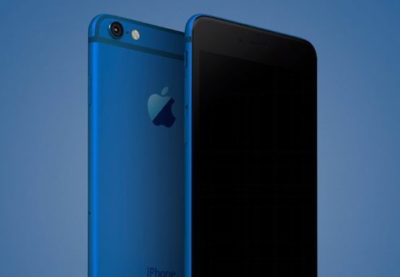
The rumor: It’s not easy being green, and iPhone owners might be starting to get envious of how many colors you can get an Android phone in. iPhones used to be pretty monochromatic, until Apple added gold and then an even brighter splash of color with last year’s rose gold hue (OK, OK, it’s pink). Japanese blog Macotara is reporting that Apple is switching it up this year, swapping the space gray color for navy blue instead.

Plausible? This is absolutely plausible. Apple’s iPhones have never been colorful, but the iPod touch comes in beautiful colored aluminum, and Apple has also set a tradition recently of switching up its Apple Watch bands to fit the season. One of the latest additions is a handsome navy Sport Band, and the Classic Buckle, Leather Loop, Modern Buckle, and two of the Hermès bands come in navy too. Navy looks great on both men and women, but we can’t help being a bit surprised it’s the “basic black” space gray color that’s rumored to be replaced.

A flat Home button?

The rumor:  Blurry, possibly fake spy photos from mobipicker (via 9to5Mac) seem to show a very flat-looking Home button. As in, maybe it’s not a button, maybe it’s just a touch-sensitive place you touch (and/or 3D Touch) instead of physically clicking it.

A fully flat Home button could have 3D Touch potential too.

Plausible? The Touch ID button got a lot faster between the iPhone 6 and 6s, but any button that physically clicks is another opportunity for hardware failure. With the rise of installment plans and the iPhone Upgrade program, we expect Apple to keep making little tweaks that make its phones more durable, so they’re turned in good enough shape to be possibly refurbished and resold. So yes, this is very plausible, and we think Apple could pull it off where the experience is the same, perhaps even using a little haptic feedback to make it feel like the button is clicking but it’s not—just like the Force Touch trackpad.

What about storage size?

The rumor: Apple is ditching the 16GB base model iPhone at long last, at least according to an IHS Technology analyst. The analyst posted on Chinese social media that the base model iPhone 7 will start at 32GB of storage space and 2GB of RAM, based on supply chain research.

Plausible? We sure hope so. Long-time Apple watchers have criticized the company for years over refusing to drop the 16GB model and forcing buyers to choose between the paltry base model and a 64GB option, with no 32GB in between. This is a tale as old as iPhones. In fact, when iOS 8 was released two years ago, many 16GB iPhone owners had to choose between offloading some of their apps, photos, and other files to upgrade to the space-hogging new version or hold off. Apple made iOS 9 a smaller, smarter upgrade, with temporary app deletion making the process easier. But apps easily eat up storage space, and Apple has improved its camera with Live Photos and 4K video-recording, both of which create large files. Sure, you can accept reality and choose the 64GB model, but it’s a lot more expensive. A 32GB base would hit the sweet spot and show Apple can change with the times.

Leaked photos show conflicting design tweaks?
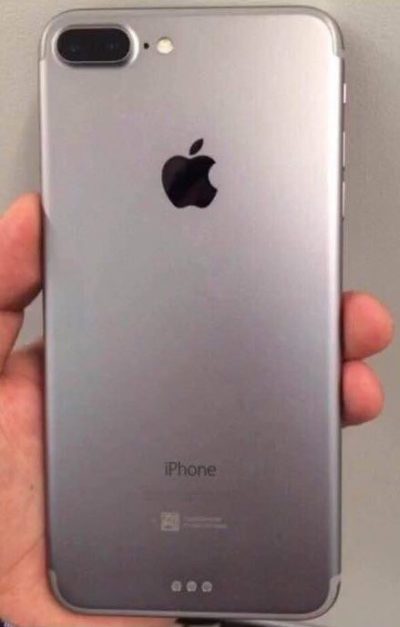
iphone_7_plus_rear

The rumor: Forbes reported on leaked photos that allegedly depict the iPhone 7 chassis. First posted on French tech site NowhereElse.fr, the photos suggest that Apple’s forthcoming iPhone with have double speakers on the top and the bottom, created quad array audio experience similar to the iPad Pro. The photos also seem to confirm, yet again, that the iPhone 7 will not have a headphone jack. Lastly, this iPhone 7 chassis has the flash repositioned underneath the camera, instead of right next to it.

But hold on… according to another recent iPhone 7 photo leak picked up by 9to5Mac, the flash will remain where it is on the 6s. So now we have conflicting rumors. Both sets of photos, however, do show that Apple has redesigned the antenna lines. Instead of horizontal lines, the antenna lines on the iPhone 7 will allegedly be traced along the top and bottom edge of the device.

Plausible? These conflicting Apple rumors could mean a few things. Either both leaked photos are fake, one of them is fake, or both of them are real. According to Forbes, Apple is known for creating several different prototypes of its upcoming products to test, so these photos could both be depicting early but different iterations of the iPhone 7. That both of them would leak, however, seems unlikely.

Smart connector?

The rumor: New images and renderings have surfaced allegedly depicting the iPhone 7 and 7 Plus models. Quoting the Japanese site Mac Otakara, MacRumors reported that these images could be the “real thing.” The leaked image of the iPhone 7 Plus shows a Smart Connector, hinting at the possibility of a Smart Keyboard. While the Mac Otakara report seems to confirm previous rumors the iPhone 7 and 7 Plus will have a similar design to the current generation 6s and 6s Plus, the website also contests previous reports. Most notably, Mac Otakara now refutes the rumor that these new iPhones will have a second speaker to create stereo sound.

Plausible? Apple has been releasing a lot of accessories in the last few months, especially for the iPad Pros. It’s possible the company wants to continue this trend and adding Smart accessories to the 7 Plus. However, a Smart Keyboard suggests that the larger iPhone could have some Pro-style features, and we’re not sure if Apple would want to have it compete with the just-released 9.7-inch iPad Pro.

No headphone jack, really?
beatsheadphones.1.medium

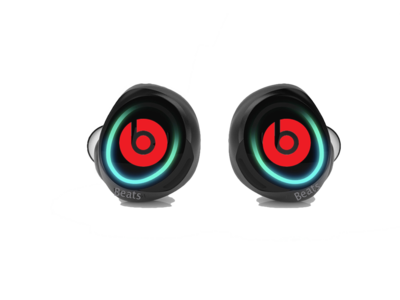
The rumor: Here it is: a leaked iPhone 7 case… allegedly!9to5Mac reported the leaked images as first posted on the@OnLeaks Twitter account. The leaks seem to corroborate a few other rumors about the iPhone 7. For example, the case has no slot for a 3.5mm audio jack, signaling that Apple might be pushing for only Bluetooth and Lightning-connected headphones. The case also has two equally sized speaker grills on each side of the Lightning port slot, confirming that the iPhone 7 will be the first to sport two speakers for stereo sound. Other than that, the purported case points to an iPhone 7 hardware design that’s nearly identical to the iPhone 6s.

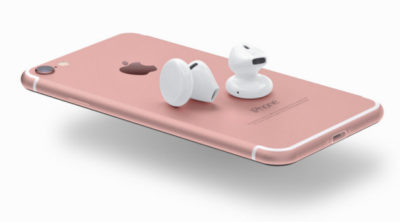
The no-headphone-jack rumor has been around for a while, previously reported by Fast Company and others. Apple is said to be developing wireless EarPods to be sold separately, alongside the iPhone 7. The premium EarPods will reportedly support Siri and wireless phone calls and ship with a carrying case that doubles as a charger.

Plausible? The larger design of the iPhone 6 and 6s lines have proven very successful for Apple, so we can see why the company would want to play it safe design-wise with the iPhone 7. But this similar design may not offer enough reasons to upgrade as we’ve seen with previous numbered upgrades—and if the major innovation requires a lot of people to ditch their 3.5mm headphones or use an adapter, get ready to hear some major griping.

This is the most controversial iPhone rumor in years, even more than the change of sizes with the iPhone 6. Some people love the idea. Others hate it. There’s even a petition to convince Apple that people still love the headphone jack. That petition has just over 300,000 signatures.

How does the dual-lens camera work?

The rumor: We previously reported on the rumor that Apple is looking to bring a dual-lens camera to forthcoming iOS devices. Based on LinX camera technology that Apple acquired last year, the dual-lens incorporates a wide-angle lens and a telephoto lens. According to MacRumors, a recent Apple patent shows for a a split-screen viewfinder where users can see the full image in the wide-angle lens and zoom in with the telephoto lens. The camera will be able to take two separate pics, or use one of the lenses to shoot video and the other to take stills. More impressively, the camera could also implement LinX’s technology to stitch it all together into one really crisp image.

Plausible? The race for bringing DSLR-quality cameras into smartphones is on. Samsung’s recently-unveiled Galaxy S7 garnered rave reviews for its use of Duo Pixel Technology to take photos. Apple may be feeling the heat to create an equally-stunning photo experience to the iPhone 7. If the dual-lens technology as outlined in this patent comes to fruition, it would help the iPhone regain its reputation as the best camera phone on the market.

How thin will the iPhone 7 be?
iphone-7-thickness

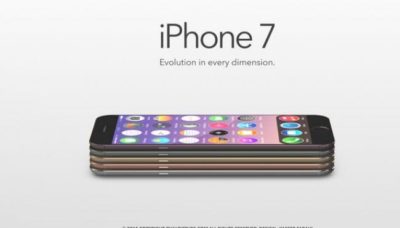
The rumor: Macotakara reported this week that the iPhone 7 will be 6.1mm thick. That’s one whole millimeter thinner than the current iPhone 6s, which measures 7.1mm. This new thinner model will be accompanied by a flush rear camera (so not protruding) for a design that’s sleeker overall.

Plausible? If this rumor is true, Apple seems to be under the impression that thinner is better. Apple has already made a device that measures just 6.1mm: the iPod touch. So it makes sense that the company would want to try to make the newest iPhone be just as thin. Hopefully, the iPhone 7 won’t be affected by any “Bendgate” issues because of this thinner design.

Will the thinner Lightning port mean I have to get new cables?

The rumor: In addition to getting rid of the 3.5mm headphone jack to achieve this new thinness, the iPhone 7 is rumored to integrate a thinner Lightning port. This will not affect the actual Lighting cables, however, so you won’t have to get all new connectors for the iPhone 7. What Apple is doing is simply making the cutout around the port smaller, so it should only affect case-makers, according to 9to5Mac.

Plausible? If Apple is already going insofar as to removing the headphone jack, which has already sparked plenty of controversy, then a slight redesign of the Lightning port doesn’t seem like a big deal. Especially if our current Lightning connectors will still be able to hook up to it.

Camera differences between the 7 and 7 Plus?
iphone-7-plus-dual-camera-1

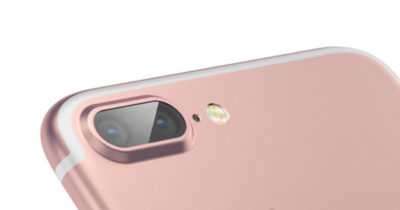
The iPhone 7 Plus might have the most amazing smartphone camera ever.

The rumor: The iPhone 7 Plus will have a better camera, to the chagrin of small-handed amateur photographers around the world. According to MacRumors, the 7 Plus may have a dual-lens camera with optical zoom, which means this phone will take better photos than many traditional cameras. Instead of pinching to zoom in digitally, which usually results in a terrible grainy photo, the 7 Plus camera will have an optical zoom. That’s where the second camera lens comes in: It’s essentially a zoom lens.

Plausible? Yes. The iPhone 6s and 6s Plus have most of the same features, but the larger phone has a small but key difference: optical image stabilization. That feature uses the Plus’s gyroscope and camera array to steady your photos even if your hand shakes. The 6 and 6s rely on camera software to achieve the same effect, though the resulting images aren’t quite as clear. If the 7 Plus has a dual-lens camera with optical zoom, it would be a huge differentiator—the Plus could become the phone to beat for serious photographers.

Is that unsightly camera lens bulge going away?

The rumor: Apple redesigned the 6 and 6s models to be thinner and lighter than ever before, but there’s one big problem: The rear-facing camera lens juts out of the body, so the phones won’t sit flat on a surface. For a company that’s all about the details, this seemed like a strange design decision. The iPhone 7 is reportedly getting a camera that sits flush against the phone, according to MacRumors, so your eyes won’t be offended any longer.

Plausible? We sure hope so. That camera protrusion had to happen for a reason, but even Apple design chief Jony Ive is not a fan.

Will the iPhone 7 be waterproof?

The rumor: Making the iPhone thinner than ever and adding a DLSR-quality camera aren’t game-changing enough for Apple, apparently, so the company is reportedly working on ways to waterproof the iPhone 7. Ambitious? Yes. Possible? Definitely. Without a headphone jack to trap water, Apple could coat the iPhone with a waterproof coating and make those third-party rugged, waterproof cases obsolete.

Plausible? Actually, yes. Apple took several steps to waterproof the iPhone 6s without actually calling it waterproof, as detailed here, and word on the street from people who have accidentally submerged a 6s indicates that those techniques worked. All Apple needs is some waterproof buttons (which it’s reportedly working on), and they’re set.

Next year’s iPhone

Yes, you read that right. In this craziest of iPhone rumor cycles, we’re been reading rumors for the 2017 iPhone mixed in with rumors of the iPhone that should come out in September of 2016. Just to keep them all straight, here are the things we may have to look forward tonext year.

An OLED screen and glass on both sides

The rumor: Remember the iPhone 4, encased in glass on both sides, so you’d have twice as many surfaces that could shatter every time it slipped out of your hand? Apple might bring back an all-glass design in 2017. Hopefully it’s a bit more durable this time.

KGI Securities analyst Ming-Chi Kuo thinks that Apple is planning a major iPhone redesign for 2017—not this fall. In a note to investors, he predicted an iPhone with a 5.8-inch OLED screen that’s encased in glass on both sides, yet smaller than the current iPhone 6s Plus, meaning Apple would be looking to eliminate as much bezel and “chin” as possible. DisplayMate President Ray Soneira echoed Kuo’s OLED predictions in a recent report, citing the “rapid improvements” in OLED performance over the last six years.

“Apple simply has no choice in switching,” Soneira said, because OLEDs are thinner, lighter, more responsive, and can be curved or bent in ways that LCD displays just can’t.

Kuo also predicted the all-glass 2017 iPhone would have wireless charging, and some kind of biometrics, like face recognition or iris scanning. The Home button takes up a lot of space on the current iPhones, and replacing it with other biometrics for login and Apple Pay (along with deep-touch gestures for exiting apps) could let Apple expand the screen.

Plausible? In Apple’s usual “tick-tock” cycle, the 2016 iPhone would get a redesign, since the current iPhone 6s and 6s Plus are upgrades to the iPhone 6 and 6 Plus designs that launched in 2014. But if Apple really is switching to OLED, that’s a major shift that might need more time to perfect. It’ll be interesting to see what innovations Apple can add in 2016 to make the iPhone seem exciting even if the overall design stays the same—a better camera and a Smart Connector are a start.

More evidence of OLED

The rumor:  According to a recent Bloomberg report, Applied Materials, an Apple supplier, has received almost four times the amount of orders for its display-making machines. This jump is linked to Apple retooling the iPhone manufacturing process to include OLED screens in the fall of 2017.

Plausible? We’ve already bought into the general rumor that Apple would switch to OLED, and this report supports the 2017 timeline—according to Applied Materials, it takes about 3 quarters for their machines to be build, delivered, and installed.

Have questions?

Get answers from Microsofts Cloud Solutions Partner!
Call us at: 856-745-9990 or visit: https://southjerseytechies.net/

South Jersey Techies, LL C is a full Managed Web and Technology Services Company providing IT Services, Website Design ServicesServer SupportNetwork ConsultingInternet PhonesCloud Solutions Provider and much more. Contact for More Information.

To read this article in its entirety click here.

CALL US NOW!