Check out a recently developed and designed website by South Jersey Techies Website Team for Sports Goombahs in Bensalem, PA.


Tech, Web, Cloud & Cabling Services


Symantec Endpoint Protection Cloud Windows client upgrade scheduled for August 5, 2019
The SEP Cloud client for Windows is updated periodically to provide improvements and defect fixes. The next update is scheduled to start on August 5, 2019.
WHAT’S NEW ?
In this release, the SEP Cloud client for Windows will be updated to version 22.18 to provide an enhanced protection framework and client stability.
IMPACT
All Windows devices that are currently enrolled in SEP Cloud will automatically be updated in the background, using LiveUpdate. This update does not affect the security of your devices.
To start, the update is distributed to a small set of clients over the first seven days of the release, and then the remaining clients will get the update. If you want to update sooner, you can run LiveUpdate from the Symantec Endpoint Protection Cloud client UI.
Action Required
If no user is logged on the device when the upgrade is made available, then the prompt is provided until the user logs on. The product update will not force the restart of the device.
If you have any questions, please email us at support@sjtechies.com or call us at (856) 745-9990.
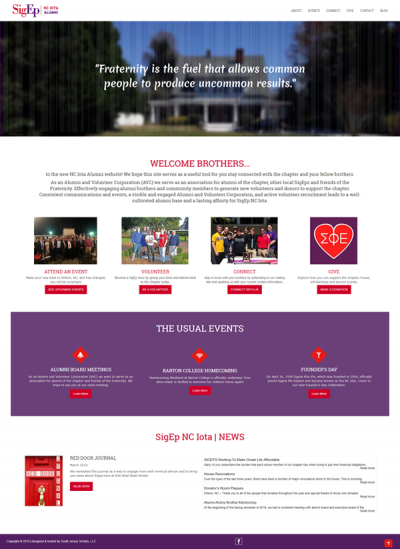
The Website Design team of South Jersey Techies has been constantly working on developing great looking websites using the latest web technologies. The most recent website developed by our team is for SigEp NC IOTA Alumni in Wilson, North Carolina.
SigEp was founded with the Cardinal Principles of Virtue, Diligence and Brotherly Love. Their mission is “Building Balanced Men,” which is achieved through a commitment to Sound Mind and Sound Body.
As an Alumni and Volunteer Corporation (AVC) they serve as an association for alumni of the chapter, other local SigEps and friends of the Fraternity. Effectively engaging alumni brothers and community members to generate new volunteers and donors to support the chapter. Consistent communications and events, a visible and engaged Alumni and Volunteer Corporation, and active volunteer recruitment leads to a well-cultivated alumni base and a lasting affinity for SigEp NC Iota.
Have questions?
Our Web Design team is here to help. Call us at: 856-745-9990 or visit: https://southjerseytechies.net.
South Jersey Techies, LLC is a full Managed Web and IT Services Company located in Marlton, NJ providing IT Services, Managed IT Services, Website Design Services, Server Support, IT Consulting, VoIP Phones, Cloud Solutions Provider and much more. Contact Us Today.
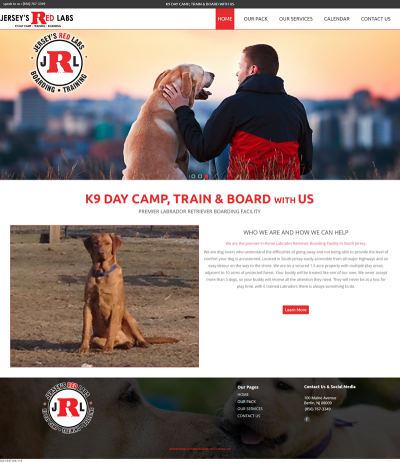
The Website Design team of South Jersey Techies has been constantly working on developing great looking websites using the latest web technologies. The most recent website developed by our team is for Jersey’s Red Labs in Berlin, New Jersey.
Jersey’s Red Labs are dog lovers who understand the difficulties of going away and not being able to provide the level of comfort your dog is accustomed. Located in South Jersey easily accessible from all major highways and an easy detour on the way to the shore. They are on a secured 1.5 acre property with multiple play areas, adjacent to 10 acres of protected forest. Your buddy will be treated like one of their own. Jersey’s Red Labs never accept more than 3 dogs, so your buddy will receive all the attention they need. They will never be at a loss for play time, with 6 trained Labradors there is always something to do.
Have questions?
Our Web Design team is here to help. Call us at: 856-745-9990 or visit: https://southjerseytechies.net.
South Jersey Techies, LLC is a full Managed Web and IT Services Company located in Marlton, NJ providing IT Services, Managed IT Services, Website Design Services, Server Support, IT Consulting, VoIP Phones, Cloud Solutions Provider and much more. Contact Us Today.

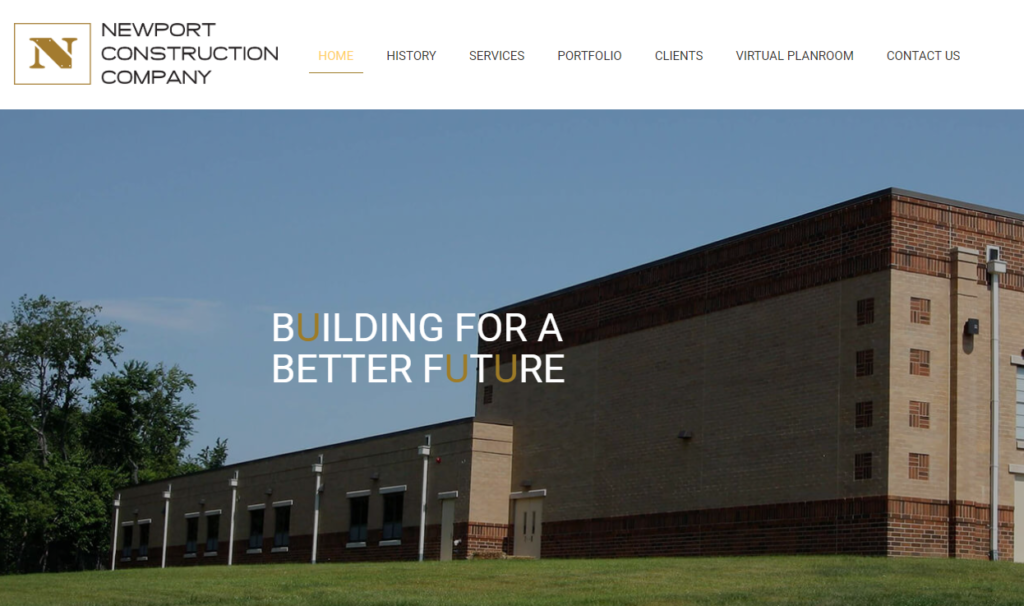
The Website Design team of South Jersey Techies has been constantly working on developing great looking websites using the latest web technologies. The most recent website developed by our team is for Newport Construction Corporation in Pennsauken, New Jersey.
Over 25 years ago, Gregg Cooke, Principal, recognized the need for a full-service general contracting & construction management firm that possessed the ability to cater to the demanding needs of all clients throughout varying project types and sizes. Newport Construction Corporation is a multi-faceted construction management and general contracting firm that is defined by its committed principals, professionals, and core values.
Have questions?
Our Web Design team is here to help. Call us at: 856-745-9990 or visit: https://southjerseytechies.net.
South Jersey Techies, LLC is a full Managed Web and IT Services Company located in Marlton, NJ providing IT Services, Managed IT Services, Website Design Services, Server Support, IT Consulting, VoIP Phones, Cloud Solutions Provider and much more. Contact Us Today.
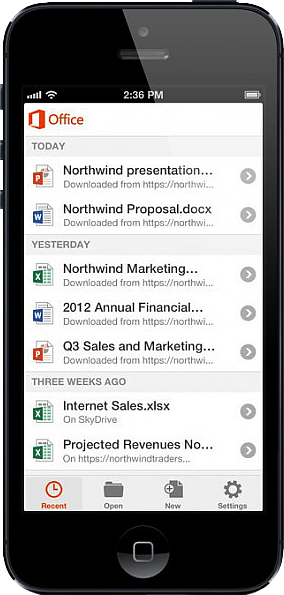 On June 14, 2013, Microsoft released Office Mobile in the Apple Store for all Office 365 users at no cost. This app is available for iPhone 4 and up, iPad 3rd generation and up, iPad Mini and iPod Touch 5th generation. All devices are required to run iOS 6 and up.
Office Mobile allows you to view and edit Word, Excel, and PowerPoint documents. SkyDrive, SkyDrive Pro and SharePoint are ways to access documents. “Recent Documents” tracks the most recent documents that you viewed or changed and makes them easily accessible. Offline editing does not require a constant internet connection but allows you to save your changes once reconnected to a network.
On June 10, 2013 Apple announced that iWork Apps, such as Pages, Numbers and Keynote, can cross platforms to be used on Windows Systems. Although, iWork Apps are proficient, they can not compare to the Office Suite.
Microsoft has taken a huge step by crossing platforms with Office software and returning the upper hand to Microsoft. Office 365 has become more valuable for businesses and home users.
https://southjerseytechies.net/blog/wp-admin/post.php?post=21&action=edit
South Jersey Techies introduces SJTHosting.net. SJT Hosting is a internet service that offers Domain Names, Web Hosting, SSL Certificates, Emails Accounts, Marketing Tools, Build a Website and much more to individuals and organizations.
Check us out at www.sjthosting.net.

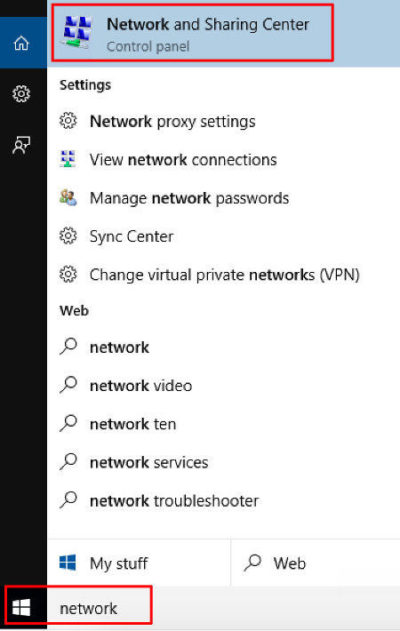
Go to your start menu, and type in “network”. In the search results click on “Network and Sharing Center”
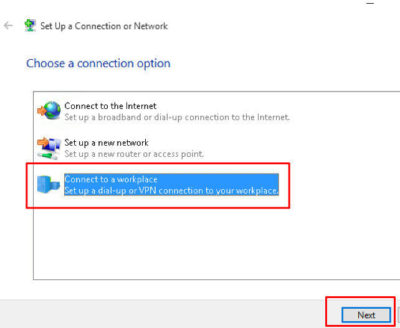
Select Connect to a workplace and click Next
Click on Use My Internet Conection (VPN)
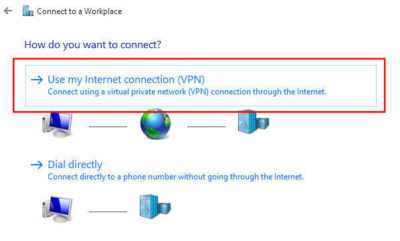
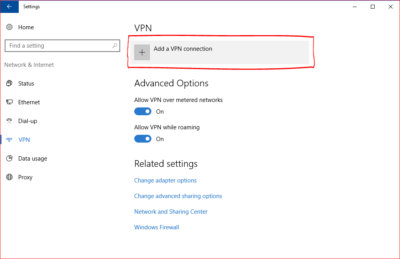
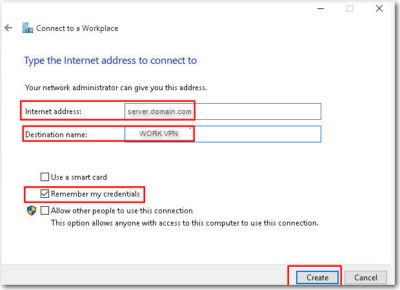
Enter in the internet address (provided by your IT Professional), Name then Create
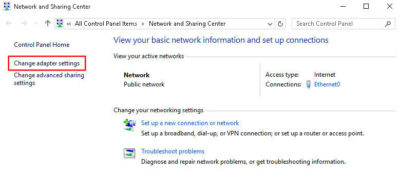
Network and Sharing Center window should still be opened. Click on Change Adapter Settings
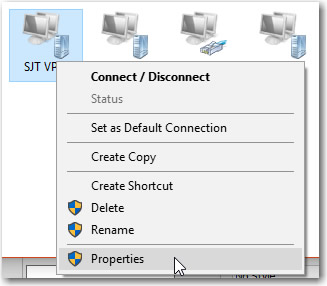
Right Click on the new connection you made, then go to Properties
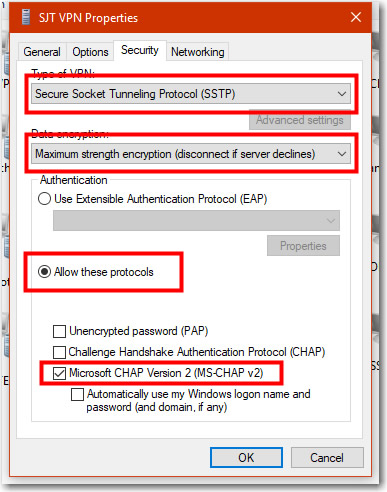
Go to the Security Tab, and change your properties to be the same as the below image. Press OK once done.
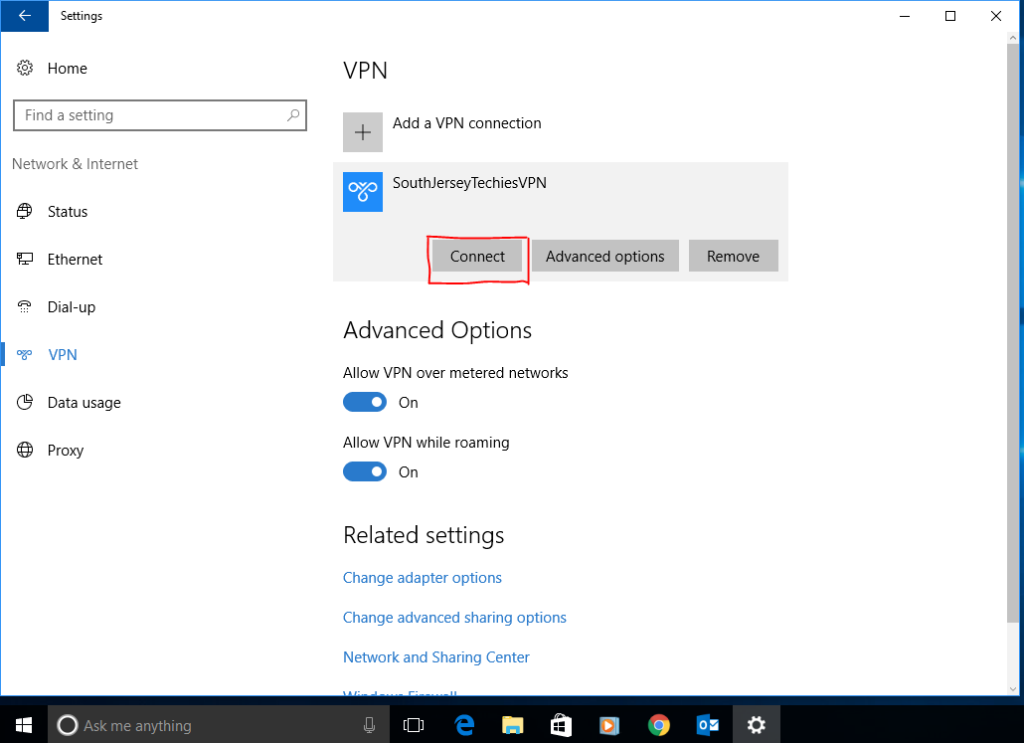
Right Click the Connection and choose “Connect” option.
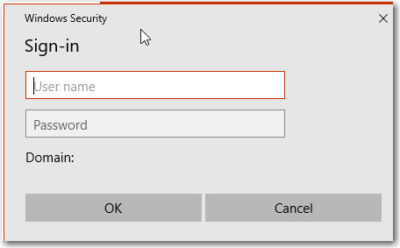
You will be prompted for your username and password for your VPN. (provided by your IT Professional). Enter them as provided. ex. DOMAIN\username and password.
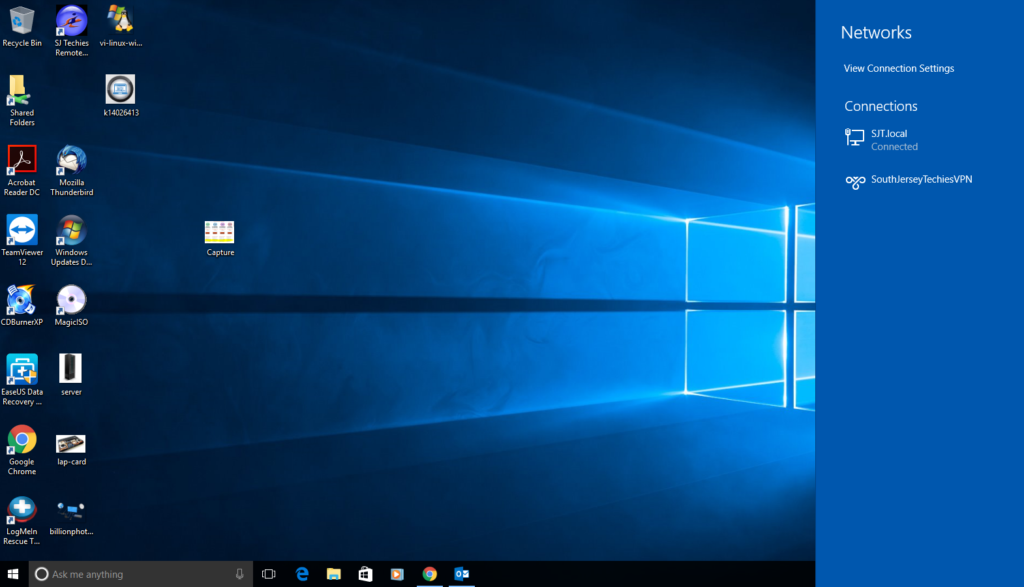
After a few seconds it will connect and show you “Connected” status.
You can also check the VPN status in the Network applet (the icon in your system tray at the bottom right).
Find the network connections icon in the bottom right corner of the screen (near the clock). The icon can be in the shape of computer display or wireless signal meter (you can see it on Step 10). Click on that icon. In the appeared list click on any network connection.
After that you will see another window with the connection list, click on theVPN connection (the connection name can be different, you have set it up on Step 5).
Click the “Connect” button under the connection name.
Find the network connections icon in the bottom right corner of the screen (near the clock). The icon can be in the shape of computer display or wireless signal meter (you can see it on Step 10). Click on that icon. In the appeared list click on any network connection.
After that you will see another window with the connection list, click on theVPN connection (the connection name can be different, you have set it up on Step 5).
Click the “Disconnect” button under the connection name.
Get answers from Microsofts Cloud Solutions Partner!
Call us at: 856-745-9990 or visit: https://southjerseytechies.net/
South Jersey Techies, LL C is a full Managed Web and Technology Services Company providing IT Services, Website Design Services, Server Support, Network Consulting, Internet Phones, Cloud Solutions Provider and much more. Contact for More Information.
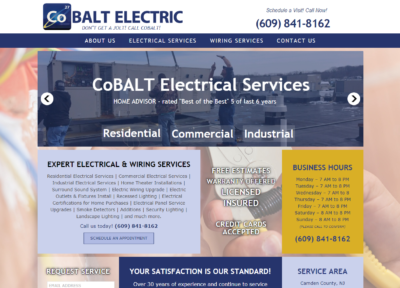
The Website Design team of South Jersey Techies has been constantly working on developing great looking websites using the latest web technologies. The most recent website developed by our team is for Cobalt Electric, providing expert electric & wiring services in South Jersey.
If your home or business is in need of anything from a few minor updates, a complete overhaul or a brand new building, Cobalt Electric will provide unparalleled quality and service, and work with you to get the job done right. Whether you want a surround-sound audio system, wired security cameras,motion sensors or ethernet jacks, choose Cobalt Electric for the highest quality cabling available in your area, making your home safer, simpler and more enjoyable.

Our Web Design team is here to help
Call us at: 856-745-9990 or visit: https://southjerseytechies.net
South Jersey Techies, LLC is a full Managed Web and IT Services Company located in Marlton, NJ providing IT Services, Managed IT Services, Website Design Services, Server Support, IT Consulting, VoIP Phones, Cloud Solutions Provider and much more. Contact Us Today.

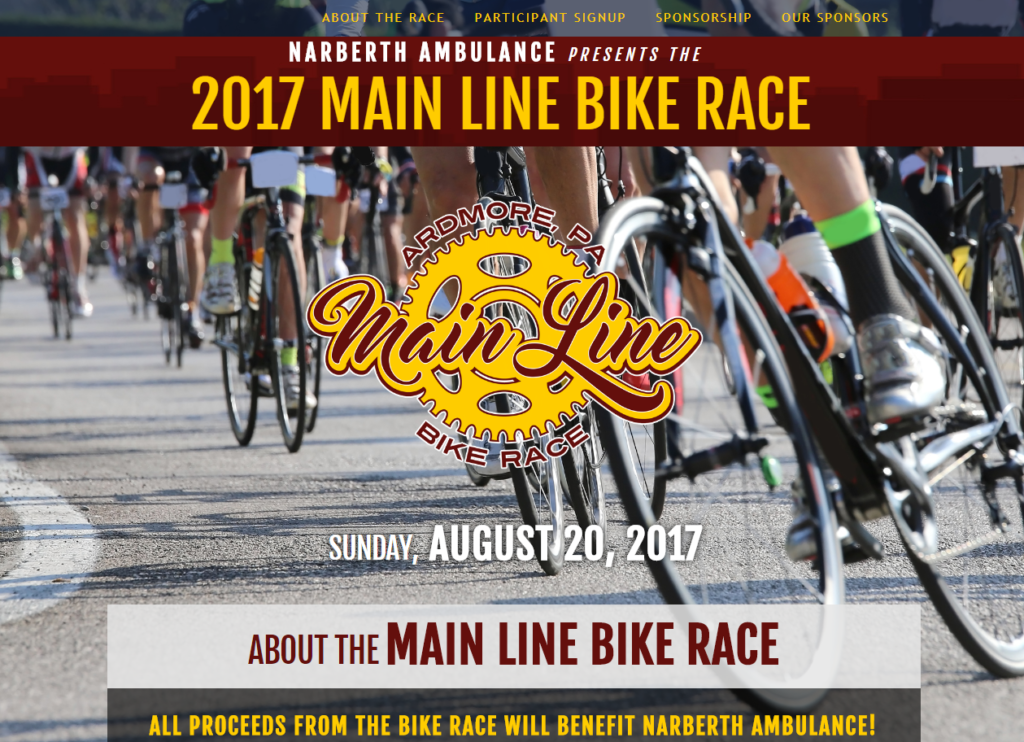
The Website Design team of South Jersey Techies has been constantly working on developing great looking websites using the latest web technologies. The most recent website developed by our team is for an event organized by Narberth Ambulance, called, Main Line Bike Race.
The 1st annual Main Line Bike Race of Ardmore to be held on Sunday, August 20th, 2017 from 8:00 am to 4:00 pm. The team – comprised of volunteers from Narberth Ambulance, Human Zoom Bikes and Boards, Lower Merion Township, Ardmore Business Association, and many others – is working hard to ensure a successful presentation of a first-class event for a first-class township. Please consider supporting the First Annual Main Line Bike Race. Your support will not only help Narberth Ambulance; it will also assist us in bringing our communities together for an action-packed day of bike racing!
Our Web Design team is here to help
Call us at: 856-745-9990 or visit: https://southjerseytechies.net
South Jersey Techies, LLC is a full Managed Web and IT Services Company located in Marlton, NJ providing IT Services, Managed IT Services, Website Design Services, Server Support, IT Consulting, VoIP Phones, Cloud Solutions Provider and much more. Contact Us Today.
 CALL US NOW!