Back to Top

Tech, Web, Cloud & Cabling Services

Author Archives: Website Admin

Wawa introduces free WiFi services

PHILADELPHIA – Wawa began offering free WiFi Tuesday for customers at its 700-plus stores.

Wawa-free-xfinity


The service is available through a collaboration between the retailer and Philadelphia-based Comcast, the companies said.

To access the free service, Comcast said, “customers should log on to the ‘xfinitywifi’ SSID in the list of available networks on their devices.”

The service includes public Xfinity WiFi for Wawa customers and private access WiFi for employees and vendors.

Wawa stores operate across the tri-state area, as well as in Maryland, Virginia and Florida. The firm’s WiFi service will be available outside of Comcast’s traditional service areas, the companies said.

Wawa noted it needed “a fast and reliable WiFi solution to enable a consistent in-store experience for its mobile application.” It also said the service allows customers “to take advantage of a free connection without having to rely on their cellular service.”

Bill Stemper, president of Comcast Business, said WiFi has become a vital service for companies looking to improve “the customer experience at their branch locations.”

Have questions?

Get answers from Microsofts Cloud Solutions Partner!
Call us at: 856-745-9990 or visit: https://southjerseytechies.net/

South Jersey Techies, LL C is a full Managed Web and Technology Services Company providing IT Services, Website Design ServicesServer SupportNetwork ConsultingInternet PhonesCloud Solutions Provider and much more. Contact for More Information.

To read this article in its entirety click here.

South Jersey Cyber Crime

The hackers used “ransomware” to lock the hospital out of its own medical records.

Not all kidnappers grab your loved ones.

A growing online threat – ransomware – essentially abducts your computer system, putting data and services off-limits to users and demanding a payment to restore access.

“We are seeing more cases of this – sometimes almost on a daily basis,” said New Jersey State Police Capt. Steve Jones. “And we’re not seeing all of it, because people may be too embarrassed or don’t believe it can be helped.”

Ransomware viruses are a plague. Once infected — installed to your computer by a website you’ve visited, a rogue email attachment or link, or instant message — your computer will lock up. With names like CryptoWall, these types of viruses may create a popup window or Web page warning you that you’ve broken some law and have to pay a fine, anywhere from hundreds to thousands of dollars, according to the FBI.

These scams threaten to encrypt your files forever or destroy them unless a ransom is paid, according to the FBI.

Once paid, your computer is unlocked or a code is sent to unlock the machine, authorities said.

Between April 2014 and June 2015, the FBI received 992 CryptoWall-related complaints with victims reporting a loss of more than $18 million.

The state’s top cybersecurity unit recently launched an online effort to help people guard against ransomware.

“For many organizations, preventing ransomware entirely is nearly impossible,” says the New Jersey Cybersecurity and Communications Integration Cell (NJCCIC), which introduced a Ransomware Threat Profile page at its website in February.

But it notes individuals and companies can take measures to prevent infections and to limit their impact.

Although ransomware can lock up laptops and desktop computers, the risk is particularly great for data-dependent organizations like hospitals and accounting firms, said Jones, the State Police spokesman.

So far, at least three hospitals have been hit nationwide – in California, Kentucky and the Washington, D.C., area. South Jersey hospitals are well aware of the menace.

“It’s a big concern. It’s something that has really spiked,” said Tom Handlon, chief information security officer for Kennedy Health, which operates three acute-care hospitals in South Jersey.

Handlon gave no details, but said Kennedy seeks to protect itself through protective measures inside its computer system and by promoting safe conduct by employees.
“We’re monitoring it constantly and updating as we go along,” he said. “We are really educating the staff and our entire organization that we are a target.”

A similar view came from Tom Rubino, spokesman for Cooper University Healthcare System in Camden.

“We have tracked the recent wave of ransomware attacks that have targeted hospitals across the nation,” Rubino said. He said Cooper’s IT security team “is proactively taking measures to prevent ransomware infection of our computer systems.”

“Additionally, as a critical component for preventing all computer viruses, we are increasing our employee education efforts.”

A key precaution is to back up your computer’s contents on a frequent basis, Jones said. “But you’ve got to keep the backup drives disconnected,” he warned. “Otherwise, the ransomware can migrate to the backups.”

The State Police in March 2015 investigated a hacking incident that disabled much of the computer system for the Swedesboro-Woolwich school system. In that case, a hacker demanded more than $125,000 in the form of a digital currency called bitcoins.

The district, which did not pay the ransom, had to wipe clean its email servers and cafeteria lunch-ordering system to rid itself of ransomware. Only a handful of classroom computers were infected.

Hackers exploited a gap in the district’s computer security system and a vendor’s “weak” passport to take over the computer system, Michael Procopio, Educational Information and Resource Center’s director of technology, said at the time. EIRC experts helped the district restore its system.

The district’s hacker was believed to have struck from abroad – a familiar pattern, according to the State Police.

“Many of these messages and attacks are coming through foreign servers,” Jones said. “The countries that house these servers are not often countries that have a real open relationship with law enforcement.”

Tools have been available to help decrypt older versions of ransomware, said Dave Weinstein, New Jersey’s director of cybersecurity.

“At this point, the strain has morphed to the point where there is no releasing your files,” said Al Della Fave, a spokesman for the Ocean County Prosecutor’s office. “The lock these cybercriminals put on your files is foolproof at this point.”

Unless you’ve backed up your computer prior to the infection, Della Fave said, “The only way you would get your files back is to pay.”

“Ransomware is working” for cyberthieves, said Ben Johnson, chief security strategist at Carbon Black Inc., a  computer security firm in Waltham, Massachusetts. “People are paying.”

In the last few weeks, cybercriminals have come up with some new twists, he said. For instance, one version encrypts files more quickly after someone opens up a malware-filled Microsoft Word document or some other attachment.

Other versions encrypt the computer at its most basic level so it can’t even power on, or use the computer’s own system administration tools to infect itself, he said.

The best course of action is to make sure you don’t get the virus. “You must be super careful what you click on,” Della Fave said.

Here’s what you should do, according to Johnson and the Ocean County prosecutor’s office:

  • Keep your computer’s security software up to date.
  • Keep your network firewall turned on.
  • Do not open spam email messages or links to suspicious websites.
  • Back up your files, such as documents, photos and music, to a secondary storage device.
  • Be careful when you browse the web. Use ad blockers to help protect yourself.

Have questions?

Get answers from Microsofts Cloud Solutions Partner!
Call us at: 856-745-9990 or visit: https://southjerseytechies.net/

South Jersey Techies, LL C is a full Managed Web and Technology Services Company providing IT Services, Website Design ServicesServer SupportNetwork ConsultingInternet PhonesCloud Solutions Provider and much more. Contact for More Information.

To read this article in its entirety click here.

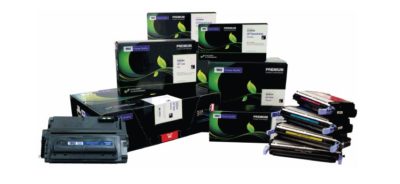
Save Big on Toner!

toner

TECHIEDEPOT.COM

Your #1 Source for the Best Printer Ink Cartridges

Looking to save on toner ?  Save upto 35% when you order Re-manufactured Toner Cartridges with TECHIE DEPOT. Our toner cartridges are intelligently re-engineered and environmentally friendly.   We offer a 3 year 100% warranty whereas most OEMs only offer a 1 year warranty.

We guarantee our products will perform better than any other aftermarket imaging product.  Rest assure you never have to worry about leaking cartridges because of our Patented Ultrasonic and Gasket Seal Technologies.  Our Secondary cleaning System also eliminates streaking.  Our toner cartridges are ISO Certified for OEM page yield and quality.  With our Extended Yield Cartridges you will get up to 100% more yield.

You will find that we are different because everyone is not as committed to quality like we are and our product is better built and more consistent.  Our cartridges have a documented 99.2% success rate and for 7 consecutive years we were awarded the best quality supplier in the aftermarket  by Recharger Magazine.

Pay less for great quality, we are sure you won’t be disappointed with our product.  Contact us and place your order today!

Tips for a Green PC

Takeaway:  Tips for making environmental choices whether buying a new computer or maintaining your current one.

To reduce energy intake you can use a power strip, monitor usage with utilities and unplug components when not in use.  Deciding to go green for current computers or buying a new computer can help with power management to cut down on wasted energy and costs.

Energy Star is a voluntary energy efficiency program that prevents greenhouse gas emissions with strict guidelines.  EPEAT is an assessment tool to help users compare and purchase computer equipment.  Both provide tools to help make an environmental choice.

epeat-logoenergystar-logo

Buying a New Computer Tips:

  • Research:  Find out if it is Energy Star rated, how much energy the computer will use and power management options.
  • Recommendations:  Check out product reviews from previous purchasers and from non-profit organizations that provide accurate feedback (Such as EPEAT and Energy Star)
  • Purify New PC:  Read the Hazardous Material Use Policy on manufacturer’s site.
  • Don’t be Greenwashed:  Research the company to make sure that their “Green Computer” is not a marketing campaign with few benefits towards the environment.
  • Green Guide:  If you would like user ratings and reviews for products, several websites provide these options as well as advice for purchasing new equipment. 

Upgrading Current Machine Tips:

  • General Health Check:  The three major components that play a role in energy are graphics card, microprocessor and monitor.
  • Replace CRT Monitor:  CRT Monitors may contain Lead, Mercury, Barium and more toxins.  Replace your old monitor with a new LCD or LED Monitor to save energy and money. 
  • Upgrading Memory:  Upgrading your RAM will increase the speed of your machine while lowering the power intake, which is a quick, inexpensive fix.
  • Greener Battery:  Similar to CRT Monitors, older laptop batteries contain hazardous chemicals such as lead.  Companies are starting to manufacturer Green Batteries that have a longer life expectancy using earth-friendly features.
  • Greener Power Supply:  The ability to scale the power required for particular actions with your power supply is an efficient way to save energy; while regular power supplies emit a steady rate of power at all times.


Go Daddy Posts Workaround for 60-Day Lock


I just found out from fellow domain blogger Kevin Murphy of DomainIncite that domain registrar Go Daddy has finally posted a workaround to their 60-day lock. Apparently their doing this is a response to the modified ICANN transfer policies taking effect since June 1, 2012.

One of the most common complaints I’ve encountered about domain registrar Go Daddy is their arbitrary 60-day transfer lock. In case you just came in, Go Daddy can prevent your domain name from being transferred to another domain registrar for 60 days if a certain condition is met.

All domain registrars have a rule wherein you can’t move your domain name to another registrar if it’s within its first 60 days of registration or recent transfer-in from elsewhere. Go Daddy is currently the only one who puts in another 60-day transfer lock on top of those.

Initially, Go Daddy’s 60-day transfer lock kicks in if the registrant or administrative contact’s name or contact details is changed. Go Daddy since evolved their 60-day lock to only if the registrant name is changed for whatever reason.

Before I describe the workaround, it might be important to know what ICANN’s recent policy change is, and how this affected Go Daddy.

ICANN mostly made just some language changes in their transfer policy among registrars, but there is one major change relevant to this. Namely:

Upon denying a domain transfer request for any of the following reasons, the Registrar of Record must provide the Registered Name Holder and the potential Gaining Registrar with the reason for denial. The Registrar of Record may deny a domain transfer request only in the following specific instances:

Express objection to the transfer by the authorized Transfer Contact. Objection could take the form of specific request (either by paper or electronic means) by the authorized Transfer Contact to deny a particular transfer request, or a general objection to all transfer requests received by the Registrar, either temporarily or indefinitely. In all cases, the objection must be provided with the express and informed consent of the authorized Transfer Contact on an opt-in basis and upon request by the authorized Transfer Contact, the Registrar must remove the lock or provide a reasonably accessible method for the authorized Transfer Contact to remove the lock within five (5) calendar days.

I bolded the portion starting from “a general objection” to indicate ICANN’s recognizing Go Daddy’s 60-day lock. However, they’re also requiring the registrar to allow the “authorized Transfer Contact” a means to do away with that within five calendar days.

In short, Go Daddy is being allowed to maintain their 60-day thing, yet allow the domain’s registrant or so a way to get around that if ever. The wording can be argued either way, but all this is a means of balancing competing interests.

I bolded the portion starting from “a general objection” to indicate ICANN’s recognizing Go Daddy’s 60-day lock. However, they’re also requiring the domain registrar to allow the “authorized Transfer Contact” a means to do away with that within five calendar days.

In short, Go Daddy is being allowed to maintain their 60-day thing, yet allow the domain’s registrant or so a way to get around that if ever. The wording can be argued either way, but all this is a means of balancing competing interests.

Domain Name Wire also has more from Go Daddy’s director of policy planning James Bladel:

“We understand our 60 day lock has been controversial,” said James Bladel, Director, Policy Planning for Go Daddy. “What is boils down to is, while it’s a very good tool for intercepting and preventing hijacking…we recognize that our efforts to address that problem shouldn’t be a hindrance to legitimate users of domain names that want transfers to be a little more simple.”

Kevin quotes Bladel’s rationale further:

“The bad guys are not going to call and ask us to take a second look at this,” he said. “The bad guys want it to happen under the radar.”

Bladel explains the lock can be lifted after a human review unless they suspect a hijacking is going on. Additionally, the domain name’s WHOIS information is changed to its original state.

I think that second part is going to pose some problems, particularly on ownership changes after a recent sale. Time will tell how this goes, and Go Daddy is surely going to adjust to that if need be.

So step by step, here’s how it goes:

1. If you change your domain name’s registrant name at Go Daddy, it turns on their 60-day transfer lock. They do post notices of this before you make the change, and they do email about it. (unless caught by your spam filter, knock on wood…)

2. You’ll get an email with an email address to contact a team at Go Daddy to appeal the lock.

I’m sure some of you wish it’s a way to call that team directly instead. Would be nice if Go Daddy accomodates that, though I also know they “need” to control that if ever.

I wish they thought of this sooner rather than have to inconvenience a lot of people unnecessarily because of this, though I know some people want this done away instead. Like I said, it’s a matter of balancing competing interests.

In any case, at least there’s now an option to go around their 60-day lock. 

To View Full Article Click Here

Our highly trained, courteous support staff is waiting to take your call. Whatever time it takes to assist you, that’s the time you’ll receive. We’ll resolve any issue to your complete satisfaction.

Call (856) 745-9990 to get started now or click here

Increase Sales & More with Site Analytics

Get the insight you need to succeed on the Web.

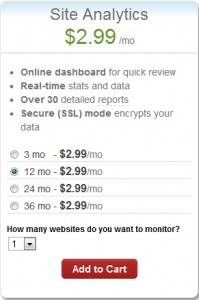
The key to any successful website is knowing your visitors. Site Analytics gives you the valuable, real-time data you need – information you can use to spotlight popular products, target new customers, track offer responses and much more. With over 30 detailed reports, you can find out where your visitors are coming from, what paths they take through your site, even where in the world they live.

Stats at-a-glance

  • Get the information you want – without having to click through countless screens – with our customizable dashboard view.

Real-time results

  • With Site Analytics’ real-time statistics, you don’t have to wait until tomorrow to find out if changes to your site are working. Plus, heat mapping and pinpoint functionality tell you which sections or links are getting the most attention.

In-depth reporting

  • Dig into the details and get a better understating of your customers with more than 30 reports. Find out who’s visiting, when they’re on your site, how they’re getting there and much more.

Choose your view

  • Site Analytics lets you decide how you want to view your data with three graphing options (Bar, Area and Line) as well as the ability to export to Microsoft Excel® or Adobe® PDF.

Powerful, easy-to-use features let you dig as deep as you want.

Everyone wants something different from their site statistics. Some people want a quick, birds-eye view; others want to get lost in the details. That’s the beauty of Site Analytics; it works for everyone. Our user-friendly interface and intuitive features put you in control so you can get exactly what you want.

See what’s happening

  • Get a quick overview of your site’s traffic and visitors with a selection of dashboard widgets.
  • Real-time statistics let you see, almost instantly, how changes to your site impact your traffic.
  • Improve your site’s structure and usability by seeing where people click and which links get the most attention with heat mapping.

Organize your data

  • Find the information you need with more than 30 reports in several categories: Visitor, Page, Referrer and Server.
  • Visualize the data the way you want with three different graphing options: Bar, Area and Line. Plus, set custom date ranges to target your results!
  • Share your data with co-workers and clients by exporting to Microsoft Excel® or Adobe® PDF. You can even create a schedule to email customized reports.
  • Get separate reports for each alias and subdomain — simply add them as separate Site Analytics accounts.

And much more

  • Easily collect stats on your WordPress® site with our free Site Analytics plugin.
  • Enable secure (SSL) mode to encrypt your data so it can’t be viewed by others during transmission.
  • Analyze long-term trends and improvements with up to 6 months of Log File data.
  • Use Site Analytics with any website, whether you host with us or a third party.


Our highly trained, courteous support staff is waiting to take your call. Whatever time it takes to assist you, that’s the time you’ll receive. We’ll resolve any issue to your complete satisfaction.

Call (888) 505-1532 to get started now or click here

South Jersey Techies was a proud sponsor of Evesham Education Foundation at this weeks’ Larry Kull Memorial Golf Classic

Why business-class PCs are a smart investment

Business PCs

Think back to the last time you bought a new PC or laptop for your business. Did you approach the purchase the same way you would for a personal device? And if you had a problem, were you satisfied with the level of service you received?

Many small and medium-sized businesses purchase consumer-grade PCs and notebooks by default, not realizing the amount of difference a business-class model can make. Consumer-grade devices can work fine for many organizations, but businesses with more stringent performance, reliability, and support needs can save time and frustration by moving up to business-class devices.

Think of it this way: when you purchase an economy-class plane ticket you know there’s going to be a marked difference between your experience and the experience of someone flying first class. More legroom, better menu options, more responsive service—the benefits are clear, and for many business travelers it makes sense to upgrade, especially if the flight is long.

When it comes to technology, the difference between consumer-grade and business-class PCs is just as marked as for flights—and for many businesses, the upgrade is just as worthwhile. Here’s the difference a business-class device can make for you:

  • Performance: Many modern consumer-grade processors and mobile operating systems prioritize battery life over processing power. Business-class PCs often offer both better performance and longer battery life, allowing users to work faster and longer while on the road.
  • Reliability: HP Elite PCs are designed to pass MIL STD testing and are tested for 115,000 hours to HP’s own testing standards to help ensure durability. New HP EliteBook 700 series notebooks are also made with Corning® Gorilla® Glass and a magnesium alloy chassis that’s 18 times stronger than plastic.
  • Support: Every HP Elite PC comes with HP Elite Premium Support, providing 24/7/365 dedicated service from U.S.-based specialists who are dedicated solely to supporting HP Elite products.
  • Software and security: Business-class devices help their users take advantage of their advanced features with free, bundled software that is not available (or requires an additional purchase) on consumer-grade PCs. For example, HP Elite family products come with security software and features that protect at the data, identity, and device levels to help keep proprietary data safe.

On average, small businesses hold on to their PCs for five to seven years. Your next device purchase will likely be with you for years to come. So when you consider that many of us are quick to upgrade our airline tickets—even though flights don’t last more than a day—upgrading to a business-class device can make a lot of sense. Weigh the benefits, and choose the device with the level of support and reliability that meets your business needs.

Have questions?

Get help from IT Experts/Microsofts Cloud Solutions Partner
Call us at: 856-745-9990 or visit: https://southjerseytechies.net/

South Jersey Techies, LLC is a full Managed Web and Technology Services Company providing IT Services, Website Design ServicesServer SupportNetwork ConsultingInternet PhonesCloud Solutions Provider and much more. Contact for More Information.

To read this article in its entirety click here.

End of Life Windows 7, Server 2008 R2, & Small Business Server 2011

The End of Life for Windows 7, Server 2008 R2, & Small Business Server 2008 + 2011

End of Life Windows 7, Server 2008 R2, & Small Business Server 2011
[wpdevart_countdown text_for_day=”Days” text_for_hour=”Hours” text_for_minut=”Minutes” text_for_second=”Seconds” countdown_end_type=”date” end_date=”13-01-2020 23:59″ start_time=”1556805309″ end_time=”0,1,1″ action_end_time=”hide” content_position=”center” top_ditance=”10″ bottom_distance=”10″ countdown_type=”button” font_color=”#000000″ button_bg_color=”#3DA8CC” circle_size=”130″ circle_border=”5″ border_radius=”8″ font_size=”30″ countdown_font_famaly=”monospace” animation_type=””][/wpdevart_countdown]

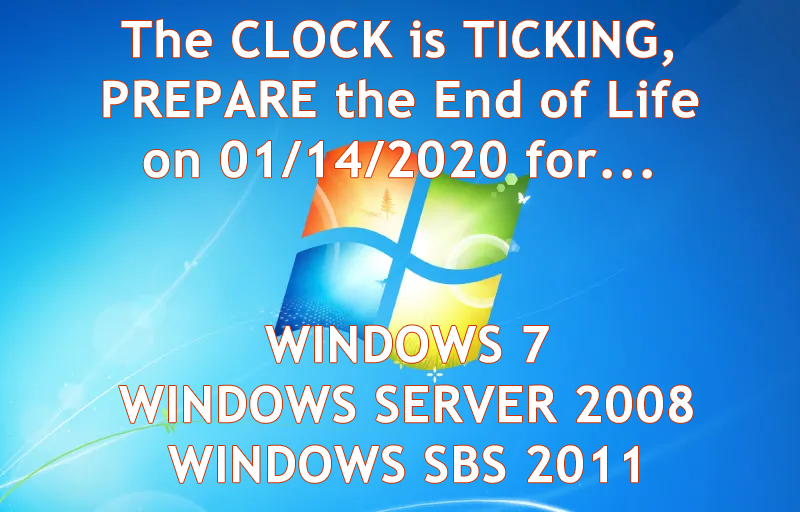
Microsoft has announced that its support for Windows 7, Windows Server 2008 R2, and Small Business Server (SBS) 2011 will be coming to an end on January 14, 2020.

What does that mean for you? First, security patches and updates will no longer be implemented, leaving Windows 7 workstations and servers susceptible to security breaches. On January 13, 2015, Microsoft ended mainstream support for Windows 7, but now extended support is ending as well. Extended support is still safe to use until 2020 currently. Normally Microsoft would add new features during the mainstream support phase, but they will not be being doing this anymore. They will however, continue to patch any security treats. South Jersey Techie’s strongly recommends upgrading your business’s servers and workstations before the January 2020 deadline- and to start planning now to avoid the urgency of the deadline. Businesses in the healthcare industry will be impacted by the changes in relation to HIPPA violations if their server isn’t updated before the deadline. The deadline will be here before you know it and updating an IT infrastructure is a large task and shouldn’t be put off until the last minute.

What are the next steps for your business? Many of our clients are starting to upgrade now or are planning to include the upgrades in their 2019 budget. Send us an email or give us a call and we will evaluate your line of business software for Windows 10 and upgraded server compatibility. If your company decides to upgrade its old server and workstations to meet the January 2020 deadline, South Jersey Techie’s has the reliable solutions and experienced technicians you need for managing the data migration and even the retired hardware. You can have peace of mind knowing your old data will be securely erased and destroyed.

Unsure if this deadline will affect your business? South Jersey Techie’s can review your server for you and determine its end of life date or if it will be affected by the 2020 end of support date. If you have any questions or concerns about your office and the 2020 end of support date, please give us a call today: (856)745-9990.

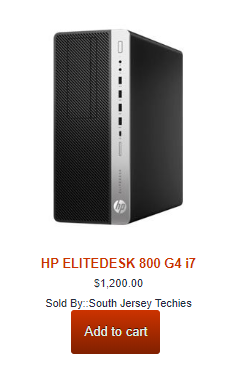
GET STARTED WITH A NEW WINDOWS 10 PC

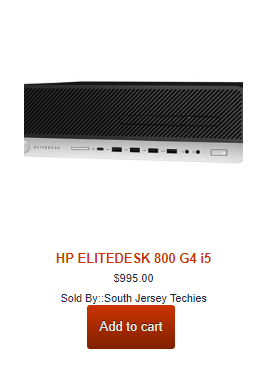
HP ELITEDESK 800 G4 – SFF – CORE I7
HP ELITEDESK 800 G4 – SFF – CORE I5
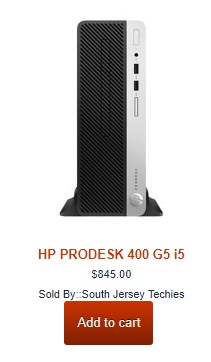
HP ProDesk 400 G5 – SFF – Core i5 8500

Can’t Find What You’re Looking For?

Whether you are upgrading an existing device, buying a new one, or just need support deploying, we have the help you need.


Here are the top features of iOS 11

The 10 best features you won’t be able to live without

Ready for some new iPhone and iPad features? iOS 11 is now out of beta and ready for the public. Here are the best features that came with it.

Get ready to back up your iPhone and iPad: iOS 11 is here. Apple released the latest version of its mobile operating system on Tuesday, introducing us to a handful of brand-new features. In fact, this version of iOS feels like the most ambitious version of iOS that Apple has launched in a while. Here are the best new features that we already can’t live without. 

Siri’s new tricks

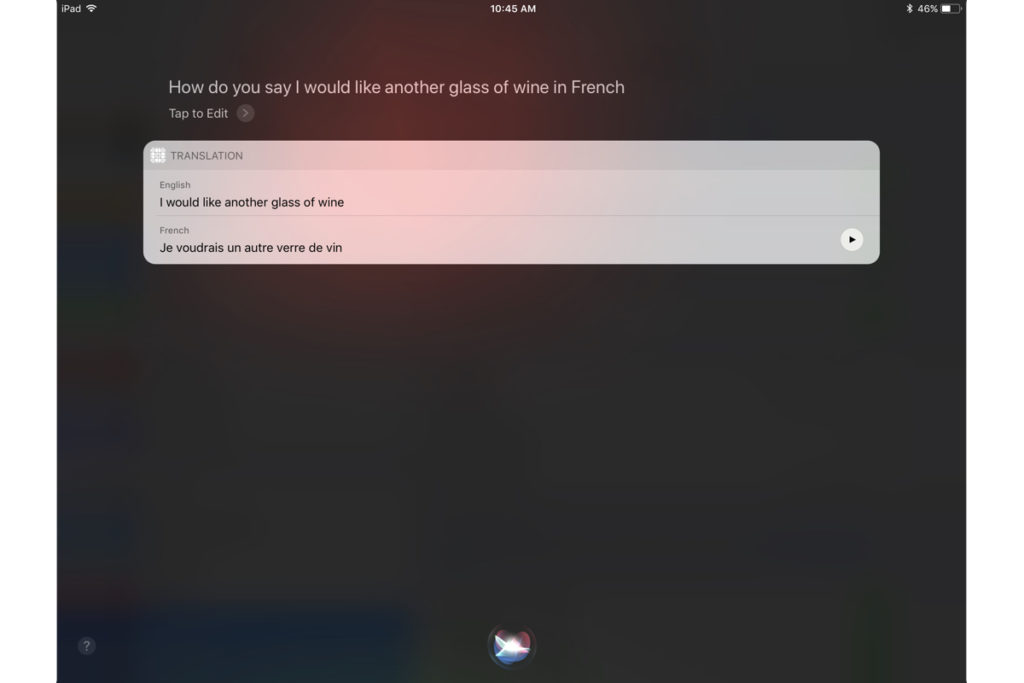
Siri is one of those features that keeps getting better with each software upgrade, and iOS 11 is no exception. This time, Siri gets a new voice, plus a super-helpful visual interface that lets you even edit your voice request with text input. And now, Siri is able to translate phrases for you—it can process English to Chinese, French, German, Italian, and Spanish. Apple said that it will add more languages in the months to come.


Customizable Control Center

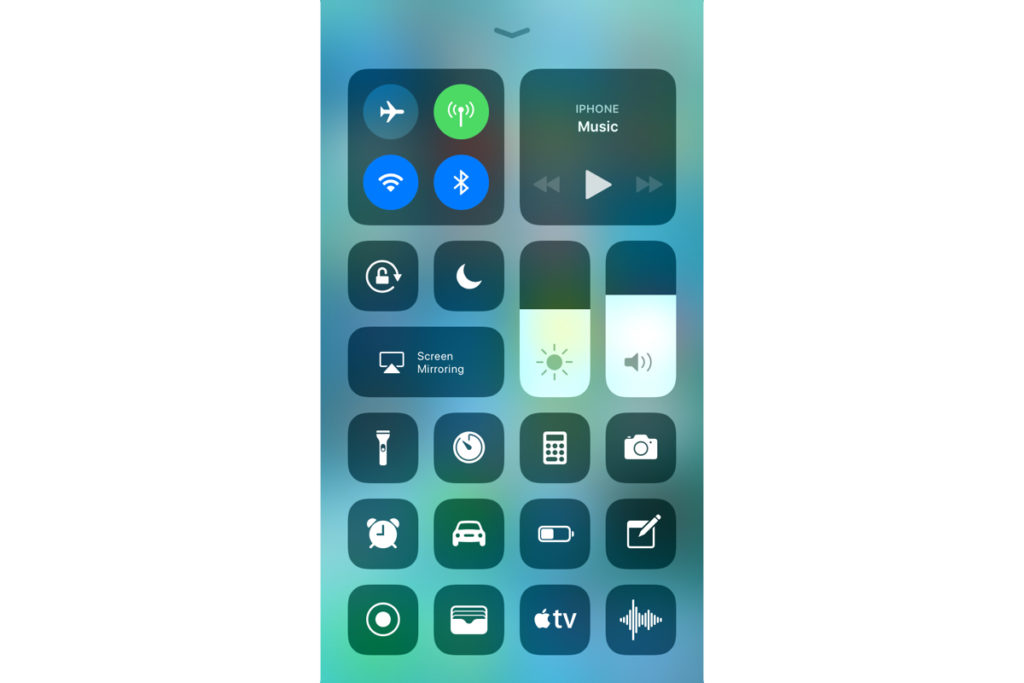
Currently, Control Center in iOS 10 takes up two panels, so you have to navigate to the second panel to access volume controls. However, iOS 11 brings everything back to a single screen and relies more on 3D Touch. Not only that, but you can also customize which controls you’d like to have on there. You can add new controls to quickly access your Wallet, turn on Low Power Mode, and even start Screen Recording—an all-new feature for iOS.


New Live Photo effects

Apple has given us more reasons to want to take Live Photos, those GIF-like moving images. In iOS 11, you can add effects to your Live Photos after you take them. Find a Live Photo on your camera roll and then swipe up. You will be able to add a looping effect to your photo or make it “bounce” back-and-forth, similar to an Instagram Boomerang. You can also make it a long exposure shot for better photos of low-lit scenarios.


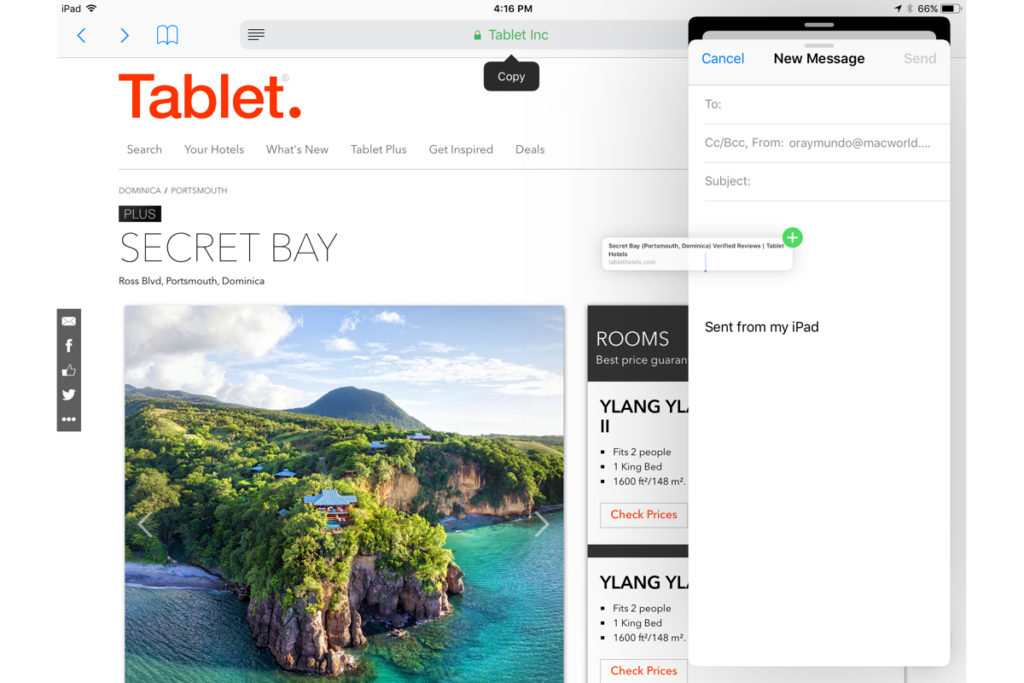
Drag-and-drop on iPad

iOS 11 makes for better multitasking on iPad. Now you can drag-and-drop images, links, and files between apps that are open side-by-side, either in Split View or Side Bar mode. In fact, you can drag-and-drop an app from Dock onto Side Bar mode, and drag that secondary app from the right to the left side of the screen.


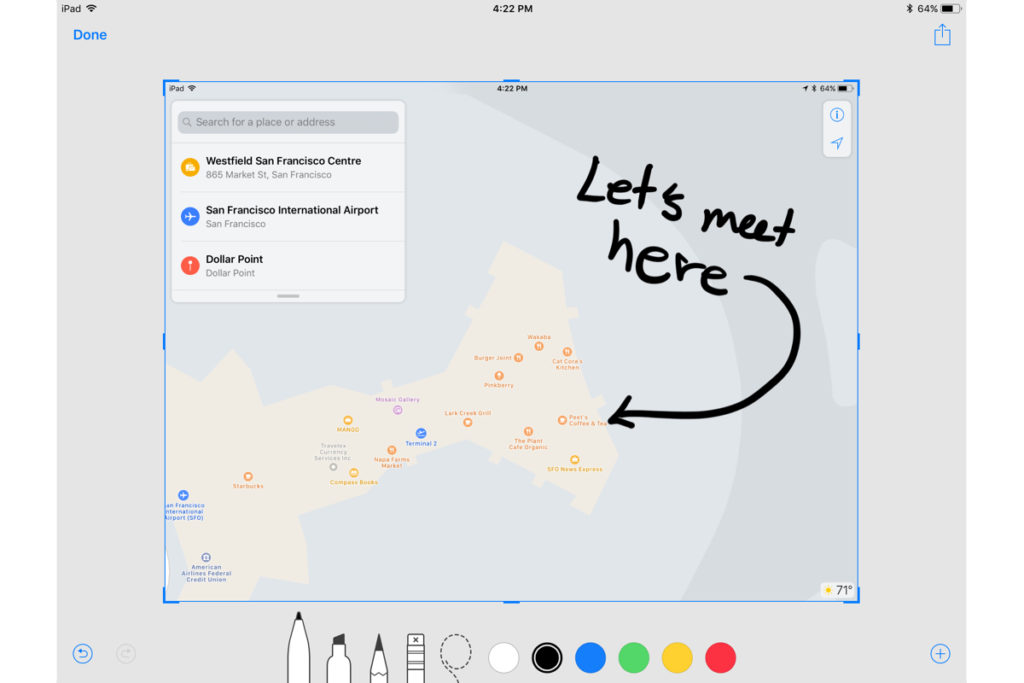
Markup your screenshots

Everytime you take a screenshot in iOS 11, it will automatically remain floating on the lower left. You can swipe it offscreen to save it to your camera roll as per usual, or you can tap on it to go into Markup. So now, you can add handwritten notes or comments either with your finger or with your Apple Pencil if you’re using an iPad Pro.


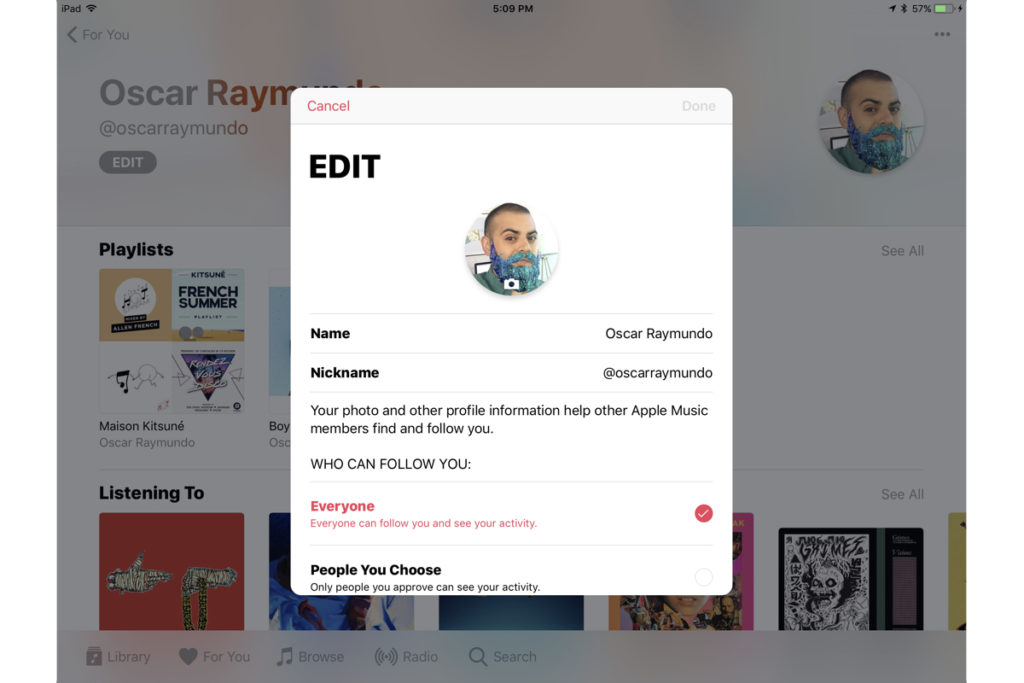
Social profiles in Apple Music

Apple Music gets social in iOS 11. Taking a page from Spotify, Apple Music members now have a profile on the streaming app. You can use your profile page to showcase your favorite playlists, as well as the albums you’ve recently listened to. You can also follow friends on Apple Music, and their profile photo will show up next to the albums they’ve listened to. However, there is currently no way to listen to music on private or secret mode, so be ready for your Apple Music followers to get a glimpse at all your guilty pleasures.


Do Not Disturb While Driving

This feature could be a real life-saver. iOS 11 also introduces “Do Not Disturb While Driving” so that the screen goes totally dark when you’re on the road. You can activate this mode manually via Control Center or have it turn on automatically whenever you’re connected to CarPlay or a car’s Bluetooth. In addition, you can go into your Do Not Disturb Settings to setup an automatic response to all your incoming texts to alert people that you’re driving and will get back to them as soon as you arrive.


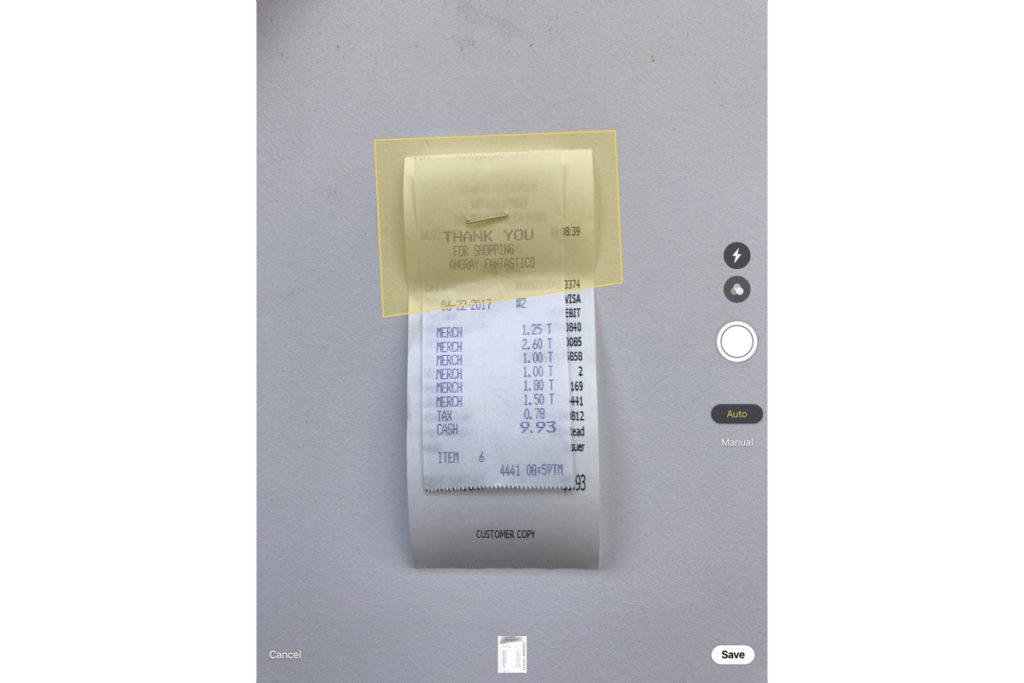
Document scanner in Notes

There’s no reason to run to the office scanner anymore, thanks to iOS 11. Using the Notes app you can now press the plus (+) sign to access an all-new document scanner. You can scan several documents at once and apply different filters. The scans can be saved inside your Notes, and you can also export them as PDF files that are Markup-friendly, so you can add your signature and send it back.


Search for handwritten Notes

Another cool feature that iOS 11 brings to Notes is the ability to search for things you’ve written our by hand. If you prefer to take notes using your finger or your Apple Pencil on iPad Pro, they are now searchable. 


QuickType keyboard improvements

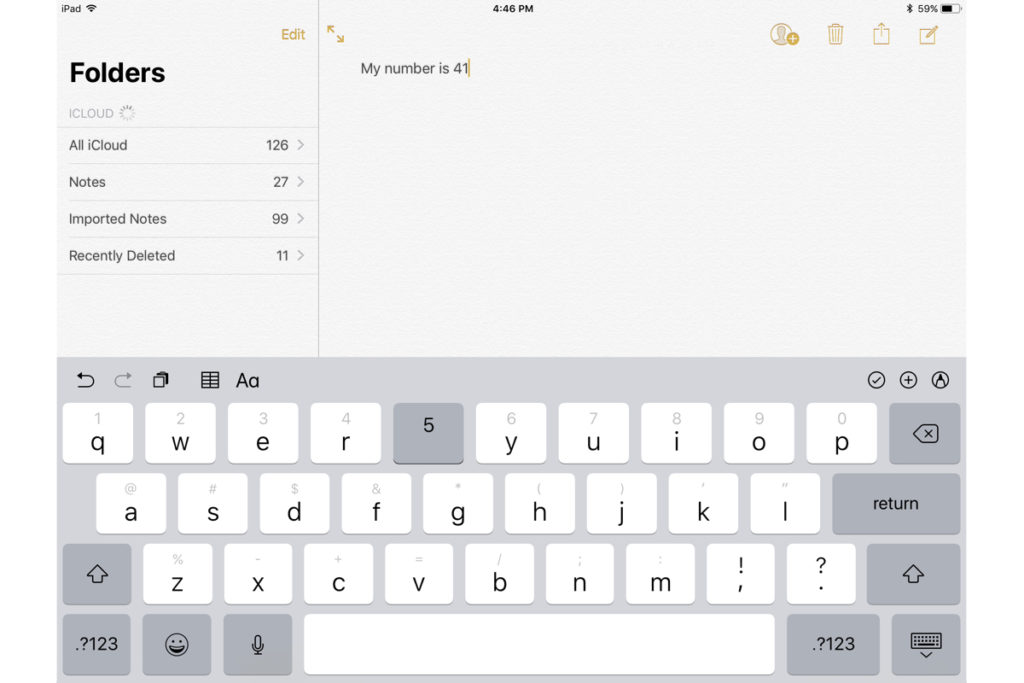
iOS 11 also makes significant improvements to the software keyboard. On iPhone, you can press-down on the globe icon and choose one-handed mode. This will bring all the keys closer to either the left or right side of the screen to make it easier to type with one hand. You can also make one-handed mode your default keyboard by going into Settings. For iPad, you can now type numbers, symbols, and punctuation marks without switching to a secondary keyboard. Simply flick down on the key to insert the character you need. 

What we’re still waiting for

Apple previewed a lot of new features for iOS 11, but not all of them are yet available. Here’s a quick look at what’s to come later this fall.

1. Apple Pay Cash for sending or receiving cash within Messages

2. Indoor maps for Apple Maps to help you navigate popular shopping centers and major airports worldwide. 

Have questions?

Get answers from Microsofts Cloud Solutions Partner!
Call us at: 856-745-9990 or visit: https://southjerseytechies.net/

South Jersey Techies, LL C is a full Managed Web and Technology Services Company providing IT Services, Website Design ServicesServer SupportNetwork ConsultingInternet PhonesCloud Solutions Provider and much more. Contact for More Information.

To read this article in its entirety click here.

CALL US NOW!