Back to Top

Tech, Web, Cloud & Cabling Services

Author Archives: Website Admin

Windows 10: The top 10 features headed your way in 2017

A look at the most significant changes due to hit Microsoft’s evolving OS in the coming year.
Microsoft has made many promises about what Windows 10 will do, and while some have materialized, others still remain ambitions.

As a perpetual work-in-progress, Windows 10 continues to accrue new features, as Windows catches up with Microsoft’s vision of it being an OS that runs anywhere, syncs with the cloud and has an intelligent assistant at its core.

While Windows 10 will be buffed up by the arrival of the Windows 10 Creators Update early next year, 2017 as a whole will see the OS undergo significant changes, some of which are long-awaited. Here’s what to look out for.

Windows 10 phones edge closer to replacing desktop PCs
Microsoft has long pushed the idea that Windows 10 on phones will be so powerful, it’ll be akin to carrying a full PC in your pocket, courtesy of the OS’ Continuum feature.

“With Continuum for phones, we believe that any screen can be your PC,” Joe Belfiore, Microsoft’s corporate VP of the operating systems group, told the Microsoft Build Developer Conference in 2015, going on to add:

“Imagine the effect this could have on mobile first countries, where individuals could be as effective with the phone that they’re buying.”

Today the reality of using Continuum on Windows 10 falls somewhat short of Belfiore’s future-gazing. While a select Windows 10 phones, such as the Lumia 950, can be hooked up to mouse, keyboard and monitor and used as a Windows desktop there are significant limitations. Only one fullscreen app can be used at a time, legacy Windows apps won’t run on existing handsets and even Universal Windows Platform apps need to explicitly support Continuum.

However, in addition to the possibility of legacy apps running on smartphones, see below, various improvements to Continuum are due to land with the Creators Update in early 2017.

These include support for more PC features, such as running multiple Windows side-by-side on the desktop, pinning apps to the Taskbar and hitting the Windows button to bring up the search box. Other improvements include the ability to keep your phone in your pocket and have it connect wirelessly to a docking station and to independently customize the Windows Start screen on the phone display and on a PC monitor.

Running classic Windows software on your phone

This one’s a rumor but based on solid foundations, and with the potential to transform Windows 10’s appeal on mobile if correct.

The big fly in the ointment when it comes to using Windows 10’s Continuum feature to run a phone as a PC is that Windows 10 phones only run Universal Windows Platform apps. This incompatibility means that widely-used Windows apps from desktop PCs can’t be used on handsets.

However, by sniffing around inside Windows 10’s code, users have uncovered signs that Microsoft is working on bringing these apps to Windows phones.

The code in question suggests that Microsoft is building an emulator that would allow desktop x86 apps to work on the ARM64-based handsets.

As reported by ZDNet’s Mary Jo Foley last month, Twitter user WalkingCat found a reference to what he termed “Windows’s hybrid x86-on-ARM64 tech” in Windows’ codebase, which also referenced the term, “CHPE.”

The clue chimed with Foley, who said her sources had told her that Windows 10 will gain this x86 on ARM64 emulation capability, but not until Fall 2017.

Foley guesses that C stands for Cobalt, the codename for x86 emulation on ARM, and that HP relates to the tech giant HP, which has been working with Microsoft on its the HP Elite x3 Windows Phone, a Windows 10 handset that can serve as a desktop PC via Continuum.

Microsoft certainly has good reasons for wanting such emulation to work. If Windows 10 phones could run as Windows desktops with full support for legacy apps, without having to resort to remote desktop software, Windows 10 phones could suddenly be far more appealing to business.

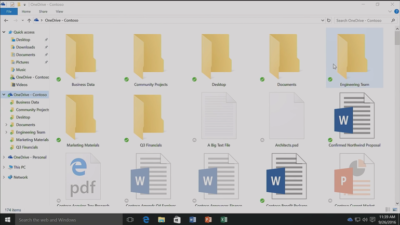
Return of OneDrive placeholders

Since the launch of Windows 10, many users have been petitioning Microsoft to reintroduce placeholders to the OS’ built-in OneDrive cloud storage service.

In Windows 8.1, placeholders, also called smart files, let users see all of their files stored on OneDrive, whether those files were stored on the device or not.

This feature was removed from Windows 10 but is now due to be bought back in Windows 10 File Explorer when browsing OneDrive. The returning feature will work in a similar fashion to Windows 8.1’s placeholders, showing users files both stored locally and on OneDrive, allowing them to download files and folders to the device and keep them in sync with OneDrive.

Orchestrate Windows apps using Linux tools

Microsoft recently updated Windows 10 to let users run a range of Linux tools from inside the OSand seems committed to continuing to improve support for Linux command-line software in Windows.

In Windows 10, Ubuntu/Linux software runs on top of the Windows Subsystem for Linux (WSL). Users run Linux software and issue commands at the command line via the Bash shell.

Microsoft is working to increase the range of commands that can be run via the shell but perhaps the most significant change on the horizon is increased interoperability between the Bash and Windows environments. Effectively this will let developers call Windows applications from within Bash — allowing them to write a Bash script to automate a complex build that includes Windows applications — and to invoke Bash applications from Windows PowerShell.

These changes will be generally available in Windows 10 after the Creators Update early next year.

Easy communication with friends and family

Next year’s Creators Update will boost Windows 10’s social credentials, with a series of changes to make it simpler to stay in touch and share content with friends and family.

The Windows MyPeople feature will allow users to pin their favorite contacts to the right-hand side of Windows taskbar. Clicking on a pinned contact’s face brings up email or Skype messages from only that person and files can be dragged files to that person’s face for quick sharing. Informal check-ins also become easier, with the Shoulder Taps feature allowing pinned contacts to send friends animated emojis and other clipart, which pop up above that contact’s face on the taskbar.

Focusing Windows around virtual and augmented reality

Microsoft plans to put 3D and virtual reality at the heart of Windows 10, as it bets on the success of low-cost headsets due out next year.

Acer, Asus, Dell, HP and Lenovo will release virtual reality head-mounted displays, with prices starting from $299.

Some of these headsets will be released in March, to coincide with the release of the Windows 10 Creators Update, which will include various tools to simplify the creation and sharing of 3D content, including a new version of Microsoft Paint.

In a demo earlier this year, Microsoft showed how Windows 10 could work on virtual reality headsets, demonstrating a mock-up of a virtual space with a large TV screen and virtual shelves stocked with apps and 3D models, and with the Edge browser appearing as a large window in the wearer’s view.

Another demo, this time using the far more expensive Microsoft HoloLens, showed Microsoft’s Edge browser as a window in the user’s vision, from which the demoer dropped actual-sized 3D models of stools from the furniture site Houzz around the room, in order to see what they looked like in real life.

Allowing Windows to function in this way is Windows Holographic, a variant of the Microsoft OS that provides a platform for virtual and augmented reality headsets to run Universal Windows Platform apps.

More detail on Microsoft’s VR and AR plans are expected this week at the WinHEC conference in China.

Better battery life

Windows 10 PCs and tablets should have better battery life after the Creators Update lands in March, thanks to changes to how the OS is patched.

The steady stream of updates isn’t going to slow down but they are going to suck up less bandwidth and reduce strain on phone and laptop batteries.

Download sizes for major updates will be cut by about 35 percent and battery life of Windows 10 mobile devices will improve, due to each device spending less time checking for updates.

The improvements will stem from Windows 10’s new Unified Update Platform, already used for Windows 10 on phones, which only updates each device with the files it needs, rather than delivering all updates to date, and doesn’t rely so heavily on the user’s device to process update data.

Windows Defender Application Guard

Coming to Windows 10 Enterprise users early next year, Windows Defender Application Guard is designed to help protect firms against online threats.

The new safeguard will add container-based isolation to Windows 10’s Edge browser.

Application Guard will ensure that when Edge accesses a website not designated as trusted, the browser will be launched inside a container, a virtualized environment isolated from the rest of the Windows OS.

If the site tries to download and run malicious code on the device, that code remains within the container, unable to permanently compromise the Windows device or the wider network, and disappears when the browser session shuts down.

Unlike the software-based sandboxes that are offered by other browsers, Microsoft says that Application Guard provides a hardware-based container that offers greater protection to the device.

Other enterprise-focused changes in the forthcoming Creators Update include improvements to Windows Defender Advanced Threat Protection’s ability to detect and respond to network attacks, an upgrade to the Windows Analytics dashboard to display additional information about the composition of IT estates, a new tool for in-place UEFI conversion, and a mobile application management feature for protecting data on employees’ personal devices.

Home Hub

Rather than building hardware to challenge voice-controlled virtual assistants such as Amazon Echo and Google Home, it seems as if Microsoft is working on transforming Windows 10 into what it calls a Home Hub.

Evidence of this shift comes from a Windows Central interview with unnamed sources. These sources claim that Home Hub will turn Windows into a shared computing environment for the home, allowing family members to more easily share calendars, apps and services.

A future-gazing Microsoft video from 2013, dug out by ZDNet’s Mary Jo Foley, shows how this system might eventually work. In it, family members share access to photos, apps and calendars on a screen attached to a wall and interact with computers around the home, for example scanning carrots to find appropriate recipes. Adding credence to the Home Hub rumor are references to Home Hub being a shared family account in Windows 10, as discovered by Twitter user WalkingCat.

ZDNet’s Foley also references a recent Microsoft job posting for a software engineer in the Windows and Devices Group, which is seeking someone to expand Windows’ “family” credentials.

According to the ad, this engineer will play a critical role in helping families to “share pictures, videos, applications, games, and other purchases easily” and to “communicate freely and stay in touch” using Windows 10.

Blue light reduction

One more unconfirmed new feature appears to be aimed at helping Windows 10 users get a good night’s sleep.

Being exposed to blue light from computer screens late at night can supposedly disrupt the body’s sleep cycle.

To counter this disturbance, Windows 10 already has f.lux software that reduces blue light emitted by screens close to bedtime.

But it seems that Microsoft may be working on its own feature to address the issue.

Twitter user Core has discovered references to “BlueLightReduction” hidden within early builds of the OS being tested under the Windows Insider Program, a setting which appears as if would be toggled from Windows 10’s Action Center.

Have questions?

Get answers from Microsofts Cloud Solutions Partner!
Call us at: 856-745-9990 or visit: https://southjerseytechies.net/

South Jersey Techies, LL C is a full Managed Web and Technology Services Company providing IT Services, Website Design ServicesServer SupportNetwork ConsultingInternet PhonesCloud Solutions Provider and much more. Contact for More Information.

To read this article in its entirety click here.

Massive Delta outage highlights need for quality data center power, backup plans

Business leaders must prepare for disasters made by man or Mother Nature with extensive, practiced recovery plans to avoid system shutdowns.

A Delta ground stop was lifted Monday morning following a 2:30 a.m. ET power outage in Atlanta that delayed and cancelled flights worldwide. Businesses should view this as a cautionary tale, highlighting the importance of quality data center power and disaster control systems.

Delta cancelled approximately 300 flights due to the outage. As of 10:30 a.m. ET, it operated 800 of its nearly 6,000 scheduled flights. However, Delta customers heading to the airport on Monday should still expect delays and cancellations, according to a press release. As inquiries are high and wait times are long, there may also be some lag time in the display of accurate flight status from the airline, it warned.

Last month, Southwest Airlines cancelled 1,150 flights after a system outage. Though the system came back online within the day, hundreds of flights were backlogged.

Based on recent research, it’s fair to say that what happened to Delta and Southwest could happen to a number of businesses. Some 57% of small and mid-sized businesses have no recovery plan in the event of a network outage, data loss, or other IT disaster, according to a Symantec study.

“Planning and executing disaster recovery exercises is something that should be done on a regular basis to find out these issues before they may be impactful,” said Mark Jaggers, a Gartner data center recovery and continuity analyst. “The issue, which was also the case with Southwest Airlines, is not planning for partial failure scenarios that are harder to get to the root cause of and work around.”

To avoid shutdowns like Delta’s, company data centers should have redundant power and networking, preferably from a grid and provider, respectively, that are completely independent from the primary ones, Jaggers said.

“Data centers are a huge piece of a disaster recovery plan,” said mission-critical facility management professional Christopher Wade. “To have a reliable infrastructure, you have to minimize single points of failure.” Business leaders should also ask about the experience levels of data center staff, as many of these companies are currently understaffed, Wade added.

Usually, large companies have a primary data center in one location and an alternate in another that is far enough away so the two do not experience the same disaster at the same time, said Roberta Witty, risk and security management analyst at Gartner.

“In today’s world, the business expectation is that you’re up and running quickly after a disaster,” Witty said. “The ‘always on’ driver is changing the way organizations deliver IT in general, and so they are building out their data centers to be more resilient.”

Faster recovery times

About 60% of organizations are moving to a recovery time objective of four hours or less, Witty said. Doing so successfully involves extensive planning. First, determine what business operations are mission critical. Then, consider factors that impact recovery time requirements, such as revenue loss, safety, and brand reputation, and build your recovery infrastructure accordingly. As more companies outsource data operations, a key consideration should be the third party’s ability to meet your recovery requirements, she added.

Crisis management practices, such as the procedures Delta used to notify management and deal with customer fallout, usually get exercised every quarter. “The more you practice your crisis management procedure and communicating with your workforce, customers, suppliers, and partners, the better off you are,” Witty said. “A plan that hasn’t been exercised is not a workable plan.”

Disaster recovery can’t be something a company reviews once a year, Witty said, but rather an ongoing part of every new project.

“Your recovery environment has to stay in sync with production, which is where a lot of organizations fail,” Witty said. “Build disaster recovery into a project lifestyle—whether it’s a new product or a change in management, you have to go back and revisit your recovery plans.”

The 3 big takeaways for readers

  1. Delta experienced a massive networked service stoppage Monday morning after a power outage in Atlanta, which offers a lesson in disaster preparedness and recovery for other businesses and data centers.
  2. About 57% of small and mid-sized businesses have no recovery plan in the event of a network outage, data loss, or other IT disaster, but these plans are key for mitigating natural and manmade disasters and keeping business operations running smoothly.
  3. Companies should build crisis management and proper communication into all new projects and management changes to ensure consistency.

Have questions?

Get answers from Microsofts Cloud Solutions Partner!
Call us at: 856-745-9990 or visit: https://southjerseytechies.net/

South Jersey Techies, LL C is a full Managed Web and Technology Services Company providing IT Services, Website Design ServicesServer SupportNetwork ConsultingInternet PhonesCloud Solutions Provider and much more. Contact for More Information.

To read this article in its entirety click here.

How to avoid ransomware attacks: 10 tips

As ransomware increasingly targets healthcare organizations, schools and government agencies, security experts offer advice to help IT leaders prepare and protect.

Nigerian princes are no longer the only menaces lurking in an employee’s inbox. For healthcare organizations, schools, government agencies and many businesses, ransomware attacks—an especially sinister type of malware delivered through spear phishing emails that locks up valuable data assets and demands a ransom to release them—are a rapidly-growing security threat.

“We’re currently seeing a massive explosion in innovation in the types of ransomware and the ways it’s getting into organizations,” says Rick McElroy, security strategist for cyber security company Carbon Black Enterprise Response. “It’s a big business, and the return on investment to attackers is there—it’s going to get worse.”

While ransomware has existed for years, 2015 saw a spike in activity. The FBI received 2,453 complaints, with losses of over $1.6 million, up from 1,402 complaints the year before, according to annual reports from the bureau’s Internet Crime Complaint Center. And the numbers are only growing in 2016, the FBIreports.

“The Dark Web and Bitcoin allow almost anyone to sell stolen data without identification—cyber criminals understand they can make easy cash without the risk of being jailed,” says Ilia Kolochenko, CEO of web security company High-Tech Bridge. And hackers—most of which are located in developing countries—are growing more sophisticated, even developing downloadable ransomware toolkits for less-experienced hackers to deploy, according to the 2016 Institute for Critical Infrastructure Technology Ransomware Report.

“The days of grammatically incorrect, mass spam phishing attacks are pretty much over,” says James Scott, senior fellow and co-founder of the Institute for Critical Infrastructure Technology, and co-author of the report. Hackers can now check a victim’s social media accounts, and create a fake email address pretending to be a friend or contact in order to get them to click on an infected link or attachment. “It’s much more targeted, and will exploit a particular vulnerability in a device, application, server or software,” Scott adds.

A typical ransom demand is $300, according to a report from security firm Symantec.

Health threats

The healthcare sector is highly targeted by hacker attacks, due to antiquated or misconfigured computer security systems and the amount of sensitive data they hold, says David DeSanto, director of projects and threat researcher at Spirent Communications.

The large number of employees at most hospitals also makes cyber security safety training difficult, DeSanto says. Experts commonly see attacks occur through spear phishing—targeted emails with attachments with names such as “updated patient list,” “billing codes” or other typical hospital communications that employees may click on if not warned.

In 2015, over 230 healthcare breaches impacted the records of 500-plus individuals, according to data from the U.S. Department of Health and Human Services Office for Civil Rights.

A February ransomware attack launched against Hollywood Presbyterian Medical Center in southern California locked access to certain computer systems and left staff unable to communicate electronically for 10 days. The hospital paid a $17,000 ransom in bitcoin to the cybercriminals, says CEO Alan Stefanek.

Following security best practices can help healthcare organizations protect themselves. “The best way is to make regular backups of all systems and critical data so that you can restore back to a known good state prior to the ransomware being on the system,” DeSanto says.

Without security best practices, healthcare organizations may be left with few options to retrieve information. In these cases, healthcare organizations may choose to pay the ransomware fee. Some make enough money that paying the ransom for a few infected computers is low compared to the cost of maintaining the infrastructure to protect these attacks, DeSanto adds.

Schools and businesses

Hackers are gaining traction and using new methods across other industry verticals as well. In 2014, a large European financial services company (whose name was not disclosed) discovered with the help of High-Tech Bridge that a hacker placed a back door between a web application and a data set.

For six months, the hacker encrypted all information before it was stored in a database, undetected by company staffers. Then, they removed the encryption key, crashing the application, and demanded $50,000 to restore access to the database.

However, the company did not end up paying, thanks to mistakes made by the hackers, Kolochenko says.

Other victims are not as lucky, says Engin Kirda, professor of computer science at Northeastern University. “If the ransomware hacker does the encryption well, once the data is encrypted it’s nearly impossible to decrypt,” he adds.

Such was the case for South Carolina’s Horry County School District this February, when hackers froze networks for 42,000 students and thousands of staff. District technology director Charles Hucks tried to shut down the system, but within minutes, the attackers immobilized 60 percent of Horry County’s computers. The district paid $8,500 in Bitcoin to unlock their systems.

Tips for IT leaders

To prevent a ransomware attack, experts say IT and information security leaders should do the following:

  1. Keep clear inventories of all of your digital assets and their locations, so cyber criminals do not attack a system you are unaware of.
  2. Keep all software up to date, including operating systems and applications.
  3. Back up all information every day, including information on employee devices, so you can restore encrypted data if attacked.
  4. Back up all information to a secure, offsite location.
  5. Segment your network: Don’t place all data on one file share accessed by everyone in the company.
  6. Train staff on cyber security practices, emphasizing not opening attachments or links from unknown sources.
  7. Develop a communication strategy to inform employees if a virus reaches the company network.
  8. Before an attack happens, work with your board to determine if your company will plan to pay a ransom or launch an investigation.
  9. Perform a threat analysis in communication with vendors to go over the cyber security throughout the lifecycle of a particular device or application.
  10. Instruct information security teams to perform penetration testing to find any vulnerabilities.

Mitigating an attack

If your company is hacked with ransomware, you can explore the free ransomware response kit for a suite of tools that can help. Experts also recommend the following to moderate an attack:

  • Research if similar malware has been investigated by other IT teams, and if it is possible to decrypt it on your own. About 30 percent of encrypted data can be decrypted without paying a ransom, Kolochenko of High-Tech Bridge says.
  • Remove the infected machines from the network, so the ransomware does not use the machine to spread throughout your network.
  • Decide whether or not to make an official investigation, or pay the ransom and take it as a lesson learned.

“There is always going to be a new, more hyper-evolved variant of ransomware delivered along a new vector that exploits a newly-found vulnerability within a common-use application,” Scott of ICIT says. “But there are so many technologies out there that offer security—you just have to use them.”

Have questions?

Get answers from Microsofts Cloud Solutions Partner!
Call us at: 856-745-9990 or visit: https://southjerseytechies.net/

South Jersey Techies, LL C is a full Managed Web and Technology Services Company providing IT Services, Website Design ServicesServer SupportNetwork ConsultingInternet PhonesCloud Solutions Provider and much more. Contact for More Information.

Ransomware 2.0 is around the corner and it’s a massive threat to the enterprise

The profits from ransomware are making it one of the fastest growing types of malware and new versions could negatively impact entire industries, according to a Cisco report.

ransomware2.0

Despite the efforts made to improve cybersecurity at many organizations, there are too many systems with aging infrastructure and vulnerabilities that leave companies at risk, with ransomware one of the most sinister threats, according to a new Cisco report.

Ransomware is a top concern because it’s become an area of intense focus for cybercriminals due to its effectiveness at generating revenue. Once a cybercriminal hacks into a company’s files and encrypts them, victims have little option but to pay the asking price for the code to decrypt their files. Ransomware is becoming more ominous as new versions are continually being developed.

“The landscape is simple. Attackers can move at will. They’re shifting their tactics all the time. Defenders have a number of processes they have to go through,” said Jason Brvenik, principal engineer with Cisco’s security business group, discussing the Cisco 2016 Midyear Cybersecurity Report.

Cisco used data from its customers to create the report, since there are more than 16 billion web requests that go through the Cisco system daily, with nearly 20 billion threats blocked daily, and with more than 1.5 million unique malware samples daily, which works out to 17 new pieces of malware every second, Brvenik said.

Brvenik has the following recommendations for companies wanting to improve security:

  • Improve network hygiene – Improve aging infrastructure to limit vulnerabilities.
  • Integrate defenses – Use machine learning techniques combined with novel data views.
  • Measure time to detection – Find out how long an attacker can live in your network before they are found.
  • Protect your users everywhere they are – Protect users whether they’re on a laptop, a smartphone, or another device. Don’t just protect networks but protect users. They are the target.

The next step in the evolution of malware will be ransomware 2.0, which Brvenik said “will start replicating on its own and demand higher ransoms. You’ll come in Monday morning and 30% of your machines and 50% of your servers will be encrypted. That’s really a nightmare scenario.”

Ransomware campaigns started out primarily through email and malicious advertising, but now some attackers are using network and server-side vulnerabilities as well. Self-propagating ransomware will be the next step to create ransomware 2.0, and companies need to take steps to prepare and protect their company’s network, Brvenik said.

New modular strains of ransomware will be able to quickly switch tactics to maximize efficiency. For example, future ransomware attacks will evade detection by being able to limit CPU usage and refrain from command-and-control actions. These new ransomware strains will spread faster and self-replicate within organizations before coordinating ransom activities, according to the report.

JexBoxx, an open source tool for testing and exploiting JBoss application services, had been used to allow the attackers to gain access to networks in the targeted companies. Once the attackers had access to the network, they encrypted multiple Windows systems using SamSam.

Overall, in all aspects of cybersecurity, there are too many companies with vulnerabilities that haven’t been addressed. Out of 103,121 Cisco devices connected to the internet that were studied for the report, each device on average was running 28 known vulnerabilities. The devices were actively running known vulnerabilities for an average of 5.64 years, and more than 9 percent had known vulnerabilities older than 10 years, according to the report.

“In April, Cisco estimated that 10% of all JBoss servers worldwide were compromised. And they were compromised using readily available tools and old vulnerabilities. Adobe Flash is still a favorite. It gives a viable attack surface for them. And we see Microsoft Silverlight vulnerabilities. This means to us that people are opportunizing those that work for them,” Brvenik said.

Brevik noted that the nature of the attack is also likely to change, focusing on service-oriented technologies and systems, with teams ready to attack and try to compromise systems. Advertising is a viable model for attack.

“We saw a 300% increase in the use of HTTPS with malware over the past four months. Ad injection is the biggest contributor. Adversaries are using HTTPS traffic to expand time to operate. That’s the attacker opportunity as it exists today,” he said.

It’s no longer reasonable to expect to block 100% of threats, but being able to detect the threat fast, and limit the time the attacker is in your system is key to minimizing the damage. In December 2014, the median time before an attack was detected was 50 hours. In April 2016, it dipped to a median of 13 hours for the previous six months, Brvenik said.

“It is a living number as defenses improve and attackers change. This is good. It says that for the customers that have these systems, when they are compromised, they’re now down to 13 hours as a median time to detect it. I wouldn’t leave the door to my house open for 13 hours; and that’s what you’re doing when you leave your door open to attackers for 13 hours.”

Industries that previously thought they were immune because their business was of little interest to attackers are wrong.

“No industry is safe,” Brvenik said. “Assuming that what you do is of no interest to attackers is not a good way to think of it.”

Three takeaways for the readers

  1. Of more than 100,000 Cisco connected devices studied for the report, an average of 28 vulnerabilities were running on each one.
  2. Self-propagating ransomware is around the corner and companies need to protect themselves from the threat.
  3. Ransomware is giving massive profits to attackers, encouraging them to create even more sinister ways to attack. The average time of attack lasts 13 hours, down from 50 hours in 2014.

Have questions?

Get answers from Microsofts Cloud Solutions Partner!
Call us at: 856-745-9990 or visit: https://southjerseytechies.net/

South Jersey Techies, LL C is a full Managed Web and Technology Services Company providing IT Services, Website Design ServicesServer SupportNetwork ConsultingInternet PhonesCloud Solutions Provider and much more. Contact for More Information.

Windows 10 Anniversary Update: Watch out for these nasty surprises

A major update to Windows 10 is being rolled out. These are the gotchas that are catching out early users.

windows-10-anniversary-update

Windows 10 users are getting the first major update to the operating system in just under a year, with the release of the Anniversary Update.

But alongside the new features and fixes are some more unwelcome changes, ranging from less control for users to frozen machines.

Here are the main gotchas to look out for, as well as some fixes.

Less time to change your mind

With the arrival of the Anniversary Update, those upgrading to Windows 10 from Windows 7 or 8 have less time to switch back to the earlier OS.

Prior to the Anniversary Update, Windows 10 users had 30 days during which they could choose to reset their machine and restore their original OS. However, following the update Microsoft has reduced this period to 10 days.

Microsoft claims it reduced the period after noticing that most users who chose to switch back did so within a few days of upgrading, adding the change will free storage space on users’ machines.

The reduction also coincides with the end of period during which Windows 7 and 8 users could upgrade to Windows 10 for free – meaning those now paying $120 or more to upgrade will likely be less keen to switch back.

Frozen computers and broken systems

When you update software there is always risk that something will break, and that’s exactly what seems to be happening for some who have received the Windows 10 Anniversary Update.

The most common complaint seems to be that the update causes the computer to lock-up soon after loading the desktop.

In response to the problem, Microsoft has been advising users to run Windows 10’s Maintenance Troubleshooter and if that doesn’t work, to perform a clean boot of the system.

Meanwhile, users are reporting the most reliable fix has been to roll back to an earlier build of Windows 10.

Another repeated complaint is that Microsoft’s virtual assistant Cortana is missing from the Task Bar, replaced instead with a search box. In affected systems, Cortana also seems to be disabled inside the Edge web browser.

Some users of Avast and McAfee anti-virus – both widely used products – are also reporting problems after the upgrade, as are gamers trying to use Xbox One controllers.

Cortana is more difficult to get rid of

If you’re not a fan of Microsoft’s virtual assistant Cortana then prepare to dislike the Anniversary Update.

Following the update, it is no longer possible to turn off Cortana from the virtual assistant’s in-built Settings menu.

Instead, if users want to ditch Cortana they will need access to specific admin tools or to edit the registry.

Users can also minimise the information that Cortana collects, although thisdoes require altering various settings.

Harder for admins to block ads

Another less welcome change is that Windows 10 Pro users lose the ability to use admin tools to block ads.

Prior to the update, admins could edit Group Policy settings to stop ads for apps showing in the Start menu and on the lock screen.

However, Windows 10 Pro users will lose that ability, and, following the update, disabling these ads via Group Policy settings will only be available to those running Windows 10 Enterprise, Windows 10 Pro Education, or Windows 10 Education editions.

Individual users should be able to turn off many of these ads by disabling Windows 10 tips, tricks, and suggestions and Windows Store suggestions in the Settings app, however.

Following the Windows 10 Anniversary Update, new installs of Windows 10 will show double the number of ads for Windows Store apps in the Start Menu. Some users have also reported a possible increase in the number of ads shown on the lock screen following the update.

Have questions?

Get answers from Microsofts Cloud Solutions Partner!
Call us at: 856-745-9990 or visit: https://southjerseytechies.net/

South Jersey Techies, LL C is a full Managed Web and Technology Services Company providing IT Services, Website Design ServicesServer SupportNetwork ConsultingInternet PhonesCloud Solutions Provider and much more. Contact for More Information.

The end is near: Say goodbye to the Windows 10 free upgrade

The deadline for a free Windows 10 upgrade is right around the corner. Find out what happens after the offer expires.

Windows 10-July29

Don’t look now, but July 29, 2016, is coming up fast. That is the one-year anniversary of the release of Windows 10, which means the ability to upgrade to the new operating system for FREE will soon expire. (If you are interested, you can take a look at the official countdown here.)

In a January 21, 2015, Windows Experience blog post titled The next generation of Windows: Windows 10, we learned that Windows 10 would be a free upgrade. Author Terry Myerson said:

Today was a monumental day for us on the Windows team because we shared our desire to redefine the relationship we have with you—our customers. We announced that a free upgrade for Windows 10 will be made available to customers running Windows 7, Windows 8.1, and Windows Phone 8.1 who upgrade in the first year after launch.

A little over six months later, on July 28, 2015, Myerson penned another Windows Experience blog post, titled Windows 10 Free Upgrade Available in 190 Countries Today, in which he reiterated the free upgrade policy:

From the beginning, Windows 10 has been unique—built with feedback from five million Windows Insiders, delivered as a service with ongoing innovations and security updates, and offered as a free upgrade to genuine Windows 7, Windows 8.1 and Windows Phone 8.1 customers.

If you’ve been reading articles by Woody Leonhard or Paul Thurrott in recent months, you know that Microsoft has been upping its game with the Get Windows 10, or GWX, program it built into Windows 7 and Windows 8.1. It really wants every Windows user everywhere to be running Windows 10.

Any holdouts—Windows 7 or Windows 8.1 users who have been sticking to their guns so far—have only a few more weeks to go before losing their chance to get Windows 10 for free.

In a recent Windows Experience blog post titled Windows 10 Now on 300 Million Active Devices – Free Upgrade Offer to End Soon, Yusuf Mehdi, the corporate vice president of Microsoft’s Windows and Devices Group, said:

…we want to remind you that if you haven’t taken advantage of the free upgrade offer, now is the time. The free upgrade offer to Windows 10 was a first for Microsoft, helping people upgrade faster than ever before. And time is running out. The free upgrade offer will end on July 29 and we want to make sure you don’t miss out. After July 29th, you’ll be able to continue to get Windows 10 on a new device, or purchase a full version of Windows 10 Home for $119.

What will Windows 10 cost after July 29?

As Mehdi pointed out in his post, you will be able to purchase a full version of Windows 10 Home for $119.

But how much will Windows 10 Pro cost?

Well, if you head over to the Microsoft Store right now, you’ll find that you can purchase both Windows 10 Home and Windows 10 Pro as a download or on a USB flash drive. Windows 10 Pro will cost you $199.99. And moving past the July 29 deadline for the free upgrade, it’s a pretty safe bet that prices will remain the same—especially since they’re the same price points that the full versions of Windows 8.1 Home and Pro sold for when that operating system was new.

Will there be upgrade versions of Windows 10 after July 29?

Since Microsoft provided free upgrades for a full year, I wonder if there will be upgrade packages for Windows 7 and Windows 8.1 users who decide to upgrade to Windows 10 after July 29. I suppose that it’s possible, but then again, maybe not. When Microsoft introduced Windows 8.1 packages, it offered only the full versions—there were no upgrade versions of Windows 8.1. With that in mind, it’s easy to speculate that this may also be the case with Windows 10.

Have questions?

Get answers from Microsofts Cloud Solutions Partner!
Call us at: 856-745-9990 or visit: https://southjerseytechies.net/

South Jersey Techies, LL C is a full Managed Web and Technology Services Company providing IT Services, Website Design ServicesServer SupportNetwork ConsultingInternet PhonesCloud Solutions Provider and much more. Contact for More Information.

Microsoft is buying LinkedIn for a whopping $26.2 billion in big data push

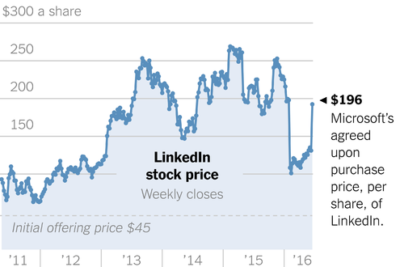
Microsoft announced that it will be acquiring LinkedIn Corporation for $196 per share in an all-cash deal, gaining access to the social platform and its data.

linkedin


Microsoft announced that it will be purchasing LinkedIn, the social network for professionals, for $26.2 billion. The all-cash deal will bolster Microsoft’s social media presence among professionals and could potentially give LinkedIn more analytics resources.

In the official press release announcing the acquisition, it was noted that LinkedIn will remain its own entity and CEO Jeff Weiner will stay at the helm. Weiner will report to Microsoft CEO Satya Nadella.

Despite the astronomical price, one of the most basic reasons for Microsoft’s pursuit of LinkedIn is to grow its appeal among business users. LinkedIn is the world’s biggest site for networking and job searches with roughly 400 million users, and Microsoft will get direct access to that audience and the data it is creating.

Speaking of data, LinkedIn stands to benefit from this deal as well. Microsoft’s press release, pointed out that LinkedIn has updated its mobile app to help “deliver better business insights,” which it could continue to do with Microsoft’s help.

Of course, a big part of LinkedIn’s publishing platform was built around its acquisition of Pulse in 2013. And, in 2015, LinkedIn announced analytics for publishing to help brands and professionals better understand the reach of their posts.

After Microsoft bought Yammer in 2012, it is integrating a host of Yammer capabilities into Office 365 and we may see the same thing from the LinkedIn deal. In a letter written by Nadella to employees explaining the deal, he cited growth in “Office 365 commercial and Dynamics” as one of the goals of the deal, as well as growth in cloud services.

microsoft-linkedin-

“This deal brings together the world’s leading professional cloud with the world’s leading professional network,” Nadella wrote. “I have been learning about LinkedIn for some time while also reflecting on how networks can truly differentiate cloud services.”

Additionally, Nadella noted that the combination could lead to an interesting overlap between the two brands relative to specific projects or tasks.

“This combination will make it possible for new experiences such as a LinkedIn newsfeed that serves up articles based on the project you are working on and Office suggesting an expert to connect with via LinkedIn to help with a task you’re trying to complete,” Nadella wrote. “As these experiences get more intelligent and delightful, the LinkedIn and Office 365 engagement will grow. And in turn, new opportunities will be created for monetization through individual and organization subscriptions and targeted advertising.”

One other option could be for Skype integration for LinkedIn to help with video interviews for job candidates, but also to assist with learning through the Lynda.com brand. LinkedIn bought Lynda.com back in 2015, which means that Microsoft gets access to the popular training platform and its audience as well.

The deal is expected to be completed sometime in 2016. Microsoft expects that LinkedIn’s financials will be reported as part of its Productivity and Business Processes segment.

The 3 big takeaways for readers

  1. Microsoft announced that it has purchased LinkedIn, the professional social network, for $26.2 billion dollars in order to further integrate the two companies’ technologies.
  2. In a letter penned by Microsoft CEO Satya Nadella, he specifically pointed out the integration will focus on “insights” and “cloud platforms.”
  3. Microsoft also gets access to the data generated by LinkedIn users around job searches, as well as access to LinkedIn’s training platform, Lynda.com, and its audience and data.

Have questions?

Get answers from Microsofts Cloud Solutions Partner!
Call us at: 856-745-9990 or visit: https://southjerseytechies.net/

South Jersey Techies, LL C is a full Managed Web and Technology Services Company providing IT Services, Website Design ServicesServer SupportNetwork ConsultingInternet PhonesCloud Solutions Provider and much more. Contact for More Information.

To read this article in its entirety click here.

Microsoft makes it easier for firms to keep running Windows 7

The technology giant releases a bundle of updates for the seven-year-old operating system in the latest move designed to appeal to businesses in no rush to move to Windows 10.

windows-7prof-logo

Microsoft has taken another decision that should make it easier for businesses to continue running Windows 7.

The technology giant announced the release of the Windows 7 SP1 convenience rollup, a collection of security and other updates for the seven-year-old operating system. The release includes core Windows fixes, security fixes and hot fixes that have been issued since Service Pack 1 was released in 2011 and is designed to simplify the updating process.

Microsoft’s decision to release the bundle is a departure from the firm’s stance earlier this year, when it said it had no news on the promised convenience rollup of fixes for Windows 7, stressing instead “the success our customers are experiencing upgrading to Windows 10”.

The release follows another recent choice by Microsoft to dial back pressure on businesses to move to Windows 10. At the beginning of the year, Microsoft announced it would phase out support for Windows 7 and 8 on new PC hardware. The move seemed designed to encourage businesses not to downgrade new Windows 10 machines to an earlier OS, as has been common in the past in order to standardize corporate hardware. However, Microsoft later watered down the plans, pushing back the point at which it will end full extended support for Windows 7 and 8.1 machines running on Intel’s Skylake CPUs.

Richard Edwards, principal analyst for Enterprise ICT at Ovum, said Microsoft’s recent decisions are an acknowledgement of how many businesses still run Windows 7 and how long it will likely take them to switch.

“Most organizations are still in the early planning stage when it comes to Windows 10. This means that most of the PCs running Windows 10 today are in the consumer segment of the market, and thus Windows 7 is probably running on 80 percent-plus business Windows PCs,” he said.

Inside enterprises, Windows 7 is “going to be around for many years to come,” he said. “Microsoft has to find ways to please and delight these enterprise customers, and easing the burden on IT departments is one way to do this.”

While Edwards believes the release of the Anniversary Edition update to Windows 10 will drive upgrades by early adopters, he predicted that mass adoption is still some way off, forecasting that the bulk of firms will migrate from mid-2017 through to 2020.

“Organizations will only upgrade to Windows 10 if they have a clear insight into its business value,” said Edwards, adding that key business features such as Enterprise Data Protection were still not in place.

Microsoft’s focus on driving customers to Windows 10 has earned it criticism from small businesses, which recently complained about the decision to push the aggressive Get Windows icons and pop-ups to domain-joined PCs.

Analyst house Gartner had predicted that adoption of Windows 10 by business would be “significantly more rapid” than that of Windows 7 but this year was more cautious, claiming that flat IT budgets are pushing the start of enterprise migrations back to 2017.

“It’s to do with current budget restrictions as much as anything. They [budgets] are not being made available,” said Gartner research director Ranjit Antwal at the time.

There is little third-party data on the rate of adoption of Windows 10 by business, although Microsoft claims enterprises are switching more rapidly than they did to Windows 7.

Have questions?

Get answers from Microsofts Cloud Solutions Partner!
Call us at: 856-745-9990 or visit: https://southjerseytechies.net/

South Jersey Techies, LL C is a full Managed Web and Technology Services Company providing IT Services, Website Design ServicesServer SupportNetwork ConsultingInternet PhonesCloud Solutions Provider and much more. Contact for More Information.

To read this article in its entirety click here.

Windows 10 Start menu will soon show twice as many ads. Here’s how to get rid of them

Want to never see a promoted app in the Start menu again? Follow this step-by-step guide for home users and businesses.

windows10giffy

Microsoft is to double the number of adverts for apps that appear in Windows 10’s Start menu.

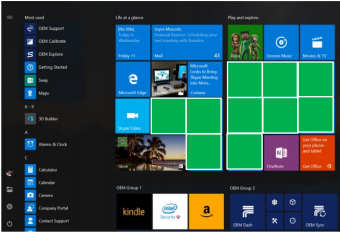
Windows 10’s Start menu currently has five tiles that display ‘promoted apps’, which are Windows Store apps the user hasn’t installed on their PC. Three of these tiles are links to apps on the Windows Store and two are Windows Store apps that Windows 10 has previously automatically installed on the machine.

In future versions of Windows 10, the number of ‘promoted apps’ tiles in the Start menu will rise to 10. To make room, the number of tiles linking to apps installed on the machine will decrease, from 17 to 12.

Microsoft discussed the changes at the Windows Hardware Engineering Conference in late April, as part of a briefing on new features in the Windows 10 Anniversary Update, due out this summer.

It remains unclear whether all versions of Windows 10 will eventually see the Start menu changes or just new installs. Microsoft has been contacted for clarification.

If you don’t want adverts appearing in your Windows 10 Start menu, here’s how to remove them.

For home users

One option for removing these tiles is to install Classic Shell. The software will allow you to customize the look and feel of Windows, including changing the Start menu to resemble that of Windows 7 or earlier Microsoft operating systems.

If you don’t want to do that, here’s how to manually remove each tile from the Start menu.

In the slides below, you can see which tiles you will want to remove to get rid of promoted apps. Figure A shows the layout of promoted app tiles before the Anniversary Update changes and Figure B shows after.

Figure A
win10before
Figure B
win10after

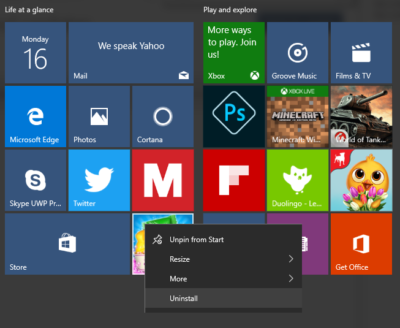
Depending on which version of Windows you’re running, you’ll want to remove each of the tiles highlighted in Figure A or B. Let’s start by removing promoted apps that are installed on your machine. Right clicking on these tiles will show a drop down menu with an ‘Uninstall’ option at the bottom, as shown in Figure C. Click on this option to remove the app.

Figure C

cons5

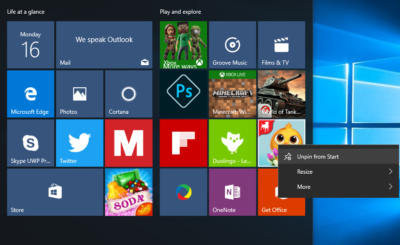
Next to get rid of those promoted apps that link to the Windows Store. Right clicking on these apps will again show a drop down menu but this time click ‘Unpin from Start’ at the top, as shown in Figure D.

Figure D

consumerlatest

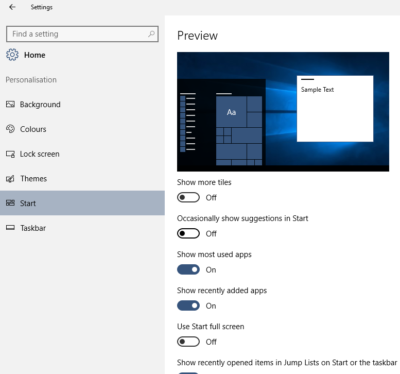
Finally, to remove suggested apps from the sidebar in the Start menu, you’ll need to make a change in Settings. Go to Settings->Personalization->Start and click the slider to ‘Off’ that sits under ‘Occasionally show suggestions in Start’, as shown in Figure E.

Figure E

consumerremoveads

For businesses

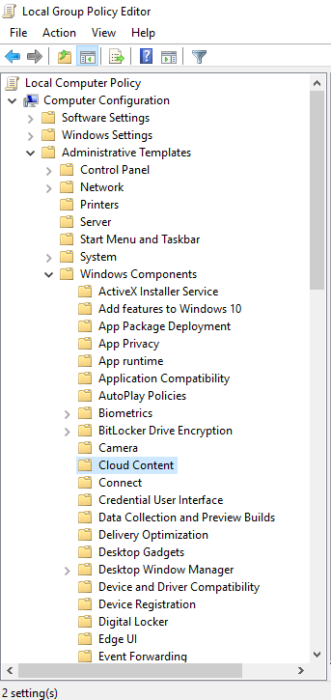
If you are running the Education or Enterprise versions of Windows 10 then promoted apps can also be disabled by changing a Group Policy setting. First open the Local Group Policy Editor. Next, as shown in Figure F, open the following folders in the left hand menu: Administrative templates->Windows Components->Cloud Content.

Figure F

cons4


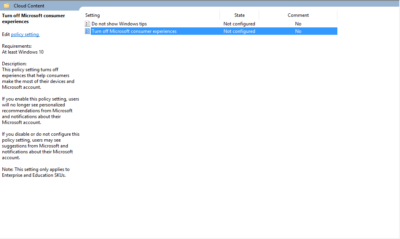
Next double click Turn off Microsoft consumer experiences, as shown in Figure G.

Figure G

biz5

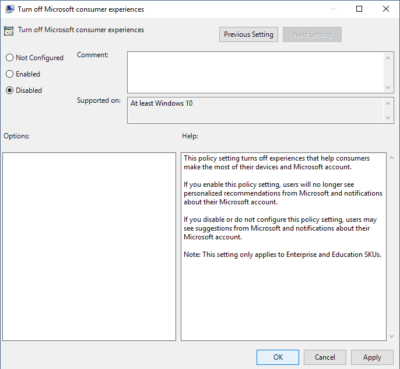
Inside the Turn off Microsoft consumer experiences window, click the radio button marked ‘Disabled’ and then click ‘Ok’ at the bottom of the window, as shown in Figure H.

Figure H

biz3

Have questions?

Get answers from Microsofts Cloud Solutions Partner!
Call us at: 856-745-9990 or visit: https://southjerseytechies.net/

South Jersey Techies, LL C is a full Managed Web and Technology Services Company providing IT Services, Website Design ServicesServer SupportNetwork ConsultingInternet PhonesCloud Solutions Provider and much more. Contact for More Information.

To read this article in its entirety click here.
Windows 10: Here’s Microsoft’s new look Start menu

Microsoft has changed the look of the Start menu in Windows 10.

The revamped Start menu is due to be added to Windows 10 this summer, as part of a major update coined the ‘Windows 10 Anniversary Edition’.

Microsoft revealed the updated appearance in an early build of the OS, which it released to testers in the Windows 10 Insider program on Friday.

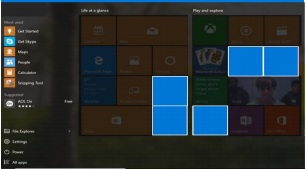
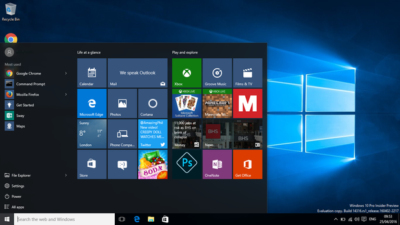
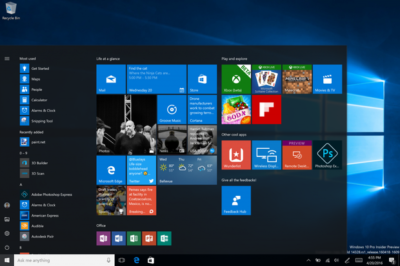
The new look Start menu makes the ‘All Apps’ list visible by default on the left-hand side. In another new addition, a selection of the user’s ‘Most-used’ apps are shown at the top of this permanently visible ‘All Apps’ list. Microsoft says the change should reduce the clicking and scrolling needed to access apps.

The Power, Settings and File Explorer icons are also always visible in the left rail of the Start menu and the ‘Recently added’ section will display three entries, instead of one. Any folders that users have added to the Start menu are now immediately accessible without having to click the hamburger icon.

win10

The old look start menu

updated-startmenu-windows10

The new look start menu

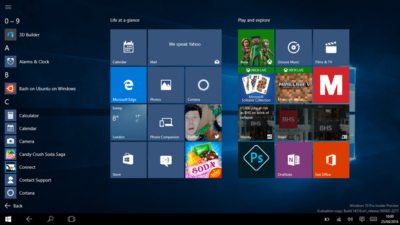
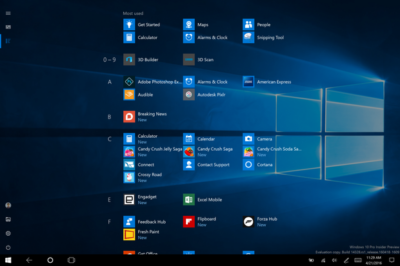
The look of the Start menu in tablet mode has also been overhauled, turning the ‘All Apps’ list into a fullscreen menu, reminiscent of the Windows 8.1 Start screen. Gabe Aul, VP for Microsoft’s engineering systems team, says the switch to fullscreen was a ‘top request from Windows Insiders’, adding that ‘the grid-like implementation of the full-screen ‘All Apps’ list aims to provide efficiency while taking advantage of the additional real estate on the Start screen on a tablet’.

win10tab

The old look ‘All Apps’ list in tablet mode.

full-screen-allapps-windows10

The new look ‘All Apps’ list in tablet mode.

The final Start menu change is designed to make it easier to toggle between pinned tiles and the ‘All Apps’ list, by providing the option to do so in the menu’s left rail.

More helpful Cortana and other changes

The latest Windows Insider build, 14328, also includes a raft of features that will be available to all users following the Anniversary Update.

These new components include Windows Ink, which allows users to more easily write notes on touchscreen PCs and tablets using a digital pen. The addition of Windows Ink to Windows 10 allows users to write on digital sticky notes, draw on digital whiteboards and annotate content in a variety of apps, including Maps, Microsoft Edge, and Office. Microsoft wants support for drawing and writing using a digital pen to be present in many Windows 10 apps and says that adding support for Windows Ink only requires developers to write two lines of code.

Windows 10’s digital assistant Cortana has also been tweaked. Users will no longer have to log into Windows to use Cortana and instead will be able to use voice commands to get Cortana to make notes, play music or set a reminder from the lock screen.

Cortana can now also be used to set photo reminders, for example the user could take a picture of a cheese they want to buy next time they’re in a store, and add reminders based on content from another Windows 10 app, for example telling a user to read an article they flagged as interesting in the Edge browser. Cortana is now also accessible to all users, with Windows 10 no longer requiring users to sign-in before they can ask simple questions of the digital assistant.

Other changes include the ability to search files on OneDrive cloud storage that aren’t synced locally, tweaks to the look of and what is displayed in the Action Center and via notifications, various changes to the Taskbar — including easier access to the calendar and the removal of the File Explorer icon, as well as updates to the Settings app and lock screen.

As this is an early build of Windows 10, some of these features may change before reaching the general public, based on feedback from testers in the Windows Insider program.

Have questions?

Get answers from Microsofts Cloud Solutions Partner!
Call us at: 856-745-9990 or visit: https://southjerseytechies.net/

South Jersey Techies, LL C is a full Managed Web and Technology Services Company providing IT Services, Website Design ServicesServer SupportNetwork ConsultingInternet PhonesCloud Solutions Provider and much more. Contact for More Information.

CALL US NOW!