Back to Top

Tech, Web, Cloud & Cabling Services

Category: News

Set Up Microsoft Exchange E-Mail on iPhone

Set Up Microsoft Exchange E-Mail on an Apple iPhone, iPad, or iPod Touch3
You can set up Exchange e-mail on an Apple iPhone, iPad, or iPod Touch. When you set up an Exchange account on your device, you’ll be able to access and synchronize your e-mail, calendar, and contacts. If you have a different device, or if you want to connect using POP or IMAP.

How do I set up Microsoft Exchange e-mail on an Apple iPhone, iPad, or iPod Touch?


  1. Tap Settings > Mail, Contacts, Calendars > Add Account.
  2. Tap Microsoft Exchange.
  3. You don’t need to enter anything in the Domain box. Enter the information requested in the Email,Username, and Password boxes. You need to enter your full e-mail address in the Email and Usernameboxes (for example, tony@contoso.com).
  4. Tap Next on the upper-right corner of the screen. Your iPhone will try to find the settings it needs to set up your account. Go to step 7 if your iPhone finds your settings.
  5. If your iPhone can’t find your settings, you’ll need to manually look up your Exchange ActiveSync server name. For instructions for how to determine your Exchange ActiveSync server name, see the Finding My Server Name section below.
  6. In the Server box, enter your server name, and then tap Next.
  7. Choose the type of information you want to synchronize between your account and your device, and then touch Save. By default, Mail, Contacts, and Calendar information are synchronized.
    Caution:
    If you’re prompted to create a passcode, tap Continue and enter a numeric passcode. If you don’t set up a passcode, you can’t view your e-mail account on your iPhone. You can set up a passcode later in iPhone Settings.

Finding My Server Name


If your email program isn’t able to automatically find your Exchange ActiveSync server name, you may need to look it up.

  1. Sign in to your e-mail account using Outlook Web App. For help signing in, see How to Sign In to Outlook Web App.
  2. If you’re connecting to an Exchange mailbox, your Exchange ActiveSync server name is contained in the address bar in your browser when you are signed in to Outlook Web App, but without the leadinghttps:// and without the trailing /owa. For example, if the address you use to access Outlook Web App is https://mail.contoso.com/owa, your Exchange ActiveSync server name is mail.contoso.com.
  3. If you’re unable to connect to your mailbox using the information earlier in this section, you can try using the server name value that you can view in Outlook Web App options. Do the following:
    1. In Outlook Web App, click Options > See All Options > Account > My Account > Settings for POP, IMAP, and SMTP access.
      Note:
      Although you’re not setting up a POP3 account, you will use this value to determine your Exchange ActiveSync server name.
    2. Under POP setting, view the value for Server name.
    3. Try setting up your email using the server name listed on your options page. For example if the value for Server name under POP setting is mail.contoso.com, try using mail.contoso.com as your Exchange server name.

What else do I need to know?

  • If you’re prompted to create a passcode and don’t create one, you won’t be able to send and receive e-mail.
South Jersey Techies A High Quality VOIP Provider

VOIP

South Jersey Techies


South Jersey Techies is a high quality VOIP provider.

Our VOIP Solutions let you combine voice and data into a single, easy to manage service and helps you focus on your business, not your network and phone systems.

You can control how your calls are routed from a simple, web based portal accessible from any browser in the world. Use the Find-me/Follow-me feature to make sure you never miss another important call, no matter where you are. With this premium level feature, you get to decide which business calls get through to you at your desk, your cell phone or even at home if you like. You also get to decide which callers go directly to voice mail without even ringing your line.

South Jersey Techies offers a wide range of VOIP Phone Services.  We also offer cheaper, simpler plans that include both local and nationwide long distance calling.

With our hosted VoIP solution there is no expensive PBX equipment in your office to go down, fail or get damaged during a storm. Only your IP phone handsets reside in your office, and those can be easily taken out and moved at any time.

Go VOIP – Go Green – it has a good ring to it don’t you think

South Jersey Techies VoIP systems are more energy efficient and help reduce the need for work related travel and car usage.  Our VOIP Solutions also help reduce paper usage. A great example of this is the fax to e-mail system enabling your company to save on paper usage as the fax no longer has to be printed out, and this applies to both incoming and outgoing faxes.

South Jersey Techies VOIP Advantages:

  • Lower Costs: Save money by combining your phone and data networks
  • Greater Functionality
  • Less maintenance
  • Excellent Voice Clarity and Call quality
  • Free calling features with optional advanced features
  • Mobility: The ability to use your smartphone as an extension of the office phone system, including the ability to have business calls automatically directed to your cell phone and make outbound calls from your smartphone as your office number.
  • Portability: The ability to use any computer or office phone as your personal extension.
  • Flexibility: The ability to redesign your phone system on the fly by simply logging into your VoIP provider’s dashboard.

For more information please visit out websites below, we look forward to serving you:

http://southjerseytechies.net/voip.php

http://www.sjtechies.com/voip-phone-services/

Smartphone Market Share

spmsTakeaway:  Kantar Worldpanel is an international company that provides market and consumer solutions. 

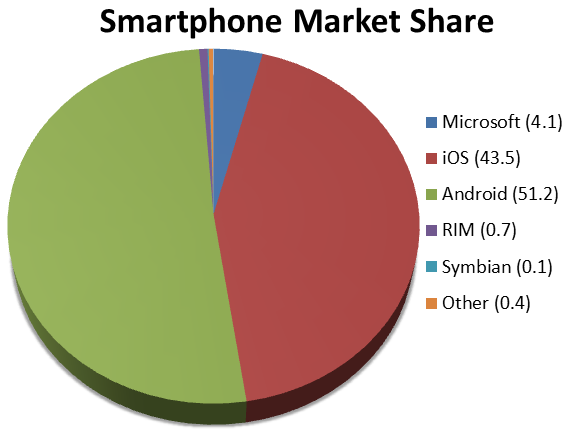
Android is up 13% market share since February 2012, now holding more than half of Smartphone sales.  Within the Android market, Samsung continues to take control over other smartphone manufacturers.  “It’s apparent that Samsung is successful at capturing users from across the competitor set and not just gaining from their own loyalists.”  said Kantar Worldpanel analyst Mary-Ann Parlato.

Apple’s iOS is down 7% market share since February 2012.  Taking more than half of Verizon and AT&T sales, Apple is steadily residing in second place behind Android.

The first quarter of 2013 has been very impacting for Microsoft, jumping into third place for smartphones and fifth place for tablets.  Microsoft has finally made a leap from 2012, bringing their market share up 52%.  Microsoft is now continuously growing in smartphone sales.

Lastly, BlackBerry has taken a “nose-dive” since 2012, dropping from 3.6 to .7 (81%) market share.


Hosted Web Server Maintenance

Our server will be coming down at 1 A.M on Friday, June 14th, 2013 as part of our planned maintenance for space efficiency. Due to the physical relocation of the servers, we cannot provide a precise time frame for this maintenance however we expect this to take between 2 to 3 hours. Our technicians have performed this maintenance several times and have established a process to minimize the outage period during the moves. We apologize for any inconveniences caused by this maintenance.

Maintenance Window:  1 A.M. – 6  A.M. (EST) on Friday, June 14, 2013.

If you have any questions, please do not hesitate to contact us.

(856)745-9990 or support@sjtechies.com

Microsoft – What went wrong?

ET83-screen[1]Touch 10 MonitorMicrosoft has always been key player in the Technology world.  In 2009, Microsoft released Windows 7, for many users it became the best operating system yet.  Not too long after the release of Windows 7, Microsoft predicted that “touch-screens” were the future of technology and focused all of their resources in one place.

On October 26, 2012, Microsoft released their Windows 8 OS and their first tablet, the Surface RT.  Shortly thereafter, on February 9, 2013, Microsoft released the second tablet, the Surface Pro.  For more information regarding the Surface RT or the Surface Pro, click here

“A Windows 8-based PC is really a new kind of device, one that scales from touch-only small screens through to large screens, with or without a keyboard and mouse,” said Julie Larson-Green from Microsoft.

Apple and Android touchscreen devices have been very successful because they are useful on-the-go.  Trying to compete with Apple and Android, Microsoft developed Windows 8, a touch-oriented OS.  Many desktop and laptop users have had problems adjusting to the new OS.   Also, the Surface Tablet users are having trouble adjusting to this device and OS because it is a touch-enabled laptop.  Using the touchscreen features on a laptop is not convenient and very uncomfortable.

How long will it take for Microsoft to regain its position in the technology world?


ActiveSync Limits – Exchange 2010 SP1

es10sp1

Exchange 2010 Service Pack 1 restricts the number of ActiveSync devices (=EAS PartnerShips) by setting the default to allow up to only 10 devices.  This default helps eliminate resources from being monopolized.

Limiting ActiveSync devices is for the new feature “Throttling” which manages Exchange performance. Throttling enforces bandwidth limits by tracking consumed resources per user.

Run command in cmdlet to adjust ActiveSync limits:

 Set-ThrottlingPolicy –EASMaxDevices # –Identity DefaultThrottlingPolicy_hex_string

  • Change # to the number of devices.
  • Run  Get-ThrottlingPolicy to find out the hex_string identity.


‘Zero-Day’ for Microsoft XP Users

194212

On April 10, 2012, Microsoft officially announced that as of April 8, 2014 they will end extended support for Windows XP and Office 2003, after which no new updates, hotfixes, patches or support will be issued.  “Since a security update will never become available for Windows XP to address these vulnerabilities, Windows XP will essentially have a “zero day” vulnerability forever” said Tim Rains from Microsoft.  Zero-day attacks are when attackers exploit a vulnerability before the developer is aware or can fix the problem.

Windows XP already has a notably higher infection rate than its successors Windows 7 and Windows 8.  Those preparing to continue using XP after the cut-off date, are going to be in a unpleasant situation trying to protect their intellectual property.   With Microsoft ending their support, the vendors for applications running on it will most likely end support.

Attackers will have the upper hand once Microsoft cuts off XP support and presumably will have more information than the defenders about system and application vulnerabilities.  Also, attackers will have the possibility of compromising the system and applications if they exploit the zero-day vulnerabilities.

For more information regarding Windows XP End of Life, click here.

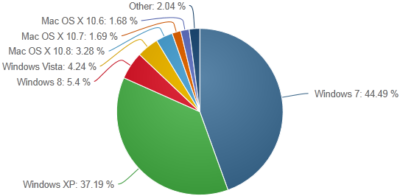
According to NetMarketShare.com, Windows XP still has about 37 percent desktop operating system share as of June 2013.   Although it is the second most used operating system, Microsoft said that they will not be extending support for XP after April 8, 2014.

xp

To protect and upgrade your home or business

 please contact us 856-745-9990 or click here.


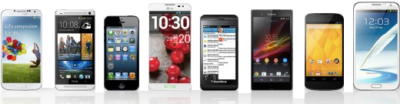
Top Smartphones for 2013 Holiday Season

2013smartphone2

iPhone 5s

The iPhone 5S was launched with iOS7.  The updated camera with iPhone 5S has become popular against competitors. Also, the iOS 7 includes many new features including fingerprint identification on the home button, control center, multitasking, enhanced Siri and many more.

The iPhone 5S is available with all major carriers.  Contract prices are $199-399 or without Contract prices are $649-$849.

HTC One

The HTC One runs Android 4.3, a quad-core processor, 2 GB of RAM, 1080p LCD displays and an ultra mega pixel camera.  The most popular feature with HTC One is the front facing speakers and dual microphones.

The HTC One is available with all major carriers.  Contract prices are as low as $50 or without Contract price is $550.

Samsung Galaxy Note 3

The Samsung Galaxy Note 3 is the most prevailing Android device on the market.  The Galaxy Note 3 includes many features, such as, the S Pen, 13 mega pixel camera (rear), microSD storage, a removable battery, LTE and many more.

The Samsung Galaxy Note 3 is available with all major carriers.  Contract price is$299.99 or without Contract price is $699.99.

Nokia Lumia 1520

The Nokia Lumia 1520 runs Windows Phone 8 OS.  The 1520 offers a larger display, faster processor, and lower resolution camera than the Lumia 1020.  Features of the Lumia 1520 include integrated Microsoft Office, 20 mega pixel camera, HD 1080p display and many more.

The Nokia Lumia is only available through AT&T.  Contract price is $199.99 or without Contract price  is$584.99.

Google Nexus 5

The Nexus 5 runs Android 4.4.  The Nexus 5 includes a Snapdragon 800 processor, 8 mega pixel camera, HDR+, wireless charging and many more.

The Nexus 5 prices are $349 (16GB) and $399 (32GB).

Moto X

The Moto X runs Android 4.4.  The Moto X includes many features, such as, 10 mega pixel camera with quick capture, touch-less control, face unlock and many more.

The Moto X is available with all major carriers. Contract price is $99 or without Contract price is $499.

LG G2

The LG G2 runs Android 4.2.2.  The LG G2 has 1080p IPS display, 13 mega pixel camera, power and volume rear keys , clip tray, knock on and many more features.

The LG G2 is available with all the major carriers.  Contract price is $199.99 or without Contract price is $603.99.

Samsung Galaxy S4

The Samsung Galaxy S4 runs Android 4.2.  The Galaxy S4 has a 13 mega pixel camera with Dual shot and Drama Shot, Air View that allows you to control your phone with hovering instead of touch, WatchON, S Health and many more.

The Samsung Galaxy S4 is available with all the major carriers.  Contract price is $199.99 or without Contract price is $627.99.

Motorola Droid Maxx

The Motorola Droid Maxx has outlasting power with a 3,500 mAh capacity battery.  The Droid Maxx features include active notifications, always-on listening, Command Center, wireless charging, 10 mega pixel camera and many more.

The Droid Maxx is only available at Verizon Wireless.  Contract price is $199.99 or without Contract price is $499.99.

Sony Xperia Z1

The Sony  Xperia Z1 is waterproof and dust resistant.  The Xperia Z1 has man features that include 20.7 mega pixel camera, full HD TRILUMINOUS display, quad-core processor, 2GB RAM, microSD card slot, and many more.

The Sony Xperia Z1 is available without a contract for $649.99.


New Security Threat: CryptoWall


crypt

In October of last year news broke about a new form of malware called Cryptolocker. This malware posed a particularly large threat to many business users and led to many quick and important security updates. Now, almost a year later, it appears that the second version of this – CryptoWall – has been released and is beginning to infect users.

What is Crypto malware?

Crypto malware is a type of trojan horse that when installed onto computers or devices, holds the data and system hostage. This is done by locking valuable or important files with a strong encryption. You then see a pop-up open informing you that you have a set amount of time to pay for a key which will unlock the encryption. If you don’t pay before the deadline, your files are deleted.

When this malware surfaced last year, many users were understandably more than a little worried and took strong precautions to ensure they did not get infected. Despite these efforts, it really didn’t go away until earlier this year, when security experts introduced a number of online portals that can un-encrypt files affected by Cryptolocker, essentially neutralizing the threat, until now that is. A recently updated version is threatening users once again.

Cryptolocker 2.0, aka. CryptoWall

Possibly because of efforts by security firms to neutralize the Cryptolocker threat, the various developers of the malware have come back with an improved version, CryptoWall and it is a threat that all businesses should be aware of.

With CryptoWall, the transmission and infection methods remain the same as they did with the first version: It is most commonly found in zipped folders and PDF files sent over email. Most emails with the malware are disguised as invoices, bills, complaints, and other business messages that we are likely to open.

The developers did however make some “improvements” to the malware that make it more difficult to deal with for most users. These changes include:

  • Unique IDs are used for payment: These are addresses used to verify that the payment is unique and from one person only. If the address is used by another user, payment will now be rejected. This is different from the first version where one person who paid could share the unlock code with other infected users.
  • CryptoWall can securely delete files: In the older version of this threat, files were deleted if the ransom wasn’t paid, but they could be recovered easily. In the new version the encryption has increased security which ensures the file is deleted. This leaves you with either the option of paying the ransom or retrieving the file from a backup.
  • Payment servers can’t be blocked: With CryptoLocker, when authorities and security experts found the addresses of the servers that accepted payments they were able to add these to blacklists, thus ensuring no traffic would come from, or go to, these servers again. Essentially, this made it impossible for the malware to actually work. Now, it has been found that the developers are using their own servers and gateways which essentially makes them much, much more difficult to find and ban.

How do I prevent my systems and devices from being infected?

Unlike other viruses and malware, CryptoWall doesn’t go after passwords or account names, so the usual changing of your passwords won’t really help. The best ways to prevent this from getting onto your systems is:

  • Don’t open any suspicious attachments – Look at each and every email attachment that comes into your inbox. If you spot anything that looks odd, such as say a spelling mistake in the name, or a long string of characters together, then it is best to avoid opening it.
  • Don’t open emails from unknown sources – Be extra careful about emails from unknown sources, especially ones that say they provide business oriented information e.g., bank statements from banks you don’t have an account with or bills from a utilities company you don’t use. Chances are high that they contain some form of malware.

CALL US NOW!