Check out a recently developed and designed website by South Jersey Techies Website Team for NuWave Marine in Deptford, NJ.


Tech, Web, Cloud & Cabling Services

Check out a recently developed and designed website by South Jersey Techies Website Team for NuWave Marine in Deptford, NJ.
Though we live in an age of nearly-ubiquitous broadband, it still seems like certain pages don’t load as quickly as one would like. After you’ve tried changing your ISP (Internet service provider), or ordering a T1 internet connection, consider that many problems can be solved with a series of tips and tricks, outlined below.
These are only a few of the most common causes of Internet slowness. Hopefully one of the solutions will work for you!

Gain new customers and keep current ones coming back! Express Email Marketing Services lets you easily create beautiful, full-color emails with no technical or design skills. Plus, build and maintain your social media presence by managing all your profiles in just one place.
Email Marketing Services is one of the most effective and inexpensive tools in your marketing arsenal, with an average cost of less than a penny per email. It’s also an obvious (if often overlooked) strategy for generating more revenue from the customers you already have. Best of all, you can place an unsubscribe link at the bottom of every email, so they’re completely permission-based.
Call (888) 505-1532 to get started now or click here
With WebSite Tonight, everything works just like you’d expect. Need to move a section? Just drag and drop it. Want to add some text? Just click and type. Need help getting started? Choose from over 2,000 design and color combinations in our template library, including 120 pre-built websites customized to fit your business or style – just replace the text and images and you’re ready to go!
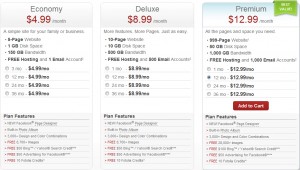
With hundreds of colorful, ready-made site designs and thousands of high-quality images, WebSite Tonight takes the complexity out of developing a website so you can let your creativity flow.
Choose a design
Make it yours
Publish it
WebSite Tonight is not only fast and easy to use, it’s packed with powerful features. Expand and enhance your site with a huge variety of tools and options that will keep your site fresh and interesting and your visitors coming back for more.
Build your website
Customize your website
Add elements to your website
Publish your website
Protect your website
Market your website
Our highly trained, courteous support staff is waiting to take your call. Whatever time it takes to assist you, that’s the time you’ll receive. We’ll resolve any issue to your complete satisfaction.
“It embodies hardware and software working together. People want to work and play,” Steve Ballmer said today amid much fanfare at Milk Studios in downtown Los Angeles. Microsoft has officially entered the ring with the Apple IPad. Microsoft views the Windows 8 Surface Tablet as a “stage for Windows 8.” It’s 9.3mm thin, has full size USB 2.0 ports, a massive kickstand and weighs only 1.5 lbs. The casing is made out of magnesium (specifically, a material Microsoft calls VaporMg) and screen is covered in the Gorilla Glass 2 and optically bonded, a feature for the Microsoft Windows 8 Surface Tablet brags was specifically made for the Surface Tablet. The Microsoft Windows 8 Surface Tablet is directly aimed at consumers, and with that, the iPad.
Windows 8 is at the core of Microsoft’s Surface Tablet. As such, it’s Metro device but also has access to all the Windows, not to mention Xbox features. Microsoft Surface Tablet is clearly the product Microsoft had in mind when it announced the Xbox SmartGlass feature at E3 earlier in the month.
Microsoft also announced several accessories for the Microsoft Surface Tablet including a clever 3mm thick cover that features a full (albeit super-slim) keyboard. Since it’s held on by magnets, it will likely be called a copy of the iPad’s SmartCover, too. The backside of the Surface even features a massive, unit-wide kickstand.
There will be two hardware options for Microsoft’s Surface Tablet, with both an ARM option and, for the full Windows experience, an Intel chip.
But like most hardware, it’s nothing without the right software. Ballmer was very clear at the beginning of the announcement event that the Microsoft Surface Tablet’s strength is the Windows ecosystem. This tablet runs Windows 8, and with that, both Metro and the traditional desktop environment. Every application that runs on Windows, save perhaps Skyrim and the like, should run on a x86 Surface.
Still, if Microsoft is attempting to take on Apple, it will need to court a new crop of developers. The iPad’s strength comes from its legions of small 3rd party devs that for the most part completely ignore all things Microsoft. Up until this product, there wasn’t another tablet platform with the same sort of penetration numbers as the iPad. But with the Surface Tablet, Microsoft is essentially giving developers a massive user base as the applications will hit both mobile and desktop units — and Metro’s dedication to the touchscreen makes the deal even sweeter.
The new Windows RT-powered Surface Tablet will sport either 32 or 64GB of storage depending on the purchaser’s preference, while the more traditional Intel variant will come with either 64 or 128GB. Microsoft declined to dive into specifics about their new tablet’s release, though they were quick to note that the Surface tablets would be priced “competitively” when they make it to market.
To View Full Article Click Here
The invitations to the ball have arrived!
October 25th is going to be busy one for Microsoft watchers, fans, and foes.
Drip, drip, drip
The Redmondians are continuing to torture us Microsoft watchers with a slow flow of information about the company’s bet-its-business launch.
We already knew Microsoft planned to launch Windows 8 and its ARM-based Surface RT devices in New York City on October 25, thanks to a save-the-date invitation we got a while back. We knew those products would become available commercially the following day, and we found out this week that Microsoft would be opening 30-plus holiday pop-up stores in the U.S. and Canada on October 26 as well.
As of October 4, we now know that the launch is going to be a lengthy affair — from 10 a.m. to 3 p.m. ET.
Here’s what I just got in my in-box:
Will there also be, as some are reporting, some kind of “midnight madness” event here in New York to coincide with Windows 8 and Windows RT PCs, tablets — and Microsoft’s own Surface RTs — going on sale as of October 26? No word on that yet. (I asked.) But I’d be surprised if there wasn’t. Microsoft officials have said its Surface tablet devices will be sold only through its own brick-and-mortar stores, as well as “select” Microsoft online stores. Those without a Microsoft Store nearby will only be able to purchase online, unless Microsoft modifies its previously stated plan.
Microsoft still has not released pricing or a full and complete spec list for its Surface RT tablets/PCs. It has not yet made them available for preorder. The Intel-based Surface Pro versions are not due out until three months, give or take, after the Windows RT launch.
If you’ll be in/around New York City on October 25 and 26, stay tuned for information about a meetup/tweetup that a few of us Microsoft bloggers, including my Windows Weekly cohost and Windows SuperSite editor, Paul Thurrott, are planning. More details on that to come soon via Twitter. Hope you can join us.
To View Full Article Click Here
Summary: A Microsoft executive let slip in the Czech Republic that the long-rumored Microsoft Office for Android smartphones and tablets and Apple iPad and iPhones will be arriving in early 2013. Microsoft now denies that their executive was speaking accurately.
We’ve known for months that Microsoft was bringing a version of Microsoft Office 2013 to Android tablets and Apple’s iPad family. Now, according to the Czech tech news site, IHNED, Microsoft product manager Petr Bobek has said that Microsoft is planning to release native iOS and Android versions of Microsoft Office 2013 in the first quarter of 2013
Bobek, a Microsoft Office portfolio manager in the Czech Republic, said that these new versions of Office will be available to larger companies and Microsoft partners In December 2012. small-office/home-office (SOHO) and household users will have to wait until at least February. The online version of Office 365 edition for mobile devices and tablets will appear in early 2013.
In an e-mail, the author of the INHED story clarified that the release would be after March 2013. “We had a slight miscommunication with the MS guys and the timeline for Office for iOS and Android is not a March release, but release sometime after March.”
Officially, the only thing Microsoft had to say at first was that “As we shared previously, Office Mobile will work across Windows Phones, Android phones and iOS, and we have nothing additional to announce today about retail availability of the new Office.”
Later the same day, Microsoft’s head of corporate communications, Frank X. Shaw, denied the whole story. Shaw tweeted, “The information shared by our Czech Republic subsidiary is not accurate. We have nothing further to share.”
No matter when Microsoft delivers the Android and iOS goods, Microsoft’s support of any version of Office on a non-Windows smartphone or tablet strikes me as an odd move. In a shareholder letter, Microsoft CEO Steve Ballmer said that Microsoft is shifting its model to focus on devices and services. This is a radical and dangerous shift for a company that’s always made it money from software licensing. And, now, instead of using Office as a crowbar to pry users from iPads and Android tablets to its Surface tablets, Microsoft is going to offer Microsoft Office 2013 on its device rivals? Odd. Very odd.
Historically, Microsoft has locked its customers into its software ecosystem. Since Microsoft is a non-starter in the mobile space, I find it surprising that they’re not trying to exploit its Office suite in a similar manner in this new market.
That said, given the early reports of Office 2013, which didn’t even have touch enabled for its tablet versions by default, I don’t see Google, with Google Docs and QuickOffice, being worried about Microsoft being a rival on either devices or services anytime soon.
Summary: In case you didn’t get the memo — or CEO Steve Ballmer’s latest shareholder letter — Microsoft officially is a devices and services company now.
Microsoft really wants to make sure its shareholders, customers, partners and competitors realize it’s not just a big software company any more.
In an October 9 letter to shareholders, part of Microsoft’s just-released fiscal 2012 annual report, CEO Steve Ballmer repeated his new “devices and services company” mantra to drive it home.
Ballmer hasn’t (yet) chanted “devices, devices, devices” in front of any public or private audiences (that we know of, at least) in the way he once infamously chanted “developers, developers, developers.”
But Ballmer told The Seattle Times a few weeks back that Microsoft can and should be considered a devices and services company. The latest Ballmer shareholder letter re-emphasizes that message.
From the letter:
“Last year in this letter I said that over time, the full value of our software will be seen and felt in how people use devices and services at work and in their personal lives. This is a significant shift, both in what we do and how we see ourselves — as a devices and services company. It impacts how we run the company, how we develop new experiences, and how we take products to market for both consumers and businesses. The work we have accomplished in the past year and the roadmap in front of us brings this to life.”
The Ballmer shareholder letter also claimed again that Microsoft is still counting on its partners to produce business and consumer devices and hardware that customers want. But it’s clear Microsoft isn’t getting into the hardware game on a lark or just to incent its OEMs to make more well-designed products, as some company watchers and partners have said.
Ballmer noted that, going forward, Microsoft plans to continue to focus on the development of “new form factors that have increasingly natural ways to use them including touch, gestures and speech.”
Along with the Xbox, the Microsoft Surface — which Microsoft described as “a series of Microsoft-designed and manufactured hardware devices” in its latest proxy statement (also released today) — are here to stay and seemingly will include more products as part of the family.
Summary: Technology will be embedded everywhere and disrupt traditional IT and the vendors and ecosystem that goes with it.
ORLANDO—Global technology spending will surpass the $4 trillion mark in 2016 and digitization of industries will ultimately force a rethink on what is IT overall, according to Gartner.
In other words, the technology pie is going to get a lot larger, but murkier.
The big theme: Cloud, mobile, social and big data will come together to create a technology boom with a bevy of challenges and disruption ahead.
“Every budget is an IT budget,” said Peter Sondergaard, senior vice president of research at Gartner. “Technology is embedded in every product.”
His point: More technology spending will occur outside traditional procurement methods. Consumers will spend more disposable income on technologies. Industries traditionally thought to be non-tech will be digitized. And technology will be embedded into everything.
There will be chief digital officers in most companies. By 2015, 25 percent of companies will have a chief digital officer. The role: Digitize the business.
Gartner’s theme at its Symposium CIO powwow is that there’s a nexus of technologies that will revamp corporate technology, vendors and employment. Nexus is a word that will be beaten to death at this annual CIO leadership therapy session. The forces inside this nexus are all interdependent.
Some takeaways to ponder from Sondergaard’s talk:
And the effects of this disruption:
Curious about what your competition does for Search Engine Optimization (SEO)? If your answer is a resounding “yes,” then you’re ready to take your SEO to the next level.
Checking out your competition and learning which keywords they use can help you refine your strategy. This is a common form of analysis to use on any website, whether it’s your competitor’s site or your favorite website.
You can identify your competitor’s keywords in a few different places on their website:
Keywords in the Code — Start by checking out their meta tags, such as the title tag or the keywords tag. Typically, the first keyword in a title tag is usually the most important. Use these steps to view the code:
The <title>tag is near the top of the page. If the site includes it, the meta name=”keywords”tag should be a few lines below. Both of these contain your competitor’s keywords.
Keywords in the Text — Checking out your competitor’s content for keywords also helps you analyze your competition. A keyword density checker (search “keyword density checker” in any search engine) can quickly determine which keywords are prominent in their copy. Or, you can simply use “find” (press CTRL-F on your keyboard) to search for specific keywords.
Assuming your competitors follow SEO best practices, it takes only about 10-15 minutes to check these things out and learn some of the ways they handle SEO for their site.
Our highly trained, courteous support staff is waiting to take your call. Whatever time it takes to assist you, that’s the time you’ll receive. We’ll resolve any issue to your complete satisfaction.
 CALL US NOW!