Back to Top

Tech, Web, Cloud & Cabling Services

Category: Windows

Windows Category

What you need to know about the WannaCry Ransomware

What has happened?

On May 12, 2017 a new variant of the Ransom.CryptXXX ransomware family (detected as Ransom.Wannacry) began spreading widely, impacting a large number of organizations, particularly in Europe.

What is the WannaCry ransomware?

WannaCry encrypts data files and asks users to pay a US$300 ransom in bitcoins. The ransom note indicates that the payment amount will be doubled after three days. If payment is not made after seven days, the encrypted files will be deleted.
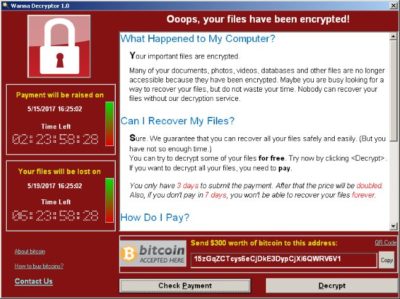
Figure 1. Ransom demand screen displayed by the WannaCry Trojan

It also drops a file named !Please Read Me!.txt which contains the ransom note.
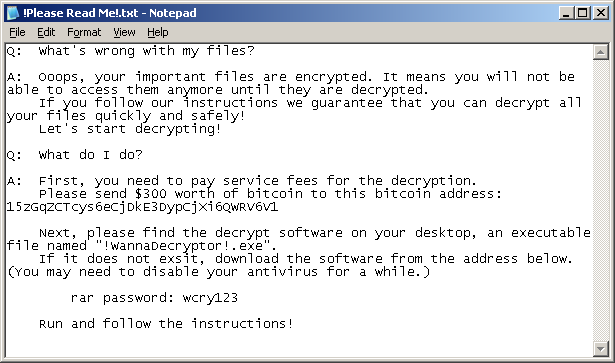
Figure 2. Ransom demand note from WannaCry Trojan

It propagates to other computers by exploiting a known SMB remote code execution vulnerability (MS17-010) in Microsoft Windows computers.

Are you protected against this threat?

South Jersey Techies, LLC recommends and offers Symantec Endpoint Protection to its clients. Symantec Endpoint Protection customers are protected against WannaCry using a combination of technologies: Antivirus, SONAR protection, Network-based protection.

All South Jersey Techies Managed IT Services client computers have the latest Windows security updates installed, in particular MS17-010, to prevent spreading. If your business / organization is not on our Managed IT Services plan please check or contact us to ensure that you have the latest updates installed.

Who is impacted?

A number of organizations globally have been affected, the majority of which are in Europe.

Is this a targeted attack?

No, this is not believed to be a targeted attack at this time. Ransomware campaigns are typically indiscriminate.

Can I recover the encrypted files?

Decryption is not available at this time but companies are investigating. South Jersey Techies, LLC does not recommend paying the ransom. Encrypted files should be restored from back-ups where possible. South Jersey Techies offers a number of backup solutions including Carbonite Online Backup and cloud storage solutions. If you are unsure about your computer / server backups, please check or contact us to discuss the best solution for your business.

What are best practices for protecting against ransomware?

  • New ransomware variants appear on a regular basis. Always keep your security software up to date to protect yourself against them.
  • Keep your operating system and other software updated. Software updates will frequently include patches for newly discovered security vulnerabilities that could be exploited by ransomware attackers.
  • Email is one of the main infection methods. Be wary of unexpected emails especially if they contain links and/or attachments.
  • Be extremely wary of any Microsoft Office email attachment that advises you to enable macros to view its content. Unless you are absolutely sure that this is a genuine email from a trusted source, do not enable macros and instead immediately delete the email.
  • Backing up important data is the single most effective way of combating ransomware infection. Attackers have leverage over their victims by encrypting valuable files and leaving them inaccessible. If the victim has backup copies, they can restore their files once the infection has been cleaned up. However organizations should ensure that back-ups are appropriately protected or stored off-line so that attackers can’t delete them.
  • Using cloud services could help mitigate ransomware infection, since many retain previous versions of files, allowing you to “roll back” to the unencrypted form.

Have additional questions?

Feel free to call us at contact us or (856) 745-9990 with any questions you may have.
Microsoft Launches Windows 8 Today

Microsoft kicks off Windows 8, on sale today

Microsoft hopes it can capture the imaginations of tech consumers again, as Apple has.

That was the subtext Thursday for a splashy launch of Microsoft’s Windows 8, the new operating system upgrade on sale today.

“What you’ve seen and heard should leave no doubt that Microsoft’s Windows 8 shatters perceptions of what a PC truly is,” said Microsoft CEO Steve Ballmer. “We’ve re imagined Windows and kicked off a new era for Microsoft and our customers.”

For the first time, the new Windows has a touch-screen interface, with movable tiles, instead of the traditional “Start Menu” and screen. For older computers that upgrade, the touch-screen will not be accessible, but the tiles can be accessed by mouse or touch-pad.

Microsoft says that 1 billion people use its Windows operating system, with 670 million on Microsoft’s Windows 7, which was introduced in 2009.

At Thursday’s launch party, PC partners — including Lenovo, Sony, Toshiba, Dell and Hewlett-Packard — showed off new computers sporting Microsoft’s Windows 8. Many of the laptops have splashy new designs with removable screens that morph into portable tablets.

Microsoft’s new operating system works on tablets and traditional PCs and laptops. Despite twin versions, Windows 8 and Windows RT, Microsoft is taking a notably different course than Apple by providing the same look and feel to both types of devices.

Apple still markets separate operating systems for Macintosh computers (OS X Mountain Lion) and for the iPhone, iPad and iPod Touch (iOS 6), even though some features are common to both operating systems.

“I think they did a really good job of reintroducing themselves to the consumer today, Microsoft, not just Windows,” says Michael Gartenberg, analyst for technology research firm Gartner.

He says part of Microsoft’s challenge is to explain to consumers why the radically different approach is better.

“Consumers have shown a willingness to learn. They learned how to use mice and keyboards. They learned how to use touch and pinch-to-zoom. They can learn how to do this, too,” he says.

Microsoft’s unified approach to the operating system is based on its belief that touch-screens will soon dominate PCs, says Ross Rubin, principal analyst at Reticle Research.

“Rather than come to market with another tablet operating system — seeing how (Google’s) Android has struggled in that space — they (Microsoft) decided to leverage the high shipping volumes of PCs every year in order to build developer support for a tablet operating system,” he says.

To View Full Article Click Here

Run MSCONFIG from Command Prompt

Go to your Primary Windows Partition Drive (ex. C:) and type the following:
CD Windows
CD PCHEALTH
CD HELPCTR
CD Binaries
Msconfig.exe

Microsoft Offers $40 Windows 8 Pro Upgrade

We set out to make it as easy as possible for everyone to upgrade to Windows 8. Starting at general availability, if your PC is running Windows XP, Windows Vista, or Windows 7 you will qualify to download an upgrade to Windows 8 Pro for just $39.99 in 131 markets. And if you want, you can add Windows Media Center for free through the “add features” option within Windows 8 Pro after your upgrade.

When you use Windows.com to purchase an upgrade to Windows 8 Pro, the Windows 8 Upgrade Assistant makes upgrading simple by walking you through the upgrade process step-by-step from purchase to download and then of course installation.

The Windows 8 Upgrade Assistant will check to make sure your PC is ready for Windows 8. It will provide a detailed compatibility report that lets you know of anything you may have to address before or after the upgrade and outlines actions to take.

It will also inform you of any application or device compatibility issues. It will ask you what you want to keep from your current Windows installation. You will be able to upgrade from any consumer edition of Windows 7 to Windows 8 Pro and bring everything along which includes your Windows settings, personal files, and apps. If you are upgrading from Windows Vista, you will be able to bring along your Windows settings and personal files, and if you are upgrading from Windows XP you will only be able to bring along your personal files. Of course, if you want to start fresh, you can choose to bring nothing along. Or if you prefer to format your hard drive as part of your upgrade experience, you can do so as long as you boot from media and then format your hard drive from within the setup experience for installing Windows 8, not prior to it.

Once you purchase your upgrade, the Windows 8 Upgrade Assistant kicks off your download. It has a built-in download manager that allows you to pause and continue your download at any time as well as a check to ensure your download completes successfully.

After your download finishes, you can choose to proceed with the upgrade (“Install now”) or install later either from your desktop or by creating your own media. If you choose to create your own media, you will be able to create your own bootable USB or .ISO file which can be burned onto a DVD for upgrade and backup purposes. If you prefer, you also have the option of purchasing a backup DVD for $15 plus shipping and handling.

We believe that your upgrade experience in Windows 8 will be a breeze by offering a faster experience, a single upgrade path, and compatibility from prior versions of Windows. We’ve continued to listen to our customers and have expanded the ability to download to over 100 countries and 37 languages. We have simplified the Windows upgrade experience with the Windows 8 Upgrade Assistant which supports you during your upgrade with everything from selecting your language to pausing your download to built-in compatibility checks – it’s seamless. And if you’re an enthusiast you will have the flexibility to download and control how you upgrade.

If you prefer to shop at a local store, a packaged DVD version of the upgrade to Windows 8 Pro will be available for $69.99 during this promotion.

This upgrade promotion for Windows 8 Pro both online and at retail runs through January 31st, 2013.

Oh, and by the way – if you’re not upgrading from a prior version of Windows and are building your own PC or installing Windows 8 in a virtual machine or a separate partition, you will be able to purchase and install the Windows 8 and Windows 8 Pro System Builder product.

Office 2016 Preview

Office 2016 Preview for existing Office 365 subscribers

For enterprise

Office 365 administrators with an Office 365 ProPlus subscription can now enable the Office 2016 Preview for their organization by turning on First Release. Learn how to turn on First Release.

Once First Release is turned on, users can install the Office 2016 Preview.

Enabled Office 365 ProPlus users

1. Sign in to the My Software page.

2. Go to Try the next version of Office.

3. Click Install.office2016

This will install the Office 2016 Preview on your device.

Note Enabled Office 365 ProPlus users can follow the same process above to install the Project 2016 Preview and the Visio 2016 Preview. On your Software page, select Project or Visio from the Software list. If Project and Visio are not listed, they are not included with your subscription.
Not ready to join First Release? You can still get the Office 2016 Preview,find out how.

For home

  • Go to the Office M Account page.
  • Click Language and install options.
  • Click Additional install options.
  • Open the Version drop-down menu and select the 32-bit or 64-bit Office 2016 Preview.
This will install the Office 2016 Preview on your device. You will stay on the Office 2016 Preview track until you uninstall the Office 2016 Preview or until Office 2016 is released.

CCleaner – Free System Optimization Download!

CCleaner
Optimization and Cleaning

Features
CCleaner is a free SJT recommended system optimization, privacy and cleaning tool. It removes unused files from your system – allowing Windows to run faster and freeing up valuable hard disk space. It also cleans traces of your online activities such as your Internet history. Additionally it contains a fully featured registry cleaner. But the best part is that it’s fast (normally taking less than a second to run) and contains NO Spyware or Adware!

Cleans the following:

Internet Explorer
Temporary files, history, cookies, Autocomplete form history, index.dat.

Firefox
Temporary files, history, cookies, download history, form history.

Google Chrome
Temporary files, history, cookies, download history, form history.

Opera
Temporary files, history, cookies.

Safari
Temporary files, history, cookies, form history.

Windows
Recycle Bin, Recent Documents, Temporary files and Log files.

Registry Cleaner
Advanced features to remove unused and old entries, including File Extensions, ActiveX Controls, ClassIDs, ProgIDs, Uninstallers, Shared DLLs, Fonts, Help Files, Application Paths, Icons, Invalid Shortcuts and more… also comes with a comprehensive backup feature.

Third-party applications
Removes temp files and recent file lists (MRUs) from many apps including Media Player, eMule, Google Toolbar, Netscape, Microsoft Office, Nero, Adobe Acrobat, WinRAR, WinAce, WinZip and many more…

100% Spyware FREE
This software does NOT contain any Spyware, Adware or Viruses.

To download your free copy of this software Click Here

The Microsoft Surface, Windows 8 Tablet From Microsoft

“It embodies hardware and software working together. People want to work and play,” Steve Ballmer said today amid much fanfare at Milk Studios in downtown Los Angeles. Microsoft has officially entered the ring with the Apple IPad. Microsoft views the Windows 8 Surface Tablet  as a “stage for Windows 8.” It’s 9.3mm thin, has full size USB 2.0 ports, a massive kickstand and weighs only 1.5 lbs. The casing is made out of magnesium (specifically, a material Microsoft calls VaporMg) and screen is covered in the Gorilla Glass 2 and optically bonded, a feature for the Microsoft Windows 8 Surface Tablet brags was specifically made for the Surface Tablet. The Microsoft Windows 8 Surface Tablet is directly aimed at consumers, and with that, the iPad.

Windows 8 is at the core of  Microsoft’s Surface Tablet. As such, it’s Metro device but also has access to all the Windows, not to mention Xbox features. Microsoft Surface Tablet is clearly the product Microsoft had in mind when it announced the Xbox SmartGlass feature at E3 earlier in the month.

Microsoft also announced several accessories for the Microsoft Surface Tablet including a clever 3mm thick cover that features a full (albeit super-slim) keyboard. Since it’s held on by magnets, it will likely be called a copy of the iPad’s SmartCover, too. The backside of the Surface even features a massive, unit-wide kickstand.

There will be two hardware options for Microsoft’s Surface Tablet, with both an ARM option and, for the full Windows experience, an Intel chip.

But like most hardware, it’s nothing without the right software. Ballmer was very clear at the beginning of the announcement event that the Microsoft Surface Tablet’s strength is the Windows ecosystem. This tablet runs Windows 8, and with that, both Metro and the traditional desktop environment. Every application that runs on Windows, save perhaps Skyrim and the like, should run on a x86 Surface.

Still, if Microsoft is attempting to take on Apple, it will need to court a new crop of developers. The iPad’s strength comes from its legions of small 3rd party devs that for the most part completely ignore all things Microsoft. Up until this product, there wasn’t another tablet platform with the same sort of penetration numbers as the iPad. But with the Surface Tablet, Microsoft is essentially giving developers a massive user base as the applications will hit both mobile and desktop units — and Metro’s dedication to the touchscreen makes the deal even sweeter.

The new Windows RT-powered Surface Tablet will sport either 32 or 64GB of storage depending on the purchaser’s preference, while the more traditional Intel variant will come with either 64 or 128GB. Microsoft declined to dive into specifics about their new tablet’s release, though they were quick to note that the Surface tablets would be priced “competitively” when they make it to market.


To View Full Article Click Here

Windows 8 Launch: 15 Days and Counting

The invitations to the ball have arrived!

October 25th is going to be busy one for Microsoft watchers, fans, and foes. 

Drip, drip, drip

The Redmondians are continuing to torture us Microsoft watchers with a slow flow of information about the company’s bet-its-business launch.

We already knew Microsoft planned to launch Windows 8 and its ARM-based Surface RT devices in New York City on October 25, thanks to a save-the-date invitation we got a while back. We knew those products would become available commercially the following day, and we found out this week that Microsoft would be opening 30-plus holiday pop-up stores in the U.S. and Canada on October 26 as well.

As of October 4, we now know that the launch is going to be a lengthy affair — from 10 a.m. to 3 p.m. ET.

Here’s what I just got in my in-box:

Will there also be, as some are reporting, some kind of “midnight madness” event here in New York to coincide with Windows 8 and Windows RT PCs, tablets — and Microsoft’s own Surface RTs — going on sale as of October 26? No word on that yet. (I asked.) But I’d be surprised if there wasn’t. Microsoft officials have said its Surface tablet devices will be sold only through its own brick-and-mortar stores, as well as “select” Microsoft online stores. Those without a Microsoft Store nearby will only be able to purchase online, unless Microsoft modifies its previously stated plan.

Microsoft still has not released pricing or a full and complete spec list for its Surface RT tablets/PCs. It has not yet made them available for preorder. The Intel-based Surface Pro versions are not due out until three months, give or take, after the Windows RT launch.

If you’ll be in/around New York City on October 25 and 26, stay tuned for information about a meetup/tweetup that a few of us Microsoft bloggers, including my Windows Weekly cohost and Windows SuperSite editor, Paul Thurrott, are planning. More details on that to come soon via Twitter. Hope you can join us.

To View Full Article Click Here

Microsoft CEO Ballmer: Devices, Devices!

Summary: In case you didn’t get the memo — or CEO Steve Ballmer’s latest shareholder letter — Microsoft officially is a devices and services company now.

Microsoft really wants to make sure its shareholders, customers, partners and competitors realize it’s not just a big software company any more.

In an October 9 letter to shareholders, part of Microsoft’s just-released fiscal 2012 annual report, CEO Steve Ballmer repeated his new “devices and services company” mantra to drive it home.

Ballmer hasn’t (yet) chanted “devices, devices, devices” in front of any public or private audiences (that we know of, at least) in the way he once infamously chanted “developers, developers, developers.”

But Ballmer told The Seattle Times a few weeks back that Microsoft can and should be considered a devices and services company. The latest Ballmer shareholder letter re-emphasizes that message.

From the letter:

“Last year in this letter I said that over time, the full value of our software will be seen and felt in how people use devices and services at work and in their personal lives. This is a significant shift, both in what we do and how we see ourselves — as a devices and services company. It impacts how we run the company, how we develop new experiences, and how we take products to market for both consumers and businesses. The work we have accomplished in the past year and the roadmap in front of us brings this to life.”

The Ballmer shareholder letter also claimed again that Microsoft is still counting on its partners to produce business and consumer devices and hardware that customers want. But it’s clear Microsoft isn’t getting into the hardware game on a lark or just to incent its OEMs to make more well-designed products, as some company watchers and partners have said.

Ballmer noted that, going forward, Microsoft plans to continue to focus on the development of “new form factors that have increasingly natural ways to use them including touch, gestures and speech.”

Along with the Xbox, the Microsoft Surface — which Microsoft described as “a series of Microsoft-designed and manufactured hardware devices” in its latest proxy statement (also released today) — are here to stay and seemingly will include more products as part of the family.

Will Microsoft Surrender?

Win82

The innovative plan for Windows 8 was to connect the mature personal computer generation with the prospering one of smartphones and tablets.

Many users are finding difficulty with adapting to the new Operating System.  Two major requests for Windows 8.1 (code-named “Blue”) is to bring back the Start button and boot-to-desktop feature.  Currently, the Start button is located in “Charms” which is a secondary taskbar set on the right-side of the screen.  The initial boot screen has much larger icons with live tiles.  Live tiles are software widgets that present dynamic content.

Windows_Start_ButtonMicrosoft is considering allowing users to restore the Start button and initially boot to the traditional desktop with Windows 8.1 (code-named “Blue”).

If Microsoft decides to add the Start button or boot-to-desktop feature to Blue, it will not be the first time a Windows Operating System has changed the user interface backwards to satisfy the users.

Microsoft has still not announced a release date for Windows Blue.  Likely, more information will arise from the Microsoft Build Developer Conference on June 26 – 28, 2013.


CALL US NOW!